.jpeg)
How to Make a Highlight Reel That Actually Performs
Learn how to make a highlight reel that hooks in the first three seconds, keeps viewers watching, and converts across YouTube, TikTok, and Instagram.
5 min read
October 3, 2026

Master the YouTube Shorts format in 2026 with exact specs on duration, aspect ratio, resolution, and file types plus upload and discovery best practices.
Written by:


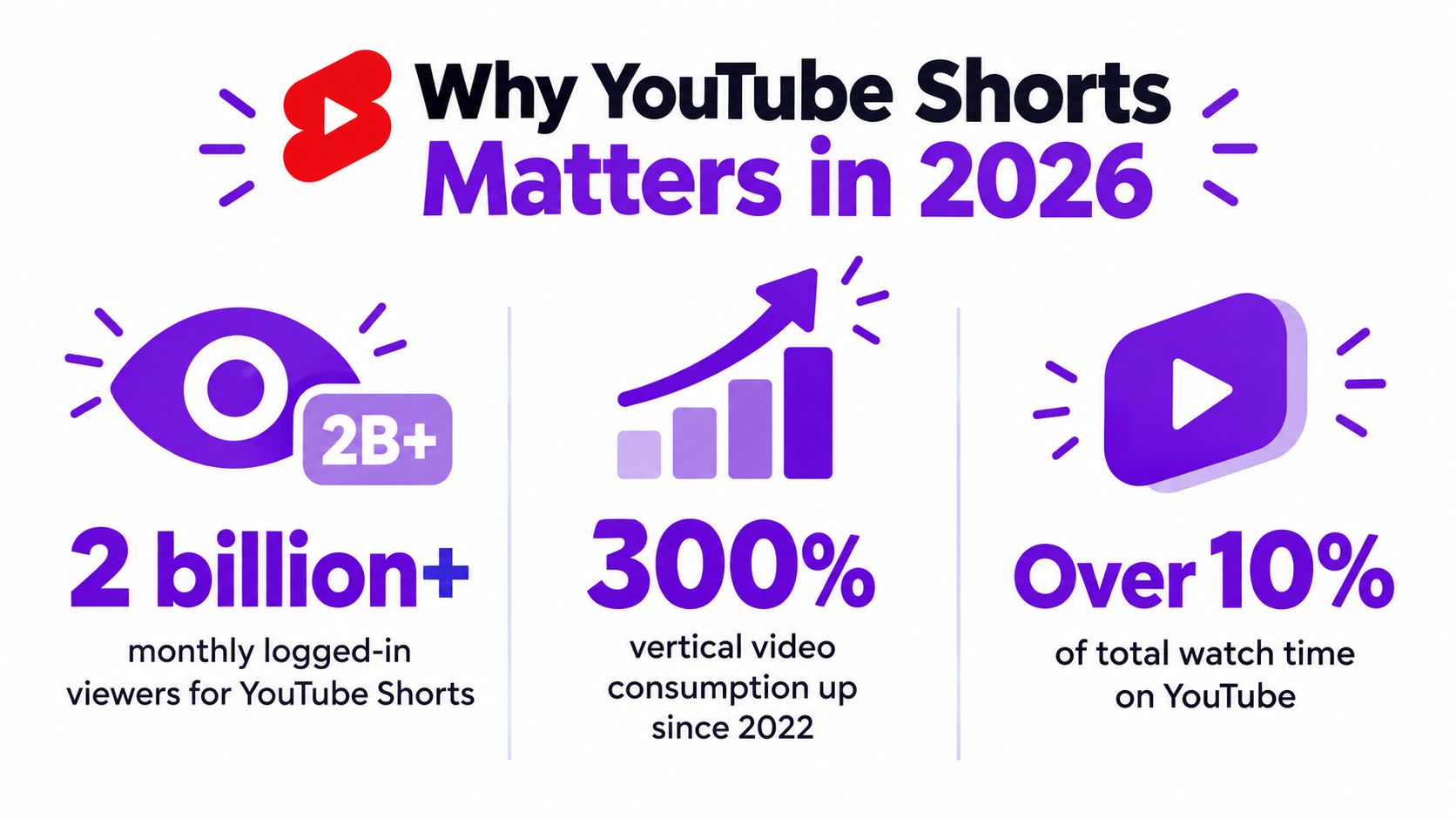
YouTube Shorts reached 70 billion daily views by 2023, after growing from 30 billion daily views in mid-2021 and 50 billion daily views by 2022 according to this documented history of YouTube Shorts growth. That scale changes how creators should approach the format. A Short is not just a smaller YouTube video. It's a vertical, mobile-first viewing experience with its own framing decisions, pacing expectations, upload rules, and audience signals.
A creator can have a strong idea, clear audio, and polished editing, then lose momentum because the export is poorly framed or because the creator is still following advice written for the old 60-second limit. The current YouTube Shorts format gives you more room, but more room doesn't automatically produce a better video. It gives you another strategic choice.
70 billion daily views by 2023 marked how far Shorts had grown from its beta debut in India in 2020. The format expanded through a major product rollout in 2021 and global expansion in July of that year, reaching 30 billion daily views in mid-2021 and 50 billion by 2022, as documented in the timeline of YouTube Shorts usage. That scale makes Shorts a distinct publishing format, not a convenient place to repost an ordinary video.
A first upload shows the difference quickly. A beginner may edit a talking-head clip in a horizontal project, export it, and find the speaker surrounded by empty space in the mobile feed. Another creator may frame a tutorial correctly yet spend too long reaching the first useful point. Both videos can contain good information, but the viewing context determines whether that information gets a fair chance.
A Short gives you a practical way to test a topic, opening, visual treatment, or audience question before building a full-length video around it. A real estate creator could compare two home-buying mistakes. An educator could answer one narrow exam question. A podcaster could isolate a disagreement from a longer conversation.
The result is more useful than a view count alone. You can observe which questions attract attention, which explanations keep viewers watching, and which ideas merit a longer treatment. That applies to tutorials, interviews, commentary, local business content, and demonstrations.
The October 15, 2024 update also changes the length decision. Vertical or square videos up to 3 minutes can qualify as Shorts under the current rules, so creators no longer need to force every idea into the old 60-second habit. Use a compact duration for a single answer, a longer cut for a demonstration or story that needs room, and trim any pause that adds no meaning.
Practical rule: Treat each Short as a focused experiment, not a compressed version of everything you know.
A poorly cropped frame, unreadable caption, or delayed opening creates friction before the message begins. Keep this guide as a production reference when an export looks wrong, a strong idea underperforms, or a topic needs a different duration.
A Short can now run for up to 3 minutes, but duration is only one part of the format. YouTube Shorts are short-form videos designed for vertical or square viewing, with the strongest default setup being a 9:16 vertical frame at 1080×1920 pixels. That layout fills a phone screen and gives faces, products, captions, and demonstrations room to remain clear. Google also identifies vertical 9:16 assets as the best fit for Shorts advertising, as explained in this technical overview of Shorts dimensions.
A useful export starts with three choices:
The update is non-retroactive. A video uploaded before October 15, 2024 keeps the classification rules that applied at upload. This explains why an older video may behave differently from a newly published Short, even if both have similar dimensions and length.
Square video qualifies under the current guidance when it meets the applicable duration rule. It can work for certain compositions, but 9:16 is usually the safer choice for a full-screen mobile presentation. Eligibility and ideal composition are separate decisions.
A hashtag does not define the format. Adding #Shorts may describe the content, but it cannot fix a sideways export, a weak opening, unreadable captions, or an unsuitable duration. Set the frame, length, and viewing experience first. Use metadata afterward to clarify the topic.
A Short is designed in the editing project before it reaches the upload page. Set the sequence to a vertical canvas before adding captions, cropping footage, or building transitions. Your framing decisions will then match the phone screen instead of forcing a finished horizontal edit into a narrow shape.
The October 15, 2024 update means eligible square or vertical uploads can run for up to 3 minutes, as noted earlier. That expands the format, but it does not turn three minutes into a default target.
Match length to the viewer's task and your niche. A quick definition, myth correction, or reaction may work best as a compact explanation. A cooking demonstration, repair walkthrough, or interview answer may need more time to show each step clearly. A tutorial channel can use the added room for sequence and context, while a comedy or commentary channel may benefit from a faster setup and payoff. Cut pauses and repetition, but keep any step the viewer needs to understand or reproduce the result.
Duration is a communication decision. Use only as much time as the idea earns.
Use 9:16 as the default vertical canvas. A 1080×1920 frame gives a talking head room for facial expression, leaves space for readable captions, and accommodates a product or process demonstration. This guide to the best YouTube aspect ratio explains the recommended setup and why the frame affects viewing comfort.
A horizontal source can still become a Short, but the crop needs deliberate control. Keep the speaker or object within the central area of the vertical composition, then review every scene for clipped hands, missing product details, and captions outside the visible frame. Automatic cropping can preserve dimensions, but it cannot choose the most informative part of each shot.
A 1080×1920 export provides a clear baseline for a full-screen vertical Short. It also gives captions and visual emphasis enough working space before the video reaches a small display. Export the final file, then inspect it on a phone, where edge crops and small type are easier to spot.
The useful test is the final processed frame, not the recording setting alone. A high-resolution source cannot fix a subject positioned against the edge or text that viewers cannot read.
Choose a platform-compatible export preset, then confirm that the file opens correctly and retains its vertical dimensions. If your editing software offers a YouTube preset, inspect the result rather than accepting its settings without review.
Export check: Open the finished file outside your editor. Watch the opening, inspect the captions, listen for distortion, and verify that the frame stays vertical from beginning to end.
Match the frame rate to the footage and on-screen movement. A talking-head explanation can remain smooth at a conventional setting, while sports, fast demonstrations, and camera movement benefit from settings that preserve motion cleanly. Consistency matters more than selecting a specification the original recording cannot support.
The upload process is straightforward when the finished file already matches the format. It becomes confusing when creators expect a title, hashtag, or upload button to convert an unsuitable file automatically.
Start in the YouTube mobile app by selecting the create option and choosing the video from your device. On desktop, open YouTube Studio, select the upload workflow, and add the finished file. The exact labels can change as YouTube updates its interface, so use the preview and video details to confirm that the platform recognizes the content as a Short rather than assuming the route alone determines classification.
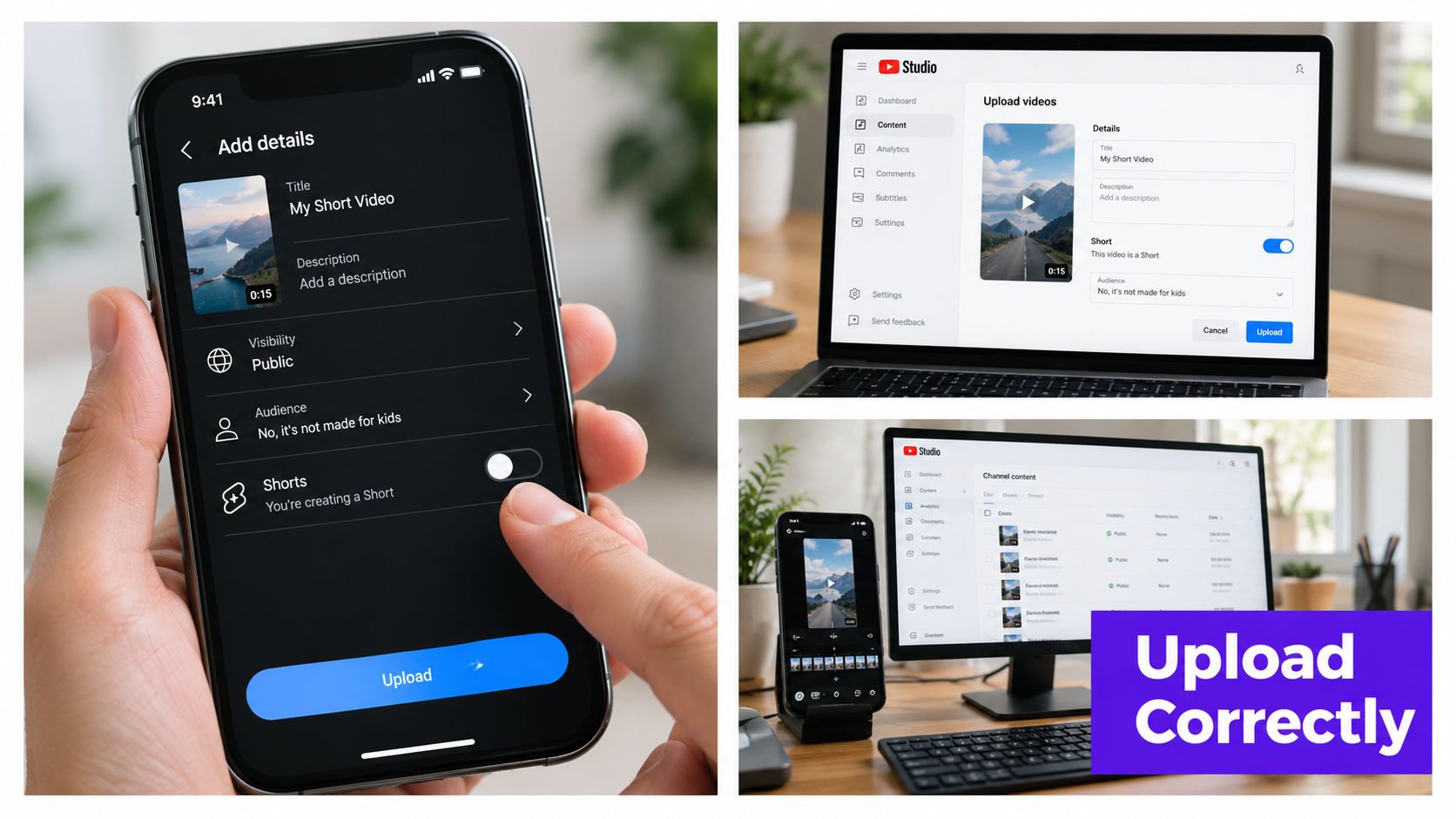
Give the Short a title that states the topic clearly and places the important phrase naturally near the beginning. Avoid turning the title into a row of keywords. A useful title might identify the problem, promise the explanation, or name the result the viewer will see.
Write a description that reflects the same search intent in natural language. If the Short answers a question about camera framing, say what the viewer will learn. If it demonstrates a repair, name the object and the specific problem. Add relevant tags where YouTube provides them, pairing the main subject with a precise niche modifier instead of unrelated popular terms.
Creators who want a separate workflow can compare the publishing steps in this guide to creating YouTube Shorts.
The #Shorts hashtag can provide context, but it shouldn't carry the entire classification burden. Confirm the video is vertical or square, within the current duration rule, and visually suitable for mobile playback. Metadata should clarify the content, not compensate for a technical mismatch.
The platform's thumbnail treatment can vary by placement and account features. Select a strong frame when YouTube offers that option, especially if the Short may appear in a browsing surface where the viewer sees a preview before opening it. A thumbnail can't fix weak retention, but a clear face, object, or result can make the subject easier to understand.
Review the audience setting, visibility, scheduling choice, and any monetization or content declarations that apply to your channel. Publish immediately when you need a live test, or schedule when a consistent release routine matters. Before confirming, watch the preview with sound off and sound on. That single check catches many caption, framing, and audio problems.
For creators who want to see how the upload experience works in context, this walkthrough shows the relevant YouTube interface:
Three minutes is now the maximum length for a YouTube Short, but that does not make three minutes the right target. Since the post-October-2024 update, choose the duration that gives the idea enough room to land without pauses, repeated context, or a conclusion viewers could predict early.
Recent independent commentary points to possible performance concentration in a narrower 22 to 45 second range. It also discusses retention benchmarks around 65% for Shorts under 30 seconds and 50% for Shorts from 30 to 60 seconds. Treat these figures as directional rather than universal. Review the analysis of YouTube Shorts sizes and duration guidance alongside your own retention curves. For a deeper examination of duration strategy, see the ultimate guide to YouTube Shorts length.
| Length Tier | Duration Range | Best Use Case | Retention Target | Discovery Fit |
|---|---|---|---|---|
| Short | Under 30 seconds | One hook, answer, reaction, or visual reveal | Around 65% as a directional benchmark | Fast idea testing and immediate payoff |
| Mid-length | 30 to 60 seconds | A compact story, explanation, or before-and-after | Around 50% as a directional benchmark | More context without requiring an extended lesson |
| Extended | 60 to 180 seconds | Tutorial, commentary, interview answer, or multi-step demonstration | Compare the curve with shorter edits | Useful when removing steps would damage clarity |
A vocabulary definition may lose energy when stretched. A software tutorial may become frustrating when cutting removes the action needed to reproduce the result. A local service provider might use a brief myth-versus-fact Short, while a property walkthrough needs enough time to show the feature being discussed.
Test different cuts of the same topic when practical. Make one concise version with a single result, one mid-length version with supporting context, and an extended version only when the explanation genuinely needs it. Compare where viewers leave, whether they reach the payoff, and whether the video attracts the audience you want.
Decision rule: Add seconds only when each added moment gives the viewer a reason to continue.
Forcing every Short under 60 seconds can rush tutorials and leave explanations incomplete. Filling the full three-minute allowance can create slow videos with weak momentum. Let the audience retention graph show whether the pacing supports the promise. The best length is the shortest version that preserves clarity, proof, and payoff.
Technical compliance gets a video into the right container. Creative execution gives viewers a reason to stay. The first visual should communicate movement, a result, a problem, or a question quickly enough that the viewer understands why the clip deserves attention.
A strong opening might show the finished repair before explaining the process. It might place the unusual object in frame and ask a direct question. It might display the mistake on screen, then immediately demonstrate the correction. The specific hook depends on the niche, but the principle stays consistent: begin with the tension or payoff, not a long introduction.
Captions should be large, high-contrast, and synchronized with the spoken words. Keep important text away from the edges and from the areas where interface controls may appear. A viewer should be able to understand the central idea even when the phone is held at a distance or the audio is unavailable.
Use visual changes with purpose. A cut can mark a new step, a close-up can reveal a detail, and a highlighted word can direct attention. Constant motion without informational value makes the frame tiring rather than engaging.
Record dialogue clearly before adding music. Background audio should support the voice, not compete with it. If you use music or another audio element, make sure you have the right to publish it and check the final mix on both headphones and a phone speaker.
Original audio can strengthen recognition when it suits your channel. Familiar sounds may help a concept feel current, but a trend isn't a replacement for a relevant idea. Choose audio that reinforces the subject and leaves the spoken explanation understandable.
A sustainable cadence beats an ambitious schedule that collapses after a week. Batch related ideas, keep a list of unanswered audience questions, and reuse a proven structure without repeating the same claim. Cross-posting can save production time, but export a clean master and adapt the framing, captions, and metadata for each platform rather than carrying another app's interface into the YouTube version.
The most common mistake happens before upload. A creator keeps a 16:9 sequence, drops a vertical clip into it, and exports the result without checking the final canvas. The video may display with empty space or awkward cropping, which weakens the full-screen experience and makes captions harder to place.
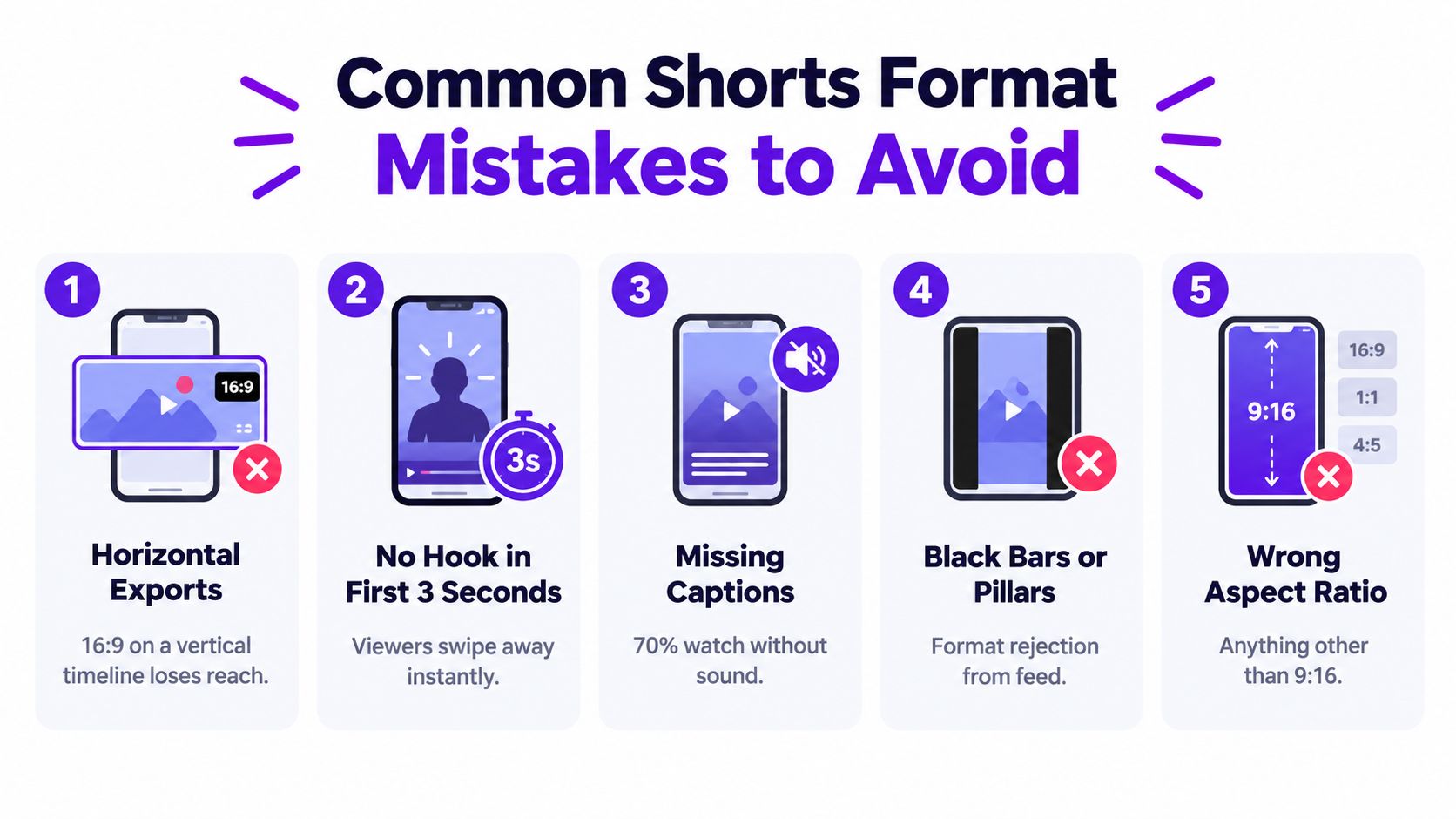
Other errors come from applying old advice without checking the current rules. Some creators still treat 60 seconds as the absolute ceiling, even though square or vertical uploads can now qualify as Shorts up to three minutes when they meet the current date and duration conditions. Others assume #Shorts can turn an unsuitable file into a properly formatted Short.
A weak audio mix creates another avoidable problem. Dialogue that peaks, clips, or sits beneath music makes viewers work to understand the message. Check the loudest words, listen on a phone, and reduce competing sounds before publishing.
Use this verification routine for every export:
The goal isn't to satisfy a checklist for its own sake. Each check removes a reason for the viewer to swipe before the idea has been understood.
Run this final pass before you publish:
#Shorts only as supporting context.Do square videos qualify? They can, under the current YouTube classification guidance, when they meet the applicable duration and upload conditions. Vertical framing remains the more dependable creative choice for full-screen mobile viewing.
Will a three-minute Short perform well? It can work when the topic needs the time. Duration alone doesn't guarantee discovery, so compare retention and viewer response against a tighter version of the same idea.
Can a repurposed video include another platform's watermark? Avoid it when possible. A clean master gives you more control over composition, branding, and captions on YouTube.
Is there one universal file-size limit? Don't rely on a remembered limit from an old tutorial. Confirm the current upload requirements in YouTube Studio and make sure the exported file processes correctly before scheduling.
How does monetization work? Eligibility depends on YouTube's current Partner Program policies, channel status, and the content's compliance with applicable rules. Check the latest official requirements in your account before treating a Short as monetization-ready.
Save this checklist beside your editing workflow and use it for every upload.
Taja AI turns long-form videos into ready-to-publish Shorts with captions, thumbnails, and platform-specific formatting, which can help you test multiple cuts without rebuilding each edit manually. Visit Taja AI to explore a workflow for converting your existing videos into consistently framed YouTube Shorts.


We are blessed to work with leading brands & Companies


We try to make easy and simple for every professionals. Get 30 days free trial - No credit card required.


© 2025 Taja AI. All rights reserved.