How Long Should Tik Tok Videos Be in 2026? Data by Goal
Wondering how long should tik tok videos be? Match length to your goal using 2026 platform limits, engagement data and a simple test.
5 min read
November 16, 2026

Learn how YouTube auto translation works for captions and dubs, where it fails, and how to publish translated videos safely in 2026.
Written by:


Your tutorial is finished, the audio is clean, and the video is picking up views. Then the comments arrive in Portuguese, Hindi and German, all asking the same thing, and you realize the version you published only works for people who already speak English.
YouTube gives you four ways to fix that, and they fail in completely different places. Knowing which lever you're pulling decides whether you're adding an accessibility layer or creating a new set of mistakes in a language you can't read.
Picture a viewer in São Paulo opening your fourteen-minute studio setup tutorial. She doesn't read English fast enough to follow the captions, finds no Portuguese option in the settings menu, and leaves before the two-minute mark. That scene is the whole problem, and YouTube answers it with four distinct features that creators routinely blur together.
Auto-generated captions turn speech into a transcript in the video's own language. Translated captions take that transcript and render it as a subtitle track in a language the viewer selects. Auto dubs generate a translated audio track that appears in the player's audio-language selector. Uploaded audio tracks are language tracks you record or commission yourself, with your voice or a hired voice actor.
The first two run on the caption track. The last two run on audio. That split is the one worth memorizing, because it tells you which input decides the quality of the output.
| Feature | What viewers get | Who creates it | Language reach | Creator review control |
|---|---|---|---|---|
| Auto-generated captions | Speech-to-text transcript in the original language | YouTube, automatically | Source language of the video | Edit or replace the transcript |
| Translated captions | Subtitle track in another language | YouTube, from the caption track | One track per target language you add | Edit the translation or upload a subtitle file |
| Auto dubs | Translated audio in the player's audio-language selector | YouTube, from the original audio | Widest from English originals, with other sources mainly dubbed into English | Require manual approval before publishing |
| Uploaded audio track | Professionally recorded language track | Creator or hired voice talent | Any language the creator produces | Full control over voice, wording and timing |
YouTube's automatic dubbing support page describes dubbing as a pipeline that detects the source language, generates a translated track, and exposes it through the player's audio selector. The same page shows the language matrix is lopsided: English originals can be dubbed into a long list of targets, while many other source languages mainly receive English dubbing.
The player also labels generated tracks as auto-dubbed and keeps the original audio one click away, so a dub adds a layer rather than replacing the source file.
Practical rule: pick the layer that matches what a wrong sentence would cost the viewer, not the layer that's easiest to switch on.
Translated captions behave like a relay race, and every runner hands the baton to the next one.
Runner one is speech recognition, which writes down what the speaker said, in the language they said it. Runner two is machine translation, which takes that written text and rebuilds it in a target language. Runner three only runs for dubbing, where speech synthesis voices the translated text as an audio track while leaving the original picture untouched.
Here's the flow before the details.
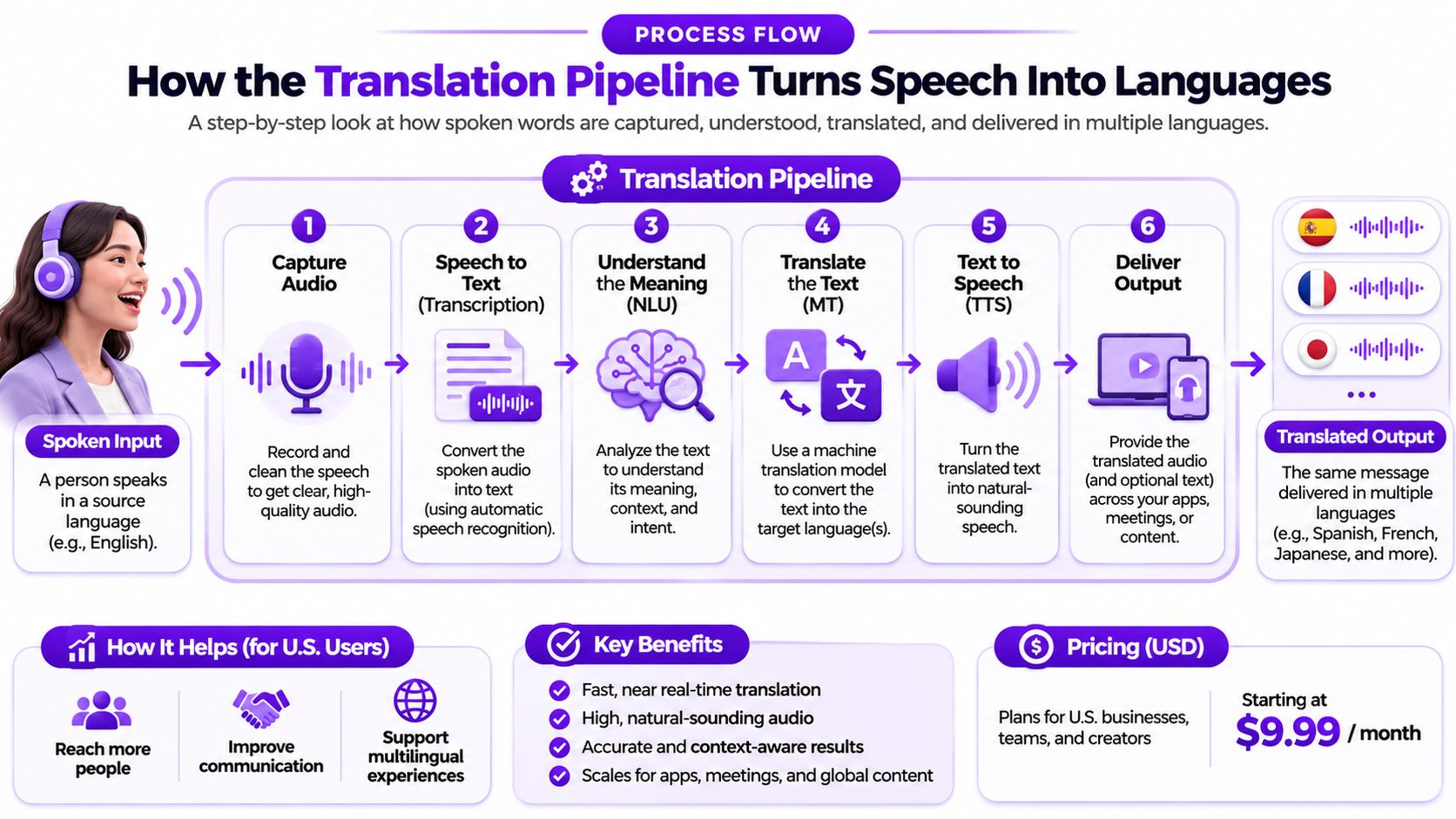
Notice what the chain never does. It doesn't alter the original audio unless a dub is enabled, and it doesn't ask the creator to write subtitles in every language. One corrected transcript can feed dozens of translated tracks.
YouTube has run the first two runners since its caption era. The Google Research account of automatic captioning lays out the sequence: machine translation for uploaded caption tracks arrived in November 2008, automatic captioning followed on November 19, 2009, and by March 2010 automatic captions were open to all users, with the resulting transcripts translatable into about 50 languages.
Viewers used the feature heavily almost immediately. YouTube later reported that by November 2010, people had watched videos with automatic captions more than 23 million times and automatically translated captions more than 7.6 million times, in its milestone post on caption growth.
The one-line version: recognition writes it down, translation rewrites it, synthesis reads it aloud, and each stage trusts the one before it.
That trust is where scale and fragility live in the same design. A translated caption can only be as accurate as the transcript underneath it, because a misheard word gets handed to the translator unchanged.
Recognition quality isn't spread evenly either. Accents, dialects and languages with sounds that English-trained models rarely meet all tax the first runner, and work like this Irish pronunciation feedback from speech recognition shows how much detail sits inside that single stage on its own.
If you'd rather work with the text outside the caption system, a video to text converter gives you an editable file you can correct line by line before anything is translated.
Captions and dubs are configured in different corners of YouTube Studio, and both can be inspected in the player before a viewer ever reaches them. Automatic dubbing first opened in December 2024 to hundreds of thousands of Partner Program channels focused on knowledge and information content, according to Mark Studios' video localization research, and the controls have shifted since. Treat the route below as a map, not a fixed script, and confirm current menu names inside Studio.
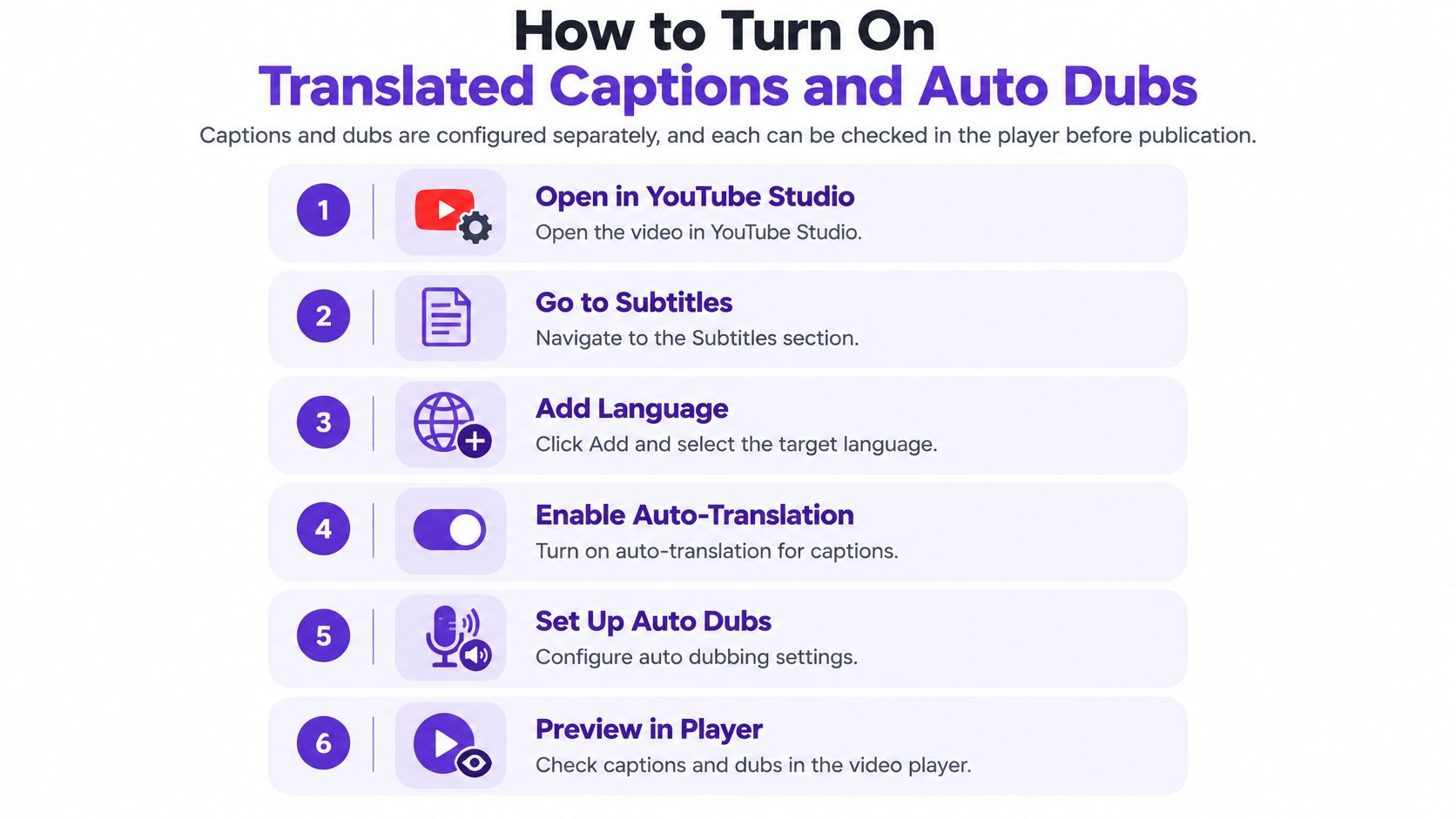
Set the original language first. Open the video in YouTube Studio and confirm the source language on the details or languages panel. Every translation downstream is built from a transcript in that language, so a wrong setting poisons all of them at once.
Read the caption track before you translate it. Open the subtitles area, scan the auto-generated transcript, and correct names, product terms, numbers and any line where two speakers overlap. This is the cheapest edit in the workflow and it produces the largest improvement.
Add target languages for captions. Use the add-language control, pick your target, and let YouTube generate the translation. If you already have a translation you trust, upload it as a subtitle file instead, since a verified file beats a machine pass on any content that carries claims.
Enable auto dubs and hold them for review. In the languages or audio section, choose your dub targets, then switch on the option that requires manual approval before a dub publishes. Approval is your only chance to catch a mistranslated price or instruction before an audience hears it.
Preview as a viewer on desktop and mobile. After publishing or scheduling, open the video in a normal browser window, check the subtitle menu, then check the audio-language selector. Test the preferred-language setting too, because a viewer's account preference can decide which track plays first.
Watch the first three minutes of each dub. Names, prices and calls to action cluster early in most videos. If a term is wrong, delete that dub and upload a reviewed audio track, because an automatic dub can't be edited in place.
Include one music-heavy or silent clip in your test if your channel publishes that kind of video. YouTube's filters skip material it judges unsuitable for dubbing, and you want to see that behavior on your own content rather than discover it from a viewer's comment.
Start with the number that makes the case. Creators who added multi-language audio tracks received more than 25% of their watch time, on average, from views in the video's non-primary language, according to YouTube's multi-language audio announcement. That's a reason to test, not a guarantee. A channel serving a purely domestic market, or a topic that only makes sense in one country, won't reproduce it.
The language pattern decides where you begin. YouTube's own guidance on automatic captions and dubbing treats caption translation and dubbing as separate systems and notes that broad language availability doesn't mean equal recognition or translation quality, so the pair you choose matters as much as the feature you switch on.
| Source language | Dub targets | Suggested action |
|---|---|---|
| English original | 20 target languages: Arabic, Bengali, Dutch, French, German, Hebrew, Hindi, Indonesian, Italian, Japanese, Korean, Malayalam, Polish, Portuguese, Punjabi, Russian, Spanish, Tamil, Telugu and Ukrainian | Start here for the widest reach |
| Other source languages | Mainly English dubs | Use translated captions or uploaded tracks for other targets |
Say a small finance-education channel has forty English tutorials and wants Spanish, Portuguese and Hindi. The tempting move is to switch on every dub for every upload. The better move is to pick three evergreen videos with the strongest watch time, dub those three, leave a matched set of undubbed videos as a control, and compare non-primary-language watch time and subscriber conversion eight weeks later.
Comments carry a signal analytics can't. A viewer who writes that the interest rate came out as something else is telling you the dub broke on the one sentence that mattered. Repeated confusion in one language, across several videos, is your cue to stop that language and repair the transcript before trying again.
Localized discovery is its own project, though. International SEO services cover the title, thumbnail and description work that decides whether a dubbed video gets found in the first place, and a perfect dub under an English thumbnail still struggles.
The video analytics tools you already use will show the traffic split by language. Pair that with comment review and you have a decision loop rather than a guess.
A machine translation is only as accurate as the transcript under it, and errors don't stay where they start. When recognition mishears a word, that mistake becomes the input to translation, and the translator renders the wrong word with complete confidence. YouTube's help documentation on automatic captions pairs speech recognition with machine translation for interlingual captions, which is exactly the arrangement that lets one misheard syllable produce a second, larger error.

The triggers are predictable. Accents and dialects, proper nouns and brand names, technical jargon, idioms, background noise and overlapping speakers all break recognition first. Academic analysis of automatic captioning has warned for years that it can fail to convey meaning accurately and can hinder comprehension of specialized vocabulary, which lands hardest on educational, medical, legal and financial channels.
A concrete version: a skincare brand sells a serum it calls "Glass Veil." Recognition hears two ordinary words, translation renders them word for word into a language where the phrase means nothing, and the caption now describes actual glass. The dub reads that same sentence aloud in a confident voice.
| Error type | Where it shows | Fix before publishing |
|---|---|---|
| Proper nouns and brand names | Misspelled captions, mispronounced dubs | Correct the source transcript and check names against a list |
| Technical jargon | Wrong term in the translated line | Add a glossary and review terms per language |
| Accents and dialects | Transcript errors that cascade into translation | Edit the source transcript or re-record the line |
| Idioms | Literal translation that loses meaning | Rewrite the line in the source script |
| Background noise and overlapping speech | Missing or merged lines | Clean the audio or split the speakers |
| Numbers, prices and calls to action | Wrong figures or links in the target language | Verify each figure against the script |
A fluent-sounding dub is not evidence of a correct one. Fluency and accuracy are separate checks, and only the second one requires you to read the target language.
Quality also shifts by language pair, so a track that sounds passable in Spanish can be weak in Tamil. Test each target on its own instead of reading one good result as a verdict on all of them.
Before you enable anything, play the source audio and read the transcript against it at the three places risk lives: every speaker change, every number, and every name. If those spots are right, the machine has a decent chance. If they're wrong, no downstream feature repairs them.
Fixing timing and line breaks while you're in there is the same job as adding subtitles to a video for free, and doing it in the source language lifts every translated track at once.
One question sorts every video you own: what would a wrong sentence cost the viewer? A traveler watching a street-food vlog loses a minute of context. Someone following dosage instructions for a supplement could lose far more. Same platform, same feature, wildly different tolerance for error.
| Content risk | Typical examples | Recommended path | Approval needed |
|---|---|---|---|
| Low risk | Travel vlogs, hobby tutorials, entertainment | Auto captions with translated captions and a spot-check | Spot-check the first minutes |
| Medium risk | Product reviews, general courses, software demos | Edited source transcript and auto dubs with review | Manual approval of each dub |
| High risk | Medical, legal, financial, religious or safety instruction | Verified script with human translation or uploaded audio track | Full review before publishing |
| Music or silent content | Music videos, silent vlogs | Captions only, dubbing filtered | None for dubs |
A cooking channel can dub most of its library after a light spot-check. Ingredients and techniques survive a rough translation, and a viewer who notices an odd phrase still ends up with dinner on the table. The cost of a small error is a shrug.
A supplement brand selling through the same format can't take that trade. A dosage claim rendered loosely in German is a safety and regulatory problem, not a content quirk. That video needs a verified script, a qualified translator, and approval on every track before publishing, and the same rule applies to legal explainers, financial projections, religious teaching and anything a viewer might act on physically.
Audience type changes the calculation too. Some viewers watch foreign-language video specifically to learn the language, and a curated list such as these German movies for A1 learners shows how much a beginner leans on accurate subtitles rather than a dub. Get the caption wrong for that audience and you've removed the reason they came.
Automation is a starting draft, never the final voice, on any video where someone might act on what they hear.
One video, one language, one review date. That's the assignment, and it beats switching on every dub across your channel and hoping something sticks.
Choose with three filters. The video already has strong watch time in your primary language, so the content is proven. The subject is evergreen enough to matter in six months, so the work keeps paying. And the risk tier is low enough that machine output plus a spot-check is honest rather than reckless.
Your next action is to open that video, add one target language chosen from your analytics rather than from a hunch, correct the source transcript for names and numbers, publish, and put a review date on the calendar. Leave a matching undubbed video as a control so the comparison means something.
Before you publish, run the final checks:
If you publish at volume, Taja AI's Multi-Language Transcription handles the transcript work that has to happen before any of it, and Taja can also optimize a video in YouTube Studio and sync the SEO back into Studio, so localization starts from a clean, well-described source instead of a raw upload.
Translate the video you'd be willing to correct line by line. If you wouldn't sit through it in a second language and fix what's wrong, it isn't ready for a machine to do it for you.
Taja AI takes a single long-form upload and repurposes it into shorts, captions, thumbnails, blog posts and platform-specific posts, with multi-language transcription so your review starts from an accurate transcript rather than a guess. Add your video, let Taja handle the transcript and the metadata, then check each language before it goes live. Start free at Taja AI and give your next upload an audience that doesn't stop at the language border.


We are blessed to work with leading brands & Companies


We try to make easy and simple for every professionals. Get 30 days free trial - No credit card required.


© 2025 Taja AI. All rights reserved.