.jpeg)

Short Form Video Creation: The Complete Step-by-Step Guide
Master short form video creation with actionable steps for scripting, shooting, editing, and distributing high-performing clips. Build your system in 2026.
5 min read
October 6, 2026

Discover workflow automation benefits for your business in 2026. Save time, reduce errors, and scale growth with practical examples.
Written by:


You're probably doing more copy-paste work than business-building work.
A lead comes in. You send a reply. You log it in the CRM. You update a spreadsheet. You create a follow-up reminder. You post a video. Then you cut clips for Instagram, rewrite captions for LinkedIn, resize thumbnails, answer the same client onboarding questions, send an invoice, chase the invoice, and wonder why you're always busy but never fully caught up.
That pattern used to feel normal. In 2026, it's expensive.
The problem isn't only time. Manual work creates friction at every handoff. It slows response times, increases mistakes, and drains the energy you need for the parts of the business that drive revenue. For content-driven businesses, the cost is even sharper. Burnout doesn't come from making one podcast, one listing video, or one client update. It comes from the twenty small follow-up tasks attached to each one.
Small businesses used to treat automation as something bigger companies did after they had an operations team. That's outdated. Today, the businesses that stay visible and responsive are the ones that remove repetitive work before it piles up.

A creator feels this when one video turns into editing, captioning, scheduling, thumbnail prep, and cross-platform posting. A real estate agent feels it when every inquiry needs a reply, a qualification step, a reminder, and a follow-up. A local service business feels it when onboarding, approvals, invoicing, and customer updates live across email threads and disconnected tools.
Content businesses don't usually fail because they lack ideas. They stall because publishing consistently creates too much admin.
If your weekly output depends on memory, manual checklists, and heroic effort, you don't have a sustainable process. You have a fragile one. That's why more owners are consolidating repetitive publishing and coordination work into fewer systems, especially when they're already looking for one app for all social media instead of juggling separate schedulers, editors, and planning boards.
Practical rule: If a task happens the same way every time, a person shouldn't have to remember each step from scratch.
Workflow automation matters because it provides small teams with an advantage. It turns repeated actions into systems. That means fewer dropped balls, faster follow-up, and more time for sales calls, content strategy, client service, and review work that still needs human judgment.
This is no longer a nice-to-have. It's how smaller teams compete with larger ones without turning every day into cleanup mode.
Workflow automation is easiest to understand as a row of dominoes. One event happens, it triggers the next action, and that action creates a predictable result.
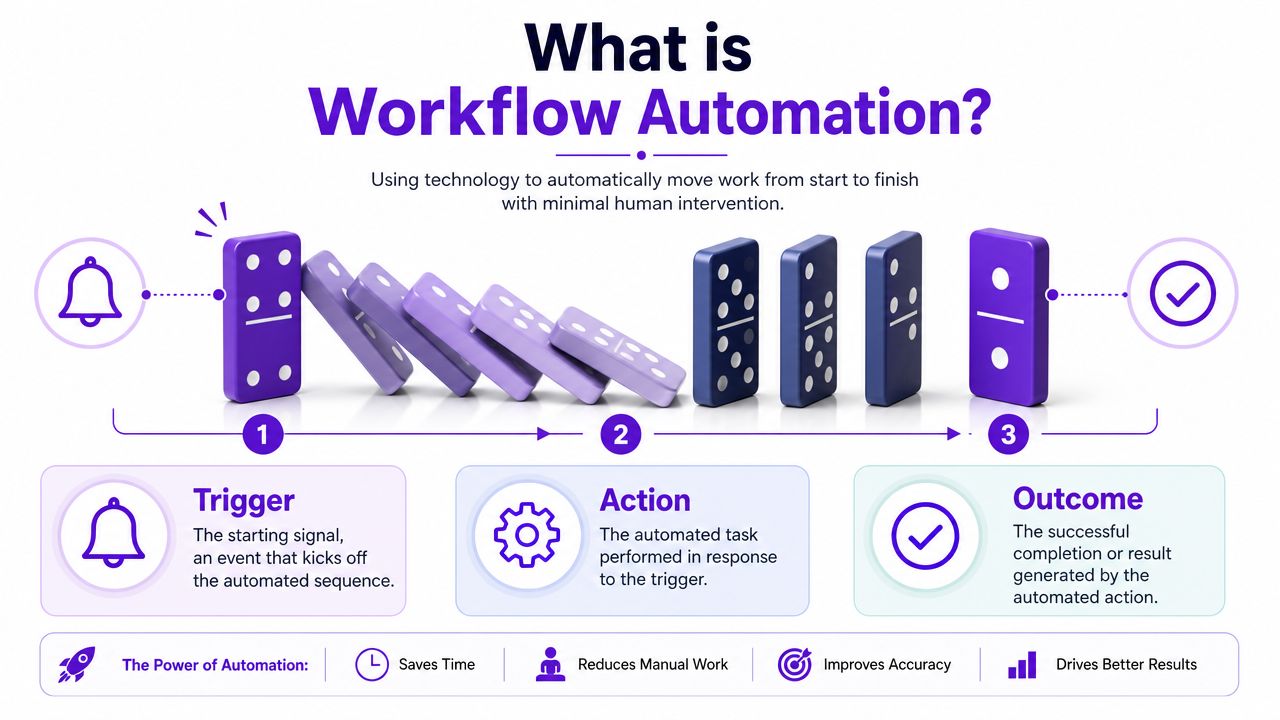
If a new lead submits a form, that's the trigger. The system sends a welcome email, creates a contact, assigns a task, and schedules a follow-up. Those are the actions. The lead gets a timely response and your team sees the next step clearly. That's the outcome.
A lot of business owners think automation means one isolated shortcut. For example, “save email attachments to Google Drive” or “send a Slack message when a form is submitted.” That's task automation. It's useful, but narrow.
Workflow automation connects multiple steps across tools and people. It doesn't just automate one action. It manages the sequence.
Here's the practical difference:
That's why the biggest gains come from replacing high-frequency, rule-based handoffs with deterministic execution. In plain English, software follows the rules the same way every time, which reduces human error, improves consistency, and speeds up completion without constant manual intervention, as explained in this overview of workflow automation benefits from Activepieces.
A quick video helps if you want to see the logic visually.
Under the hood, a good workflow usually includes a trigger, rules, and validation points. That matters because business work isn't just “do X after Y.” It's often “if this client is new, do one thing, but if they're existing, skip ahead.”
For content teams, this becomes especially useful when the workflow spans research, production, approvals, repurposing, and publishing. If you're exploring more structured AI search processes, it helps to think the same way. Start with the trigger, define the rules, then decide what should happen automatically versus what should stop for review.
The real value isn't that software does work faster. It's that your process stops depending on someone remembering the next step.
A five-person business can lose a shocking amount of time to work that feels too small to fix. One person updates the CRM. Another sends the follow-up. Someone else checks whether the invoice went out, whether the draft got approved, and whether the right file made it to the right folder. None of those tasks are difficult. Together, they drain hours every week and create the kind of inconsistency that shows up as missed leads, late content, and billing mistakes.
That is where automation earns its keep. It reduces the cost of routine coordination and lowers the error rate at the same time.
Independent 2025 summaries report that automated workflows can increase data accuracy by up to 88%, reduce manual errors by as much as 90%, cut repetitive-task time by 60% to 90%, and recover as much as 77% of time previously spent on manual work, according to workflow optimization statistics compiled by Anchor Group.
For an owner, those percentages are only useful if they map to a business problem. In practice, they usually show up as fewer invoices that need correction, fewer approvals stuck in someone's inbox, fewer duplicate records, and less staff time spent re-entering the same information across multiple tools.
Content-driven businesses feel these gains fast because so much of the workload sits in repeatable coordination. A new podcast episode kicks off editing, thumbnails, descriptions, clips, approval, scheduling, and cross-platform publishing. A real estate inquiry needs assignment, response, reminder, and CRM logging. An agency client handoff needs intake, task creation, asset collection, and status updates. If those handoffs are still manual, growth creates administrative drag before it creates revenue.
| Benefit Area | Key Metric | Typical Improvement |
|---|---|---|
| Accuracy | Data accuracy | Up to 88% |
| Error reduction | Manual errors | As much as 90% |
| Time savings | Repetitive-task time | 60% to 90% reduction |
| Labor recovery | Time previously spent on manual work | As much as 77% recovered |
Automation pays back fastest in high-frequency work. If a task happens once a quarter, the upside is limited. If it happens 20 times a day, small gains compound quickly.
Take a simple example. If a team member spends 45 minutes a day on manual status updates, file routing, and reminder emails, that is almost 4 hours a week. Across 50 working weeks, that is roughly 200 hours a year from one role. At $30 an hour, that is $6,000 in labor tied up in coordination work before counting the cost of delays or rework. Multiply that across two or three recurring processes and the case becomes hard to ignore.
There is a trade-off, though. Bad processes automated at scale become bad processes that run faster. I see this often with content teams that automate publishing before they fix naming conventions, approval rules, or source-of-truth folders. The result is not efficiency. It is faster confusion.
The strongest results come from automating work that is already defined, repetitive, and tied to a measurable outcome. For content businesses, that often means steadier publishing calendars, quicker lead response, cleaner client onboarding, and fewer hours lost to post-production admin. It also means planning for the work automation creates: exception handling, quality checks, and ownership when a workflow fails.
If you want another grounded explanation of how automation transforms business, focus on examples where capacity increases without adding the same amount of headcount. That is usually the point where automation shifts from a nice efficiency project to an operating requirement.
The best way to understand automation is to watch what changes before and after a workflow gets cleaned up.
Before automation, a podcaster records one long episode and then hits the bottleneck. Export audio. Upload video. Pull clips. Write captions. Draft platform-specific copy. Schedule posts. Track what was published where. None of that work is hard by itself. Together, it eats the week.
After automation, the workflow changes shape. One completed recording triggers asset generation, draft metadata, clip preparation, approval tasks, and scheduling steps. The creator still reviews outputs, but they're no longer rebuilding the process from zero every episode.
That distinction matters. Automation doesn't replace editorial judgment. It removes the repetitive production layer around it.
Real estate is full of small timing failures. A prospect asks about a listing. The agent sees the message late. Follow-up slips because showings ran long. Notes sit in texts instead of a CRM. By the time the agent circles back, the prospect has already spoken to someone else.
A better workflow captures the inquiry, logs the contact, sends an immediate response, creates the next task, and routes the lead into the right nurture sequence. The agent still decides how to handle the conversation. The system makes sure the conversation starts on time.
Observability emerges as a real business advantage. Automated workflows create a machine-readable record of who did what and when, making it easier to monitor cycle time, exception rates, and SLA performance, as described in NetSuite's overview of workflow automation visibility and compliance benefits.
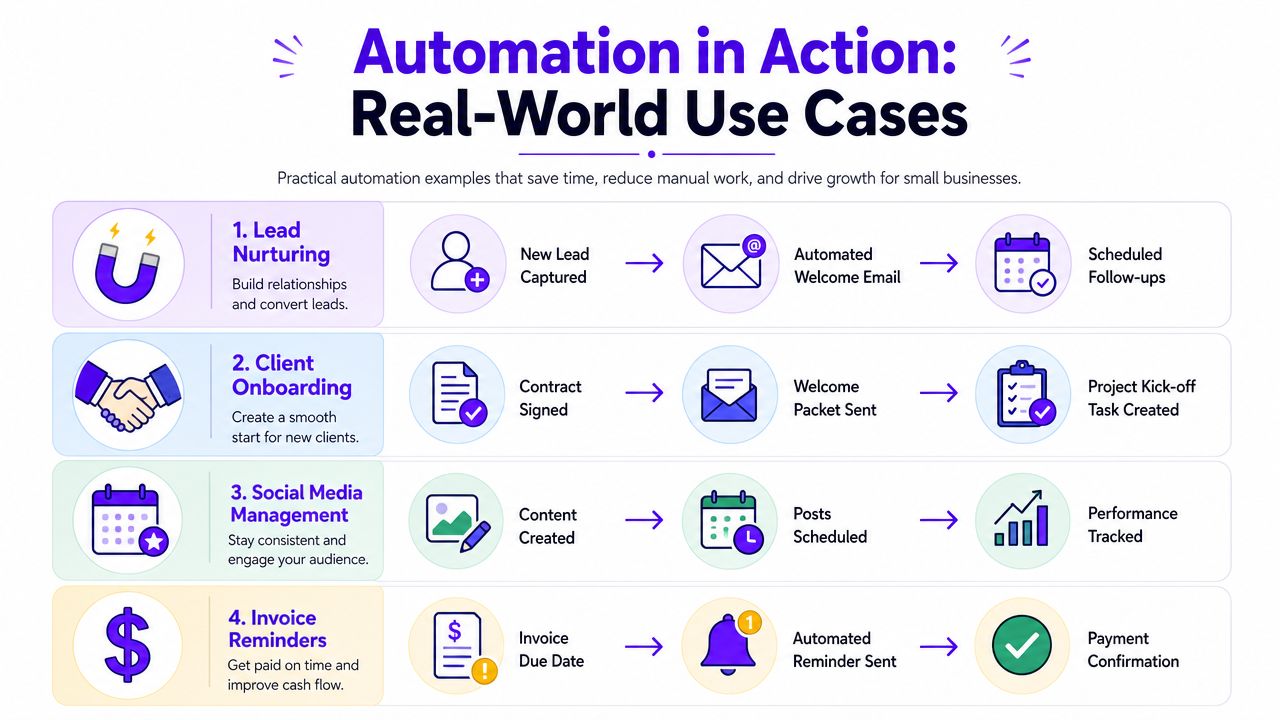
A small agency or local service firm often runs on invisible admin. Signed proposal. Welcome packet. Intake form. Kickoff task. Invoice. Reminder. Payment confirmation. Most owners patch that together with inbox rules and memory.
That works until volume rises.
Once onboarding and billing are automated, the experience gets tighter for everyone involved. Clients get timely communication. Internal tasks appear without someone manually assigning them. Payment reminders go out consistently. The owner spends less time checking whether the system is being followed because the system itself is enforcing the flow.
Here's what smart businesses tend to automate first:
Good automation doesn't make a business feel robotic. It removes the repetitive friction so the human parts happen faster and with more context.
A lot of owners make the same mistake. They assume any automation is good automation.
It isn't.
The question isn't “Can this be automated?” It's “Should this process be automated in its current form?” Guidance on implementation consistently emphasizes that automation scales well only when the underlying process is stable and standardized. If the workflow is flawed, automation can make errors faster and more visible without improving outcomes, as noted in OneAdvanced's workflow automation guidance.
You don't need a complex dashboard to evaluate ROI. Start with operational metrics that show whether the workflow got cleaner.
Track:
If you're using AI in your content pipeline, review matters as much as speed. Teams experimenting with AI for social media marketing usually discover this quickly. The output can be faster, but the business still needs rules for review, approval, tone, and brand consistency.
The hidden trap is that automation doesn't eliminate work. It redistributes it.
Routine execution shrinks. Oversight, exception handling, and governance grow. That's normal. A workflow that sends drafts automatically still needs someone to handle edge cases. A lead routing system still needs cleanup rules. A content repurposing pipeline still needs a person to catch weak outputs before publishing.
Use this quick filter before automating:
Automation is a multiplier. If the process is sound, you get leverage. If the process is messy, you get faster mess.
It's Monday morning. A new lead fills out your form, a client is waiting on onboarding documents, and last week's podcast still has not been turned into clips, captions, or email copy. None of that work is hard. It is just repetitive, easy to delay, and expensive to keep doing by hand.
Start with the workflow that creates friction every single week and follows clear rules. For a small business, that is often lead follow-up, client onboarding, invoice reminders, or the content tasks that pile up after every recording.
Pick one workflow with a clear business cost. Good starting points are tasks tied to missed revenue, late follow-up, or content backlog. If a two-hour podcast takes another six hours to turn into publish-ready assets, that delay has a cost in labor, missed reach, and team fatigue.
Map the workflow before you buy anything. Write down the trigger, each handoff, approvals, common exceptions, and the final output. For content businesses, that usually means documenting what happens after a recording is finished. Who pulls the transcript, who cuts short clips, who writes captions, who reviews brand voice, and who publishes.
Then choose the tool category that fits the process. Zapier and Make are useful for cross-app automation. HubSpot fits sales and marketing workflows. Stripe and accounting tools handle many finance triggers. For content operations, Taja AI can automate parts of repurposing, asset generation, and scheduling from one long-form video. If transcription is part of that stack, this guide on maximize ROI with transcription software is a practical place to compare where that step fits.
Keep the first rollout narrow. One trigger. One owner. One success metric.
A good first automation does not aim to remove every manual step. It removes the boring, repeatable ones and leaves review where review still matters. That is especially true for creator businesses, real estate teams, and small companies publishing high volumes of content. Automation can draft, sort, route, label, schedule, and notify. Someone still needs to catch weak outputs, off-brand copy, or edge cases that should never go live.
If your backlog comes from turning one recording into many assets, review a practical system to automate content creation before adding more disconnected tools.
Run the workflow for two weeks. Track failures, manual interventions, and turnaround time. Then fix the weak points before you expand to the next process.


We are blessed to work with leading brands & Companies


We try to make easy and simple for every professionals. Get 30 days free trial - No credit card required.


© 2025 Taja AI. All rights reserved.