.jpeg)
TikTok Content Strategy: A Step-by-Step Playbook
Build a TikTok content strategy in seven steps: set goals, pick pillars, batch production, repurpose videos, post consistently and measure what works.
5 min read
October 25, 2026

Learn how voicemail to text works in 2026, the best apps and services, accuracy tips, privacy concerns, and workflows for creators and small businesses.
Written by:


You miss a call in the middle of a meeting, glance at your phone later, and see a voicemail from an unknown number. The audio player sits there, waiting, while your inbox and messages keep moving. Many don't listen right away. They skim the transcript, decide whether it matters, and move on.
That habit is why voicemail to text stopped feeling like a novelty and started behaving like part of normal phone use. It turns voicemail from something you have to stop and hear into something you can read, search, forward, and file. If you're comparing setup options, a practical place to start is to compare voicemail to email solutions, especially if you already live in email all day and want messages routed there instead of buried in a call inbox.
For creators and small teams, the shift matters for another reason. A transcript is easier to sort into follow-up notes, FAQs, social drafts, or client records than an audio clip is. Tools that already work with text-heavy workflows, including systems used for content repurposing like AI for social media marketing, make that transition even more useful because the message becomes an input, not just an inbox item.
The change usually starts with one missed call. A customer rings while you're on a job site, a client leaves a message while you're driving, or a collaborator calls at the exact moment you can't answer. Instead of dialing into a mailbox and listening line by line, you open your phone and read the message in seconds.
That shift sits behind voicemail to text. Automatic voicemail transcription spread through consumer and business platforms in the 2000s and 2010s, with services like Google Voice and Vonage helping turn voicemail into email or text form instead of audio only Big Think. Business guides now describe transcription as a mainstream feature delivered through native carrier tools, third-party apps, or AI receptionist systems.
Reading a transcript changes the job. You are no longer treating voicemail like a recording to consume from start to finish. You are scanning for names, numbers, requests, and deadlines, which is much closer to how people already handle email.
Practical rule: If the message is simple, short, and routine, read it first. Only play the audio when the transcript looks uncertain or the stakes are high.
That is why voicemail transcription fits small businesses so well. A receptionist, a contractor, or a solo creator can triage messages faster when they arrive as text. It also explains why modern voicemail setup is less about “checking messages” and more about building a searchable communications trail.
If you've ever wanted your missed calls to behave more like emails, that is the mental model to keep. The rest of the pipeline, and the places where it breaks, are what make the difference between a useful transcript and a confusing one.
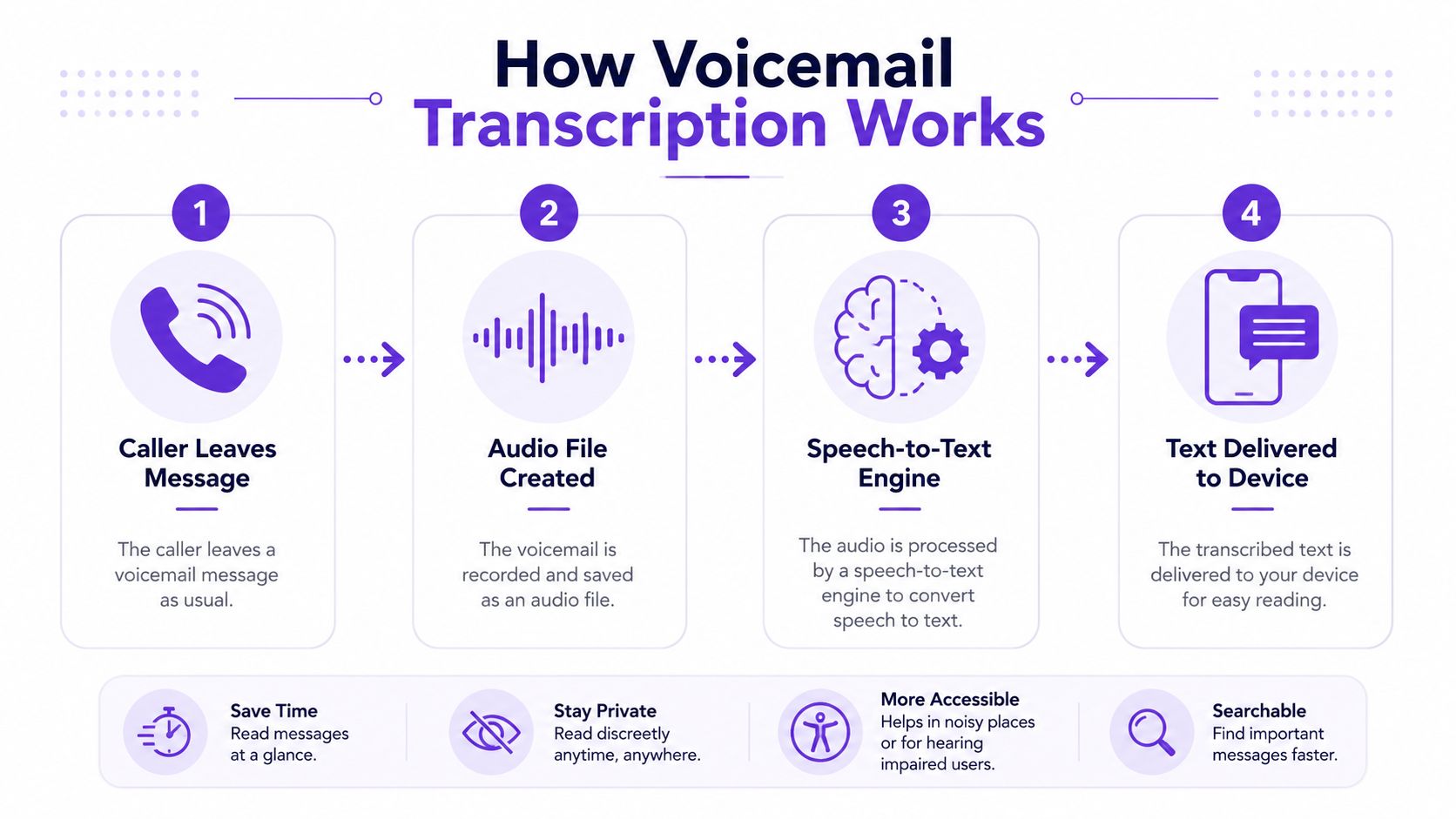
At a technical level, voicemail transcription is a speech-to-text pipeline wrapped in phone infrastructure. The audio doesn't become text by magic. It moves through a few distinct stages, and each one can affect what you see on screen.
First, an unanswered call gets routed to a voicemail platform when the line is busy, out of coverage, or not picked up MVNO Index. The user then gets message-waiting indication, SMS, or push notification, and the system may attach a transcript to that message flow MVNO Index.
Next, the platform captures the audio and sends it through speech recognition software. That raw output is only the first pass. The transcription pipeline can then use natural-language post-processing to improve readability by recognizing names, phone numbers, and business terms before delivery by SMS, email, app notification, or dashboard GetNextPhone.
The transcript feels simple on the surface, but delivery changes how people use it. If it lands in email, it becomes part of the inbox. If it appears in an app, it stays tied to the phone experience. If it shows up in a dashboard, it becomes something a team can scan, route, or archive.
That's important because transcription decouples retrieval from playback. A salesperson can search a message thread. A support lead can forward a customer request. A founder can read ten missed calls in the time it would take to listen to one or two.
A transcript is only as clean as the audio, the recognition model, and the post-processing that follows it.
The useful question is not “Does voicemail transcription work?” It's “Which step failed when the transcript looks odd?” If the audio was noisy, the recognition stage may have struggled. If the transcript missed a number or name, the post-processing layer may not have normalized it correctly. That's the troubleshooting mindset that saves time later.
The first question anyone asks is simple. Does my phone already do this? In many cases, yes, but the feature often hides behind carrier support, regional availability, or a voicemail app you never opened.
On iPhone, transcription generally shows up through Visual Voicemail in supported regions and carrier setups. On Android, it often appears in the Google Phone app or a carrier-provided voicemail app. On some plans, the carrier's visual voicemail service bundles transcription directly into the mobile line.
The catch is that the setting can look available while the service behind it is missing. A phone may show voicemail features, but transcription can still stay silent if the carrier, region, or app combination doesn't support it. That's why people often think transcription is broken when it's really just not fully provisioned.
The cleanest setup depends on where you want the message to live. If you want everything inside your handset, native visual voicemail is the least disruptive path. If you want more flexibility, a forwarded business line can use a service like Google Voice to route missed calls into a text-friendly workflow.
The practical difference is control. Native dialer tools are easy to use, but they usually stay close to the phone. Carrier or third-party systems can give you more routing, notification, and mailbox handling options, which matters if more than one person needs to see the messages.

If transcription never appears, the fastest fix is usually not a speech setting, it's checking whether the voicemail service itself is active on that line.
People get stuck here because they expect a single master toggle. In practice, voicemail transcription is a stack of permissions, app support, and carrier capability. Once you understand that, setup gets much less mysterious.
Accuracy is where most disappointment begins. A transcript can look crisp one day and messy the next, even if nothing about your phone changed. That's normal, because the quality depends on the voice, the room, the network audio, and the words themselves.
The biggest factors are easy to spot. A clear speaker with a short message usually transcribes better than someone talking fast in a noisy street. Names, numbers, job titles, and jargon are harder than plain conversational language. Compression can also blur the audio before it even reaches the transcription engine.
Guidance for 2026 voicemail strategy says messages under 20 seconds perform best, with 8–13 seconds described as the sweet spot for read-through and callback rates, because recipients often read the transcript instead of playing the audio Martal. That's a workflow signal as much as a writing tip. Shorter messages are easier to understand, easier to verify, and easier to act on.
When a transcript lands, don't treat every word equally. Scan it in layers.
That approach keeps transcription useful without pretending it's perfect. If you already use audio-to-text workflows in other places, such as transcribing TikTok video, the same discipline applies. Read for speed, verify for risk, and keep the audio as the source of truth when details matter.
Built-in voicemail transcription is enough for many people, but third-party services can fill the gaps. The right choice depends on whether you care most about convenience, spam handling, team routing, or integrations with other tools.
| Service | Best For | Notable Strength | Notable Limit |
|---|---|---|---|
| Google Voice | Individuals and small teams that want a simple text-first mailbox | Easy read-first workflow and business-friendly routing | Depends on how you want calls forwarded and managed |
| YouMail | Users who want voicemail handling plus stronger call screening | Focused voicemail experience with smarter message management | Can feel like another layer if you only want basic transcription |
| HulloMail | People who want voicemail messages delivered in more than one place | Flexible message handling and text delivery | Less familiar than native phone tools for many users |
| Carrier visual voicemail | Users who want the least friction on their existing plan | Built into the mobile line and dialer flow | Feature availability can vary by carrier and region |
| AI receptionist systems | Businesses that want call handling and message capture in one place | Goes beyond transcription into caller routing and intake | More setup than a simple voicemail app |
The table is not a ranking. It's a filter.
If you need voicemail only, native carrier visual voicemail is the simplest path. If you want a business line that feels like email, Google Voice is often the first stop because it makes missed calls easier to scan. If spam and call management matter as much as transcription, a service like YouMail can make sense because it treats voicemail as part of a bigger call-handling system.
This is also where AI receptionist tools enter the conversation. They sit on top of voicemail-like intake and try to handle the front door of your communication. For some small businesses, that's useful because the message is already structured before it reaches you.
The right lens is workflow, not feature count. A polished interface won't help if the message ends up in the wrong inbox. A simple system that routes reliably is often better than a “smarter” one you never fully configure.
A transcript is more than a record of a missed call. It can become source material. That's especially useful when your inbox contains the same questions, objections, or customer stories over and over.

Creators and small businesses already sit on useful audio. A listener leaves a question after a podcast episode. A customer explains a frustrating booking problem. A prospect leaves a voicemail that captures the exact language your sales page should answer.
A transcript makes those moves faster because you can copy the exact phrasing the caller used. That helps with tone, especially when the goal is to sound like a human, not a polished ad.
The same logic applies when you're repurposing longer recordings into publishable assets. A tool like video transcript generator can turn spoken content into editable text for clips, captions, and downstream formats, which is useful when voicemail is only one input in a broader content system. Taja AI also fits here as one option for teams that want transcription embedded in a broader content repurposing workflow.
The best part is that you don't need a huge archive to start. One well-written voicemail can become one sales reply, one FAQ, or one post. The transcript is just the raw material.
The moment a voicemail becomes text, it becomes easier to search and easier to copy. That's useful, but it also makes sensitive information easier to move around than the original audio ever was. Customer names, appointment details, billing questions, and personal updates can all end up sitting in a transcript inbox.
A more careful workflow starts with storage. Keep the original audio when auditability matters, run transcription in a controlled environment, and correct names, numbers, and dates by listening back before you treat the text as final HyperWhisper. If you need to preserve evidence or customer records, save both the raw transcript and the cleaned version.
That matters because voicemail transcription is not only a convenience feature. It is a data handling step.
Practical rule: If the voicemail includes private or regulated information, assume the transcript needs the same care you'd give an email attachment or client note.
If you want a deeper look at offline handling and local processing ideas, the Verbex offline voice to text app is a useful reference point because it reflects the same privacy-first mindset Verbex. The bigger lesson is simple. Transcription is convenient, but convenience should never outrun control.
The best setup depends on what you need the transcript to do. If you only want to know who called and why, the simplest path is usually enough. If you're running a business, the transcript should help you respond faster and keep a record. If you're a creator, it should also feed your content pipeline.
For a casual user, native visual voicemail is usually the right starting point. It keeps the workflow close to the phone and avoids extra accounts. If the transcript looks off, use the audio only when needed.
For a small business owner, choose the setup that gives you reliable routing and easy scanning. A service like Google Voice or a carrier visual voicemail plan can make missed calls manageable, but only if the messages land where your team works.
For a creator or content team, transcripts should be treated as source material. That means choosing a toolchain that makes messages easy to export, review, and repurpose into posts, scripts, or support content. It also means building a habit around verification, since an edited transcript is only useful when the details are right.
Read transcripts first, then verify only the parts that affect action. That keeps voicemail from becoming another inbox you have to babysit. It also gives you a repeatable way to turn short calls into records, replies, and content ideas without losing control of the message.
Voicemail is no longer just an audio box hidden inside your phone plan. It's a text workflow with an audio backup. Once you treat it that way, it starts saving time in ways the old mailbox never could.
If you want to turn more spoken content into usable assets, Taja AI can help by transcribing uploaded video audio and turning long-form material into ready-to-publish clips, captions, blogs, and posts. It's a practical fit for creators and small businesses that want transcripts to feed production instead of sitting in an inbox.


We are blessed to work with leading brands & Companies


We try to make easy and simple for every professionals. Get 30 days free trial - No credit card required.


© 2025 Taja AI. All rights reserved.