.jpeg)
10 Facebook Video Best Practices for Creators in 2026
Facebook video best practices for creators: master hooks, specs, captions, distribution, Reels, Stories, boosting, and analytics in 2026.
5 min read
October 22, 2026

A content strategy for small business that sets one goal, picks a few channels, turns one video into many posts, and tracks real leads.
Written by:


You filmed a useful video between appointments, posted it after dinner, and checked the likes before opening the next morning. Someone booked later that week, but you can't tell whether they watched the video, followed a recommendation, or just needed help right then. Meanwhile, your next post is still an empty box on the calendar.
For a salon owner, that video might explain why damaged hair needs a consultation before another color appointment. For a realtor, it might show what buyers should notice during a walkthrough. The advice is useful, the delivery sounds natural, and the owner knows the subject.
Then the recording gets published once and forgotten. There's no follow-up explaining the service, no clear invitation to inquire, and no record of what prospective customers ask afterward.
The missing piece isn't another idea. It's a repeatable path from useful advice to a customer conversation.
In a 2024 survey of 620 participants in Goldman Sachs' small-business program, conducted by Babson College, 91% used social media for business, 65% posted at least weekly, and 21% named converting followers into customers as their biggest social-media challenge, according to the Goldman Sachs and Babson social-media findings.
Those respondents weren't ignoring social media. The practical problem was connecting the activity to something commercially useful. That distinction matters when you're deciding whether to spend your next available hour filming, editing, answering inquiries, or improving the booking page.
This is the familiar pattern to interrupt:
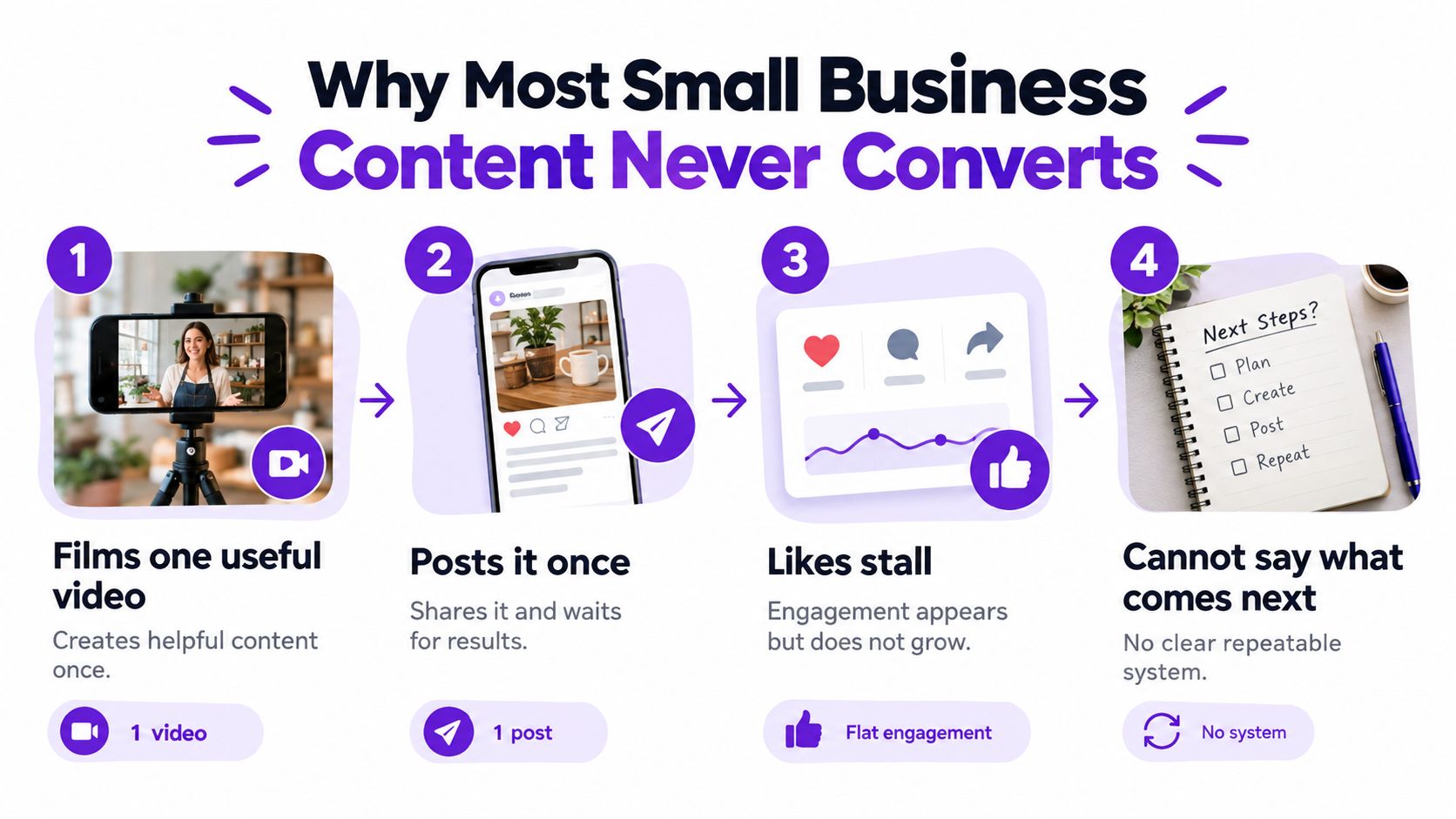
A useful content strategy for small business replaces occasional promotion with a publishing routine across a short list of relevant channels. Each asset needs a business purpose, even when its immediate purpose is education rather than a sale.
That doesn't mean adding a sales pitch to every sentence. It means deciding what someone should understand, trust, or do after consuming the content.
Practical rule: If you can't explain what a post helps a prospective customer decide, don't spend your evening polishing it.
A beautiful feed isn't the operating goal. Neither is a folder full of recordings that nobody has time to edit.
Keep the pieces that belong together: a commercial goal, a recognizable voice, a manageable channel list, a source recording, a calendar with an owner, and evidence of customer action. Cut the extra formats and networks that you can't support without sacrificing service delivery.
You don't need to become a full-time creator. You need a system you can run during the marketing time you have, not the uninterrupted afternoon you keep hoping will appear.
Choose a commercial objective for the next quarter before writing another post. Qualified inquiries, booked consultations, event registrations, or repeat purchases are useful choices. Trying to pursue all of them at once makes editorial decisions harder than they need to be.
Choose the result your business can currently fulfill. A consultant with an empty calendar needs suitable conversations, not a large audience of people who will never buy. A salon with limited appointment availability might prioritize returning clients rather than broader discovery.
Keep your audience brief short enough to leave open while drafting. Include these decisions:
For example, a tutor could focus on parents whose children understand lessons in class but struggle with homework independently. The content would address that specific gap, support an assessment offer, and invite parents to describe where their child gets stuck.
That's more useful than a goal to increase engagement. It gives the owner a reason to reject unrelated topics, even if those topics might attract attention.
Skip adjectives such as authentic, professional, and approachable unless you explain what they mean in practice. A property manager might sound like a neighbor explaining a repair: calm, specific, and clear about what happens next.
A tutor might sound like a patient coach who explains mistakes without embarrassment. A congregation might describe what a visitor can expect on arrival instead of relying on promotional language about an upcoming event.
Use a quick voice test:
A short guide to brand voice consistency can help turn those choices into editing rules.
Keep voice examples beside the audience brief. Someone helping with content should be able to see both what the business wants customers to do and how the business speaks to them. Platforms and publishing dates can wait until those decisions are clear.
Don't choose a network because another owner seems busy there. Choose it because your intended customers pay attention there and you can support the format without turning every post into a production project.
Use a small shortlist of platforms, then remove any that lack a clear role. Maintaining an account isn't a good enough reason to keep publishing on it.
Use this filter before committing:
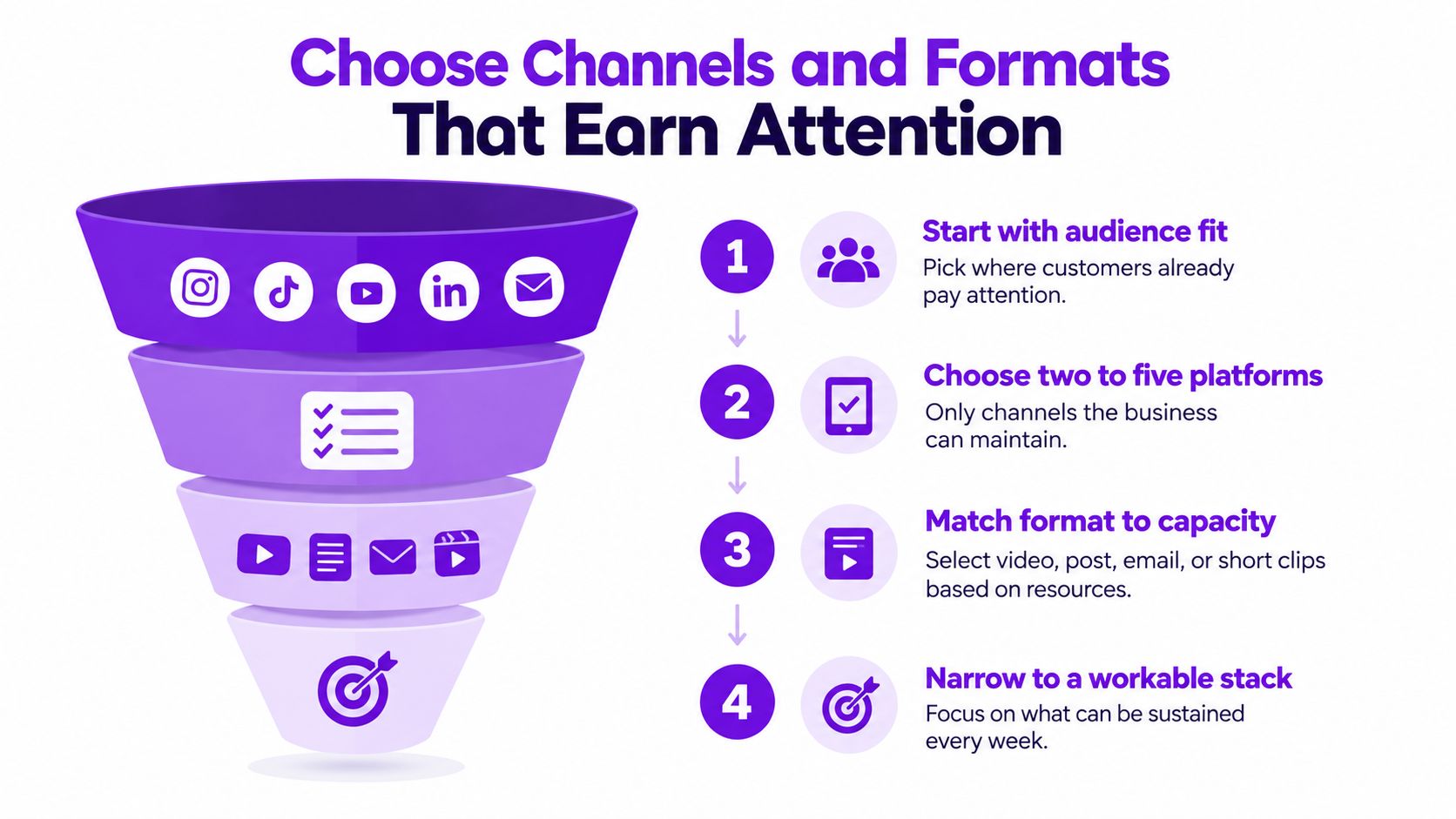
In the 2024 Content Marketing Institute and MarketingProfs B2B benchmark, 76% said content helped generate demand or leads and 58% said it helped generate sales or revenue; the most-used formats included short articles or posts (94%), video (84%), and customer stories or case studies (78%), according to the B2B content marketing benchmark findings.
These are B2B respondents, not a forecast for your local business. Use the findings to challenge the idea that content belongs only at the awareness stage, not to predict your results.
Build a channel-and-format map around customer decisions:
| Customer decision | Suitable content | Primary next step |
|---|---|---|
| Understand the problem | Short explanation or educational clip | Explore the fuller answer |
| Compare possible solutions | Demonstration or practical comparison | Review the relevant service |
| Decide whether to trust you | Customer story or process walkthrough | Start a qualified inquiry |
| Prepare to use the service | Follow-up email or preparation guide | Complete the booking requirements |
A plumber could answer a repair question in a short post and show the relevant warning signs in a clip. Keep the advice within safe boundaries and direct service-ready viewers toward an inquiry.
A realtor could use a listing walkthrough to explain a layout trade-off rather than just repeat the property description. An educator could finish a lesson excerpt with an invitation to ask about the next course.
For a visual service, you might pair a video-friendly social channel with email follow-up. For a consultant, LinkedIn and a useful website article might fit better. These are starting choices to test, not universal prescriptions.
The practical advice in small-business video marketing can help you connect recording choices to that channel mix.
Use the video below as a separate resource while evaluating your approach:
Every channel needs a role, and every asset needs a next step. If you can't name either, leave that channel out of the calendar.
The expensive habit is starting from a blank page for every platform. Record a useful explanation once, then adapt the strongest parts for different customer decisions.
Your source could be a lesson, service demonstration, podcast conversation, client interview with permission, or sermon. Choose a recording with substance, not just the longest file on your computer.
Manual clipping gives you direct control. You select the moments, adjust the framing, write the captions, and prepare each upload. Choose this route when the publishing scope is modest and editing doesn't consume the time you need for customers.
A freelance editor makes sense when you need judgment, storytelling, or careful visual treatment. Give the editor the audience brief, intended channels, examples of your voice, and approval requirements. Don't pay someone to guess which parts of the recording matter commercially.
An AI repurposing workflow suits owners who can review content but can't keep cutting and reformatting it themselves. Use it to produce candidate clips and supporting text, then make the final editorial decisions yourself.
Automation should reduce repetitive production work. It shouldn't decide what your business promises customers.
The practical difference is where you spend your attention. Manual work requires editing time, freelancers require briefing and approvals, and automated workflows require careful selection and checking.
This is the production pattern to aim for:
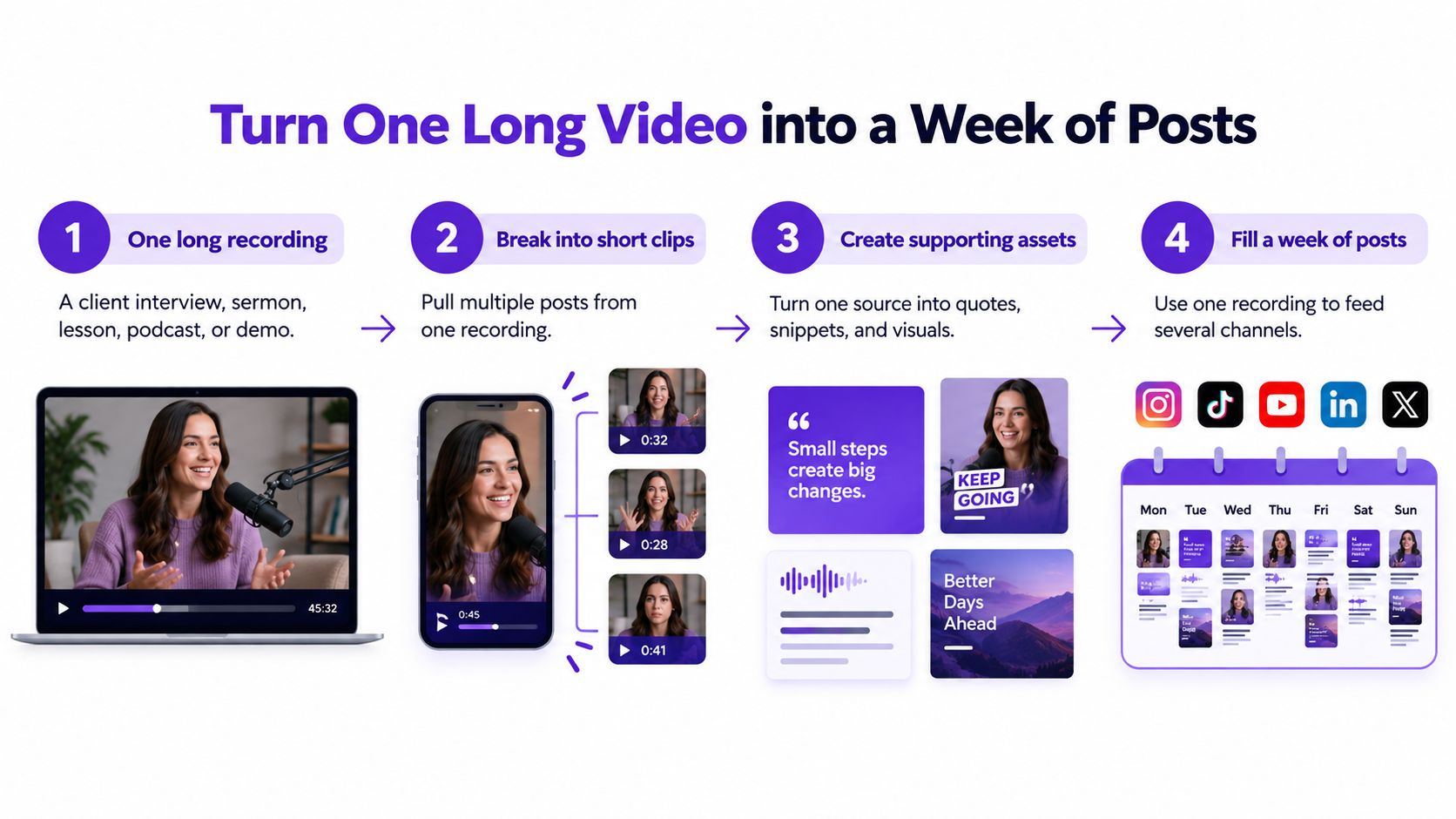
Record around a real buying question. Explain the situation, show or describe your approach, address a hesitation, and finish with the relevant next step.
For a service explainer, that might produce an educational clip, a process excerpt, a written answer, and a follow-up message. They shouldn't all repeat the same introduction. Give each piece a distinct purpose while preserving the source's meaning.
When comparing automated platforms, look for practical capabilities rather than output volume:
Topic suggestions and tools for revisiting older recordings can also help, but customer questions should remain your editorial starting point.
For a text-led variation, RedactAI's guide to build a month of LinkedIn content is a useful resource to consult when adapting a source idea beyond video.
Define done as approved assets with accurate captions, a suitable destination, a clear action, and a scheduled date. A large pile of generated drafts isn't a finished week.
A content calendar should tell you what happens next without requiring another planning session. If it only lists topics, it's an ideas document, not an operating tool.
The distinction matters: in a Content Marketing Institute and MarketingProfs benchmark of 1,186 global respondents, 95% of B2B marketers had a content strategy, but only 29% rated it extremely or very effective, according to the content strategy effectiveness findings.
Having a strategy isn't the same as executing a useful one. Keep your written plan practical enough to guide production, approval, and review.
Use a spreadsheet, a shared document, or your existing project tool. Don't introduce new software unless the current setup prevents someone from doing the work.
Create a row for each asset and record:
Before publishing, note the current level of relevant inquiries and bookings. Keep that baseline comparable with the period you'll review later, and record unusual events such as closures or a separate promotion.
The workflow should remain visible:
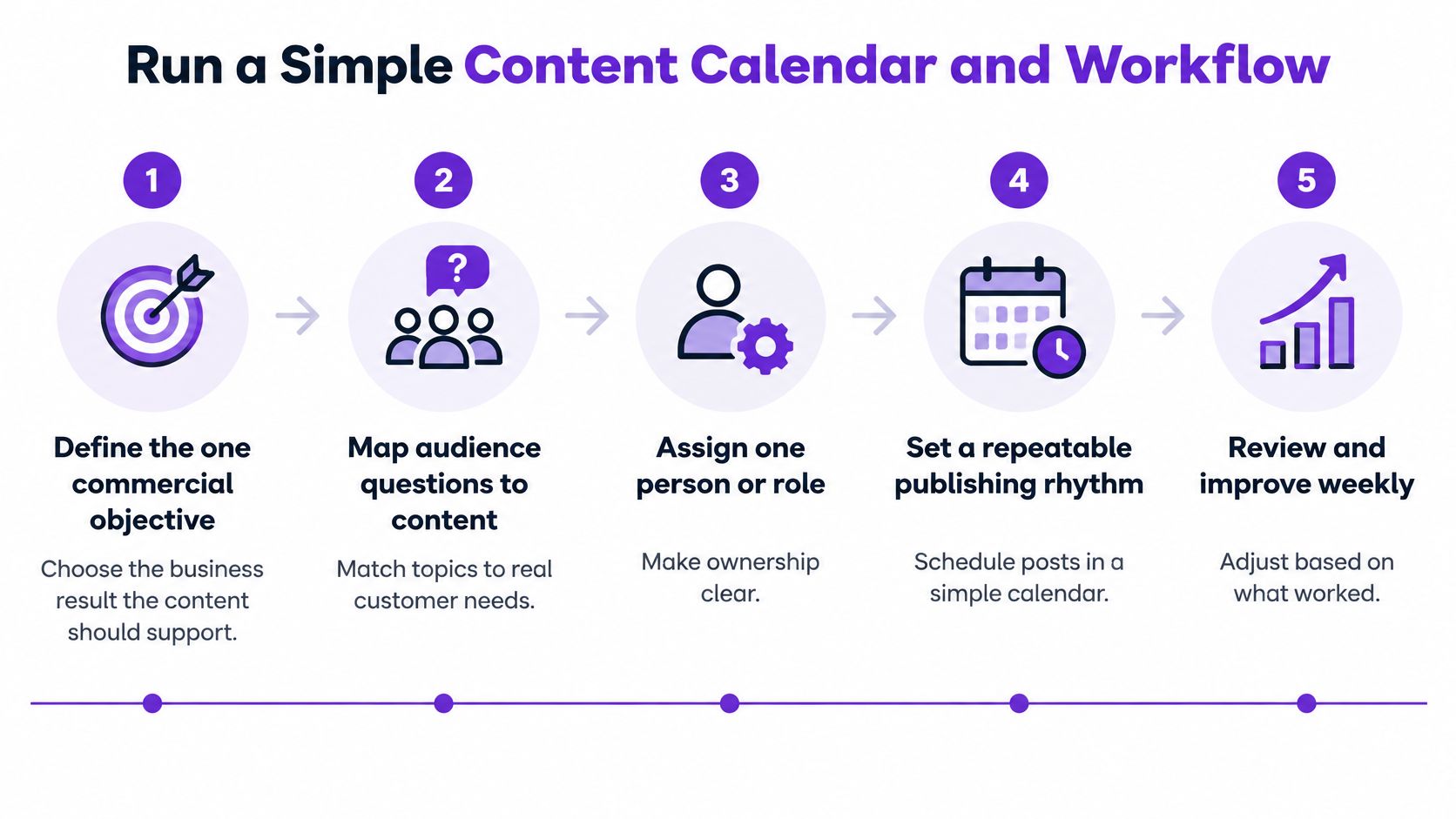
Use this as an example schedule, not a required publishing quota:
| Calendar period | Main work | Supporting output |
|---|---|---|
| Opening week | Record or select the source asset | Publish the central explanation |
| Following week | Release selected clips and written adaptations | Answer related customer questions |
| Proof week | Share customer-approved evidence and a process example | Address buying hesitations |
| Offer week | Publish a direct invitation | Follow up and review the inquiry log |
Assign a single accountable owner, even if that's you. A collaborator can edit or approve, but someone must notice when the scheduled post lacks a destination or the promised resource isn't ready.
If LinkedIn is part of your selected stack, consider a dedicated linkedin post scheduler from ViralBrain when evaluating how to queue approved posts. Avoid adding it if your existing scheduling tool already handles the job.
Check execution weekly. Review performance monthly and revisit the commercial direction quarterly. Fix broken links immediately, but don't abandon a theme because an early post received little attention.
Keep ownership clear, let useful evidence accumulate, and resist adding posts just to make the calendar look busy.
Last-click reporting can leave out the content someone watched before calling, asking a friend, or returning directly to your booking page. Don't treat the final recorded click as a complete explanation of the sale.
You also don't need to reconstruct every interaction. You need enough evidence to decide what to keep, improve, or stop.
A 2025 survey of nearly 6,000 small businesses across 25 countries found that 42% identified building awareness as a top marketing concern and 40% identified creating engaging content, while owners often spent fewer than five hours weekly on marketing, according to the Fiverr small-business marketing survey.
Use a simple log alongside your booking records. Record what you know, mark what the customer told you, and leave genuine uncertainty visible.
Minimum Evidence Chain for a Small Business
| Evidence step | What to record | Review cadence |
|---|---|---|
| Exposure | Relevant views, visits, or content the customer recalls | Monthly |
| Qualified conversation | Suitable calls, messages, and questions tied to your offer | Record when received, review monthly |
| Lead or booking | Inquiry date, service requested, campaign destination | Record when received, review monthly |
| Sale | Purchase or appointment outcome and associated revenue | Update when confirmed, review monthly |
| Retention | Repeat booking, renewal, or returning-customer purchase | Update when confirmed, review monthly |
Ask new customers how they found the business and what helped them decide. Those are different questions: someone may discover you through a referral but book after watching your explanation.
Use a distinct landing page or booking destination for a major campaign. Add a manual note when someone mentions a video, email, or post, but don't count each mention as a separate sale.
An assisted conversion is evidence of influence, not permission to claim all the revenue.
If relevant people watch but nobody starts a conversation, examine the offer and invitation. If inquiries arrive but bookings don't, review qualification, response handling, and the booking experience.
When the destination is confusing, use website conversion advice from Operosus to guide your inspection rather than commissioning more posts. For a broader evaluation, connect your log to content marketing ROI, including production costs and owner time.
Compare like-for-like periods. With a small audience or a long sales cycle, treat the findings as directional evidence, not proof that a particular clip caused a purchase.
Start with your written audience brief, select an existing source recording, approve its short adaptations, and schedule the batch. Then keep the evidence log through the first month. Your next production decision should come from customer questions and commercial progress, not whichever post earned the most likes.
Taja AI offers video repurposing, editing, and scheduling tools for turning a long recording into clips and supporting posts. Start free with no credit card required, upload a useful recording, and review the generated assets against your audience brief before scheduling your first batch. Keep the evidence log beside your calendar so publishing and learning happen together.


We are blessed to work with leading brands & Companies


We try to make easy and simple for every professionals. Get 30 days free trial - No credit card required.


© 2025 Taja AI. All rights reserved.