.jpeg)
How to Auto Generate Captions on TikTok: A Complete Guide
Learn how to auto generate captions on TikTok with this step-by-step guide. Master native tools, fix errors, and optimize for accessibility and SEO.
5 min read
October 20, 2026

Learn how to use video for blog content with proven types, SEO tips, and repurposing strategies that boost engagement, retention, and search rankings in 2026.
Written by:


94.6% of online adults watched online video during the previous month, according to the Digital 2026 figures summarized in Shopify's video marketing statistics. That changes the question for bloggers. You're not deciding whether your audience watches video. You're deciding whether your expertise will be available in the formats they use.
Using video for blog content well takes more than adding a player. You need a recording that answers a real question, a page search engines can understand, and a publishing workflow that connects discovery to a useful next action.
A local property agent records a walkthrough, publishes it on social media, and then writes a separate blog post about the same property. An educator delivers a lesson, closes the recording, and starts an article from a blank document. Both creators are treating closely related work as separate assignments.
A more practical approach starts with the explanation itself. Record the demonstration or conversation, then develop the article around what readers need to understand, verify, or do afterward. The video becomes source material, not a decoration added after the writing is finished.
Wyzowl's annual tracking records the business adoption figures below, including growth from 61% in 2016 to 91% in 2023, holding there in 2024; the same research reports that 91% of consumers had watched an explainer to understand a product or service and 82% said a brand video had convinced them to purchase.
Video Adoption Among Businesses (2016 to 2024)
| Year | Businesses Using Video |
|---|---|
| 2016 | 61% |
| 2017 | 63% |
| 2018 | 81% |
| 2019 | 87% |
| 2020 | 85% |
| 2021 | 86% |
| 2022 | 86% |
| 2023 | 91% |
| 2024 | 91% |
The visual comparison makes that change easier to see.
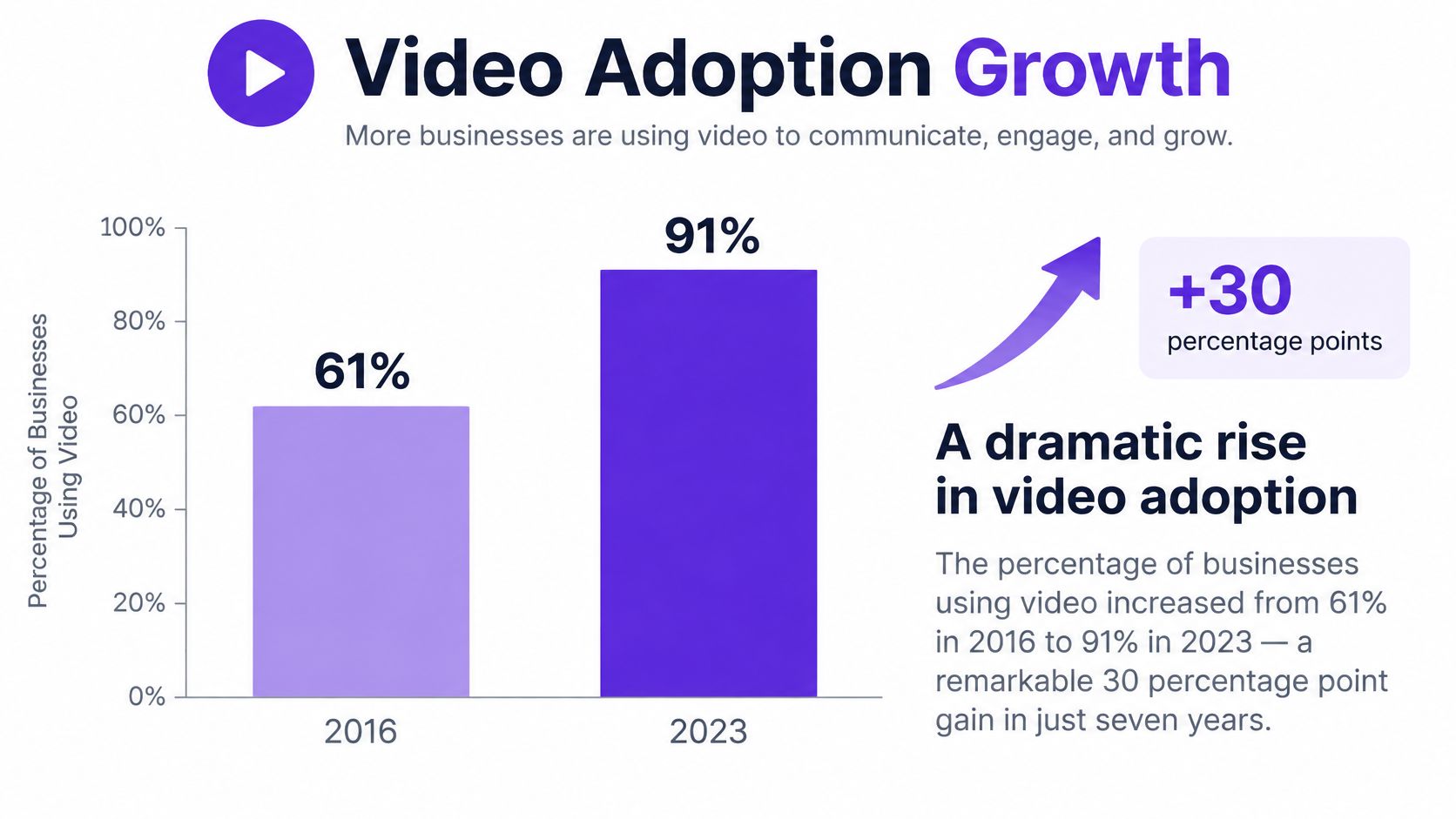
Those findings support making video a normal publishing consideration. They don't prove that every article needs a recording or that text has become secondary.
For a solo creator, the useful shift is operational. Instead of asking what video you could add to an article, ask which part of the topic would be clearer if someone could see or hear it.
A property walkthrough can demonstrate layout. A lesson can reveal the reasoning behind a solution. A service explanation can show what happens during an appointment.
Practical rule: Record what benefits from demonstration. Write what benefits from scanning, checking, or returning to later.
This approach preserves the strengths of both formats without requiring you to build unrelated content from scratch.
Choose a format by the reader's job, not by whichever recording setup feels easiest. Someone troubleshooting software needs to see the interface. Someone evaluating a consultant may need to hear how that person reasons through a difficult decision.
A talking-head introduction might suit the second situation and frustrate the first. Production polish can't fix a mismatch between the reader's question and what the video shows.
These categories provide a starting point for choosing the right treatment.
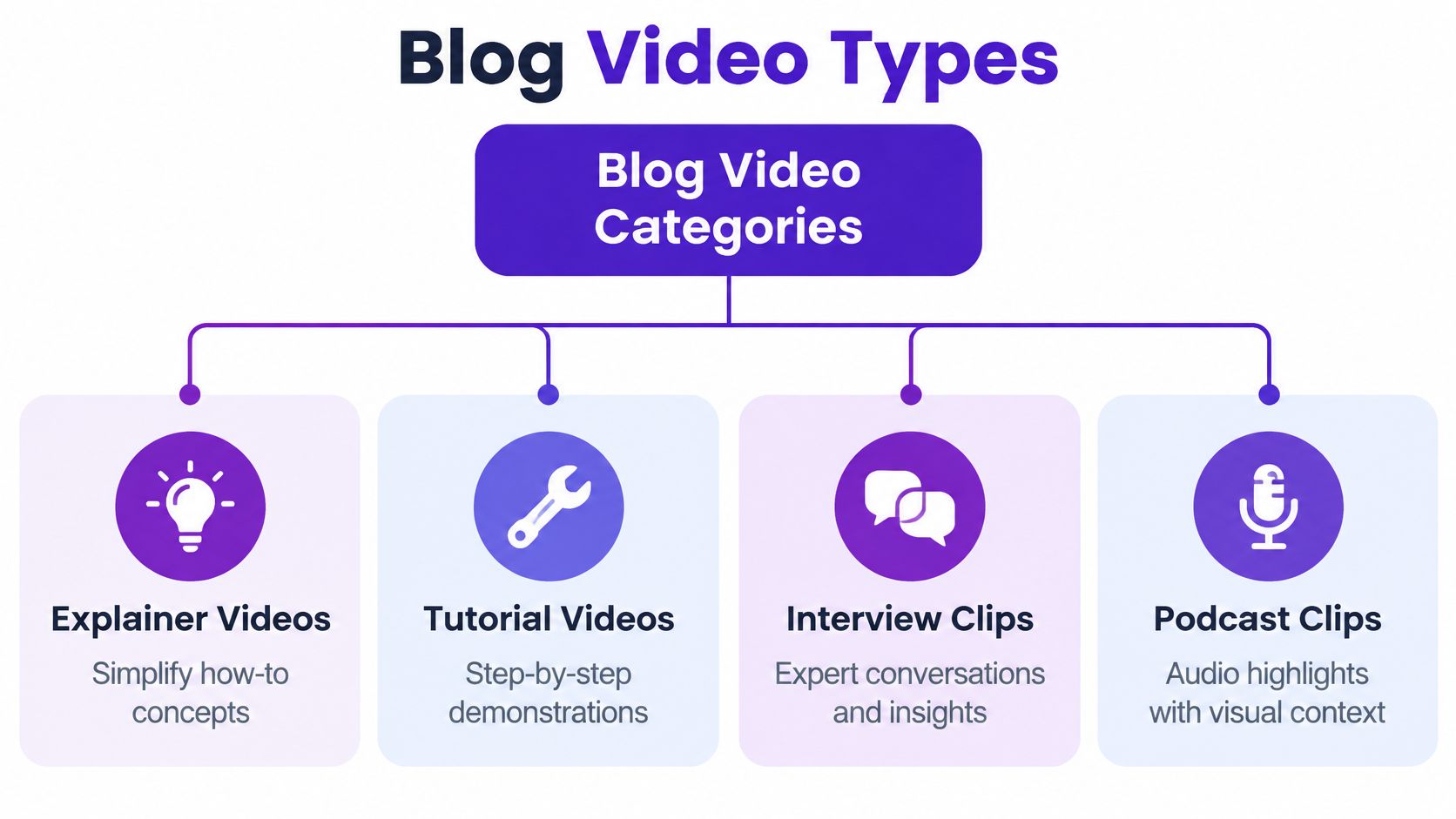
Consider a hypothetical article about choosing appointment-booking software. An explainer could clarify scheduling terminology, while a screen recording could demonstrate availability settings. A customer interview might address whether the workflow suits a particular kind of business.
Those assets aren't interchangeable. Choose the one that resolves the page's most important unanswered question.
Short vertical clips can fit a blog when the answer is narrow and self-contained. But don't force readers through a cropped excerpt if understanding the task requires a wider screen or a longer sequence.
Before recording, complete this sentence: After watching, the reader should be able to… If you can't finish it clearly, refine the topic before choosing equipment or writing a script.
Google reports that its AI-powered search reaches more than 1.5 billion monthly users across over 200 countries and territories, according to its AI-powered search marketing overview. For a blogger, that makes answer visibility a separate consideration from earning a traditional search click.
Readers may move between summaries, source pages, and video while researching a question.

Answer extraction means designing an explanation so a relevant passage remains understandable outside the full conversation. It's a useful editorial goal, not a guarantee that an AI system will cite your page.
Suppose an educator records a discussion about lesson planning. A passage beginning with “That's why this works” depends on missing context. A passage beginning with “A lesson objective describes what the learner should be able to do” names the subject and states the answer directly.
Use a clear question, give the answer, then add the example or exception. Say important definitions aloud rather than leaving them only on a slide.
For a visual reference alongside this discussion, use the embedded video below.
MyMentions' guidance on how to earn more AI citations is a useful companion when reviewing how clearly your page presents attributable answers. Treat it as an optimization resource, not a promise of inclusion.
The same precision should carry into your metadata optimization workflow. A clear passage and an accurate description should identify the same subject.
Make the answer understandable without making the full page unnecessary. Offer the demonstration, examples, or working materials that a summary can't fully reproduce.
A strong explanation still needs a technically accessible page. VideoObject structured data describes the video to search engines; it doesn't repair a blocked page, an unavailable player, or inaccurate content.
Google's video best-practice documentation covers discoverability, thumbnail accessibility, video metadata, and eligibility for enhanced search presentation. Use it as the reference for implementation rather than assuming that a successful playback in your browser proves search accessibility.
noindex directive and that relevant resources aren't blocked in robots.txt.If your publishing setup needs a practical walkthrough, VeloCMS explains how to embed YouTube videos. Follow the implementation appropriate to your own CMS, then inspect the published page rather than relying only on the editor preview.
Keep a reference image alongside your publishing checklist if it helps you document the workflow.
Populate VideoObject with accurate name, description, thumbnailUrl, uploadDate, duration, and embedUrl values. Don't copy the article's publication date into the video's upload date unless they match.
The description should explain what viewers will see, not repeat a string of target keywords. Likewise, the thumbnail should represent the recording rather than promise an unrelated result.
Validate the markup with Google's Rich Results Test and resolve relevant errors. For a larger library, consider a video sitemap to help identify video pages and their associated assets.
Eligibility isn't guaranteed indexing. Treat validation as a technical check, then monitor whether search engines discover and present the intended video. Keep a record of changes so you can distinguish an editorial update from an embed or markup fix.
A useful repurposing workflow begins with a source recording and ends with connected assets, not a folder full of loosely related exports. Each output should retain the original meaning while serving a different reading or viewing situation.
Consider a hypothetical educator's recording about preparing for a practical assessment. The article can explain the method, the full video can demonstrate it, and a short clip can address a common misunderstanding. Each asset has a purpose beyond repeating the same message.
Start by reviewing the recording and correcting its transcript. Mark clear answers, demonstrations, examples, and passages that require additional context.
Develop the written article from those ideas, not from every spoken sentence. Remove conversational detours, introduce necessary background, and add source links where the speaker refers to evidence. A transcript is an editorial input, not automatically a finished blog post.
Repurposing Outputs From One Long-Form Video
| Output | Use Case | Primary Platform |
|---|---|---|
| Edited article | Explain the topic with examples and references | Blog |
| Full recording | Preserve the complete demonstration or discussion | YouTube |
| Captioned vertical clip | Answer a focused question | Instagram or TikTok |
| Professional takeaway | Connect the topic to a work-related decision | |
| Concise observation | Introduce an idea worth discussing | X |
| Thumbnail | Set an accurate expectation for the recording | YouTube or blog |
A repurposing platform can help generate drafts, clips, captions, and thumbnails. Keep human review at the points where meaning can change: clip boundaries, automatic transcription, summaries, and calls to action.
Use a documented content repurposing workflow to assign each output a destination and an approval status. Record which source passage supports each derivative asset so an update doesn't require reconstructing the entire process.
The sustainable approach isn't to publish every possible variation. Publish the assets that help a defined audience understand the topic or continue toward a relevant next step.
In a 2025 survey of 411 business owners, 66% wanted video to generate leads and sales, while 99% had watched video during the previous week but only 50% had posted one; Jammy Digital's video marketing analysis also summarizes LinkedIn and Ipsos findings that 78% of B2B marketers use video, with short-form video associated with 41% ROI in respondents' assessments.
Those findings describe intentions, activity, and reported assessments. They don't establish that publishing more clips will produce a profitable result for your business.
An awareness clip, a service explanation, and a product demonstration shouldn't all end with the same request. Ask for an action that matches what the viewer is ready to do.
| Video's role | Appropriate next action | Useful outcome to examine |
|---|---|---|
| Introduce a problem | Read the related guide | Relevant visits to the article |
| Teach a method | Download a working checklist | Email sign-ups from interested readers |
| Explain a service | Review suitability or request an assessment | Qualified inquiries |
| Demonstrate a product | Try the relevant workflow or request a demo | Product engagement or demo requests |
| Resolve a buying concern | Visit the corresponding offer page | Progress toward a purchase |
Place the invitation after the explanation that makes it useful. For example, a property agent demonstrating how to prepare for a viewing could offer a preparation checklist after showing the inspection process.
Use campaign-tagged links to distinguish distribution sources. Record the landing page, offer, and conversion event so you can tell whether a clip attracted the right visitors.
Then examine lead quality. Did the inquiry concern the service you offer? Was the person in the area you serve? Did the conversation progress?
A practical video lead-generation workflow should connect those checks rather than stop at form submissions. Where your systems permit it, record assisted revenue too, while recognizing that attribution won't capture every interaction.
Measurement check: A widely watched video and a useful sales-support video may be different assets. Judge each against the job you assigned it.
For AI-mediated discovery, also watch for identifiable answer citations and changes in branded searches. Treat those as diagnostic signals, not proof that a particular video caused a sale.
Review results alongside the actual content. A weak offer, confusing landing page, or mismatched audience needs a different fix from an unclear explanation.
The recurring mistake is treating publication as completion. Uploading a recording doesn't settle whether it answers the reader's question, belongs on the page, or supports a business objective.
Use a four-stage system to keep those decisions connected.
When a video underperforms, diagnose the workflow before recording another one. A clear lesson with little discovery may need a publishing review. A popular clip with irrelevant inquiries may need tighter audience selection or a different offer.
Skipping the transcript removes an important review surface. Hiding the player behind interaction can complicate discovery. Optimizing only for YouTube leaves the blog experience unexamined, while counting only views tells you little about lead suitability.
The next recording isn't always the next priority. Choose an existing article with a useful video and audit the connection between its question, explanation, implementation, and offer. Fix the weakest stage, record what changed, and use that version as your publishing template.
Taja AI offers video-to-blog drafting, clips, captions, thumbnails, and platform-specific posts as part of a repurposing workflow. Visit the platform with an existing long-form recording, then review the resulting assets against your reader's question, publishing checklist, and intended next action.


We are blessed to work with leading brands & Companies


We try to make easy and simple for every professionals. Get 30 days free trial - No credit card required.


© 2025 Taja AI. All rights reserved.