.jpeg)
How to Make a Shorts Video That Actually Gets Views
Learn how to make a shorts video that drives real engagement. Master hooks, vertical formatting, and AI repurposing to scale your content without burnout.
5 min read
September 28, 2026

Master lead generation with video. Our practical playbook covers funnels, scripting, automated repurposing, and measurement to turn views into qualified leads.
Written by:


Businesses that use video in their marketing generate 66% more qualified leads year over year, yet 78% of small business owners say time consumption is the biggest barrier to creating video consistently, according to Wyzowl's video marketing statistics. That gap explains why so many video efforts feel disappointing. The upside is real. The workflow is usually the problem.
Most businesses don't fail at lead generation with video because they picked the wrong camera or missed a trend. They fail because they treat video creation, editing, clipping, captioning, posting, and follow-up as separate jobs. That turns one marketing asset into a pile of manual tasks, and eventually the whole thing stalls.
A better approach is to build one core video asset on purpose. You record it once, script it for multiple funnel stages, frame it so it can be repurposed, and distribute it across channels without rebuilding everything from scratch. That's how video starts behaving like a lead system instead of a creative side project.
A lot of small businesses are making video the hard way. They write a script for one platform, record one version, edit for one format, post it, and hope the algorithm does the rest. Sometimes they get views. Usually they don't get enough qualified conversations to justify the time.
The issue isn't effort. It's fragmentation.
If your videos aren't generating leads, one of three things is usually happening. The content is too broad to attract the right buyer, the call to action is too weak to move someone forward, or the asset dies after a single post. That last one is the silent killer. You spend hours creating something valuable, then let it fade after one upload.
A lead-generating video system needs intent behind each piece. Awareness content should pull in the right people. Consideration content should answer buying questions. Decision-stage content should remove friction and make the next step obvious.
When businesses skip that structure, they end up publishing “content” instead of building demand. A nice-looking reel might get attention, but attention alone doesn't fill your pipeline.
Practical rule: If a video doesn't match a clear buyer stage and a clear next action, it's brand activity, not lead generation.
There's also a production trap here. Many owners think the answer is better editing, more gear, or more polished visuals. In practice, strategic clarity matters more. If you need a grounded example of how planning affects output quality before the camera even turns on, these insights on UK video production strategy are worth reviewing.
Busy owners rarely have a content problem. They have a workflow problem. They can't keep writing, recording, editing, resizing, captioning, scheduling, and tracking every week without dropping something else.
That's why inconsistent posting often has nothing to do with discipline. The system is too manual. When your process depends on having extra time, it won't survive a normal month of client work, meetings, and admin.
Lead generation with video works best when one effort creates multiple outcomes. One solid recording should become your long-form asset, your short clips, your email follow-up content, your landing page support, and your social posts. If it doesn't, you're rebuilding your marketing from zero every time.
Stop making videos based on what feels easy to post. Start with where the viewer is in the buying process.
Some people have just realized they have a problem. Others are comparing providers. A smaller group is close to making a decision and needs reassurance. Those are different moments, and they need different videos.
At the top of the funnel, people don't want a pitch. They want clarity. Short educational videos, myth-busting clips, quick explainers, and strong opinion pieces work well here. Their job is to earn attention from the right audience.
In the middle, the viewer already knows the problem. Now they want proof that you understand it better than the alternatives. At this stage, deeper walkthroughs, webinars, tutorials, FAQ videos, and process videos do the heavy lifting.
At the bottom, buyers are looking for confidence. They want to see the offer, understand the experience, and remove any final hesitation. Product demos, testimonials, comparison videos, proposal walk-throughs, and direct invitation videos belong here.
If you work in a visual industry, niche examples can sharpen this quickly. For instance, these real estate video strategies show how different formats support awareness, trust, and conversion in a local service context.
| Funnel Stage | Goal | Video Type Examples | Key Metric |
|---|---|---|---|
| ToFu | Build awareness and attract the right audience | Short educational videos, problem-led reels, industry commentary, simple explainers | Qualified traffic |
| MoFu | Nurture interest and build trust | Tutorials, webinars, FAQ videos, behind-the-scenes process videos, expert interviews | Clicks to landing pages |
| BoFu | Help the lead make a decision | Testimonials, demos, offer breakdowns, objection-handling videos, personalized sales videos | Lead conversion |
A lot of content calendars break because they're just lists of post ideas. A stronger setup starts with one buyer problem and develops assets for each stage around it. If you need a practical way to organize that workflow, this guide on building a content calendar is useful.
Here's a simple example for a local service business:
Each video has a separate job, but they all connect to the same buying decision.
The easiest way to waste video budget is to make every video say everything at once.
Most funnels get sloppy. A top-of-funnel clip shouldn't ask for a hard sales call unless the audience already knows you. A bottom-of-funnel video shouldn't end with a vague “follow for more.”
Use lighter CTAs early and stronger CTAs later.
Lead generation with video gets easier when every asset has one job. The funnel doesn't need more content. It needs cleaner assignments.
Most weak videos don't fail on camera. They fail on the page.
If your script rambles, starts too slowly, or tries to say five things at once, you lose the viewer before the useful part arrives. The fix isn't writing longer. It's structuring the message around what the viewer needs at that moment.

For top-of-funnel videos, I like Hook, Story, Offer.
Open with a clear point, not an intro. “Most service businesses lose leads because they answer the wrong question first” is stronger than “Hey guys, welcome back.” Then give a short story, example, or observation that proves the point. End with an offer that matches the intent, such as watching a longer explanation or downloading a checklist.
For middle-of-funnel content, use Problem, Agitate, Solve. State the friction clearly. Make the consequences feel real. Then show your process, method, or perspective as the answer. This works especially well for webinars, tutorials, and FAQ videos because it creates movement without sounding hypey.
For bottom-of-funnel videos, Feature, Advantage, Benefit still works. Name the feature, explain why it matters operationally, then connect it to the buyer's real outcome. Not “we include onboarding support,” but “we include onboarding support, which means your team doesn't have to figure the setup out alone, so you launch faster with fewer mistakes.”
The smartest script in this whole system is your pillar asset. That could be a webinar, workshop, deep tutorial, recorded presentation, interview, or live Q&A. The key is to build it so it naturally contains reusable moments.
A good pillar script includes what I call golden nuggets:
If you're scripting a 20-minute training, don't dump all the value in one long block. Build intentional stopping points. Each one can become a short-form clip later.
Write for extraction. If a sentence can't stand alone in a clip, it probably needs tightening anyway.
A simple outline for a pillar video might look like this:
That structure creates plenty of reusable segments without forcing awkward transitions.
Reading polished copy word for word usually sounds stiff. Write the script in bullet beats, not perfect paragraphs. You want clarity on camera, not literary elegance.
Useful habits:
This breakdown is worth watching if you want a visual example of how stronger framing and messaging improve the final output.
The fastest way to improve lead generation with video is to stop scripting for “content” and start scripting for decisions. Ask what question the buyer is trying to answer right before they move forward. Then write only for that question.
That discipline makes the recording easier, the edits cleaner, and the clips more useful later.
You don't need a studio to make effective lead-gen video. You do need a setup that looks intentional and sounds clean.
Bad audio makes people leave faster than average lighting ever will. If you're choosing where to spend attention, start with sound, then framing, then light. Fancy transitions can wait.
The fastest home-office upgrade is a dedicated microphone placed close enough to capture your voice clearly. Room echo is what makes many otherwise decent videos feel amateur. Soft furnishings help. So does recording in a smaller space instead of a big empty room.
Lighting matters, but it can stay simple. A basic key light or well-positioned window light does most of the work. Add a softer fill if your shadows are harsh, and use a small background light only if the frame feels flat.
A practical checklist:
Clear sound beats cinematic ambition every time for service-based marketing videos.
This is one of the most overlooked efficiency moves in the whole process. If you record a standard 16:9 talking-head video with your face jammed to one side, repurposing into 9:16 later becomes awkward. Crops feel tight, captions cover your mouth, and key gestures get lost.
Instead, sit slightly wider in frame and keep your head and torso in a central safe zone. Leave some room above your head and avoid placing important on-screen text at the far edges. That gives you far more flexibility when clipping for Shorts, Reels, TikTok, or LinkedIn vertical formats.
This doesn't require complicated planning. It just means recording with future crops in mind.
A lot of business owners waste time polishing videos that were never structured cleanly. Heavy editing usually compensates for weak scripting, weak framing, or both.
Your edits should serve clarity:
If your current workflow still feels bloated, it's worth reviewing methods for how to edit faster. The main idea is simple. Reduce manual decisions, standardize repeatable choices, and stop rebuilding your style every time.
Consistency gets easier when setup isn't a fresh puzzle each week. Keep your camera position, lighting, mic placement, and background largely the same. Save title styles, lower-thirds, and caption preferences in templates if your editing tool allows it.
That way, when you record a new pillar video, you're not also reinventing the production environment. You're just capturing the next useful asset.
Lead generation with video becomes sustainable when recording is boring in the best possible way. Predictable setup. Predictable output. Less friction between idea and publish.
Businesses that treat video as a one-and-done post usually stall out fast. The leads come more reliably when one strong video is built to feed every channel, every week, with as little manual work as possible.
That changes the job. You are not creating a YouTube video, then separately creating Shorts, Reels, LinkedIn posts, and email copy. You are producing one core asset that can be clipped, packaged, scheduled, and routed to an offer inside a single system.
The best source material does two things at once. It delivers a full idea in long form, and it contains clear segments that can stand alone as short clips.
A workshop, podcast episode, FAQ session, product demo, customer education call, or founder point of view video can all work. The deciding factor is structure. If the recording jumps around, repurposing gets slow. If each section covers one objection, one lesson, or one decision point, the rest of the workflow gets much easier.
A practical engine usually looks like this:
Order matters here. Pull clips from a strategic source, then adapt the packaging. That keeps the message consistent and saves you from creating random filler content just to keep feeds active.
The expensive part of video is rarely the filming. It is everything that happens after. Clipping, resizing, rewriting descriptions, adding captions, choosing publish times, and tracking what already went live can eat more time than the shoot itself.
I see the same failure pattern all the time with small teams. They record one useful video, then let it sit because turning it into ten more assets feels like another project. That is why distribution has to be designed into the workflow from the start.
As noted earlier, teams using AI repurposing tools report substantial time savings per video. The bigger win is consistency. If the post-production load drops enough, publishing stops depending on spare time and starts running on process.
The bottleneck is usually not content quality. It is the pile of repeatable tasks after the camera turns off.
If you want a practical example of that setup, this guide on automating content creation for repeatable multi-channel publishing is a useful reference.
Repurposing works best when the message stays intact and the presentation changes. A good clip can work across several channels, but the title, caption, opening line, and CTA usually need adjustment.
For example:
That is a real trade-off. More customization can improve performance, but it also adds production time. For many small businesses, the best middle ground is standardizing 80 percent of the workflow and only changing the parts that affect click-through or conversion.
One recording session should give you more than one publish date. That is the operating advantage here.
A simple weekly system looks like this:
That integrated approach is what a lot of video advice misses. Creation, repurposing, and distribution are the same job. Once the original video is planned for AI-assisted clipping and scheduling, one hour of recording can support weeks of lead generation content instead of a single post.
A lot of businesses say their videos are “doing well” when what they really mean is that people watched them.
Views can be useful context. They are not proof that your video strategy is generating leads. If you're serious about lead generation with video, you need to track movement toward revenue.
Start with the metrics that connect content to outcomes.
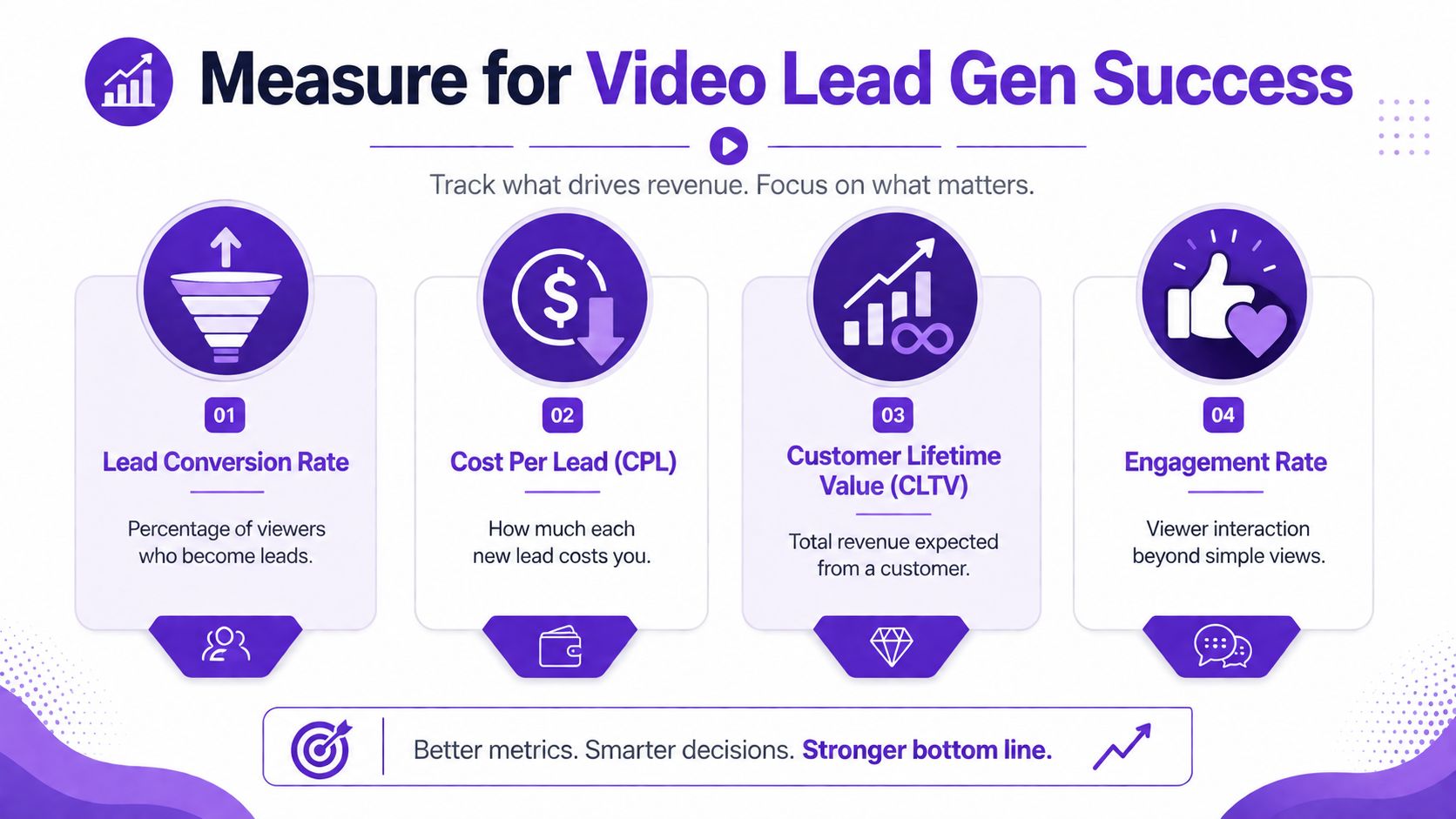
The most useful ones are usually:
A short clip with modest reach can outperform a viral post if it sends the right people to your site and they convert.
If your video descriptions, profile links, and CTAs all point to the same page with no tracking, you're guessing.
Use UTM parameters in your links so you can tell which platform, campaign, and video type drove the visit. That lets you compare a webinar clip against a testimonial clip, or a LinkedIn post against a YouTube description, without relying on platform reporting alone.
Keep your naming clean and repeatable. If you change the convention every week, your reporting gets messy fast.
You don't need a complex dashboard to improve. A short monthly review is enough if it's disciplined.
Ask questions like:
If a video gets attention but produces no next-step behavior, treat it as creative feedback, not pipeline progress.
That last point matters. Some videos are useful because they teach you what angle attracts people. Others are useful because they create leads. Those are not the same thing.
The strongest gains usually come from tightening the full chain. Sharpen the hook, improve the CTA, send viewers to a cleaner landing page, or match the clip to a better funnel stage. Don't just blame the edit.
Once you track the journey from view to click to lead, your video program gets easier to manage. You stop posting on instinct and start making better decisions with each recording cycle.
If you want a faster way to turn one long-form recording into clips, captions, posts, thumbnails, and scheduled multi-channel content, Taja AI is built for exactly that workflow. It helps busy businesses stay consistent without turning video marketing into a full-time editing job.


We are blessed to work with leading brands & Companies


We try to make easy and simple for every professionals. Get 30 days free trial - No credit card required.


© 2025 Taja AI. All rights reserved.