.jpeg)
Best Aspect Ratio for YouTube: The Complete 2026 Guide
Discover the best aspect ratio for YouTube videos, Shorts, and community posts. Learn when to use 16:9 vs 9:16 with practical tips and real examples.
5 min read
October 2, 2026

Master SEO title best practices with data-backed strategies for keyword placement, length, intent alignment, and CTR optimization.
Written by:


Google rewrote 76.04% of title tags in Q1 2025, up from 61% in a 2023 study. When it changed a title, it removed an average of 2.71 words and retained only 35.02% of the original content, according to Search Engine Land's analysis of Google title rewrites. That changes the central question behind SEO title best practices. You're not trying to write a title Google must display. You're writing one that gives Google as little reason as possible to replace.
A strong SEO title still needs to communicate relevance, attract the right click, and fit the visible search result. But it also needs to agree with the page's H1, match the searcher's intent, and remain useful when the same content is repurposed for YouTube or social media. The practical standard is no longer perfection. It's clarity, consistency, and controlled flexibility.
Many SEO workflows still treat the title tag as if it travels unchanged from your CMS to Google's results page. That assumption is outdated. Google can generate a different title from the page's visible heading, other prominent text, internal or external anchor text, and the content itself when the supplied title appears too long, repetitive, vague, promotional, or disconnected from the page.
The rewrite rate is the uncomfortable part. A Q1 2025 analysis reported that Google rewrote 76.04% of title tags, while modified titles preserved only 35.02% of the original content on average. Those figures don't mean title tags are irrelevant. They mean your title is a proposal, not a guarantee.
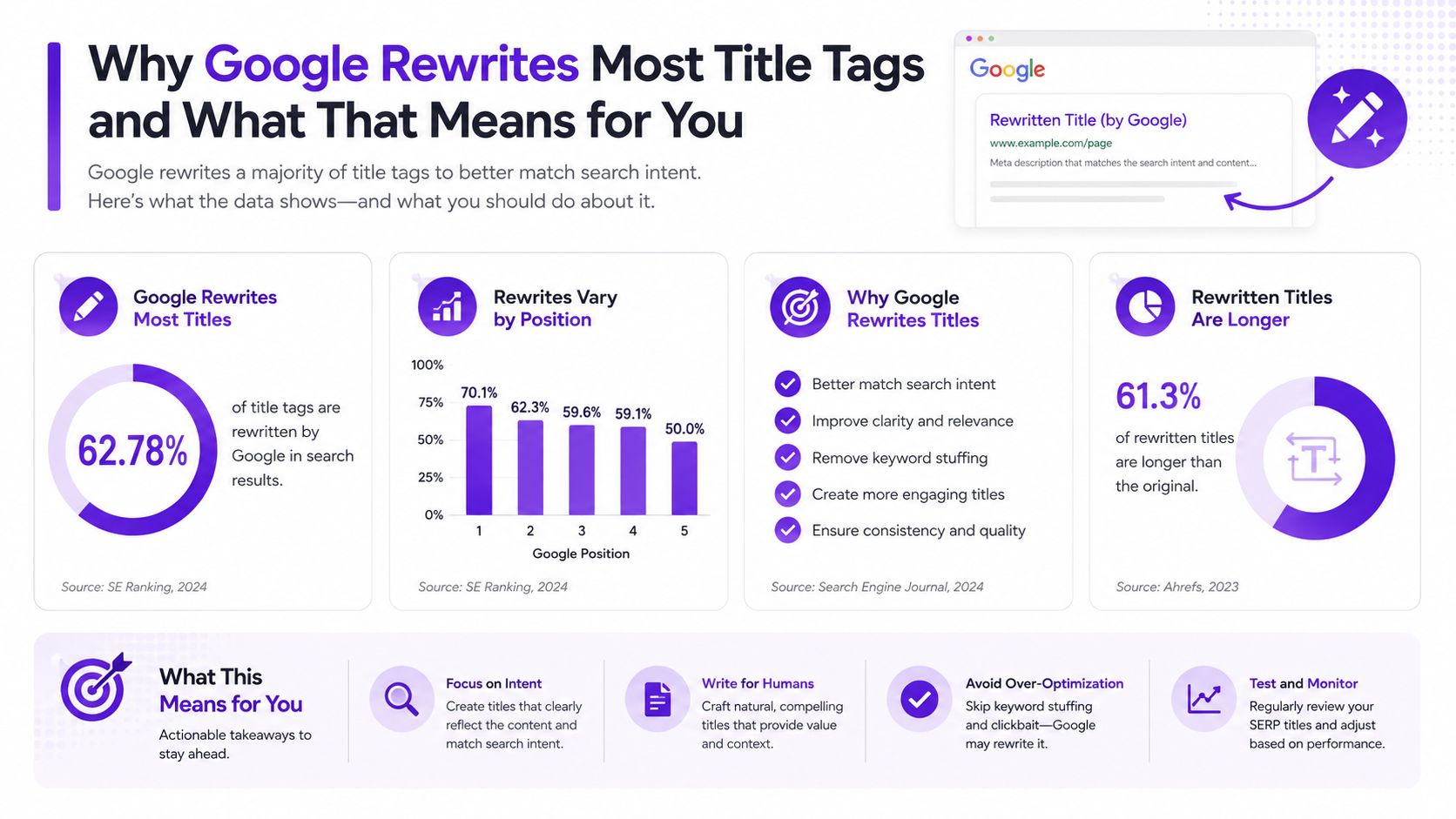
A title is more likely to survive when it accurately summarizes the page, uses natural language, avoids keyword repetition, and aligns closely with the H1. Brand names can also be removed in rewritten titles, particularly when they consume space without helping the result answer the query.
The historical trend supports this shift. In Ahrefs' analysis of 953,276 pages published in 2021, Google rewrote titles over 600 pixels 46.12% of the time, compared with 29.45% before, a 56.6% increase in rewrite frequency. The point isn't to chase an old benchmark mechanically. It's to recognize that title optimization controls how your page is represented in the SERP, not merely how a crawler interprets its topic.
Practical rule: Write the title, H1, opening copy, and page content as a consistent description of one subject. Don't make Google reconcile competing versions.
That principle matters for every site, from a product catalog to a guide about winning SEO for B2B SaaS. A clever title may earn attention from a human editor, but an ambiguous or exaggerated title gives Google more material to replace. Treat the title as a negotiation with the search engine. You control the first draft, while Google controls the final presentation.
Character counts are a useful editing shortcut, but Google evaluates a title by its rendered width. Each character consumes a different amount of space, so a title filled with wide letters can truncate earlier than one using shorter words with the same count.
For desktop results, aim for under about 580 pixels. 50 to 60 characters is a workable proxy, according to Zyppy research summarized by Search Engine Land. It is fast to apply during editorial production, although it cannot account for every word combination. Run the finished title through a SERP preview that measures pixel width before publishing.
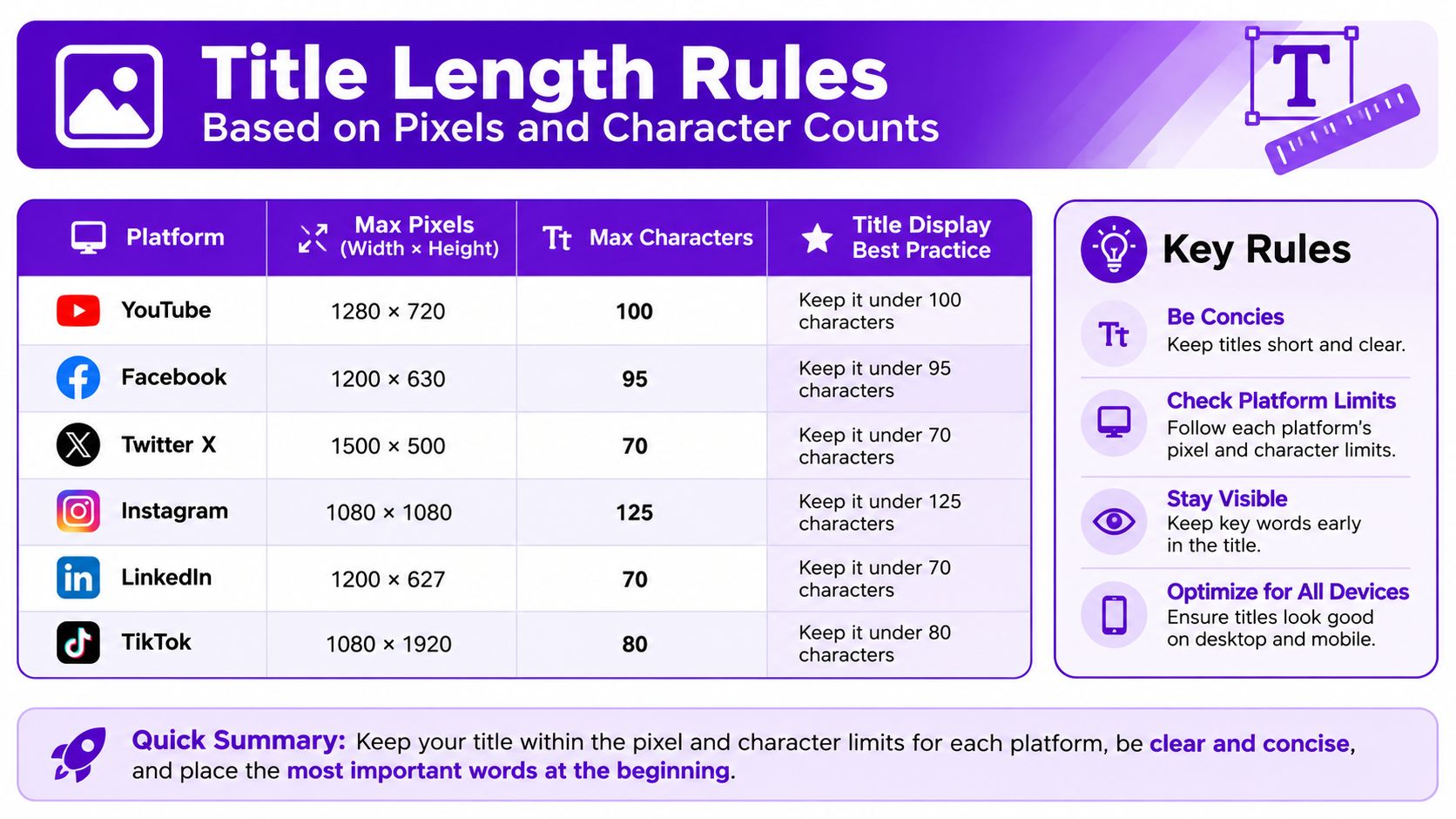
A compact title still needs to identify the page clearly. Cut filler before removing the subject, format, benefit, or other detail that helps a searcher choose the result. Brand names and secondary phrases should earn their space.
| Page type | Length decision |
|---|---|
| Informational guide | Keep the topic and format visible, then add a useful qualifier if space allows |
| Product or service page | Put the product or service and its defining benefit first |
| Local page | Lead with the service and location, while avoiding repetitive boilerplate |
| Repurposed video page | Name the core subject clearly before adding episode or format context |
Character studies provide useful direction, but they should inform testing rather than become fixed rules. A Backlinko study of 5 million Google search results, cited by Search Engine Land, found that titles between 15 and 40 characters earned much higher click-through behavior, with the sweet spot producing close to 36% more clicks than titles outside that range. A separate summary of a 4-million-result study reported a 33.3% CTR share for titles between 40 and 60 characters, and that range outperformed longer alternatives. The practical trade-off is clear: shorter titles can display cleanly, while longer titles may communicate enough specificity to earn the click.
Check every final version in desktop and mobile previews. If the key subject is buried at the end, remove low-value wording and bring the important detail into the visible area. If shortening strips out the answer, product detail, or benefit, keep the meaning intact and accept that Google may generate an alternative. Prioritize pixel-width checks over character counters during editorial production.
Put the primary keyword early, but don't force it into an unnatural sentence. Industry guidance recommends placing it within the first 1 to 4 words, because early placement makes relevance easier to scan and clarifies the result before truncation. This guide to SEO title tag formulas also emphasizes rendered width, which makes front-loading a practical display decision rather than a keyword-density exercise.
Start with the query your page answers. Then build the title around that phrase, adding the format, audience, outcome, or differentiator that helps a searcher choose your result.
Before: “The Complete Guide for Businesses That Want to Learn About SEO Title Best Practices”
After: “SEO Title Best Practices for Higher-Quality SERP Snippets”
The second version leads with the subject, removes throat-clearing language, and tells readers what the page focuses on. It's also easier for Google to compare with the H1 and body copy.
When space is limited, rank title elements in this order:
Long-tail queries need judgment. You don't always need to reproduce every word in exact order if doing so creates a poor title. Include the essential concepts early, then make the sentence sound like something a person would click.
Avoid starting with a brand name unless the search is navigational or the brand itself carries the strongest relevance. “Taja AI Video Repurposing” makes sense for a branded page. “Video Repurposing for Small Businesses | Taja AI” is more useful for a non-branded service query.
For deeper topic discovery before writing, use AI tools for keyword research to organize primary and supporting phrases. The tool doesn't replace intent judgment. It helps you avoid stuffing every related term into one title.
The same keyword can support very different pages, and the title should reveal which job the page performs. A searcher looking for an explanation wants a different result from someone comparing vendors or ready to purchase. If the title promises the wrong format, even a well-ranked page can attract the wrong audience and lose the click.
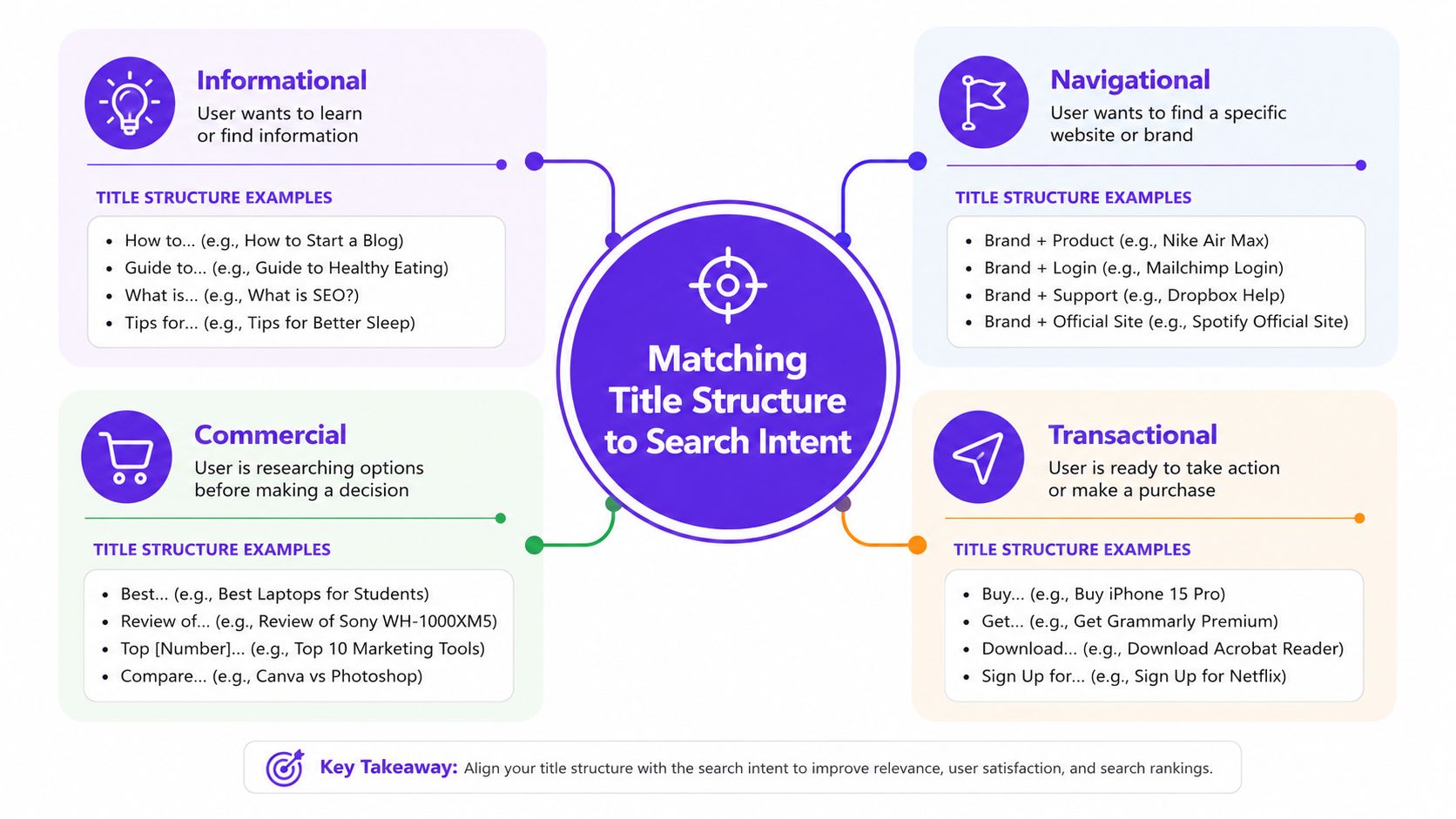
Informational intent usually calls for a question, explanation, or guide structure.
Navigational intent benefits from a direct brand, product, or destination reference.
Commercial investigation signals evaluation. Comparison language helps searchers understand that the page will support a choice.
Transactional intent needs specificity and a clear action or offer.
Take the keyword, inspect the pages already visible for it, and identify the dominant format. Then ask whether your title promises that same experience. If the results are comparison pages and your title says “complete guide,” you may be misaligned even if the article contains useful comparisons.
Avoid using commercial language on an informational page just to make the result sound more valuable. “Best” implies evaluation. “Buy” implies a transaction. “How to” implies instruction. These words set expectations before the visitor reads a sentence, so use them only when the page fulfills the promise.
A strong title gives the searcher enough information to self-qualify. That can reduce irrelevant clicks, but the remaining visitors are more likely to find the page useful. Click-through appeal isn't created by making every title louder. It comes from making the title accurate, specific, and visibly relevant to the task behind the query.
A Google title and a YouTube title may describe the same video, but they serve different discovery systems. Google needs an explicit topic and close query alignment. YouTube has more room for curiosity and emotional framing because recommendations and viewer behavior depend heavily on the promise of the video. Social feeds need a fast pattern interrupt that makes sense beside an image, clip, or personal comment.
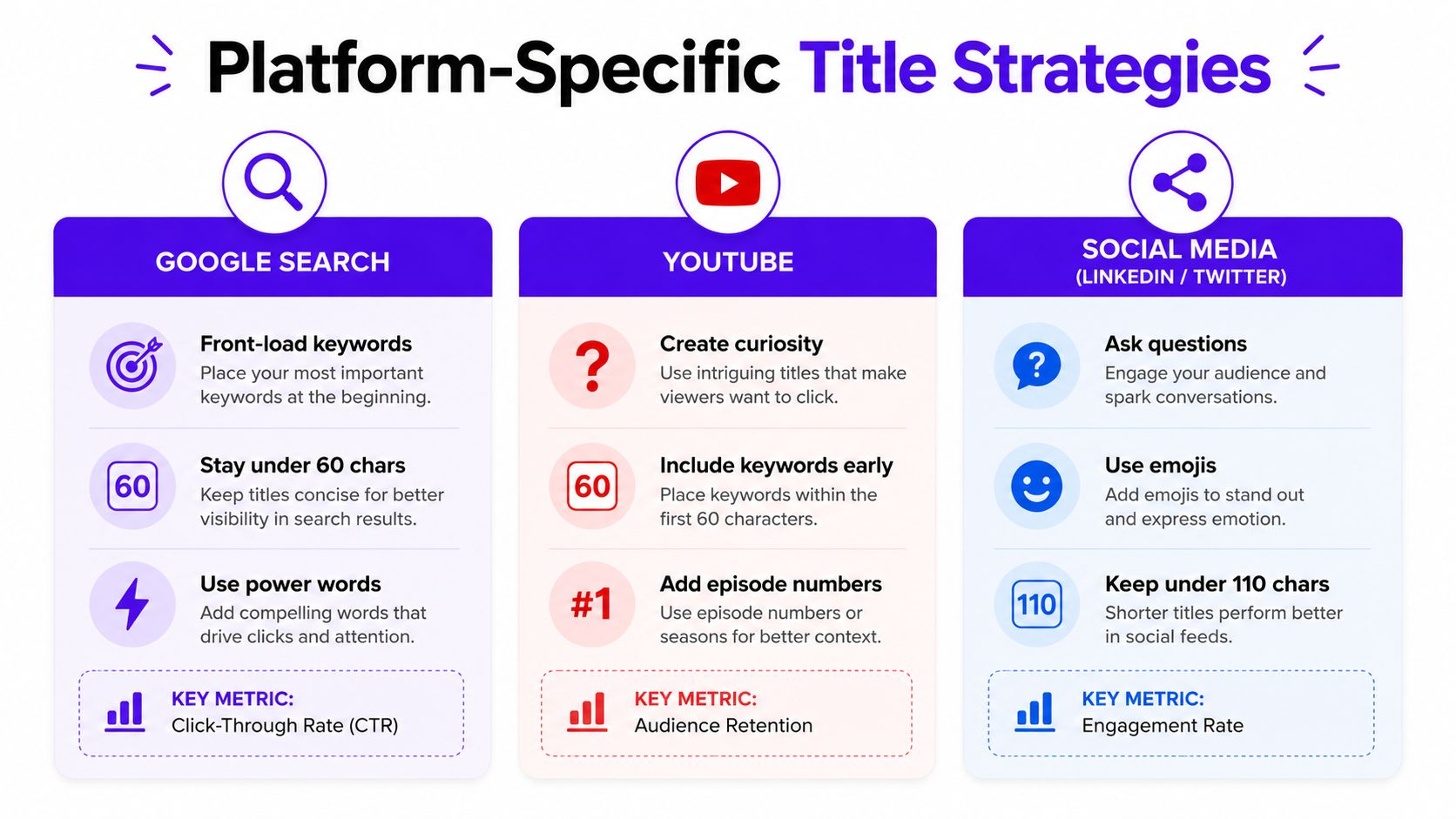
For a search landing page, lead with the topic and align the title with the H1. Avoid hiding the subject behind a tease such as “What Nobody Tells You About This.” That wording may create curiosity, but it doesn't tell the searcher or Google what the page covers.
A video title can preserve the core keyword while adding tension or a clear payoff.
The YouTube version still communicates the topic, but it creates a more concrete reason to watch. Don't use a curiosity gap that withholds the subject entirely. Include the essential topic early, then make the promise engaging.
A LinkedIn post may work better as a question or contrarian observation. An X post may rely on a sharper statement. A social headline can be more conversational because the surrounding post, visual, and author identity supply context that a Google result often lacks.
Repurposed video makes separate versions especially useful. One recording can have an SEO title for its blog page, a recommendation-oriented title for YouTube, and a conversational hook for LinkedIn. Metadata optimization can help coordinate these fields without treating every platform as if it had the same audience or display environment.
Create separate titles when the platform's discovery behavior differs. Reuse one title only when it remains clear, natural, and compelling in every placement. A title that satisfies Google but sounds stiff in a social feed is not a failed title. It's a title being used in the wrong context.
A title shouldn't be considered finished because the page has been published. Search performance changes, competitors change their positioning, and a page can rank for queries its original title never anticipated. The most productive testing starts with pages that already receive impressions but attract fewer clicks than their visibility suggests.
Use Google Search Console to inspect query, page, impression, click, and average-position patterns. Don't change a title just because its click-through rate looks low in isolation. Compare similar pages, examine the queries producing impressions, and determine whether the title answers the intent those queries reveal.
A quarterly audit can uncover patterns across templates, brands, locations, and content types. Look for duplicate titles, titles that begin with boilerplate, and pages where the H1 says something materially different from the search title.
A/B rotation can be useful, but uncontrolled changes create noisy conclusions. Treat title testing as an editorial experiment with a recorded hypothesis. The winning title isn't the one with the most clicks at any cost. It's the one that brings the right searchers to a page that fulfills its promise.
Most weak titles don't fail because they omit a keyword. They fail because they make the searcher work too hard to understand the result. Google can also rewrite titles that repeat terms, overuse separators, make exaggerated promises, or conflict with the page's visible heading.
Consider this stuffed version:
Before: “SEO Title Best Practices, SEO Titles, SEO Title Tips, SEO Title Guide”
It names the topic repeatedly but offers no reason to choose the page. A cleaner alternative is:
After: “SEO Title Best Practices for Clearer Search Results”
The revised title uses the topic once, adds a meaningful outcome, and leaves room for the page to explain the method.
A brand-first title can also waste valuable space on a non-branded query. Move the brand to the end when the subject matters more, or omit it when the visible result already supplies strong brand recognition.
Run a self-audit by asking three questions. Can a stranger identify the page's subject immediately? Does the title match the H1 and the actual content? Would the first visible words still make sense if Google truncated the rest? If the answer to any question is no, revise the title before chasing more advanced tactics. For additional ways to evaluate searcher response, see this guide on how to improve click-through rate.
Templates reduce blank-page friction, but they shouldn't replace judgment. Start with the page's subject, add the intent signal, and use a modifier only when it describes a real feature of the content.
How-to guide:How to [Achieve Outcome] With [Method]
Example: “How to Improve Video Reach With Platform-Specific Titles”
Practical guide:[Topic] Best Practices for [Audience]
Example: “SEO Title Best Practices for Small Business Websites”
List post:[Number] [Topic] Ideas for [Audience or Outcome]
Example: “Content Repurposing Ideas for Local Service Businesses”
Use a number only when the article contains that many distinct items. Brackets can clarify format, such as “[Template]” or “[Checklist],” but they shouldn't become decoration.
Comparison:[Product Category] Compared for [Use Case]
Example: “Video Repurposing Tools Compared for Marketing Teams”
Product page:[Product or Service] for [Audience] | [Brand]
Example: “Video Editing for Podcasters | Brand Name”
Case study or proof page:How [Audience] Used [Method] to Solve [Problem]
Example: “How a Marketing Team Used Video Repurposing to Scale Content”
Avoid unsupported performance promises. A title should describe what the page contains, not imply an outcome you can't substantiate.
For YouTube, combine the topic with a clear tension or payoff:
[Keyword] That Helps You [Outcome]
“Video Repurposing That Helps You Publish More Consistently”
For social, use a question or sharp observation:
Are You [Problem]? Try [Specific Approach]
“Are Your Video Titles Too Generic? Try Platform-Specific Versions”
Keep the SEO title, social title, and video title separate when their audiences need different hooks. The same principle applies to descriptions and previews. If you're refining the supporting snippet, this resource on writing better meta descriptions for your business is a useful companion.
Taja AI helps creators and small teams turn long-form video into optimized titles, clips, captions, blogs, thumbnails, and platform-specific posts from one upload. Visit Taja AI to generate title options with SEO scores, adapt them for different discovery channels, and build a more consistent publishing workflow.


We are blessed to work with leading brands & Companies


We try to make easy and simple for every professionals. Get 30 days free trial - No credit card required.


© 2025 Taja AI. All rights reserved.