.jpeg)
10 Facebook Video Best Practices for Creators in 2026
Facebook video best practices for creators: master hooks, specs, captions, distribution, Reels, Stories, boosting, and analytics in 2026.
5 min read
October 22, 2026

Learn how to improve click through rate in 2026 with proven tactics for headlines, thumbnails, SEO snippets, email, ads, and AI search.
Written by:


Higher CTR is not automatically better. In one recent guidance set, B2B and paid-search teams were warned to pair click optimization with CAC, conversion rate, contribution margin, or revenue, because raw clicks can pull in traffic that looks busy and buys nothing. That's the shift in 2026, improving click through rate means choosing the right clicks, not just more of them.
The strongest programs don't start with a headline tweak. They start with a filter, which queries, ads, emails, and snippets deserve more attention because the clicks they earn are likely to turn into useful sessions, qualified leads, or actual revenue. Once that's clear, the work becomes practical, diagnose the leak, fix the surface, and test one variable at a time until the pattern is repeatable.
A stronger CTR only matters when the click is worth having. B2B and paid-search teams already know this trade-off, because a lift in clicks can still leave CAC, conversion rate, contribution margin, or revenue headed in the wrong direction. That is the test, especially when more traffic comes from people who were curious, not ready to buy.
The practical question is whether a surface deserves more clicks at all. A headline, ad, or snippet can be underperforming, but it can also be doing its job and attracting the wrong audience. If the clicks do not produce qualified sessions, pipeline, or revenue, the metric is decoration.
A high CTR can hide weak intent. That shows up in paid search when broad messaging pulls in browsers, in email when subject lines overpromise, and in organic search when a meta description earns the click but the page misses the intent behind it. Teams that do this well keep the guardrails tied to business outcomes, not just engagement, and they use CAC, conversion rate, and revenue per click to decide whether the traffic was worth the attention.
Practical rule: If a CTR win makes the next stage of the funnel worse, stop calling it a win.
CTR work starts with value, not vanity. If a page exists to drive demos, applications, or product purchases, extra clicks from low-intent visitors can create busy-looking reports and weak results. If a page supports awareness or research, a stronger click may still be worth chasing, but only when it brings in the right segment.
That is why strong CTR programs often look methodical from the outside. They sort, rank, and leave some assets alone because those assets are already pulling the right audience. They also have to account for AI-heavy search and social environments, where the click is harder to win because platforms answer the question directly or compress attention into fewer visible options.
The work breaks into three buckets, diagnostic measurement, creative and technical fixes, and a repeatable testing loop. If you can answer “should I try to raise this CTR?” before changing a title tag or subject line, you are already avoiding a common mistake. If the content gap is the primary issue, a content gap analysis will usually show that faster than another round of cosmetic edits.
Start with the data you already have. In Google Search Console, look for pages or queries with high impressions and weak CTR, then export a baseline that covers at least 2 weeks so you are not reacting to a random dip or spike. The point is not just to find underperformers, it is to sort them by business value so you do not spend time optimizing the wrong page.
Use the search console view to separate three situations. Some results have plenty of impressions but poor click response because the snippet does not match intent. Others are ranked too low, which means the CTR problem is really a position problem. A third group has a decent click rate already, but the traffic quality is bad, which means the message is attracting the wrong audience.
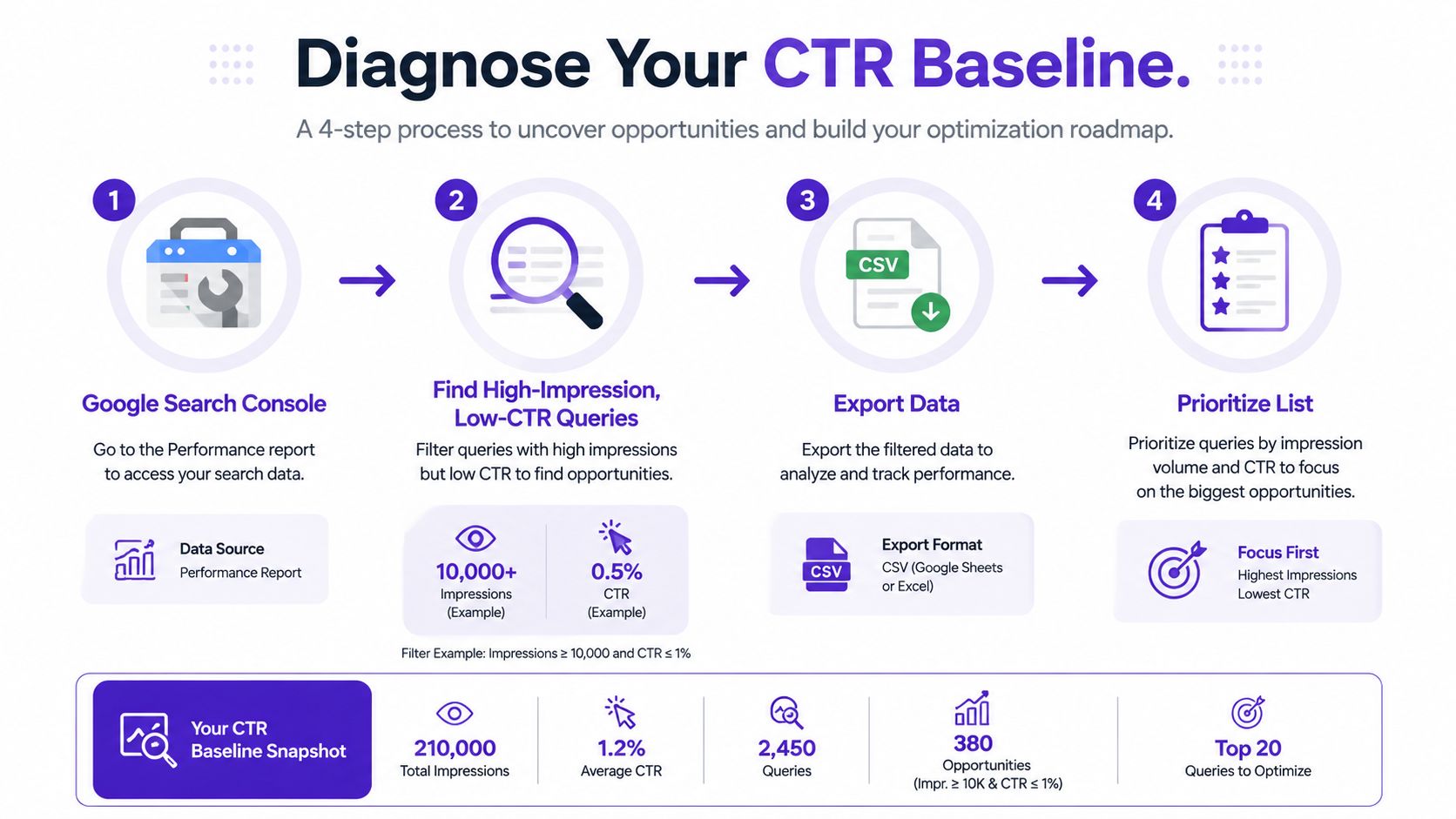
Once you have chosen a candidate, change only one variable. If you alter the title, meta description, and structured data together, you will not know what moved the metric. The same discipline applies across paid ads, email, and landing pages, because mixed changes hide the cause of the lift.
Before you change anything, define the baseline by query group, device, and page type. Mobile behavior often looks different from desktop behavior, and an informational query can tolerate a weaker click pattern than a transactional one. If you skip that split, you end up comparing different audiences as if they were the same.
Google Search Console opportunity filtering and baseline discipline matter here because the first pass should separate clean opportunities from noisy ones. When you have enough volume to trust the read, then compare pre and post performance. A weak sample can make a bad title look strong, or a good one look flat.
Use a fast checklist before you write a new title or refresh a thumbnail.
A useful internal workflow is to pair the query audit with a content gap review, especially when the search result is close to useful but not quite aligned. A practical framework for that kind of mapping is in Taja AI's content gap analysis guide. When you know whether the problem is relevance, presentation, or reach, the fix becomes much clearer.
The first thing people see usually decides the click. That's true in organic search, where the title and meta description do most of the work, and it's just as true on YouTube, where the thumbnail often carries more weight than the title itself. If the user can't understand the value in a second or two, the page loses before it has a chance to persuade.
For organic snippets, front-load the query term when it makes sense, then lead with a clear benefit. Meta descriptions should read like a promise, not a keyword dump, and they need to be skimmable enough to hold up on a crowded results page. If you want a practical reference for structure and tone, SEO meta description best practices is a useful checklist for keeping the copy tight without making it sterile.
A few patterns keep showing up in winning snippet tests. Numbers help because they make the value concrete. Brackets or parentheses can create a visual break. Year stamps can help on time-sensitive queries, but only when freshness matters to the user.
Useful headline templates include:
Descriptions should answer the user's implied question in plain language. If the result feels vague, the user assumes the page will be vague too. That's why benefit-led copy usually beats clever copy when the audience is already scanning for a solution.
For YouTube, the rules change a bit. A strong thumbnail usually keeps the face close to the camera, uses very few words, and makes the subject unmistakable at a glance. Strong contrast matters, but so does emotion, because the thumbnail needs to interrupt the scroll before the title gets any attention. A deeper breakdown of this approach is in AI thumbnails and boosting YouTube click-through rates.
A good thumbnail doesn't explain the video, it creates an instant reason to care.
Don't assume a headline rule from blog SEO will translate to YouTube. A title that performs in search can underperform in browse, where the visual cue is stronger than the text cue. Likewise, a thumbnail that wins attention may still fail if the title doesn't clarify the outcome.
If you're working across content systems, Taja AI is one tool that can generate YouTube titles, descriptions, keywords, and thumbnail options in a repurposing workflow. That doesn't replace judgment, but it can speed up the comparison set when you're testing different creative directions.
CTR looks like one number until you compare channels. In email, Mailchimp defines CTR as clicks on a link divided by delivered emails, multiplied by 100. In organic search, the denominator is impressions in Google Search Console. In paid search, the familiar formula is clicks divided by impressions, while social platforms often use their own reporting conventions and placement-specific logic.
That matters because a “good” CTR means different things depending on intent. A strong email number can reflect a warm audience and a narrow offer. A strong search number can reflect relevance and positioning. A social number can be skewed by the feed, the creative format, or how aggressively the platform distributes the post.
| Channel | CTR Formula | Healthy Benchmark | Common Pitfall |
|---|---|---|---|
| Google Ads | Clicks ÷ impressions × 100 | Context dependent, search intent is usually stronger than display | Chasing clicks with broad targeting |
| Organic search | Clicks ÷ impressions in Search Console | Position and query intent matter more than a single universal target | Comparing weak positions to top-ranking pages |
| Clicks ÷ delivered emails × 100 | Varies by list quality and offer fit | Measuring a subject line with the wrong denominator | |
| Social | Clicks ÷ impressions, with platform-specific reporting | Heavily dependent on creative and placement | Treating feed and story behavior as the same thing |
For channel-specific reporting, a tool like Statiko's analytics platform is useful when you need to inspect how audience behavior differs by placement instead of staring at a blended total.
The wrong benchmark creates fake urgency. A team can waste weeks trying to “fix” an organic result that's already doing fine for its position, or overreact to an email that was never meant to behave like paid search. The better habit is to define the metric, name the denominator, then compare like with like.
This is also where social targeting and segmentation matter. If the wrong audience sees the right creative, the CTR number may look passable, but the traffic won't convert. If the right audience sees the wrong creative, the click never happens.
Search pages don't behave like they used to. AI overviews, zero-click answers, and mobile result compression have changed what it means to “win” a query. In some cases, the platform answers the question before the user ever needs to leave the page, which means CTR strategy now includes earning the click in a much tighter visual space.
The practical response is to make your content easier to extract and easier to trust. That means writing concise answer blocks inside the page, using structured formatting, and making sure key information is visible early enough for both humans and machines to understand it. It also means thinking beyond position one, because a featured snippet or AI-visible excerpt can pull attention even when the traditional top spot isn't enough.
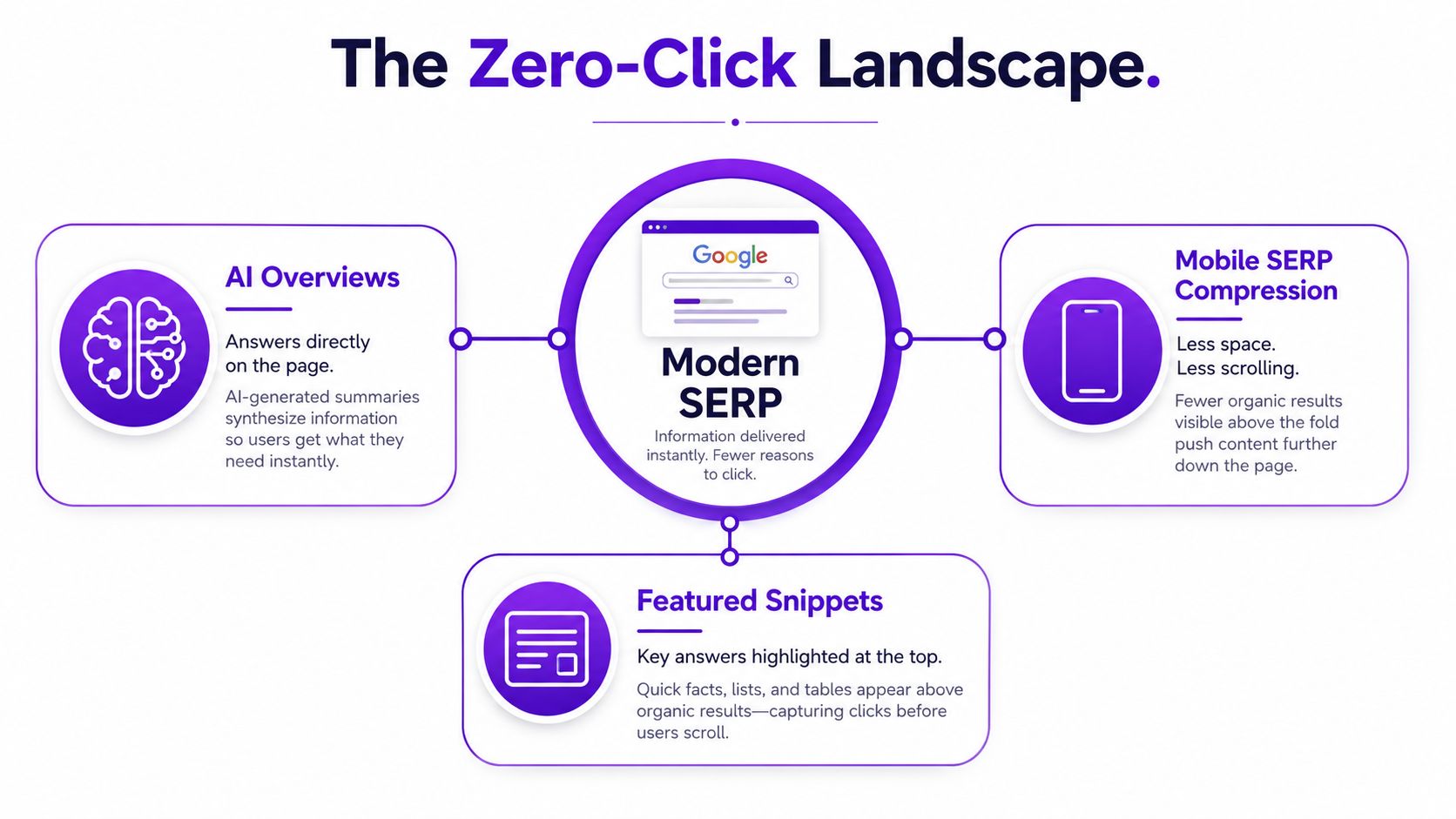
If a search engine can lift a clean answer from your content, it has a better chance of surfacing you in the right format. That doesn't mean stuffing the page with keyword blocks. It means placing short, useful definitions, crisp summaries, and clear subheads where they belong.
Mobile makes this even more important. Meta titles need to stay concise enough to read quickly on a small screen, descriptions have to fit the thumb-sized real estate they get, and image alt text should support visual discovery instead of acting like a dumping ground for keywords. On mobile, clutter kills curiosity fast.
A few structural choices help in AI-heavy search:
The video below is useful if you're thinking about metadata and discoverability as one workflow instead of separate tasks.
If you're optimizing video alongside search, video metadata optimization is a smart companion topic because titles, descriptions, and thumbnails all influence whether a result gets noticed or ignored.
Good CTR work is a system, not a trick. The mechanics are simple, but the discipline is what separates useful experimentation from random churn. Pick one variable, write down the hypothesis, ship the change, and wait long enough to know whether the result was real.
A lot of CTR tests fail because the team celebrates movement before the sample is large enough to trust. For headline tests, subject line tests, and ad rotation, use a clean test window and enough impressions to avoid chasing noise. Keep the bar high enough that a weak idea cannot look like a winner just because it got an early spike.
Document the date of the change and the before and after CTR so the next test starts from evidence, not memory. That same habit shows up in structured SaaS SEO recommendations, where clean documentation and repeatable testing matter more than clever one-offs.
A Google Ads headline rotation might test a benefit-led line against a more specific offer-led line. An email subject line test might compare a concise promise with a more conversational version. A landing page CTA swap might compare “Get Started” against a more outcome-focused label. The channel changes, but the logic stays the same.
Use one primary metric and one guardrail. CTR can be the goal, but conversion rate, revenue, or CAC should decide whether the change ships.
The guardrail matters because a high-click variant can still be bad business. I have seen teams celebrate a lift, then realize the new copy pulled in curious traffic that did not convert. If clicks rise and the downstream metric falls, kill the variant.
A practical log is enough to compound learning:
That log becomes an asset over time. It shows which audience segments respond to clarity, which respond to urgency, and which respond to a cleaner visual. Once those patterns are visible, you stop guessing and start reusing proven language across campaigns.
Use the next 90 days to build a real CTR program, not a pile of one-off tests. Keep the core question visible at every step: was the CTR you lifted worth lifting? If the answer is no, stop the test and move on.
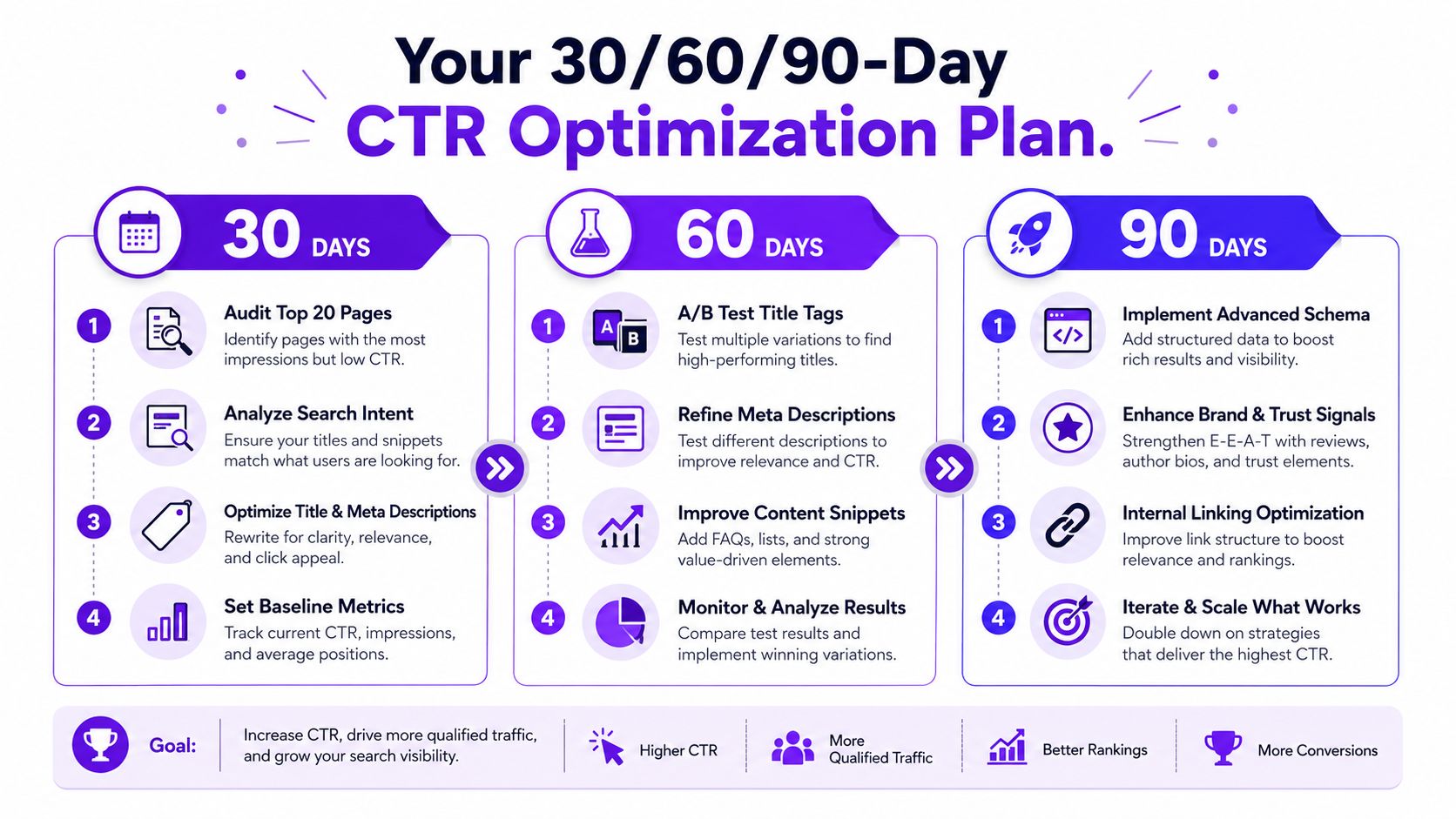
A month from now, you should know where your CTR is leaking. By day 90, you should have at least one repeatable pattern that works across multiple surfaces. If you want a tool that helps repurpose long-form video into searchable assets, thumbnails, and platform-ready text, Taja AI is one option to evaluate in that workflow.


We are blessed to work with leading brands & Companies


We try to make easy and simple for every professionals. Get 30 days free trial - No credit card required.


© 2025 Taja AI. All rights reserved.