.jpeg)
10 Hashtags for Music to Boost Discovery
Find the best hashtags for music by genre, platform, mood, and trend, plus practical ways to mix broad and niche tags for stronger discovery.
5 min read
October 5, 2026

Discover what sales enablement content is and how to create it. Our guide covers types, examples, and a video-first workflow for small teams to drive sales.
Written by:


Sales enablement used to sound like a big-company function with software, dashboards, and a room full of sales ops people. That framing overlooks its true potential.
Adoption has surged by 343% over the last five years, and 75% of companies using it report sales increases between 6% and 20% according to Calldrip's sales enablement statistics roundup. For a creator, consultant, local service business, or lean startup, that matters for one reason. It proves the gap between “content that gets attention” and “content that closes business” is no longer optional to fix.
If you record videos, host webinars, run discovery calls, publish tutorials, or answer the same buyer questions every week, you already have the raw material. The problem usually isn't a lack of content. It's a lack of conversion-ready content that helps someone say yes.
Most small teams create content like publishers and sell like improvisers.
They post educational videos, newsletters, social clips, and blogs. The content may be useful, even polished, but when a prospect asks a serious buying question, the business often has nothing ready. No crisp one-pager. No comparison asset. No proof story. No follow-up email that handles the exact objection that keeps showing up on calls.
That's where revenue leaks out.
Views can signal interest. They don't guarantee buying momentum.
A prospect can watch three of your videos and still stall because they can't answer practical questions like these:
General marketing content rarely does all of that. It attracts. It warms. It introduces. But it often stops short of helping someone make a purchase decision.
The biggest mistake I see is assuming a content problem is solved by making more content.
It usually isn't.
The better fix is to create assets that support actual sales conversations. That means content built for buyer questions, objections, proof, and next steps. It also means organizing those assets so you can reach for them fast, whether you're a solo founder sending a follow-up email or a two-person team handling inbound leads.
Content that converts usually isn't more entertaining. It's more usable at the moment a buyer hesitates.
If your current content library produces likes but not many closed deals, don't take that as proof that content marketing doesn't work. Take it as a signal that your business needs sales enablement content. The point isn't publishing more. The point is giving buyers the exact information they need when trust, clarity, and timing matter most.
Sales enablement content is easiest to understand as a sales conversation toolkit.
A generic toolbox has random tools tossed together. A working toolbox has the right tool for the exact job. That's the difference between general content and sales enablement content.
Sales enablement content is the strategic mapping of internal resources like battlecards and playbooks, and external assets like case studies and demos, to specific stages of the buyer journey to directly influence win rates, as defined by Sales Enablement Collective.
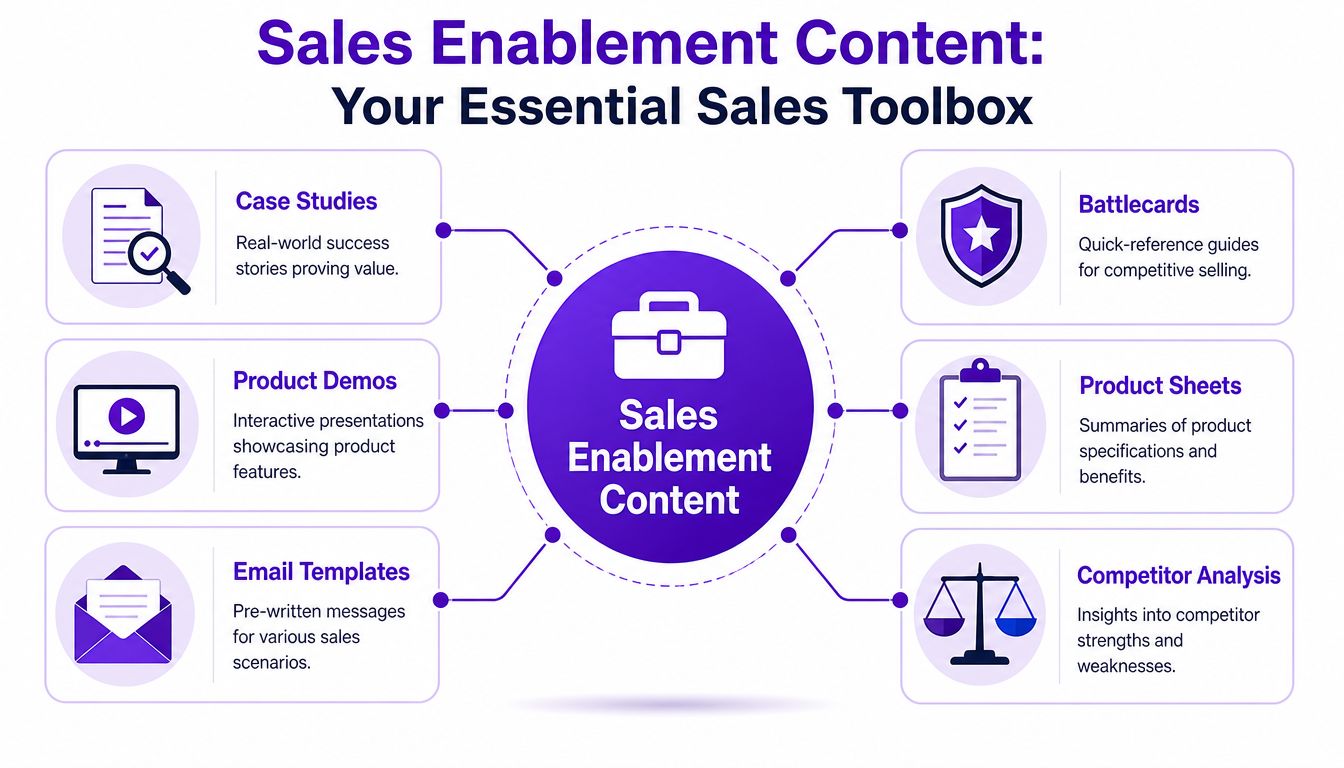
A blog post can be sales enablement content, but only if it helps move a real buyer forward.
A demo can be sales enablement content. So can a one-page service overview, a pricing explainer, a testimonial clip, a proposal template, a discovery-call script, or a short FAQ that helps handle objections. The format matters less than the job it does.
Here's the practical test:
For small businesses, the “seller” is often the owner. That makes this even more useful. You're not building a resource center for a future team. You're reducing the number of times you have to explain the same thing from scratch.
A strong asset answers the question the buyer has right now.
If someone is early in the process, a broad educational video may help. If they're comparing vendors, that same video may be too vague to matter. At that point they need specifics, proof, and a reason to move.
That's why a real sales enablement content strategy should map assets to moments, not just formats. A case study isn't “for content marketing.” It's for the moment a prospect asks whether your process has worked for someone like them. A battlecard isn't “internal documentation.” It's what helps you answer a competitor question without rambling.
Practical rule: If a piece of content can't be tied to a buyer question, a sales objection, or a decision step, it probably isn't enablement content yet.
For creators and SMBs, that definition is freeing. You don't need a giant library. You need a focused set of assets that do real work in the sales process.
The easiest way to build a useful library is to map content to buyer intent.
People in the awareness stage don't need the same asset as buyers in the decision stage. One wants orientation. The other wants confidence. If you send both people the same generic video, one will stay confused and the other will stall.
At this stage, the buyer is trying to understand the problem, not buy immediately. They need language, context, and a credible point of view.
The best assets here are usually:
The job of awareness content is not to close. It's to make the buyer feel understood and informed enough to keep going.
Now the buyer is actively evaluating options. They're asking whether your method fits, whether your offer solves their specific problem, and whether your claims hold up.
Many small businesses often falter at this point. They keep sending top-of-funnel content when the prospect is asking for proof.
Useful assets here include:
A good consideration asset doesn't try to say everything. It answers one important question well.
Buyers in consideration don't need more inspiration. They need fewer unknowns.
At the decision stage, friction gets practical. Budget, implementation, timing, stakeholders, and risk become the key issues.
That calls for assets like:
These assets should make it easier to say yes internally and personally. If your prospect needs to forward something to a partner, manager, or team, decision-stage content should be built for that.
| Sales Stage | Content Type | Primary Goal |
|---|---|---|
| Awareness | Educational video | Clarify the problem and introduce your approach |
| Awareness | Blog post or transcript article | Help buyers self-educate and revisit key ideas |
| Awareness | FAQ sheet | Remove early confusion and common misconceptions |
| Consideration | Case study | Show proof and relevance through a real scenario |
| Consideration | Product or service sheet | Explain offer details, fit, and practical benefits |
| Consideration | Competitor comparison sheet | Help buyers evaluate alternatives with confidence |
| Decision | Product demo | Show exactly how the solution works in context |
| Decision | Proposal support document | Reduce risk around scope, delivery, or onboarding |
| Decision | Follow-up email template | Reinforce value and move the next step forward |
For a solo operator, this doesn't need to become a publishing machine. One strong asset per stage can outperform a large pile of disconnected content. The key is matching the asset to the moment.
The fastest way to build a sales enablement library is to stop treating every asset as a separate project.
A better model is one recording, many sales assets. Start with a long-form video that already contains expertise, buyer language, objections, examples, and proof. Then pull multiple pieces from it.
That's the practical version of a pillar-and-post workflow.
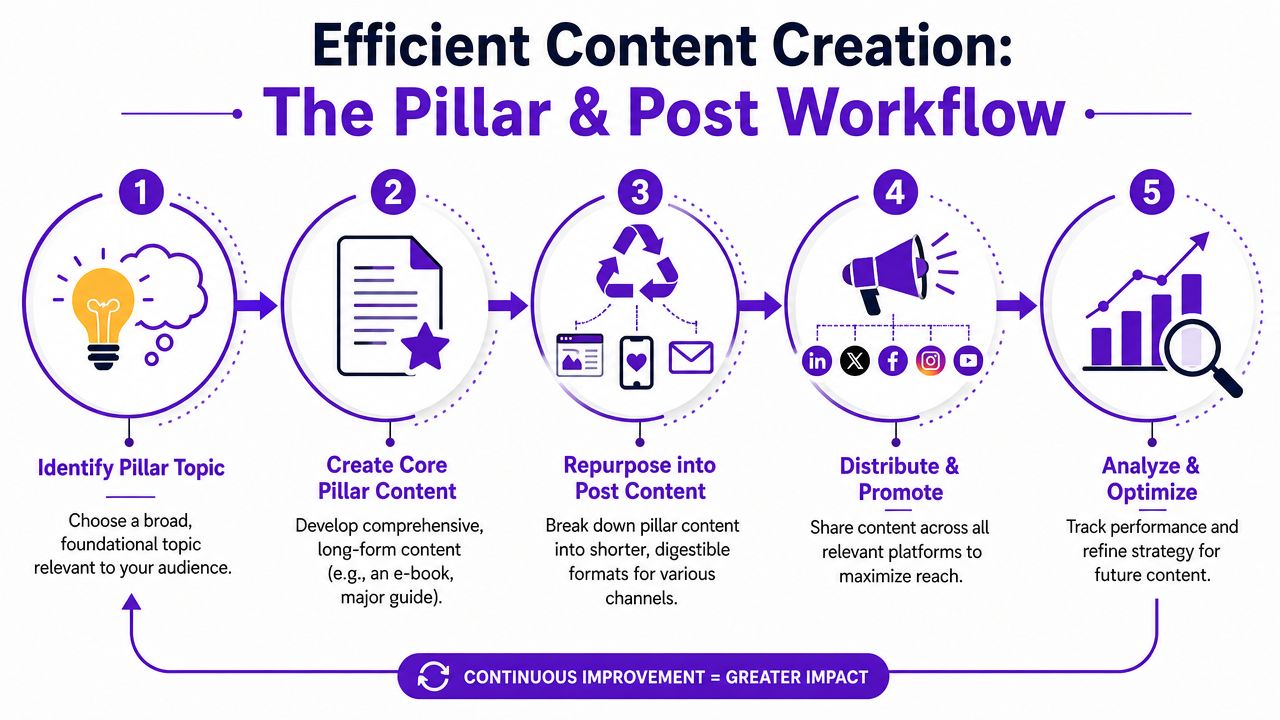
The best pillar formats for small teams are usually:
If you already host calls, workshops, demos, or training sessions, you may not need to create anything net new. You may only need to record what's already happening.
A strong pillar recording should include buyer questions in plain language. That's what gives you reusable material later.
A common practice involves repurposing content by channel, considering platforms like YouTube, LinkedIn, Instagram, or email. For sales enablement, it's smarter to repurpose by sales job.
From one long-form recording, you can extract:
That's why repurposing webinars for lead generation works so well for lean teams. A single session can feed both demand generation and deal support when you extract the right moments.
Use this sequence:
Choose one buyer question
Pick a topic tied to sales friction, such as pricing, implementation, common mistakes, or comparing options.
Record one substantial video
Aim for depth, not polish. Clarity beats studio production.
Transcribe and segment it
Break the recording into themes like proof, objections, process, FAQs, and next steps.
Turn each segment into an asset
A transcript section becomes a blog. A proof moment becomes a testimonial clip. A product explanation becomes a one-pager.
Tag and store each asset by sales use case
Label for who it helps and when to use it.
Here's a useful example in practice:
The manual version of this workflow works, but it gets slow fast. Editing clips, rewriting transcripts, creating thumbnails, drafting posts, and formatting platform-specific assets can eat the week.
That's why many teams now rely on AI systems to speed up retrieval and reuse. Top-tier organizations use AI-powered platforms to synthesize answers from across their knowledge ecosystem, and reps can be 20-30% more efficient when they don't have to search manually for impactful resources, as explained in SiftHub's guide to sales enablement content strategy.
For a solo business, the takeaway is simple. Automation isn't a luxury. It prevents content from dying inside raw recordings and half-finished drafts. If you're trying to build a lean workflow around video, resources on automating content creation can help you think in systems instead of isolated posts.
Most sales enablement content fails after creation.
Not because it's bad. Because nobody can find it in time.
A folder called “marketing assets final final v2” is not a content system. If a prospect asks a question on a call and you need five minutes to search for the right file, the content may as well not exist.
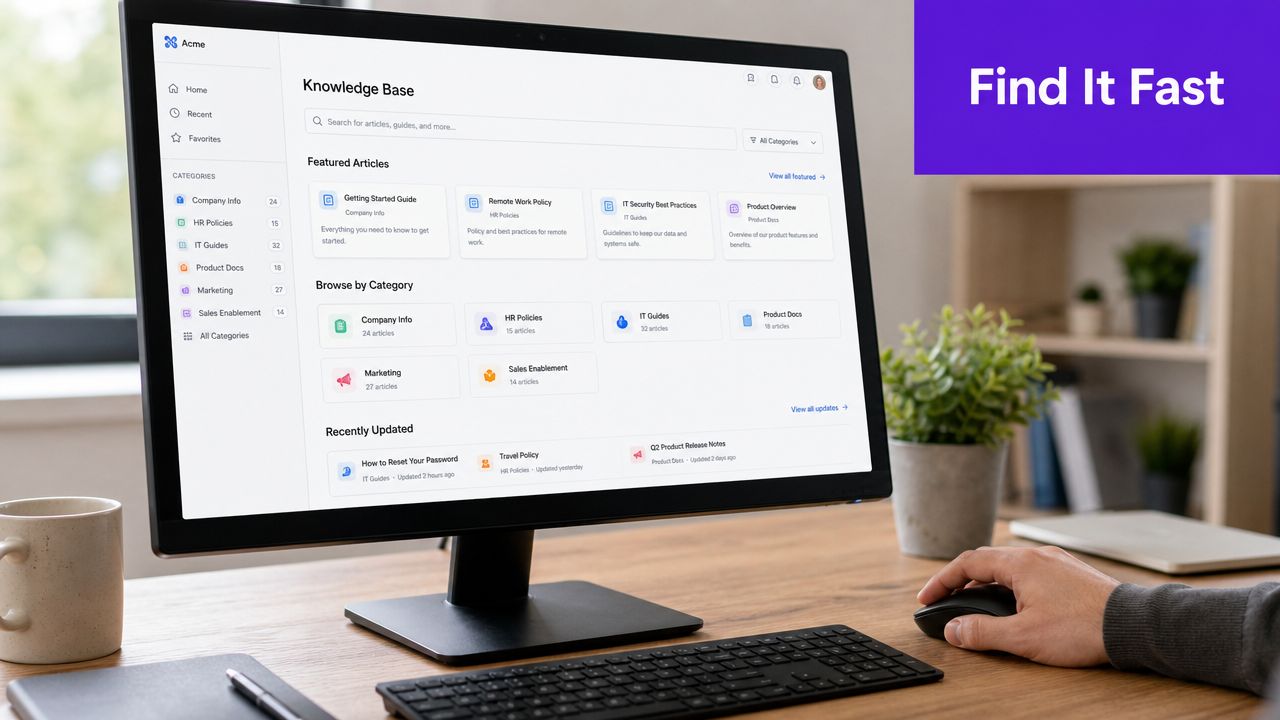
For small teams, the best distribution system is usually boring on purpose. It should be easy to search, easy to update, and obvious to use.
Three workable setups:
The exact platform matters less than consistency. Every asset should have one home, one current version, and one naming convention.
This part gets overlooked. Small naming choices create huge friction.
Instead of titles like “webinar clip 3” or “new deck revised,” use names tied to use case:
That way, the seller searches for the buyer problem, not the file creator's memory.
If your system requires people to remember where something lives, it won't get used consistently.
Blueprint one: Solo operator setup
Use Google Drive. Create folders by buyer stage. Put a tracking sheet at the top with asset name, use case, and last updated date.
Blueprint two: Small service team setup
Use Notion. Add tags for persona, sales stage, objection, and format. Make one database view called “Use on calls this week.”
Blueprint three: Fast-moving startup setup
Store files in Drive or Notion, then post each new asset in a dedicated Slack channel with one sentence on when to use it.
If your distribution is inconsistent, fix that before making more content. A lightweight system your team uses beats a complex one nobody touches. For teams trying to sharpen reach after asset creation, these ideas connect well with broader thinking on the best way to distribute content.
If you only measure views, likes, and impressions, you'll end up optimizing for activity instead of sales.
That's fine for brand content. It's weak for enablement content.
Organizations with mature sales enablement strategies achieve a 49% win rate on forecasted deals and see an 8% increase in quarterly revenue, according to Qwilr's sales enablement statistics. That should shift your measurement mindset immediately. The question isn't whether people consumed the content. It's whether the content helped deals move.
Track which assets show up in deals that close.
For a small business, this can be simple. Add a field in your CRM or spreadsheet for “content shared before close.” After each won or lost deal, log the assets that were used. Patterns will start to appear.
You're looking for questions like:
Some content doesn't increase close rate directly. It shortens the decision cycle.
A strong onboarding explainer, pricing guide, or comparison sheet can remove delays that usually happen after the call. Watch for deals that move faster after certain assets are sent.
That's one reason video can be so effective in the sales process. A buyer can rewatch, share internally, and revisit specifics without needing another live conversation. If video is central to your pipeline, this framework for lead generation with video pairs well with content performance tracking.
This is the cleanest small-team metric.
Pick a handful of key assets and compare the leads who engaged with them against those who didn't. You don't need advanced attribution software to start. A spreadsheet and disciplined notes can do enough.
Track fewer assets well. Ten carefully observed assets will teach you more than a library of fifty with no usage history.
An asset that never gets used can't influence revenue.
Watch whether you or your team can find and send the right piece quickly. If retrieval is messy, the content may be good but operationally broken. Usage logs, link clicks, CRM notes, and even a simple “used / not used” check box can reveal whether your library is helping or just taking up space.
A practical starter kit beats another strategy doc. Use the checklist below to audit what you already have, then create one case study you can send this week.
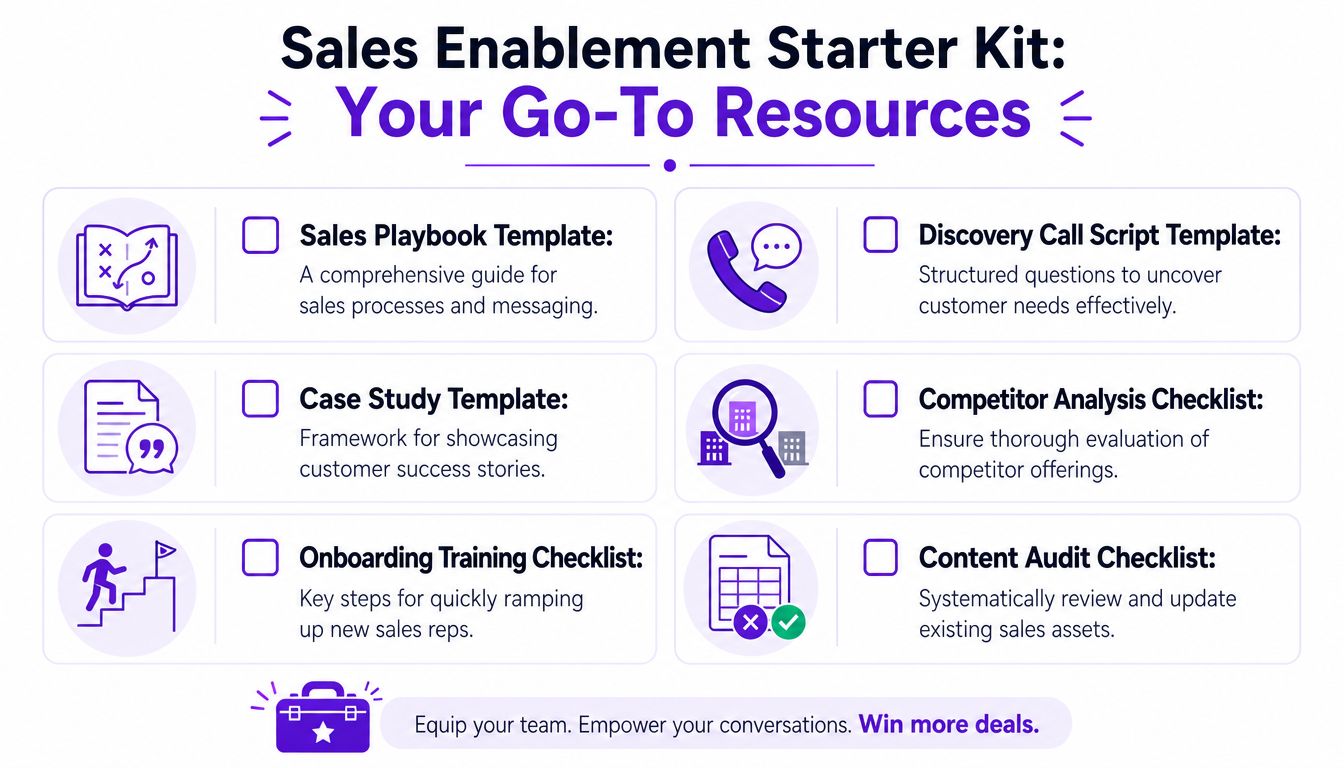
Check buyer stage coverage
Do you have at least one useful asset for awareness, consideration, and decision?
Check objection coverage
Can you quickly send something for pricing, trust, timing, alternatives, and implementation?
Check proof quality
Do you have a case study, testimonial clip, or demo segment that feels concrete and current?
Check findability
Can you locate the right asset in seconds without guessing folder names?
Check freshness
Are your offer details, screenshots, messaging, and positioning still accurate?
Use this format:
Client or customer type
Who were they, in plain language?
Starting problem
What issue were they dealing with before working with you?
What they tried before
Briefly note prior attempts, confusion, or friction.
Your solution
What did you provide, change, or implement?
Why it worked
Highlight the mechanism, not fluff.
Outcome
Describe the result qualitatively if you don't have verified numbers.
Best-fit takeaway
Who should read this case study and think, “That sounds like me”?
If you need a sharper way to connect content to business outcomes, guides on proving content marketing ROI can help you move beyond vanity reporting and focus on the assets that support revenue.
If you already have long-form videos, webinars, demos, interviews, or podcasts, you don't need to start from zero. Taja AI helps turn one recording into clips, blogs, captions, thumbnails, and platform-ready posts, so you can build a stronger sales content library without adding hours of manual work.


We are blessed to work with leading brands & Companies


We try to make easy and simple for every professionals. Get 30 days free trial - No credit card required.


© 2025 Taja AI. All rights reserved.