Content Repurposing Strategy: 8 Ways to Multiply One Idea
Build a content repurposing strategy that works: 8 actionable ways to turn one video, podcast, or post into channel-ready assets across every platform.
5 min read
November 18, 2026

Learn how to automate video editing with a staged workflow: detect cuts, score clips, add captions and review before publishing.
Written by:


The most repeated advice about how to automate video editing is to hand over everything and bank the hours. It's half right, and it breaks exactly where accuracy matters most. Software will produce a cut, a caption file and a dozen thumbnails before you finish your coffee. None of it is publishable until a person decides it's correct, and that decision, not the saved clicks, is the actual ceiling on automation.
Automate without that boundary and the work doesn't disappear. It turns into a review queue: forty clips nobody has time to watch, captions that read cleanly and misspell the client's name, a thumbnail that promises something the video never delivers. The fix is to decide, before the first run, which edits can go out unattended and which need a sign-off, then let software work inside that line.
Most mechanical editing can be automated. The judgement calls stay with you, and the table below is the honest split for the seven tasks that fill a normal production week.
| Editing task | What automation does | Human check still needed |
|---|---|---|
| Scene and shot detection | Finds candidate cut points | Confirm cuts keep setup and reaction shots |
| Transcript-based clipping | Picks segments from speech and emotion signals | Check each clip keeps its full claim |
| Captioning | Generates timed text from speech | Verify names, technical terms and timing |
| Reframing to vertical | Tracks the subject and crops to 9:16 | Check the subject stays framed and on-screen text fits |
| Transitions and color | Applies standard transitions and correction | Check the look matches your brand and mood |
| Resizing and pacing | Adjusts length and cut rhythm to a target | Check pacing does not drop the call to action |
| Thumbnails | Generates options from topic and past designs | Check it matches the actual video and is not misleading |
The pattern matters more than the rows. Scene detection and vertical reframing are mature enough to run on every upload, because a wrong boundary is cheap to spot and cheap to fix. Clip selection and thumbnails sit in a different class, since they decide what a viewer sees first and therefore what the viewer believes the video is about.
Adoption stopped being experimental a while back. A 2026 summary of Wyzowl research reports that 63% of video marketers had used AI tools to help create or edit marketing videos, up from 51% the year before, and Wistia research cited in the same summary finds more than a third of teams already use AI in their video workflow with nearly a quarter more planning to begin. Independent research summarized in a 2025 academic publication puts the potential workload reduction at 50 to 70% against frame-by-frame manual adjustment (video editing statistics).
Read that reduction carefully. It's hours moved from selecting and formatting to reviewing and judging. Software narrows fifty takes to six; you still decide which six say something.
What to automate first: the task that eats the most hours each week, which is usually captioning or first-pass clip selection, not the feature with the best demo.
Pick one task, automate it for a month, and keep the review step intact. Time the review before you hand over a second task, because that number is what tells you whether the automation paid for itself.
The practical limit is reviewability. An automated edit is safe to run unattended when its output can be inspected quickly, rejected cleanly, and changed before publication. Treat shot detection as candidate generation, the editorial equivalent of a junior editor's string-out: fast, useful, and never the final word.
The core stages look like this before the guardrails go on.
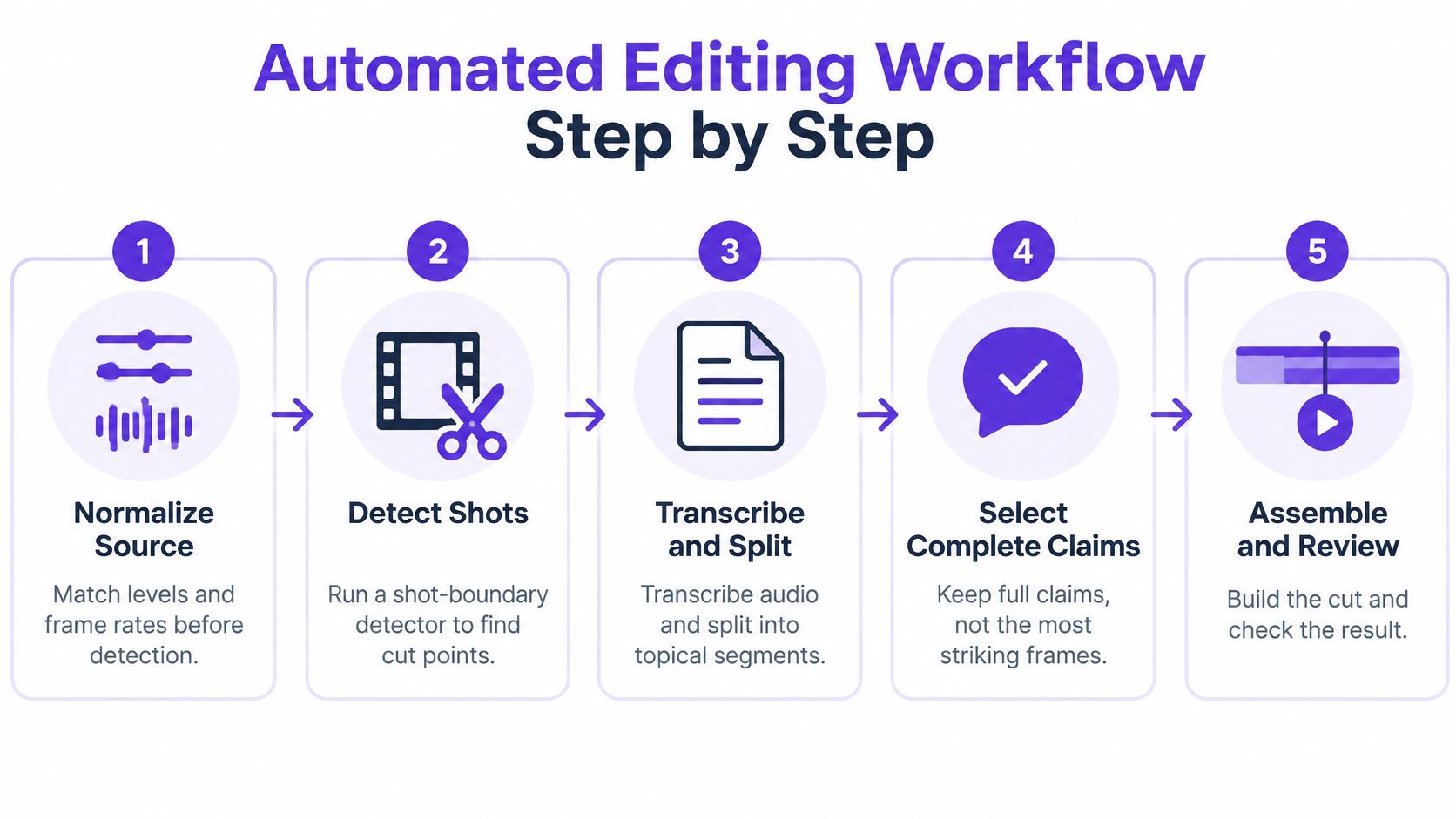
Benchmarks explain why the staging is necessary. Conventional detectors report overall F1 scores of roughly 0.75 to 0.82, but transition intersection-over-union can fall to 0.18 to 0.25, which means a detected boundary may sit only loosely on the actual transition, and sudden jumps are hard to catch at all. A newer method reaches 0.632 transition IoU and 0.883 range F1 and still makes editorial mistakes (shot-boundary detection benchmark).
The mechanical stages can run unattended when their decisions are logged. Narrative scoring, defective boundaries, caption checks and publishing need a visible review queue, with each flagged item marked accepted, corrected or rejected before release.
A clip that works opens on a complete thought, ends before the next topic starts, and still carries the call to action. Judge that alongside semantic continuity and caption integrity, not just boundary accuracy, because a technically correct cut can throw away the setup that made the punchline land.
High-volume publishing tightens the review window while the sequence stays the same. Pinnacle Property Media's guide covers video tools for high-volume listing agents. On a listing-driven schedule, automation earns its keep by clearing normalization and detection early, leaving reviewer attention for narrative fit, captions and final approval.
The instinct baked into most clipping tools is to grab the most visually striking frames, or the loudest point in the waveform. That produces a highlight reel of laughter and no argument.
Selection quality comes from the order of operations, not the model.
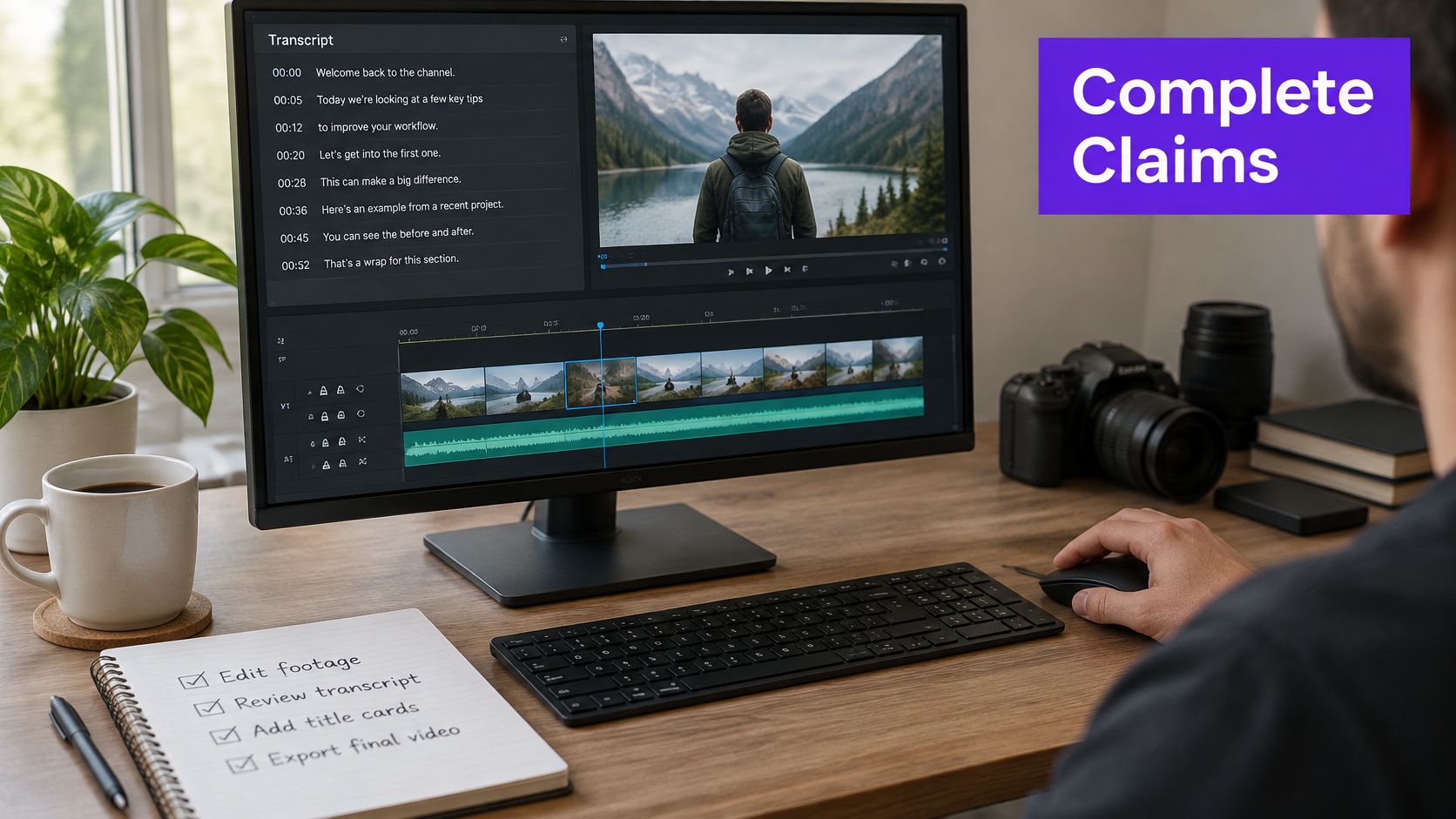
Transcribe and split the recording into topical units first, then score each unit on information density, narrative completeness, speaker clarity and audience relevance. Scoring before transcription is how a tool ends up choosing a punchy sentence that depends on thirty seconds of setup you cut away.
Enforce a duration ceiling and strip repeated points next, then assemble the survivors in their original order so the logic still holds. Reordering for drama breaks an explanation faster than any single bad cut. The final stage belongs to a person: check for missing context and for anything that distorts what the speaker meant.
Take a 30-minute tutorial and cut it to roughly 45 seconds, 90 seconds and three minutes. Ask the same question of each version: does it keep the setup and the result, or only the result?
The 45-second cut usually drops the setup and turns a demonstrated method into a bare claim. That's a selection failure, not a compression limit, which is why the same model run can produce a strong three-minute clip and a misleading short.
Historical evaluation found that computer-generated summaries at 20% to 25% of the original presentation length supported learning, yet viewers learned less than they did from author-made summaries and initially judged the automated versions less coherent. A more interactive system that let users guide selection was judged best in 41% of tested videos, including comparisons against manual summaries (automated video summarization research).
A clip that keeps the setup and the result will beat a shorter clip that keeps only the result, every time a viewer is deciding whether to trust you.
Before running your own pass, it helps to see assembly and review in motion.
Plan repurposing instead of improvising it, since the same recording cut three ways is a decision about length, not about effort. Here's a practical breakdown of repurposing long-form video into platform-ready clips.
Track three numbers together: completion rate, comprehension or conversion, and edit-review time. Clip count on its own rewards the aggressive cutting that damages meaning, and a jump in output with a slide in completion is the signal that you cut past the argument.
A caption file can read cleanly and still fail the viewer. Automated captions arrive fast and nearly right, and the errors that survive are the ones that make a clip look careless: a mangled name, a missing speaker label, text hidden under a platform button. Ten minutes of review catches all of them.
The temptation is to tidy the transcript, cut fillers and tighten grammar. Resist it where wording carries meaning. Keep captions verbatim for quotes, technical phrasing and anything a speaker chose deliberately. When you do smooth text for readability, check every edit against the audio so no speaker's words are altered without a reviewer noticing.
Run this check in about ten minutes per video.
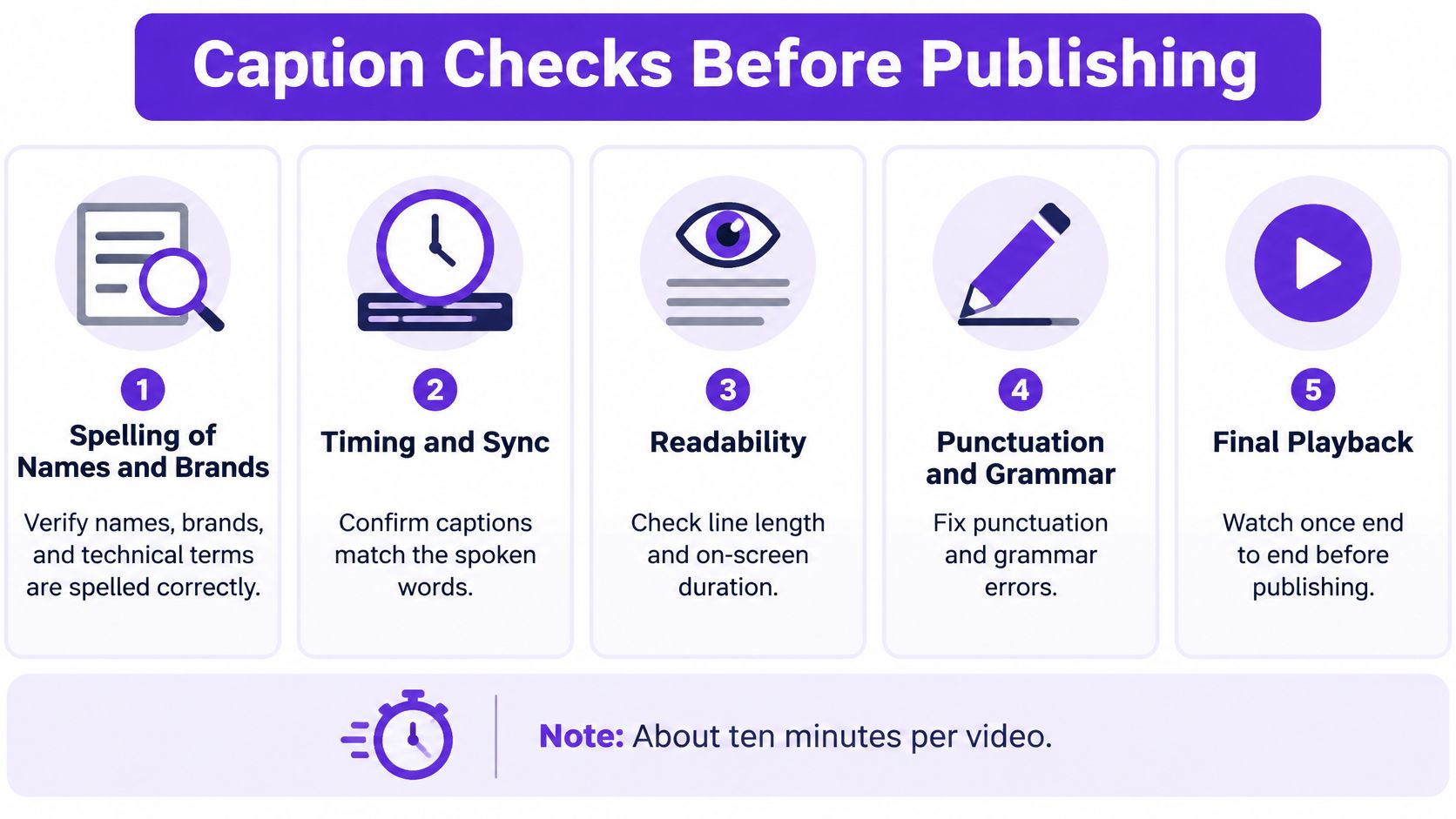
The check gets faster when the file starts clean: generate captions automatically, then spend the saved time on the list.
Treat the list as a sign-off, not a polish pass. A caption that fails any item gets fixed before the clip reaches scheduling, because a problem caught after publishing costs a re-upload and a dent in trust.
Creators already know what they want from automation. A 2026 global Adobe and Harris Poll survey of more than 16,000 creators found that 44% would want the ability to review, edit or undo an AI agent's actions before granting it more independence, 37% wanted transparency into what the agent was doing and why, and 34% wanted clear limits on data and tool access. The same survey found only 49% always or often disclose AI use, 18% rarely or never do, and 90% consider copyright protection important for AI-assisted work (Adobe's 2026 Creators' Toolkit Report).
That gap between what people want and what they do is where the approval decision lives.
| Edit type | Automation allowed | Approval gate |
|---|---|---|
| Caption timing and line breaks | Automatic | Spot check a sample of each clip |
| Clip selection and cut points | Automatic with review | Review every clip before export |
| Factual claims and figures | Automatic draft only | Approval required before publishing |
| Client names and testimonials | Never automatic | Approval required with written permission |
| Music and licensed media | Automatic suggestions only | Approval required and license checked |
| Thumbnails | Automatic draft | Approval required for brand and accuracy |
| Legal or financial statements | Never automatic | Approval required from a qualified reviewer |
Set the gates up as part of building a content approval workflow rather than as a separate policy nobody opens.
The test for any item: if an error here would embarrass a client or break a legal rule, a person signs off before publishing.
Reviewability and undo do more for adoption than another one-click feature, because they're what let you hand over the boring parts without handing over the consequences.
Take one recording you already have, ideally 15 to 30 minutes, and run a full automated pass on it, from normalization through the human review. Time each stage, especially the review, because that's the number that tells you whether the automation saved anything.
Taja AI handles the volume end of this: it turns a long video into shorts, clips with captions, thumbnails and platform-ready posts, then auto-schedules them across your platforms, so the same gates apply to its output before anything goes live.
Then publish two versions of one clip, one from the automated pass and one edited by hand, and compare completion rate after a week. If the automated version holds, you've found the task to hand over next.
Write this down before the first run: which items from the approval table always need a signature, and whose name goes on it.
Approval that depends on memory fails on the week you're busiest, and that week is already coming.
Taja AI is built for the part of this workflow you can hand over safely: upload one long recording and it returns shorts, captioned clips, thumbnails and platform-ready posts, ready for your approval gates rather than published past them. Optimized content is typically on the dashboard about 30 minutes after the video lands in your playlist. Start free at Taja AI and run your first automated edit against a written review rule.


We are blessed to work with leading brands & Companies


We try to make easy and simple for every professionals. Get 30 days free trial - No credit card required.


© 2025 Taja AI. All rights reserved.