.jpeg)
How to Make an Announcement That Gets Read and Shared
Learn how to make an announcement for a product, business update or event, with templates, clip repurposing, scheduling and CTA tips.
5 min read
October 29, 2026

Stop chasing feedback. Build a content approval workflow that saves hours. Our guide covers roles, tools, and real examples for agile marketing teams.
Written by:


You already know the feeling. The post is drafted, the clip is edited, the caption is ready, and then everything stalls. One person leaves feedback in Google Docs, another sends a Slack message, someone else rewrites the hook in email, and nobody's sure who holds the authority to say “publish.”
That isn't a creativity problem. It's an operations problem.
For small teams and solo operators, a content approval workflow sounds like something built for big marketing departments. It's not. If you repurpose one video into shorts, captions, thumbnails, blog posts, and platform-specific posts, you need a system even more. Otherwise the speed you gained from repurposing gets wiped out by review chaos.
A lot of generic advice gets this wrong. It assumes one asset, one review path, one final sign-off. Real content operations don't work like that anymore. One source file becomes a pile of downstream assets, each with different stakes, different reviewers, and different turnaround expectations.
The fix is simple in principle. Define who gives feedback, who approves, what gets reviewed, and how fast each step must move. Then enforce it.
Your content probably isn't stuck because people care too much. It's stuck because too many people are involved at the wrong time, in the wrong way.
A founder wants to tweak the message. A contractor changes the title. A designer asks for a new CTA. A subject matter expert rewrites a paragraph after the social post is already scheduled. Nobody's malicious. The process is just loose, so every asset becomes a committee project.
That's why even strong content teams get bogged down. A widely cited benchmark says the average approval process takes 8 days according to Agility PR's content approval workflow benchmark. If your team publishes frequently, losing more than a week inside review is a serious drag on momentum.
Most approval problems come from a short list of failures:
You don't need more reviewers. You need fewer decisions per asset.
A content approval workflow is just a repeatable path from draft to publish. That sounds basic, but the payoff is huge for small teams. It removes the hidden tax of chasing approvals, reconciling conflicting comments, and guessing whether something is ready to go live.
For founders and lean marketers, the goal isn't bureaucracy. It's speed with control. You want the team to know what happens next without asking. You want low-risk content to move fast and higher-risk content to get a proper check. You want one person to own the final call.
If your current system depends on memory, pings, and “quick looks,” you don't have a workflow. You have a bottleneck with notifications.
A content approval workflow falls apart when roles are vague. “Everyone reviews” is not a process. It's a delay machine.
Start by documenting how content moves today. A strong workflow is a mapped, stage-gated process: track the current path of recent assets, note who touched them, how many revision rounds happened, where delays showed up, then define explicit handoffs for draft, review, revisions, final approval, and publication. Guidance on this also stresses separating feedback from approval so reviewers can comment without acting as approvers, as explained in Ybug's guide to mapped approval stages.
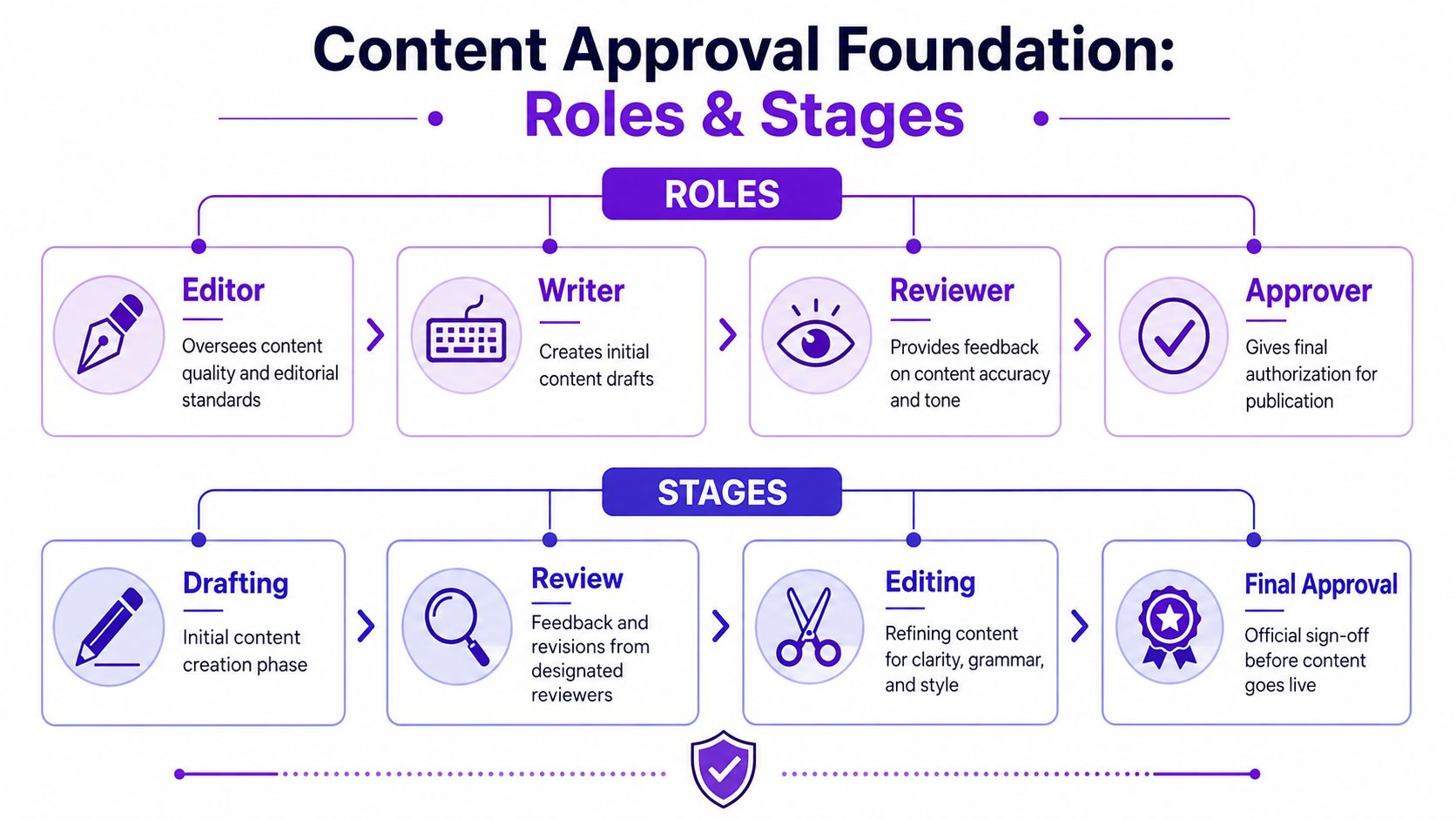
Small teams don't need more roles. They need cleaner ones.
| Role | What they do | What they don't do |
|---|---|---|
| Content creator | Produces the draft, clip, caption, or blog from the brief | Doesn't chase five people for conflicting edits |
| Editor or QA lead | Checks clarity, accuracy, formatting, and brand alignment | Doesn't make final business decisions unless assigned |
| Subject matter expert | Verifies factual or technical accuracy | Doesn't rewrite the whole asset for style preference |
| Stakeholder | Flags business, legal, or brand issues when needed | Doesn't jump in on every low-risk asset |
| Final approver | Makes the go or no-go decision | Doesn't reopen settled comments without a real reason |
The key move is this: one asset gets one final approver. Not three. Not “marketing plus founder plus whoever has thoughts.”
Sloppiness often emerges in this phase. Feedback is input. Approval is authorization.
If you mix them together, every comment feels blocking. Then creators waste time trying to satisfy people who were never supposed to decide in the first place.
Use a simple rule set:
Practical rule: If someone can't block publication, label them as a reviewer, not an approver.
You do not need a fancy workflow. You need one people will follow.
Use these stages for most content:
Draft
The creator produces the initial asset from a brief, source recording, or template.
Internal review
Editor or QA lead checks structure, tone, brand fit, and obvious issues.
Stakeholder feedback
This only happens when the asset needs specialist input.
Revision
The creator updates the asset in one clean pass.
Final approval and publish
One owner signs off. Then it goes live or gets scheduled.
For repurposed content, don't rebuild this from scratch for every asset type. Keep the same logic and change only the depth of review. A blog post may need more scrutiny than a thumbnail variation. That's fine. The operating model still stays the same.
Teams often pick tools backward. They buy software first, then try to force a broken process into it.
Do the opposite. Start with your approval rules, then choose tools that make those rules easier to enforce.
If you're a solopreneur or a two-person team, you can run a usable content approval workflow with Google Docs, Google Sheets, and a clear file naming system. One document holds the asset. One tracker holds status, owner, due date, and approval state. It's not glamorous, but it works if you're disciplined.
For a small in-house team, use a project management tool like Trello, Asana, ClickUp, or Monday. Build columns around stages, not departments. “Draft,” “Needs Review,” “Revising,” “Approved,” and “Scheduled” is often sufficient. Add automations so status changes trigger notifications instead of manual follow-ups.
Here's what that looks like in a platform built around repurposing and review:

If you're managing high-volume repurposing, a platform like Taja AI can make sense because it handles content generation, downstream asset creation, and workflow coordination in one place. If you're comparing options, look at how content automation software supports review and publishing workflows.
Automation should remove admin, not judgment.
Use it for:
Don't automate final judgment on every asset. Automate the path. Keep the accountable human visible.
This matters more than is often acknowledged. The core issue with AI content isn't just quality. It's accountability.
One workflow guide puts the question plainly: who is accountable when content was machine-assisted, partially auto-published, and distributed across multiple channels? The same source notes that 71% of organizations use generative AI in at least one business function, with marketing and sales among the most common areas, as cited in Iconik's discussion of AI-assisted approval accountability.
That means your workflow needs a few extra rules:
If AI helped create it, a person still owns the risk.
Small teams can't afford fuzzy accountability. If the caption is wrong, the thumbnail misleads, or the blog overstates something, “the tool generated it” won't save you. Your workflow has to say who checked it.
Most advice on content approval assumes one asset goes through one line of review. That's not how repurposing works. One source video turns into clips, captions, thumbnails, carousels, blog posts, and platform-specific versions. Existing guides often skip that operational mess, even though one asset can branch into many outputs with different reviewers and turnaround needs, as discussed in Screendragon's take on multi-format approval workflows.
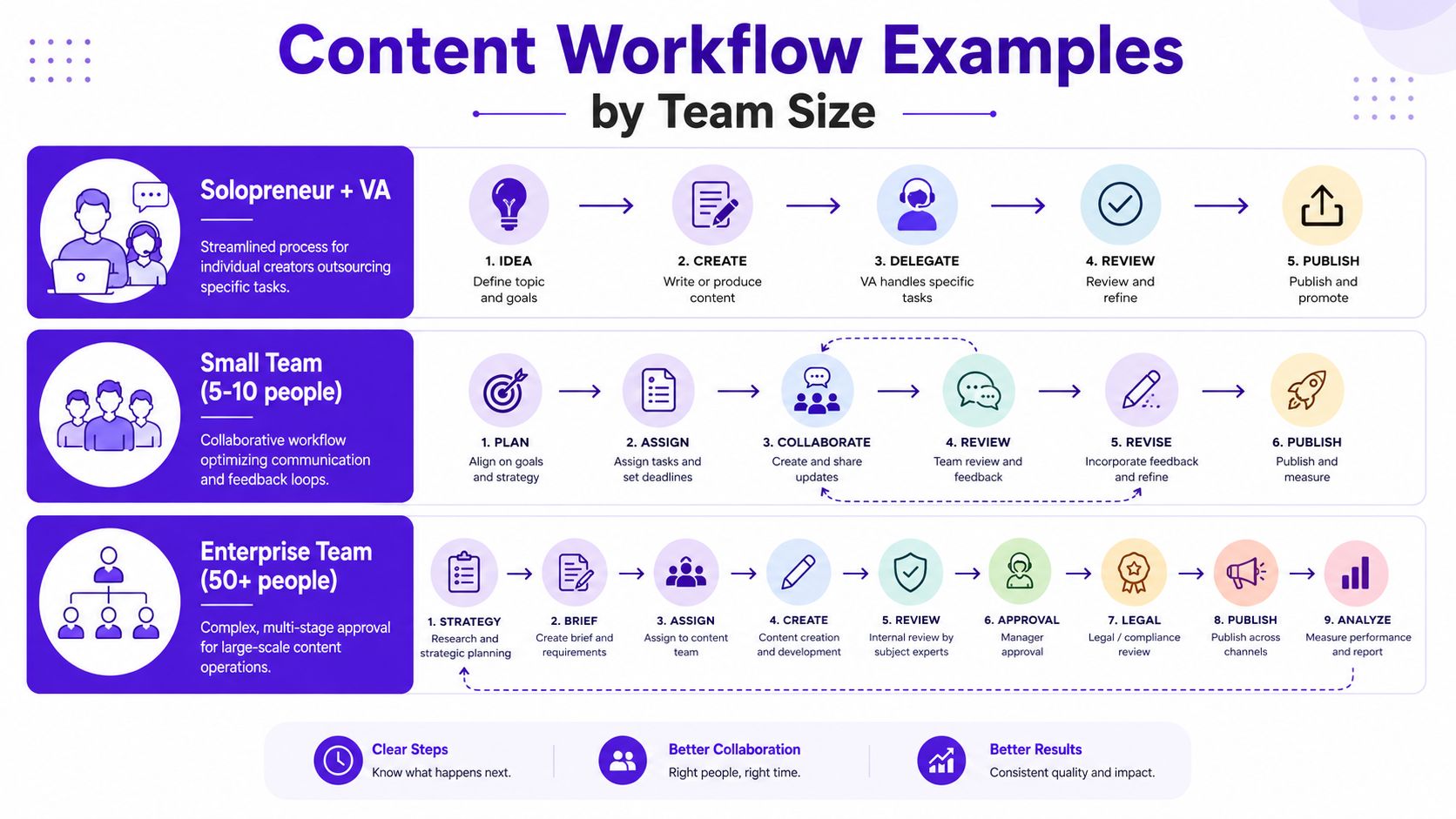
You record one long-form video every week. Your VA cuts shorts, drafts captions, and prepares thumbnails. You review everything between client calls.
This setup breaks when you review each asset as if it's brand new. Don't do that. Approve at the source level first.
Use this flow:
Source approval
You approve the main video, key talking points, brand angle, and CTA first.
Repurposing batch
Your VA creates the clips, captions, thumbnails, and post variants from that approved source.
Light review for low-risk assets
You only check items that can affect positioning or trust, such as the title, thumbnail, and core claims.
Auto-clear templated assets
Routine caption variants, platform formatting changes, and repeated CTA blocks move forward if they follow your template.
A lot of solo operators think they need to personally review every derivative asset. That's how they become the bottleneck. If your templates are good, you should review exceptions, not every comma.
For teams trying to plan output realistically, team capacity planning for content production helps stop overcommitting before approvals even start.
Now picture a startup team with four people: a content marketer, a designer, a social media manager, and a head of marketing.
Their weekly workflow might look like this:
| Asset type | Review path | Final approver |
|---|---|---|
| Blog post | Writer → Editor/SEO check → Head of Marketing | Head of Marketing |
| Social post | Social manager → Brand check if needed | Social manager or Head of Marketing |
| Short-form clip | Editor → Social manager | Social manager |
| Launch content | Creator → Stakeholder review → Revision | Head of Marketing |
The mistake small teams make here is giving the founder access to everything. If the founder wants to weigh in on every caption and every clip, the workflow is dead on arrival.
Use a rule instead: founders review campaign messaging and high-stakes assets. The marketing lead owns day-to-day content approval.
Here's a useful operating habit. Review in batches, not one asset at a time. Approve all shorts from a single video together. Approve all thumbnail options together. Approve all posts for the week in one window. Batching cuts context switching and makes inconsistency easier to spot.
To see another perspective on lean team workflow design, this video is worth a look:
Agency workflows get ugly fast because you don't just have internal reviewers. You also have clients with different response times, different expectations, and different levels of decisiveness.
So split approval into two tracks:
Your team checks brand fit, technical quality, platform formatting, and obvious risks before the client sees anything. Never send rough, unvetted work to clients and call it collaboration.
Clients should approve only what requires their decision. Usually that means strategic messaging, high-visibility creative, paid campaign assets, or regulated content. They do not need to approve every crop, subtitle style, or caption variation unless that's part of the agreement.
Agencies lose speed when they outsource internal indecision to the client.
For repurposed content, send grouped approvals:
That keeps the client from reopening the whole content package because they disliked one line in one post.
A content approval workflow isn't finished when you write it down. It's finished when it moves content on time without drama.
The fastest gains usually come from tiered approval rights and SLA-based routing. Operational guidance recommends assigning one final approver with decision authority, pre-approving brand and content guidelines to reduce the number of decisions people need to make, and routing low-risk assets through lighter review while escalating high-risk items. It also recommends tracking stage-level cycle time, reminders, and consolidated feedback loops, as outlined in Simple's guidance on measuring approval workflow performance.
You don't need a dashboard stuffed with vanity metrics. Track the operational numbers that tell you where work is slowing down.
Focus on:
If you want to tighten this up further, look at how workflow automation benefits show up in approval-heavy processes.
An SLA is just a promised turnaround time. It stops “as soon as possible” from becoming “sometime next week.”
Your SLA can be simple:
| Stage | Owner | Expected turnaround |
|---|---|---|
| Internal review | Editor or QA | Same business day or next working window |
| Stakeholder feedback | SME or stakeholder | Short fixed window, then assumed no changes |
| Final approval | Final approver | Fast decision window with escalation if missed |
The exact timing depends on your team. The point is that every stage needs a clock.
This is the stakeholder who disappears for most of the process, then swoops in late with major changes.
Fix it by locking review windows. If someone misses their stage, they don't get to reopen the asset unless there's a material issue. Put that in writing.
This happens when comments arrive in Slack, email, docs, and voice notes all at once. The creator becomes a traffic cop.
Fix it by forcing one feedback channel per asset. One document, one thread, one task card. Also appoint one person to consolidate comments before they go back to the creator.
This is usually the founder, head of marketing, or client who insists on approving too much.
Fix it with tiered approval rights. Low-risk assets get lightweight review. High-risk assets escalate. Also pre-approve brand voice, CTA language, visual templates, and recurring post structures so people aren't debating the same basics every week.
Non-negotiable: If a person approves everything, they slow everything.
A healthy workflow doesn't eliminate review. It limits unnecessary decisions.
If your workflow lives only in people's heads, it will break the moment someone gets busy, goes on vacation, or hires a freelancer. Write the rules down.
The simplest version is a one-page policy and a pre-publication checklist. That's enough for most small teams.
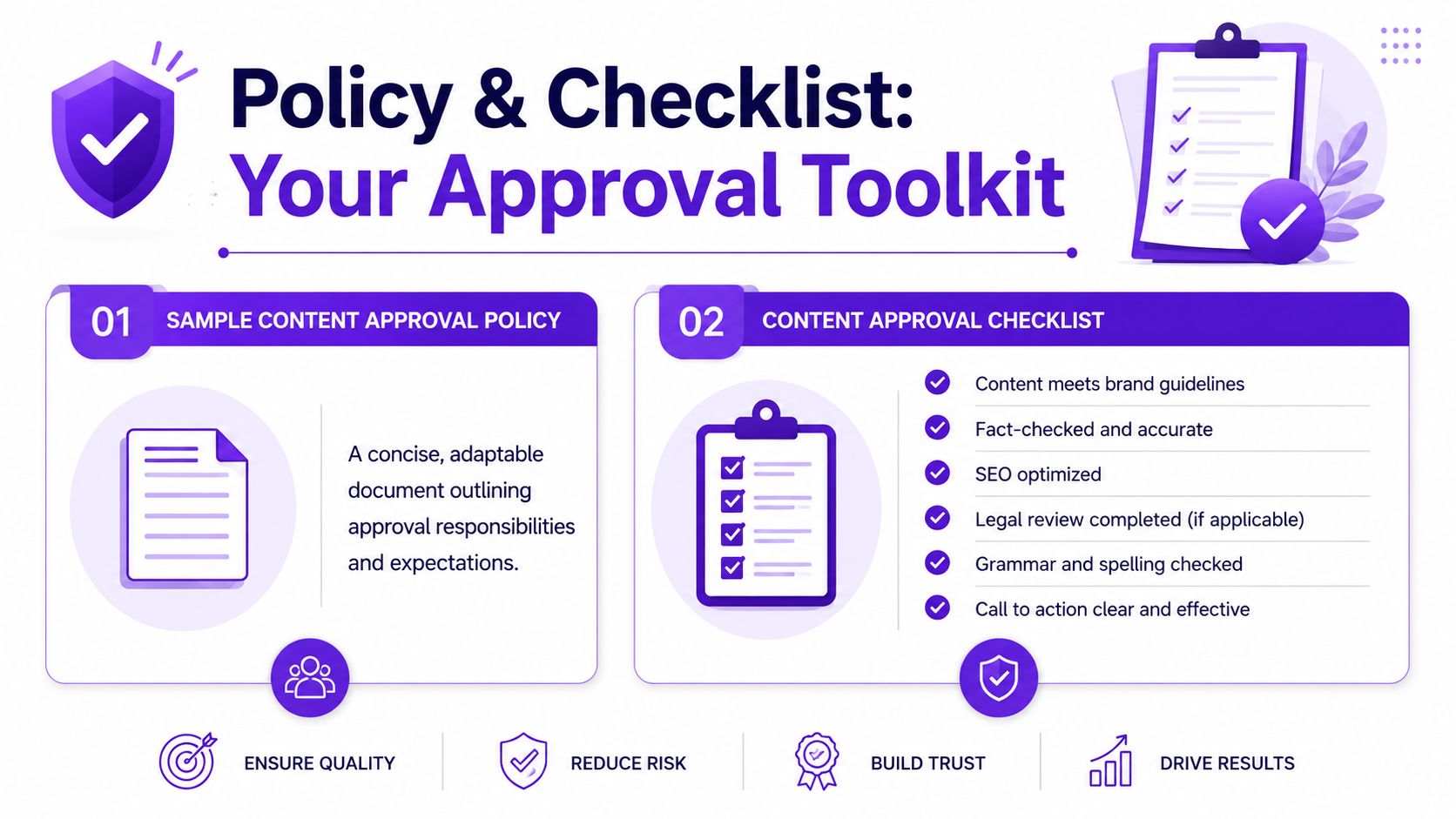
Use this as a starting point and adapt it.
We use a content approval workflow to move content from draft to publication with clear ownership, fast review, and visible accountability.
| Stage | Required output |
|---|---|
| Draft | Asset is created and ready for internal review |
| Internal review | QA or editor comments are resolved |
| Stakeholder review | Specialist concerns are addressed if needed |
| Revision | Final changes are made in one clean pass |
| Approval and publish | Final sign-off is recorded and asset is scheduled or published |
This is the part many organizations skip, then regret later.
For any asset, check:
Brand fit
Voice, tone, visual style, and CTA match current brand guidelines.
Accuracy
Claims are fact-checked, names are correct, and links or references are verified.
Formatting
Platform-specific sizing, captions, title length, and post structure are correct.
Ownership
The final approver is recorded and the approved version is clearly marked.
For blogs, add:
SEO basics
Title, headings, internal links, metadata, and featured image are in place.
Readability
The piece is scannable, clean, and free of obvious grammar issues.
For video and short-form content, add:
Captions and visuals
On-screen text is accurate, branding is correct, and thumbnails match the message.
Call to action
CTA is present, clear, and appropriate to the platform.
For client or compliance-sensitive content, add:
Good workflows reduce the number of decisions. Good checklists reduce the number of mistakes.
Keep both documents in the same place your team already uses. Don't create a hidden policy folder nobody opens. Put the checklist inside the task template. Put the policy in your team handbook or pinned workspace.
A working content approval workflow should feel boring. That's a compliment. Boring means people know the path, the handoffs are clear, and content keeps moving.
If your team is repurposing long-form video into clips, captions, thumbnails, blogs, and platform-specific posts, Taja AI is one option to help centralize that workflow. It's built for turning one source asset into multiple ready-to-publish outputs, which makes it easier to keep approvals organized instead of managing every derivative asset by hand.


We are blessed to work with leading brands & Companies


We try to make easy and simple for every professionals. Get 30 days free trial - No credit card required.


© 2025 Taja AI. All rights reserved.