.jpeg)

YouTube to Text: How to Convert Videos in 2026
Master YouTube to text conversion. Learn to extract auto-captions, download SRT files, use AI tools, and repurpose video content for SEO and growth.
5 min read
October 10, 2026

Learn how content automation software eliminates burnout, scales reach, and optimizes workflows. Discover tools & strategies for 2026.
Written by:


You publish one solid piece of content, then spend the next week chopping it into clips, rewriting captions, resizing graphics, scheduling posts, and trying to remember what worked. By the time you're done, the original idea already feels old.
That cycle burns people out fast. It also creates a strange kind of frustration. You're working hard, but the work doesn't compound. A podcast episode becomes one podcast episode. A webinar becomes one replay. A property walkthrough becomes one listing video and then disappears into the feed.
Most small teams don't have a creativity problem. They have a system problem. Content lives in scattered docs, folders, editing tools, and scheduling apps, so every new publish feels like starting over.
A familiar pattern shows up in almost every small business content operation.
You record something useful. A client Q&A. A podcast interview. A product demo. A Sunday message. Then the intensive work begins. Someone has to trim it, title it, write supporting copy, pull quotes, create social posts, upload files, schedule distribution, and check performance later. If that someone is you, content starts stealing time from sales, delivery, and actual thinking.
The problem isn't that you're lazy or disorganized. The problem is that manual content production doesn't scale well when one asset needs to become many assets across many channels.
A creator can spend hours making one strong long form video and still feel behind by Friday. A realtor can film three walkthroughs in a day but lose momentum because every listing needs fresh captions, platform tweaks, and local posts. A consultant can host a webinar full of useful insights, then never reuse the material because repackaging it feels like another full project.
That's the treadmill. You keep moving, but the system keeps resetting.
Practical rule: If publishing one piece of content creates five more manual tasks, your workflow is working against you.
Content automation ceases to be merely a shiny feature and begins its role as a business tool. Done right, it doesn't just help you make more content. It helps you extract more value from the content you already made.
The shift is simple in principle. Instead of treating each caption, clip, email, and post as separate work, you build a repeatable workflow where one source asset feeds the rest.
That might mean transcribing a video automatically, generating draft social posts from key moments, routing assets into review, and scheduling approved content without bouncing between six tabs. It might also mean using a workflow designed around your actual publishing bottleneck, which is why these workflow automation benefits matter more than another standalone AI writer.
The point isn't to remove human judgment. It's to stop wasting it on repetitive production chores.
It's frequently believed that content automation software refers to 'AI that writes blog posts.'
That's only a small piece of it.
A better comparison is a restaurant kitchen. A home cook can make an excellent meal, but everything depends on memory, attention, and manual effort. A professional kitchen runs on prep systems, standardized ingredients, handoff rules, and clear stations. That's how it serves consistently at scale.
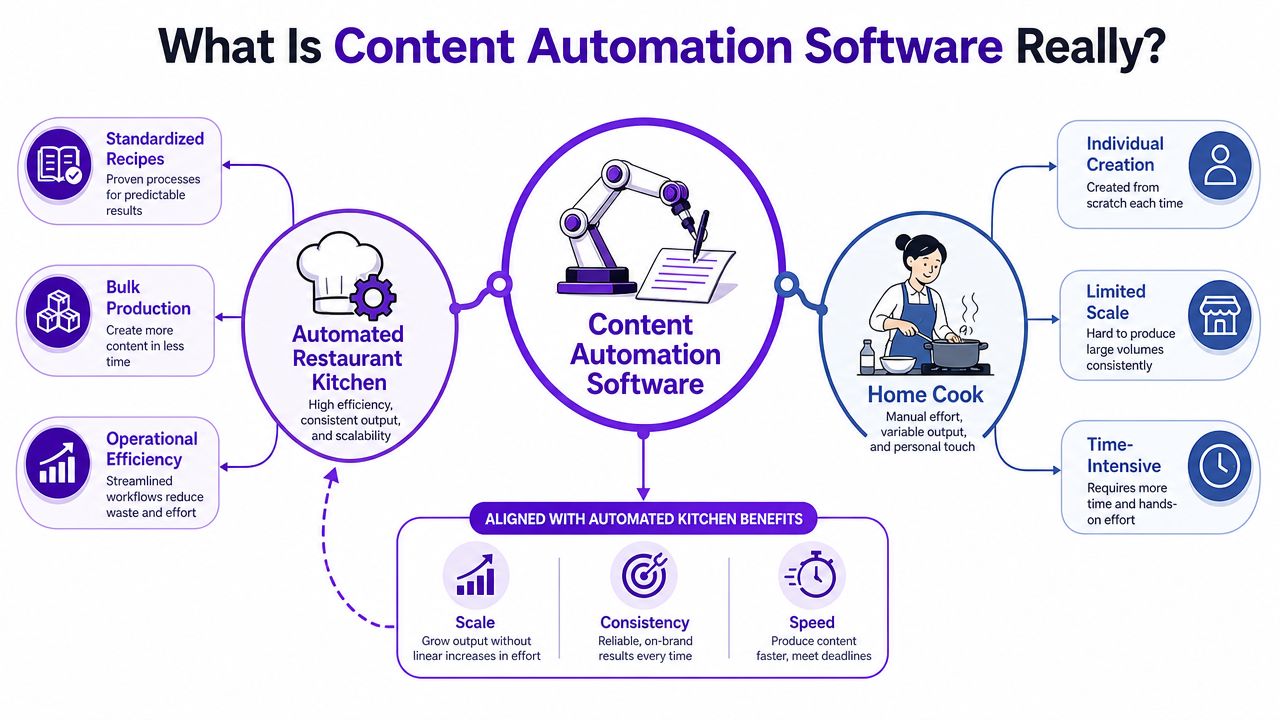
Content automation software is a connected system that helps you move content from source material to publishable assets, then into distribution and analysis.
That can include:
The technical foundation matters more than people realize. Content Science's guidance on starting a content automation initiative explains that content automation works best when it's built on structured content models and reusable metadata, because those let the system route content, trigger approvals, and reuse content fragments across channels without re-entry. It also notes that automation quality depends less on writing faster and more on whether content is machine-readable and governed by explicit rules, as outlined in Content Science's automation guidance.
A text generator can produce a draft. That doesn't mean it can support your whole workflow.
If your tool can write a caption but can't understand where that caption belongs, which asset it came from, how it should be reviewed, or when it should be published, you still have a manual operation. You just have faster draft production.
That's why many teams buy "AI content" tools and still feel overwhelmed a month later.
The useful version of content automation software usually has three qualities:
Automation breaks when content is unstructured. If your system can't tell what a quote, clip, approval stage, or channel format is, a person has to keep stepping in.
That doesn't make automation weak. It means true value comes from operational design, not novelty.
Once you stop treating content automation software like a robot writer, the important capabilities become easier to evaluate. The core question isn't "What can it generate?" It's "Which repeated bottleneck does it remove?"
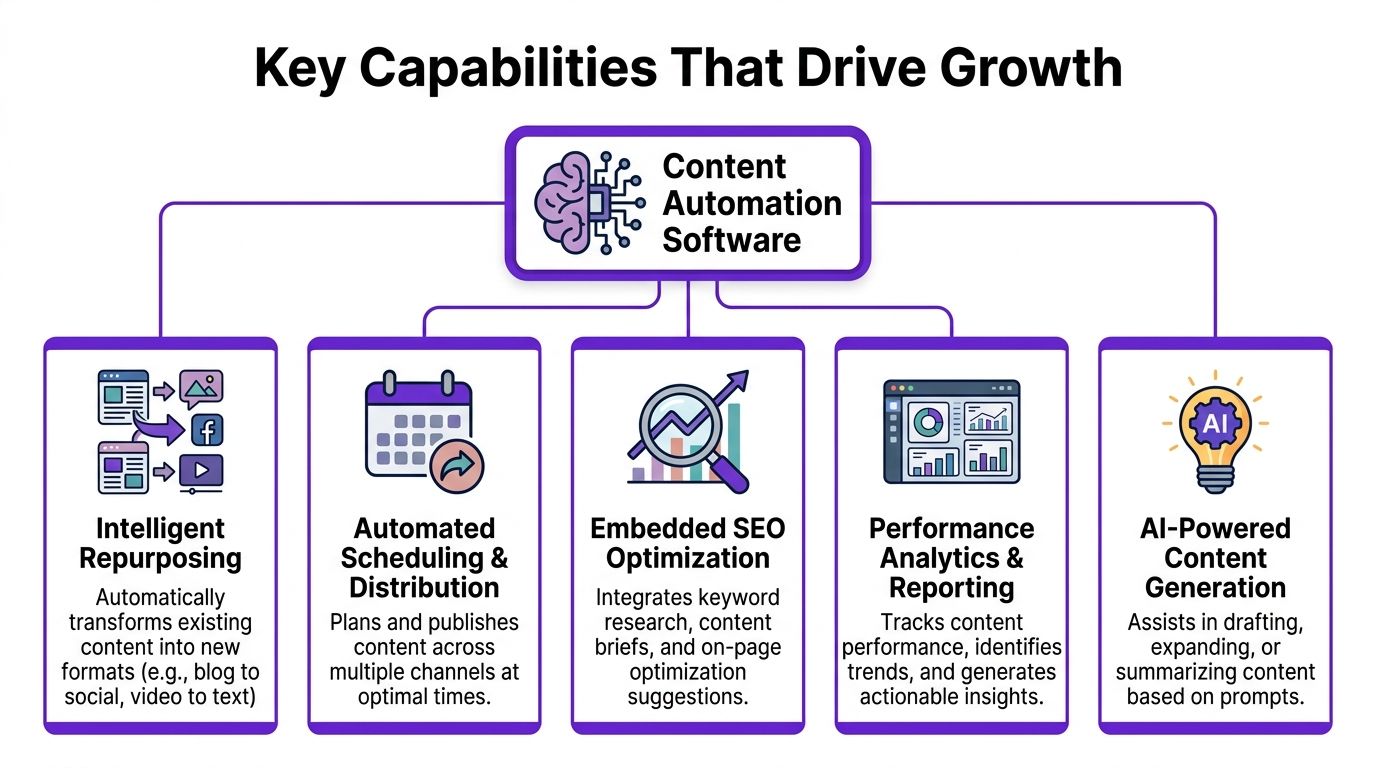
A lot of content dies too early. You record a strong interview or customer story, post it once, and move on because repackaging it takes too much time.
Repurposing tools solve that by pulling multiple outputs from one source asset. A long video can become short clips, quote cards, show notes, blog drafts, title ideas, or platform-specific posts. The useful systems don't just cut content shorter. They adapt it for the channel and context.
Specialized tools offer a distinct advantage over generic AI generators. If you want to explore AI for Mac capabilities, it's worth looking at how desktop workflows fit into your actual editing and publishing stack, especially if you manage assets locally before distribution.
Publishing isn't just about filling a calendar. Timing affects whether content gets seen.
ZoomInfo's review of AI marketing automation tools notes that Sprout Social Publishing uses an "Optimal Send Times" algorithm based on 16 weeks of audience data and reports up to a 60% lift in reach, which shows how timing and engagement history can improve distribution when scheduling and analytics work together in one loop, as described in ZoomInfo's review of AI marketing automation software.
That matters because a scheduler by itself is limited. The stronger setup combines three things:
A lot of small businesses publish decent content with weak packaging. Titles are vague. Descriptions miss key terms. Video metadata gets rushed. Blog structure doesn't match search intent.
Automation can help here if it works upstream. Good systems assist with topic framing, SEO-friendly titles, descriptions, tags, and post structure while the asset is being prepared, not after it's already published.
This is also where better tools help you find stronger angles, not just draft copy. The best AI-assisted briefs surface underserved angles, intent clusters, and gaps that competitors missed. That's far more useful than spinning out another generic article on a crowded topic.
Templates sound boring until you've had to fix fifteen posts that all look and sound slightly different.
Brand templates help in practical ways:
If you're a small team, templates reduce decision fatigue. If you're a growing team, they reduce cleanup.
This is the capability people skip, then regret.
Without performance visibility, automation can become a faster way to produce content that doesn't work. Analytics tell you which clips hold attention, which topics earn responses, which posting windows are worth repeating, and which content formats aren't pulling their weight.
EmailMonday cites Demand Spring's 2021 research showing 96% of marketers had already implemented a marketing automation platform, 54% of B2B marketers use marketing automation software to support content marketing, and 75% say it gives them better insight into content performance. That matters because the category matured around scale plus measurement, not scale alone, according to EmailMonday's marketing automation statistics overview.
The return on content automation usually shows up before it appears in a spreadsheet. You feel it when production stops swallowing your week. You feel it when a single recording fuels multiple channels. You feel it when your team finally knows what to repeat and what to stop.
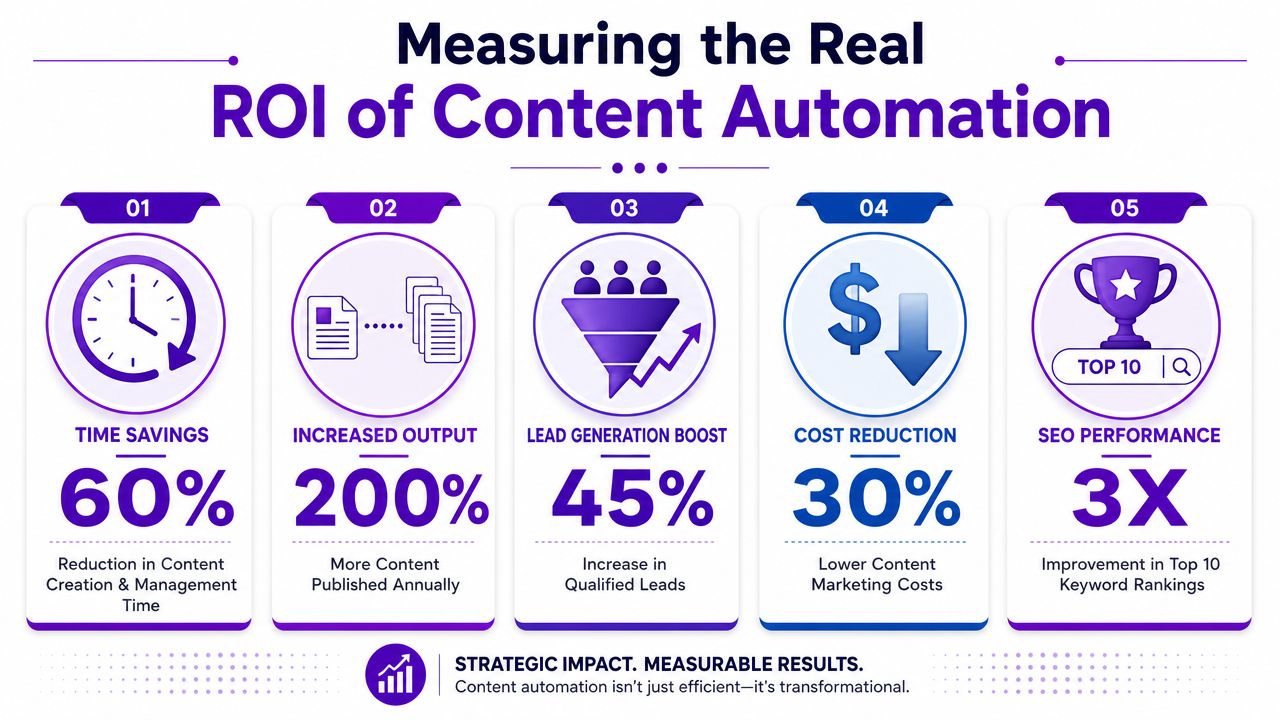
If you spend less time trimming clips, rewriting captions, uploading assets, and chasing approvals, that time doesn't vanish. You can put it into better strategy, client work, audience research, or sales follow-up.
For a solo operator, reclaimed time often matters more than volume. For a team, it reduces the hidden cost of context switching. People stay in their best work longer.
The first ROI win is usually not "more content." It's getting your best hours back.
Manual production treats every asset as a separate job. Automation treats one strong source asset as a hub.
A podcast episode can become a transcript, a blog draft, short clips, quote graphics, email copy, and scheduled social posts. A product demo can turn into FAQs, launch snippets, and follow-up content. You don't need infinite new ideas if you can extend the useful life of what you've already created.
That makes your existing effort go further. It also makes consistency more realistic, which is one reason many teams pair automation with broader systems like AI for social media marketing workflows instead of relying on ad hoc posting.
The market's adoption curve tells you something important. By 2021, 96% of marketers had already implemented a marketing automation platform, and 75% said it gave them better insight into content performance, based on the same Demand Spring research cited by EmailMonday earlier in the article. That doesn't automatically prove any tool is worth buying. It does show that operators increasingly value measurement inside the workflow, not just after-the-fact reporting.
When evaluating ROI, look at three questions instead of chasing vanity promises:
| ROI lens | What to ask | What good looks like |
|---|---|---|
| Time | Which recurring task takes too long every week? | Fewer manual handoffs and less repetitive editing |
| Output | Can one content asset reliably produce several usable outputs? | More publish-ready assets from the same source material |
| Clarity | Can you see what content types and topics actually work? | Better decisions about what to repeat, refine, or drop |
If a tool only increases draft volume, the ROI is shaky. If it reduces production drag and improves decision-making, the value is much easier to defend.
The biggest mistake people make is trying to automate everything at once. That usually creates a messy stack of half-connected tools.
Start with one repeatable content source, one clear business goal, and one workflow that you can run every week.
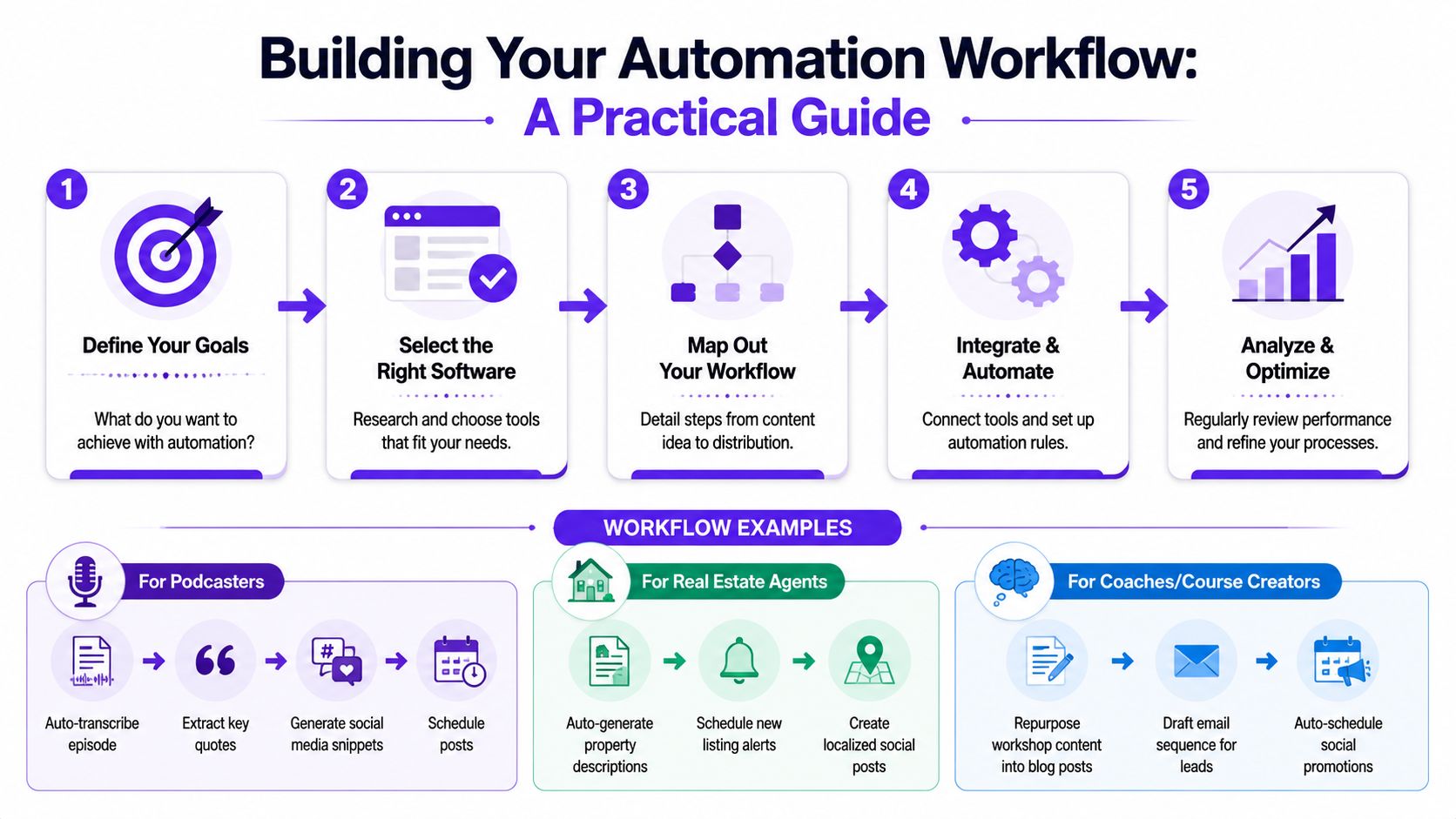
A short walkthrough can help you think through the setup:
Before
After
This is a strong fit for workflow-aware automation. The system should understand the source asset is a conversation, not just a file.
Before
A listing video goes live. Then you rewrite the property description for each channel, pull stills, create neighborhood posts, and scramble to stay current when another listing hits.
After
A realtor doesn't need generic "make me content" output. They need location-aware, offer-aware assets that fit a repeatable listing process.
Before
You run a live workshop, then the recording sits untouched because turning it into lead nurture content feels like another launch.
After
One useful platform to highlight is Taja AI. It is an example of a repurposing-first system built around long-form video workflows. It turns uploaded videos into shorts, captions, blogs, thumbnails, and platform-specific posts, with channel and brand-voice analysis plus scheduling from one dashboard. For teams centered on video, that's different from buying a standalone writer and stitching the rest together manually.
Small teams often need approvals more than generation.
A practical setup looks like this:
Independent commentary on underused AI automation use cases makes a useful point here. A significant gap is workflow-aware specialization. Teams get more value from tools that understand context and support repeatable processes, such as turning long-form video into platform-specific shorts and posts, than from generic generation alone, as discussed in this commentary on workflow-aware AI automation.
Working rule: Automate the path your content already takes. Don't buy software that forces you into a workflow your business doesn't actually use.
If your bottleneck is social repurposing, start there. If it's review and approvals, build around that. If it's consistent publishing, focus on scheduling and asset reuse. A tool like a social media content generator makes more sense when it sits inside a repeatable workflow, not as a disconnected prompt box.
The market is crowded now, which is both useful and annoying. You have more options, but you also have more ways to buy the wrong one.
Market.us Scoop reports the marketing automation software market was expected to grow from $6.87 billion in 2010 to $19.66 billion by 2026, with a 19.2% CAGR from 2021 to 2026. More investment usually means more vendors, more categories, and more overlap, which is why fit matters more than feature lists, according to Market.us Scoop's marketing automation statistics.
A flashy demo can hide a bad fit. If your main headache is turning long videos into channel-ready assets, a repurposing-first platform makes sense. If your issue is approvals and calendar control, a workflow or publishing system may serve you better. If your team mainly needs brief creation and topic support, research and SEO-oriented tools may be enough.
If you're still comparing how different AI content tools approach the problem, LocalChat's AI content guide can help you see the broader overview before you narrow the field.
| Criteria | Key Question | Why It Matters |
|---|---|---|
| Primary content format | Do you mostly work from video, audio, text, or mixed media? | The wrong input model creates friction from day one |
| Main workflow problem | Are you trying to solve repurposing, scheduling, approvals, SEO support, or analytics? | One strong use case beats five weak ones |
| Output quality | Does the tool create assets that are close to publishable for your channels? | Low-quality output just shifts the work downstream |
| Workflow fit | Can it match how your team already moves content from draft to publish? | Forced workflows usually break adoption |
| Integration needs | Does it connect to your CMS, social platforms, storage, or editing tools? | Manual exporting and re-uploading kills efficiency |
| Brand controls | Can you apply templates, voice rules, or review stages? | Automation without governance creates cleanup work |
| Performance feedback | Does it show which outputs and topics are working? | You need learning, not just output |
| Ease of use | Can you or your team run it consistently without heavy setup? | Complicated tools often get abandoned after the trial |
This mental model helps:
You don't need the "most advanced" software. You need the one that removes your most expensive manual habit.
Content automation software isn't a magic button. It won't replace taste, judgment, or subject matter expertise. What it can do is remove the repetitive work that keeps your best ideas trapped in raw files and unfinished drafts.
The fastest way to start is small.
Identify your single biggest content bottleneck.
Pick the task you dread repeating. Maybe it's clipping long videos, writing captions, routing approvals, or scheduling posts across channels.
Run a narrow pilot.
Choose one workflow, one content type, and one tool category. Test it on a single podcast episode, webinar, listing video, customer interview, or blog post. Judge the result by usable output and reduced effort, not by hype.
Start with one repeatable asset and one repeated pain point. That's where automation becomes practical instead of theoretical.
If the pilot works, expand carefully. Add templates. Add review steps. Add analytics. Build around what already proves useful.
You don't need a perfect system on day one. You need a system that's better than doing everything by hand again next week.
If your content starts as long-form video, Taja AI is a practical place to test that pilot. It focuses on turning one video into clips, captions, thumbnails, blogs, and platform-specific posts, then scheduling that output from one workflow. Start with one recording, see what comes out publish-ready, and build from there.


We are blessed to work with leading brands & Companies


We try to make easy and simple for every professionals. Get 30 days free trial - No credit card required.


© 2025 Taja AI. All rights reserved.