.jpeg)

Best Aspect Ratio for YouTube: The Complete 2026 Guide
Discover the best aspect ratio for YouTube videos, Shorts, and community posts. Learn when to use 16:9 vs 9:16 with practical tips and real examples.
5 min read
October 2, 2026

Stop team burnout and missed deadlines. This practical guide to team capacity planning shows content teams how to measure, forecast, and manage their workload.
Written by:


You finally built a content engine that works. The podcast is recording on schedule. The long-form videos are getting clipped. Social posts are queued. The calendar looks full for the first time in months.
Then the strain shows up.
Drafts sit waiting for review. Thumbnails get approved late. Captions need rewrites. A team member is answering comments while also trying to finish edits. Publishing slips from Tuesday to Thursday, then to “sometime this week.” The problem isn't a lack of ideas anymore. It's that your ability to produce content has outgrown your ability to review, approve, publish, and promote it.
That's where team capacity planning becomes useful. Not as corporate overhead. As a way to stop a small content team from turning momentum into chaos.
A packed content calendar looks like progress from the outside. Inside a small team, it often means three different bottlenecks are colliding at once. Creation speeds up first. Review gets messy second. Distribution breaks third.
That pattern is common with lean teams, especially when one person wears multiple hats. The editor is also the uploader. The founder still has final approval. The social manager is also writing email copy, checking links, and replying to comments. Work keeps moving, but only until one person becomes the gatekeeper for everything.
The mistake is assuming content volume equals marketing capacity. It doesn't.
A team might be able to record a weekly show and cut it into multiple assets, but that doesn't mean they can consistently get every asset polished, approved, scheduled, distributed, and monitored. Those are different workloads with different friction points. The more channels you add, the more that gap widens.
A full calendar can hide an overloaded team for a while. Missed approvals and rushed publishing are usually the first visible signs.
This is also why teams that want to achieve faster content approval usually need more than a better review checklist. They need a realistic picture of who has time to review what, when, and at what level of quality.
Formal capacity planning isn't just for enterprise operations teams anymore. According to ActivTrak's workforce capacity planning analysis, 86% of organizations engaged in capacity forecasting in 2026, up from 81% in 2025. That matters because it signals a broader shift. Teams are treating workload planning as a normal operating practice, not a specialist exercise.
For a small content business, that shift matters even more. You have less slack, fewer backups, and less room for sloppy handoffs.
A simple way to see the issue is to separate content work into two buckets:
| Work type | What it includes | What usually goes wrong |
|---|---|---|
| Creation work | recording, drafting, editing, clipping, design | output increases faster than review capacity |
| Activation work | approvals, scheduling, publishing, link checks, community replies | deadlines slip because this work is underestimated |
When teams skip team capacity planning, they usually overcommit based on what they can make, not what they can ship. That's how a “great month of content” becomes a month of late posts, messy revisions, and tired people.
Team capacity planning starts with one practical question. How many usable hours does your team have for the work that moves content forward?
That question is often answered with job titles or rough intuition. “We have one editor, one writer, and one marketer” sounds useful, but it doesn't tell you how much work those people can realistically complete in a week. Capacity planning works better when you measure time instead of headcount.
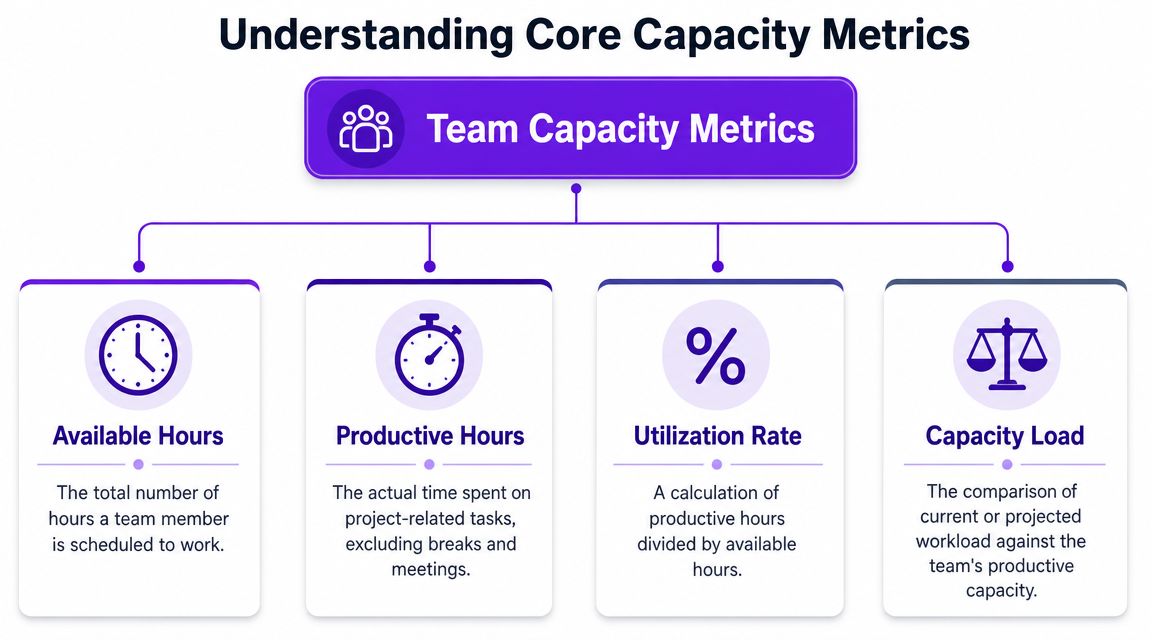
Pipedrive frames capacity planning as a forecasting exercise. The method starts with total available hours, then subtracts planned absences and non-project time such as meetings and admin, because a team's theoretical capacity is never its actual usable capacity, as explained in Pipedrive's guide to team capacity planning.
That distinction matters in content operations. Someone can be employed full-time and still have far less time for publishable work than you assume.
Think of it this way:
If you skip that middle step, every plan looks healthy on paper and strained in practice.
For small teams, I'd keep the system simple and track four things well.
Practical rule: if your team talks about being “busy” but can't say where the hours went, you don't have a capacity problem alone. You have a visibility problem.
Metrics get easier when roles are clear. If your writer is also a strategist, approver, publisher, and analyst, capacity numbers stay blurry because the work itself is blurry. Teams doing a reset on responsibilities often benefit from optimizing your marketing team's structure before they try to forecast output in detail.
Here's a plain-language reference for the core metrics:
| Metric | Simple definition | Why it matters for content teams |
|---|---|---|
| Available hours | scheduled work time | shows the outer limit of the week |
| Non-project time | work that supports delivery but doesn't create content assets | reveals hidden workload |
| Usable capacity | time left for planned content work | gives you a realistic planning baseline |
| Utilization | the share of available hours already committed | helps spot overload and idle time |
The point of these metrics isn't to make content work feel mechanical. It's to stop guessing. Once the team can distinguish between theoretical time and usable time, decisions about publishing volume become much easier.
Most small teams don't need expensive software to get started. They need two weeks of honest tracking and a willingness to count the work nobody likes to count.
That invisible work is what usually breaks the plan. Quick Slack answers. Asset handoffs. Thumbnail revisions. Approval nudges. Community replies. File cleanup. The hours disappear in fragments, but they still consume capacity.
A practical workflow map can help before you start logging time. If you want a useful example of how to lay out the steps and handoffs, discover Sight AI's workflow insights.
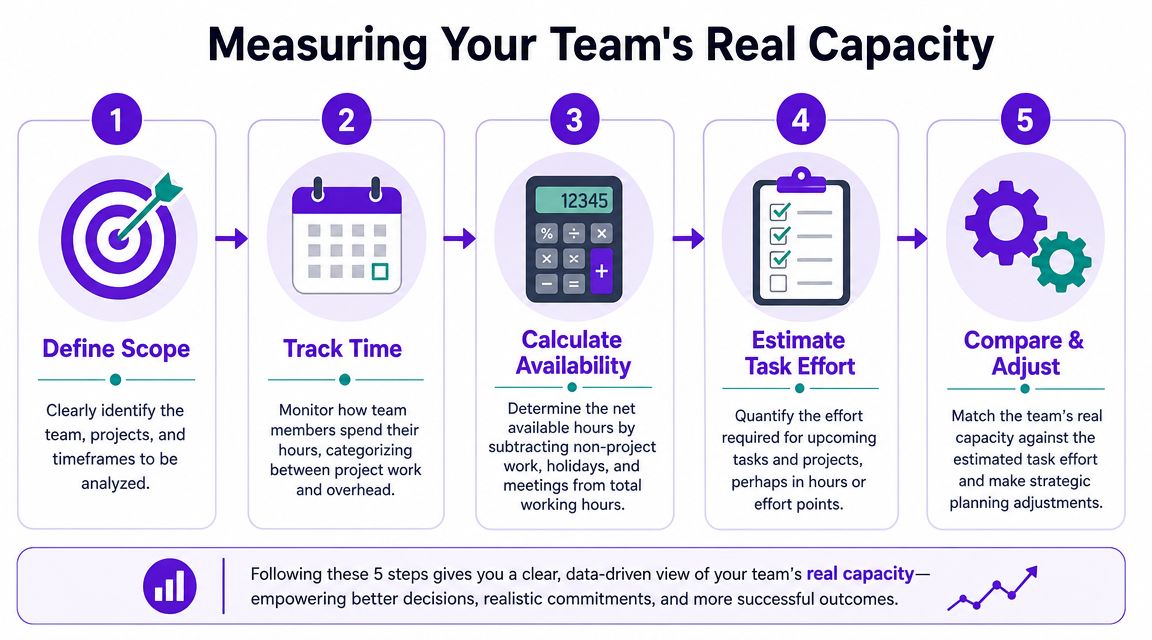
Run a temporary audit for one or two normal working weeks. Don't choose your cleanest week or your busiest launch week. Pick a period that reflects how the team usually works.
Track time in broad buckets, not microscopic increments:
Planned content production
Recording, scripting, editing, writing, design, clipping.
Content operations
Reviews, approvals, scheduling, publishing, metadata checks, upload management.
Support work
Meetings, admin, internal communication, platform checks, troubleshooting.
Reactive work
Rush changes, urgent requests, comment moderation, unexpected fixes.
If the team works with a lot of video, it helps to define what belongs inside the production bucket ahead of time. Tighter task definitions prevent undercounting. A reference like social video editing workflows is useful because video work often expands through revisions and exports, not just editing itself.
One planning mistake shows up constantly. Teams treat non-project work like background noise instead of planned workload.
According to monday.com's capacity planning guidance, recurring tasks, meetings, and administrative duties can consume up to 30% of the workweek. The same guidance says a realistic utilization target is 70–85%, not 100%, to preserve buffer and reduce burnout.
That gives you a strong starting benchmark. Then you adjust based on your actual audit.
Here's a simple way to turn that into a team number:
| Step | What to do | Outcome |
|---|---|---|
| List scheduled hours | Write down each person's work hours for the week | raw availability |
| Subtract known absences | Remove time off, holidays, appointments, training | adjusted availability |
| Subtract recurring overhead | Remove regular meetings, admin, approvals, routine support | usable baseline |
| Review reactive work | Estimate how much surprise work appeared during the audit | planning buffer |
| Set weekly capacity | Use the remaining time as your real planning figure | realistic team capacity |
The hidden load in content teams usually sits in the last mile of the process.
If a task happens every week, it belongs in capacity planning, even if nobody thinks of it as “real project work.”
This video gives a good visual explanation of how to think about workload versus actual team bandwidth:
At the end of this exercise, each person should have one number for a normal week. Not total hours worked. Usable hours for planned content work.
That number won't be perfect. It doesn't need to be. It needs to be believable enough that you can stop promising output your team can't absorb.
Capacity is only half the equation. The other half is demand, and demand is where content teams get ambushed.
Project-based planning assumes work arrives in neat blocks. Content rarely behaves that way. A webinar suddenly becomes clips, quote graphics, show notes, email copy, shorts, platform captions, and repost variations. Then a trend appears midweek and somebody wants a quick response piece by Friday.
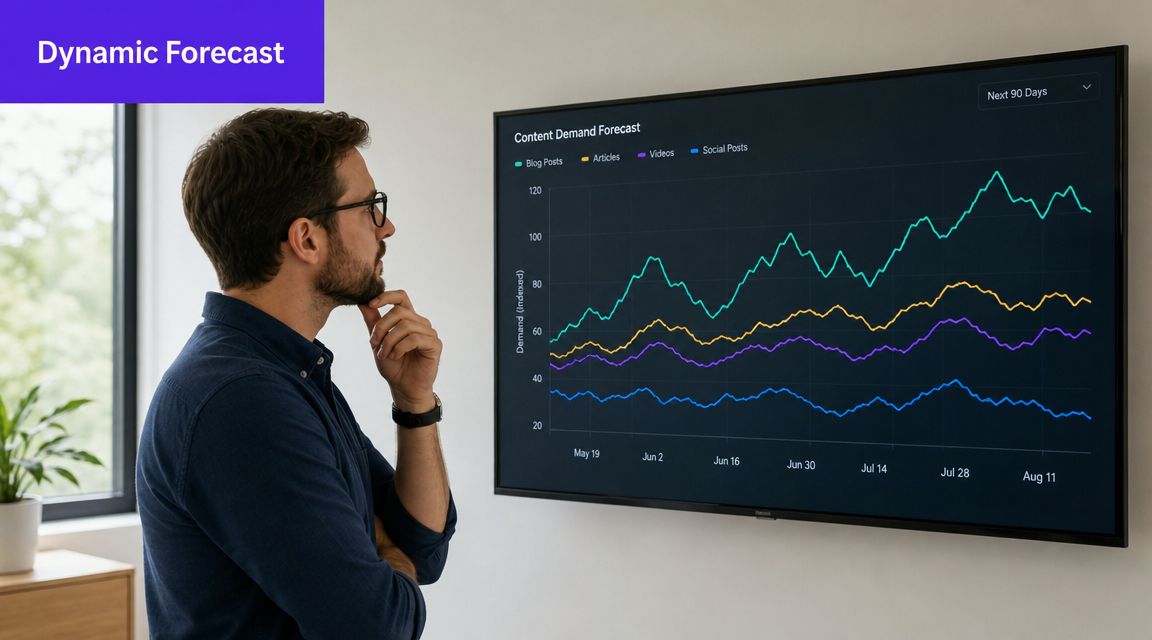
The easiest way to improve team capacity planning for content is to stop forecasting in titles and start forecasting in task clusters.
“Publish one YouTube video” is not a usable forecast. It hides too much labor. A better forecast breaks that initiative into the jobs different people must complete.
For example, one long-form video might generate demand across:
Content calendars often fail. They show what will go live, but not the full workload required to make that happen.
A planning aid like social media content generation workflows is useful when you're breaking broad content ideas into repeatable production tasks. The key is not the idea volume. It's the operational load attached to each idea.
Mainstream guidance often fits better for stable project teams than for fast-moving content operations. For volatile, multi-channel content demand, scenario planning is more useful than pretending the first estimate will hold. That's the core recommendation highlighted in Atlassian's capacity planning overview, which notes the value of scenario planning because priorities and actual progress change constantly.
For a small content team, I'd use three scenarios:
| Scenario | What it assumes | When to use it |
|---|---|---|
| Base schedule | normal publishing week, no major surprises | default operating plan |
| Heavy repurposing week | one anchor asset creates many deliverables | when long-form content fans out across channels |
| Disruption week | delayed approvals, urgent edits, last-minute requests | when decision-makers or priorities are unstable |
This approach does two things. It makes uncertainty visible, and it gives you pre-decided trade-offs.
A useful forecast answers questions like these:
The real planning question isn't “How much content can we create?” It's “How much content can this team absorb, finish, and publish without choking the workflow?”
When teams forecast demand well, they stop treating every content opportunity as equally urgent. They can see the hidden cost of saying yes, and that makes prioritization much sharper.
Most failed capacity systems don't collapse because the math was too hard. They collapse because the operating habits were weak.
Mosaic points to recurring capacity-planning failures such as poor communication, siloed efforts, misjudged workload needs, and over-reliance on manual tools like spreadsheets, which can distort assessments over time, as outlined in Mosaic's breakdown of common capacity planning mistakes.
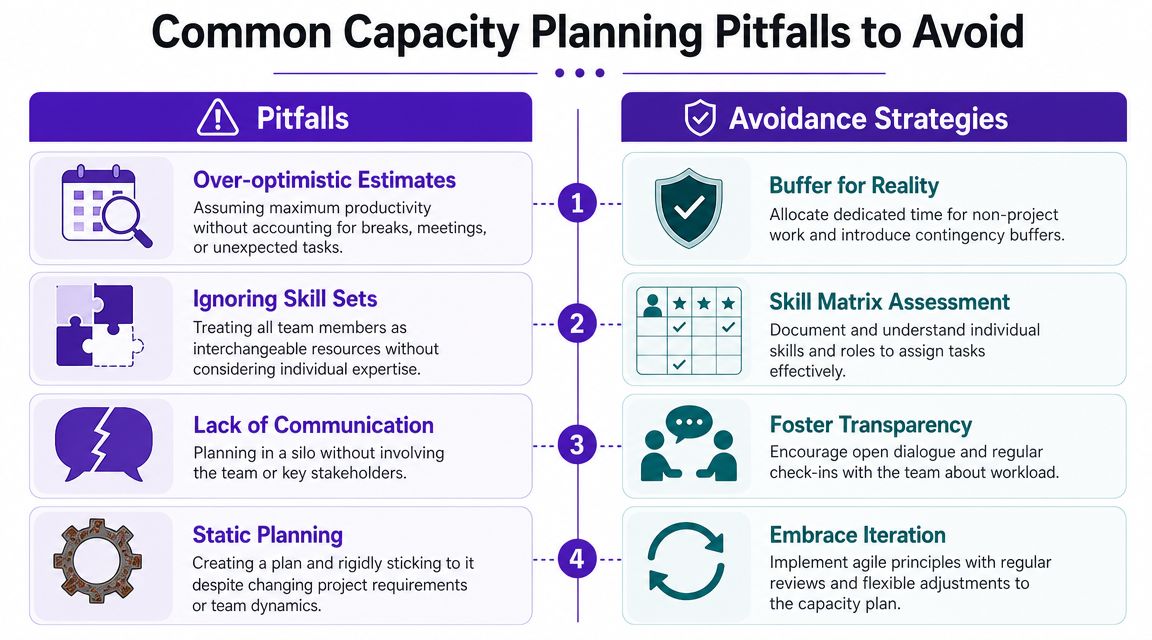
The problems usually look ordinary at first.
Planning in a silo
A manager estimates team load alone, then announces deadlines. The team already knows the plan won't hold because the review queue, approvals, or editing constraints weren't discussed.
Treating people as interchangeable
“We have spare capacity” means very little if the spare person can't do the bottleneck task. Content teams usually have skill-specific choke points, especially around editing, design, and final approvals.
Using spreadsheets as the operating system
Spreadsheets are fine for a first audit. They're weak as a live planning environment when dates, priorities, and ownership keep changing.
Keeping the plan static
Content work changes too quickly for one monthly estimate to stay accurate. If the team isn't revisiting workload regularly, the plan becomes fiction.
Each of those issues has a practical fix.
| Pitfall | Better move |
|---|---|
| Siloed planning | review workload with the people doing the work |
| Skill blindness | plan by role and task type, not just team headcount |
| Manual fragility | keep one shared source of truth for live priorities |
| Static forecasting | update assumptions when approvals, priorities, or channels shift |
One more issue deserves special attention. Teams often say they're too small for team capacity planning. Small teams need it more, not less. A ten-person team can absorb one broken handoff. A two-person team feels it immediately.
Capacity planning works best at a practical level of detail. Enough detail to see overload early, not so much detail that the system becomes another job.
If your process feels burdensome, the answer usually isn't to abandon planning. It's to reduce the complexity and keep only the inputs that help you make better trade-offs.
The value of team capacity planning isn't cleaner spreadsheets. It's better decisions.
Once you know your real usable capacity, content planning changes. You can choose which channels deserve consistent effort. You can spot when approvals are the true bottleneck. You can tell the difference between a team that needs better sequencing and a team that needs outside help.
The operating loop is simple. Measure actual capacity. Forecast demand against it. Adjust before the week gets away from you.
That rhythm creates a calmer kind of growth. It gives you permission to say no to low-value work, delay a format that's too expensive to maintain, or simplify a publishing schedule that looks good on paper but strains the team in practice.
It also changes how you evaluate automation. Tools that speed up content creation are helpful, but only if your downstream workflow can absorb the output. If your team wants to scale responsibly, it helps to look at ways to automate content creation with the full operating chain in mind, not just the generation step.
The strongest content teams don't win because they publish the most. They win because they know what they can sustain, what they can absorb, and when to rebalance before quality drops.
That's the point of capacity planning. It replaces wishful scheduling with operational clarity.
If you're ready to scale output without overwhelming your team, Taja AI helps turn long-form videos into ready-to-publish shorts, clips, captions, thumbnails, blogs, and platform-specific posts from a single workflow. It's built for creators and small teams that need more consistency without taking on the burden of becoming a full-time production department.


We are blessed to work with leading brands & Companies


We try to make easy and simple for every professionals. Get 30 days free trial - No credit card required.


© 2025 Taja AI. All rights reserved.