How to Share TikTok to Instagram Without Losing Quality
Discover How to Share TikTok to Instagram as a Reel or Story, with export specs, quality settings and fixes for cropped or muted posts.
5 min read
November 5, 2026

Learn what content repurposing AI is, how the pipeline works, key use cases, metrics to track and the safeguards that keep clips accurate.
Written by:


A 40-minute webinar takes hours to prepare, gets one social post, and then disappears into the archive. Content repurposing AI can help turn that recording into clips, captions, summaries, and platform-specific posts, but the useful question isn't how many assets it can create. It's whether each asset gives a particular audience a reason to take a measurable next step.
The difference between a busy publishing calendar and a useful one comes down to choices: which moments to extract, how to adapt them for each channel, what a person should do after watching, and how you'll tell whether it worked. Treat the process as an experiment with a human review step, not a one-click content machine.
Content repurposing AI uses machine learning to turn a source recording, such as a webinar, podcast episode, tutorial, or livestream, into several assets ready for editing and publication. It does three jobs: identifies moments worth keeping, reshapes them into formats suited to different platforms, and drafts the text that accompanies them.
The outputs shouldn't all be the same clip with a different caption. Each format needs a different kind of moment and has a different job to do.
| Asset | What the AI produces | Source moment it needs | Typical destination |
|---|---|---|---|
| Vertical short | 9:16 clip with captions and reframed subject | One complete answer or punchline | TikTok, Instagram Reels, YouTube Shorts |
| Quote clip | Under-60-second clip built around one line | A strong, self-contained statement | LinkedIn, X |
| Text summary | Blog post or newsletter draft | Key points mapped to timestamps | Blog, email list |
| Thumbnail | AI-generated or still-based image | Topic and the channel's best past design style | YouTube |
| Platform post | Caption, SEO description, and tags | Transcript plus target audience | YouTube, Instagram, Facebook, LinkedIn |
A vertical clip might capture a complete answer from a webinar, while a text summary can pull together the main points from several parts of the recording. A quote clip needs a statement that makes sense on its own. A thumbnail and platform post add context and help the asset fit its destination.
That fit matters because viewers don't encounter video in only one long session. In its April 2025 Global Statshot, DataReportal reported that 87.5% of online adults worldwide watched short-video formats during a typical week. Users spent an average of 6 hours and 37 minutes per week watching short videos, equivalent to approximately 57 minutes per day. That's a reason to consider short-form versions of a recording, not proof that every clip will find an audience.
The practical test is simple: can you name the platform, the intended audience action, and the metric for every asset? If not, it may not deserve a place in the batch. For help deciding what to track across repurposed posts, see this guide to measuring repurposed video performance.
A repurposing pipeline works best when it treats a recording as a set of moments that can be found, evaluated, and traced, not merely as a transcript to summarize. Think of the AI as a film logger: it marks the source timecodes and notes what happens before an editor decides what to cut.
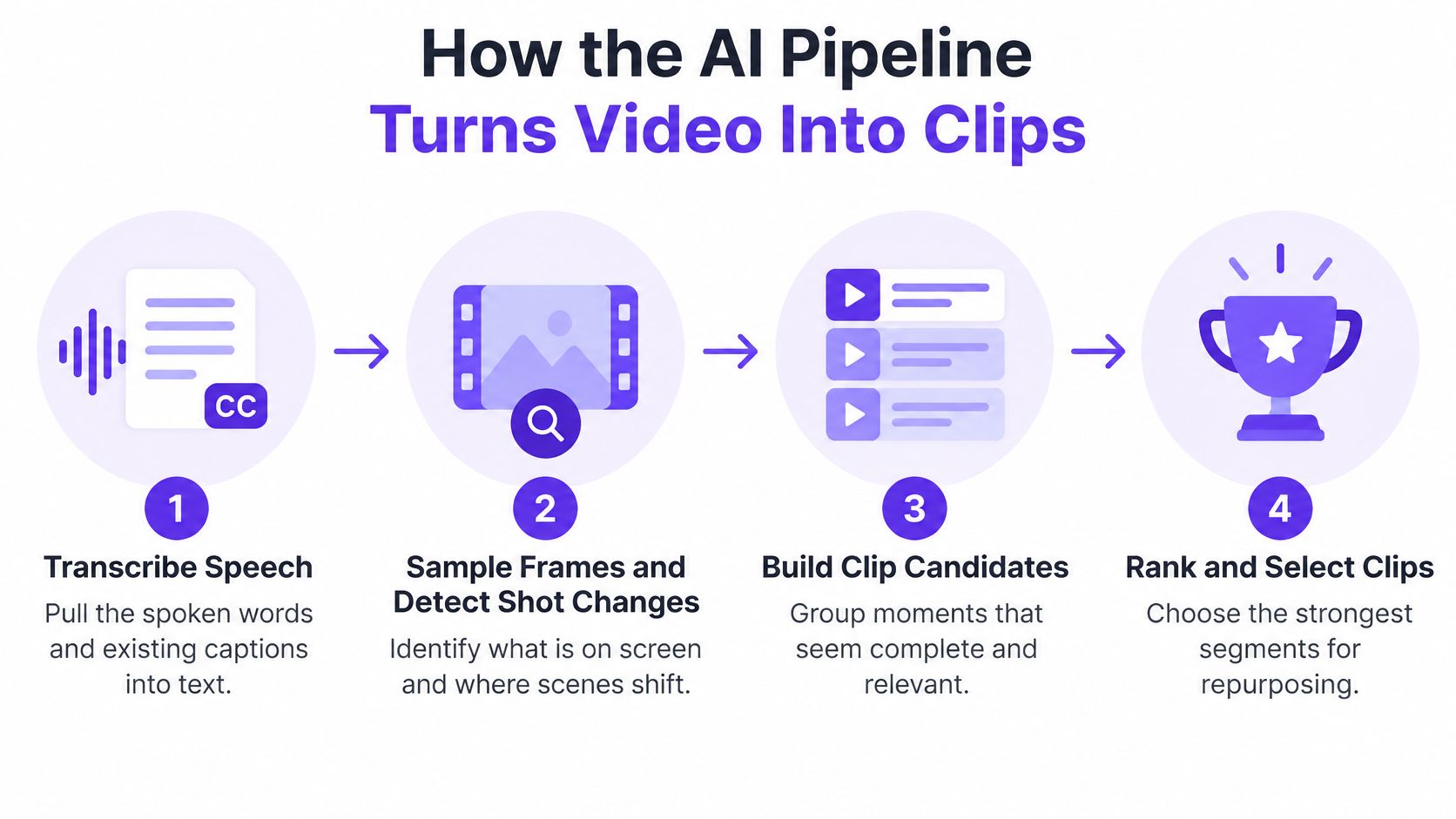
Here's what happens along the way:
Transcribe the speech. The system turns spoken words into text and pulls in existing captions when available. This is like creating a searchable script for the editor.
Sample frames and detect shot changes. It checks what's visible and where scenes shift, so the candidate moment isn't judged by words alone. A speaker's expression, a slide, or an on-screen demonstration may change whether the segment works.
Build time-indexed notes. The system ties ideas and visual information to points in the recording. That gives each candidate a trail back to the source, rather than leaving the editor to guess where a quote came from.
Rank moments for the job. The system scores candidate segments for relevance and production quality, then selects ones suited to an output such as a short, a quote clip, or a summary.
Reframe the selected moment. For a vertical clip, the crop should keep the speaker's face and relevant on-screen text visible. A technically vertical video can still be hard to follow if the crop hides what the speaker is discussing.
Draft the accompanying text. Captions, titles, descriptions, and post copy can come from the same recording, but they still need to be adapted to the intended platform and audience.
The LVSum benchmark for long-video summarization is built around web videos at least 10 minutes long, with human annotations and labels for the importance of specific intervals. That approach highlights why timecodes matter: each caption or highlight should point to the exact source interval for editing, subtitle synchronization, and fact-checking. A transcript tool such as a video transcript generator can also make it easier to work from searchable speech rather than replaying an entire recording to find a line.
A strong candidate needs enough context to make sense, continuous speaker audio, acceptable sound quality, and a clear opening or payoff. The system should also avoid selecting several sentences that sound punchy but repeat the same idea. One timeline might yield a concise answer for TikTok and a fuller instructional segment for YouTube Shorts. Those are different edits for different viewing purposes, not just different lengths.
The right source recording depends on the action you want a viewer to take. A creator trying to hold attention needs a different output from a local business trying to generate inquiries.
| Audience | Typical source | Main output | Metric to watch |
|---|---|---|---|
| Creators | Long tutorial or vlog | Several shorts plus one quote clip | Average view duration |
| Local businesses and real estate | Client Q&A or property walkthrough | Captioned clips with a booking link | Calls and form fills |
| Podcasters and interviewers | Full interview episode | Clips per guest moment plus a text summary | Completion rate and subscriptions |
| Educators and faith communities | Lecture or teaching session | Short explainers and shareable quotes | Shares and replies |
For creators, a tutorial can become several focused shorts, each built around a single useful point. A separate quote clip can carry one memorable line to another platform. Average view duration helps show whether viewers stayed with the clip, though it can't tell you on its own whether they took any action afterward.
For local businesses and real-estate professionals, a client Q&A or property walkthrough can answer one practical question per clip and direct viewers to a booking link. The key metric is not just attention. Calls and form fills help show whether people followed through. Give each post a clear next step, such as requesting a consultation or booking a viewing.
Podcasters and interviewers can select moments around distinct guest contributions rather than cut clips at arbitrary intervals. A text summary and show notes can help people decide whether to listen to the full episode. Completion rate and subscriptions provide useful signals about whether clips bring in interested viewers.
Educators and faith communities can turn a teaching session into short explainers or quotes that invite a reply or share. Taja AI is used by solopreneurs, realtors, and congregations, groups that may need a consistent posting routine without a full-time editor. For a congregation, for example, a concise clip could invite a response to a discussion question rather than just announce that a longer talk exists.
Choose the action first: decide whether you want a booking, a subscription, or a reply. Then choose a recording that already contains a useful moment for that action.
Start with a simple expectation. One recording produces a batch where a small share of clips draws most of the views. That pattern is normal. Treat each clip as a small test of an opening, a topic and an action, not as a guaranteed winner because it is short.
| Metric | What it tells you | Where to check | How to read it |
|---|---|---|---|
| Impressions | Reach of each clip | Platform analytics | Compare medians across the batch |
| Average view duration | Whether the opening hook holds | Platform analytics | Low values point to a weak first few seconds |
| Completion rate | Whether the clip ends on a satisfying payoff | Platform analytics | Compare within the same format only |
| Rewatches and shares | Which moments are worth saving | Platform analytics | Look for moments worth testing again |
| Link clicks or codes | Whether viewers take the business action | Trackable link or code | Judge against the original post over the same window |
A single average can mislead when two clips take off and eight stay quiet. Use the median to describe the typical result, then look at the spread to see how wide the range runs. If one opening holds attention for 12 seconds while the others lose viewers at second three, run that opening again with a different moment before you call it a rule. A guide to video analytics tools for creators can help you think through where to find those platform numbers.
Split discovery from conversion for every platform. Impressions, view duration and completion rate describe watching behavior. Clicks, calls, bookings or purchases show whether watching led somewhere. Give each asset its own hook and its own next step, then compare each repurposed post with the original over the same window.
More output helps only when it improves the next choice. Twenty assets mean little if you cannot name which opening earned the booking or the subscription. Keep a short log: opening line, clip length, call to action, median retention, clicks. Keep the patterns that repeat across two or three wins. Retire the rest. That log turns repurposing into a round of trials where human review decides what ships again.
A workable routine begins with a recording that has a clear subject and a purpose. The steps below give one recording a review, publishing, and measurement path across a week.
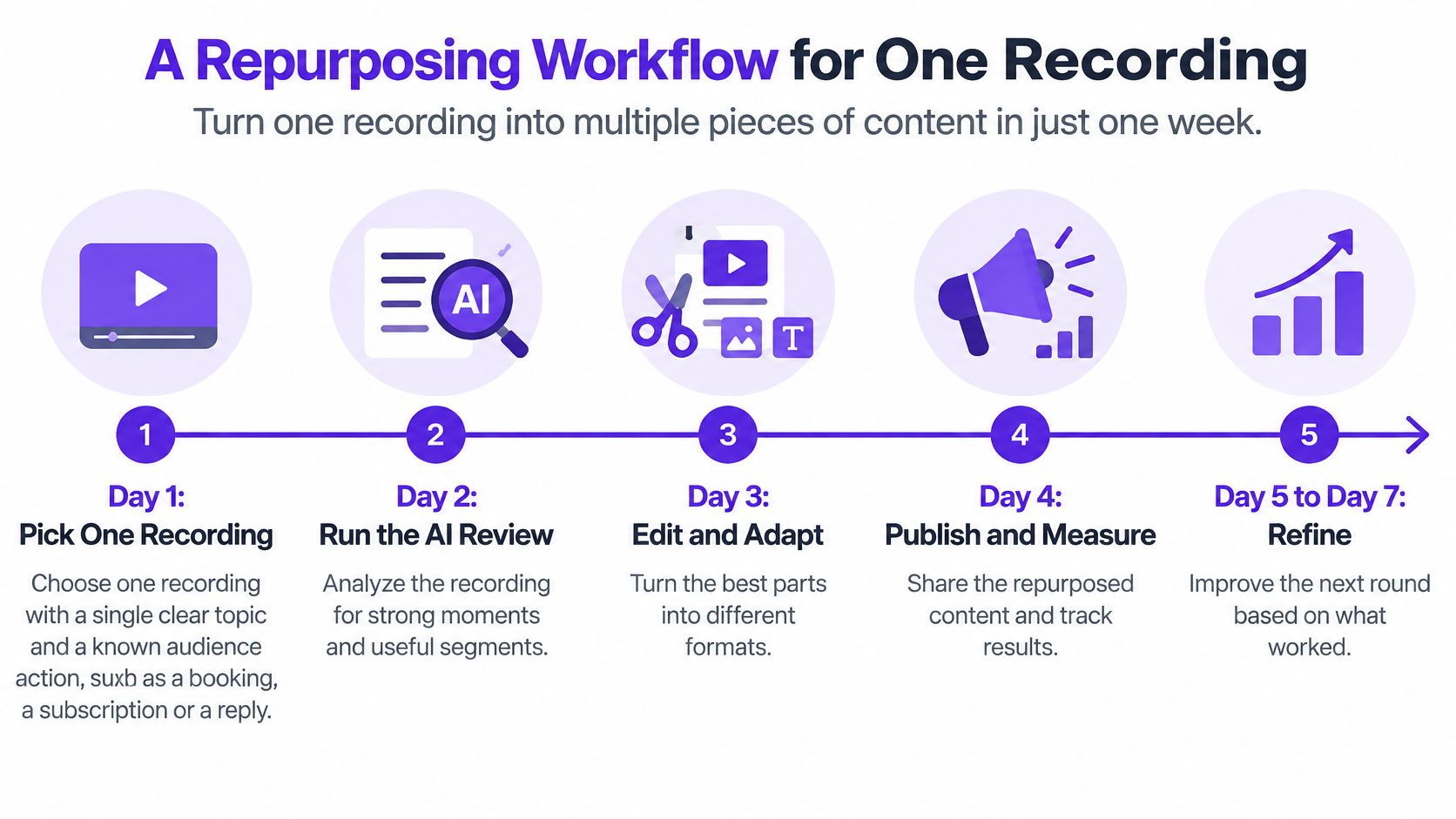
Pick the recording. Choose one video with a focused topic and a specific action in mind, such as a booking, subscription, or reply. If the source wanders across unrelated topics, the outputs are likely to wander too.
Run the AI pass. Generate candidate moments, captions, and text drafts from that recording. Taja AI says optimized and repurposed content is ready on its dashboard about 30 minutes after the video is added to a playlist, so the initial pass can fit into one work session.
Review against the source. Check every quote, number, date, and proper noun against its timestamp before approving anything. The common slip is to read a polished draft as proof it's accurate.
Create distinct versions. Make a small batch of clips for each platform, with different openings and a suitable call to action. Reusing the same hook everywhere makes it harder to learn which approach works for which audience.
Schedule across the week. Spread the posts out instead of publishing the entire batch at once. That gives each asset room to reach viewers and gives you a clearer record of which post produced which response.
Measure the batch. Track performance for a consistent period and compare medians, completion, and business actions. Don't let one breakout clip stand in for the whole batch.
Apply what you learned. Keep the opening patterns that performed well and use them to guide the next selection. The point is to start the next recording with a tested idea rather than a blank page.
This process doesn't require every clip to be perfect before it can teach you something. It does require a clear record of what you published and what you hoped each post would do. If a clip earns views but no meaningful action, decide whether its job was discovery or conversion before you label it a success or failure.
A 40-second clip works like a lab sample taken from a longer recording. Removed from the full conversation, a sentence can sound absolute when it was conditional, and a number can sound current when it was an example. That risk grows with volume. Many small businesses already use AI for content creation and social-media management, which makes a deliberate human review step more important as output grows.

Treat each batch as a measured experiment with a safety check before release. Keep the source timestamp attached to every clip and quote, so a reviewer can open the original moment in seconds. Flag numbers, prices, dates, names, and other proper nouns for verification against the recording. Separate direct quotations from summaries. A quote must match the speaker's words, while a generated summary should be labeled as a summary.
Assign approval to a named person. That person confirms claims, context, identity, and calls to action, plus consent and disclosures where they apply to the speaker, recording, or platform. The check is stricter for real-estate, financial, health, local-service, and faith-based content, where context and trust carry more weight. Use that same review pass to preserve brand voice consistency as the format changes from long video to short caption.
Check data terms before uploading client calls or unreleased material. Taja AI reserves the right to send user-uploaded data, including images, text, and other user-generated content, to third-party AI models for analytics, performance improvement, and other service enhancements. Make sure your team's permissions and privacy requirements are compatible with the tools you use.
Let AI assist with cutting and drafting. Concentrate human review where error costs the most.
Before adding more output, check that the process can preserve and evaluate what it creates:
If any answer is no, fix that gap before scaling. More posts won't solve missing approvals, weak attribution, or uncertainty about what happens to uploaded material.
Taja AI is one option to consider in a repurposing stack. It turns long-form uploads into shorts, clips, captions, thumbnails, and platform-ready posts, with scheduling across YouTube, Instagram, TikTok, Facebook, X, and LinkedIn from one dashboard. Its clip selection looks at emotional tone, pace, punchlines, and retention signals, and optimized content appears on the dashboard about 30 minutes after a video is added to a playlist.
When you compare tools, check input length, timestamp export, output formats, and the cost per clip you'd use. Taja AI offers a free 1:1 content consultation to assess fit against your recordings and audience. The next step is to choose one recording this week, run the workflow, and measure the batch before deciding whether to scale.
Taja AI turns long-form video into shorts, clips, captions, thumbnails, and platform-ready posts, giving you a practical way to test repurposing without treating every output as finished. Choose one recording, review the drafts, and track the audience action that matters to your business. Visit Taja AI to explore whether it fits your workflow.


We are blessed to work with leading brands & Companies


We try to make easy and simple for every professionals. Get 30 days free trial - No credit card required.


© 2025 Taja AI. All rights reserved.