.jpeg)
Impressions Click Through Rate: What Good Looks Like
Learn what impressions click through rate means, how to calculate it, realistic benchmarks for YouTube, TikTok and Instagram, and how to improve it.
5 min read
October 30, 2026

Learn repurposing content on LinkedIn with a 2026 playbook that turns long-form videos and posts into carousels, captions, and scheduled assets that convert.
Written by:


You finish a 25-minute video, export a captioned clip, paste the original title into LinkedIn, and wait. The post stalls. The source idea was solid, but the LinkedIn version feels like an upload rather than something made for the feed.
That distinction drives effective repurposing content on LinkedIn. You aren't converting files. You're translating an idea into a format, opening, pacing, and visual container that fit how LinkedIn users read, watch, save, and respond. LinkedIn's analytics distinguish reactions, comments, reposts, and other distribution signals, while Page analytics can show up to 365 days of performance history (LinkedIn's Page analytics documentation).
The practical question isn't “How many clips can we cut from this?” It's “Which LinkedIn format gives this idea the clearest chance to travel?”
A creator exports a webinar clip, keeps the YouTube title, copies a sentence from Instagram, and schedules the post. The reach disappoints, so the topic or algorithm takes the blame. The failure usually happened earlier. The team treated repurposing as file conversion, leaving the LinkedIn post without a reason to exist in the feed.
The same pattern appears in different forms. An Instagram caption reaches LinkedIn packed with emojis, lifestyle language, and an invitation to “drop a heart.” A webinar recording becomes audio-led video with no visual structure, giving viewers little reason to continue. A TikTok hook built for instant retention arrives without the context a professional audience needs to judge the idea.
A long video rarely contains one usable LinkedIn post. It usually holds several ideas, examples, and conclusions. The opening may spend time establishing credibility, spoken transitions may carry the logic, and the strongest point may arrive late. LinkedIn readers often need that point earlier, before the post reaches the “see more” break.
Native repurposing changes the editorial build:
Practical rule: Preserve the insight, not the packaging.
A useful LinkedIn content strategy framework begins with the audience's reading and decision-making context, then rebuilds the asset around it. One 25-minute video might produce a document teaching one process, a short native video answering one objection, and a text post taking a clear position. Each version needs a distinct job, argument, and stopping point.
The format decision also determines what to cut. A spoken aside may help in the original recording but weaken a document. A detailed example may deserve its own text post rather than being squeezed into a short clip. Repurposing teams that make these choices before editing ship fewer near-duplicates and more posts that stand on their own.
The source becomes raw material. The LinkedIn version becomes a native editorial product, built for a specific reader and a specific reason to respond.
Start with the reader's intended action, then choose the LinkedIn container. A process needs a format people can move through. A personal judgment needs room for voice. A visual comparison needs assets that make the differences immediately clear. The source file is only raw material.
Format benchmarks cited in current guidance place document and carousel posts around 7.0% engagement, compared with 4.3% for text posts, while multi-image posts sit around 6.8% (LinkedIn repurposing format benchmarks). Treat these figures as directional, not as a forecast for your account. Structured visual formats can make dense ideas easier to consume, while text remains effective when the argument itself is the product.
A document suits steps, comparisons, frameworks, and evidence that benefit from controlled pacing. Native video fits a personal explanation, behind-the-scenes observation, or concise demonstration. Text works when the value comes from judgment, a firm position, or a lesson that needs no visual support. Multi-image posts earn their place when each image advances a visible comparison, not when a team has spare graphics.
Technical setup still affects the result. Check LinkedIn's requirements during the editing handoff instead of assuming a file exported for another platform will behave correctly. Taja's LinkedIn video specifications guide covers the practical details for preparing native video.
Ask: What should the audience do with this idea?
Carousels can support saves and sustained reading because readers control the pace. Text posts can prompt more direct discussion when the point is specific enough to invite a considered response. Recruiters, buyers, and creator audiences may respond to the same topic through different formats, so use the signal you need rather than optimizing every asset for one surface-level interaction.
| Source Asset | Best LinkedIn Format | Primary Signal | Watch Out For |
|---|---|---|---|
| Long-form video with a teaching sequence | Document or carousel | Saves and sustained reading | Turning every spoken sentence into a slide |
| Long-form video with a personal viewpoint | Native video | Watch time and conversation | Reusing the original introduction |
| Podcast interview | Text post with pull quotes | Comments and qualified discussion | Posting audio without visual or written context |
| Blog article | Document carousel or commentary text | Saves, profile visits, and replies | Copying the article's structure word for word |
| Visual comparison or examples | Multi-image post | Swipes and reactions | Adding images without a clear argument |
| Audience question with useful responses | Poll with follow-up text | Responses and follow-up discussion | Asking a question that doesn't inform future content |
The choice becomes clearer once you define the primary signal. If the audience should remember a process, make the process navigable. If they should evaluate your judgment, give them a clear position in text or video. If the source lacks a distinct takeaway for any format, do not repurpose it yet. Rework the idea first, or retire the asset.
A recording can contain several usable ideas, yet none may fit the same LinkedIn format. Before production starts, log the source asset, topic, intended audience, central takeaway, supporting proof point, and question the content should answer. This gives the team an editorial brief instead of forcing someone to search a transcript for an angle under deadline pressure.
The workflow has four steps: identify strong source material, rewrite it for LinkedIn, match the medium to the idea, and distribute the variants across a schedule (LinkedIn repurposing workflow).
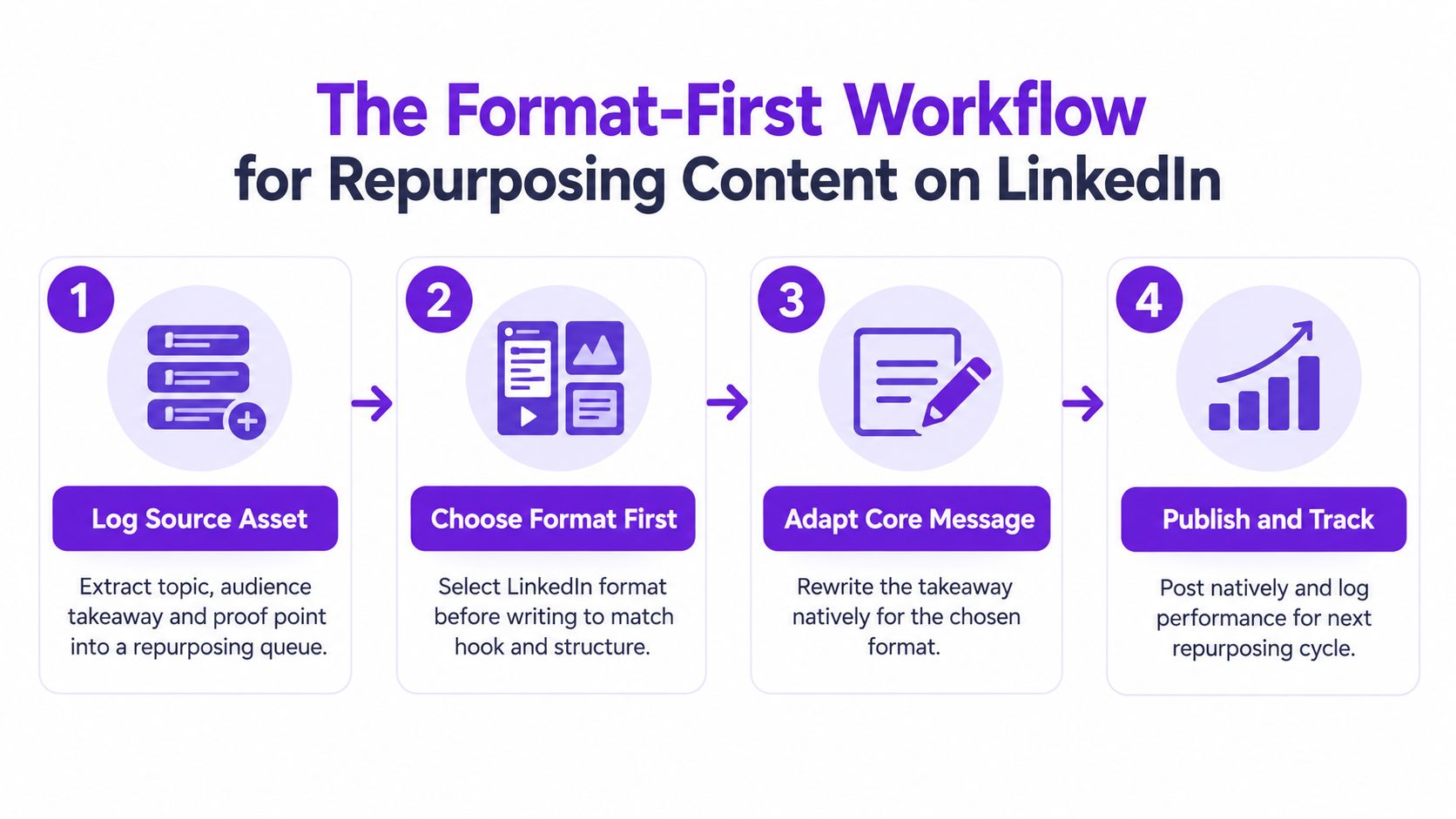
Step one is source selection. Review posts and assets with strong views, shares, or audience response, then record what made the idea useful. “High performing” is not enough. Capture the audience takeaway and the proof that supports it.
Step two is format locking. Choose the LinkedIn container before drafting. A document needs slide-level progression, a video needs a cold open and visual beats, and a text post needs a first line that works on its own. Starting with the transcript usually preserves the source structure, even when that structure does not suit the new format.
Step three is native adaptation. Build a complete experience for each version. A document can teach the process, a short native video can explain the sharpest insight, and a text post can state the opinion or implication. Keep the argument consistent, but do not make the assets identical or require readers to find one variant to understand another.
Step four is voice review and distribution. Check terminology, point of view, sentence rhythm, examples, and certainty. Schedule the variants separately, then record performance by format and source asset. A broader content repurposing strategy can guide work across channels, while LinkedIn still needs its own editorial pass. Tools such as Taja's content creation workflow can assist with production, but the team must decide whether the angle remains clear and credible.
Batch by source asset, not by format. Completing one source across its document, video, and text versions keeps the team in context and exposes contradictions before publishing. If no format can deliver a distinct takeaway, pause the repurposing queue and rework or retire the idea.
A repurposed asset can be useful and still fail before anyone reaches it. If the caption does not establish the value in the first two lines, the document, video, or image has little chance to earn attention. The caption must also give enough context for the attached asset to stand on its own.
Open with tension, an observation, or a specific claim. Four dependable patterns are:
Instagram-style openers packed with emojis often feel imported because they create visual energy without defining the professional problem. LinkedIn writing can remain warm, but it should identify the decision, constraint, or trade-off behind the post. A caption for a video should also tell readers what they will learn before asking them to watch.
Compare caption lengths across similar posts instead of assuming one ideal length fits every account. A short caption may support a strong visual. A longer one may be needed to frame a complex document or explain why a clipped idea matters. Record results by format and source topic, not impressions alone.
| Caption Length | Avg. Impressions | Comment Rate | Save Rate |
|---|---|---|---|
| 150 characters | Not provided in the verified data | Not provided in the verified data | Not provided in the verified data |
| 300 characters | Not provided in the verified data | Not provided in the verified data | Not provided in the verified data |
| 800 characters | Not provided in the verified data | Not provided in the verified data | Not provided in the verified data |
| 1300 characters | Not provided in the verified data | Not provided in the verified data | Not provided in the verified data |
The blank table is deliberate. Do not fill it with borrowed benchmarks. Use your LinkedIn analytics to compare reactions, comments, reposts, and the performance history available for each version (LinkedIn Page analytics). Change one meaningful variable at a time, such as the opening, format, or discussion prompt, so the result remains useful.
Hashtags should identify the topic, not rescue a weak caption. Choose a small mix of branded, niche, and subject tags, then adjust them when the post's angle changes. Broad tags added to every post rarely clarify the message. Readers should understand the argument without them.
A generic caption says: “We had a great conversation about content marketing. Watch the clip and let us know what you think.”
A stronger version says: “Teams don't have a content shortage. They have a packaging problem. This clip breaks down how to turn one useful discussion into separate LinkedIn posts, each built for a different reader action.”
The second caption gives the video a reason to earn attention and states a point of view before playback begins. If the source cannot support a distinct hook or takeaway, do not force a caption around it. Rework the angle or leave that asset unpublished.
A repurposing queue needs spacing, intent, and a clear stop point. Publishing the same source as a document, video, and text post within a tight cluster makes the audience feel repetition, even when the production team sees three separate files. Choose the format first, then decide whether the idea still deserves another slot.
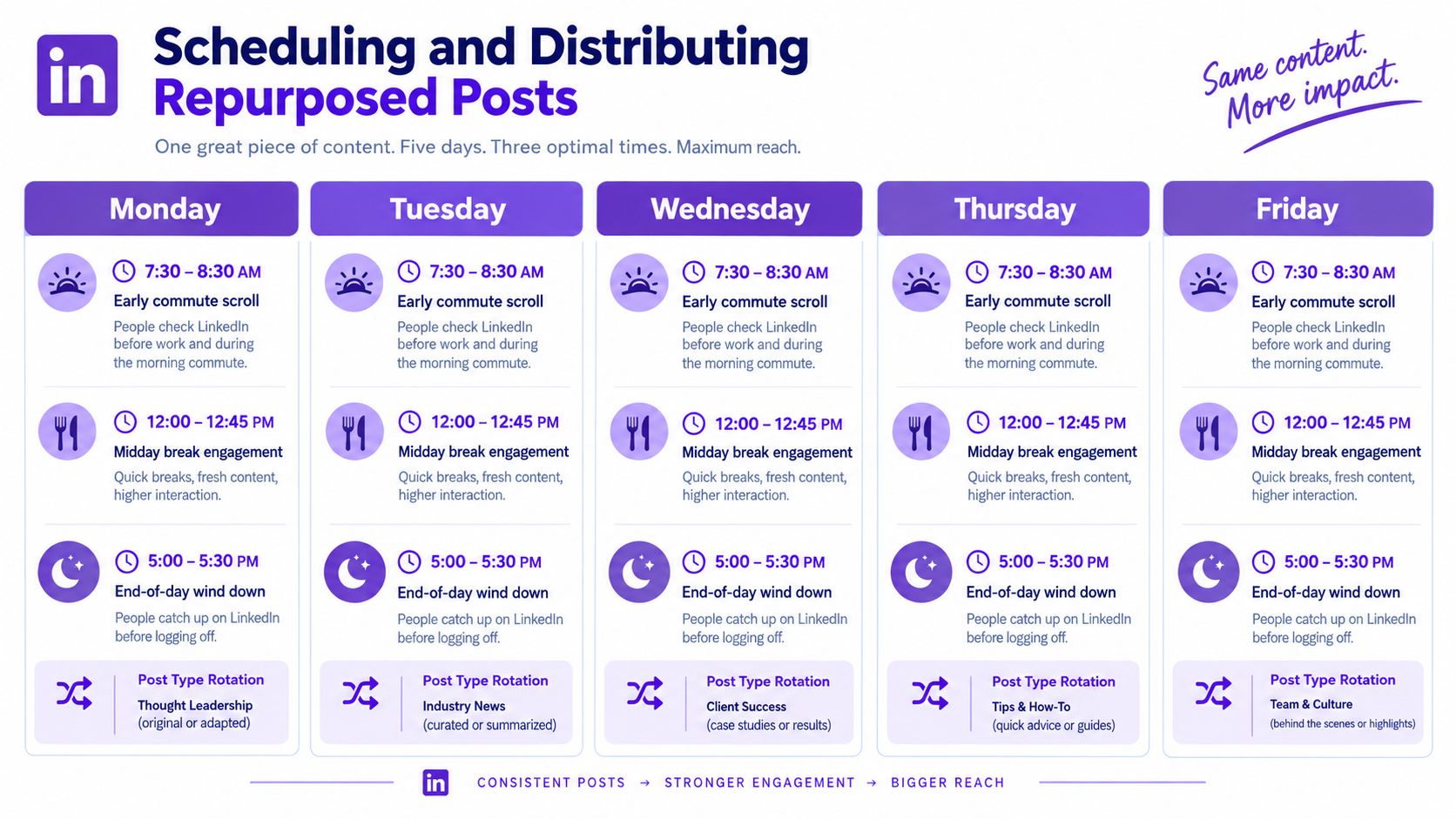
Schedule around your audience's time zone and test the three working windows: 7:30 to 8:30 AM, 12:00 to 12:45 PM, and 5:00 to 5:30 PM. Treat them as starting points, not guarantees. Analytics should determine which window fits the response you need, whether that means discussion, clicks, or completion of a video.
A Monday-to-Friday grid can separate formats while giving each idea room to develop:
Do not force every derivative from one source into the same week unless the topic is unusually timely. Spreading assets across multiple weeks gives the team cleaner evidence about which transformation works and reduces audience fatigue. If the first version receives little response, pause the remaining versions and reassess the angle before filling the queue.
LinkedIn's native scheduler works well when the team needs direct publishing and simple queue visibility. Third-party tools can support calendars, approvals, and cross-channel coordination, but every scheduled post still needs a final review. Formatting, mentions, links, and document uploads may change across tools.
The operating discipline is distribution separation. Assign each asset a source ID, format, scheduled date, and audience takeaway. Before approval, scan the calendar for repeated hooks, identical opening lines, and posts that ask for the same action.
Use this video placement as a production reference for a scheduling workflow, then adapt the routine to your team's approval process.
Protect weekends from accidental auto-publishing. A Friday review should confirm that Saturday posts are intentional, current, and appropriate for the audience. If a post depends on a weekday conversation, hold it instead of letting the scheduler publish it automatically.
A post can perform well and still be a poor candidate for another publication. Before reusing it, check whether the idea remains relevant, whether the new format adds a distinct takeaway, and whether the audience has a reason to see it again.
Selective reuse can work. A 2025 analysis found that 17% of top-performing posts were reposts, 36% of profiles had a repost among their top three posts, and 67% of reposts outperformed the original post (LinkedIn personal-branding analysis). Those findings support reposting as a practical growth tactic, not as permission to repeat every successful sentence indefinitely.
Rewrite a post when its underlying insight still helps the audience, while its presentation needs work:
A useful rewrite changes the framing, sequence, example, or implication. Swapping a few words creates surface variation without giving readers a fresh reason to care.
Repost an evergreen idea when it remains accurate, relevant, and likely to reach people who missed it. Review available LinkedIn history to compare the repost with the original and other repurposed versions. Check reactions, comments, reposts, and profile actions rather than judging the original only by its first publication window.
Choose retirement when the claim is outdated, your position has changed, or the topic has appeared too often in the recent feed. Retirement protects the quality of the archive and keeps a high-volume publishing queue from narrowing how the audience understands your expertise.
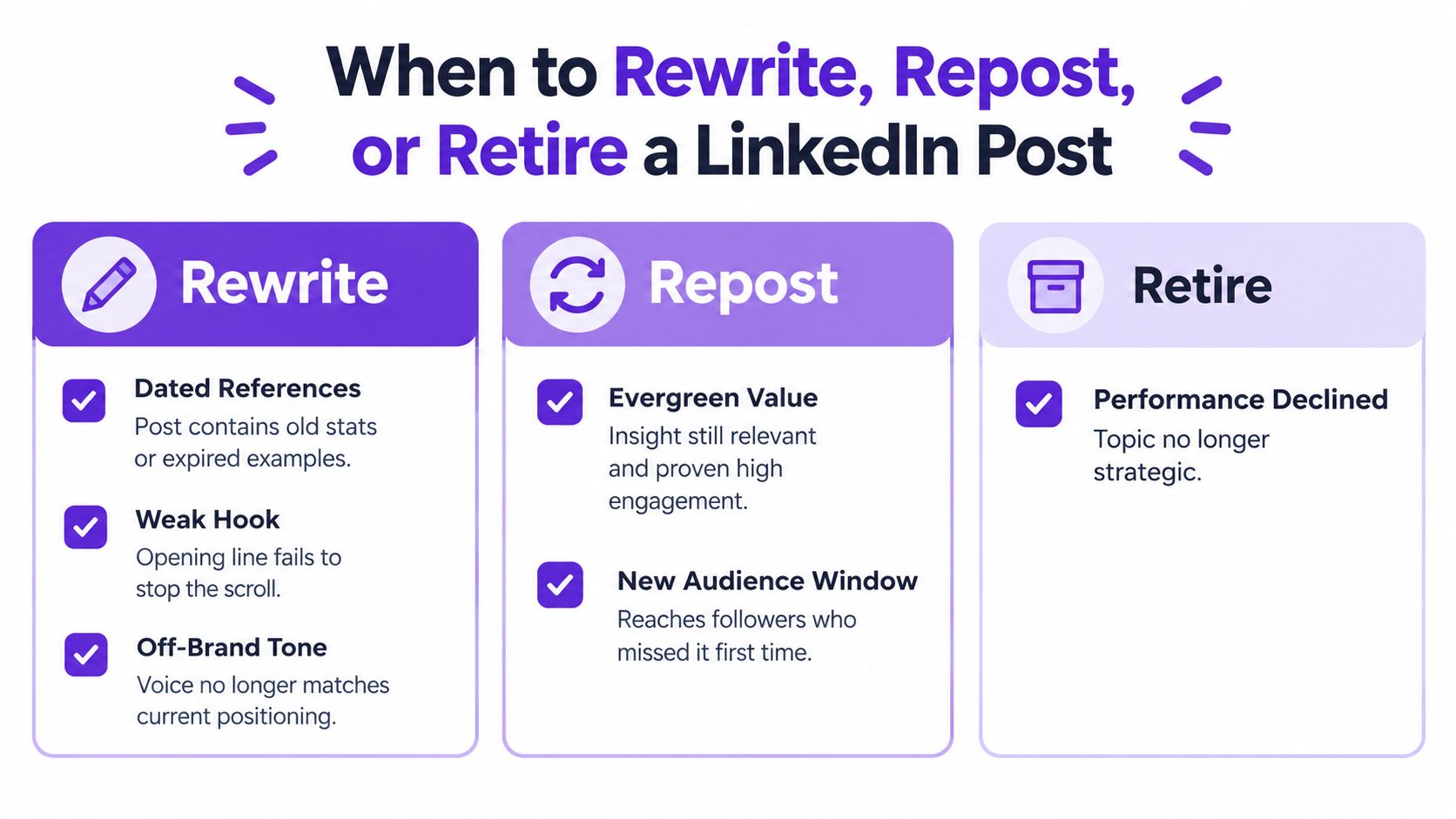
Run a quarterly audit with four questions:
No verified universal threshold defines content fatigue or diminishing returns. Record audience overlap, repeated language, and format history instead of relying on an invented repost limit.
Impressions show whether LinkedIn distributed a post. They do not show whether the right buyer noticed it, trusted the author, or moved closer to a conversation. Measure the path from attention to commercial action.
Run a weekly measurement loop. Export LinkedIn analytics, tag every post with its source asset and format, then connect meaningful actions to CRM activity. Platform analytics provide reactions, comments, reposts, and historical performance for consistent comparison (LinkedIn Page analytics help).
Build the dashboard around actions that indicate buying interest:
Record assisted touches as well. A document can generate saves and profile visits, while a later text post prompts a direct inquiry. Credit the journey across source asset, format, audience action, and eventual pipeline touch instead of assigning all value to the final click.
| Format | Impressions | Engagement Rate | Profile Views from ICP | Pipeline Touches |
|---|---|---|---|---|
| Repurposed document | Track in LinkedIn analytics | Track in LinkedIn analytics | Track in CRM or tagged analytics | Track by source ID |
| Repurposed native video | Track in LinkedIn analytics | Track in LinkedIn analytics | Track in CRM or tagged analytics | Track by source ID |
| Repurposed text post | Track in LinkedIn analytics | Track in LinkedIn analytics | Track in CRM or tagged analytics | Track by source ID |
| Original post | Track in LinkedIn analytics | Track in LinkedIn analytics | Track in CRM or tagged analytics | Track by source ID |
Use the table to compare your own formats, not to copy platform averages. Audience, topic, profile strength, and publishing history affect results, so a consistent source tag and format label matter more than a borrowed benchmark. A Notion or Sheets dashboard is enough for a small team.
For a broader method of connecting social activity to business outcomes, use The Social Search ROI guide as a planning reference. The useful test is specific: which assets created qualified attention, which supported consideration, and which produced a pipeline touch?
Taja AI turns long-form video into LinkedIn-ready posts and other platform-specific assets, with direct publishing and auto-scheduling available from one workflow. Upload a source video, review the generated adaptations, and visit Taja AI to start free without a credit card.


We are blessed to work with leading brands & Companies


We try to make easy and simple for every professionals. Get 30 days free trial - No credit card required.


© 2025 Taja AI. All rights reserved.