.jpeg)
10 Best Video Analytics Tools for Creators in 2026
Compare 10 video analytics tools by features, pricing tiers, and best use cases, from YouTube Studio to Wistia. Includes a checklist for choosing one.
5 min read
October 31, 2026

Explore 10 repurpose examples for turning long-form content into clips, posts, blogs, emails, and lead magnets across creator and business niches.
Written by:


One long-form asset can power a full content system, yet many teams still publish a podcast, sermon, webinar, interview, or educational video once and move on. That leaves useful ideas, proof points, emotional moments, and calls to action buried inside an expensive source asset.
The opportunity is larger than simple duplication. Effective repurposing extracts distinct moments and rebuilds them for different audience contexts, so a podcast insight becomes a short video, a search-focused article, a newsletter lesson, or a conversion asset without forcing every audience to consume the original recording. One 2026 industry roundup reports that 94% of marketers repurpose content in some form, while 60% repurpose content 2–5 times, showing how established this workflow has become (content repurposing statistics).
The 10 repurpose examples below cover podcasts, real estate, faith organizations, creators, and small businesses. Each one examines the source material, the assets worth extracting, platform fit, audience-journey purpose, trade-offs, and a repeatable workflow. Taja AI can support the process by analyzing one upload and generating shorts, clips, captions, thumbnails, blogs, and platform-specific posts. Human review still matters for context, accuracy, permissions, and brand voice.
A long interview, webinar, podcast recording, property tour, or educational YouTube video contains multiple short-form stories. The strongest clips usually aren't simple excerpts. They have a clear tension, a useful answer, a surprising observation, or an emotional turning point that makes sense without the full recording.
Start by marking the source video's golden moments. Look for a sharp opinion, a direct answer, a customer objection, a before-and-after explanation, or a moment when the speaker changes tone. A real estate professional might turn a full property tour into separate clips about the kitchen, neighborhood, financing considerations, and one feature buyers often overlook.
TikTok, Instagram Reels, and YouTube Shorts each reward immediate clarity, but the same edit shouldn't be posted everywhere without adjustment. Use a platform-native opening, readable captions, vertical framing, and supporting visuals such as B-roll or on-screen text. Short-form video can hold attention particularly well, with 50% of viewers watching videos under 90 seconds in full, according to a recent summary of repurposing data (short-form video and content repurposing statistics).
A practical workflow looks like this:
Practical rule: A short clip should reward someone who never watches the original, then give interested viewers a reason to continue.
Taja AI can reduce the manual work involved in automating content creation, but an editor should still check every cut for missing context, inaccurate captions, and an awkward ending.
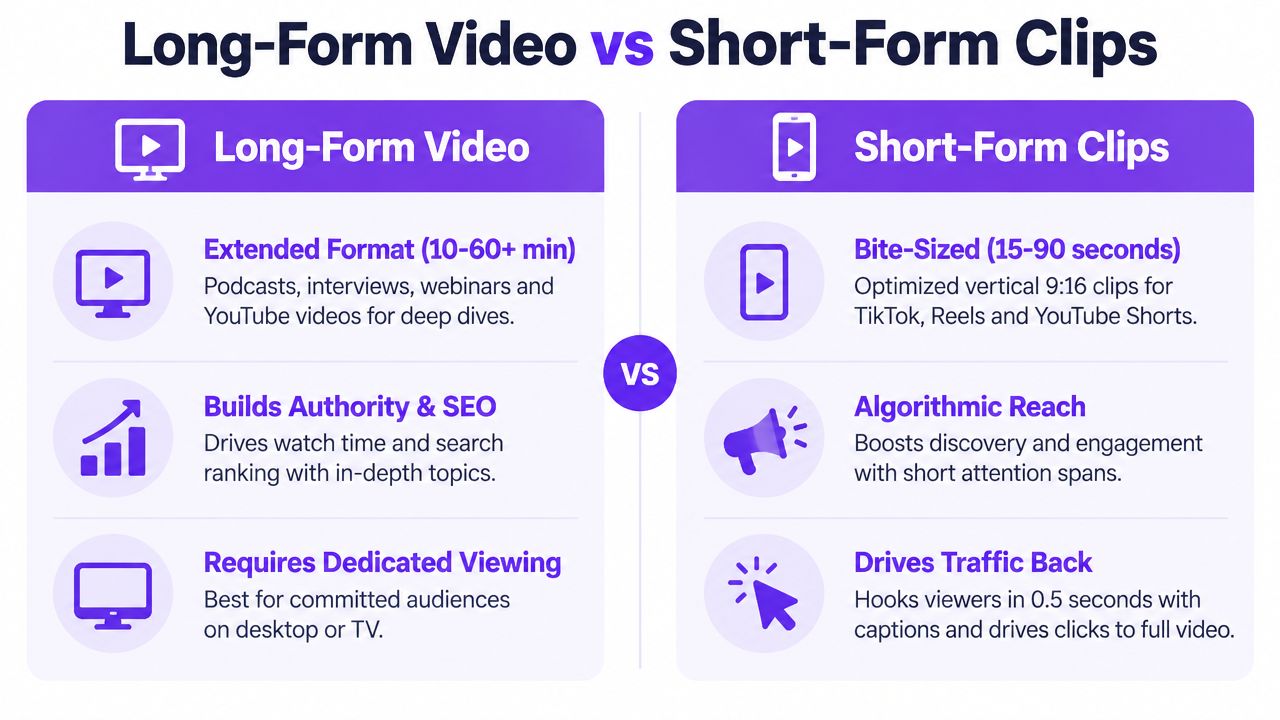
The long-form source remains the authority asset. The clips handle discovery.
Video earns attention through voice, presence, and demonstration. Articles earn attention through search, scanning, bookmarking, and sharing. Turning a transcript into a blog post connects those behaviors, but publishing the transcript unchanged usually produces a weak reading experience.
Begin with a transcript cleanup pass. Remove filler, repeated points, unfinished sentences, and conversational detours. Then reorganize the material around the reader's problem, not the order in which the guest happened to answer questions. A podcast about first-time property investment might become an article organized around financing, due diligence, common mistakes, and next steps.
A strong article adds structure without changing the speaker's meaning. Pull out the central argument, create descriptive subheadings, add a short opening summary, and link to the original episode. Timestamps can serve readers who want to switch back to video or audio, while internal links can move search visitors toward related services or products.
This workflow also works well for faith organizations. A sermon transcript can become a thoughtful reflection with discussion prompts, provided the editor preserves theological context and doesn't reduce a nuanced message to disconnected soundbites.
Use a transcript tool or workflow that helps you generate a video transcript, then edit the output as source material rather than finished prose. For creators working from YouTube, converting YouTube to text on macOS can provide another starting point.
The main trade-off is speed versus editorial quality. Automation can expose topics and passages quickly, but a human still needs to verify names, terminology, claims, links, and the article's search intent. The finished post should feel written for readers who prefer text, not like a recording with punctuation added.
A single recording can supply a collection of social posts, but each platform needs a different entry point. The core idea may stay consistent, while the hook, length, visual treatment, and call to action change.
For a real estate agent, one property video might produce an Instagram carousel about the home's best design details, a Facebook post inviting local questions, a LinkedIn post about market considerations, and an X thread explaining the buying lesson behind the listing. A coach can extract one principle from a client call and turn it into a professional insight, a casual video script, and a discussion prompt.
Start by extracting several content atoms:
Then package those atoms natively. LinkedIn usually benefits from context and a clear professional lesson. Instagram can use a visual sequence and a caption that encourages saving or sharing. TikTok needs a conversational opening and strong visual pacing. Facebook often works better when the post reflects a local or community concern. X can turn the same argument into concise observations or a threaded narrative.
Don't copy one caption across every channel. That saves a few minutes but makes the content feel imported, and the calls to action often stop matching audience behavior. Batch creation helps, but schedule variations rather than identical duplicates.
A useful test is to ask whether each post makes sense to someone who hasn't seen the source video. If it does, the asset has earned its place. If it only points vaguely toward the original, it still needs editing.
Email gives repurposed content a more intentional setting. A subscriber has already allowed you into an inbox, so the message can develop one useful idea rather than competing only for a passing scroll.
A podcaster can turn an episode into a short recap, a favorite quote, a practical lesson, and a link to the full recording. A faith organization might extract the central sermon theme, add reflection questions, and invite members to a gathering or discussion. A real estate educator can turn a training video into a weekly tip for agents, with one action to apply before the next message.
Don't paste a full transcript into the newsletter. Extract the strongest lesson and rewrite it in an email voice. A concise summary can introduce the topic, followed by a few takeaways and one relevant call to action, such as watching the full video, registering for a webinar, downloading a guide, or replying with a question.
Subject lines should create curiosity without exaggerating the source. The body should make the benefit clear quickly, especially for readers who scan on mobile. Segmenting by interest can also improve relevance. A local service business may send different versions to homeowners, property managers, and past customers because the same educational video serves different needs.
The trade-off is reach versus depth. One newsletter cannot carry every useful point from a long recording, and trying to include everything weakens the message. Choose the point that fits the subscriber's current stage. Discovery subscribers may need a useful insight, while warm prospects may need a practical example and a next step.
Use the original video as the deeper resource. Email should make the source easier to approach, not compete with it.
Some source assets contain information that readers need to compare, remember, or share. A market analysis video, fitness lesson, product walkthrough, or research presentation can become a visual summary when its ideas have a clear sequence or contrast.
A real estate professional could turn a neighborhood analysis into a visual guide covering transport, amenities, buyer considerations, and local context. A fitness coach might convert a training explanation into a movement sequence. A small business could transform a process demonstration into a one-page guide that customers can save or share with colleagues.
The most common mistake is trying to compress the entire source into one crowded graphic. Choose one idea, one process, or one decision framework. Use short labels, strong hierarchy, readable contrast, and enough white space for the asset to work on a phone.
A useful production sequence is:
Infographics work best as trust-building or lead-generation assets when they teach something specific. They work poorly when they become branded posters with little practical value. If the source contains sensitive community, financial, or health information, check every label and qualification before publishing.
For teams that want to convert structured ideas into social carousels, ViralBrain's carousel generator is one possible part of the production workflow. Design assistance can speed up layout, but the source logic still needs an editorial owner.
Video isn't always the best format for the audience's situation. An educator, interviewer, or webinar host can extract the audio track, refine the structure, and publish an audio-first episode for people who listen while traveling, exercising, or completing routine work.
The source may be a recorded interview, a course lesson, a panel, or a long educational video. Begin by removing visual references that don't translate to audio. Phrases such as “look at this chart” or “as you can see on screen” need either a spoken explanation or removal. Add an introduction that frames the episode, clear transitions between topics, and show notes with relevant links.
Uploading a video soundtrack can sound unfinished. Listeners notice long pauses, inconsistent volume, abrupt endings, and references to visuals they can't see. A clean audio edit, descriptive title, and useful episode summary make the repurposed version feel like a real product.
For a faith organization, a sermon audio feed can serve members who missed a service. For a creator, a video essay can become an audio series. For a business, a webinar can become a focused episode that answers one customer problem instead of preserving every live-event aside.
Audio usually supports authority and retention more than immediate discovery. Short clips and social posts can introduce the idea, while the podcast gives the audience a deeper, lower-friction way to spend time with the subject. The trade-off is that audio loses demonstrations, screens, facial expression, and visual proof. If those elements carry the argument, add verbal explanation or keep the video as the primary asset.
A single interview or business video can become a LinkedIn series when it contains a point of view, a lesson from experience, or a method other professionals can apply. The series format works because each post earns attention independently while contributing to a broader argument.
A SaaS founder might extract lessons from a product launch. A real estate professional can turn a market briefing into posts about buyer behavior, negotiation, and deal analysis. A local service provider can explain how a recurring customer problem gets diagnosed and resolved. A coach can separate a methodology into individual lessons, then use comments to discover which topic deserves deeper treatment.
Don't divide a video mechanically by timestamp. Divide it by audience question. One post can challenge a common assumption, another can explain the process, and another can describe the mistake that creates avoidable cost. Each post needs its own opening, context, and question.
LinkedIn readers often respond better to a specific observation than a generic motivational statement. Use short paragraphs, concrete examples, and a closing prompt that invites professionals to share their experience. Tagging should be relevant, not decorative, and a post shouldn't depend on a viewer clicking away to understand it.
A series can build authority, but it also carries a consistency risk. If every post repeats the same claim, the audience sees volume rather than insight. Keep a source note for every statistic, customer reference, and attributed statement, then review the posts together before scheduling.
Taja AI's guide to repurposing content on LinkedIn can help shape the channel-specific workflow. The tool can accelerate extraction and formatting, while the subject-matter expert should make the final judgment about tone and professional accuracy.
Repurposing becomes especially valuable when the source already teaches a process. A webinar, course lesson, property-investment training, product demonstration, or home-improvement video can become a guide, template, checklist, workbook, or decision aid.
The key is to create a resource that solves a defined problem. A real estate investor might turn an introductory lesson into a due-diligence guide. A software company can transform a product demo into a comparison worksheet. A local contractor can offer a home-maintenance planning document based on an educational video. A congregation can provide discussion material based on a teaching series.
A downloadable asset shouldn't be a transcript with a cover page. Convert explanations into fields to complete, questions to answer, steps to follow, or decisions to make. Remove stories that don't help the reader act, but keep examples where they clarify the process.
Lead magnets belong late in the audience journey because they ask for an exchange, usually contact information. Discovery clips and social posts can introduce the problem. The guide demonstrates practical value. A follow-up sequence can then direct the subscriber toward a consultation, event, product, or full-length resource.
The trade-off is specificity versus audience size. A broad guide may attract more casual interest but produce less useful leads. A narrowly defined resource may reach fewer people while speaking much more clearly to the customers you can serve.
Promote the resource from the source video, related posts, email, and relevant website pages. Before publishing, confirm that every promise in the landing page matches what the download delivers.
Long-form creators often treat publishing day as the end of a video's life. YouTube Community posts offer a way to keep the conversation active between uploads using questions, polls, behind-the-scenes moments, and short educational prompts.
An educator can pull a quiz question from a lesson. A fitness creator can ask which training topic deserves the next video. A real estate educator can invite predictions about a local market issue. A faith organization can use a reflection question from a sermon to encourage discussion beyond the service.
A Community post shouldn't announce that a video exists. Pull out an unresolved question, a surprising choice, a production detail, or a small lesson that invites response. Polls work best when the options reveal something useful about the audience, such as what they struggle with or which topic they want explained next.
The strongest workflow starts during the original edit. Mark moments that can become questions, behind-the-scenes posts, or previews. After publication, use responses to shape follow-up content. This turns engagement into research rather than treating comments as a vanity metric.
There is a clear trade-off between conversation and control. Open questions may produce valuable audience language, but they can also attract off-topic replies or expose disagreements that require moderation. Assign someone to review comments, answer thoughtfully, and remove content that violates community standards.
Community content sits between discovery and trust. It keeps existing viewers involved, gives new viewers a reason to inspect the channel, and helps the creator understand which parts of the source deserve another treatment.
Long interviews and webinars often contain customer stories that deserve their own packaging. A full customer conversation may include the original problem, objections, decision process, experience with the product or service, and outcome. Those elements can become short testimonial videos, written case studies, landing-page proof, and sales enablement assets.
A software company might separate a customer's initial challenge from the implementation lesson and the final recommendation. A real estate coach can extract an agent's account of learning a new process. A fitness coach can turn a longer transformation interview into a short statement about the client's experience. A local service provider can combine a customer's spoken review with project footage.
Permission comes before editing. Confirm that the customer agreed to the intended channels and uses, especially if the content will appear in advertising, on a landing page, or in a sales presentation. Avoid cutting a statement so tightly that it changes the speaker's meaning.
A useful testimonial clip includes a recognizable problem, a specific experience, and a clear result when the customer has provided one. Don't add numbers, outcomes, or claims that the source doesn't support. If a result is material to the sale, pair the video with a written case study that explains the context.
Testimonial assets support conversion, unlike discovery clips that primarily earn attention. Place them near a relevant offer, pricing explanation, consultation form, or product comparison. The trade-off is authenticity versus polish. Overproduced edits can make a genuine story sound scripted, while raw footage may contain distracting pauses or unclear context.
Rotate stories by customer type and use case. One testimonial rarely answers every buyer's concern, but a collection of specific stories can help prospects recognize their own situation.
| Repurposing Type | Implementation Complexity 🔄 | Resource Requirements ⚡ | Expected Outcomes 📊⭐ | Ideal Use Cases 💡 | Key Advantages |
|---|---|---|---|---|---|
| Long-Form Video to Short-Form Clips | Medium, automated scene detection + manual curation | Low–Medium, editing tools, captions, thumbnails | ⭐📊 High reach & engagement; drives traffic to originals | Podcasts, interviews, webinars for social snippets | Scales output quickly; cost-effective; fits short attention spans |
| Blog Posts and Articles from Video Transcripts | Medium, clean-up & restructure for written flow | Low, transcription + SEO/editorial time | ⭐📊 Improved SEO, organic traffic, long-term discoverability | Tutorials, trainings, course content, SEO strategies | Captures search traffic; extends content lifespan |
| Social Media Posts and Captions | Low, template-based copy + tone adaptation | Low, scheduling tools, variant creation | ⭐📊 Increased posting frequency and multi-platform engagement | Brand awareness, A/B testing messaging, cross-posting | Consistent presence; saves posting time; platform-tailored copy |
| Email Newsletter Content | Low–Medium, extract takeaways & craft sequences | Low, email platform, templates, segmentation | ⭐📊 High ROI; deeper subscriber relationships & repeat traffic | Lead nurturing, course updates, episode recaps | Converts engaged audience; drives site returns |
| Infographics and Visual Summaries | Medium, design and data visualization work | Medium, design tools or templates, assets | ⭐📊 Very high shareability and retention; strong lead magnet | Data-heavy reports, tutorials, marketing reports | Boosts shares; visually condenses complex info |
| Podcast Episodes and Audio Repurposing | Low, audio extraction + light editing | Low, audio editor, host/distribution platforms | ⭐📊 New audio audience; extended content lifespan | Interviews, lectures, educational series | Reaches on-the-go listeners; low production barrier |
| LinkedIn Content Series and Thought Leadership | Medium, series planning & professional tone polish | Low, writing time, engagement management | ⭐📊 Builds authority; generates high-quality professional leads | B2B founders, executives, niche experts | Establishes credibility; attracts inbound opportunities |
| Lead Magnets and Downloadable Resources | Medium, design + gating + follow-up sequence | Medium, design, landing page, email automation | ⭐📊 Email list growth; lead qualification & long-term ROI | Solopreneurs, coaches, SaaS product funnels | Converts viewers to leads; valuable asset for nurture |
| YouTube Community Posts and Engagement Content | Low, lightweight posts, polls, teasers | Low, simple assets, posting cadence | ⭐📊 Improved channel engagement & watch time | Active creators (1k+ subs) wanting off-video touchpoints | Keeps audience engaged; quick feedback loop |
| Testimonial and Case Study Videos | Low–Medium, extract clips, edit, obtain permissions | Low, editing tools, client coordination | ⭐📊 Strong conversion lift through social proof | SaaS, coaches, service businesses, landing pages | Authentic proof that boosts trust and conversions |
The 10 repurpose examples work best when you assign each derivative asset a job. Short clips, social posts, and YouTube Community content support discovery. They introduce ideas, create curiosity, and help unfamiliar viewers find the source. Blogs, newsletters, LinkedIn series, and podcasts build trust by adding explanation, consistency, and a deeper point of view. Lead magnets, testimonials, and case studies support conversion by giving prospects something practical or credible to act on.
Start with one strong long-form source. It might be a podcast episode, sermon, webinar, property tour, customer interview, or educational video. Don't begin by asking how many assets you can create. Ask which moments solve audience problems, demonstrate expertise, answer objections, or create a natural next step.
Then create a simple extraction brief:
Schedule distribution over several weeks so the source keeps working after its initial release. One industry analysis reports that creation and editing represent 56.9% of total reported production time, compared with 16.1% for review and approval (video repurposing workflow analysis). That makes extraction and editing obvious places to improve efficiency, but it also reinforces why approval shouldn't disappear. Faster production is useful only when the published assets remain accurate and appropriate.
Systematic repurposing can improve performance when adaptation is deliberate. A documented case study describes one webinar becoming five blog posts, three short videos, and ten social snippets, with overall content engagement increasing by 35% in one quarter (SaaS content repurposing case study). Treat that result as an example of what format-specific adaptation can achieve, not a promise for every business.
Repurposing works when every derivative asset earns attention in its native format. It fails when teams copy the original and call the work finished.
Taja AI can reduce the manual work involved in extracting clips, formatting vertical video, drafting captions, creating thumbnails, and preparing blogs or platform-specific posts from one upload. Its outputs still need human review for context, accuracy, permissions, and final brand decisions. A small business owner may use automation to create the first draft, then spend the saved time choosing the right hook and refining the call to action. A marketing team can use the same approach with an approval step before scheduling.
Review performance after each distribution cycle, but don't judge every asset by the same outcome. A short may earn discovery, a blog may support search, a newsletter may deepen the relationship, and a testimonial may assist a sales conversation. Keep the strongest topics, hooks, objections, and formats in a winners library, then build the next source around what your audience responded to.
Choose one recording this week. Mark its strongest moments, assign each one an audience-journey job, and publish the first adapted asset before producing another long-form piece. A repeatable system begins with one source, one editorial decision, and consistent platform-native execution.
Use Taja AI to turn one long-form video into ready-to-publish shorts, clips, captions, thumbnails, blogs, and platform-specific posts, then review the drafts for context and brand voice. Visit Taja AI to upload your next podcast, webinar, interview, sermon, or educational video and start building a repeatable content system.


We are blessed to work with leading brands & Companies


We try to make easy and simple for every professionals. Get 30 days free trial - No credit card required.


© 2025 Taja AI. All rights reserved.