.jpeg)
Short Form Video Creation: The Complete Step-by-Step Guide
Master short form video creation with actionable steps for scripting, shooting, editing, and distributing high-performing clips. Build your system in 2026.
5 min read
October 6, 2026

Master local business video marketing with this step-by-step guide. Learn to create, optimize, and repurpose videos for local SEO and a measurable ROI.
Written by:


89% of people say a video has convinced them to buy a product or service, according to SundaySky's 2025 video marketing statistics. For a local business, that should change how you think about content.
Video isn't a side project anymore. It's a sales tool, a trust builder, and, if you set it up properly, a repeatable system that keeps working after you've stopped filming. The businesses getting traction with local business video marketing usually aren't the ones with the fanciest cameras. They're the ones that know how to turn one useful recording into weeks of content across the platforms their customers already use.
That matters because most local owners don't have spare hours for constant posting. They have jobs to run, staff to manage, and customers in front of them. The practical way to win with video is simple. Record once with intention, repurpose aggressively, and measure whether those videos lead to calls, bookings, walk-ins, and sales.
Video has already crossed the line from useful to expected. 89% of businesses globally used video as a core marketing tool in 2025, and 95% of video marketers considered it an essential part of their strategy, according to Wix's video marketing statistics roundup. If you run a local business, that means your competitors are not waiting for perfect conditions to start.
The common objection is still the same. Video sounds expensive, time-consuming, and hard to maintain. That concern is understandable, but it's based on an outdated model where every video had to look like a polished brand commercial. Local businesses don't need that model. They need a practical one.
What works better in local markets is relevance, familiarity, and consistency. A useful walkthrough from a roofer, a quick before-hours clip from a bakery, or a direct explanation from a dentist often does more than a glossy ad because people want to see who they're dealing with.
Practical rule: If your video helps a nearby customer trust you faster, it's good enough to publish.
A lot of owners still think of video as a campaign asset. It's better to think of it as operating infrastructure for marketing. One smart recording can support your Google Business Profile, Instagram Reels, Facebook posts, website pages, email follow-up, and sales conversations.
If you need examples of workable small business video marketing strategies, study systems that start with simple content formats and local intent, not production complexity. For a strong baseline on execution, these video marketing best practices are useful because they focus on how videos perform, not just how they look.
The true cost isn't filming. It's staying invisible while competitors show their face, explain their process, answer objections, and build trust before the first call.
A local video without a business goal usually turns into content that feels active but doesn't move anything. Views can rise while calls, bookings, and walk-ins stay flat.
The fix is straightforward. Start with the action you want a nearby customer to take, then build videos around that action. For a local business, that usually means estimate requests, booked consultations, phone calls, direction requests, repeat visits, or fewer no-shows.
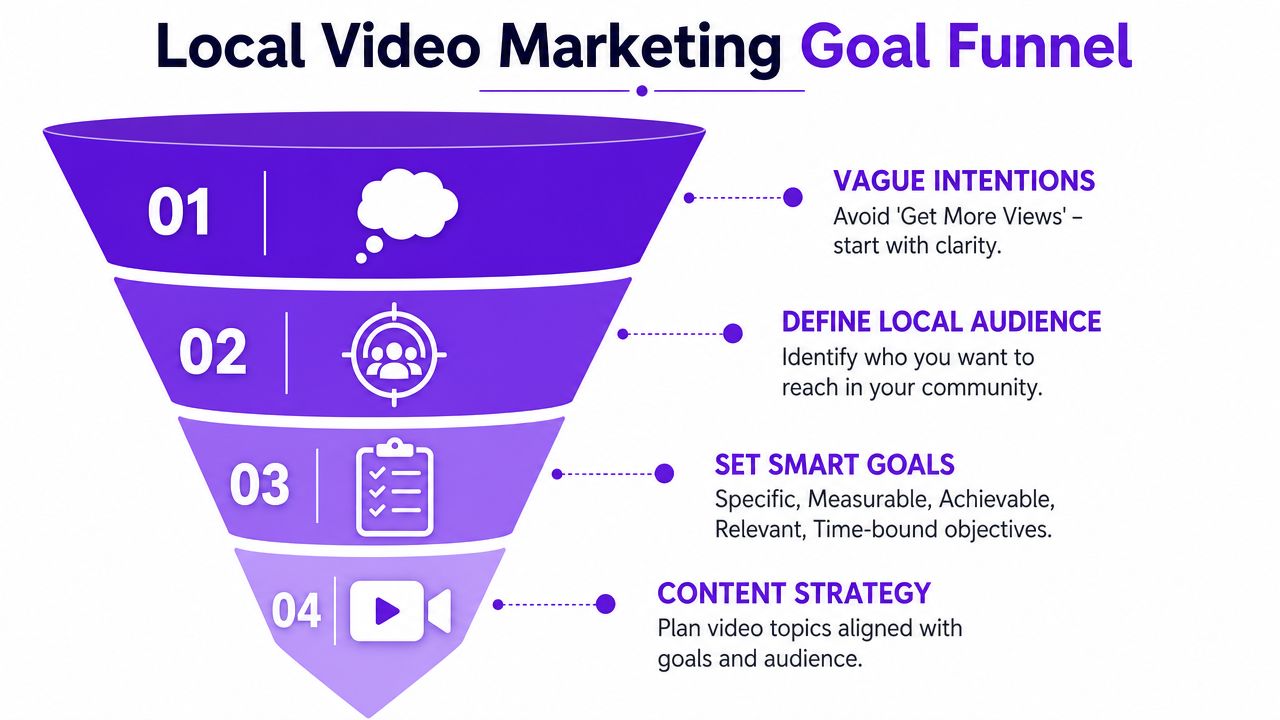
This matters even more if you want video to scale. A business owner does not have time to film random clips all month and hope one works. One recording session should produce a useful set of assets. A trust-building clip for cold prospects. A FAQ answer for people comparing options. A direct offer for people ready to book. That only happens if the goal is clear before the camera turns on.
A lot of local businesses start with the wrong question: “What should we post this week?” That creates platform-first content. It usually leads to scattered topics, weak calls to action, and a pile of videos that are hard to reuse.
A better workflow is tighter:
Choose one business objective
Increase service inquiries, improve show-up rates, generate referrals, or drive more in-store visits.
Choose one audience segment
Pick one group with one immediate need. Keep it narrow enough that the message sounds specific.
Match topics to buying intent
A first-time customer needs explanation. A comparison shopper needs proof. A returning customer may only need a reason to come back this week.
Set one next step
Call, book, visit, request a quote, send a message, or ask about availability.
That sequence keeps production efficient. It also makes repurposing easier later, because every clip already has a job.
Demographics help with ad targeting, but they rarely give you the message. Local video performs better when it speaks to the problem, the urgency, and the hesitation that slows the sale.
Examples make this clear:
A strong local video answers one question that regularly comes up before someone buys.
That framing also helps on shoot day. Instead of trying to invent 20 ideas, record answers to the questions your staff already hears every week. Then cut those answers into short versions for social, longer versions for your site, and follow-up clips for leads who are close to booking.
Use three content buckets and assign each one a purpose:
| Stage | Viewer mindset | Video angle |
|---|---|---|
| Discovery | “Who are you?” | Introductions, neighborhood presence, team clips, behind-the-scenes |
| Consideration | “Can you solve my problem?” | FAQs, service explanations, demos, process videos, testimonials |
| Decision | “Why choose you now?” | Appointment expectations, proof, offers, guarantees, clear calls to action |
This structure prevents a common waste pattern. A business films five awareness videos, posts them everywhere, and still has nothing that helps a ready-to-buy customer take the next step.
A clear goal, a defined audience, and a simple message map give you something better than a content calendar. They give you a repeatable system. That is what makes local business video marketing manageable for a small team and profitable over time.
The strongest local business video marketing usually looks more like a real conversation than an ad. That's why polished production often underperforms for neighborhood brands. 85% of consumers prefer authentic, smartphone-shot content from local businesses over polished, high-production ads, according to O'Rourke Media Group.
That preference changes the creative brief. You don't need a script that sounds corporate. You need footage that makes someone think, “These are real people. I'd buy from them.”

A bakery is a good example. The video that works is rarely a dramatic montage with cinematic music. It's often the owner pulling trays out of the oven, explaining what's fresh that morning, or showing how special orders are handled. That clip feels local because it is local.
A coffee shop can post a quick “what's new this week” clip filmed behind the counter. A real estate agent can walk through one pricing mistake sellers make in a specific neighborhood. A plumber can record a short explanation of what homeowners should do before emergency service arrives.
None of those ideas require elaborate setup. They do require clarity.
Try these formats first:
Meet the owner
Talk about why the business exists, who you serve, and what customers can expect.
Behind the scenes
Show prep, process, tools, team routines, or quality checks.
Quick tip videos
Teach one useful thing your audience can apply immediately.
Customer story clips
Let real clients describe the problem, the experience, and the result in plain language.
Day-in-the-life posts
These work well for service businesses because they show responsiveness and professionalism without sounding salesy.
The local advantage isn't polish. It's proximity, personality, and proof.
Owners often freeze because they think they need to memorize lines. They don't. A prompt-based approach is faster and sounds more human.
Use prompts like these:
For a bakery, that might become: “Three things to know before ordering a custom birthday cake.”
For a realtor: “What sellers in this neighborhood usually overestimate.”
For a plumber: “What counts as an emergency and what can wait until morning.”
Later in the process, a simple explainer format like this can help you vary style and pacing:
Local businesses get stronger results when the content reflects place, routine, and familiarity. Mention the neighborhood. Reference weather, seasonal needs, local events, common service issues, or timing patterns your customers recognize.
That's what separates local business video marketing from generic content marketing. You're not trying to appeal to everyone. You're trying to become the obvious choice for people nearby who already have a reason to care.
A useful local video has three production jobs. It must be easy to watch, easy to hear, and easy to find. Most problems happen because owners focus on one and ignore the other two.
You don't need a production crew to solve the first part. A smartphone, a quiet space, and a few filming habits will cover most of what matters.
Use this checklist every time you record:
Stabilize the shot
Prop the phone up, use a tripod, or brace your elbows against a counter. Shaky footage makes simple videos feel careless.
Face a light source
Film near a window or in even indoor lighting. Don't stand with bright light behind you unless you want your face in shadow.
Prioritize clear audio
Move away from loud refrigerators, traffic, music, or HVAC noise if possible. Viewers will tolerate average visuals faster than bad sound.
Frame with intent
Keep your eyes near the top third of the screen. Don't leave too much empty space above your head.
Open fast
Start with the point. “If your water heater is making this sound, don't ignore it” beats a slow introduction.
Record vertical when the clip is meant for short-form
That saves cropping headaches later.
One more practical point matters a lot. The verified data shows the strongest-performing structure captures attention within the first 3 seconds and delivers the complete message within 2 minutes, according to Business Support Club's small business marketing statistics. For local businesses, that usually means saying the problem and the payoff immediately.
Keep the opening concrete. State the issue, the mistake, or the question in the first line.
A strong clip can still disappear if it isn't packaged for local search and local context. Discovery is part content, part distribution discipline.
Use this checklist after filming:
Upload directly where possible
Native video uploads matter more than posting external links on social platforms.
Write location-aware captions
Mention the city, neighborhood, or service area naturally in the caption and on-screen speech when relevant.
Use specific local hashtags
Broad tags are weak. Neighborhood-level or district-level tags usually signal local intent better.
Geo-tag your post
On platforms that support location tagging, use it.
Publish to your Google Business Profile when appropriate
Short updates, service explanations, offers, and behind-the-scenes clips can reinforce your local presence.
Add the right next step
If someone is ready, make the action obvious. Call, book, request a quote, or get directions.
Different posts do different jobs.
| Platform | Best use | Good content type |
|---|---|---|
| Google Business Profile | Local visibility and trust | Updates, service explainers, team clips |
| Instagram Reels | Attention and familiarity | Behind-the-scenes, tips, customer moments |
| TikTok | Reach and discovery | Fast tips, reactions, myths, local personality |
| YouTube Shorts | Search plus repeat visibility | FAQs, mini demos, short educational clips |
| Community retention | Offers, local updates, event tie-ins, testimonials |
Local discovery improves when the content is useful and the metadata is specific. “Spring maintenance tip for homeowners in North Austin” gives platforms and viewers much more context than “Helpful tip for everyone.”
The local businesses that stay consistent with video usually don't film every day. They build a repurposing system. That's the operational shift that makes local business video marketing sustainable.
Instead of recording ten separate posts, record one substantial piece of content with enough substance to split apart. A five-minute FAQ, customer interview, service walkthrough, or owner Q&A can become short clips, captions, email content, platform-specific posts, and website material.
That model matters because creating content from scratch burns time fast. AI-powered repurposing reduces content creation time by an average of 2.3 hours per video, according to Vyond's small business video marketing guidance.
Here's a practical breakdown of what one useful recording can generate:
Workflow matters more than creativity. If every new post requires a fresh idea, a fresh shoot, fresh editing, and fresh caption writing, most small businesses will stop. If one recording session can supply two or three weeks of output, consistency becomes realistic.
A practical workflow usually looks like this:
Record one core asset
Example: “Five questions customers ask before booking.”
Break it into distinct moments
Each answer becomes its own clip.
Format by platform
Shorter and punchier for Reels and TikTok. Slightly more contextual for Facebook and YouTube.
Write captions with intent
Each caption should support the clip, not repeat it word for word.
Schedule in batches
Don't publish manually every day if you can avoid it.
For more tactical examples, Sovran's creative reuse tips are useful because they show how to stretch one recording into multiple asset types without making the content feel repetitive.
Some businesses do this manually with a mix of editors, schedulers, and spreadsheets. Others use repurposing tools. One option is automating content creation workflows, including Taja AI, which turns a long-form video into clips, captions, thumbnails, blogs, and platform-specific posts from one upload. The value isn't novelty. It's reducing the editing and formatting work that usually kills momentum.
Consistency doesn't come from filming more. It comes from extracting more value from what you already filmed.
There is a trade-off here. A repurposing system can make content more efficient, but only if the original recording is worth repurposing. Rambling, low-signal footage creates more clutter, not more marketing value.
That's why the best system starts with one focused recording that answers real buyer questions. Once that base is solid, AI and workflow tools can multiply output without multiplying effort.
A video strategy earns its keep when it produces calls, form fills, appointments, and sales conversations. Views can help with reach, but local businesses rarely have the luxury of treating video as a branding exercise with no feedback loop.
Start with the actions that signal buying intent. For most local businesses, that means tracking:
Keep the system simple. A spreadsheet, call tracking number, tagged links, and a weekly review are usually enough to spot which topics bring in real demand.
Many owners waste time comparing Instagram against YouTube when they should be comparing video topics against business outcomes.
If one FAQ video brings in three estimate requests and a polished brand reel brings in nothing, the FAQ wins. If a customer story gets fewer views but leads to booked consultations, make more customer stories. ROI comes from fit with buyer intent, not vanity metrics.
That matters even more if you are building a repurposing system. One good shoot should feed short clips, follow-up emails, Google Business Profile posts, and sales conversations for weeks. The point is not to publish more for the sake of activity. The point is to get more return from each recording session.
A simple content calendar makes performance easier to review because each week has a job.
| Week | Main Content Pillar (Create Once) | YouTube / Facebook | Instagram / TikTok | Google Business Profile / Email |
|---|---|---|---|---|
| Week 1 | Owner FAQ video | Full FAQ upload or edited long clip | 2 to 3 short answers as vertical clips | Service update post and one email follow-up |
| Week 2 | Customer story or testimonial | Full testimonial or interview excerpt | Short trust-building clips with captions | Review-focused post and testimonial snippet in email |
| Week 3 | Behind-the-scenes process video | Process walkthrough | Quick cuts showing steps, tools, or prep | Operational update or “what to expect” post |
| Week 4 | Offer, seasonal tip, or common objection | Short explainer with call to action | Direct-response clips with clear next step | Offer reminder or appointment-driven email |
This structure works because it gives you a cleaner read on performance over time. You can see which pillar drives inquiries, which one builds trust, and which one supports closing.
Some patterns hold across industries. In property marketing, teams that create videos that sell properties focus on reducing buyer hesitation by answering practical questions before the prospect ever reaches out. Local service businesses benefit from the same approach. Good videos remove friction, shorten the sales conversation, and qualify leads earlier.
For tighter attribution, build a process for lead generation with video so each asset points to a specific next step, such as calling, booking, requesting a quote, or replying to an email. That is how video stops being extra marketing work and starts acting like a repeatable revenue channel.
If you want a simpler way to turn one recording into a month of usable marketing assets, Taja AI is built for that workflow. It takes a long-form video and generates shorts, captions, thumbnails, blog content, and platform-ready posts so you can keep showing up without spending your week editing.


We are blessed to work with leading brands & Companies


We try to make easy and simple for every professionals. Get 30 days free trial - No credit card required.


© 2025 Taja AI. All rights reserved.