.jpeg)
8 Reels Best Practices That Drive Views in 2026
Master reels best practices with 8 actionable tactics for hooks, pacing, captions, CTAs, and posting cadence that help short videos grow reach.
5 min read
October 12, 2026

Learn how to set up a company YouTube channel from scratch. Our 2026 guide covers Brand Accounts, customization, SEO, and content strategy for business growth.
Written by:


YouTube reached 2 billion logged-in monthly users in 2020, which is why a company channel isn't a side asset anymore. It can sit in front of an audience at internet scale, not just a narrow social feed, if the business treats it like a real media property instead of a storage folder for webinars and product demos (Creator Dynamics on YouTube's scale).
That distinction matters when you're figuring out how to set up a company YouTube channel. Most businesses don't fail because they can't click through YouTube Studio. They fail because they launch with the wrong owner account, weak branding, no metadata discipline, and no plan for how the channel will work when more than one person touches it.
A strong company channel does three jobs at once. It presents the brand clearly, it helps the right viewers discover useful content, and it gives the team a repeatable system they can keep running. If setup doesn't support those three things, the channel becomes clutter fast.
A business channel should function like owned media. That means it should keep working after the launch week, after the first campaign, and after the employee who created it moves on.
Too many teams approach YouTube like a file cabinet. They upload a few videos, fill out the minimum fields, and assume presence equals strategy. It doesn't. A company channel is closer to a searchable content hub that can educate buyers, answer objections, reinforce expertise, and keep attracting attention long after a post on another platform has disappeared from the feed.
When businesses ask how to set up a company YouTube channel, they're often asking a technical question. The better question is operational. What kind of channel can this company manage consistently, brand properly, and measure over time?
That shift changes your decisions from the start.
A neglected channel doesn't look neutral. It signals that the business starts things it doesn't maintain.
For small teams, this is especially important. If you're already investing in video, the smart move is to build a structure that compounds. The businesses getting the most from video usually treat YouTube as a long-term brand and discovery engine, not a one-off posting destination. If you're building that broader foundation, this guide on small business video marketing strategy is a useful companion.
A few patterns show up again and again.
| Approach | What happens |
|---|---|
| Channel built around a clear audience problem | Viewers understand why to subscribe and what they'll get |
| Uploads grouped into themes | The channel feels intentional and easier to browse |
| Business treats YouTube as a library only | Videos exist, but they don't support discovery or retention |
| No operating owner or publishing process | Access problems and inconsistency appear quickly |
The practical takeaway is simple. Don't launch a company channel until you've decided what role it plays in your marketing system. The setup clicks take minutes. The structure behind them is what determines whether the channel becomes useful.
The first serious choice is the account model. For a business, use a Brand Account.
That isn't a nice-to-have. It's the only setup that makes sense when multiple people may need access or when the company wants the channel identity separated from one employee's personal Google login. Brandwatch's setup guidance also notes a practical branding standard: use a square profile image of at least 98×98 pixels and check channel art across device previews before publishing (Brandwatch on creating a business YouTube channel).
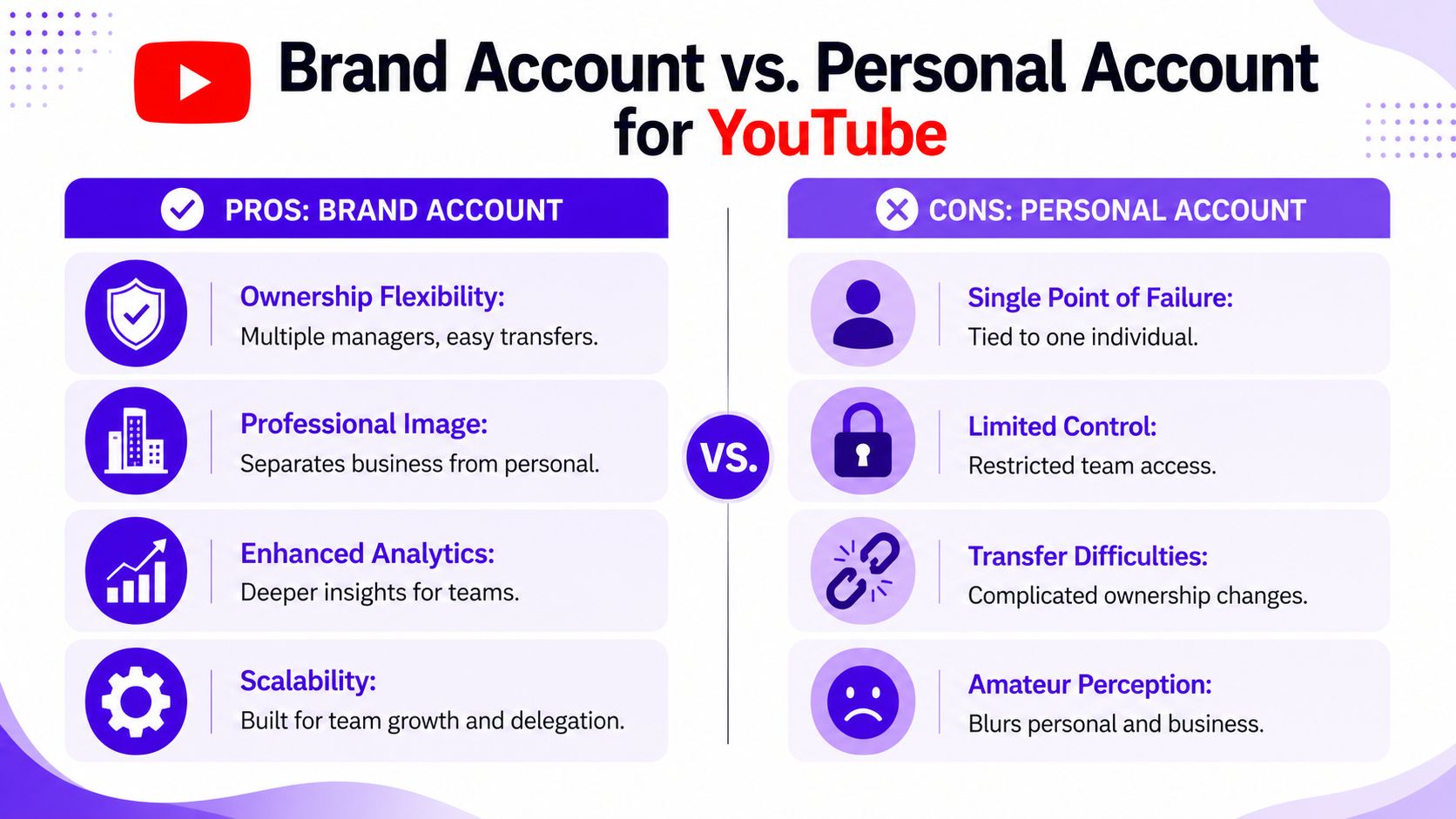
A personal account creates a fragile setup. The business becomes dependent on one login, one inbox, and one person's employment status. That might feel manageable on day one. It becomes a problem the first time a teammate leaves, changes roles, or forgets how the channel was originally configured.
Google's help documentation reinforces the governance side of this. A business channel can be created on a Brand Account and owners and managers can be added later. It also notes an easy point of confusion: if the Brand Account already has a channel, you can't create a new one under that same account (YouTube Help on Brand Accounts and channel creation).
Practical rule: The company should own the channel. An employee should help manage it, not personally control it.
Use this order. It prevents most of the mistakes that create messy handoffs later.
Sign in with the right Google identity
Use the business-controlled Google login, not a founder's personal Gmail and not a contractor's account.
Open YouTube and choose Create a channel
Select the business or brand option rather than attaching the channel to a personal creator profile.
Name the channel carefully
Use the company name customers search for. If your business operates under a brand and a legal entity, choose the public-facing brand.
Complete customization in YouTube Studio
Don't stop after account creation. Add branding, descriptions, links, and default settings before the first public upload.
Assign roles early
Add the people who need access. Usually that means an owner, a backup owner, and managers for marketing or production.
This is the part most setup guides skip, and it's where companies create future headaches.
A channel isn't stable because it's live. It's stable because the business can still run it when team structure changes.
A lot of companies create the shell and promise themselves they'll clean it up later. Later usually turns into months of half-finished branding and unoptimized uploads.
Before your first video goes public, make sure you have:
That doesn't make the channel perfect. It makes it usable, governable, and ready to scale.
A company channel gets judged fast. If the profile image is blurry, the banner says nothing useful, and the About tab reads like placeholder copy, visitors assume the content will be just as loose.
Your identity layer should answer three questions immediately. Who are you? Who is this channel for? What will people get if they stick around?

The profile image is usually your logo. Keep it simple enough to remain recognizable at small size. If your full logo becomes unreadable in a tiny circle, use the mark or initials version instead.
Your banner does more work than many companies realize. It should reinforce the category you operate in, the audience you serve, and the type of content you publish. Generic brand art might look polished, but it doesn't help a new visitor understand the channel.
A better banner usually includes some mix of:
A common setup mistake is under-optimizing metadata. The About section should clearly state the company mission, expertise, and expected content because vague bios reduce trust and make it harder for viewers and search systems to understand the channel's purpose (Fourthwall on business YouTube channel setup).
That means your About text shouldn't read like a slogan workshop. It should read like a concise positioning statement.
Use this structure:
| Element | What to include |
|---|---|
| Who you help | The audience or customer type |
| What you know | Your expertise or specialization |
| What you publish | Tutorials, product advice, industry commentary, customer education |
| What to do next | Visit your site, contact your team, subscribe |
If your company sells to a niche market, be explicit. Broad copy sounds safer, but it usually weakens trust.
A good About section makes the channel legible before a viewer watches a single second.
This walkthrough is helpful if you want to see how professionals think about the page elements that shape perception and click behavior.
Three things tend to make a business channel look unfinished:
You don't need a huge design budget to solve this. You need consistency. The channel should look like it belongs to the same company people find on your website, proposals, and social profiles.
A channel homepage is not decoration. It's a navigation system.
When companies leave their channels as a flat stream of uploads, they force visitors to do the sorting work themselves. They rarely will. They'll glance, fail to find the most relevant next video, and leave. That's a layout problem as much as a content problem.
A stronger approach is to organize the channel like a library with guided paths. You want a first-time visitor to see where to start, and you want an interested viewer to see what to watch next.
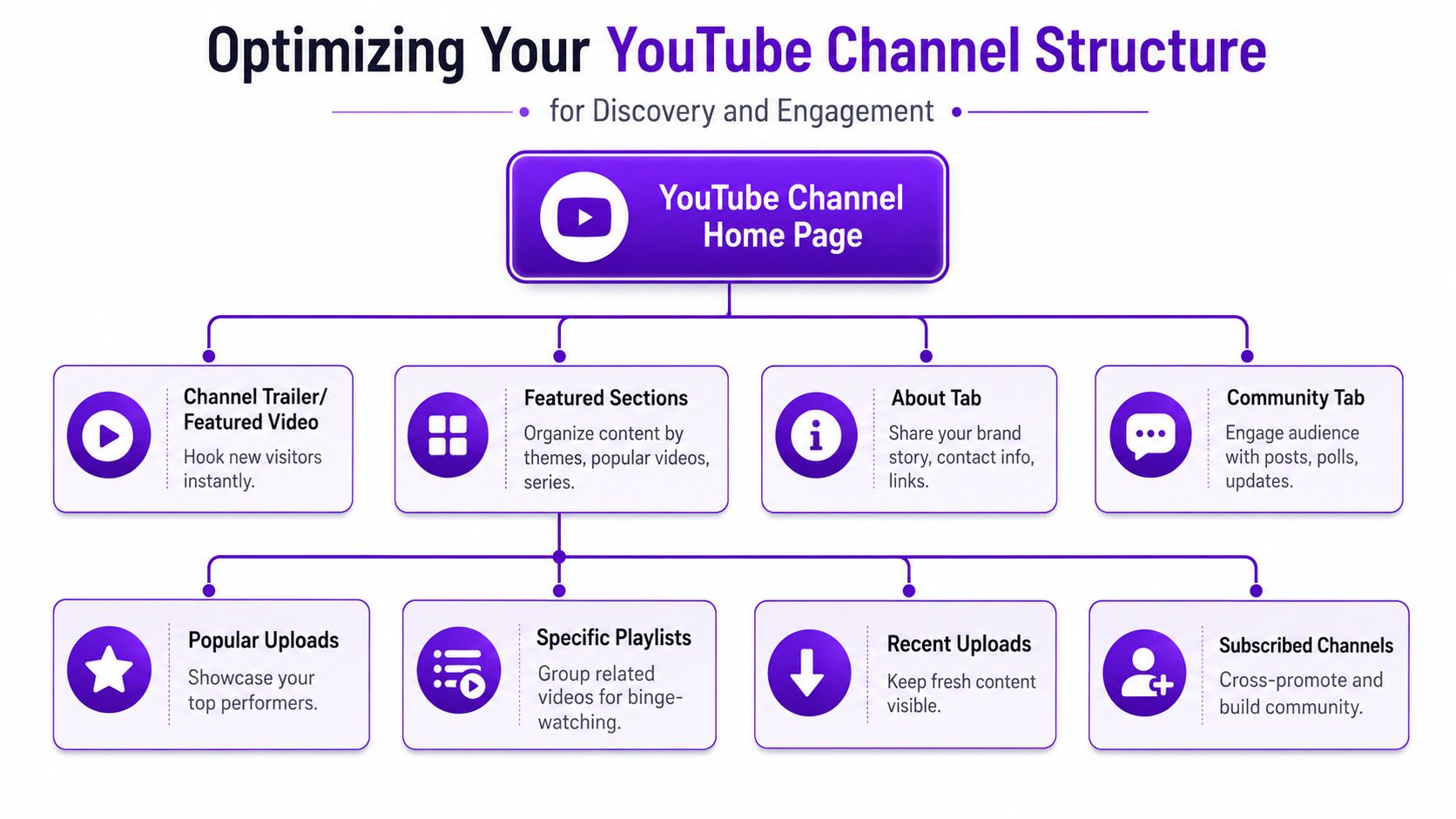
High-performing company channels are usually structured around themes. That might mean tutorials, customer stories, FAQs, product deep dives, or industry education. The point is to help viewers self-select the track that matches their intent.
This kind of structure also helps discoverability. Fourthwall's guidance emphasizes keyword-rich descriptions, titles, tags, timestamps, closed captions, and thematic playlists. It also notes that relying on YouTube's automatically generated thumbnail frame is a weak default for a business channel because custom thumbnails support deliberate branding and click-through optimization. I covered the metadata side in the section above. Here, the important part is how those assets support channel organization.
A business homepage works better when each row has a job.
Consider using rows like these:
Most businesses create playlists as an afterthought. That's a mistake. A playlist can act like a mini-course, a sales enablement path, or an onboarding sequence.
Here are examples of useful playlist structures:
| Playlist type | Best use |
|---|---|
| Getting started | Helps new prospects understand your product or service |
| How-to tutorials | Answers recurring support and pre-sales questions |
| Customer stories | Builds trust without forcing a hard sell |
| Industry insights | Positions your company as informed and current |
If one video answers a question, a playlist builds a relationship.
A clean structure also improves internal alignment. Sales can send prospects to a playlist. Customer success can use another one for onboarding. Marketing can promote a third as top-of-funnel education. The channel stops being a pile of uploads and starts acting like an organized content system.
Your first upload sets the standard for every upload that follows. If the workflow is sloppy now, it usually stays sloppy later.
Many beginner guides prove inadequate. Newer creator guidance increasingly points to hidden settings, handles, upload defaults, verification, templates, and Studio configuration because simple one-time setup instructions don't prepare a business for long-term discoverability or smooth operations (YouTube creator guidance on channel setup and ongoing optimization).
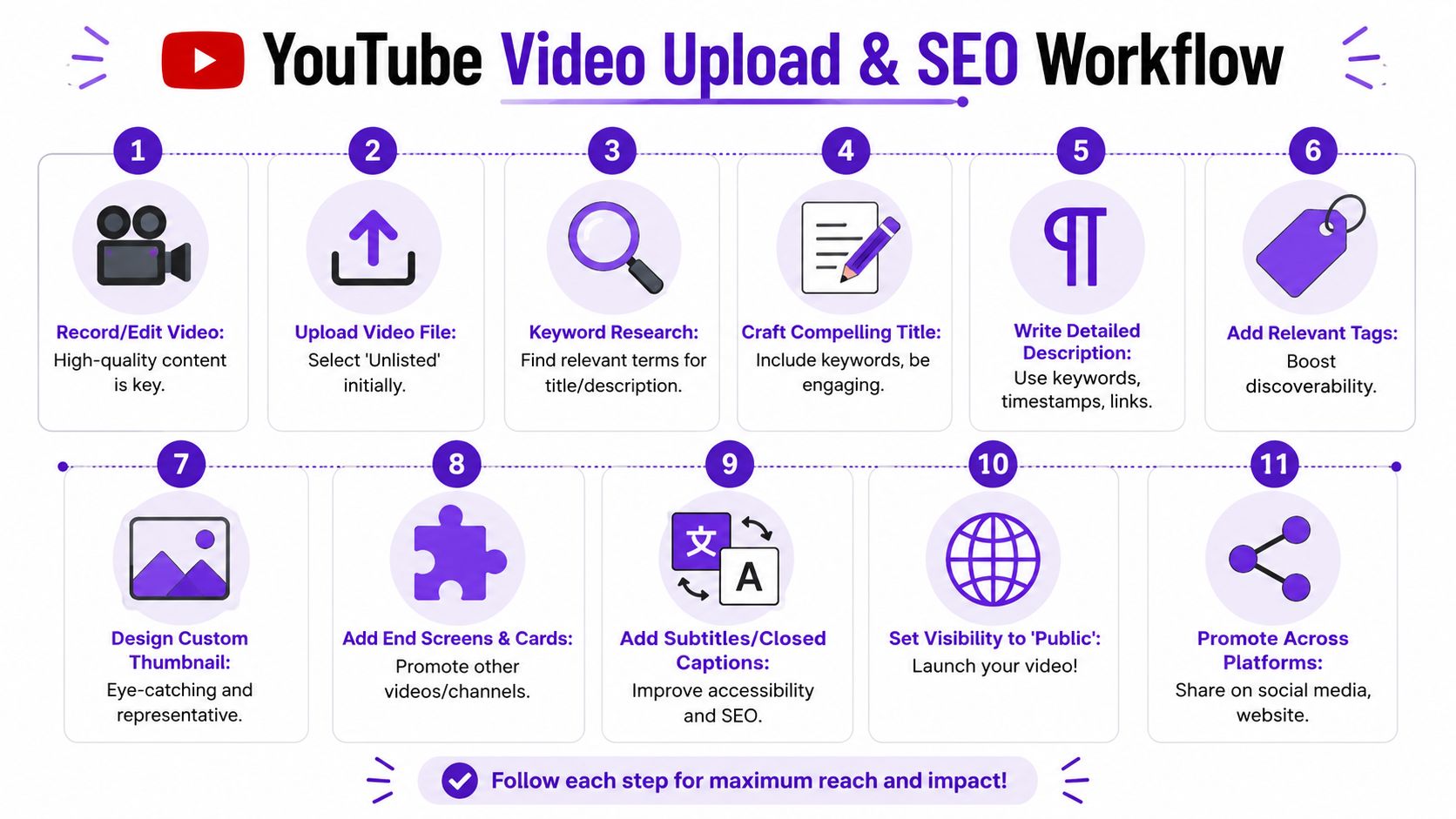
The businesses that get traction on YouTube usually don't "post and hope." They use a repeatable checklist.
A practical upload flow looks like this:
Upload as unlisted first
That gives the team room to review details before the video goes public.
Write a title based on intent
Good titles reflect what the viewer wants, not just what the company wants to say.
Build a useful description
Include context, links, relevant terms, and clear next steps. Don't stuff it with disconnected keywords.
Add tags, timestamps, and captions
These support context, accessibility, and clearer organization.
Upload a custom thumbnail
Don't settle for the automatic frame. Business channels need consistent visual packaging.
Add end screens and cards
The goal is to move viewers into the next relevant video or playlist.
Check category, audience setting, and visibility
Small settings mistakes create avoidable friction.
YouTube discovery rewards clarity more than cleverness. The title should describe the topic in language your audience would use. The description should reinforce the same topic and explain why the video matters.
A few practical standards help:
If your team wants a stronger process for packaging videos after editing, this guide on how to improve YouTube video engagement is a solid reference because it focuses on optimization decisions that affect clicks and watch behavior.
One of the most useful moves inside YouTube Studio is setting upload defaults. That might include standard description elements, link structure, naming conventions, or disclosure language your team uses repeatedly.
This is also where a tool can help if the team is producing at volume. For example, Taja AI can generate SEO-oriented descriptions, tags, thumbnails, and repurposed assets from long-form video, which can reduce manual production work for businesses trying to keep a publishing rhythm. If you're building that workflow, this guide on how to post on YouTube complements the operational side well.
The real SEO win is consistency. A decent workflow repeated every time beats a brilliant workflow used once.
Before you hit publish, verify these points:
That is the difference between uploading a file and publishing a discoverable asset.
A company channel should be built around measurement. YouTube Analytics centers on watch time, click-through rate, audience retention, and subscriber growth, and those are the metrics that matter for optimization more than raw views alone (Improvado's YouTube analytics guide).
Views can tell you something got exposure. They don't tell you whether the right people clicked, stayed, or wanted more. A business channel needs stronger signals than that.
Each core metric points to a different operational question.
| Metric | What it helps you evaluate |
|---|---|
| Watch time | Whether the content holds attention in a meaningful way |
| CTR | Whether your title and thumbnail are convincing enough to earn the click |
| Audience retention | Where viewers lose interest or get what they need and leave |
| Subscriber growth | Whether the content builds an ongoing relationship |
If retention drops early, the opening likely needs work. If CTR is weak, the packaging is probably the issue. If watch time is solid but subscriber growth is flat, the videos may be useful without creating a reason to come back.
A business channel scales when content production, optimization, and review are linked. That means looking at patterns across uploads rather than obsessing over one video's performance.
A sustainable system usually includes:
If you want a practical outside perspective on repeatable systems for YouTube channel performance, that resource is useful because it frames growth as an operating model, not a viral event. For a deeper look inside YouTube's own reporting environment, this walkthrough on turning analytics into channel growth with YouTube Studio is worth bookmarking.
Channels usually plateau for operational reasons. Inconsistent publishing, weak packaging, and no review loop do more damage than most teams realize.
Sustainable growth doesn't mean posting everything everywhere with no structure. It means building a channel that can keep producing useful content without burning out the people behind it.
For most companies, that starts with a manageable publishing cadence, a defined set of content pillars, and a review process tied to the metrics above. It also means accepting that launch day isn't the hard part. Ongoing improvement is.
If you get the setup right, the channel becomes easier to run. If you build the review habit, the content gets sharper. And if you organize the channel around the business, not around one person's memory or login, it can keep compounding over time.
If you're building a company YouTube channel and want a lighter production workflow, Taja AI can help turn long-form videos into shorts, captions, thumbnails, blog assets, and scheduled social posts from one upload. It's a practical option for teams that need to maintain a consistent channel without turning every video into a manual editing project.


We are blessed to work with leading brands & Companies


We try to make easy and simple for every professionals. Get 30 days free trial - No credit card required.


© 2025 Taja AI. All rights reserved.