.jpeg)
How to Schedule Instagram Reels: Creator Workflow Guide
Learn how to schedule Instagram Reels using native tools, Meta Business Suite, and AI automation. Master timing, captions, and bulk workflows
5 min read
October 1, 2026

Learn how to post Facebook videos to YouTube the right way. Our guide covers downloading, optimization, copyright, and automation for maximum reach in 2026.
Written by:


Most advice on how to post facebook videos to youtube makes it sound like a publishing shortcut. It isn't. You're not “posting” from one platform to another. You're extracting a video from Facebook, checking whether you can legally reuse it, cleaning it up, and then rebuilding it as a YouTube asset.
That difference matters because the bad version of this workflow is easy. Download whatever Facebook gives you, upload it to YouTube, copy the caption, and hit publish. The result usually looks like a recycled social clip, not a video built for search, watch time, or channel growth.
The professional version takes more effort. But it also avoids the common problems that waste time later: soft video quality, broken captions, weak titles, wrong aspect ratios, and copyright headaches. If you handle this like repurposing instead of transfer, the same Facebook recording can become a much stronger YouTube video.
The phrase itself causes the confusion.
There is no native one-click workflow for standard Facebook posts that sends a video straight to YouTube. In practice, you download the Facebook video first, then upload that file into YouTube Studio as a new video, as shown in this manual Facebook-to-YouTube upload walkthrough. That means you're dealing with a file handoff, not a cross-post.
A lot of creators assume Facebook and YouTube work like connected publishing channels. They don't. Facebook hosts the original file inside its own environment. YouTube wants a fresh upload into its own system, with its own metadata, audience settings, subtitle handling, thumbnail, and copyright checks.
Here's the practical difference:
| Assumption | Reality |
|---|---|
| Click one button and send video to YouTube | Download file from Facebook, then upload manually |
| Reuse the same caption and title | Rewrite for YouTube search behavior |
| Same file means same quality | Extra handling can reduce quality if you re-encode badly |
| One asset, one workflow | Two platforms, two optimization passes |
Practical rule: If you treat this like distribution, you'll miss what YouTube needs. If you treat it like repurposing, your upload has a chance to perform.
A direct push button would be convenient, but it would also encourage lazy publishing. Facebook-native videos often need editing before they belong on YouTube. A live replay might need trimming. A square feed video may need reframing. On-screen text that worked in autoplay may not carry a longer YouTube session.
That's why the main job isn't posting. It's adaptation.
For serious creators, churches, educators, real estate teams, and local businesses, the best workflow starts with accepting that YouTube deserves its own version of the asset. Once you stop looking for a mythical cross-post button, the process gets clearer.
The first job is simple in theory and messy in practice. You need the actual video file, ideally the highest-quality version you can legally access.
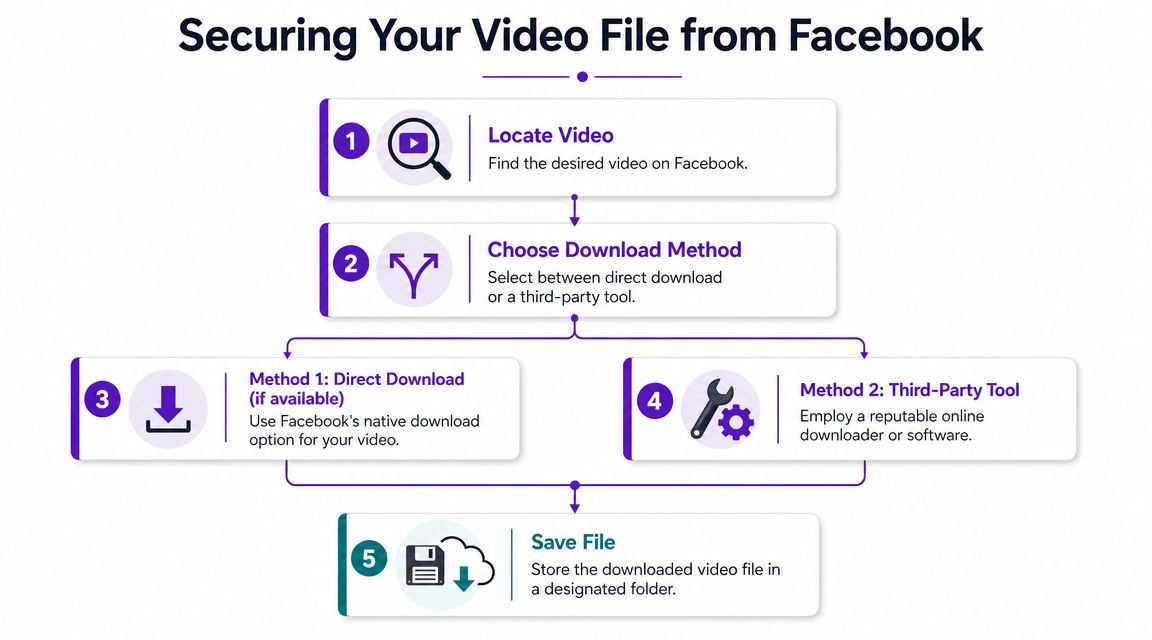
If you own the post, start with Facebook's native options. For a Facebook Live replay, Facebook has historically allowed users to open the video's three-dot menu after processing and download the replay file, as described in this Stonemaier Games guide to downloading a Facebook Live video. In many cases, that gives you the cleanest path to an MP4 you can move into your editing or upload workflow.
For standard posts, access varies by account type, post type, and Facebook's current interface. If a native download option is visible, use it first. It's simpler and usually safer than trying to scrape the file.
Historically, this process got technical fast. One common manual method involved changing the Facebook URL from www. to m., opening browser developer tools, locating the video tag, and pulling the raw source file into a new tab for download. That's a real reminder that this was never a clean “save video as” workflow.
That kind of workaround still tells you something important. If your business relies on repeated Facebook-to-YouTube republishing, manual file retrieval will become a bottleneck.
The file handoff is where many teams lose time before editing even starts.
If your broader workflow also includes short-form extraction, API-based retrieval, or platform-specific clip handling, this guide to implementing Facebook Reels API download is useful context for thinking beyond one-off browser downloads.
Don't download and repost someone else's video because you found a workaround. Ask for the original exported file instead. That gives you three advantages:
A lot of businesses get this wrong with guest interviews, event footage, and partner videos. The marketing team grabs the Facebook version because it's convenient, then discovers the text looks soft, captions are burned in, or music rights are unclear.
For a broader look at distribution workflows before the YouTube step, Taja's guide on how to share videos on Facebook helps frame where Facebook-native publishing choices affect repurposing later.
A quick reference can help when you're deciding what to request:
Later, when you upload to YouTube, a clean source file saves far more time than anticipated.
A short walkthrough of the manual process is useful if you want to see what this looked like in practice:
Before the upload, stop and answer one question. Do you have the right to republish this video on YouTube?
A Facebook post being visible doesn't mean it's reusable. That matters even when the content features your business, your event, or your interview. Ownership and posting access aren't the same thing.
The most common problems aren't dramatic. They're ordinary:
None of those situations feel serious until a claim blocks monetization, limits visibility, or forces a takedown after the video is already live.
For business use, verbal approval is weak protection. You want simple written permission that covers platform reuse, editing permission, and whether clips, thumbnails, captions, and derivative versions are allowed.
Use a lightweight checklist:
| Permission item | Why it matters |
|---|---|
| Right to republish on YouTube | Prevents “Facebook only” misunderstandings |
| Right to edit | Lets you trim, crop, add intros, and create clips |
| Music clearance | Avoids upload conflicts |
| Guest likeness consent | Useful for interviews, events, and testimonials |
| File delivery method | Helps you get the source asset, not a compressed copy |
Non-negotiable: If you didn't create the video, ask for permission before you touch the upload workflow.
For teams dealing with recurring misuse, impersonation, or unauthorized reposting, it's worth reviewing how digital IP protection solutions fit into a broader content ownership process.
If rights are unclear, don't publish yet. Ask who owns the footage, who cleared the music, and whether YouTube republication is included. That's the professional move, and it's usually faster than cleaning up a dispute after the fact.
A repurposing workflow only scales when rights scale with it.
Amateur reposts often fall apart. Facebook gave you a file, but that doesn't mean it's the right file for YouTube.
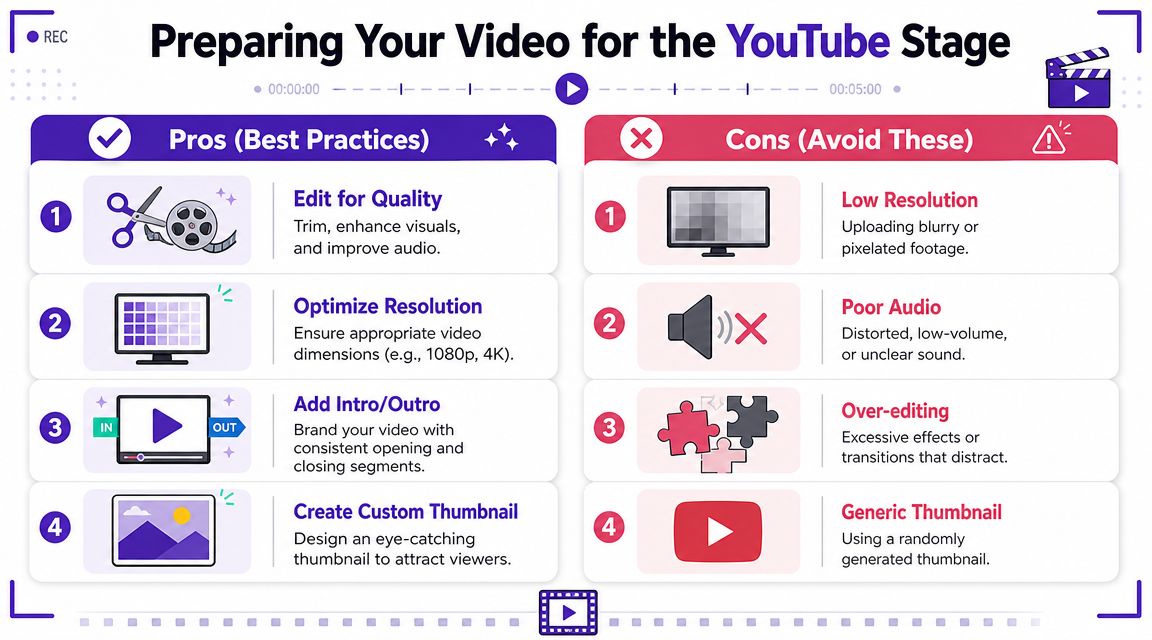
Start with the basics. Confirm the download opens correctly, audio stays in sync, and the file is in a YouTube-friendly container such as MP4. If the file already works, avoid unnecessary conversion because each extra encode step can soften detail or introduce artifacts.
This is especially important with Facebook Live replays. By the time a replay is downloaded, Facebook has already processed it. If you then run it through another export without a clear reason, you're stacking quality loss onto an already processed file.
A Facebook video often reflects Facebook-first decisions:
Those choices can still work on YouTube, but not automatically.
If the source is square or vertical, decide whether you're publishing it as-is, placing it inside a 16:9 canvas, or rebuilding the edit. For channel presentation, a deliberate frame almost always looks better than dumping a social aspect ratio into YouTube and hoping for the best.
Uploading the Facebook copy isn't the same as preparing a YouTube version.
One of the biggest mistakes is thinking the Facebook post text can carry the upload. It can't. A common pitfall is publishing a Facebook-native clip without rebuilding the title, description, keywords, and thumbnail for YouTube search behavior, because the original Facebook text does not automatically optimize discoverability on YouTube, as noted in this YouTube-focused upload guide.
That affects more than SEO. It changes how the video is understood by a YouTube viewer who didn't see the Facebook post, doesn't know the context, and expects a clear promise from the title and thumbnail.
Before opening YouTube Studio, review these items:
Professionals handle this stage like quality assurance, not file management. That's what turns a repost into an asset that belongs on the channel.
Once the file is ready, treat the YouTube upload as a fresh publication event. Not a dump. Not a mirror. A new asset with its own search intent and viewing context.

The strategic reason this work matters is simple. Facebook remains a massive video-discovery environment, with over 4 billion daily video views, and native Facebook videos reportedly get 478% more shares than videos from other sources, according to 99Firms' Facebook video statistics. If you capture attention there and republish properly on YouTube, the same recording can work in more than one ecosystem.
The clean workflow looks like this:
Upload the file
Drag the downloaded or edited MP4 into YouTube Studio.
Write a YouTube-specific title
Don't paste the Facebook caption. Write a title that makes sense in search results and on a channel page.
Draft a usable description
Add context, links, speaker names, topics covered, and any next-step actions you want viewers to take.
Set audience and visibility
Handle audience settings, checks, and publish timing deliberately.
Add subtitles, cards, and end screens
At this stage, repurposed content starts acting like channel content.
For a broader look at channel-side publishing habits, this guide on how to post on YouTube is a useful companion.
A lot of teams do the hard part of getting the file off Facebook and then get lazy inside YouTube Studio. That's backwards. The upload form is where discoverability gets built.
Use this table as a standard:
| Element | Weak approach | Stronger approach |
|---|---|---|
| Title | Copy the Facebook caption | Rewrite for YouTube intent |
| Description | One sentence | Context, structure, links, topics |
| Thumbnail | Auto-generated frame | Custom visual built for click clarity |
| Subtitles | Ignore them | Review or upload intentionally |
| End screens | None | Route viewers to related videos or next steps |
Channel habit: Every repurposed video should point somewhere. Another video, a playlist, a site, or a conversion step.
YouTube's upload flow supports immediate publishing or scheduled release. That's useful when you're moving a backlog of Facebook videos into a more deliberate content calendar. Instead of flooding the channel with old assets, stagger the releases and give each one its own metadata treatment.
That's also the point where serious teams realize the manual process isn't just “uploading a file.” It's a repeated editorial workflow.
The manual version of this process has too many moving parts to stay clean for long.
You retrieve the file. You confirm rights. You check quality. You adjust the format. You rebuild the title, description, thumbnail, subtitles, and publish settings. Then you do it again next week for another live, another interview, another listing video, another sermon, another webinar.
The bigger issue isn't that this workflow is impossible. It's that it subtly becomes expensive in team time. There's no native, reliable Facebook-to-YouTube auto-publish pipeline, and for teams publishing recurring lives or interviews, every upload still needs YouTube-specific optimization rather than a copied file, as discussed in this Spiceworks thread on automatic Facebook-to-YouTube publishing.
A useful system doesn't just “cross-post.” It should help with the tasks that people usually skip when they're busy:
If you're comparing broader categories, these social media automation tools are a good starting point for understanding what cross-posting platforms aim to centralize and where manual work still remains.
For serious creators and SMB teams, repurposing tools make more sense than chasing a one-click Facebook-to-YouTube bridge that doesn't really solve the hard part. The value is in turning one long-form source into multiple publishable assets with platform-specific packaging.
One example is Taja AI, which can turn a longer video into clips, captions, thumbnails, blog content, and scheduled posts from a single workflow. For teams trying to reduce repetitive production work, that's closer to the core problem than simple transfer.
If your current process still depends on downloading one file at a time and rebuilding every asset manually, it's worth looking at Taja's approach to automate content creation.
The professional takeaway is simple. Don't optimize for “Can I move this file?” Optimize for “Can I repurpose this asset without losing quality, control, or time?”
If you want a cleaner way to turn long-form videos into YouTube-ready assets, clips, thumbnails, captions, and scheduled posts without rebuilding the workflow every time, take a look at Taja AI.


We are blessed to work with leading brands & Companies


We try to make easy and simple for every professionals. Get 30 days free trial - No credit card required.


© 2025 Taja AI. All rights reserved.