.jpeg)
How to Share Instagram Reel to TikTok: A 2026 Guide
Learn how to share Instagram Reel to TikTok without the watermark. Our 2026 guide covers saving, audio, captions, and optimizing for both platforms.
5 min read
September 25, 2026

How to edit tiktok video after posting - Learn how to edit tiktok video after posting in 2026. Fix captions, update covers, or use our re-upload strategy to
Written by:


You post the TikTok. The first few likes come in. Maybe a comment lands. Then you notice it.
The caption has a typo. The wrong @mention is tagged. The cover frame looks awkward. Worse, the video itself has the wrong clip, the wrong timing, or audio you didn't mean to use.
That moment creates a bad choice fast. Leave the mistake and feel sloppy, or delete and repost and risk killing the momentum the post just started building. If you're searching how to edit tiktok video after posting, the hard truth is this: TikTok still doesn't let you directly edit the video file after it goes live. But that doesn't mean you're stuck. It means you need to know exactly what can be changed, what can't, and when deleting is worth the cost.
Most creators don't panic because the mistake is huge. They panic because they know TikTok rewards early traction, and every minute after posting feels important.
A common scenario looks like this. A business owner posts a property walkthrough, product demo, or quick educational clip. Then they realize the on-screen text is wrong, the audio starts too late, or the end card includes outdated info. Their instinct is to pull it down immediately and replace it with the corrected version.
That's exactly where most damage happens.
A 2024 Hootsuite report found that 68% of TikTok creators who discovered errors in posted videos chose to delete and repost, leading to an average 92% loss of views and an 87% drop in likes. The same report ties that outcome back to TikTok's long-standing policy of blocking direct post-publish video edits to preserve algorithmic consistency, a policy in place since 2018 according to the cited documentation and reporting in this referenced breakdown of TikTok's editing limits.
Practical rule: If the mistake is in the video itself, don't assume reposting is harmless. You're not just fixing an error. You're restarting distribution.
That matters because creators often treat delete-and-repost like a small correction. It isn't. You're replacing a post TikTok has already started evaluating with a fresh upload that has no social proof, no accumulated watch behavior, and no momentum.
The better way to think about it is simple:
The rest of this guide is about making that call correctly, then protecting as much engagement as possible when you don't have a choice.
If the error isn't inside the video file, move fast and stay inside TikTok. That is the safest path.
TikTok's post-publish editing options are limited, but they're still useful. A 2024 Later.com analysis found that using TikTok's Edit Post feature for non-video elements boosted performance by 32% on average. It also found that updating descriptions with trending hashtags within the allowed window increased reach by 28% and engagement by 19%, while hashtags account for 41% of content discovery, as summarized in TikTok Shop's guide covering post editing behavior.
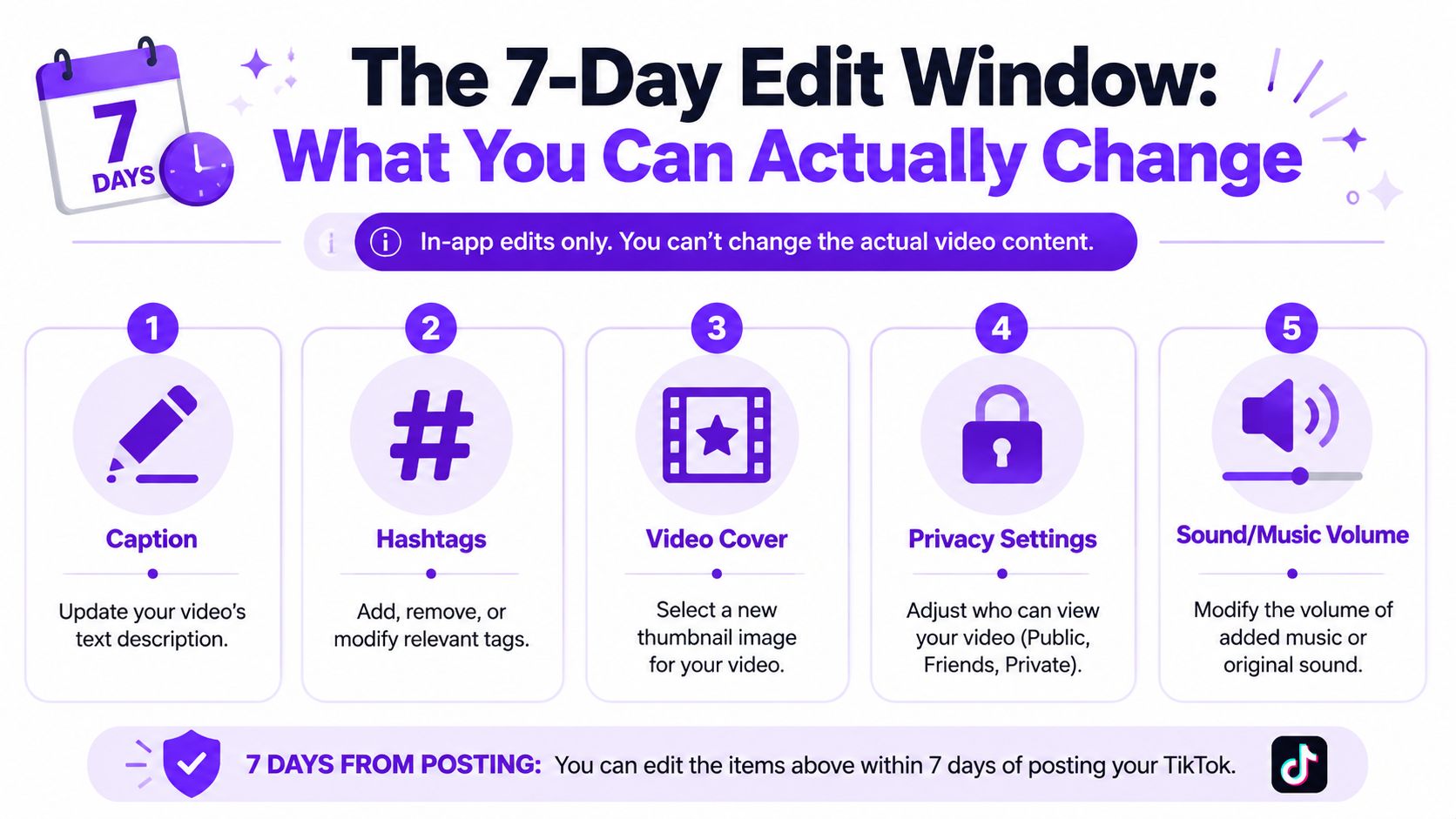
Within the edit window, you can usually adjust the parts around the video, not the video itself.
Description and caption text
Fix typos, tighten the hook, or add clearer context.
Hashtags
Useful when you forgot a relevant term or want to refine discoverability.
@mentions
Important if you tagged a partner, creator, client, or brand incorrectly.
Cover image
A weak cover can hurt click interest from profile visitors and playlist-style browsing.
Privacy and interaction settings
If a post needs to be temporarily limited while you decide what to do, these controls help.
TikTok also limits these edits. The post-publish window is short, and changes aren't open-ended. Treat it as a quick correction opportunity, not a long optimization cycle.
Open the video from your profile, access the post options, and look for the edit controls available on your version of the app. If TikTok lets you revise the post details, don't just correct the mistake. Improve the packaging.
Use that moment to ask:
| Element | What to check | Better move |
|---|---|---|
| Caption | Is the first line clear? | Lead with the value or hook |
| Hashtags | Are they generic or mismatched? | Replace weak tags with more relevant ones |
| Mention | Did you tag the right person or business? | Fix spelling and relevance |
| Cover | Does the thumbnail show the point of the video? | Choose a frame that makes the topic obvious |
One overlooked mistake is treating the caption like an afterthought. On TikTok, packaging affects discovery. If you need a deeper walkthrough on post-publish caption changes, this guide on whether you can edit a TikTok caption is useful background.
A small metadata edit can be a recovery move, not just a correction.
You can't replace or trim the actual uploaded video inside TikTok after posting. That includes the core clip, timing, embedded text, and the creative choices baked into the final file.
So if your issue is visual, structural, or audio-based inside the video itself, you're no longer in "edit" territory. You're in "replace the asset" territory, and that calls for a stricter process.
If the video itself is wrong, reposting becomes a last-resort repair job. Handle it like one.
The first mistake creators make is rushing. They delete the original, save a watermarked copy, make a tiny fix, and upload the same thing again. That feels efficient. It usually isn't.
A referenced summary of TikTok's 2025 Creator Insights report says reposted videos often receive 40% to 60% lower initial For You Page impressions because duplicate content flags reduce early distribution. The same summary notes that one practical mitigation tactic is creating watermark-free variants with new, SEO-optimized captions, covered in this analysis of post-publish TikTok editing workarounds.
Repost when the original has a problem that changes meaning, trust, or usability.
Good reasons include:
Wrong information
A date, price, location, instruction, or call to action is incorrect.
Broken audio or sync
Viewers can't follow the message, or the sound choice undermines the post.
Brand or client risk
The wrong logo, clip, name, or approved version was used.
Bad reasons are usually cosmetic. A minor typo in a caption or an imperfect cover frame usually does not justify wiping out a post that has already started moving.
Use a controlled sequence. Don't improvise.
Pause before deleting
Check whether the issue is inside the video. If it's not, use in-app edits instead.
Save the cleanest source you have
Use the original exported file if possible, not a downloaded TikTok with branding baked in.
Make the correction externally
CapCut is the tool many creators reach for because it's fast and built for vertical video. Any editor is fine if it preserves quality and lets you create a properly refreshed version.
Change more than the mistake
If you're going to re-upload, improve the opening seconds, tighten the text, and rewrite the caption. Don't post a near-identical duplicate unless you have to.
Decide whether to private first or delete outright
If you need a short review window, switching visibility can buy you time before full removal.
Re-upload as a new post with stronger packaging
Use a sharper cover, better caption, and clearer positioning.
If your process for short-form editing is messy, study a more disciplined social video editing workflow before your next posting cycle. It will save you from emergency fixes later.
The risky moves are predictable:
It is a new post. TikTok will judge it like a new post.
A quick walkthrough can help if you need a visual example of the repost-and-replace process:
Reposting should create a better asset than the original, not a corrected clone of it.
The main trade-off isn't convenience versus inconvenience. It's control versus decay.
If the video contains a serious flaw, leaving it up can waste traffic on a broken message. But if the issue is small, deleting can cost more than the mistake itself. Skilled creators don't ask, "Can I repost this?" They ask, "Is this error expensive enough to justify resetting distribution?"
That question protects reach.
A forced repost shouldn't be handled like cleanup. It should be treated like a relaunch.

The creators who recover best from a repost usually do three things well. They move quickly, they improve the replacement, and they make the new post feel intentional instead of recycled.
If you only remove the error and upload the same structure again, you're giving TikTok very little reason to test the second version more broadly. Improve the opening line. Pick a stronger cover. Rewrite the caption so it frames the value more clearly.
That matters even more when the original had an average hook and the correction gives you an excuse to sharpen it.
If the original already drew comments, use the replacement to reconnect context.
A few practical moves help:
Reference the correction clearly
If needed, note that the updated version fixes an issue from the earlier upload.
Keep the same core topic and promise
Don't switch messaging so dramatically that existing interest no longer matches the post.
Reuse the strongest creative signals
If the sound, opening shot, or framing worked, preserve what helped and only replace what hurt.
Some reposts fail because the creator fixes the mistake but removes the reason people were watching in the first place.
When a post is still fresh, a delayed correction can create more confusion than a fast one. If the original is clearly wrong, don't let it sit while collecting reactions you can't use.
If the original has already accumulated meaningful discussion, think before deleting. In some cases, a follow-up clarification or a corrected second version can serve the audience better than erasing the first one immediately. The right choice depends on whether the original is merely imperfect or actively misleading.
A repost gives you one useful advantage. You get another shot at packaging.
That means reviewing:
The point isn't to hope the repost performs "close enough." The point is to make the replacement stronger than what you first shipped.
The best answer to how to edit tiktok video after posting is still prevention. Strong creators build friction before publishing so they don't pay for mistakes later.
Run through this before you post:
Watch once with sound on
Check sync, music choice, voice clarity, and awkward pauses.
Watch once with sound off
Make sure the message still makes sense from visuals, text, and pacing.
Read the caption slowly
Typos hide in familiar phrasing. Read for errors, not meaning.
Verify names and @mentions
Brand tags, collaborator handles, and location references are easy to miss.
Check the cover frame
If someone sees only the thumbnail on your profile, will they understand the topic?
Confirm the right export made it into TikTok
Many posting mistakes happen because an older file gets selected.
Preview on mobile before posting
Small-screen viewing exposes text size issues and clutter fast.
If you routinely batch content, a draft-stage process matters even more. In this scenario, a clean system for reviewing unpublished posts helps, and this article on how to edit TikTok drafts is a useful operational reference.
Quick gut check: If you're posting while multitasking, you're increasing the odds of needing a repost later.
The goal isn't perfection. It's removing the obvious avoidable errors that cost reach, time, and confidence.
You can edit some post details in TikTok, but you can't directly edit the uploaded video file itself after publishing. If the issue is inside the video, the practical fix is to create a corrected replacement and upload it as a new post.
TikTok may let you adjust post-level elements such as description text, hashtags, mentions, cover, and certain privacy or interaction settings during the allowed edit window. The video content itself stays locked.
Usually, no. If the typo is minor and doesn't change the meaning, leaving the video up is often the better business decision. The correction is rarely worth sacrificing a post that has already started getting traction.
TikTok doesn't give creators a simple public rule that says "delete X and your account gets punished." What creators do see is that a replacement upload doesn't inherit the traction of the first post, so the loss is practical even when the platform doesn't label it as a penalty.
Fix small issues inside TikTok when possible. Repost only when the actual video is wrong enough that keeping it live creates a bigger problem than replacing it.
If you want fewer repost emergencies and a smoother way to turn long-form content into TikTok-ready clips, Taja AI helps you generate shorts, captions, thumbnails, and platform-specific assets from one upload. It's built for creators and businesses that need a repeatable workflow, not more last-minute fixes.


We are blessed to work with leading brands & Companies


We try to make easy and simple for every professionals. Get 30 days free trial - No credit card required.


© 2025 Taja AI. All rights reserved.