.jpeg)
How to Auto Generate Captions on TikTok: A Complete Guide
Learn how to auto generate captions on TikTok with this step-by-step guide. Master native tools, fix errors, and optimize for accessibility and SEO.
5 min read
October 20, 2026

Can you edit a TikTok caption after posting? Get the answer, plus strategic workarounds to fix typos, add hashtags, and optimize your videos.
Written by:


Let's cut right to the chase: No, you can’t edit a TikTok caption after you’ve published your video. It’s a hard and fast rule on the platform. That glaring typo, the hashtag you forgot, or the call-to-action you botched? It’s locked in for good.
It's frustrating, I know. But understanding why your caption is so critical is the first step to making sure you nail it every single time.
Think of your caption as more than just a few lines of text. It's a powerful signal you're sending directly to the TikTok algorithm, and it does some serious heavy lifting for your video's performance.
A killer caption has a direct impact on:
The fact that you can't edit a TikTok caption isn't just a random platform quirk. It's a massive incentive for creators to be more intentional. Getting your caption right the first time is a core skill for any professional content strategy.
This limitation basically forces you to be more strategic before you hit "Post." A simple typo can make your brand look unprofessional. Forgetting a crucial hashtag can suffocate your video's reach before it even has a chance to breathe.
Imagine a real estate agent posts a killer apartment tour but forgets to include #CityRealEstate in their caption. They’ve just missed out on thousands of potential local buyers actively searching for that exact content. Ouch.
Since you can't go back and fix these mistakes, your entire focus needs to shift. You have to perfect your caption before you publish and know exactly how to handle a mistake when one inevitably slips through. This guide will walk you through the workarounds and best practices you need to turn this limitation into a strategic advantage.
So you’ve just posted a TikTok, the views are starting to trickle in, and then you see it. A glaring typo. A forgotten hashtag. The wrong @ mention. Your stomach drops.
Since you can’t just tap ‘edit’ on a live TikTok caption, your best move is often the one that feels the most painful: delete and repost. I know, it feels like admitting defeat, especially when you see those first few likes rolling in. But trust me, this isn't failure—it's brand protection.
Think about it from your audience's perspective. A sloppy caption with a misspelled product name or a broken call-to-action doesn't just look unprofessional; it kills momentum. Every new view on that flawed video reinforces the mistake, confusing your audience and weakening your message.
The fear of losing those initial 50 or 100 views is real, but it’s almost always overblown. The long-term damage from a bad caption—eroded trust, missed conversions, poor discoverability—is far worse than the short-term loss of a handful of early engagements. Fixing it fast is the smarter business decision.
I’ve seen this happen dozens of times. A quick repost is the only real option in scenarios like these:
This whole process is pretty straightforward. Once that caption is out there, it's locked in and the algorithm starts doing its work based on that text.
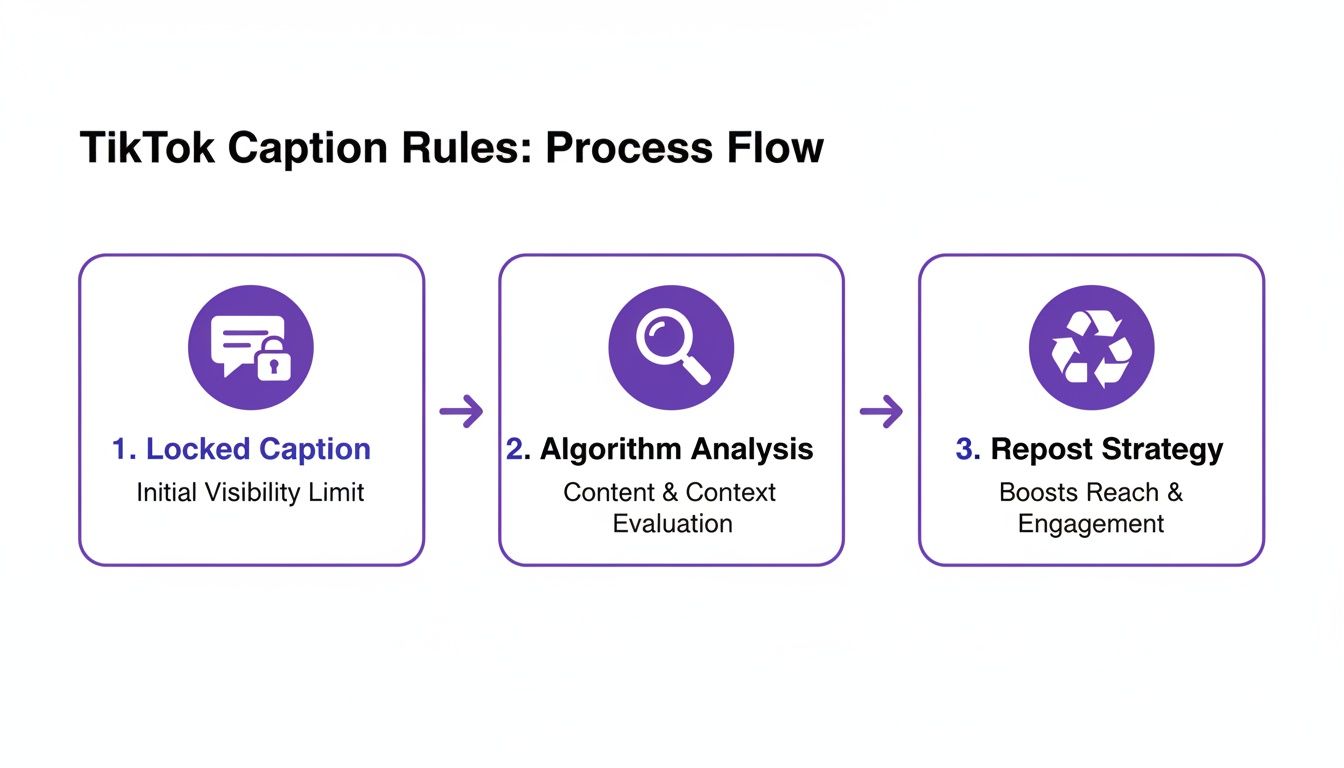
As the diagram shows, once that caption is locked and being analyzed, the only way to correct its course and get the performance you want is to pull it down and repost it strategically.
To do this right, the first thing you need to do is save the video to your device before you delete the post. This is critical. It preserves your original edited video without that pesky TikTok watermark, so it looks clean when you re-upload.
Now you can confidently delete the flawed post, upload the clean video you just saved, and write the caption you meant to write the first time. This isn't just a TikTok quirk; knowing how to manage post-publication edits is a key skill for creators. It’s useful to see how to edit descriptions on Instagram, where similar strategic thinking often applies.
If you find yourself making these fixes often, automating parts of your workflow can be a lifesaver. You can streamline your entire content pipeline and make corrections faster by using our bulk scheduling features to get your content right before it even goes live.
Let's be honest, the best fix for a TikTok caption mistake is making sure it never happens in the first place. Since you can’t just tap an "edit" button after your video is live, dialing in your pre-publish routine isn't just a good idea—it's how you protect your professionalism and reach. It means treating every caption with the same level of care you give your actual video.
A simple but powerful first move is to actually use TikTok's drafts feature. Instead of rushing to post, just save the video as a draft. This one action forces a pause, letting you step away and come back with fresh eyes to catch the typos or awkward phrases you missed in the heat of the moment.
If you're a solopreneur or part of a marketing team, that draft suddenly becomes a collaboration tool. Fire it over to a colleague or a friend for a quick second opinion. You'd be amazed what a fresh set of eyes can catch when you've become blind to your own mistakes.
Don't just give it a final glance and hope for the best. Create a "pre-flight" checklist you run through before you even think about hitting that post button. This takes the guesswork out of it and makes sure you've covered all your bases.
Your checklist could look something like this:
Think of your caption as the final polish on your content. You wouldn't publish a video with a distracting glitch in the middle, so why publish one with a distracting error right below it?
This deliberate approach helps you avoid that frantic "delete and repost" dance we all hate. To make this even smoother, consider writing your captions outside of TikTok entirely. Using a notes app or a content planner lets you fine-tune the text, hashtags, and mentions without the pressure of that "Post" button staring you down.
For an even bigger head start, AI tools can give you a solid first draft. Platforms like Taja AI can generate optimized caption options based on your video, which you can then tweak and personalize. This saves you from staring at a blank screen and ensures your caption is built on an SEO-friendly foundation right from the get-go.
Alright, let's get one thing straight: if you're treating your TikTok captions as an afterthought, you're leaving views on the table. A great caption isn't just a description; it's a direct line to the TikTok algorithm, telling it exactly who needs to see your video.
With the caption limit now expanded to a massive 2,200 characters, you have enough room for some serious micro-blogging and storytelling. This changes the game entirely. Your caption is no longer just a placeholder for hashtags; it's a strategic asset. Don't just describe what's happening—add context, share your unique perspective, and start a real conversation.
Here's the thing: the best captions are packed with the exact keywords your target audience is already searching for. You have to think like your viewer. What words would they type into the search bar to find content like yours?
For example, a fitness coach shouldn't just post "New workout." That’s lazy. A caption that actually performs would look something like this: "Try this beginner-friendly HIIT workout right from your living room! All you need is a pair of dumbbells for this 15-minute full-body burn. It's perfect for anyone looking to boost their cardiovascular health and build some lean muscle." See how that’s loaded with searchable terms?
The same goes for an e-commerce brand. Instead of the boring "Check out our new candle," they could write: "Our new 'Autumn Morning' soy candle is hand-poured in small batches right here in our studio. With notes of cinnamon, crisp apple, and clove, it’s the perfect scent for those cozy fall days. #fallvibes #soycandle #handmadegifts." It tells a story and hits multiple keywords.
A well-crafted caption gives the algorithm multiple data points to work with. It's not just about the hashtags; it's about the descriptive language you use throughout the text.
Long captions only work if they're actually readable. Nobody wants to squint at a giant wall of text on their phone. You need to use some simple formatting tricks to make your captions scannable and inviting.
The impact of a well-structured, optimized caption is huge. We've seen that creators who go back and edit their captions can see a 28% lift in engagement and 32% more shares. This is especially true now that you can essentially write a detailed, keyword-rich mini-blog right in the caption—a feature that has skyrocketed in use since the character limit increased. If you want to dive deeper, you can find more details on how the algorithm prioritizes these elements by exploring the latest TikTok algorithm research.
But to really crush it, you need to know which keywords will give you the most visibility. You can take your content to another level by using a specialized keyword research tool built specifically for video creators, which does the heavy lifting for you.
For busy creators, staring at that blank caption box is a familiar kind of torture. It’s a total momentum killer. That blinking cursor just sits there, mocking you while your creative energy slowly drains away, slowing down your entire content workflow.
This is exactly where you can start working smarter. By bringing AI into your pre-publish routine, you can pretty much eliminate the risk of making a mistake you'll regret later.
Instead of writing every single caption from a cold start, you can use AI to instantly spit out a dozen high-quality options tailored specifically for your video. Platforms like Taja AI don't just guess; they analyze your video's content, your niche, and even your unique brand voice to give you drafts that are already optimized for the TikTok algorithm. You’re starting with a strong foundation, not an empty screen.
Look, using AI isn’t about outsourcing your creativity. It’s about augmenting it. It takes on the tedious, time-sucking parts of content creation so you can focus on the bigger picture—like strategy and actually growing your channel.
The benefits are impossible to ignore:
This proactive approach is especially powerful now that captions have become so important. Back in 2023, TikTok boosted its character limit by a massive 730% to 2,200 characters, turning captions from an afterthought into a critical tool for engagement and search. Videos with optimized captions see way more engagement, and using an AI caption generator gives you a powerful head start on crafting these longer, more detailed descriptions.
By integrating AI, you shift from a reactive mindset of fixing errors to a proactive one of creating excellence. You’re no longer just trying to avoid typos; you’re strategically building captions that drive results from day one.
For creators who repurpose content, this is a complete game-changer. An AI content generator for video can turn one long-form video into dozens of clips, each with a unique, platform-specific caption. This ensures that even though you can't easily edit a TikTok caption after posting, you won't ever need to.
Of course. Here is the rewritten section, crafted to sound completely human-written and natural, following all the specified requirements.
Even when you’ve got a solid strategy, a few nagging questions always seem to pop up right after you hit "post." Let's clear the air on some of the most common ones so you know exactly what your options are.
Yes, but there's a huge catch you need to know about. You can edit your video’s description—which includes all your hashtags and @mentions—using the "Edit post" option. The catch? This lifesaver is only available for seven days after you initially publish the video.
After that one-week window closes, your hashtags are locked in for good. So if you spot a typo or want to swap in a better hashtag, act fast.
Thankfully, this is where TikTok has really stepped up its game. If you enabled auto-captions (the on-screen text that transcribes what you’re saying), you can absolutely go back and edit them for typos or clarity. Just tap the three-dot menu on your video, find "Edit captions," and you can clean up any mistakes.
Don't sleep on this feature. It's incredibly valuable, especially since refined captions can boost engagement by 26-28% and increase watch time by a staggering 40% by making your content accessible for silent viewing. For a deeper look, you can explore the data behind TikTok caption effectiveness.
The ability to edit auto-captions is a total game-changer. It lets you fix all those annoying AI transcription errors—like mangled brand names or industry jargon—ensuring your video’s SEO isn't being torpedoed by mistakes.
Instead of stressing about last-minute edits, what if you could generate perfect, SEO-optimized captions right from the start? Taja AI analyzes your video and instantly creates multiple caption options, saving you hours and making sure your content is primed to perform from the moment you post. Get started for free and see for yourself.


We are blessed to work with leading brands & Companies


We try to make easy and simple for every professionals. Get 30 days free trial - No credit card required.


© 2025 Taja AI. All rights reserved.