.jpeg)

How to Flip Video: Mirror and Rotate Quickly
Learn how to flip video in popular editors and mobile apps. Step-by-step guide to horizontal mirrors and vertical flips with quality and privacy tips.
5 min read
October 9, 2026

Learn how to create a content calendar built for today's creators. This guide covers planning, templates, and a repurposing-first workflow to save time.
Written by:


Your content process probably looks organized from the outside. A few ideas in Notes. Half a dozen draft files with names like final-v2-actual-final. A social post you meant to publish yesterday. A blog outline sitting untouched because a client request, launch update, or trend pulled you off course.
That isn't a calendar problem first. It's an operations problem.
Those who search for how to create a content calendar often think they need a better spreadsheet. Usually they need a better system for deciding what deserves to go on the spreadsheet in the first place. If you're a solo creator or small business owner, that distinction matters. A rigid calendar becomes another guilt document. A practical one reduces decisions, supports repurposing, and gives you enough structure to stay consistent without locking you into a brittle schedule.
The version that works now is not a neat list of single posts by date. It's a flexible, repurposing-first workflow built for multi-channel publishing.
The fastest way to build a useless content calendar is to open Google Sheets before you know what you're trying to make happen.
A workable calendar sits at the bottom of a stack. First comes the business objective. Then the audience problem. Then the content themes. Then the formats. Only then does the publishing schedule make sense. Airtable's guidance reflects that order: start with a cross-channel audit, define goals, audience, channels, and cadence, then build the calendar fields. It also recommends planning themes and campaigns at least a quarter ahead, while scheduling specific ideas 4 to 6 weeks in advance to preserve lead time for research, drafting, review, and approvals in its guide to creating a content calendar in Airtable.
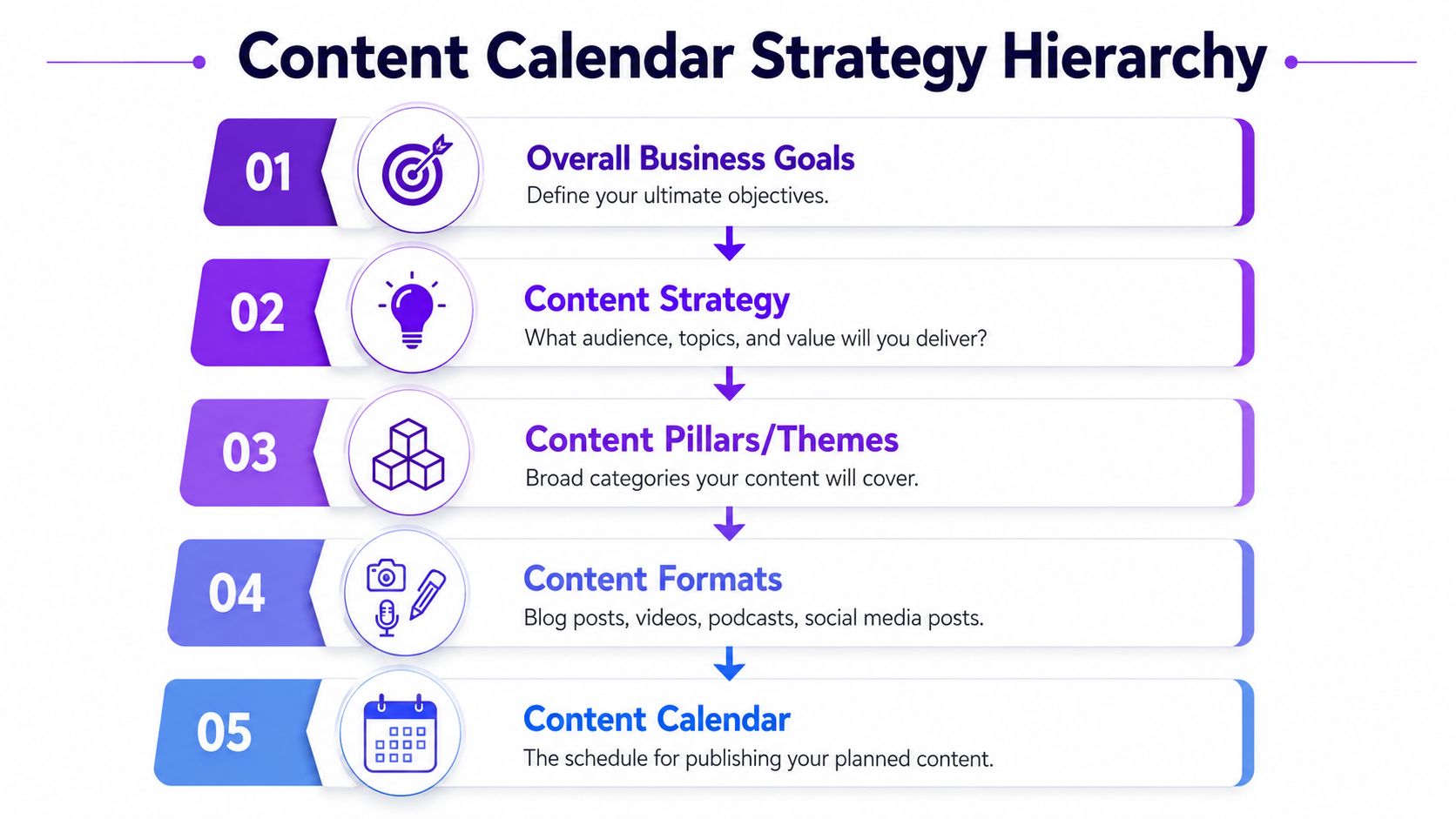
You don't need a deck. You need one page with five decisions:
If you work in a niche business, it's worth looking at examples that tie calendar planning directly to industry-specific marketing systems. This real estate marketing blueprint is useful because it shows how content planning becomes more effective when it's tied to a real sales workflow instead of generic posting advice.
A cross-channel audit sounds formal, but for a small team it can be simple. Pull up your blog, Instagram, YouTube, LinkedIn, email sends, and any recurring offers. Then answer three questions:
Practical rule: If a channel takes a lot of effort and rarely supports a business goal, it shouldn't drive your calendar.
This is also where AI can help, but only after strategy is clear. If you're exploring automation for distribution and planning, Taja's article on AI for social media marketing is a useful reference point for where AI fits and where human judgment still matters.
A calendar built without strategy becomes a to-do list. A calendar built from strategy becomes a filter. That filter is what keeps you from publishing busywork.
Once the strategy is set, the next mistake is overfilling the calendar with isolated ideas. That's where burnout starts. A better move is to map a small set of recurring themes, then assign a publishing rhythm you can sustain.
Hallam's guidance repeats a practical rule that has held up for years: plan at least a month in advance so teams can handle approvals, asset creation, and channel-specific adaptation without last-minute bottlenecks, as noted in Hallam's advice on building a content calendar that works.
Most small businesses don't need a huge editorial universe. They need 3 to 5 content pillars that connect directly to what they sell and what their audience asks.
A local service business might use:
A creator or coach might use authority, audience questions, behind-the-scenes workflow, client objections, and product education.
Don't schedule from a blank page. Build a backlog under each theme. Keep it rough. Fragments are fine if they spark execution later.
A simple way to build the backlog:
If you run a startup or early-stage business, the practical thinking in Distribute.you's startup guide can help here because it pushes you to prioritize content that supports actual growth constraints instead of vanity posting.
Most calendars fail because the publishing rhythm gets set by guilt. Daily posting sounds committed until the fourth week.
Use a lower starting cadence than your ego wants. Then protect it.
| Channel | Better starting question | Bad assumption |
|---|---|---|
| Blog | Can we publish consistently with enough research and editing time? | We need to post constantly |
| YouTube or podcast | Can we maintain recording and editing bandwidth? | Long-form has to be frequent |
| LinkedIn or X | Can we post enough to stay visible without recycling junk? | More posts always means better reach |
| Can we send something worth opening on a reliable rhythm? | Weekly is mandatory |
A sustainable calendar should feel slightly underfilled at first. That's a good sign. It leaves room for real work, revisions, and life.
If your team shares production work, capacity planning matters more than inspiration. A framework for team capacity planning provides key assistance here. Content output should match actual bandwidth, not your wish list.
A content calendar doesn't need fancy software to be useful. It needs the right fields.
A Google Sheet works for many solo operators. Airtable works well when you want multiple views, linked assets, and cleaner workflow management. Project tools like Asana or Trello can also work if the calendar is tightly connected to execution. The wrong move is choosing a tool because it looks advanced while ignoring whether it matches your actual process.
This comparison helps frame the trade-off.
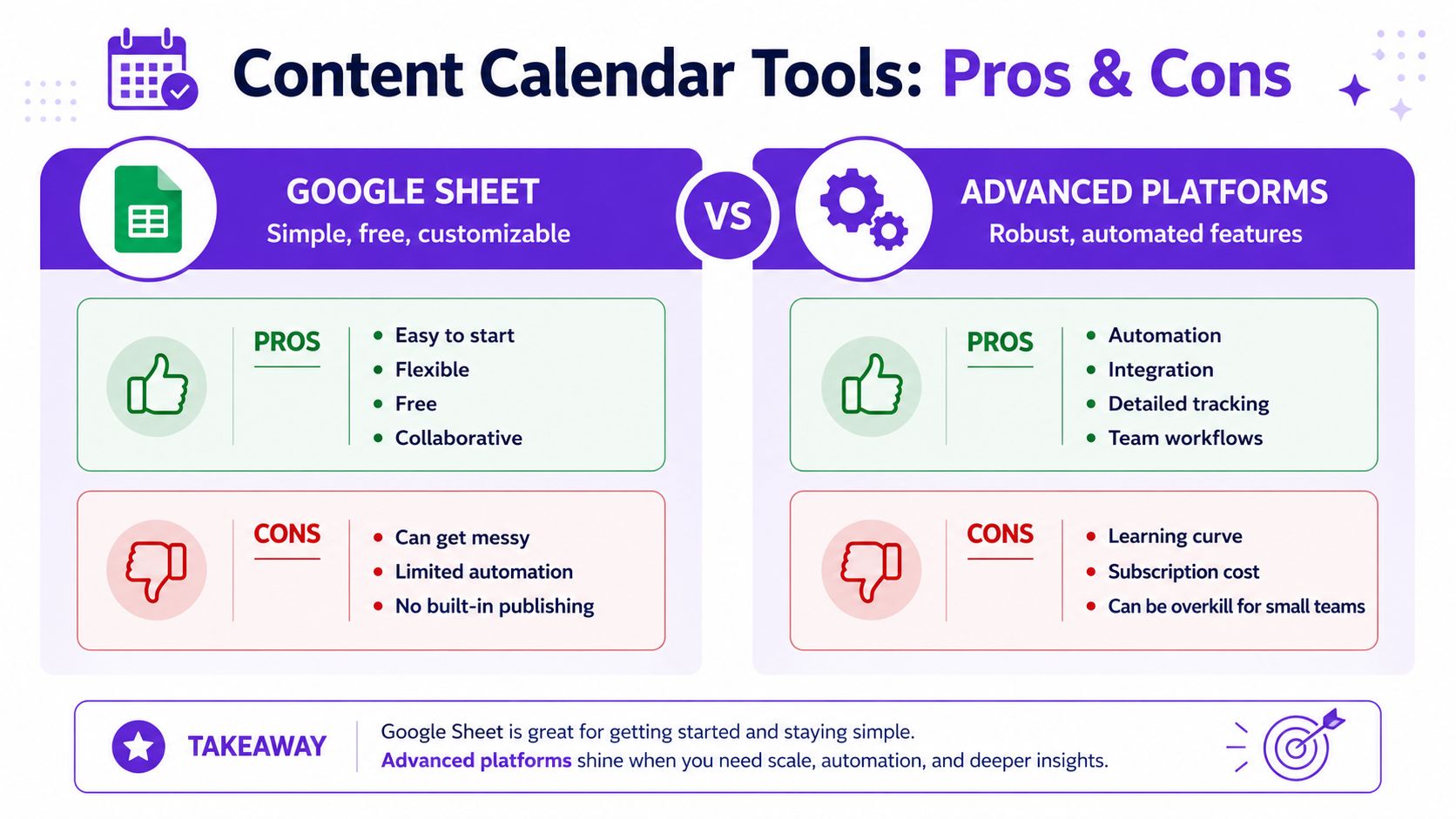
A widely cited survey found that over three-fourths of marketers' calendars include content type, title, publication date, description, and target keywords. That matters because it confirms mature calendars function as production trackers with SEO and execution metadata, not just date lists, according to Zerys' discussion of content calendar tools and ideas.
If you're building from scratch, start with these fields:
Many calendars break because they only track publish dates. Production depends on internal milestones.
Use fields like:
That gives you a calendar that helps prevent jams instead of documenting them after the fact.
A video walkthrough can make template-building easier if you want to see one approach in action.
Use a spreadsheet if you are solo, early, or still refining your process.
Use a database-style tool if you need views by owner, status, channel, and campaign.
Use a dedicated platform if publishing, repurposing, and scheduling happen in the same workflow. For example, automating content creation becomes more practical when your planning tool connects directly to production outputs instead of forcing you to copy data between apps.
If updating the calendar takes longer than using it, the setup is too complicated.
Most advice about how to create a content calendar still assumes a one-post workflow. One blog post goes in one slot. One Instagram post goes in another. One email goes somewhere else. That model breaks fast when you're publishing across several channels and trying to avoid reinventing the wheel every day.
A better calendar starts with source content, not individual posts.
The gap matters because most content calendar guides still don't explain how to sequence a dozen repurposed assets from a single long-form video across platforms, especially for creators and small businesses using tools built around repurposing workflows, as discussed in this video on the modern creator workflow gap.
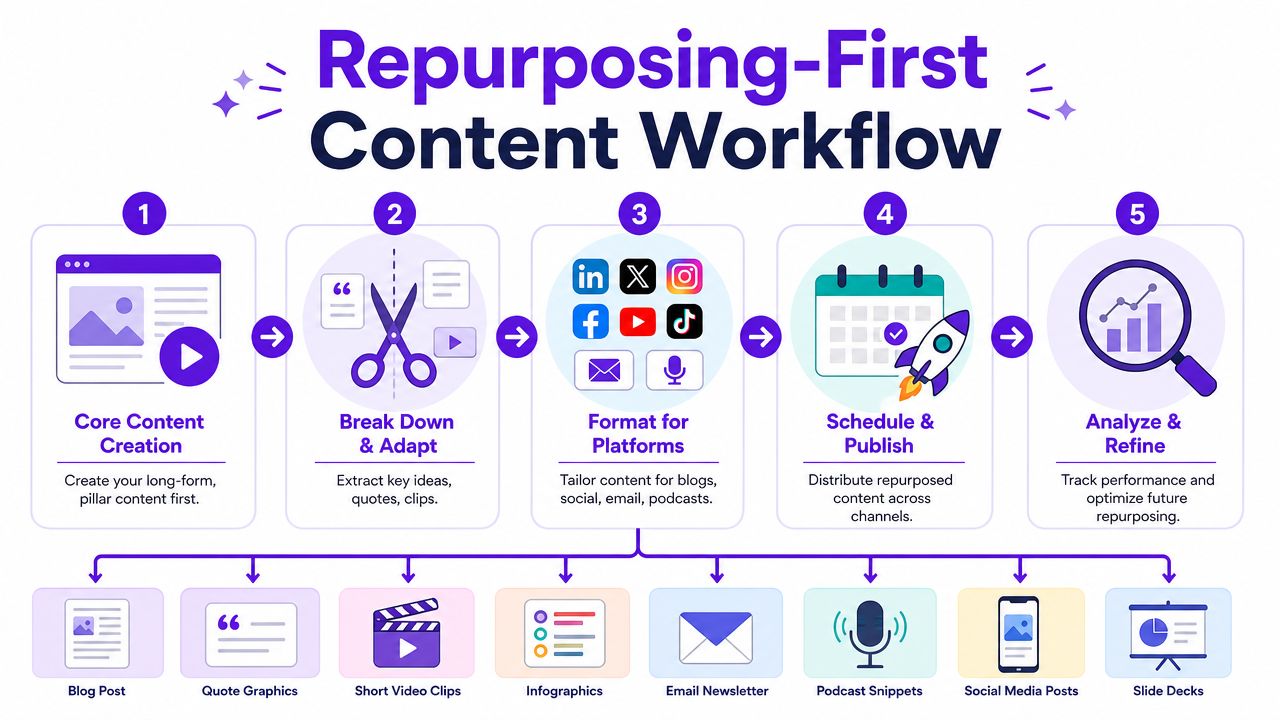
Here's the shift that makes the calendar manageable.
Instead of entering five separate content ideas, enter one pillar asset and attach the downstream pieces to it. A recorded webinar, podcast episode, tutorial, interview, listing tour, FAQ video, or teaching session becomes the parent item. Everything else gets planned from that source.
For example, one long-form recording can produce:
That changes the calendar from a schedule into a distribution map.
Repurposing only works when each asset has a job.
A practical sequence might look like this:
| Asset type | Role in the funnel | Calendar behavior |
|---|---|---|
| Long-form video or podcast | Authority and depth | Publish first |
| Short clips | Reach and discovery | Release across the next several days |
| LinkedIn or X post | Insight and conversation | Pull one claim or observation |
| Blog post | Search and evergreen reference | Publish after the source asset is ready |
| Direct audience activation | Send when supporting assets are live |
This staggered approach helps you avoid posting the same idea in the same format everywhere on the same day.
Treat the original recording like raw material, not a finished event. The real leverage comes from the follow-on assets.
Repurposing-first calendars work best when production is batched.
Record once. Clip once. Write captions in one sitting. Schedule the outputs together. If you create everything channel by channel, you end up doing context switching all week and the calendar starts slipping.
This is also why a repurposing-first calendar is more forgiving than a rigid one. If the long-form source gets delayed, you can move the child assets together instead of manually rebuilding a week of disconnected posts.
A content calendar stops being useful the moment you treat it like a contract.
High-performing calendars are maintained through weekly or monthly optimization loops that review engagement, clicks, conversions, and audience feedback, turning the calendar into a closed-loop system rather than a static posting schedule, as Emplifi explains in its guide to a social media content calendar.
Single-post analysis can mislead you. One post may flop because of timing, format, weak packaging, or a distracted audience. Themes tell you more.
Review the calendar by asking:
That review should shape the next cycle. If behind-the-scenes content consistently starts conversations, keep the theme. If polished graphics eat time and don't move anything, scale them back.
Many teams build a perfect month and then break it on the first unexpected event. The fix is simple. Leave room.
Reserve open space for:
A packed calendar looks productive. A resilient calendar performs better.
Flexibility doesn't mean chaos. It means having a system for deciding what moves.
A practical re-prioritization rule set:
Review the calendar often enough that changes feel normal, not like failure.
The strongest calendars are living documents. You update them because you're paying attention, not because the original plan was wrong.
Abstract advice gets clearer when you can see the calendar in use.
A common gap in content calendar advice is resilience. Many guides don't explain how to keep the calendar working when priorities change, even though modern workflows need to absorb repurposed assets and auto-scheduled outputs without constant manual reshuffling, as discussed in Dotdigital's guide to a marketing content calendar.
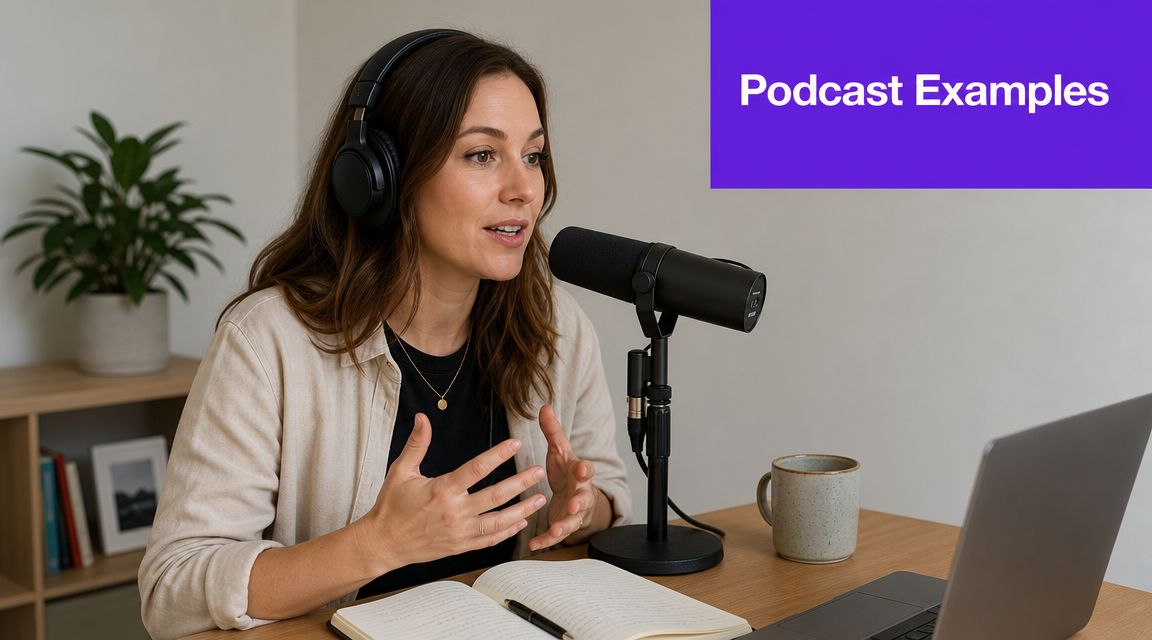
A podcaster records one episode each week. Instead of placing disconnected posts on the calendar, the episode becomes the parent item.
The calendar might look like this in practice:
That last line matters. The calendar stays stable because it includes backup assets, not just ideal outcomes.
A real estate agent shoots one property tour or neighborhood walkthrough.
From that one source asset, the weekly calendar can branch out:
| Day | Asset | Purpose |
|---|---|---|
| Monday | Full property or neighborhood video | Depth and trust |
| Tuesday | Short behind-the-scenes Reel | Personality and local familiarity |
| Wednesday | Neighborhood spotlight post | Context and education |
| Thursday | Testimonial graphic or quick client story | Proof |
| Friday | Blog post about what buyers should watch for in that area | Search and evergreen value |
If a listing status changes or a new opportunity appears, the calendar doesn't collapse. The agent can replace the Friday blog with a market update and keep the rest of the asset cluster moving.
They don't depend on daily originality. They depend on structured reuse.
They also separate three layers that often get mashed together:
That's the difference between a calendar that survives real work and one that dies after a busy week.
If you're tired of planning content in one tool, producing it in three more, and manually turning one recording into a dozen posts, Taja AI is built for that workflow. It turns long-form video into clips, captions, thumbnails, blogs, and platform-specific posts, then helps schedule those assets across channels from one dashboard so your content calendar reflects a repurposing system instead of a pile of disconnected tasks.


We are blessed to work with leading brands & Companies


We try to make easy and simple for every professionals. Get 30 days free trial - No credit card required.


© 2025 Taja AI. All rights reserved.