.jpeg)
TikTok Content Strategy: A Step-by-Step Playbook
Build a TikTok content strategy in seven steps: set goals, pick pillars, batch production, repurpose videos, post consistently and measure what works.
5 min read
October 25, 2026

Set up Facebook auto share the right way. Learn permissions, scheduling, cross-posting best practices, and fixes for common auto share issues.
Written by:


A small e-commerce team can save hours each week with Facebook auto share, then lose the benefit when every product update appears unchanged on Instagram, a Facebook Page, and several Groups within minutes. The scheduler is working, but the workflow isn't. Audiences see duplicates, engagement weakens, permissions expire, and a post that looked “published” in one dashboard never reaches Facebook at all.
That's the trade-off. Automation reduces repetitive distribution work, but it also creates a compliance-sensitive system that needs permission checks, content variation, monitoring, and a human fallback. Facebook auto share works best as operational plumbing, not as a shortcut to automatic reach.
The appeal is easy to understand. A social media manager publishes one announcement, connects the relevant destinations, and lets an automation tool handle routine delivery. For a creator, retailer, or small team, that can remove a tedious sequence of copying captions, uploading media, selecting Pages, and checking whether each post went live.
The trouble starts when teams treat every destination as interchangeable. A product launch written for Instagram may need a different opening on Facebook. A Page audience may tolerate a link-heavy update that performs poorly in a community Group. A partner Page may share the same announcement, but not at the same time or with the same copy.
Operational rule: Save automation for distribution. Keep editorial judgment at the source.
Facebook auto share commonly fails in four ways:
Native sharing between connected Meta properties is usually safer because it stays within Facebook and Instagram's own controls. Third-party tools can add team approvals, calendars, and multi-network scheduling, but every extra connection adds another point of failure. A practical guide to AI for social media marketing is useful here, provided automation supports the publishing process rather than replacing review.
The durable setup is simple in principle: authorize narrowly, adapt content by destination, stagger distribution, and inspect logs. The rest is maintenance.
A scheduler can show “connected” while Facebook rejects the next post. The usual fault is authorization: the person who connected the tool lacks the required role on the destination Page, the approved scope changed, or the connection has gone inactive. Treat permission status as part of the publishing workflow, not as a one-time setup task.
Facebook's documentation states that a third-party app, website, or game may retain access to information shared with it when the person has used that service within the last 90 days. Facebook labels the app access “Active” during that period and provides an apps-and-websites area for reviewing or removing connected services. Check the official Facebook explanation of app access and connected services before depending on a third-party auto share connection.
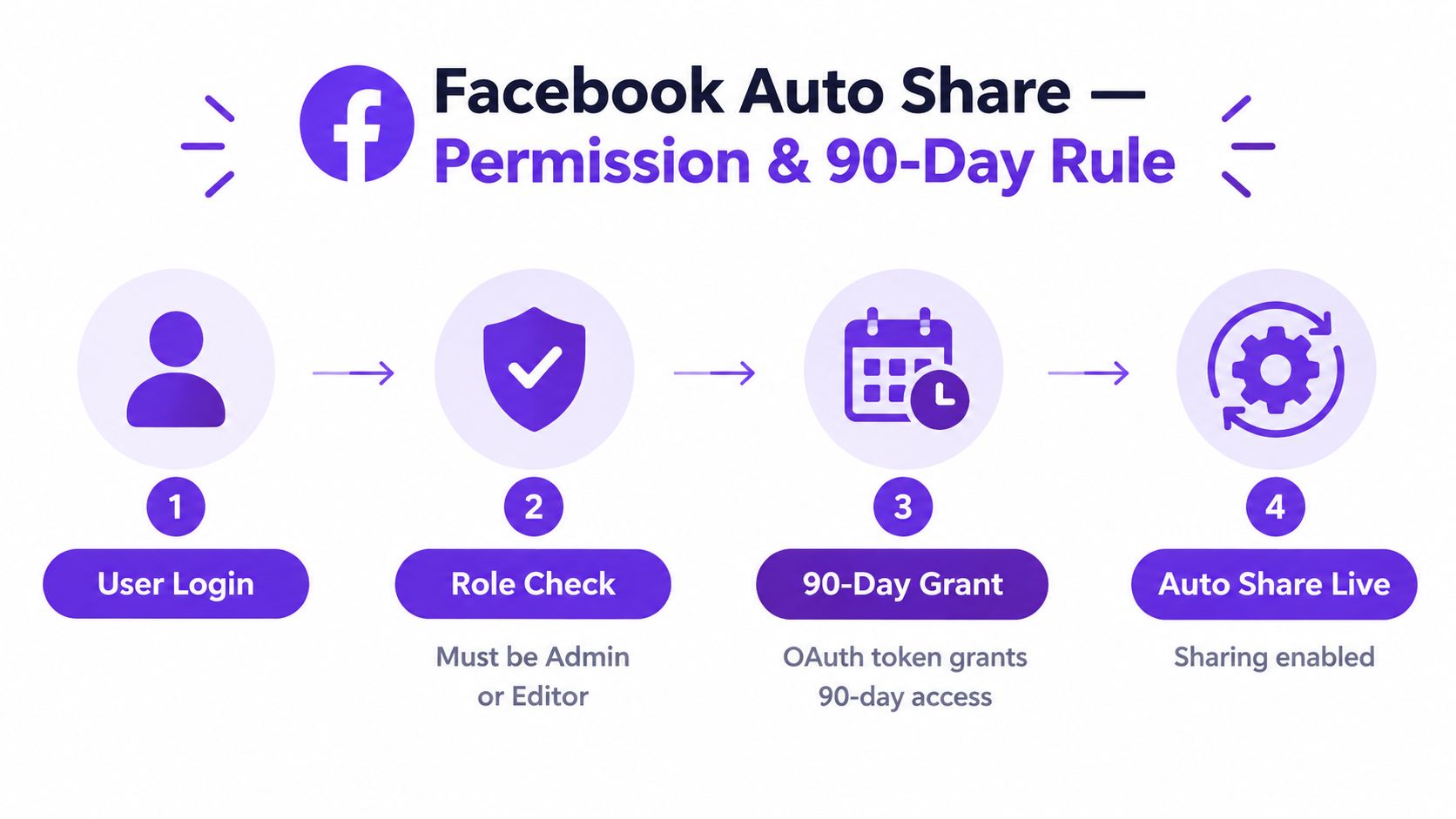
A user access token records the person and the permissions they approved. A Page access token enables the Page action covered by that approval. Many tools request both: the user establishes the relationship, while the Page carries out the publishing action.
Permission labels differ by implementation and approval status, but the operational roles are consistent:
Advanced access may require business verification and Meta app review. A scheduler's “Reconnect Facebook” button starts an OAuth flow, but it does not prove that every permission returned. After reconnecting, verify the selected Page, granted scope, and a real test post.
Set an internal reauthorization check every 60 to 75 days. Facebook does not require that schedule. It gives the team time to detect a broken connection before inactivity within the documented 90-day window causes queued posts to fail. Record who owns the connection and review failed publishing logs after each test.
Native controls are the right starting point for most operators managing a small number of connected Meta destinations. They reduce the number of vendors involved and make it easier to see which profile, Page, or Group has approved the workflow.
Begin with the Page or profile relationship. In Facebook's settings, review connected accounts and cross-posting options, then choose only destinations with a meaningful audience overlap. Native cross-posting can republish supported text, photos, links, and videos, but the result still needs a destination-specific review. A shared video may need a different caption, thumbnail, or call to action on each Page.
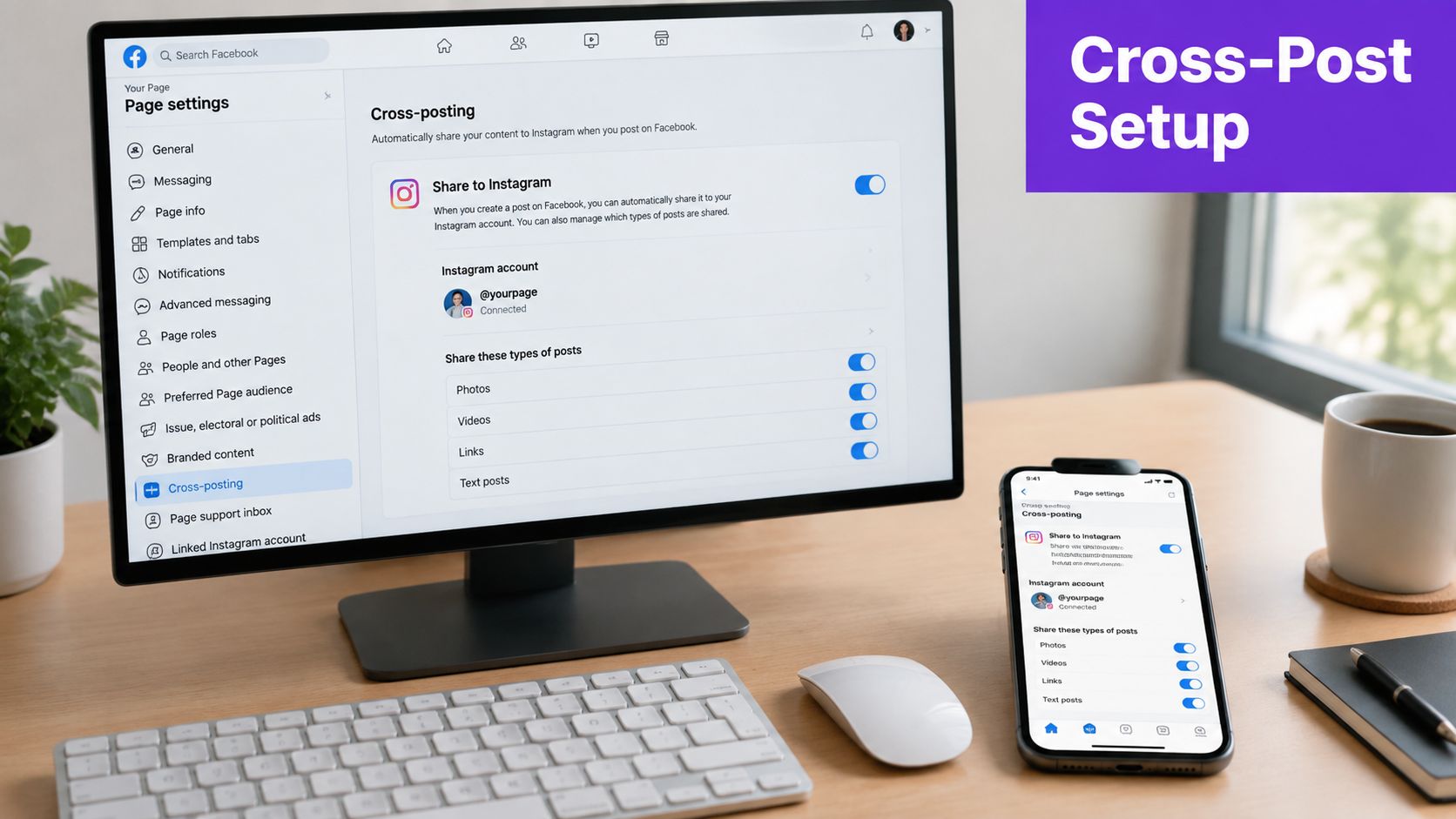
Stories and Reels deserve separate checks. Music rights, aspect ratios, captions, and remix behavior can differ from ordinary feed posts. A workflow that publishes a feed video correctly may not preserve the intended Reel treatment.
Native tooling has clear limits. It won't provide every conditional rule, recurring RSS-style distribution pattern, or cross-network route outside Meta properties. For a broader walkthrough of scheduling systems and publishing workflows, the AgentPulse social automation guide provides useful operational context.
The choice isn't “manual versus automatic.” It's a decision about how much workflow complexity your team can safely operate.
Meta Business Suite is generally sufficient for a solo operator or a small team working mainly with Facebook and Instagram. It keeps the workflow close to Facebook's native controls and avoids adding another vendor between the Page and the platform. Buffer, Hootsuite, Later, and similar tools become more valuable when approvals, shared calendars, client accounts, bulk queues, or cross-network publishing matter.
The risk rises when a tool hides the important details. You need to know whether it uses approved Graph API access, how it reports token expiration, which destinations it supports directly, and what happens when a format isn't available. A tool that drops a Group post or converts a Reel into a static asset creates a false sense of reliability.
| Tool | Best For | API Access | Token Handling | Group Sharing | Reels Support | Risk Level |
|---|---|---|---|---|---|---|
| Meta Business Suite | Single-account operators and Meta-focused teams | Native Meta controls | Reconnect through Meta when required | Conditional, destination permissions apply | Supported features vary by format | Lower when kept native |
| Buffer | Teams needing a shared publishing queue | Verify current official integrations | Depends on account connection and alerts | Check destination support before purchase | Verify per account and format | Moderate |
| Hootsuite | Larger approval and reporting workflows | Verify approved integration scope | Centralized connection management, still requires monitoring | Confirm support and policy limits | Verify before building the workflow | Moderate |
| Later | Visual planning and content calendars | Verify current official integrations | Review reconnection prompts and account status | Often limited by destination rules | Confirm supported publishing paths | Moderate |
| Custom automation | Specialized internal workflows | Requires careful API implementation | Your team owns refresh, alerts, and recovery | High policy and maintenance exposure | Format handling is your responsibility | Highest |
Third-party tools earn their cost through coordination, not permission immunity. They won't make identical posts into many Groups safe, and they can't prevent Facebook from restricting behavior that looks like spam or coordinated distribution. Meta's native guidance focuses on user-controlled sharing between connected profiles, while the Facebook cross-posting help documentation shows the platform's emphasis on connected, user-managed sharing.
For a focused comparison of automation patterns, review this guide to automating social media posting. Match the tool to your risk tolerance, approval needs, and actual destinations, not to the length of its feature list.
A Facebook auto share workflow should produce posts that feel native to each destination. Start with one source of truth, then adapt the material for Facebook, Instagram, LinkedIn, or a Group instead of copying the same caption everywhere.
Facebook and Instagram often need different openings, context, and calls to action. Link posts also deserve review because an outbound destination changes the user's path and may make the update less engaging than a native conversation starter. Hashtags, mentions, line breaks, and media crops should be checked per platform rather than inherited blindly from the source.
Publishing the same announcement to a Page, partner Page, and several Groups within minutes creates an obvious duplicate pattern. Space related posts apart, vary the first line, and decide whether every audience needs the update at all. A Group should receive a community-relevant version, not a pasted campaign caption.
The riskiest pattern is high-velocity identical posting across many Groups. Independent coverage referenced in the brief highlights that automated tools can trigger restrictions or bans when they push content at high velocity or identically across many Groups. That makes Group distribution a review queue, not a set-and-forget destination.
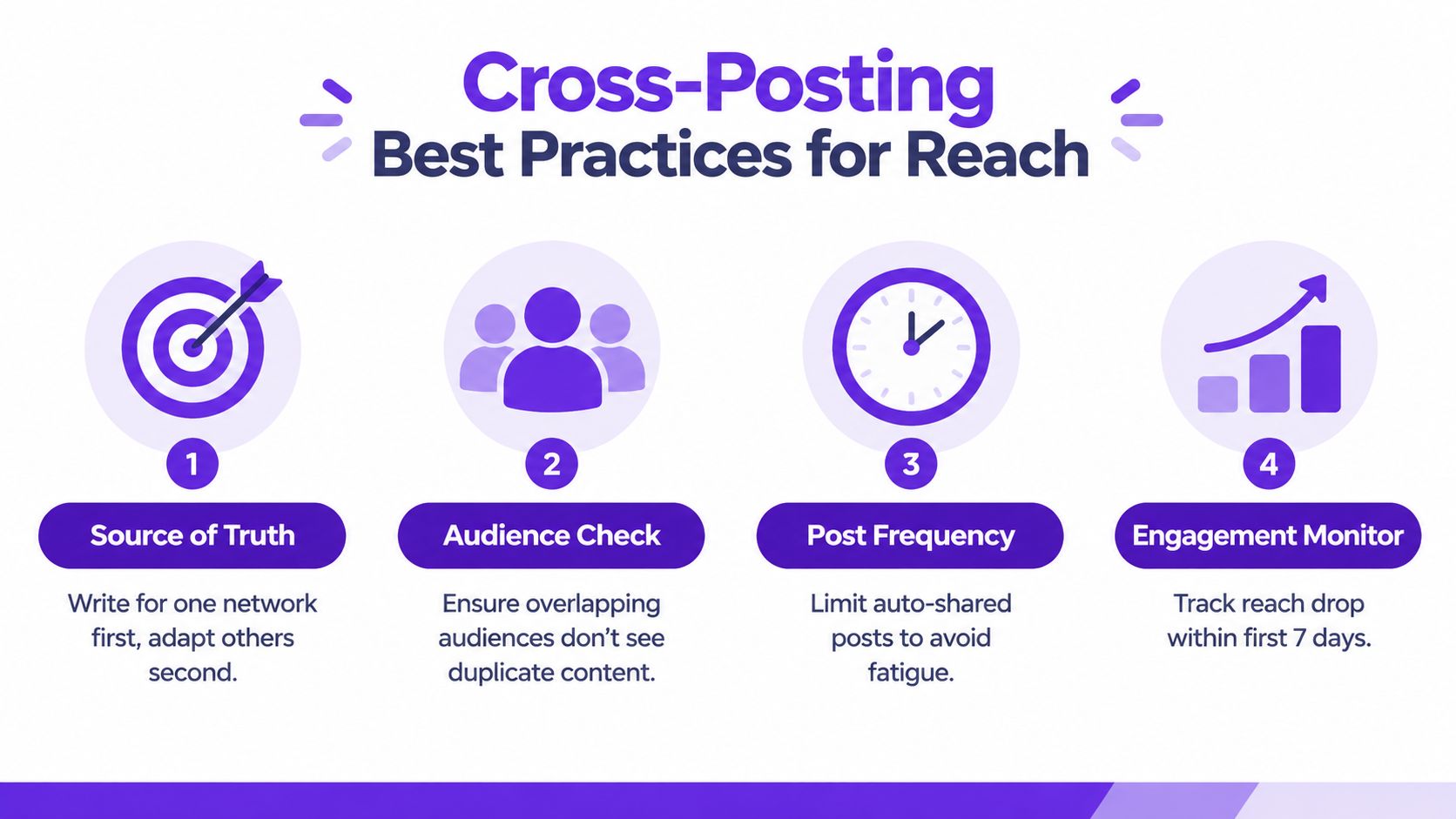
Use automation for predictable content pillars, evergreen education, and approved recurring campaigns. Keep breaking news, sensitive announcements, crisis communication, and fast-moving offers under human control.
Audience test: If the same person could see the identical update in several places, rewrite or remove at least one of those appearances.
Track reach, comments, click behavior, and failed posts after each workflow change. If performance weakens after automation begins, don't assume the scheduler is harmless. Compare the content, timing, destination mix, and duplication pattern before adding more automation. For platform-specific adaptation, see this guide to moving Facebook posts to Instagram.
Most failures show up as a specific symptom. Start by identifying the failed handoff, then test that part of the workflow before rebuilding everything.
Open the connected app or scheduler and check the account status, then review Facebook's apps-and-websites settings and any reconnection prompt. If authorization is stale, reconnect the account, select the intended Page again, confirm the required permissions, and send a low-risk test post.
Check the documented 90-day access window first when a reliable connection suddenly stops publishing. As noted earlier, an expired access grant usually calls for fresh authorization, not a new content queue.
Inspect the source file, destination type, and scheduler mapping. A video may be routed as a feed attachment instead of a Reel. Publish the same file directly through Meta Business Suite and compare the result. If the direct post is correct, change the publishing path or media mapping rather than replacing the integration.
Stop the queue before more copies go out. Compare captions, media, and destination settings across Pages and Groups, then remove duplicates where appropriate. Create a destination-specific rewrite before restarting, because an identical caption can make the workflow look repetitive even when delivery succeeds.
Pause the workflow and review recent posts for repeated creative, weak engagement, crowded timing, and destinations that add little value. A short period of manual publishing can help the team observe audience response, but it does not guarantee an algorithmic reset. Use the pause to change the workflow, then compare performance after the change.
Have the current Page manager verify the connected app and role assignment. Remove obsolete access, reconnect through an authorized Page manager, and test the exact destination that failed. Record the connection owner internally so staff changes do not disable publishing. Permission failures often point to ownership drift, not a broken scheduler.
Run this pre-flight before enabling a Facebook auto share workflow. Treat the 90-day permission window as an operating deadline, not a detail to check after launch.
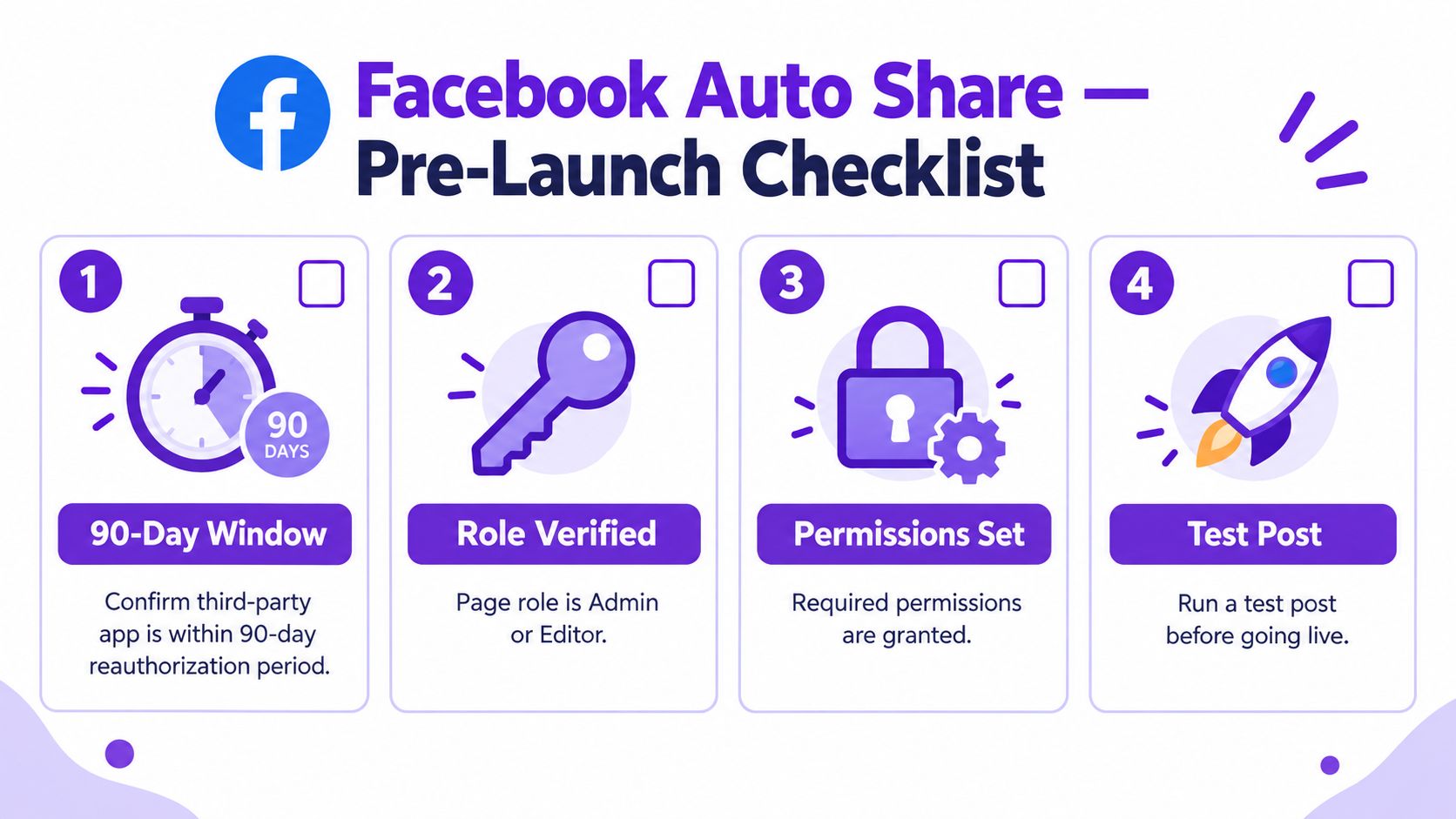
A checklist controls the workflow, but it cannot guarantee delivery. Facebook auto share holds up when someone owns permissions, content adaptation, reauthorization, and failure monitoring.
Taja AI can repurpose long-form video into Facebook-ready clips, captions, thumbnails, and platform-specific posts, then support scheduling across social channels from one dashboard. Visit Taja AI to reduce repetitive production without relying on identical cross-posts.


We are blessed to work with leading brands & Companies


We try to make easy and simple for every professionals. Get 30 days free trial - No credit card required.


© 2025 Taja AI. All rights reserved.