.jpeg)
Content Calendar Free: 10 Tools & Templates (2026)
Compare 10 content calendar free tools and templates—Sheets, Trello, Notion, schedulers—with pros, cons, use cases, and Taja AI workflow tips.
5 min read
October 24, 2026

Learn how to automate social media posting across platforms without hurting engagement. Step-by-step workflow for repurposing, scheduling, and scaling content.
Written by:


You're probably sitting on a folder of solid long-form videos, a few half-finished captions, and a posting routine that eats your morning before you've even opened your inbox. The work itself isn't the issue. The issue is that every platform wants a different format, a different caption style, and a different publishing rhythm, so the distribution side turns into a second job.
That's where automate social media posting starts to matter. In practice, it's not about replacing judgment, it's about turning publishing into a repeatable system so good content doesn't stall because you ran out of time. Modern tools now handle scheduling, bulk upload, recurring queues, analytics, cross-platform workflows, and message management from one place, which is why automation has become a standard operating model rather than a niche workaround, as described in Hootsuite's automation guide.
A strong podcast episode lands, the clips are ready, the captions are drafted, and then the grind starts. One person still has to open Instagram, LinkedIn, X, Facebook, and YouTube one by one, paste the right copy into each field, check the video format, and hope nothing gets missed before the next task pulls attention away.
That overhead hurts small businesses even more because the job is bigger than hitting publish. Someone has to keep the cadence straight, adapt the post for each platform, format the video, watch the comments, and figure out which versions perform. Social media automation software exists to pull that repeat work into one operating system, and guides from Hootsuite describe the core workflow as connecting accounts, setting publishing cadences, uploading content, and scaling gradually.
The content itself usually is not the problem. Many teams already have more raw material than they can publish well. The failure point is consistency, because manual posting turns every day into a stack of small decisions that drain attention.
Practical rule: If publishing a post requires fresh effort every single time, your system is too fragile.
Automated posting works because it shifts the job from remembering to publish to preparing good assets once, then distributing them cleanly. Analysts at its post-automation analysis found very little variance in click and conversion impact between manual and automated posts, and concluded that automation is just as effective as manual posting in most situations. That matters because it gives you steadier execution without forcing every publish to be a hand-built task.
For solo operators, that means fewer missed days and less context switching. For SMBs, it means the brand voice stays consistent even when the person posting changes. For repurposed long-form video, it also means you can keep clips moving across channels without burning trust by rushing uploads, skipping platform-specific edits, or forcing the same asset into every feed exactly the same way. Automation should handle distribution, while judgment still decides what gets published and how it should be framed.
Automation fails fast when the content plan is vague. If everything can be posted at any time, nothing has a reliable place to live in the calendar. The cleanest workflow is still the simplest one, plan, create, schedule, which is the low-friction path recommended in PostBae's social automation workflow.
Content pillars should reflect what you already know, sell, or teach. A solopreneur might use three pillars, education, proof, and process. A real estate agent might use listings, neighborhood context, and client questions. Podcasters can organize around episode highlights, behind-the-scenes commentary, and guest insights. Educators can rotate lessons, student wins, and answers to recurring questions.
The point isn't variety for its own sake. It's creating enough structure that batch production feels repetitive in a good way. If a pillar takes too much original thinking every week, it isn't a pillar yet, it's a one-off.
Batching works because it separates creative work from administrative work. You sit down once, outline a week's worth of posts, write the captions, export the graphics or clips, then load everything into a scheduler. That's the implementation path PostBae explicitly recommends for solo operators and SMBs.
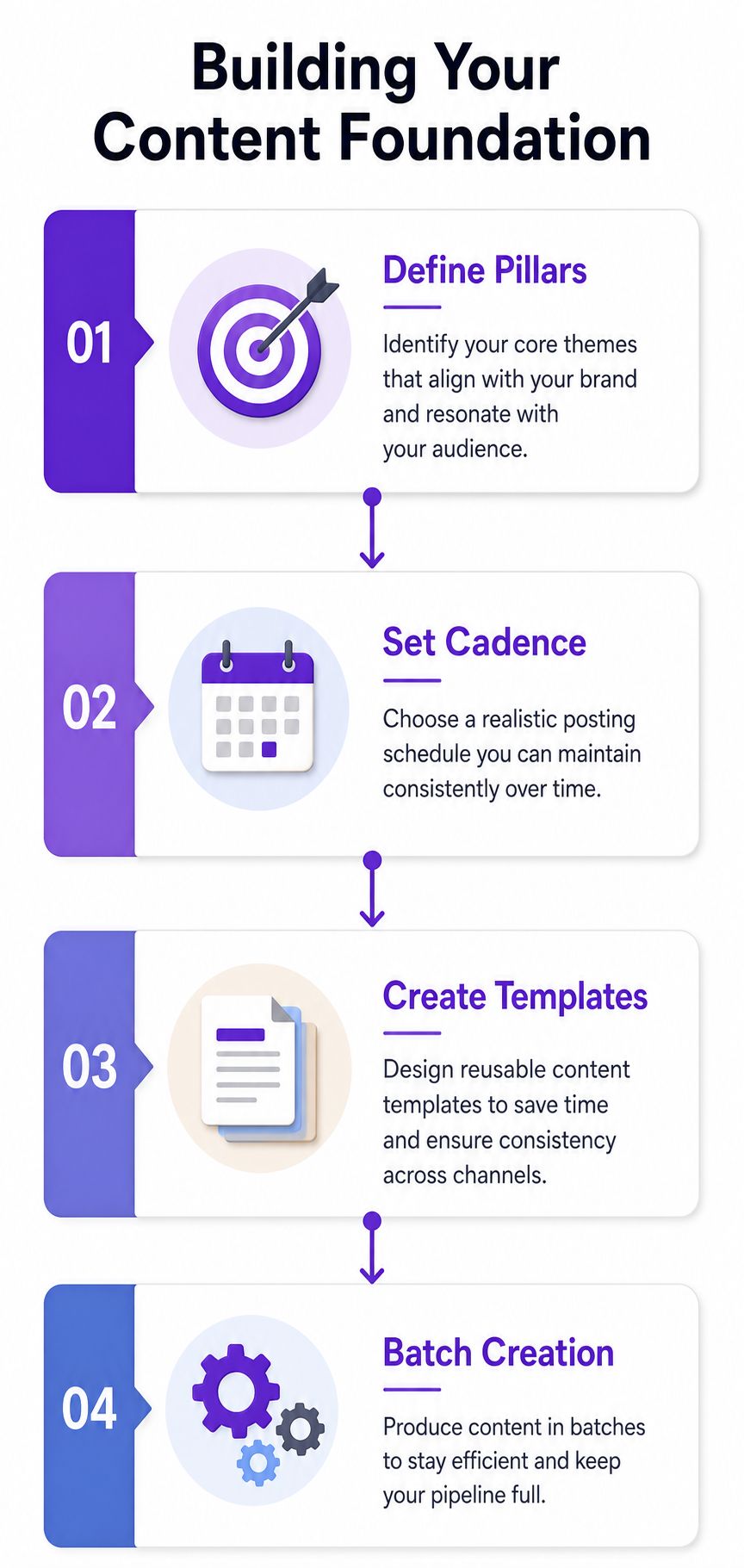
A useful batching cadence is the one you can repeat without resentment. Weekly batches work well for small teams that want current content with minimal overhead. Longer batches fit creators with stable offers or evergreen teaching content.
Write the post once, then decide where it belongs. Don't decide where it belongs while you're writing it.
That distinction matters because publishing systems break when content generation and distribution are tangled together. Batch first. Schedule second. Edit only when the platform demands a different format or tone.
Generic scheduling tools assume you already have finished posts. For video-led businesses, that's the wrong starting point. The power comes from taking one long-form recording and turning it into a stack of platform-native assets, shorts, captions, thumbnails, blog drafts, and network-specific variants, all from the same source file.
A workflow built around repurposing also solves the consistency problem. Instead of asking a creator or team member to invent fresh social content every day, the system extracts useful moments from a finished video and adapts them for the channel that will carry them. That's the model behind Taja AI's automation and content repurposing workflow, where one upload becomes multiple ready-to-publish outputs. For a practical adjacent example of video-focused production in another niche, see WearView's ai video generator for clothing brand, which shows how specialized video workflows can support repeatable marketing output.
The cleanest setup starts with one long-form video, then branches outward. The source can be a webinar, podcast, interview, class, walkthrough, sermon, or client presentation. Once it's in the system, the repurposing layer can pull shorts, trim clips, draft captions, and generate text variants that fit each network.
That matters because platform-native content isn't just about length. It's about context. A LinkedIn post built from a webinar takeaway should read differently from a YouTube Short pulled from the same recording, even if the visual source is identical. The edit should respect the channel instead of forcing the same script everywhere.
Brand templates matter more as volume rises. If every clip gets a different font treatment, title treatment, and CTA style, the feed starts to feel random. Template discipline keeps the output recognizable while still letting each post adapt to the platform.
Practical rule: Repurpose the message, not the format. Same idea, different delivery.
That's where automation starts to feel useful instead of noisy. The system takes care of extraction and formatting, while you keep control over which clip deserves the strongest hook, which quote needs trimming, and which platform should get the most native version. Done well, a single recording can fuel a week or more of distribution without turning into a full-time editing project.
Automation only works when the platform trusts the content and the account behind it. The technical side matters, but so do the platform's eligibility rules and formatting expectations. Open Hootsuite's automation overview and you'll see the modern standard already assumes cross-platform scheduling across Facebook, Instagram, LinkedIn, X, and YouTube, but each network still enforces its own limits on what can be published and how.
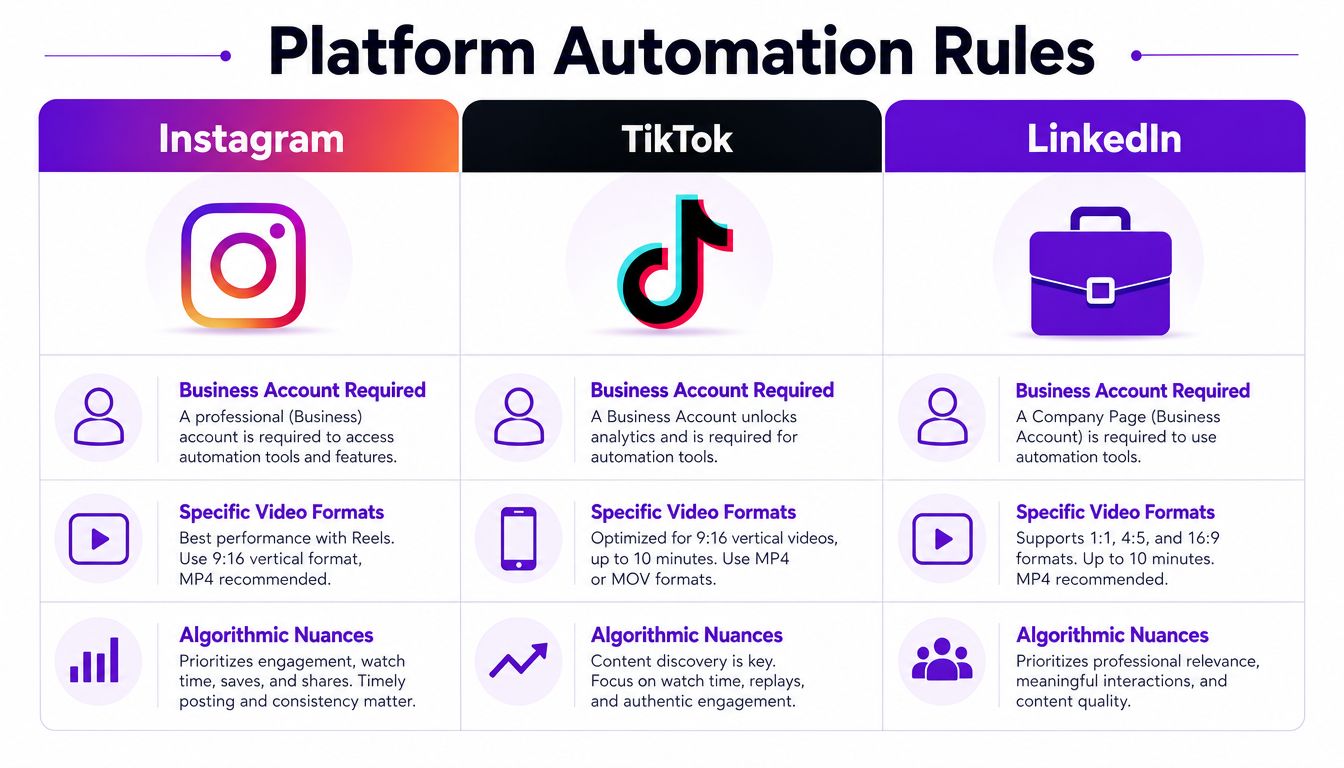
Instagram is the easiest example of a rule that breaks automation when ignored. Scheduling depends on having the right account type, and guides consistently point to Business or Creator eligibility. TikTok and LinkedIn bring different constraints, especially around how media is formatted and how repetitive the post looks once it lands in the feed. In practice, the account must be configured before automation gets anywhere near the publish button.
That's also why technical setup matters so much in tools that use API-connected publishing. A workflow can look perfect in the dashboard and still fail if credentials aren't validated or the connected account doesn't meet platform requirements. PostPlanify's technical breakdown is useful here because it shows the operational logic, schedule trigger, data source, branching by platform, and publishing nodes, while also calling out the failure points that break posts.
The bigger risk isn't just broken publishing, it's trust loss. Platform systems are built to detect spam-like behavior, duplicated distribution, and content that feels mechanically repeated. Buffer's automation guide points out that current social platforms are tightening API access and emphasizing original or non-duplicative content, which is why the safest strategy is to adapt the message by platform instead of blasting the same post everywhere, as noted in Buffer's social automation guide.
If a video clip looks identical on every network, it invites the wrong signal. A better approach is to vary the caption, trim length, title card, and CTA so the post feels native. That isn't extra polish for its own sake. It's the difference between a post that looks distributed and one that looks dumped.
Once the assets are repurposed and the platform rules are clear, scheduling turns into a logistics problem. The goal is to place strong content in the right slots without making the feed look like it was copied into a queue and pushed everywhere at once. Tools like Taja AI's calendar and bulk scheduling fit naturally here because the system moves from asset creation into distribution without a lot of handoffs.
A good calendar does more than store posts. It shows spacing, format variety, and campaign overlap so you can see where repetition starts to wear thin. That matters for evergreen content, because even a strong topic can make the feed feel stale if it appears too often in the same form. If you need a practical framework for building that structure, use this guide on how to create a content calendar. PostBae treats the scheduler as the second core piece after content generation, and that is the right sequence. The content has to exist before the machine can distribute it.
Recurring queues work when the post still holds up weeks later. Educational clips, FAQs, service explainers, and low-friction proof posts are good candidates. Time-sensitive announcements, launches, and anything tied to a specific event should stay out of the evergreen loop.
A recurring queue also needs weekly review. That review is where you check whether the timing still fits audience behavior, whether the post's framing still matches current brand voice, and whether a piece should be pulled out of rotation. A content calendar only stays useful if it reflects what is performing, not what looked organized on paper. Ignite Social Media's analysis supports the idea that automation works best when content operations stay consistent and data-informed.
Don't confuse “scheduled” with “finished.” A post in the calendar still needs a human check before it goes live.
If you're using a calendar to manage multi-platform distribution, stagger the timing across networks instead of dropping the same asset everywhere at once. That small delay helps the feed feel intentional, not spammy. It also gives you room to adjust captions and thumbnails so each channel gets its own native expression.
The easiest way to damage reach is to treat automation like a switch you flip and forget. That's where accounts start sounding identical, engagement gets over-automated, and the content begins to look like it came from a queue instead of a person. Most guides stay on the surface here, but the actual risk sits in these details.
The biggest mistake is copying the same post across every platform without any adaptation. It saves time, but it also strips out the context that makes a post feel native. Buffer's automation guidance calls out the need to preserve original or non-duplicative content, which is why identical cross-posting is a bad habit if you care about distribution and not just output, as discussed in Buffer's guide.
Another common failure is over-automating engagement. Auto-replies, auto-DMs, and scripted comment behavior can make a real account feel synthetic fast. That doesn't mean you shouldn't automate replies where platforms allow it, it means the automation should handle routing and organization more than personality.
The safest boundary is often drafting, not publishing. If the post needs a human judgment call, especially on tone, timing, or current events, stop at the draft stage and send it through review. That's especially true for sensitive brands, regulated industries, and executives who post under their own name.
You can use this simple filter:
A post that looks efficient but feels robotic often costs more reach than it saves time.
The other mistake is ignoring the account and media requirements that platforms expose. If a reel isn't formatted correctly, or the connected account type isn't eligible, the failure may happen before anyone sees the post. PostPlanify's workflow breakdown is a good reminder that operational hygiene matters as much as creative quality.
A repurposing workflow only gets better when you read the results with the same discipline you used to build it. Once the posts are live, the work shifts from publishing to deciding which clips deserve another pass, which captions drove clicks, and which platforms handled the native version better than the cross-posted one. Taja AI's social media automation resource belongs in that measurement loop because the goal is not just faster scheduling, it is faster learning.
A strong automation system does not treat every asset the same. It gives more weight to repurposed clips that already held attention, then uses those winners as the starting point for the next batch. Taja AI's Next Video Idea and Backlog Boost fit that approach, one helps surface new angles from keyword and performance signals, the other brings older videos back into rotation when they still have useful material. The product description also says users report saving up to 2.3 hours per optimized video, which matters when production time is the bottleneck.
Key takeaway: scale the format that works, not just the topic that worked once.
A large dashboard is not required. A repeatable review cycle is. Check which clips earned the strongest reactions, which captions pushed people to click, and which platforms rewarded the native post instead of a straight cross-post. Then change the next batch before it enters the queue.
The scaling decision is knowing when automation should carry the load and when it should stop. Evergreen republishing can handle a lot of the calendar, but launches, partnerships, and sensitive moments still need a human voice. If the system is working, that balance shows up fast, because the calendar stops eating the week and starts supporting the strategy.
Automating social posting from long-form video works best when measurement protects trust instead of chasing volume. A repurposed clip that performs well on one platform can still underperform elsewhere if the caption, crop, or posting cadence feels copied instead of native. The teams that keep reach healthy usually review performance by format, not just by topic, and they are willing to retire a template when the numbers flatten out.


We are blessed to work with leading brands & Companies


We try to make easy and simple for every professionals. Get 30 days free trial - No credit card required.


© 2025 Taja AI. All rights reserved.