.jpeg)
Add Subtitles to Video Free: 5 Methods That Actually Work
Add subtitles to video free with YouTube, TikTok and free editors. Step-by-step captions, SRT export, timing rules and fixes for auto-caption errors.
5 min read
October 26, 2026

Learn how to design a high-converting YouTube Shorts thumbnail. Master dimensions, text placement, and surface-specific optimization
Written by:


Most advice about a YouTube Shorts thumbnail starts in the wrong place. It tells you to add giant text, dramatic arrows, and exaggerated expressions as if every Short competes in the swipe feed like a long-form video competes on the YouTube homepage. In practice, the first frame and opening hook do most of the work in the feed, while the thumbnail earns its keep on search, channel pages, playlists, Home, and other browsing surfaces.
That distinction changes the design brief. You're not making a miniature billboard for every viewer. You're creating a clear packaging asset for people who are already browsing your channel, searching for a topic, or deciding which result to open. YouTube's own analytics documentation treats thumbnail impressions as a measurable event, including for Shorts, so the image belongs in your distribution strategy, not in the “optional decoration” category. YouTube's thumbnail impression documentation also shows that Studio reports impressions alongside views, click-through rate, average view duration, and other Shorts metrics.
A polished YouTube Shorts thumbnail rarely determines whether someone watches in the main Shorts player. Viewers usually enter an autoplaying vertical feed, where the opening frame, spoken hook, and early pacing carry more weight than a cover selected from a grid. Designing the thumbnail as if it were a long-form homepage asset misallocates effort.
The cover matters when viewers choose deliberately. Search results, channel pages, playlists, Home placements, and other browsing surfaces may show the image before playback starts. There, the thumbnail helps a viewer identify the topic, judge its relevance, and choose your Short over nearby results.
Practical rule: Make the opening frame earn the swipe, and make the thumbnail earn the browse decision.
The familiar “make it pop” formula often fails because attention and understanding are different jobs. A large arrow can create clutter without clarifying the subject. A detailed composition that looks strong on a desktop monitor may collapse into an unreadable tile in a channel grid. Test the more useful question: would someone searching this topic recognize the value immediately?
Your Short needs three related packaging decisions:
The scale of Shorts makes these distinctions worth applying. YouTube Shorts had surpassed 9 trillion collective views by November 21, 2025, with nearly 70 billion views per day, according to the YouTube Shorts market milestone reference. A thumbnail may influence only non-feed discovery, but even a modest improvement in browse packaging can affect many opportunities to be found.
Use design effort where the asset is visible. Build a recognizable, legible cover for searchers, channel visitors, playlist viewers, and people returning to older content. Reserve swipe-feed persuasion for the opening frame and the first seconds of the video.
Shorts thumbnails need a surface-aware canvas. For search results, channel pages, and other browsing views, start with 1080 × 1920 pixels in a 9:16 aspect ratio. That matches the video format and gives you enough resolution to position the subject cleanly before the image is reduced to a small tile.
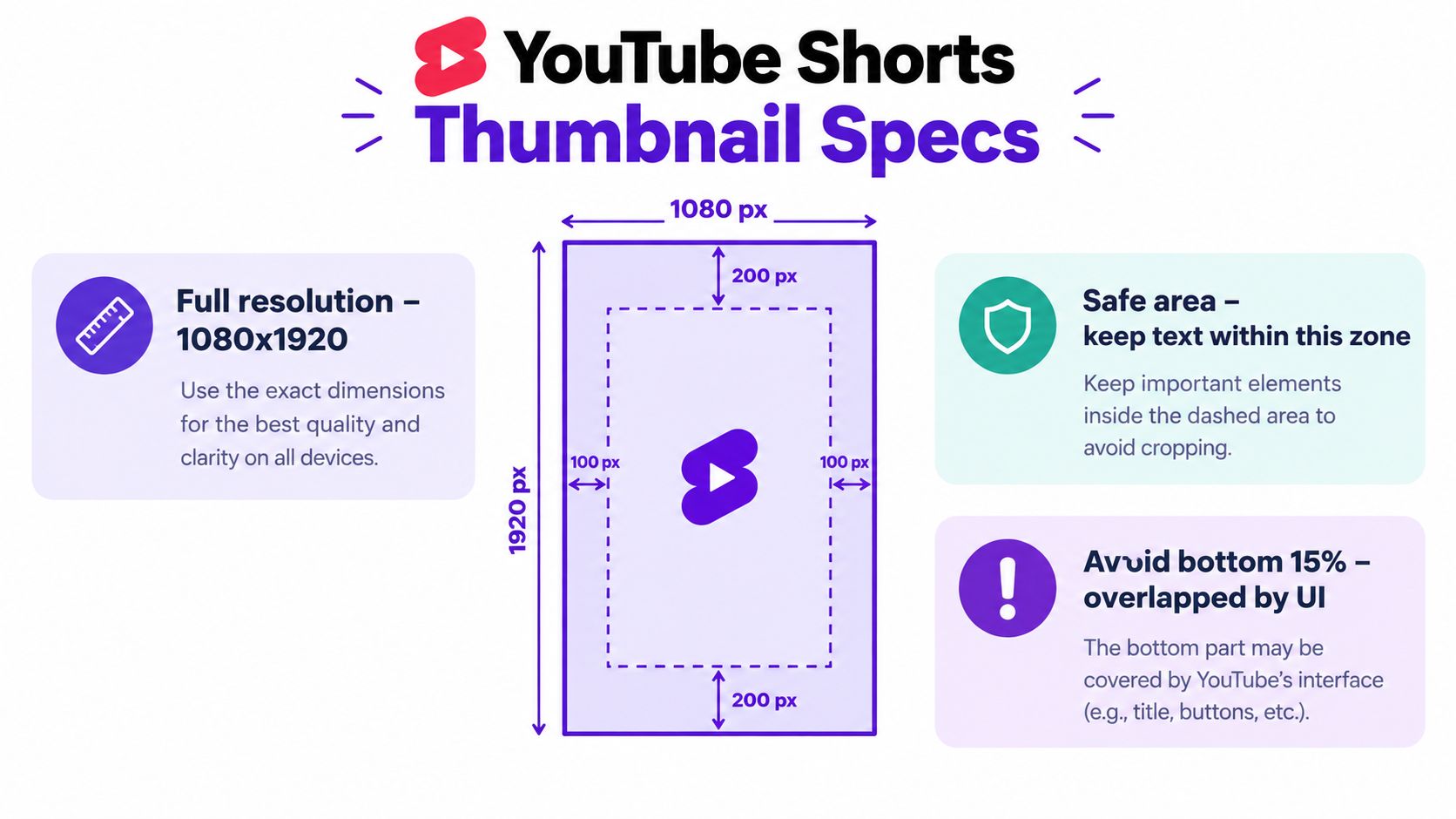
The actual canvas is only the starting point. YouTube may place interface elements, titles, and other information over parts of the image, especially near the edges and lower portion. Keep the face, product, main object, and text inside a generous central area. Treat the outer margins as protection, not spare design space.
Place the focal point first. Center a face, product, or action instead of pushing the important subject toward an edge. A centered composition survives cropping and small previews better than a layout balanced only for a desktop screen.
Reserve the lower area. Keep important words and visual details away from the bottom, where interface elements and titles may compete with the artwork. A design that looks clear in the editor can lose its meaning after overlays appear.
Leave breathing room at the sides. Edge-to-edge lettering and logos are easy to clip or crowd. Keep them comfortably inside the frame so small display changes do not damage recognition.
Export a clean vertical asset. Do not begin with a 16:9 long-form thumbnail and squeeze it into portrait dimensions. That approach often produces awkward crops, tiny subjects, or empty bands that weaken the composition.
The image may be judged at roughly 150 pixels wide, so details that look sharp at full resolution can vanish in the browsing view. Small logos, thin outlines, and long sentences rarely earn their space. Use large shapes, clear foreground-background separation, and one obvious subject.
Shrink the design until it resembles a channel tile before uploading. If you cannot identify the person, object, or topic immediately, simplify the composition. Tools such as create YouTube thumbnails with Nim can help assemble vertical concepts, but the final check belongs on a small mobile preview rather than inside the design editor.
Keep the thumbnail safe zone generous. Platform interfaces change, and unused space costs less than a covered face or unreadable headline.
A strong cover communicates one idea before the viewer reads every word. Start with the key frame or image that best represents the promise of the Short, not necessarily the most cinematic frame. A paused reaction, a finished result, or a clearly visible object usually works better than a beautiful frame where the subject is too small to identify.
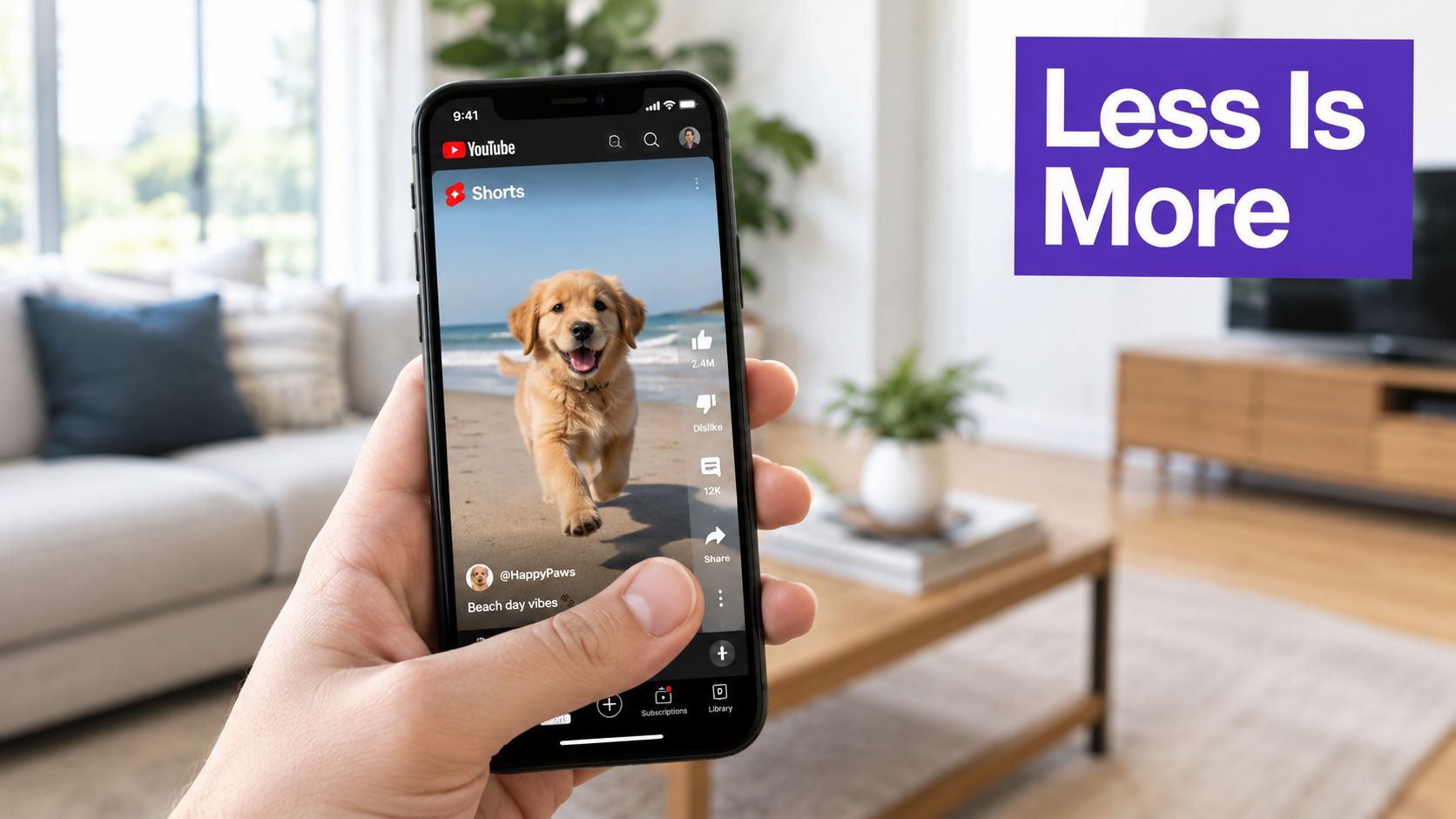
At a small preview size, hierarchy matters more than decoration. Give the viewer a clear sequence:
The “face plus about three words” approach is useful because it respects the limited visual budget of a small tile. It isn't a law, and some subjects work better without a face, but it forces a helpful decision: remove anything that doesn't improve recognition or context. Long subtitles, several icons, and multiple competing objects make the viewer decode the image instead of choosing the video.
Don't repeat the title word for word. Use the thumbnail to emphasize the result, tension, or specific angle that the title can't communicate visually. A tutorial might use a concise outcome, while a reaction Short might use the moment of surprise. Avoid vague phrases that could describe every upload on your channel.
Color should support the subject. A bright foreground against a muted background is easier to parse than several equally saturated elements. White or yellow lettering may work on a dark background, but contrast has to be judged in the actual composition, not selected from a color palette in isolation.
Use this video as a practical reminder that the frame itself can carry much of the message:
Export two or three variations, then compare them as tiny tiles. Hide the title temporarily and ask whether the image still communicates the subject. Next, hide the image and see whether the words are too generic to earn attention. The strongest version usually has one dominant answer to both questions.
A faceted thumbnail creation tool can speed up variation building, especially when you're testing different frames, text lengths, and contrast treatments. For topic-based planning, keep related concepts together with thumbnail ideas for YouTube, then apply the same small-preview test before publishing.
Thumbnail quality usually declines when creation becomes a separate chore. A creator publishes several Shorts, opens a design tool for each one, searches manually for a usable frame, rebuilds the layout, and eventually starts choosing whatever is fastest. The solution isn't to automate every creative decision. It's to automate the repetitive parts while keeping the editorial judgment close to the source video.
A workable pipeline begins with frame selection. Generate candidate frames from the Short, then reject anything with a blink, motion blur, blocked product, awkward gesture, or weak facial expression. AI can narrow the search, but a human should decide whether the frame represents the promise of the video.
Use a fixed sequence rather than designing from scratch:
A platform such as Taja AI can combine Short creation with captions and thumbnail generation from an uploaded or linked video. Its workflow can also use channel and niche context when producing content assets, which is useful for teams that want consistent packaging across a batch rather than isolated one-off designs. It should still be treated as a production assistant, not an approval layer. This guide to automating thumbnail design with AI is useful for mapping the repetitive steps before you choose where automation belongs.
The best template is intentionally boring behind the scenes. It should make the correct choice easier, not force every Short into an identical composition. Keep the layout flexible enough for a talking head, product demonstration, screen recording, or interview excerpt. Consistency should come from recognizable decisions, not from placing every subject in the same rigid box.
When publishing frequently, batch the work. Review candidate frames for several Shorts together, approve the strongest compositions, then polish the text and color treatments in one pass. That keeps the creative standard stable and makes it easier to notice when a new thumbnail breaks the visual language of the channel.
A Shorts thumbnail matters most where viewers choose deliberately, not in the main swipe feed. On Search and channel pages, the cover can affect whether someone selects the video, so evaluate it by surface instead of treating one channel-wide CTR as the verdict.
YouTube defines a thumbnail impression narrowly. It counts when the thumbnail appears for more than one second and at least 50% of it is visible, according to YouTube's official analytics definition. Studio places related Shorts information in the Reach analytics card, where you can examine exposure, clicks, and subsequent viewing.
Read the metrics as a sequence:
| Metric | What It Measures | Why It Matters for Thumbnails |
|---|---|---|
| Thumbnail impressions | Qualifying times the cover is shown | Confirms that viewers encountered the asset on measurable surfaces |
| Views | Plays generated after exposure and other discovery paths | Shows whether distribution produced viewing |
| Click-through rate | The share of measured impressions that led to a click | Evaluates packaging where viewers choose a video |
| Average view duration | How long viewers watched on average | Tests whether the cover's promise matches the content |
| Subscribers, likes, and shares | Viewer actions reported for Shorts | Shows whether the packaging attracted the intended audience |
A reported average benchmark of 4.2% for Shorts thumbnail CTR appears in the YouTube Shorts reference, but that figure cannot diagnose every surface. A cover may perform weakly in the swipe feed because viewers rarely use it there, while producing a clearer signal in Search or on a channel page.
Native thumbnail experimentation for Shorts remains limited. Custom thumbnail availability and testing behavior can differ by account and surface, so a single overall CTR cannot prove that a design worked or failed everywhere.
Use controlled comparisons instead:
Use Storyshort thumbnail performance analysis to generate design hypotheses, then test those ideas against actual viewer behavior. A mobile preview tool such as YouTube thumbnail preview can reveal cropping, scale, and overlay problems before analytics are interpreted.
Compare like with like. Record the surface, cover style, title, upload context, and subsequent behavior. A search tutorial and an entertainment Short can have different audiences, traffic sources, and viewing intent, so their results should not be treated as a direct design comparison.
One strong thumbnail can win a click. A coherent channel grid can reduce the friction of choosing the next video. When viewers land on your Shorts tab or channel homepage, repeated visual cues help them understand which uploads belong together and which series deserves attention.
Consistency doesn't mean cloning one design forever. Use a small set of recognizable rules:
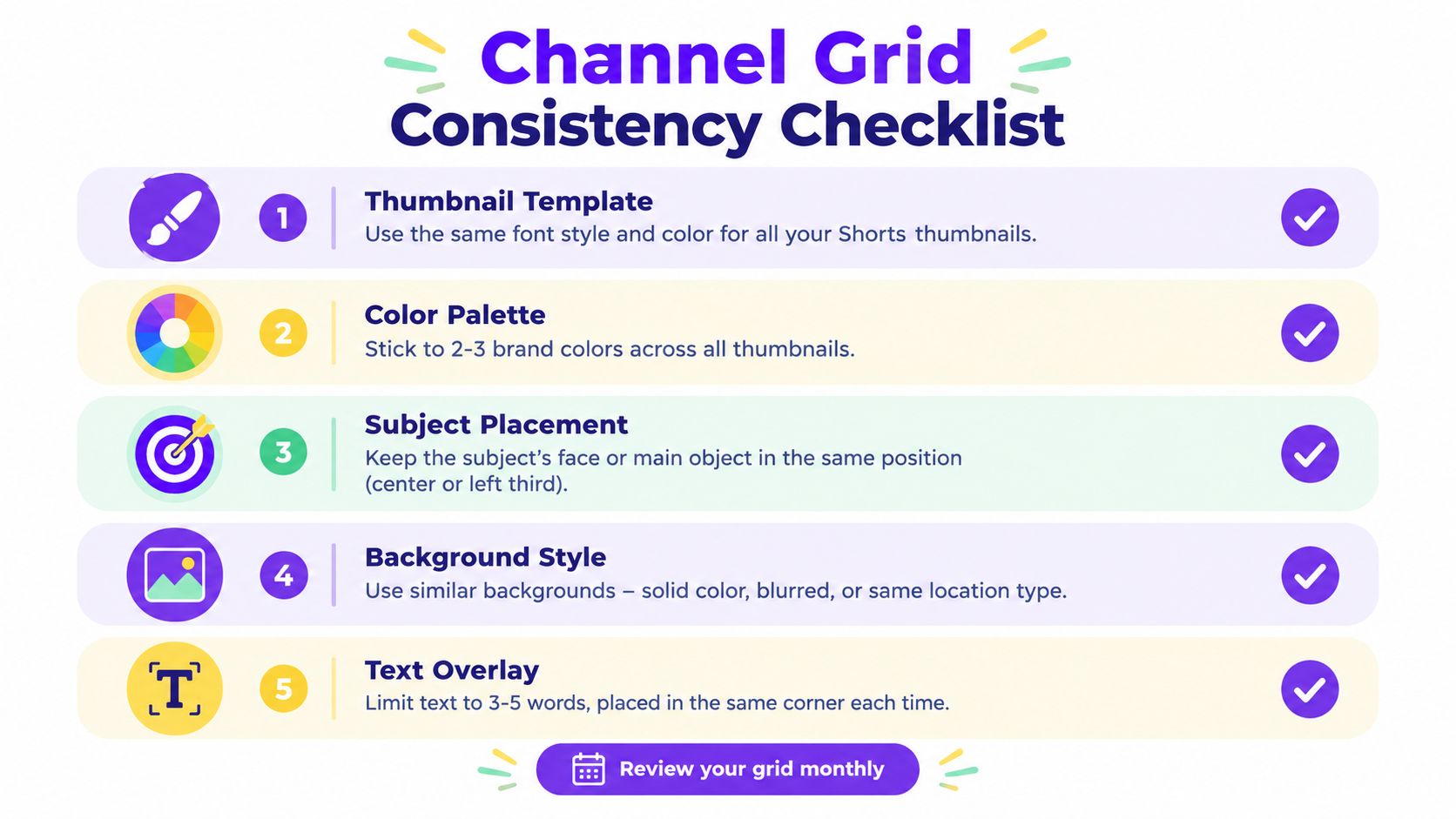
The grid should communicate your content categories without requiring a viewer to read every title. A podcast channel might distinguish guests through faces and a stable color band. A tutorial channel might use the finished result as the primary subject. A local business could emphasize the service, location, or transformation while keeping its brand treatment consistent.
Before approving the cover, verify:
That last check prevents a common strategic mistake. A polished browse asset can't compensate for a slow opening, confusing first frame, or mismatched promise. Treat the thumbnail as one part of a packaging system, with the feed hook handling autoplay discovery and the cover handling intentional selection.
Review the grid regularly and remove patterns that create clutter. The goal isn't to make every tile identical. It's to make the channel feel deliberate enough that a casual visitor understands what you publish and knows which Short to choose next.
Taja AI can turn a long-form video into Shorts, captions, thumbnails, and platform-specific posts while applying your channel context and brand templates. Visit Taja AI to see how its workflow can make surface-specific thumbnail production part of your regular publishing process instead of a last-minute design task.


We are blessed to work with leading brands & Companies


We try to make easy and simple for every professionals. Get 30 days free trial - No credit card required.


© 2025 Taja AI. All rights reserved.