.jpeg)
Content Calendar Free: 10 Tools & Templates (2026)
Compare 10 content calendar free tools and templates—Sheets, Trello, Notion, schedulers—with pros, cons, use cases, and Taja AI workflow tips.
5 min read
October 24, 2026

Explore 10 actionable thumbnail ideas for YouTube, from emotional faces and bold text to niche templates, comparisons, and quick-edit workflows.
Written by:


A strong video can be overlooked before it earns a single view because its thumbnail doesn't explain the promise at feed size. YouTube defines click-through rate as the percentage of impressions that become clicks, and creator benchmarks commonly place average performance around 3% to 4%, with strong thumbnails often reaching 5% to 7% and broader channel performance ranging from 2% to 10%, depending on the audience and traffic mix (vidIQ's thumbnail CTR guide). Your thumbnail is packaging, not decoration.
The best thumbnail ideas for YouTube aren't random visual effects. They're repeatable systems built around a video's promise: emotion, clarity, transformation, identity, curiosity, evidence, or comparison. Match the visual system to the content, simplify it for mobile viewing, then create an honest variation you can test against the original.
Use the correct canvas and keep the composition readable at small sizes. This guide to the perfect thumbnail size covers the technical foundation, while Taja AI can help turn long-form footage into thumbnail options, apply brand templates, and speed up batch production.
A close-up face makes an immediate emotional promise. The viewer should understand the reaction before reading the title, whether the expression signals surprise, relief, excitement, concern, or curiosity.
This format works best when the emotion belongs to the actual video. A podcast guest laughing at an unexpected confession, a real estate agent reacting to a hidden property problem, or an educator showing disbelief at a common misconception all give the face a clear role. A random shocked expression pasted onto a calm tutorial creates a mismatch that can damage trust after the click.
Research in anonymized YouTube channel data found that thumbnails with a single dominant face and clear emotional expression outperformed neutral or no-face designs by about 18% to 32% CTR (thumbnail CTR patterns study). That doesn't make an expressive face a universal winner, but it does support using emotion as a deliberate design choice.

Choose the strongest frame from the recording, crop tightly, and place the face against a background that separates skin tones, hair, and clothing from the surrounding colors. Keep the background simple. Bright color can work, but contrast matters more than decoration.
Taja AI's guide to using AI for YouTube thumbnails is useful when you're pulling candidate frames from interviews, sermons, lessons, or webinars.
This concept makes a clarity promise. The text states the value, while an arrow, circle, hand, or pointer directs attention to the object that proves it.
A productivity video might show a presenter beside SAVE TIME and a highlighted calendar. A real estate video could point toward a renovated kitchen feature. A podcast thumbnail might direct the eye from the guest's face to a distinctive credential or a document discussed in the episode.
The design fails when the pointer becomes the main event. A thumbnail crowded with arrows, circles, and oversized text feels like an advertisement for visual noise. Use one directional element and one obvious destination.
Write the thumbnail phrase after identifying the video's core outcome. “SAVE TIME” is more useful than “MY BEST TIPS,” because it gives the viewer a reason to care. The title can provide the detail, while the thumbnail supplies the fast visual hook.
Keep text short enough to read without pausing. High contrast and a heavy sans-serif typeface help, but the phrase still needs to be specific.
For a local service provider, this template can turn one customer education video into several focused thumbnails, each highlighting a different problem or outcome. The visual language stays consistent while the promise changes.
Before-and-after thumbnails make a transformation promise without requiring much text. A cluttered desk beside an organized workspace, an unrenovated room beside its finished version, or an unedited frame beside a graded final shot can communicate the video's payoff instantly.
The strongest comparisons use the same subject and a clear visual difference. A home improvement creator should photograph the same room from a similar angle. A real estate professional should avoid pairing unrelated property images, because the viewer may interpret the split as a misleading comparison.

Start with the two strongest visual states, then remove anything that doesn't support the change. A narrow dividing line or small arrow can establish direction, but heavy labels aren't always necessary. If the difference is obvious, “BEFORE” and “AFTER” may add clutter rather than clarity.
Taja AI's cut-and-paste pictures app guide can support workflows where you need to combine frames, subjects, or visual states from long-form footage.
The embedded video below offers a related visual reference for transformation-led presentation.
A numbered thumbnail makes a structure promise. Viewers immediately know the video contains an organized set of lessons, mistakes, principles, tools, or examples.
Use the exact number that appears in the video. If the title says seven mistakes but the thumbnail says five, the inconsistency creates unnecessary doubt. The number should be large enough to read, while the supporting phrase explains why the list matters.
A productivity channel could use 5 WAYS TO FOCUS. A real estate professional might choose 3 BUYER MISTAKES. A podcast editor could frame an episode around 7 EDITING SECRETS, while a faith-based organization could use 10 FAITH PRINCIPLES.
Don't illustrate every item inside the thumbnail. That usually produces a crowded grid of tiny objects. Instead, show one representative image and make the number the secondary focal point. If the video's most compelling point is hidden in the middle of the list, use a phrase that hints at it without making a false promise.
Practical rule: The number should create structure, not confusion. The title explains the subject, and the thumbnail makes the list feel easy to enter.
A reusable series template might include a fixed number position, one image zone, and a changing accent color for each topic. Taja AI can help generate variations from a long-form upload, but you should still review every version for accuracy. Automation speeds production. It doesn't decide whether the list is useful.
Avoid unsupported superlatives. Words such as “hidden,” “rare,” or “shocking” only help when the content supports them. Otherwise, they turn a clear list into clickbait.
Brand-led thumbnails make an identity promise. They tell returning viewers that the video belongs to a recognizable series, host, business, podcast, or organization before the viewer reads the title.
The branded element might be a logo, but it could also be a recurring color pair, custom typeface, presenter treatment, illustrated character, or consistent layout. A small business owner can combine a recognizable face with a discreet business name. A podcast can use the host and guest portraits in a fixed composition. A congregation can use a consistent ministry color system and speaker treatment.
A logo shouldn't compete with the subject. If the viewer notices the watermark before the person, product, or result, the brand element is too dominant. Place it in a predictable area that doesn't cover the face or key evidence, then check the design at feed size.
Taja AI's guide to adding a logo to a picture can help formalize this part of the workflow.
Brand consistency doesn't mean every thumbnail must look identical. The channel should feel connected, but each upload still needs a distinct promise. For creators publishing interviews, lessons, property tours, and short clips from the same recording, a shared template can prevent the channel from looking assembled by several unrelated teams.
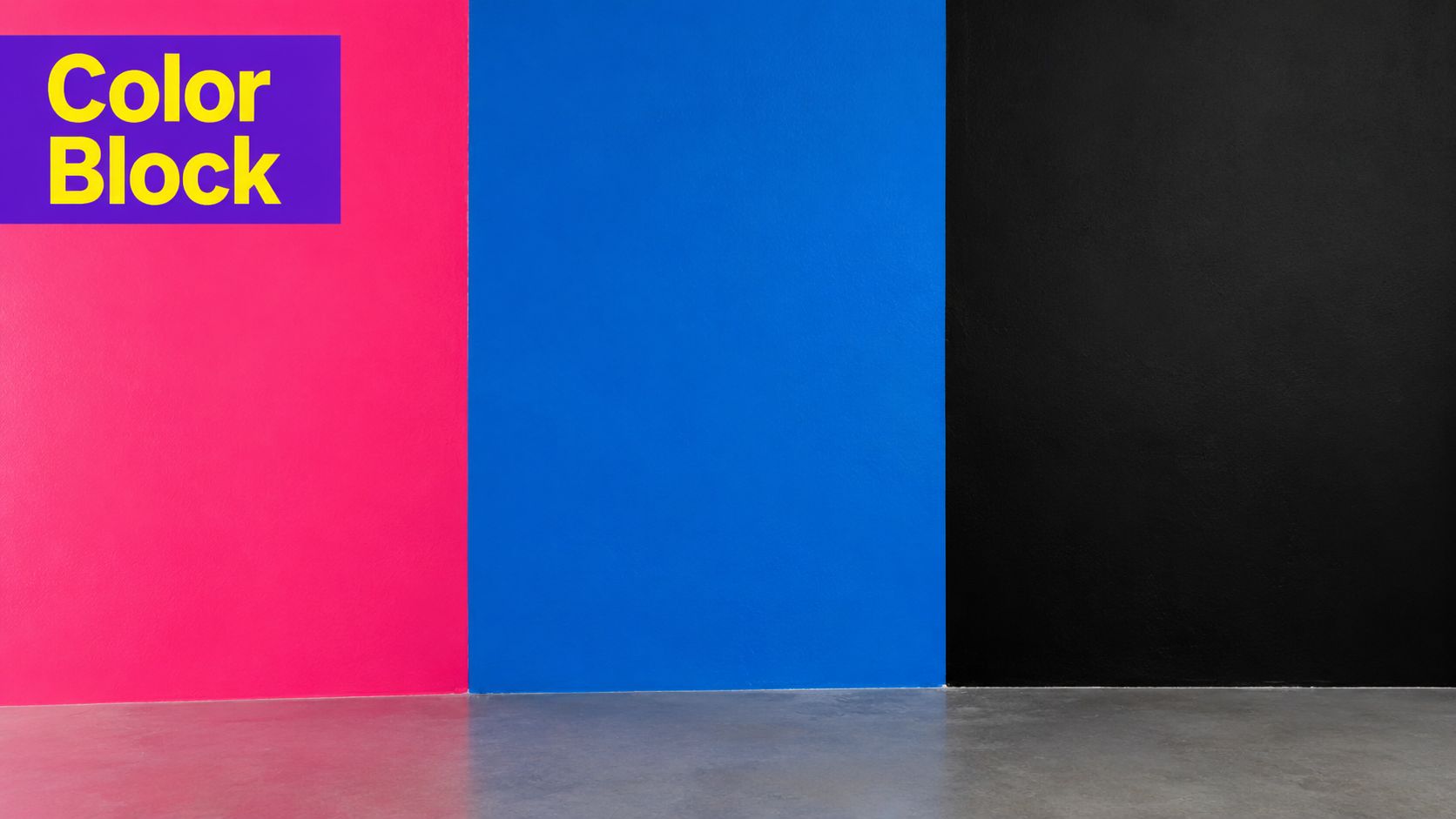
Color blocking makes a clarity promise. Two or three bold color fields can frame a face, phrase, icon, or product without forcing viewers to decode a busy scene. The visual system works especially well for business education, software tutorials, automation content, music production, and productivity channels.
Use the blocks to show the thumbnail's visual hierarchy. Reserve one color for the subject area, another for the headline, and a darker tone to ground the composition. That division turns the layout into a repeatable template: swap in a software screen for a tutorial, a product for a review, or two speakers for an interview while keeping the same structural logic.
Palette choices should support recognition rather than chase novelty. Electric blue with yellow, bright green with purple, or neon pink on black can create separation, but the combination should fit the channel's established identity.
A useful test is grayscale. If the subject and headline disappear without color, the blocks are carrying too much meaning. Pair them with a clear subject, concise phrase, or strong visual cue so the topic remains understandable beside other colorful thumbnails.
For bulk production, the structure stays useful as topics change. Taja AI's thumbnail templates can apply the same visual system across YouTube uploads and repurposed social assets, while human review checks that each thumbnail still makes a specific promise.
Blurred content makes a specific curiosity promise: something shown in the video remains undisclosed. A censor bar, pixelation, question mark, or covered object creates the unresolved detail viewers must uncover.
Choose the hidden element from the video itself. An interview thumbnail might partially conceal a guest's identity. A product comparison could cover the competitor's name, while documentary footage might blur a document and reveal its subject through a short headline. Podcast creators can obscure the final reaction in a revealing exchange.
The design needs a clear question and a credible answer. Hide too much and the topic becomes vague. Reveal too much and the viewer has no reason to investigate. The video must resolve the exact question the thumbnail raises.
Use a frame, statement, or object that appears in the recording. If the thumbnail suggests a secret price, the video should examine that price. If it hints at hidden evidence, the episode should present and discuss the evidence rather than use mystery as decoration.
A podcast workflow can flag pauses before a speaker reaches a conclusion. Editors still need to verify that the selected frame represents the conversation accurately. Curiosity should open the video, not misrepresent it.
A screenshot or text-led thumbnail promises evidence, a statement, or a clear idea. Use it when the strongest asset is something someone said, posted, wrote, or demonstrated on screen.
An interview channel can feature a concise guest quote. A commentary creator can center a social post or headline. An educator can highlight one key concept, while a faith-based organization can present a short scripture reference with suitable context.
Choose a sentence that is specific, surprising, or consequential. “Work hard and stay focused” gives viewers little reason to investigate. A sharper statement creates curiosity, provided it remains faithful to the speaker's meaning.
A readable reconstruction often beats a tiny interface screenshot. Keep the source recognizable, then rebuild the important words as clean typography when the original layout contains too much clutter.
For faster repurposing, keep a fixed quote area, attribution position, and background treatment. Swap the statement for each clip, then adapt the same frame for interviews, commentary, lessons, or podcast highlights. One recording can yield several thumbnails, each built around a different claim that the video supports.
The template stays stable. The evidence changes.
A progress bar makes a clear promise: the video will show movement, measure quality, or track a defined stage. Use a gauge, rating, meter, score, or completion bar when viewers need to understand the result quickly.
This concept suits educational series, product reviews, self-improvement experiments, fitness instruction, software learning, and property analysis. A course thumbnail can mark the learner's stage. A review can display an 8.5/10 rating when the video explains the scoring method. A productivity video can show a scorecard tied to a specific workflow.
The strongest version gives the metric a job. “TIME SAVED” tells viewers what the bar measures. A learning series can keep the same stage markers across episodes, while a review can reserve the meter for its final evaluation. Stars fit reviews, bars fit progression, and a simple score suits commentary or analysis.
Color supports the reading. Green can signal progress, yellow caution, and red a problem, but color alone cannot explain the subject. Pair the visual with a short label and keep the scale consistent across related videos.
Numbers need evidence. Do not add a percentage to create a focal point. Use a rating, score, or progress stage only when the video establishes its meaning and shows how it was reached. Qualitative videos may work better with a result image or a concise quote.
For faster repurposing, build one reusable meter template with fixed positions for the label, value, scale, and subject image. Swap the metric and supporting visual for each niche, then reuse the same system across a course, review series, experiment, or property breakdown. Keep the design recognizable, while ensuring every displayed value reflects the video.
A VS thumbnail promises a decision, not just two objects placed side by side. Use it when the video compares products, methods, viewpoints, destinations, or people, then build the design around the question viewers need answered.
Start with the editorial angle. A reviewer might place a premium tool beside a free alternative and label the choice “WHICH SAVES TIME?” A marketing educator could contrast traditional campaigns with social media. A property channel might compare luxury with value, while an interview creator can show opposing viewpoints only when the discussion examines both.
Give each side a defined visual role. Use separate colors, icons, faces, or product images so the options remain readable at small sizes. A centered VS marker clarifies the relationship, but the phrase beside it should name the stake. “WHICH IS BETTER?” says little. Price, speed, usability, quality, or audience fit gives the comparison a usable promise.
Fairness protects the channel's identity. If the video delivers a balanced evaluation, avoid making one option look absurd merely to create conflict. Attention built on a misleading frame can weaken trust when the content does not support it.
Adapt one layout into a repeatable cluster:
A disagreement in a long-form interview does not automatically justify a VS design. Use the format only when opposing positions shape the episode. The thumbnail should sharpen the comparison and make the viewer's decision clear.
| Thumbnail Style | Implementation 🔄 | Resources & Speed ⚡ | Effectiveness ⭐ | Results/Impact 📊 | Ideal Use Cases & Tips 💡 |
|---|---|---|---|---|---|
| High-Contrast Face with Emotion | 🔄 Moderate, frame selection, lighting and expression capture | ⚡ Medium, needs good footage and retouch; partial automation | ⭐⭐⭐⭐⭐, strongest emotional pull and CTR | 📊 High CTR & strong thumbnails at small sizes; good brand scaling | 💡 Best for tutorials/podcasts; keep text minimal; test 2–3 emotion levels |
| Bold Text with Arrow or Pointer | 🔄 Low, template-based but needs careful typography | ⚡ High, very automatable and fast to produce | ⭐⭐⭐⭐, excellent scannability and keyword clarity | 📊 Improves CTR and reduces iteration time; SEO-friendly | 💡 Use for real estate, business, tutorials; limit 3–5 words; test arrow placement |
| Split-Screen Before/After Comparison | 🔄 Moderate, requires matched before/after frames and divider | ⚡ Medium, automatable if contrasting footage exists | ⭐⭐⭐⭐, clearly conveys transformation narrative | 📊 Drives curiosity and intent to view the process | 💡 Best for renovations, fitness, product demos; add center arrow; test labels |
| Numbered List or Series Format | 🔄 Low, template-friendly; ensure numeric accuracy | ⚡ High, easy bulk creation with templates | ⭐⭐⭐⭐, promises structured, consumable value | 📊 Boosts CTR for listicle and educational content | 💡 Use odd numbers (3/5/7), pair with superlative; match number to content |
| Brand Logo or Branded Element | 🔄 Low, consistent template application required | ⚡ High, scales once brand assets are prepared | ⭐⭐⭐⭐, strong channel recognition and trust | 📊 Long-term brand lift; may not spike short-term CTR | 💡 Use for solopreneurs/faith orgs; ensure logo legible at 140x90 |
| Contrast Color Blocking | 🔄 Low, needs color theory and clean layouts | ⚡ High, extremely automatable and scalable | ⭐⭐⭐, strong visual standout; less emotional pull | 📊 Excellent visibility at small sizes; consistent aesthetic | 💡 Use for tech/productivity; test contrast ratios and color combos |
| Curiosity Gap with Hidden/Obscured Content | 🔄 Low, simple effects but requires careful calibration | ⚡ High, easily automated but ethically sensitive | ⭐⭐⭐⭐, high CTR potential but risky for trust | 📊 Short-term CTR lift; risk of retention loss if misleading | 💡 Use for interviews/docs; A/B test blur intensity; avoid for trust-first niches |
| Screenshot or Text-Based Design | 🔄 Low, text extraction + strong typography needed | ⚡ High, automatable with quote extraction tools | ⭐⭐⭐⭐, high information density and shareability | 📊 Improves discoverability and shares; depends on legibility | 💡 Use for podcast quotes/stats; keep text <15 words; use sans-serif fonts |
| Progress Bar or Percentage Indicator | 🔄 Moderate, requires accurate metrics and infographic design | ⚡ Medium, data-driven automation possible | ⭐⭐⭐⭐, communicates measurable results clearly | 📊 Good for credibility, rankings, and result-driven curiosity | 💡 Use for reviews, fitness, education; ensure metric is discussed in video |
| Comparative or "VS" Format | 🔄 Moderate, compose two distinct elements and clear divider | ⚡ Medium, template-friendly if assets available | ⭐⭐⭐⭐, creates debate and decision-driven clicks | 📊 Strong for comparison/review content; drives engagement | 💡 Use for product/idea comparisons; use distinct colors; avoid sensitive topics |
The best thumbnail concept is the one that matches the video's promise. Use an emotional face when the story depends on reaction. Choose before and after when the payoff is visible. Use a quote when a speaker's words carry the episode. Pick a comparison when the viewer must decide between alternatives.
Start with one clean template. Define the focal-point position, text treatment, brand colors, and safe areas before you create variants. Then make a small set of honest alternatives, such as a different frame, background contrast, text phrase, or expression. Don't change every variable at once. If the winning version performs better, you should know which design decision likely helped.
Check each option at feed size on both light and dark backgrounds. Remove competing focal points, keep the main subject obvious, and make sure the thumbnail and title contribute different information. YouTube's Reach tab includes an impressions CTR card, which makes thumbnail evaluation part of a normal creator workflow rather than a purely subjective design exercise (YouTube thumbnail strategy and CTR).
Judge clicks alongside retention and watch time. A curiosity-led design can attract attention, but it's only successful when the opening seconds confirm the promise. The useful benchmark is your own channel history and the same traffic context, because search, browse, and suggested viewers behave differently (YouTube CTR benchmark guidance).
For creators producing at scale, Taja AI can connect thumbnail generation with long-form repurposing. Its thumbnail generator can create multiple options from a video topic and channel context, while brand templates and the built-in editor support consistent polishing. That workflow is useful for podcasters, educators, real estate professionals, local businesses, and small marketing teams that need several platform-ready assets without designing every thumbnail from scratch.
Treat the thumbnail as part of the editorial decision, not the final decoration. When the visual promise, title, opening, and actual content agree, your packaging becomes faster to produce and easier for viewers to trust.
Taja AI helps you turn long-form videos into thumbnail options, short clips, captions, blogs, and platform-specific posts while keeping your brand templates consistent. Visit Taja AI to create more repeatable thumbnail systems and reduce the manual work behind every upload.


We are blessed to work with leading brands & Companies


We try to make easy and simple for every professionals. Get 30 days free trial - No credit card required.


© 2025 Taja AI. All rights reserved.