.jpeg)
10 Best YouTube Video Thumbnail Maker Tools for 2026
Compare the top YouTube video thumbnail maker tools by features, pricing, ease of use and integrations, plus what makes thumbnails get clicks.
5 min read
October 13, 2026

A practical guide to workflow optimization for busy creators and SMBs. Learn to map, diagnose, and streamline your processes to save time and scale growth.
Written by:


Your week probably looks like this. You record a video, answer client messages, tweak a thumbnail, chase an invoice, post on two platforms, forget the third, then spend your evening fixing something that should've taken five minutes. You're working all day, but the important work keeps getting pushed to tomorrow.
That isn't a motivation problem. It's a workflow problem.
Small teams and solo operators feel this faster than bigger companies because there's no buffer. If your process is messy, you absorb the cost personally. Time leaks into setup, handoffs, approvals, switching between tools, and fixing avoidable mistakes. That's why workflow optimization matters. It's not corporate jargon. It's how you stop running a business that depends on your constant rescue work.
Busy people often optimize the wrong thing first. They buy another tool, connect another app, or ask AI to move faster through a process that's already broken. That usually creates more output, not more control.
The better move is simpler. Slow down long enough to see where your work gets stuck, duplicated, or delayed. Then clean that up before you automate anything.
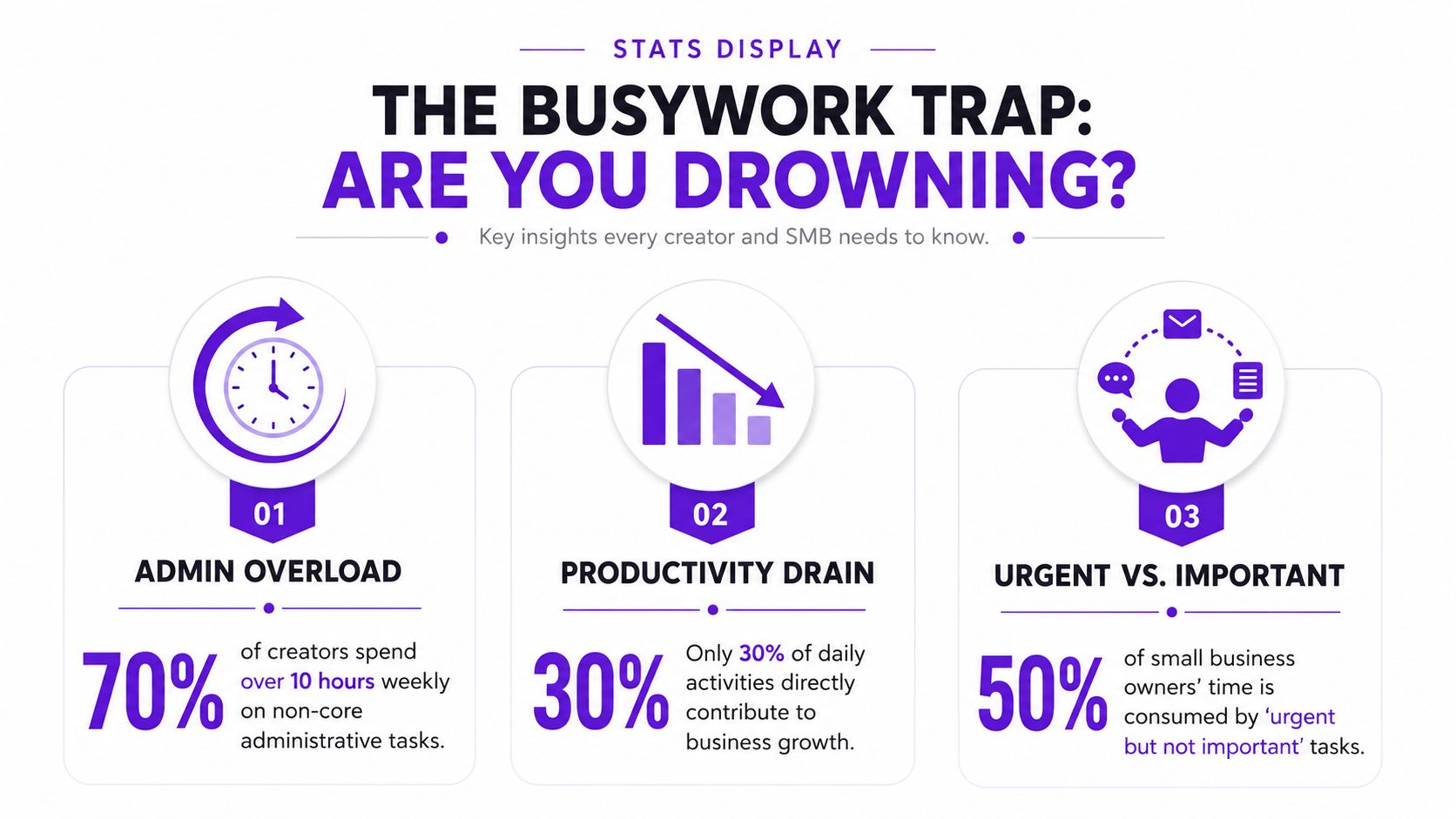
Workflow optimization is already delivering practical results for organizations that take it seriously. 60% of organizations achieve a positive ROI within 12 months, and automated processes deliver average productivity increases of 25-30% according to these workflow automation statistics. For a creator or SMB owner, that translates into something more immediate. Less admin drag. Fewer avoidable errors. More time spent on sales, delivery, publishing, and follow-up.
The market trend points in the same direction. Teams aren't treating workflow optimization like an optional side project anymore. They're treating it like operating discipline. If you publish content regularly, manage leads, or deliver repeatable services, your workflow is part of the product.
A lot of owners also discover that publishing consistency doesn't fail because they lack ideas. It fails because the work between “done” and “published” is chaotic. That's where a tighter system, plus something like a content calendar workflow, starts reducing last-minute scrambling.
Practical rule: If you keep saying “I just need to be more disciplined,” but the same tasks keep slipping, your system is doing the damage.
Creators and SMB operators often confuse motion with momentum. A packed day feels productive. It isn't, if most of that day is context switching and cleanup.
A healthier test is this short list:
If you want practical examples of how teams boost content efficiency, study the process around creation, review, repurposing, and publishing. That's usually where hidden waste lives.
Workflow optimization starts paying off when you stop treating every task as equally important. The core job is to protect the few activities that grow the business, then build a system that supports them.
Many can describe their process. Very few can show it. That's the gap.
Workflow optimization starts by documenting what happens. Not what should happen. Not what your assistant thinks happens. Not what your SOP says. This version, including delays, side chats, missing files, and all the little detours that eat your day.
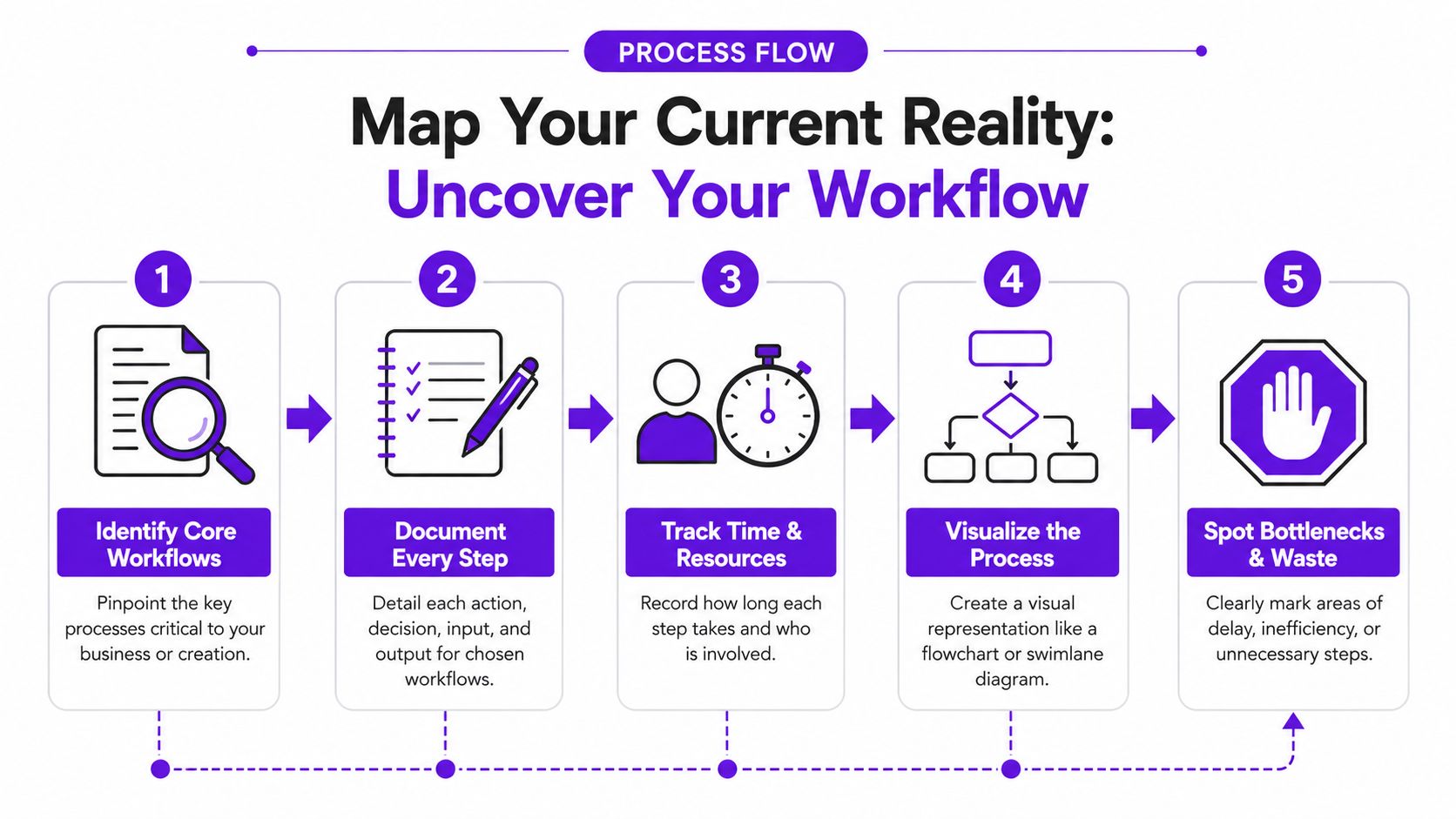
You don't need process mining software to start. Sticky notes on a wall work. A spreadsheet works. A whiteboard works. The only requirement is honesty.
As BiteCode's workflow optimization guide notes, expert-level workflow optimization begins by mapping the current state and documenting every step, handoff, and system touchpoint as it operates. It also warns against relying on tribal knowledge instead of system-generated data, because that creates flawed baselines.
For a simple map, create five columns:
| Step | Owner | Tool | Time or delay | Notes |
|---|---|---|---|---|
| Record video | You | Camera, mic | Same day | Smooth |
| Edit long form | Freelancer | Premiere Pro | 2 days | Waiting on intro assets |
| Review edit | You | Google Drive, email | 1 day | Feedback split across apps |
| Repurpose clips | You or contractor | Various tools | Delayed | Titles and captions rewritten manually |
| Publish | You | Platform schedulers | Inconsistent | Missed posts happen here |
That's enough to expose a surprising amount of friction.
Take a YouTube creator with one weekly long-form video. On paper, the process sounds clean. Record on Monday, edit on Tuesday, post on Thursday, repurpose after. In practice, it usually looks messier.
The actual workflow may be closer to this:
A process like that often hides delays inside “review,” “repurpose,” and “publish.” If you need a concrete reference point for the production side, this video production workflow guide is useful because it helps separate filming, editing, packaging, and distribution into distinct stages.
Don't map from memory alone. Open your tools and check timestamps, file trails, and message threads. Your calendar and software history usually tell a less flattering but more useful story.
Don't just list steps. Capture the conditions around them.
When the workflow is visible, it gets harder to lie to yourself about where the chaos lives. That's useful. Most optimization work gets easier once the hidden mess is on the page.
A mapped workflow is only the starting point. Its true value comes from reading it like an operator, not a bystander.
The biggest mistake at this stage is deciding that software will save you before you've diagnosed the problem. The optimization paradox is simple. You can automate a bad process and make it fail faster. SparkPod puts it plainly in its discussion of workflow optimization. Teams can automate inefficient processes and accelerate waste rather than value, including situations where an AI tool generates 27 assets from a video but amplifies brand inconsistencies because the underlying logic wasn't cleaned up first. You can see that argument in their workflow optimization article.
Traditional operations teams talk about waste in categories like waiting, overproduction, and defects. For creators and SMBs, the language is different, but the problems are the same.
Look for friction in forms like these:
Waiting for feedback
Final approval sits in a text thread. The editor can't move. Publishing slips.
Rework
You rewrite captions because the original brief was vague. Or you fix a thumbnail because the brand style wasn't clear.
Unused output
You produce clips, graphics, or drafts that never get published or never match the platform.
Tool switching
You bounce between Drive, Notion, Slack, Canva, email, and native platform schedulers just to finish one asset.
Duplicate entry
The same title, CTA, or client info gets typed into multiple systems by hand.
Unclear ownership
Nobody knows who's supposed to approve, upload, or follow up.
Decision lag
Work pauses because a small judgment call depends on you every single time.
Go step by step through your workflow map and ask blunt questions. The point isn't to defend the process. It's to find what's wasting effort.
Use this checklist:
| Diagnostic question | What it usually reveals |
|---|---|
| Does this step create value for the customer or audience? | Busywork or internal overhead |
| What always waits here? | Bottlenecks and approval drag |
| What gets redone later? | Weak briefs, poor standards, missing information |
| Who owns this step? | Ambiguity and stalled decisions |
| Which tool is slowing this down? | Tool mismatch or unnecessary switching |
| What breaks on exceptions? | Fragile automation or undocumented edge cases |
A surprising number of problems come from weak handoffs. The step itself may be fine. The transition into or out of it is what creates delay. That's common with editing, client onboarding, invoicing, and social scheduling.
If a task regularly needs “just a quick fix,” that task isn't stable yet. Small fixes repeated every week become a system cost.
Don't try to clean everything at once. That's another form of waste.
Instead, identify the two or three issues that create the most drag. Good candidates usually have one or more of these traits:
For a solo creator, the worst bottleneck may be the jump from final edit to published assets. For a local service business, it may be the handoff from new inquiry to booked consultation. For a small agency, it's often approvals.
That focus matters. Workflow optimization works best when you treat it like triage. Fix the points where work slows, gets repeated, or waits for rescue. Leave the minor annoyances alone until the major leaks are sealed.
Once you know where the friction is, the next job is sequencing your fixes correctly. The temptation to rush often presents itself here, leading to an immediate desire for the app, the integration, or the shortcut. That's usually too early.
The stronger approach is to clean the process in layers. TechMoths describes the sequence clearly in its guidance on workflow optimization. The most effective framework is to eliminate non-value-adding steps, synchronize handoffs, streamline remaining steps, and only then automate, with a warning that automating too early amplifies inefficiencies. That framework is explained in this process optimization guide.
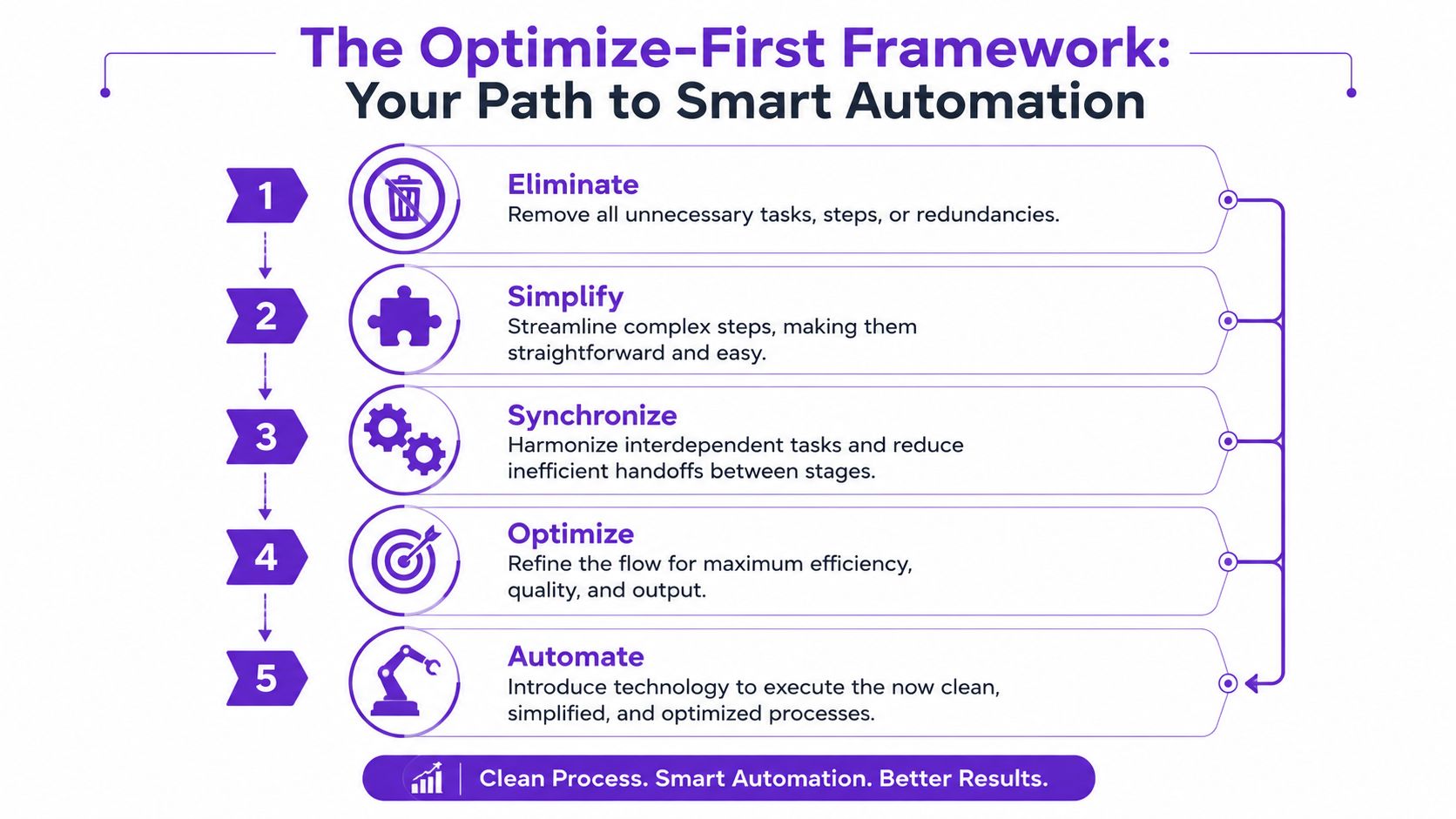
Some workflow steps don't need improvement. They need deletion.
That might mean stopping a weekly report nobody uses. It might mean removing a second approval that never changes the outcome. It might mean deciding you don't need a custom caption rewrite for every platform.
Before:
You export clips, manually rename them, upload them to a shared folder, then message your contractor to tell them the files are ready.
After:
You drop the message step because the upload itself triggers visibility in the shared workspace.
A lot of workflows are slow because timing is sloppy. The tasks themselves are fine, but they aren't lined up.
For example, a creator records on Monday, sends the file on Tuesday, asks for thumbnails on Thursday, and writes the title on Friday. That creates idle gaps and rushed decisions. A synchronized workflow groups related actions so one step feeds the next without waiting for rediscovery.
A few practical fixes:
This is a good point to watch a practical walkthrough of process thinking in action.
After elimination and synchronization, simplify the work that's still necessary. Standardization matters here.
Use templates. Create standard briefs. Define naming conventions. Use one checklist for publish-ready content. For client work, build one intake form that captures what your team repeatedly asks for later.
Standardization doesn't make your work generic. It removes predictable confusion so your creative effort goes where it matters.
Here's what that looks like in practice:
| Before | After |
|---|---|
| Every client onboarding call asks slightly different questions | A standard intake form collects basics before the call |
| Every video gets a fresh, improvised handoff note | A reusable editor brief covers brand, goals, hooks, and deliverables |
| Social posts are scheduled one by one | Posts are prepped in a single weekly batch |
Automation belongs at the end, not the beginning. It works best on repetitive, rule-based tasks with clear inputs and outputs.
Good candidates include file routing, meeting reminders, invoice follow-ups, content repurposing after approval, and scheduling posts after metadata is finalized. Bad candidates include processes that still depend on constant judgment, unclear brand decisions, or frequent edge-case fixes.
That's the difference between adding technology and doing workflow optimization. One gives you more moving parts. The other gives you a cleaner operation.
After the workflow is cleaned up, automation finally starts behaving like help instead of extra maintenance. The standard to use is straightforward. If an automation creates output but leaves you doing cleanup, quality control, and exception handling every time, it hasn't saved you much.
That's why human intervention rate is such a useful metric. Recepta's discussion of workflow optimization argues that successful workflows are increasingly measured by this rate because it shows whether automation reduces cognitive load or instead shifts friction, and it notes that system sync gaps and unhandled edge cases can cause 30-40% of repurposing failures in video-to-short workflows in its workflow optimization analysis.

For small teams, the best automations are narrow and predictable. They remove repeated manual handling without taking control away from the operator.
Useful categories include:
One option in the content workflow category is content automation software. Tools in that category are useful when your production process is already defined and your output standards are clear.
Before you adopt a tool or build a new automation, answer these four questions:
Is the process already stable?
If the answer is no, fix the process first.
Are the inputs standardized?
Bad briefs and inconsistent files create bad automation results.
Where do exceptions happen?
If edge cases appear constantly, the workflow may still need human judgment.
How often will someone need to intervene?
This is the metric that tells the truth.
For content teams, one practical example is an efficient repurposing workflow where final long-form approval triggers asset generation and scheduling prep. In that context, Taja AI can turn a long-form video into shorts, clips, captions, thumbnails, blogs, and platform-specific posts from one upload, then push approved content through a single scheduling dashboard. That kind of automation fits best when naming, review, and brand rules are already defined upstream.
A lot of owners judge automation by volume. More clips. More posts. Faster turnaround. Those matter, but they're incomplete.
A healthier scorecard looks more like this:
| Automation | Good sign | Warning sign |
|---|---|---|
| Repurposing | Outputs match brand and need light review | Every asset needs manual rewriting |
| Scheduling | Posts go out on time from one queue | Platform formatting keeps breaking |
| Lead follow-up | Replies and reminders are consistent | Special cases constantly fall out of sequence |
| Client onboarding | Forms and docs route automatically | Missing information forces repeated follow-ups |
The best automation feels boring. It handles routine work reliably enough that you stop thinking about it.
That's the goal for creators and SMBs. Not a flashy system. A dependable one.
A workflow only stays optimized if someone checks whether it's still working. Small businesses often skip this because the process finally feels better and everyone wants to move on. That's understandable. It's also how old bottlenecks return.
The long-term case for maintaining a clean workflow is strong. Employee satisfaction improves by 15-35% when repetitive work is reduced, and 65% of organizations are expanding automation initiatives across industries according to these workflow automation trends. Even if your “team” is just you and a contractor, the same principle applies. Cleaner workflows reduce stress, decision fatigue, and avoidable handholding.
You don't need a massive operations dashboard. You need a short list of metrics that show whether work is flowing cleanly.
Use role-specific measures tied to the workflow that matters most.
| Role | Primary Workflow | Key Metric to Track |
|---|---|---|
| Creator | Long-form video to published shorts | Time from final cut to published assets |
| Podcaster | Episode production and repurposing | Number of review loops before release |
| Real estate professional | Lead follow-up and listing content | Time from inquiry to first response |
| Agency owner | Client onboarding | Onboarding cycle time |
| Local service business | Estimate to booked job | Handoff delay between inquiry and scheduling |
| Marketing manager | Content publishing | Percentage of scheduled posts published without manual fixes |
Cycle time, throughput, and error rate are useful. But for smaller teams, human intervention rate often reveals more. If your automations or handoffs still need constant rescue work, the workflow isn't healthy yet.
A simple monthly workflow check can be enough:
Workflow drift is normal. New offers, new platforms, new hires, and new tools all change the system. That's why ownership matters. Someone has to notice when a “temporary workaround” becomes standard practice.
Common warning signs include:
A good workflow doesn't remove human judgment. It protects it for the few moments where it matters most.
Workflow optimization is never finished in the sense that it becomes untouchable. But it can become stable, visible, and much easier to improve. That's what busy creators and SMB owners need most. Not more hustle. A system that stops wasting it.
If your biggest content bottleneck is turning one long-form video into a steady stream of publish-ready assets, Taja AI is worth considering. It's built for teams that want a cleaner repurposing and scheduling workflow without managing every clip, caption, thumbnail, and platform post by hand.


We are blessed to work with leading brands & Companies


We try to make easy and simple for every professionals. Get 30 days free trial - No credit card required.


© 2025 Taja AI. All rights reserved.