Content Calendar Management: A Practical Guide for 2026
Learn how content calendar management keeps publishing consistent, from fields to track and planning steps to scheduling and performance reviews.
5 min read
November 26, 2026

Why closed captions help accessibility, comprehension and reach, and how they differ from subtitles. See the rules, data and when captions are required.
Written by:


You just spent two hours recording, trimming, and exporting a sharp three-minute explainer. You upload it, share the link, and watch the retention chart drop off a cliff in the first five seconds. Most creators blame their hook or lighting, when the culprit is simpler: half the people scrolling past your video never turned the sound on.
Understanding why closed captions work starts with how people watch video today. Captioning has moved from a broadcast compliance checkbox into a baseline viewing habit across living rooms and mobile feeds alike. In 2025, 34% of U.S. adults said they always or often used closed captions or subtitles while watching television shows or movies, according to an AP-NORC poll reported by Markstudios. Organizations have noticed the shift, too: in 2024, 90% of organizations surveyed by 3Play Media captioned at least some of their content, while just over 60% pointed to equal access as their main motivation.
Treat captions as a core part of how a video communicates, not as an afterthought bolted on after export. Two questions decide whether your captions do their job: who relies on them, and which text mistakes twist your meaning enough to cost you a viewer.
A commuter stands shoulder to shoulder on a crowded morning train, phone muted, thumb hovering over a short software demo. The presenter's voice is invisible in that noisy car, yet the commuter stays to the end because crisp text at the bottom of the frame carries every step, punchline, and audio cue. Without that text layer, the demo becomes a silent slideshow and the viewer scrolls on.
Closed captions are synchronized text tracks that display spoken dialogue along with meaningful non-speech sounds, such as laughter, background music, or a door slamming, and allow viewers to switch them on or off. That toggle matters because audio is unreliable almost everywhere people press play. Open offices, waiting rooms, busy kitchens, and cheap phone speakers all strip away spoken clarity before your message lands.
Captioning began as an equal-access milestone, yet mainstream adoption followed quickly. According to a historical analysis in Disability Studies Quarterly, roughly 36 million U.S. adults (about 11% of the population in 2010) reported some degree of hearing loss, while roughly 50 million Americans, or about one in six people, used closed captions during the same period. That broad demand grew out of decades of broadcast infrastructure, from the Federal Communications Commission reserving Line 21 for caption data in 1976 and the National Captioning Institute launching regular broadcasts in March 1980, to the Television Decoder Circuitry Act of 1990, which required caption decoders in nearly all U.S. televisions with screens of at least 13 inches starting in 1993.
Captions are judged by who actually reads them in daily life, not only by who legally needs them.
That reality affects every creator, educator, podcaster, local service business, and marketing team publishing video online. Sorting out formats, audience behavior, memory gains, conformance rules, and automatic-caption blind spots gives you a clear decision checklist you can apply before every upload.
Creators mix up captions, subtitles, and transcripts all the time, which leads to publishing the wrong file format at export. Each text format carries different information and solves a different viewer problem.
| Format | What it carries | Who it serves | Can viewers turn it off? |
|---|---|---|---|
| Closed captions | Dialogue plus important non-speech sounds such as music and speaker labels | Deaf and hard of hearing viewers, plus anyone watching muted or with poor audio | Yes |
| Subtitles | Dialogue only, often translated | Viewers who do not understand the spoken language | Usually yes, but sometimes burned in |
| Open captions | Dialogue and sound cues, burned into the video | Viewers on platforms with no caption toggle | No |
| Transcript | Full text with no timing | Readers, note-takers and search engines | Not applicable |
One practical boundary separates closed captions from baked-in text: closed captions are user-controllable, so each viewer decides whether to display them and how they look, whereas open captions are permanently burned into the video pixels and stay locked on screen. Outside the United States, particularly in the U.K. and Europe, you'll often see closed captions labeled SDH (subtitles for the Deaf and Hard-of-Hearing), which still includes speaker labels and bracketed cues like [applause] or [phone rings].
Burning text straight into your video frame creates hidden problems the moment you republish a clip. A viewer who scales up caption font size for readability can't resize burned-in text, and a viewer watching on a platform that requires a separate accessibility track won't get compliant captions from pixels alone. Translated subtitles also leave out non-speech sounds because they assume the listener can hear the background track.
Publishing rule: If your audience speaks the same language as your audio, export closed captions as a separate file such as SRT or WebVTT. If you also serve viewers in another language, add translated subtitles on top rather than replacing the caption track.
Most major video players, learning platforms, and social channels accept a sidecar caption file right beside your MP4 export. Keeping that file separate lets you fix a typo in thirty seconds without re-rendering the entire video.
Many video producers still assume captions serve a tiny niche audience. Survey data tells the opposite story: many viewers reading your captions have typical hearing and watch video in imperfect conditions.
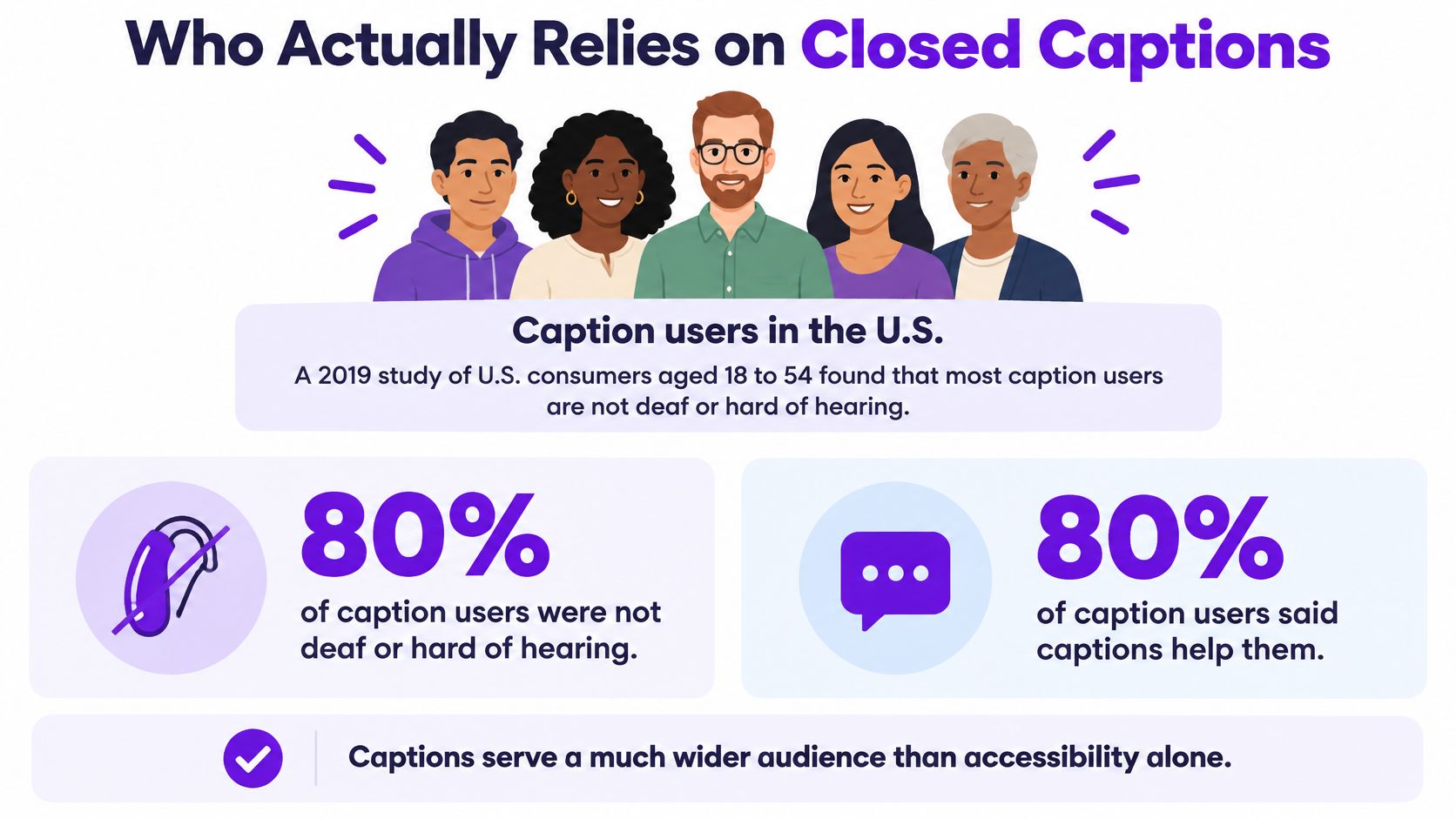
A 2019 study of U.S. consumers aged 18 to 54, cited in Library Technology Reports, found that 80% of people who used captions were not deaf or hard of hearing, and 80% said captions made them more likely to watch a video. The same report notes that 69% watched video with sound off in public places, while 25% did so even in private. Later U.S. survey findings cited in the same publication showed that about half of 1,265 respondents kept subtitles on most of the time, climbing to 70% among Gen Z.
| Reason or condition | Reported share | Typical viewer |
|---|---|---|
| Watched with sound off in public places | 69% | Commuter on a bus |
| Watched with sound off in private | 25% | Parent with a sleeping child |
| Muddled audio | 72% | Viewer in a noisy room |
| Difficulty following accents | 61% | Viewer hearing unfamiliar accents |
| Avoiding disturbing others | 29% | Parent with a sleeping child |
| Language learning | 18% | Viewer learning English from a tutorial |
| Kept subtitles on most of the time | About half, rising to 70% among Gen Z | Everyday streaming and social viewer |
Numbers feel abstract until you picture the exact moments people tap the CC button:
The World Wide Web Consortium notes that captions help both viewers in loud or silent environments and people who process spoken material better when they can read along. Educators designing inclusive online courses can pair well-timed captions with dedicated classroom strategies for deaf learners from Queens Online School so students who rely on visual access aren't left piecing lessons together from fragmented notes.
When you skip captions, you don't just lock out deaf and hard-of-hearing viewers. You shrink your mainstream audience every time someone watches in a crowd, a quiet bedroom, or a second language.
Even in a silent room with studio headphones on, captions change how viewers absorb what you say. Psychologists call this dual-channel processing: your brain takes in spoken words through your ears while reading synchronized text through your eyes at the exact same moment.
Think of ordering dinner at a restaurant. If a server recites six specials at conversational speed, you probably forget the third dish before they finish the sixth. Hand a printed menu to the diner while the server reads those same specials aloud, and every ingredient sticks. Synchronized captions hand your viewer that printed menu.
A review of more than 100 empirical studies published via PubMed Central found that captions improve comprehension, attention, and memory. Those gains matter most whenever a viewer has to track dense ideas rather than casual entertainment: long-form interviews, recorded classroom lectures, onboarding walkthroughs, webinars, and technical product explainers.
Many social editors slap big three-word punchlines onto the middle of a clip and call it captioned. Headline text grabs a glance, yet it leaves out the connective logic viewers need to understand complex terms, unfamiliar regional accents, room echo, or a thin lapel microphone. Captioning the complete dialogue lets viewers verify the exact word they missed without breaking focus.
Timing makes or breaks that benefit. Well-synced captions appear as the speaker starts a phrase and clear cleanly before the next thought lands. By contrast, a caption that drifts two seconds behind the audio forces the viewer's brain to reconcile yesterday's sentence with today's voice, which creates more friction than watching without text.
For learners watching exam-prep recordings or licensing lectures, pairing accurate captions with structured study habits turns passive playback into active recall. Students reviewing complex regulatory material, for instance, can combine captioned replays with 24hourEDU tips on MLO note-taking to capture definitions and numbers accurately on the first pass.
Producer check: Watch sixty seconds of your latest video once with captions off and once with captions on. Count how many times you instinctively pause, squint, or scrub backward to catch a name or phrase.
Viewer engagement is a strong business case, yet captions are also a formal accessibility conformance requirement. Knowing the core technical benchmarks keeps you from delivering files that look fine on screen while failing an accessibility audit.
Under W3C WCAG 2.1 guidance, two success criteria establish the baseline for synchronized video:
W3C guidance is specific about what counts as a valid caption track. Captions must represent spoken dialogue and meaningful non-speech sounds in the same language as the video, and they must remain user-controllable. Permanently burned-in subtitles miss that requirement because viewers can't toggle them off or adjust display preferences to fit their vision needs.
When a university, agency client, or enterprise platform asks whether your videos conform to accessibility standards, handle the handoff in three clear steps:
[laughter] or [door slams], rather than burning text into the pixels.Treating the caption file as a permanent sibling of your video file takes almost no extra storage and prevents awkward rebuilds when compliance questions surface months after launch.
Most captioning platforms advertise eye-catching accuracy percentages, which encourages creators to click "auto-generate" and walk away. That single summary score hides the exact errors that wreck viewer trust.
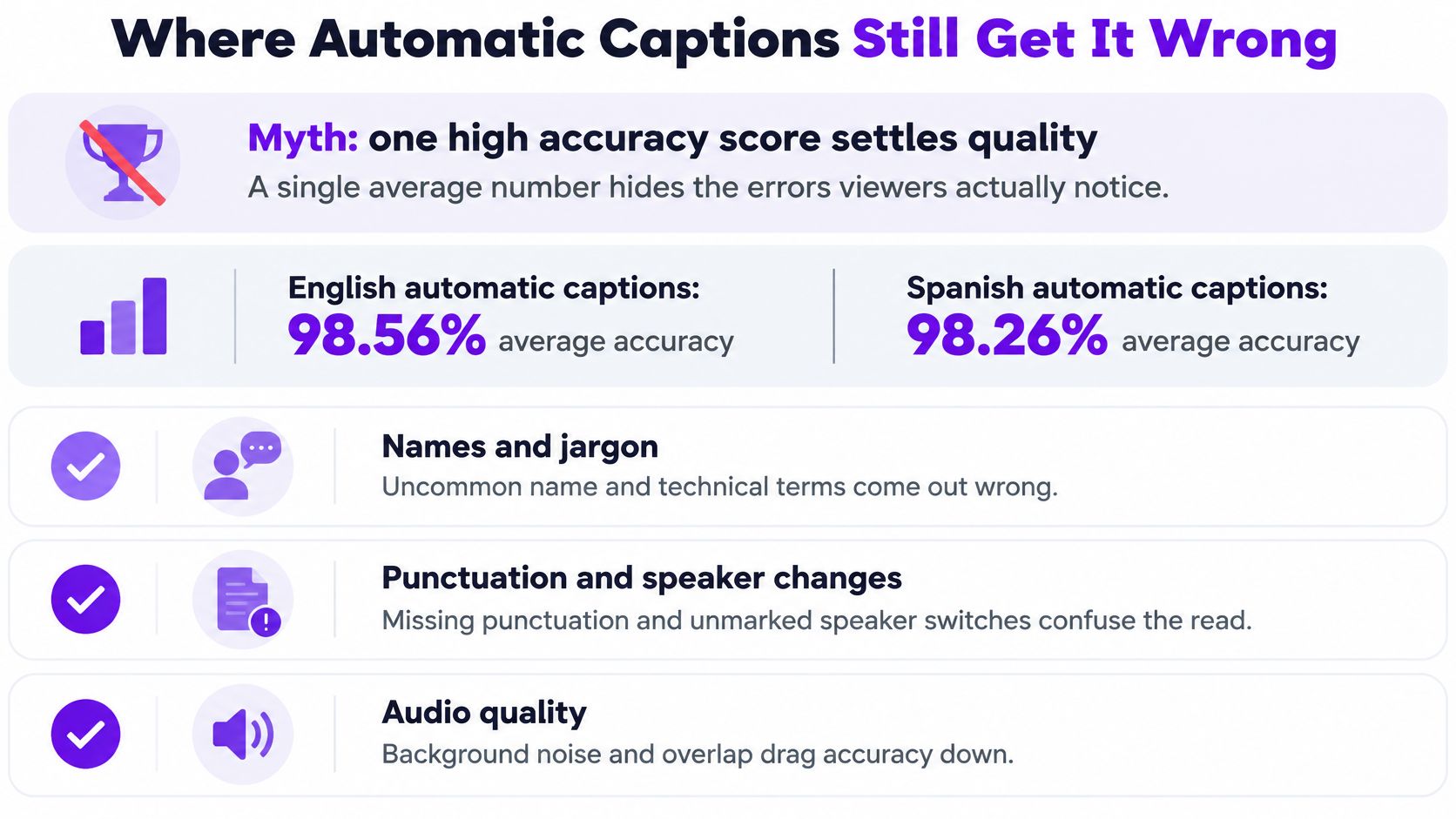
A comparative study archived by the University of Antwerp reported that English and Spanish automatic captions averaged 98.56% and 98.26% accuracy, respectively. Those numbers look nearly flawless on paper, yet the authors found that colloquial phrasing, overlapping speakers, speaker identification, rapid speech, and technical complexity remained stubborn failure points. A 2025 live-captioning study noted in the same source likewise flagged background noise, jargon, and fast delivery as key factors that drag down quality and comprehension, even as researchers test large language models for correction.
Here is the twist most caption guides skip. An education study also summarized in that work found that editing already-strong automatic captions, which had a mean word-error rate of roughly 4.5%, didn't measurably improve student learning outcomes, though students preferred the cleaned-up version. The researchers cautioned that those results may not hold up with noisy recordings or looser conversational audio.
That evidence points to a smarter habit: you don't always need to obsess over every comma or "um," yet selective human review is essential whenever a single slip flips your meaning.
| Error type | Why it changes meaning | Review priority |
|---|---|---|
| Names and speaker labels | Wrong attribution misleads the viewer | High |
| Numbers, prices and dates | A wrong digit changes the claim | High |
| Negations such as not or never | One missing word reverses the point | High |
| Technical terms and jargon | Viewers cannot recover the term from context | Medium |
| Filler words and minor grammar | Meaning usually survives | Low |
Once you auto-generate captions for video, skip the tedious word-by-word rewrite and run a targeted five-minute pass:
Abstract guidelines click faster when you see them working inside ordinary videos. Research on live television reported by Streaming Media showed that caption quality and source significantly affect comprehension for both deaf or hard-of-hearing audiences and hearing viewers alike; the same report cited a Verizon and Publicis survey of 5,616 U.S. adults in which 50% said captions mattered because they watched video without audio, while only 25% of caption users in an independent survey cited a hearing disability.

Look at five everyday publishing moments where captions earn their keep, along with the one pre-publish check that protects each clip from common closed caption fails.
Say Maya, a marketing manager, scrolls LinkedIn while waiting for her train. A 45-second SaaS demo auto-plays with the sound off. Because crisp captions spell out the core offer ("Cut onboarding setup in half without touching code") in the opening four seconds, she watches to the end and books a trial. What to check: verify every negation ("without," "no," "never") and pricing figure, because dropping a single "not" turns a selling point into a false promise.
Say Devon misses ten minutes of a university lecture and replays the recording in a shared dorm room with captions switched on. Complex terms like mitochondrial phosphorylation appear on screen as the professor speaks, letting him spell them accurately in his review guide. What to check: scan every specialized term and acronym against the slide deck, since speech recognition frequently swaps scientific jargon for absurd everyday sound-alikes.
Two founders debate hiring strategies on a video podcast, cutting a 50-second highlight for YouTube Shorts. Viewers watching muted need to know who holds which opinion during rapid back-and-forth banter. What to check: verify speaker names and timing at every cut so a contrarian quote isn't accidentally pinned on the wrong guest.
An agent plays a neighborhood walkthrough on an iPad beside the kitchen island while fifteen visitors chat around the room. Nobody can hear the narration, so the captions carry the listing price, square footage, HOA fee, and school district cleanly across the screen. What to check: audit every digit, street name, and decimal twice, because turning "$415,000" into "$450,000" creates an immediate trust gap.
Say a heating and cooling contractor records a quick tip explaining why a thermostat clicks off early, speaking from a rattling service van with a strong regional accent. Captions smooth over engine rumble and unfamiliar pronunciation so homeowners follow the troubleshooting steps. What to check: verify part names and safety warnings ("turn the breaker off first"), where noisy audio causes the heaviest auto-caption drift.
A clip that performs beautifully with sound can fall apart the moment someone watches it muted on a train. That single scenario settles the caption question for most videos: publish closed captions on every public, educational, or business-facing video, and treat them as required for prerecorded content under WCAG Level A.
The true test is not whether a deaf or hard-of-hearing viewer might show up. It is whether anyone will ever need the words. Commuters, parents rocking a sleeping baby, warehouse staff on a break, viewers whose first language is not yours: all of them judge your captions by whether the text lets them follow along, and they judge errors by whether the meaning changed, not by some overall accuracy percentage. A caption file that scores 95 percent accurate still fails if the missing 5 percent is your price, your guest's name, or the word "not" in a key sentence.
If you're still deciding where to start on a tight production schedule, run your next upload through three quick questions:
One "yes" puts captions inside your standard publishing workflow rather than on a someday to-do list after launch. That applies just as much to community groups as to corporate brands. A church communications volunteer posting weekly sermon clips, or even helping congregants find accessible nativity scene setups during the holiday season, is already doing accessibility work, and captioned video is the same instinct applied to announcements and teaching moments so families watching at home or from a hospital room feel welcomed rather than excluded.
Committing to captions is the easy part. Keeping the habit sustainable takes a review routine that respects your time, so work in priority order. Fix names, numbers, negations, and speaker labels first, because those are the errors that flip meaning. Confirm synchronization at every speaker switch next, since a correct line pinned on the wrong person is still a wrong caption. Then store the timed caption file beside your master video so future reposts never start from scratch. If you're setting up that process for the first time, follow a step-by-step guide on how to add captions across your channels so nothing slips through the cracks.
When you publish across YouTube, Instagram, TikTok, and LinkedIn, managing separate caption tracks by hand slows teams down fast. In Taja AI, thumbnails and captions are included, and they can be edited before posting, alongside Multi-Language Transcription for video optimization so you can review high-priority details in one workspace before anything goes live.
Turn your next long-form recording into ready-to-publish shorts, clips, editable captions, and platform-ready posts without spending hours scrubbing timelines by hand. Visit Taja AI to start free and build fast, editable captioning right into your publishing workflow.


We are blessed to work with leading brands & Companies


We try to make easy and simple for every professionals. Get 30 days free trial - No credit card required.


© 2025 Taja AI. All rights reserved.