
Social Media Caption Writing: A Platform-by-Platform Guide
Learn social media caption writing step by step, with length benchmarks for Instagram, TikTok, Facebook and LinkedIn, plus hooks, CTAs and brand voice.
5 min read
November 25, 2026

Learn how content calendar management keeps publishing consistent, from fields to track and planning steps to scheduling and performance reviews.
Written by:


In 2025, 38% of surveyed marketers planned their social media content only one week ahead, while just 14% planned three or more months ahead, according to Planable's global survey of 1,000 marketers. That short planning horizon explains why so many marketing teams feel busy every morning yet struggle to trace what their publishing schedule produced by the end of the quarter.
It's common to treat a content calendar like a wall planner filled with titles and dates. That habit breaks down the moment a writer misses a draft, an approver goes out on leave, or a platform changes how it distributes video. Effective content calendar management treats the calendar as a production-control and review system, not a chronological wish list.
When a calendar works properly, every row connects a specific asset to a named owner, a defined business objective, a clear workflow stage, and a post-publication result. Whether you run a spreadsheet in Google Sheets, a Kanban board in Asana or Trello, or a dedicated workspace like CoSchedule, the tool matters far less than the operational discipline inside each row.
Most organizations assume that having a publishing schedule means they have an operating content strategy. The numbers tell a sharper story. In the Content Marketing Institute and MarketingProfs 2025 B2B benchmark, which surveyed 1,186 global marketers between June and August 2024, only 47% of B2B marketers reported that their organization had a documented content strategy. Among those with a documented strategy, just 29% rated it extremely or very effective, while 58% called it moderately effective, 12% said it was not very effective, and 1% said it was not effective at all.
Writing a strategy deck once a year doesn't run a publishing operation. A calendar is the place where a documented strategy turns into daily accountable work. If your spreadsheet only tracks publication dates and rough headlines, your team has no operational bridge between quarterly goals and Tuesday's output.
Every row in a working calendar should act as a control record. Removing any of these core fields creates blind spots that only show up after a deadline slips.
| Field | What It Records | Why It Matters |
|---|---|---|
| Content asset | Title, source file and parent asset | Links every short, caption and post to one original |
| Format | Long-form video, short, blog, thread or carousel | Sets production time before a date is committed |
| Target channel | One platform per row | Stops the same post being planned twice |
| Owner | One named person for each status | Turns a deadline into an accountable task |
| Status | Idea, briefing, production, review, approved, scheduled, published or repurposed | Shows where work stalls |
| Publish time | Date, time and time zone | Makes schedules checkable against audience time |
| Objective | Awareness, community, lead generation or retention | Explains why the asset exists |
| Measurement fields | Metrics to check and the review date | Connects each post to a result |
Notice how those fields govern behavior before anyone writes a word. Assigning a format early prevents someone from promising a ten-minute tutorial video on a timeline that only fits a text post. Setting one target channel per row keeps a YouTube upload, its LinkedIn carousel, and its email summary from colliding inside a single messy cell.
Compare two calendar rows for the same campaign. The first reads: Tuesday | LinkedIn | Post about Q3 pricing update. No one knows who writes it, what outcome it should drive, whether legal reviewed it, or when anyone will check how it performed.
The second row reads: Q3 Pricing FAQ Carousel (Parent: Pricing Webinar) | Carousel | LinkedIn | Owner: Priya (Review) | Tuesday, 9:00 AM EST | Objective: Retention | Review Date: +14 days (Saves, DMs, Help-Desk Clicks). The writer knows the angle, the reviewer knows the deadline, and the operations lead knows how to judge success two weeks later.
Simple calendar audit: Open your current schedule and scan the next ten rows. If any row lacks a single named owner or a stated objective, you are looking at a reminder, not a plan.
A calendar fails when assets move through ad-hoc Slack messages and email threads instead of defined stages. Treating your editorial calendar as an operational control system lets you trace draft delays, approval latency, and adaptation bottlenecks rather than writing off missed slots as random bad luck, a workflow model detailed in MarTech's guide to tactical content workflows.
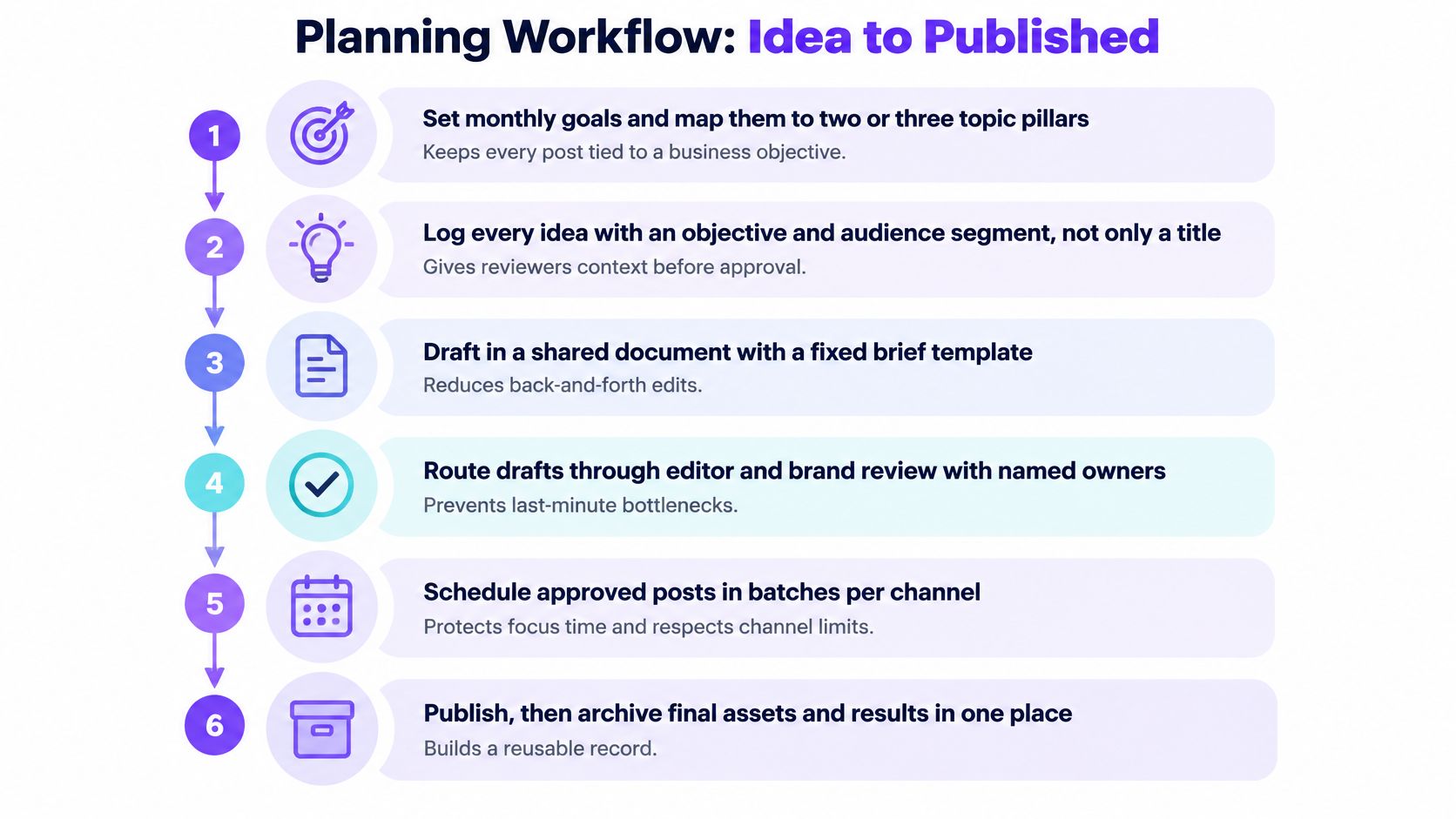
I would set up the production path in seven fixed steps so every contributor knows what triggers the next handoff.
Your calendar status column should follow one clean sequence: idea, briefing, production, review, approved, scheduled, published, and repurposed. Limiting status labels to those eight states makes stalled work jump off the screen during a five-minute check-in.
The single most common breakdown happens right between idea and briefing. A team holds a productive brainstorm, dumps forty titles into the backlog, and leaves the owner column blank. Weeks later, those ideas are still sitting untouched in briefing while everyone scrambles to publish something for Friday.
Healthy calendars rely on two distinct roles. Each row keeps its own production owner who drafts, edits, or records that specific asset. At the same time, one designated calendar owner oversees the entire board, verifies every status transition, and enforces agreed time limits for each stage.
A healthy calendar has no orphan rows. Every item sits in an active status, carries a named owner, and never lingers in one stage longer than the team agreed.
Separating system maintenance from asset creation removes ambiguity. When a video stalls in review for five days, the calendar owner traces the delay directly to a specific person and step instead of sending a vague reminder to the whole marketing channel.
Ambition breaks more content calendars than laziness. Teams copy a competitor's daily posting schedule without calculating the hours required to research, script, design, review, and distribute each piece.
In HubSpot's 2025 State of Blogging Report, which surveyed more than 500 marketers, 65% worked at companies that maintained blogs. Among those marketers, 93% rated blogging important or very important to their marketing strategy, and 50% reported higher blogging ROI in 2024 than the year before. Yet their publishing schedules varied dramatically across organizations.
| Publishing frequency | Share of blogging businesses | Planning implication |
|---|---|---|
| Daily | 22% | Keep a rolling two-week queue to avoid gaps |
| Two to three times per week | 37% | Reserve fixed slots, about 8 to 13 posts a month |
| Weekly | 30% | One fixed slot, easy to batch monthly |
| Every two weeks | 7% | Pair with a recurring review day |
| Monthly | 5% | Plan campaigns a quarter ahead |
Look closely at the cumulative totals from those benchmarks. Exactly 59% of blogging organizations publish at least twice a week, and 89% publish weekly or more often. That pace creates an immediate operational load that spreadsheets rarely show at a glance.
Say a small B2B team commits to publishing two to three blog posts a week. That single decision creates 8 to 13 long-form posts every month. Now add the supporting work around each post: three social adaptations, one email newsletter mention, a short video recap, and occasional seasonal promotions. A modest blog cadence quickly expands into fifty or sixty calendar rows a month.
Don't pick your frequency by copying an industry benchmark. Calculate it from your actual production hours so your team can sustain the pace without burning out or dropping quality checks.
Consistency beats burst publishing every time. A single well-researched weekly post supported by planned distribution outperforms a frantic daily schedule that collapses after week four.
Posting more often feels like the fastest lever for growth. In 2024, 45% of surveyed marketers said posting content more frequently drives results, according to HigherVisibility's compilation of content-marketing research. Pushing identical volume across every social network, however, wastes production hours and triggers audience fatigue.
Before you load next month's queue, look at how real platform behavior shapes a weekly workspace.

A massive 2024 Rival IQ benchmark report analyzing more than 5 million posts and 10 billion interactions documented wide engagement differences across Facebook, Instagram, TikTok, and X. Posting frequency differed sharply by platform, and Reels emerged as the strongest Instagram post type by engagement rate. Those platform gaps mean a single universal cadence rule doesn't fit modern distribution.
Your calendar should enforce separate cadence and format standards for each destination rather than cloning one caption across five networks.
| Platform | Cadence rule | Format rule |
|---|---|---|
| TikTok | Video-heavy stream | Short video |
| Video-heavy stream | Reels, the strongest post type by engagement rate in the 2024 benchmark | |
| Lower-volume stream | Document or discussion posts | |
| Distinct timing rule | Community updates, native video, and link posts | |
| X | Distinct timing rule | Short commentary, replies, and multi-post threads |
Separating streams keeps creative work realistic. A small team might film four vertical videos on Monday to feed TikTok and Instagram Reels, write two thoughtful PDF carousels for LinkedIn on Tuesday, and reserve X for timely commentary rather than forcing ten daily posts everywhere.
Once channel rules are set, batch creation and scheduling into dedicated blocks. Record or draft a full week of assets in one focused session, then enter every item into the calendar in a single pass so each row gets its owner, status, format, and channel before anything touches a scheduler. If you want a step-by-step walkthrough of queue setup and timing, our guide on how to schedule posts lays out the mechanics in detail.
Tool automation should remove repetitive manual uploading once your batch is approved. Taja AI's Content Calendar supports bulk scheduling and automatically schedules all of a user's content across YouTube, X, Instagram, Facebook, TikTok, and LinkedIn based on the days and times each platform's content receives the most engagement.
Still, faster scheduling never replaces human review limits. Set a hard weekly ceiling per channel inside your calendar so the sheet flags any queue that exceeds what your editors can check and what your team can reply to once comments roll in. Raising posting volume only pays off when reviewers and community managers can keep pace without letting accuracy or conversations slip.
Watch this walkthrough for a closer look at how structured scheduling and calendar controls hold up across a multi-channel week.
Teams often treat the "Published" column as the finish line. Once a post goes live, they close the row and start chasing next Tuesday's deadline, leaving behind no institutional memory about what worked.
That blind spot is getting more expensive as discovery fragments. According to Demand Gen Report's coverage of small-business creator trends, 49% of consumers across the U.S., U.K., Canada, Australia, and New Zealand discover new small businesses through social media, compared with 40% through search engines. Search clicks have also grown less predictable as AI summaries and zero-click views capture attention before a buyer ever visits a website.
Because buyers encounter brands across social feeds, search results, email, and direct referrals, every calendar row needs a clear discovery objective (awareness, community, lead generation, or retention) paired with a specific downstream action. Without that pairing, teams end up judging a community-building Reel by direct link clicks and killing a format that was filling their sales pipeline.
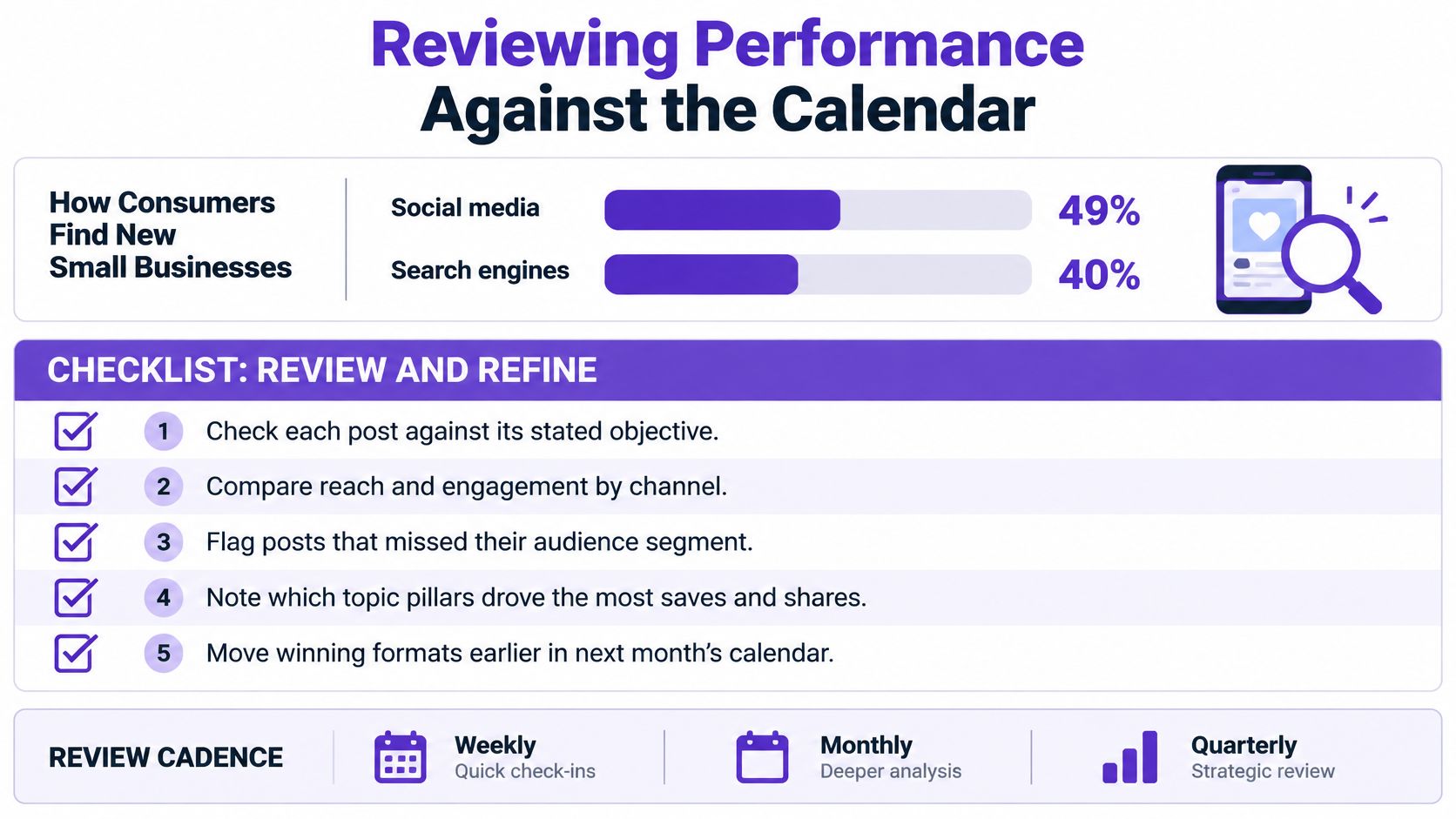
Don't track vanity totals across a whole month and call it analysis. Record performance at the row level using consistent metrics so you can compare formats and pillars fairly.
For video-heavy calendars, pairing row-level tracking with dedicated video analytics tools helps isolate exact retention drop-offs so your next script fixes the underlying leak instead of guessing.
Instead of changing five variables at once, turn your calendar into a controlled testing ground using a rolling four-week experiment. Keep your topic pillar and target audience segment roughly constant across those four weeks, then vary just one lever, such as posting cadence or asset format.
At the end of week four, compare median performance per post alongside total weekly output. Using the median prevents one outlier viral clip from masking twelve underperforming uploads. If doubling volume cuts median engagement in half while total conversions stay flat, you have clear evidence to pull back and reinvest that time in stronger angles.
Build a recurring 60-minute monthly review directly onto the team calendar. During that session, compare planned rows against what shipped, audit how many days assets spent sitting in review, isolate your top three and bottom three performers, and pick proven evergreen pieces to adapt for fresh discovery surfaces without feeling repetitive.
Publishing fewer brand-new ideas while systematically adapting proven material across different formats and buyer intents often outperforms constant brainstorming.
Once a quarter, step back and ask one structural question: which discovery surfaces are producing qualified audience growth right now, and does our calendar still allocate our best production hours to them? If LinkedIn documents and YouTube tutorials drive seventy percent of your real leads while X consumes half your daily effort, rebalance the slots before the next quarter begins.
Among 564 marketers surveyed in the 2025 Emplifi State of Social Media Marketing Report, the top planned AI applications were predictive analytics and customer insights at 30% and automated content creation at 28%. Scaling those workflows requires clear editorial responsibility: generic or inaccurate content can weaken audience trust regardless of how efficiently it gets published.
Your calendar should define where automation stops and human judgment takes over. Each row needs an owner, an objective, and a measured result, with review requirements attached before the asset enters production. Otherwise, a full queue can hide unfinished editorial work.

Add a risk tier column directly to your calendar. Label each asset before production begins so writers and editors know which checks stand between a draft and approval.
Classify the content, not just the task. A caption containing a financial claim still needs human review even if caption drafting usually receives only a spot-check. Scheduling an asset should never substitute for approving it.
Keep higher-risk rows out of "Approved" until five verification fields are complete: the source footage or reference file, the factual verification status, the named approval owner, any disclosure requirement, and a freshness or expiration date. These fields make the approval decision traceable and help prevent outdated offers or seasonal advice from being recycled.
For example, a local real estate brokerage might schedule a short video about neighborhood school ratings and mortgage rate options. Its calendar row could read:
Risk: High | Source: Raw interview clip #14 + county data sheet | Fact-Check: Verified by Sam | Approver: Dana (Broker) | Disclosure: Licensed brokerage disclaimer included | Expires: September 30
Sam's fact-check and Dana's approval serve different purposes. Keeping both visible prevents a completed check from being mistaken for permission to publish.
Editorial standard: Use AI to eliminate repetitive formatting and scheduling work so your team gains hours back for local context, thoughtful replies, and real customer relationships.
Higher output still needs accountable judgment. Judge automation by whether it supports the row's objective without weakening accuracy or relevance.
You don't need a new software subscription or a two-week offsite to fix a messy calendar. Block ninety minutes this month and run these five actions in one sitting.
Ignore how full or color-coded your grid looks. Judge your system strictly by behavior: a well-built row should change what gets approved, what gets published, or what gets measured. If a column never influences a decision during your monthly review, delete it and keep the board lean enough that your team opens it every morning.
Turning one recording into weeks of well-governed, multi-channel content takes far less manual work when repurposing and scheduling live in the same workspace. We built Taja AI to transform long-form videos into ready-to-edit shorts, clips, captions, thumbnails, blogs, and platform-specific posts, complete with bulk scheduling across YouTube, X, Instagram, Facebook, TikTok, and LinkedIn, plus a free 1:1 content consultation to help map your workflow. Explore how to streamline your calendar and start free at Taja AI.


We are blessed to work with leading brands & Companies


We try to make easy and simple for every professionals. Get 30 days free trial - No credit card required.


© 2025 Taja AI. All rights reserved.