.jpeg)
10 Instagram Reel Captions That Drive Action
Explore 10 Instagram Reel captions with hooks, CTAs, niche formulas, hashtag examples, and Taja AI ideas for faster content creation.
5 min read
September 24, 2026

What is tiktok aspect ratio - Master the TikTok aspect ratio (9:16) to boost your algorithm reach. Learn how to format videos correctly and avoid cropping
Written by:


The correct TikTok aspect ratio is 9:16, and the right export size is 1080 x 1920 pixels. Use anything else and you're actively reducing your odds of strong For You Page performance before your hook even gets a chance to work.
That's the part too many creators miss. They obsess over captions, trends, cuts, and posting times, then upload a horizontal clip with lazy cropping and wonder why the video stalls. TikTok isn't a neutral player here. It's built for vertical viewing, and content that fits that experience gets treated like native content while everything else looks repurposed, cramped, or unfinished.
If you've been asking what is tiktok aspect ratio, stop thinking of it as a boring export setting. It's a visibility setting. Get it right and your video fills the phone screen the way TikTok wants. Get it wrong and the platform either adds black bars, crops your footage, or both.
For busy creators, especially anyone repurposing podcasts, interviews, webinars, talking-head content, or YouTube videos, this mistake is expensive. It wastes good footage, weakens performance, and creates extra editing work you shouldn't be doing manually.
Most creators assume weak reach means weak content. Sometimes that's true. A lot of the time, the problem starts earlier.
TikTok's dominant format is 9:16 at 1080 x 1920 pixels, and that standard exists for a simple reason: it fills the smartphone screen the way people naturally watch video on the app. Sked Social notes that this format has become TikTok's gold standard for 2026, and that videos exported in the exact ratio align with the platform's preferred viewing experience and perform better than mismatched formats (TikTok video size guide from Sked Social).
A great script won't rescue a poor fit. If your video lands in-feed with awkward framing, empty space, or obvious repurposing artifacts, viewers feel that friction immediately.
That's why aspect ratio isn't a finishing detail. It's the container your content lives in. If the container is wrong, your message gets handicapped before the first second plays out.
Practical rule: If the video is for TikTok first, build for 9:16 first. Don't “fix it later” in export.
There's also a hardware reality here. TikTok is a mobile-first platform, so your footage needs to look clean on modern phone screens. If you're filming on older gear and thinking about an upgrade without paying flagship prices, this guide to best refurbished iPhones is a useful place to start. Better source footage makes reframing easier, but only if you still export in the right shape.
Creators love to talk about hooks and retention. Fair enough. But TikTok can't reward a viewing experience your frame is already sabotaging.
Here's the blunt version. If you're posting 16:9 clips into a 9:16 environment, you're making your content easier to skip.
Pick the wrong ratio at the start, and you do extra editing, worse reframes, and weaker cross-platform performance later. TikTok may accept a few formats, but your workflow should not treat them as equal.
9:16 at 1080 x 1920 pixels is the format TikTok is built to display best. It matches how people hold their phones, fills the screen cleanly, and gives your content the strongest starting position.
Set this as your default in filming, editing, templates, and exports.
That one decision saves time across your repurposing stack. You avoid last-minute crops, missed captions, awkward headroom, and the quality loss that happens when editors try to force horizontal footage into a vertical feed. If you publish across channels, start with native specs for each destination. This comparison guide to Instagram video format helps when you are planning a wider distribution workflow.
Square video, 1:1, is supported in some ad scenarios. That does not make it a smart default for TikTok.
Use it only if you are stuck with a square asset library or a paid campaign requires it. For organic posts, square wastes screen space and makes the video feel adapted instead of created for the platform.
Horizontal video, 16:9, belongs in widescreen environments. On TikTok, it usually signals that the content started somewhere else and got squeezed into a vertical feed after the fact.
TikTok can technically accept 1:1 and 16:9 in some ad placements, with minimum resolutions for each. Technical support is not the same as strategic fit. If your team keeps building in 16:9 first, you are creating editing debt on every clip you repurpose.
This is the actual challenge for busy creators and marketing teams. Aspect ratio is not just a spec. It determines how much manual fixing your team has to do across TikTok, Reels, Shorts, and paid placements. Taja AI solves that bottleneck by helping you turn long-form content into platform-ready vertical assets faster, without rebuilding every post from scratch.
| Aspect Ratio | Resolution (Pixels) | Primary Use Case |
|---|---|---|
| 9:16 | 1080 x 1920 | Standard TikTok posts, Stories, carousels, vertical-first content |
| 1:1 | 640 x 640 minimum for ads | Limited ad use cases, legacy square assets |
| 16:9 | 960 x 540 minimum for ads | Horizontal ad variants, repurposed widescreen footage |
Use non-vertical formats only when a campaign specifically requires them. For regular TikTok publishing, 9:16 is the right call.
Wrong aspect ratio does not just make your video look off. It wastes screen space, weakens watch behavior, and turns every repurposed asset into a lower-performing version of itself.
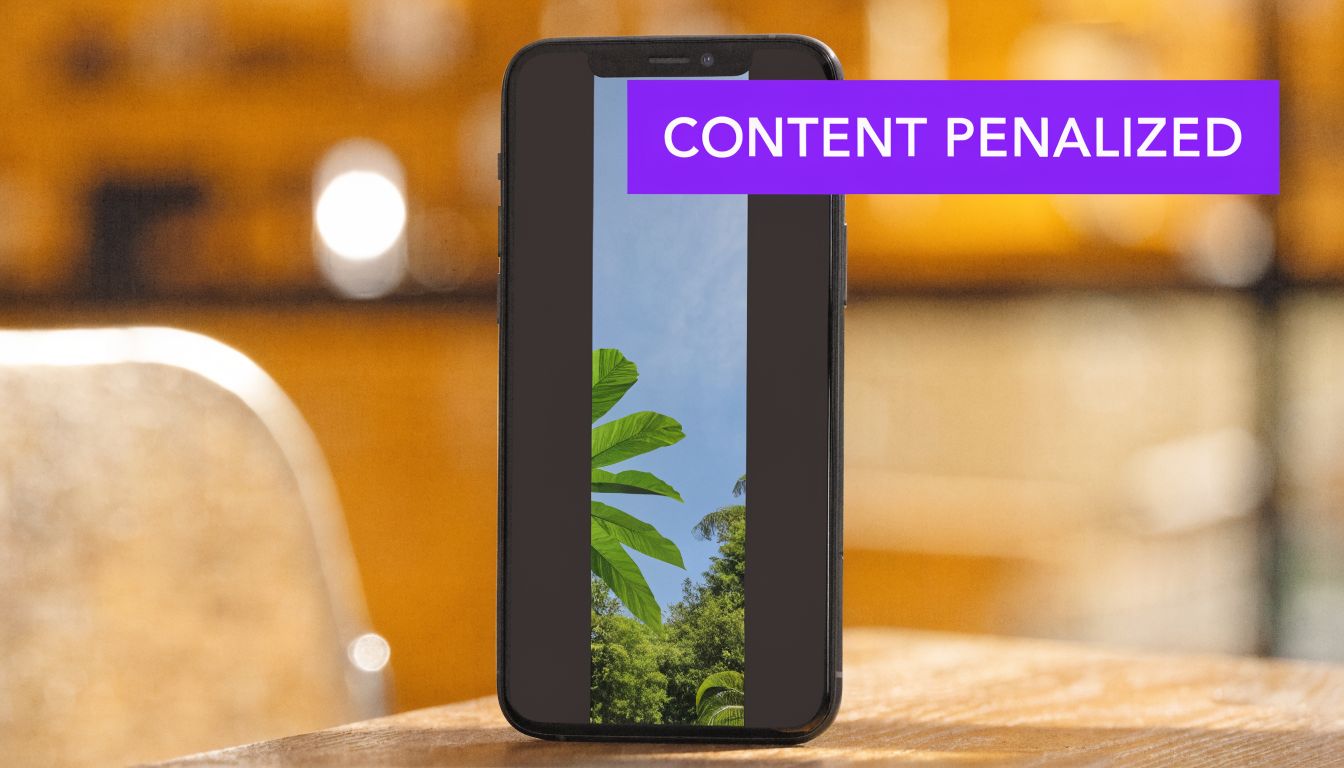
When creators upload non-conforming videos such as 16:9, TikTok displays them with pillarboxing, which shrinks effective screen canvas by 44% and correlates with 35% drops in dwell time and 28% lower share rates. ProPhotoStudio also reports that 9:16 ads deliver 2x average CTR because full-screen vertical placement matches how the For You Page is designed to work (TikTok image size and ad specifications).
Black bars signal compromise. Cropped heads, tiny subjects, and boxed-in visuals tell viewers the clip was made for somewhere else and pasted into TikTok afterward.
That first impression matters. TikTok is a speed test. Users decide in a second whether a video feels native enough to watch, and weak framing loses that decision before your hook even lands.
Aspect ratio errors are not isolated production issues. They create workflow drag across every channel you publish to.
A horizontal master built without vertical framing forces extra editing, manual cropping, subtitle repositioning, and thumbnail fixes. Then the same team has to repeat that work for Reels, Shorts, and paid social. If you want to avoid ugly padding and awkward crops, use video borders and formatting that fit vertical platforms from the start, not as a last-minute patch.
That is the cost creators miss. You are not just losing reach on one TikTok post. You are paying for bad formatting with more labor, slower publishing, and weaker performance across your entire repurposing pipeline.
TikTok does not need to guess what belongs on the platform. Full-screen vertical video already matches the product experience, so it earns stronger watch signals and cleaner presentation.
A lazy crop tells viewers your process broke. TikTok sees the same outcome in retention, shares, and click behavior.
If your team keeps blaming creative fatigue while shipping the wrong frame, fix the production system first. Taja AI helps you turn long-form content into vertical-ready assets faster, so your repurposing workflow stops bleeding time and your content shows up looking native where it matters.
Getting to 9:16 is step one. Keeping your important content visible inside that frame is step two.
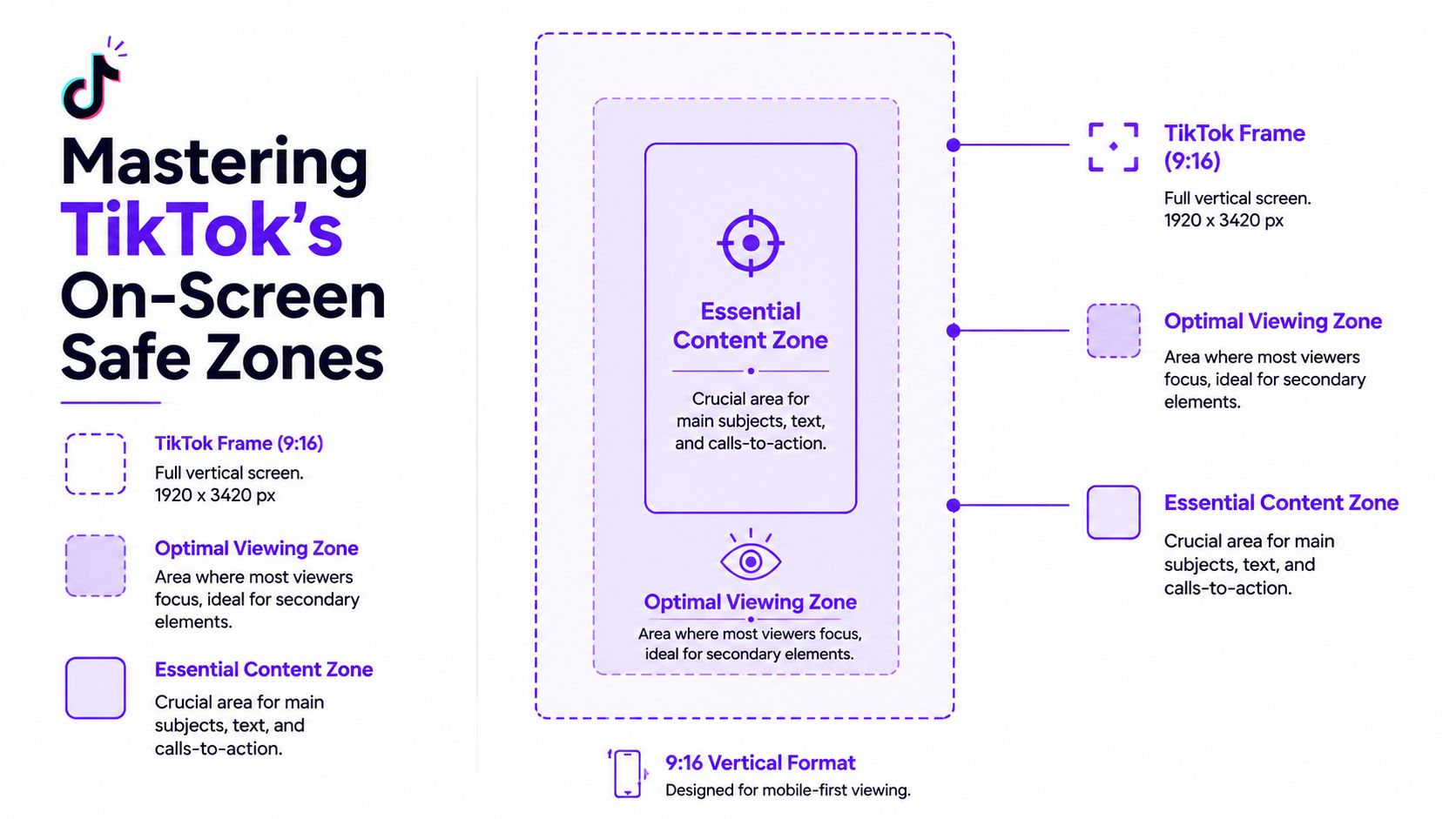
TikTok overlays interface elements on top of your video. Your username, caption area, and engagement buttons all compete with your visuals. So even if your file is the right shape, your message can still get buried if your text or face sits in the wrong spot.
Think of the TikTok screen like a TV broadcast with permanent graphics layered on top. The outer edges are risky. The center is where your content should live.
That means your headline text, product demo, subtitles, face, or call to action should stay in the middle area, not pressed against the sides or bottom.
Use this simple placement rule:
A lot of creators don't notice this until they publish and see their text half-covered. If you're adding design elements or frames manually, this guide to video borders is helpful because borders and overlays can make bad safe-zone decisions even worse.
Center the message, not just the subject. TikTok's interface will take the edges whether you plan for it or not.
Before exporting, preview the clip on a phone-sized canvas. If essential text looks even slightly close to the edges, move it inward. Don't trust a desktop timeline to tell you what's safe.
Most TikTok formatting mistakes are easy to spot once you know what to look for.

You take a YouTube clip, drop it into TikTok unchanged, and publish. The result is a small horizontal video floating inside a vertical feed.
It looks like an afterthought because it is one. People can tell.
This happens when someone tries to “fix” a horizontal clip by zooming in without reframing. The editor centers the frame, but the speaker moves slightly, and now the top of their head disappears.
That kind of crop feels cheap. It also makes talking-head content harder to watch because the viewer keeps noticing what's missing instead of listening to what's being said.
Your original 16:9 video has text that worked perfectly on YouTube. Then you compress it into TikTok space, and suddenly the words are tiny.
This is common with webinar slides, podcast title cards, tutorial callouts, and lower-third text. On desktop it looked fine. On a phone screen it's useless.
A quick visual example helps:
Some creators try to preserve the full horizontal shot inside a vertical layout by stacking graphics above and below it. Sometimes that can work. Often it creates a cluttered frame with too many competing focal points.
If your viewer doesn't know where to look, they leave.
If the crop makes the speaker look awkward, the text unreadable, or the frame cluttered, start over. Don't publish a compromise.
The fastest way to catch these errors is simple. Watch your finished clip once with the sound off on your phone. If the message isn't instantly clear, the framing failed.
Aspect ratio mistakes usually happen before editing starts.
Creators shoot a podcast, webinar, Zoom interview, sermon, listing walkthrough, or YouTube video in 16:9, then try to force TikTok versions out of that footage at the end of the process. That decision adds extra editing time, creates inconsistent framing across platforms, and turns one piece of content into a production bottleneck.
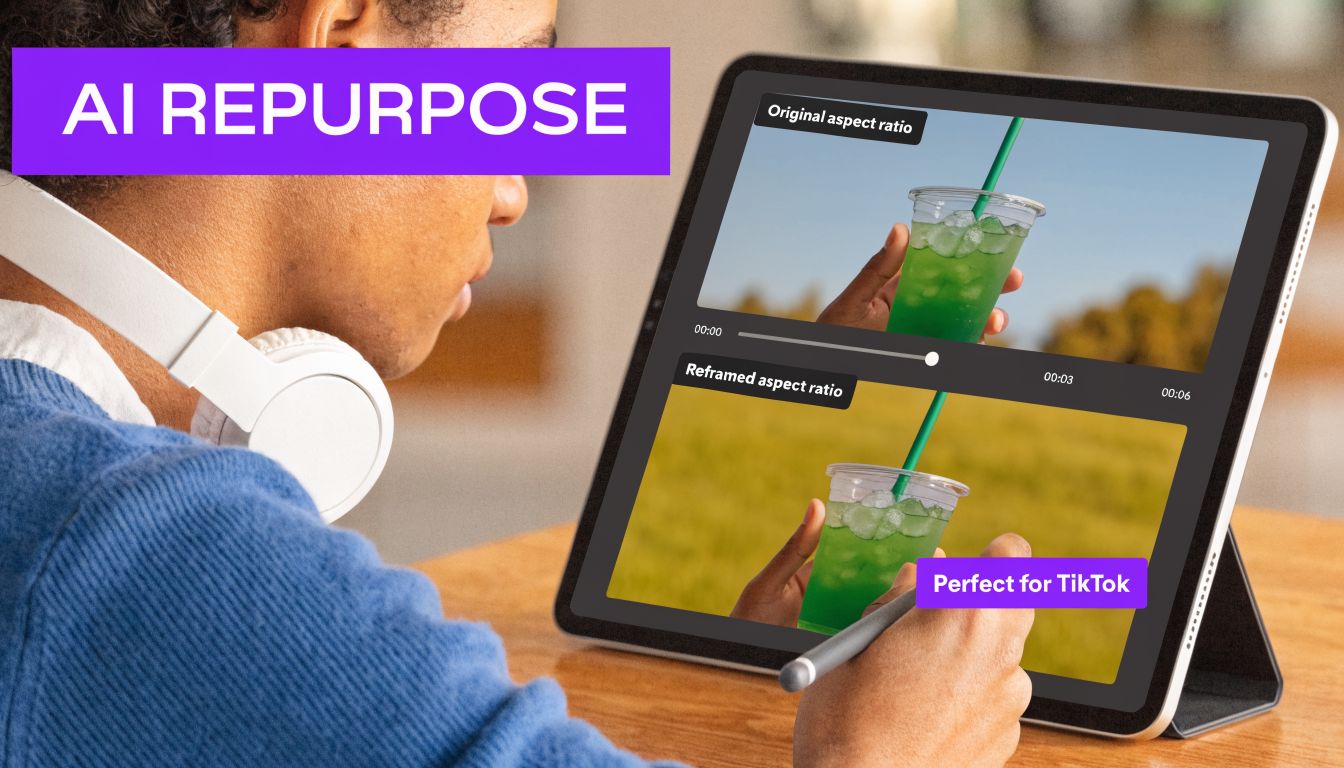
Knowing TikTok prefers 9:16 is basic. The expensive part is converting one long-form asset into clean, platform-ready clips without re-editing every frame by hand.
That is the gap many creators ignore. They plan for YouTube first, treat TikTok as an afterthought, and pay for it later with rushed crops, unreadable captions, and clips that feel obviously recycled. In a repurposing workflow, aspect ratio is not a small formatting detail. It decides how many usable assets you get from every recording session.
A good process handles four jobs every time:
If you publish clips regularly, use a TikTok clip maker that builds vertical outputs into the workflow from the start. Taja AI solves the actual bottleneck. It helps you turn long-form content into TikTok-ready clips without wasting hours on repetitive reframing decisions.
Stop treating TikTok formatting like post-production cleanup.
Build for repurposing on day one. If your workflow depends on manual resizing every time, your output will slow down, quality will slip, and cross-platform consistency will break. Taja AI is the smarter fix because it turns aspect ratio from a recurring editing problem into a repeatable content system.
Use MP4 if you can. TikTok supports MP4 and MOV, but MP4 is the preferred format for compatibility. For standard 1080p video, a 5 Mbps bitrate at 30 fps is the recommended baseline, according to Fliki's TikTok video size guide (TikTok video size specifications from Fliki).
If your footage has lots of motion, you can work with higher frame rates during editing, but keep your final export clean and platform-friendly.
This depends on how you upload.
That difference matters. If you keep getting blocked by upload limits on mobile, stop fighting your phone and publish from desktop instead. Same source, same platform, far fewer headaches.
No. TikTok enforces 9:16 for its core feeds, including posts, Stories, and carousels. If you want one reliable default for TikTok publishing, use 1080 x 1920 and keep your content designed for vertical playback.
You can, but I wouldn't make that your default. TikTok is built around 9:16, and content that doesn't match the native frame won't look as natural in-feed.
If you're repurposing from Instagram, resize intentionally. Don't assume “vertical enough” is the same as native.
If you're turning long videos into short-form content every week, Taja AI is the fastest way to stop wasting time on manual cropping, resizing, captions, thumbnails, and multi-platform formatting. Upload once, generate platform-specific assets, and publish TikTok-ready clips that fit the screen instead of fighting it.


We are blessed to work with leading brands & Companies


We try to make easy and simple for every professionals. Get 30 days free trial - No credit card required.


© 2025 Taja AI. All rights reserved.