.jpeg)
TikTok to Text: A Practical Guide for Creators
Learn how to convert TikTok to text the right way. Step-by-step workflow for transcripts, captions, and repurposing with accessibility and accuracy in mind.
5 min read
October 8, 2026

Learn how to use video editing templates to save time and create consistent, high-quality content. Our guide covers types, customization, and AI workflows.
Written by:


You spent time scripting the video, setting up lights, recording clean audio, cutting the rough edit, fixing captions, resizing for vertical, then making a thumbnail. By the time you publish, the piece has already consumed more energy than the response it may get.
That's the trap a lot of creators and small teams live in. The problem usually isn't a lack of ideas. It's that every video starts from a blank timeline.
Video editing templates solve that. Not by replacing creativity, but by removing repeat decisions that don't need to be made over and over. A good template turns your editing process into a system. Your hooks still change. Your message still changes. But your structure, branding, text treatments, motion style, and export setup stop slowing you down.
A video template is a pre-built editing framework you reuse across multiple pieces of content. Think of it as the production version of a brand kit. Instead of manually rebuilding your intro, lower thirds, caption style, logo placement, CTA screen, and layout every time, the template gives you a ready-made structure with editable parts.
For busy creators, that matters more than most editing advice.
When people say they need to “post more consistently,” what they often mean is that their workflow is too fragile. One long client week, one travel day, or one complicated edit can knock out the whole publishing schedule. Templates reduce that fragility because they turn content production into a repeatable process.
A solo consultant might record a webinar, a podcast, and a quick opinion video in the same week. Without templates, each asset becomes a separate edit with separate styling decisions. Fonts drift. CTA language changes. Captions look different. The channel starts to feel assembled instead of intentional.
With templates, the opposite happens. The audience starts recognizing your content before they even read the handle.
The broader market is moving in that direction too. The global video editing software market reached $4.7 billion in 2024 and is projected to reach $10.2 billion by 2030, according to video editing market statistics compiled by Skillademia. That growth reflects a practical reality. Creators and businesses need speed and consistency, and template-based workflows help deliver both.
Practical rule: If you publish on a schedule, templates aren't optional production extras. They're part of your operating system.
They don't replace judgment. They replace setup.
A template can handle:
That's why templates work best when you stop treating them like decorative add-ons. They're workflow assets. Used well, they save attention for the part that deserves it most: the message.
A strong template works a lot like a website theme or a slide master in PowerPoint. Some pieces are fixed because they define the brand. Other pieces are meant to be swapped every time you publish.
A common mistake is focusing only on how a template looks. What matters just as much is how it behaves when you need to edit it under deadline.
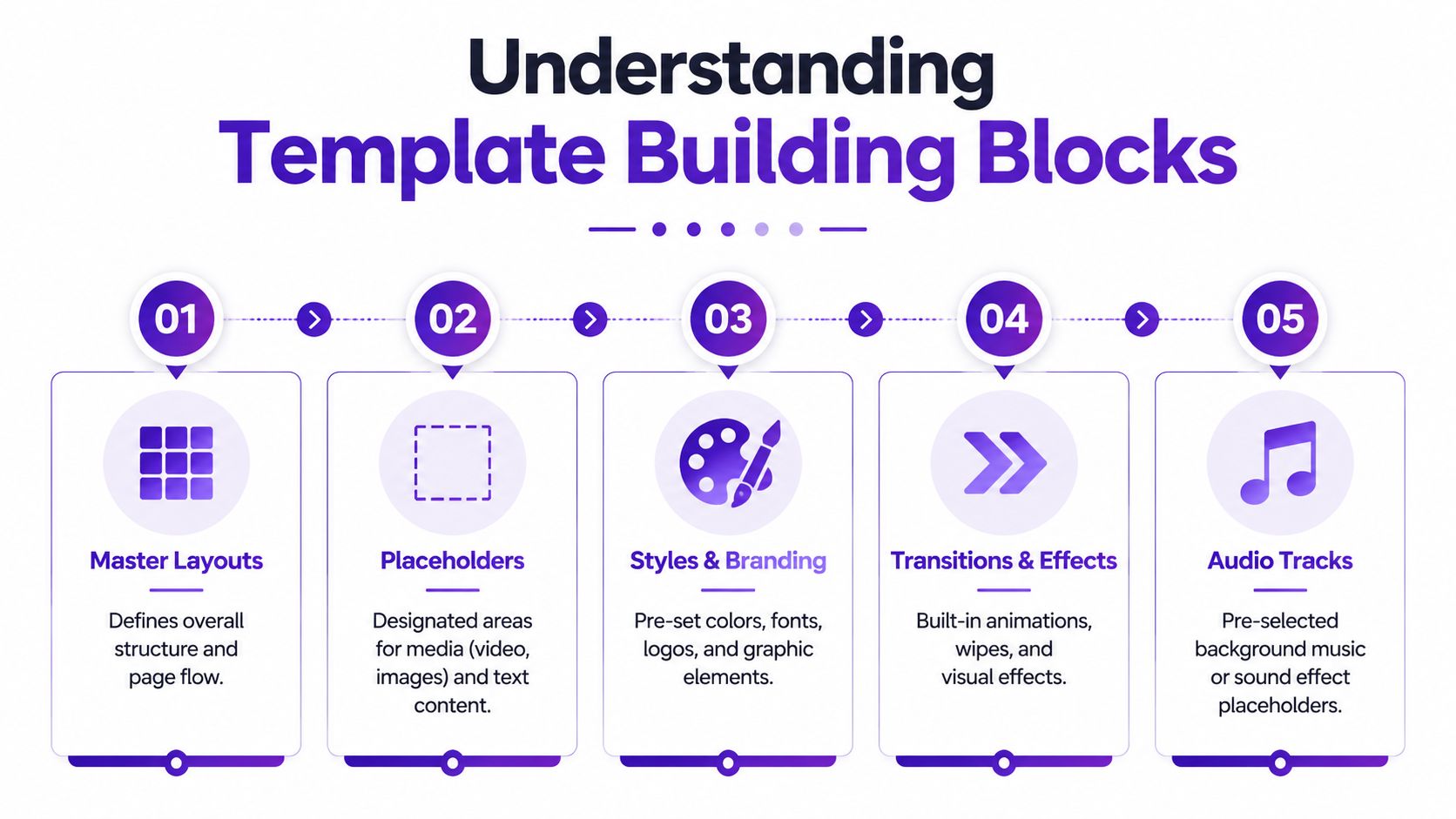
If you're formalizing your visual rules, a documented video style guide for reusable templates helps keep editors, contractors, and in-house teams aligned.
Every useful template has two layers.
The first layer is locked. That includes your brand colors, logo behavior, approved fonts, lower-third style, transition style, and visual rhythm. These elements shouldn't change unless your brand system changes.
The second layer is flexible. That includes:
This separation is what makes templates scalable. Editors can move fast without accidentally rewriting your visual identity.
Not every creator needs a huge template library. Most need a tight set of assets that cover recurring use cases.
These templates create continuity. A short branded intro can work for YouTube or podcast video. A clean outro can hold the CTA without forcing you to redesign the last screen every time.
For service businesses, this often matters more at the end than the beginning. A repeatable outro with space for one offer, one next step, and one brand mark keeps the close clear.
Captions aren't just accessibility features. They carry tone.
A faith-based channel might use softer, calmer typography. A real estate creator may want high-contrast captions with neighborhood names and listing highlights. A business educator may prefer minimal subtitles that don't compete with charts or screen recordings.
The style should feel native to the content, not pasted on after export.
Many “templates” often encounter this issue. People create one version and keep forcing it into every platform. That usually means cropped faces, awkward text positioning, and extra editing friction.
A proper template library includes separate layouts for:
A template isn't finished when it looks good in the editor. It's finished when it survives real publishing conditions.
These carry more weight than people think. A lower third tells the viewer who's speaking, what segment they're in, or why the current point matters. A recurring title card can make a weekly series feel like a series instead of random uploads.
The best ones are simple. If the animation draws more attention than the speaker, it's doing too much.
Technically, thumbnails often sit outside the timeline, but they belong in the same system. Your video package should include a repeatable thumbnail structure with room for the right headline style, image framing, and brand signals.
If you're building templates for Adobe workflows, packaging matters. Adobe Stock submission requirements specify that .mogrt files are capped at 500 MB, while .prproj and .aet files can go up to 2 GB. Template packages also need a ZIP structure with the customer project, a thumbnail in 1920×1080 or 3840×2160, and an MP4 preview of 60 seconds or less, as outlined in Adobe's technical requirements for video template submissions.
That sounds technical because it is. But the practical takeaway is simple. Great templates aren't just attractive. They're stable, portable, and easy to hand off without broken assets.
Most template mistakes happen before editing starts. People pick based on trendiness, not fit. The result looks polished in isolation but wrong for the business, wrong for the audience, or too cumbersome to customize quickly.
A useful template should make your content easier to produce and easier to recognize.

A brand isn't just a palette. It's pacing, tone, energy, visual density, and how much motion feels appropriate.
A mortgage broker, a church media team, and a SaaS founder can all use clean modern templates, but they shouldn't use the same ones. One may need calm authority. Another may need warmth and readability. Another may need screen-recording overlays and product callouts.
If your team needs a quick refresher on why visual repetition matters beyond aesthetics, this explainer on the importance of brand consistency for businesses is worth reviewing before you lock in a template set.
The fastest way to tell whether a template belongs in your workflow is to open it and try to change the obvious items.
Can you find the title fields? Can you swap footage without hunting through nested comps? Can you change the logo without breaking alignment?
According to Yuzzit's guidance on professional video templates, if a user can't locate and edit placeholders like titles, images, and logos within 10 minutes, the template is too complex and can reduce production fluidity by 35%. That lines up with real editing experience. Confusing templates don't save time. They transfer the cost into frustration.
Different template sources solve different problems.
| Source | What works | Trade-off |
|---|---|---|
| Built-in app libraries | Fast to start, easy for beginners, often optimized for that platform | Limited portability and less brand uniqueness |
| Marketplaces like Envato-style libraries | More variety, stronger motion design, broader use cases | Quality varies, and some files are harder to customize |
| Custom in-house templates | Strongest brand alignment and cleaner workflow control | Takes setup time and requires a clear system |
This is the gap a lot of creators feel but can't quite name. A template may work beautifully in CapCut, then become useless when you need a long-form YouTube version in Premiere Pro or DaVinci Resolve.
That's why it helps to choose templates with portability in mind:
The practical goal isn't a magical universal file that works everywhere. It's a template system you can reproduce across tools without reinventing your brand every time.
Most creators don't lose time in one dramatic editing task. They lose it in dozens of small resets. Finding the hook. Resizing the frame. Restyling captions. Rewriting the title. Making a thumbnail after the video is already done.
That's why the best workflow improvement usually isn't “edit faster” in the timeline. It's reducing how many times you have to make the same production choices.
The software category moving fastest is the one built around that shift. The AI video generation and editing software market is projected to grow from $3.67 billion in 2026 to $24.89 billion by 2036, at a 21.4% CAGR, according to Meticulous Research's AI video editing market forecast. That growth points to where teams are placing their bets. They want systems that automate repetitive editing and asset creation, not just prettier timelines.
A typical repurposing process often looks like this:
None of these steps is impossible. Together, they create drag.
A stronger workflow starts before editing.
Create a repeatable package for each content type:
Then pair that package with a repurposing process. One long-form recording becomes the source asset. Your templates define how that source should appear in each output.
This matters most when the template carries more than visuals.
The weak spot in many template setups is that they stop at design. They don't help with metadata, brand voice, or deciding what to cut.
That's where AI-assisted workflows become useful. A tool like Taja AI for faster editing workflows can take one long-form upload and generate shorts, captions, thumbnails, and platform-specific assets while applying saved brand template choices. In practical terms, that means the template isn't only governing color and layout. It's also helping standardize how the content is packaged for publishing.
That's especially helpful for the gap many creators feel around SEO. A polished short that has weak titling, generic descriptions, or flat captions still underperforms. Embedding naming patterns, caption style, and brand language into the workflow gives the template a strategic job, not just a visual one.
Build templates around repeated outcomes, not repeated animations.
A useful point of reference is below.
If you want this to work without overcomplicating it, keep the system narrow.
Use one source recording. Define your content categories. Assign a template to each category. Then let your editing tool or AI layer handle as much of the repetitive formatting as possible.
A workable stack often includes:
That's how templates start saving real time. They move your team from custom production to managed production.
A template that feels polished on YouTube can feel clumsy on TikTok. A vertical reel that works on Instagram can look underbuilt in a long-form YouTube environment. Platform-native formatting isn't a detail. It changes how viewers experience the content.
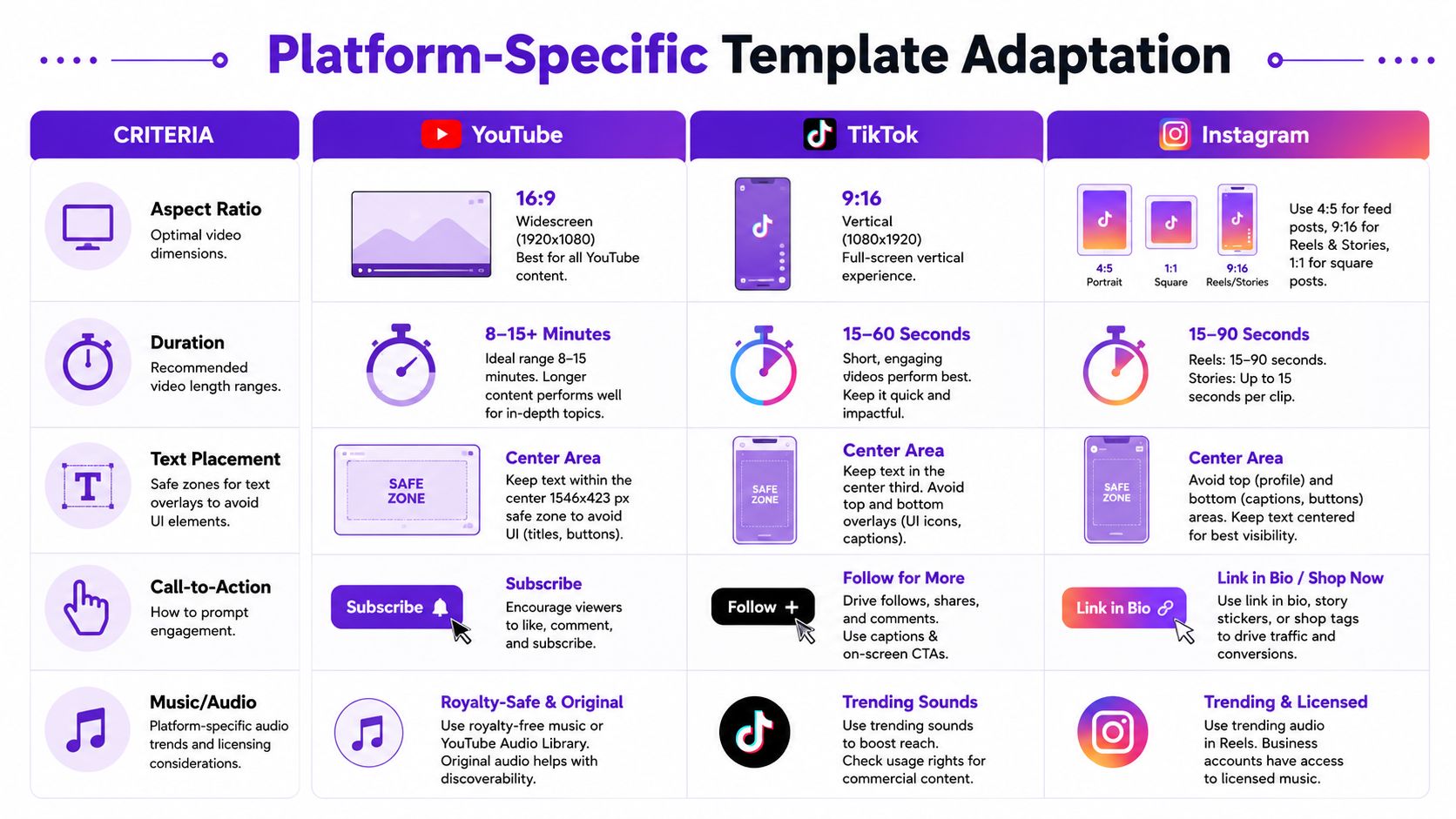
According to UNA's video production standards, 9:16 vertical templates at 1080×1920 are the right fit for Reels and Stories, and 16:9 at 1920×1080 with h.264 encoding is the benchmark for YouTube. The same guidance notes that templates that miss platform-specific formatting expectations can see up to 40% lower engagement because of compression issues and weak visual clarity.
That's the practical reason to build separate template versions. Not because designers like organization, but because each platform punishes the wrong layout.
| Platform | Template priority | What usually works | What often fails |
|---|---|---|---|
| YouTube | Structure and retention | Clean intro, clear lower thirds, strong end screen, thumbnail consistency | Recycled vertical layouts stretched into widescreen |
| TikTok | Immediate hook and readability | Bold text, fast visual pacing, captions built for silent viewing | Small text, slow openings, clutter near UI zones |
| Instagram Reels | Visual clarity and mobile-native flow | High-contrast overlays, strong first frame, compact CTA | Generic reposts that ignore Story and Reel behavior |
For YouTube, templates should support clarity over intensity. Give titles, chapter cards, lower thirds, and end screens enough space. Long-form viewers tolerate more structure, but they also notice when a short-form template has merely been stretched into a wide frame.
Use your YouTube templates for:
On TikTok and Instagram, the first impression is mostly visual. The frame must communicate quickly even with sound off.
That means your short-form templates should emphasize:
If you're refreshing your visual approach for Stories specifically, these fresh Instagram Story layout ideas can help spark variations without abandoning your brand system.
You don't want one-size-fits-all templates. You do want one recognizable brand translated into different formats.
A practical way to do that is to maintain:
For creators juggling multiple channels, this guide to social media video templates for multi-platform publishing is a useful companion when you're building separate output versions.
Templates save time, but they can also make content feel generic fast if you use them carelessly. Most problems come from treating the template as the content instead of the container.
Too many motion elements, oversized logos, or constant animated graphics can bury the actual message. This happens a lot when someone wants every second to “feel branded.”
The fix is restraint. Let the content carry the video. Branding should support recognition, not compete for attention.
A flashy social template can work for energetic product updates and look completely wrong on a serious client testimonial, educational explainer, or faith-based message.
Choose templates based on the emotional context of the video, not just what looked good in a marketplace preview.
If the viewer notices the template before the idea, the template is too loud.
A layout can look perfect on desktop and break on mobile. Captions get covered. Logos sit too low. CTAs land where platform UI lives.
Check every recurring template on an actual phone before you lock it into your system. Safe zones aren't optional for short-form publishing.
This is the fastest route to sameness. If a template is widely used and you change nothing except the footage, your content will blend into the feed.
Make at least a few structural choices your own:
Templates should make you more recognizable, not more interchangeable.
The bottleneck usually isn't your camera or your ideas. It's the amount of manual setup hiding inside every edit.
That's why video editing templates matter so much. They give you consistency without forcing you to rebuild your process for every upload. They protect brand presentation. They make repurposing less messy. And when paired with AI-assisted workflows, they can carry not just visuals but also packaging decisions like captions, titles, and platform formatting.
Start small. Don't build a giant template library this week.
Pick one recurring content type. A podcast clip. A listing video. A teaching short. Build one clean template for it. Test whether someone on your team can use it quickly. Then create separate versions for the platforms that matter most to you.
That's when content production gets lighter. Not because you're doing less work, but because you've stopped repeating the wrong work.
If you want to turn one long-form video into branded shorts, captions, thumbnails, and publish-ready assets from a single workflow, Taja AI is built for that kind of repurposing system. It's a practical option for creators and teams who need templates to support speed, consistency, and multi-platform output instead of just visual polish.


We are blessed to work with leading brands & Companies


We try to make easy and simple for every professionals. Get 30 days free trial - No credit card required.


© 2025 Taja AI. All rights reserved.