.jpeg)
YouTube Shorts Format: A Complete 2026 Creator Guide
Master the YouTube Shorts format in 2026 with exact specs on duration, aspect ratio, resolution, and file types plus upload and discovery best practices.
5 min read
October 4, 2026

A practical video content creation playbook for solopreneurs and SMBs covering planning, shooting, editing, repurposing, and measuring what works in 2026.
Written by:


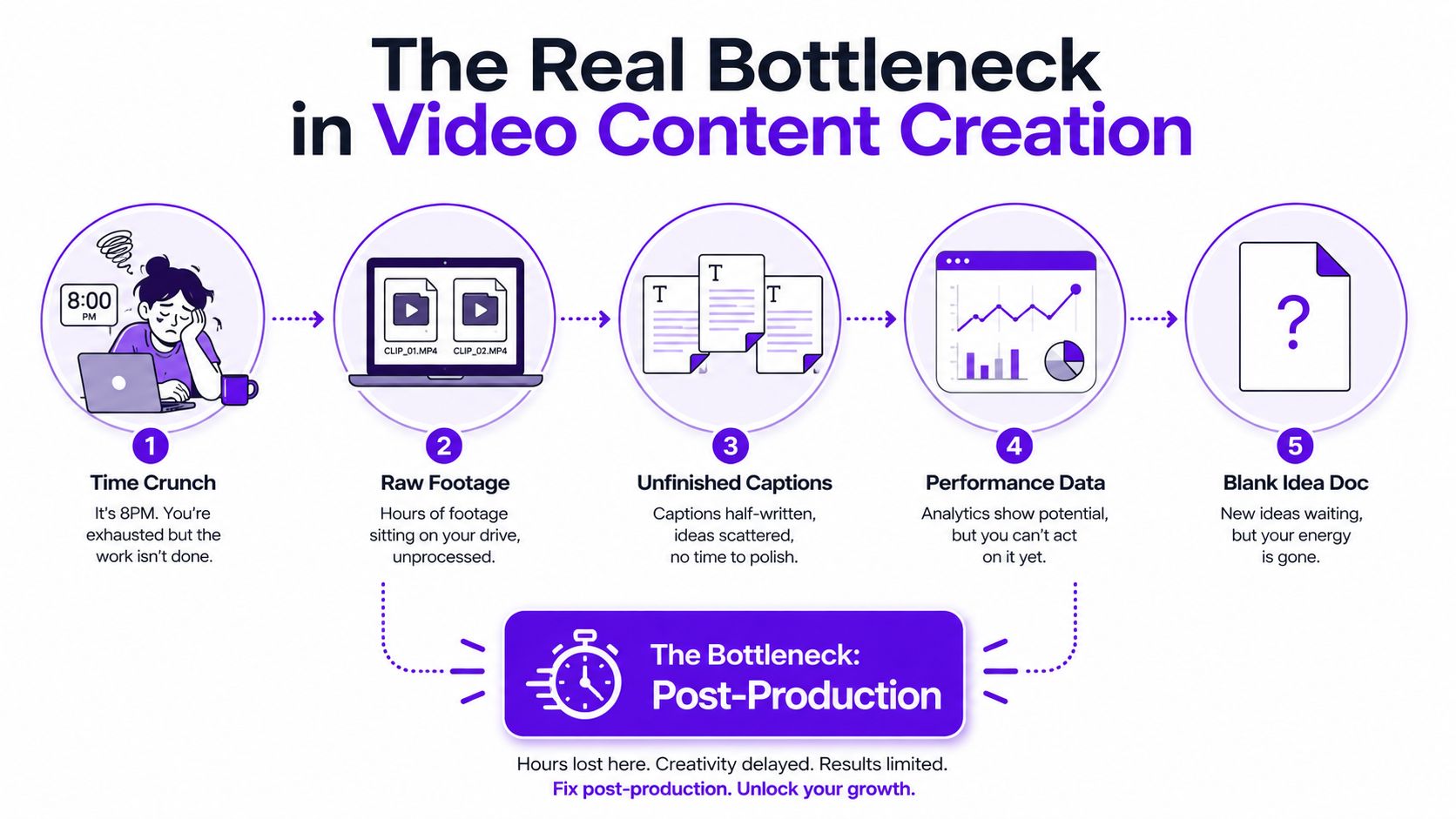
At 8 p.m., your laptop has two unedited videos open, three captions half-written, an analytics tab waiting for attention, and a blank idea document staring back at you. You didn't run out of creativity. You built a workflow that turns every video into a fresh emergency.
That problem is common because video content creation gets treated like a sequence of isolated creative projects. Each recording starts from scratch, each edit gets reinvented, and each platform demands a new version. The result is predictable, you spend more time managing content than making useful content.
Video has become a core daily media habit. DataReportal's April 2025 Global Statshot reports that online adults spend an average of 6 hours and 37 minutes each week watching short-form content, while mobile users consume more than 110 billion gigabytes of video each month worldwide. You don't need to chase every platform to benefit from that demand, but you do need a system that turns one strong idea into several purposeful assets.
At 10 a.m., a solo consultant records a useful tutorial. By Thursday, the footage still needs editing, the vertical crop fails, and no one saved the transcript. A local business owner publishes one clip, then spends an evening recreating captions from memory. The problem is not the camera or editing software. It is the missing connection between idea, production, publishing, and measurement.
Build a four-stage operating system:
This system cuts decisions per video. You know what to record, where it will go, what else it can become, and which signal determines whether the topic deserves another attempt.
Practical rule: Treat every recording as raw material for a content batch, not as a finished post.
The technology behind this workflow has developed for decades. Videomaker's history of video identifies Sony's Portapak in 1968 as the first consumer two-piece video recorder, VHS decks entering the market in 1976, consumer camcorders arriving in 1980, and Nikon's D90 in 2008 as the first DSLR to shoot video. Each milestone lowered a barrier. A phone-first workflow continues that progression by putting capable capture tools in one device.
Your job is throughput, not creative heroics. Set up a system that turns one strong source recording into several purposeful assets, then use performance evidence to decide what to make again. Keep the workflow documented, and use this creator's guide to workflow efficiency improvement for additional process ideas.
Don't begin with “What should I post?” Begin with “Which business problem should this video help solve?”
Pick three content pillars. A real estate professional might use buyer education, local market guidance, and property walkthroughs. A consultant could choose diagnosis, implementation, and client decision-making. Each pillar should support a business goal, not just describe a subject you enjoy discussing.
Spend one focused planning block each week collecting ideas from customer questions, sales call transcripts, support tickets, search suggestions, and objections you hear repeatedly. If you're still stuck, a resource like what video should I make next can help turn audience questions into usable prompts.
Before you schedule a recording, write four lines:
The fourth line is the quality filter most creators skip. If an idea only works as one polished video, it may not deserve a production slot. Strong ideas contain distinct arguments, examples, mistakes, steps, or opinions that can stand alone.
Use this weekly template:
| Field | What to Write |
|---|---|
| Pillar | The business-aligned topic category |
| Working title | A clear internal description |
| Hook | The opening promise or tension |
| Target platforms | Where the source and derivatives will publish |
| Repurposing count | The number of planned derivative assets |
| Production slot | The day and time for recording |
Use ICE, impact, confidence, and ease. Score each idea qualitatively if you don't want another spreadsheet burden. Prioritize ideas that can influence a meaningful business outcome, answer a question you know customers ask, and fit your current production capacity.
Batching then becomes straightforward. Record two pillar pieces per session, plan six short-form posts from each, and refuse to shoot a one-off that can't produce at least three useful assets. The point isn't to force every topic into identical fragments. It's to make repurposing a design constraint from the beginning.
A content calendar workflow can help you turn those briefs into assigned production and publishing slots rather than a loose list of ideas.
You don't need a studio. You need a setup you can leave mostly assembled.
A practical one-person kit is a current smartphone capable of 4K recording, an inexpensive LED panel with a diffuser, a clip-on lavalier microphone, and a phone tripod. Keep the equipment near your recording position. If setup requires a room reset, cable hunt, and lighting experiment every time, you'll avoid recording.

Light matters more than expensive camera features. Use a window as your free key light, place yourself facing it, and add the LED panel from the opposite side at lower intensity to soften shadows. A desktop version of three-point lighting can use the window as the key, the LED as fill, and a lamp or practical background light as separation. Keep the background intentional, but don't waste time building a set nobody asked for.
Write the shot list before you press record:
Audio is essential. Place the lavalier around six inches from your mouth, move away from hard reflective surfaces, and use blankets, curtains, or cushions to reduce room echo. Record ten seconds of room tone after the take. That small sample gives an editor a clean reference for noise reduction and makes cuts less jarring.
Noisy rooms, awkward angles, children in the background, and interruptions are normal operating conditions. Move the microphone closer, record tighter framing, turn interruptions into a brief human moment, or write a script that doesn't depend on uninterrupted performance. Don't wait for perfect conditions that rarely arrive.
Record twice. Ship the better take. A third take is allowed only when the first two contain a factual mistake or unusable audio. Most creators don't need more perfection. They need a finished source file.
Choose editing software based on volume, turnaround, skill, and review needs, not on what a professional editor uses.
| Workflow | Monthly Volume | Time/Min Footage | Skill Level | Cost | Best For |
|---|---|---|---|---|---|
| Phone-native editing | Under 10 videos | Varies by complexity | Beginner | Low | Daily short-form publishing |
| Lightweight desktop NLE | 10 to 30 videos | Varies by complexity | Intermediate | Low to moderate | Weekly long-form and controlled edits |
| Batch editing | 10 to 30 videos | Lower after templates are built | Intermediate | Moderate | Repeated formats and consistent branding |
| AI-assisted hybrid | Above 30 videos | Lower for first-pass work | Beginner to advanced | Varies by tool | High-volume clipping with human review |
For occasional short-form output, use phone-native tools such as CapCut or iMovie. They handle trimming, captions, simple overlays, and vertical exports without forcing you into a desktop workflow. Keep a reusable template for fonts, caption placement, intro treatment, and end card.
Add a desktop non-linear editor such as DaVinci Resolve or Final Cut when your videos need multi-track audio, screen recordings, detailed color work, longer timelines, or more precise pacing. The software isn't the important part. The saved project template is. Preload your brand fonts, music rules, export settings, and recurring graphics.
Batch editing means you perform the same task across several videos before moving on. Review all transcripts together, make rough cuts together, caption together, then export. This reduces context switching and makes quality more consistent.
AI-assisted editing can auto-cut transcripts, remove filler, create captions, and suggest B-roll. It still needs human review for jump cuts, awkward pauses, incorrect emphasis, mismatched visuals, and brand voice. Let automation handle repetitive selection and formatting. Keep judgment, meaning, and final approval with a person.
Use a simple rule:
Taja AI is one option for this hybrid stage. It can analyze a long-form upload, generate clips, captions, thumbnails, blogs, and platform-specific posts, then support scheduling from one dashboard. Whatever tool you choose, don't outsource taste. Outsource repetitive assembly once your format and review checklist are clear.
Start with one substantial recording, not a pile of disconnected clips. A 20 to 30 minute conversation, tutorial, interview, or workshop contains enough material to support a meaningful content batch when you tag ideas instead of cutting randomly.
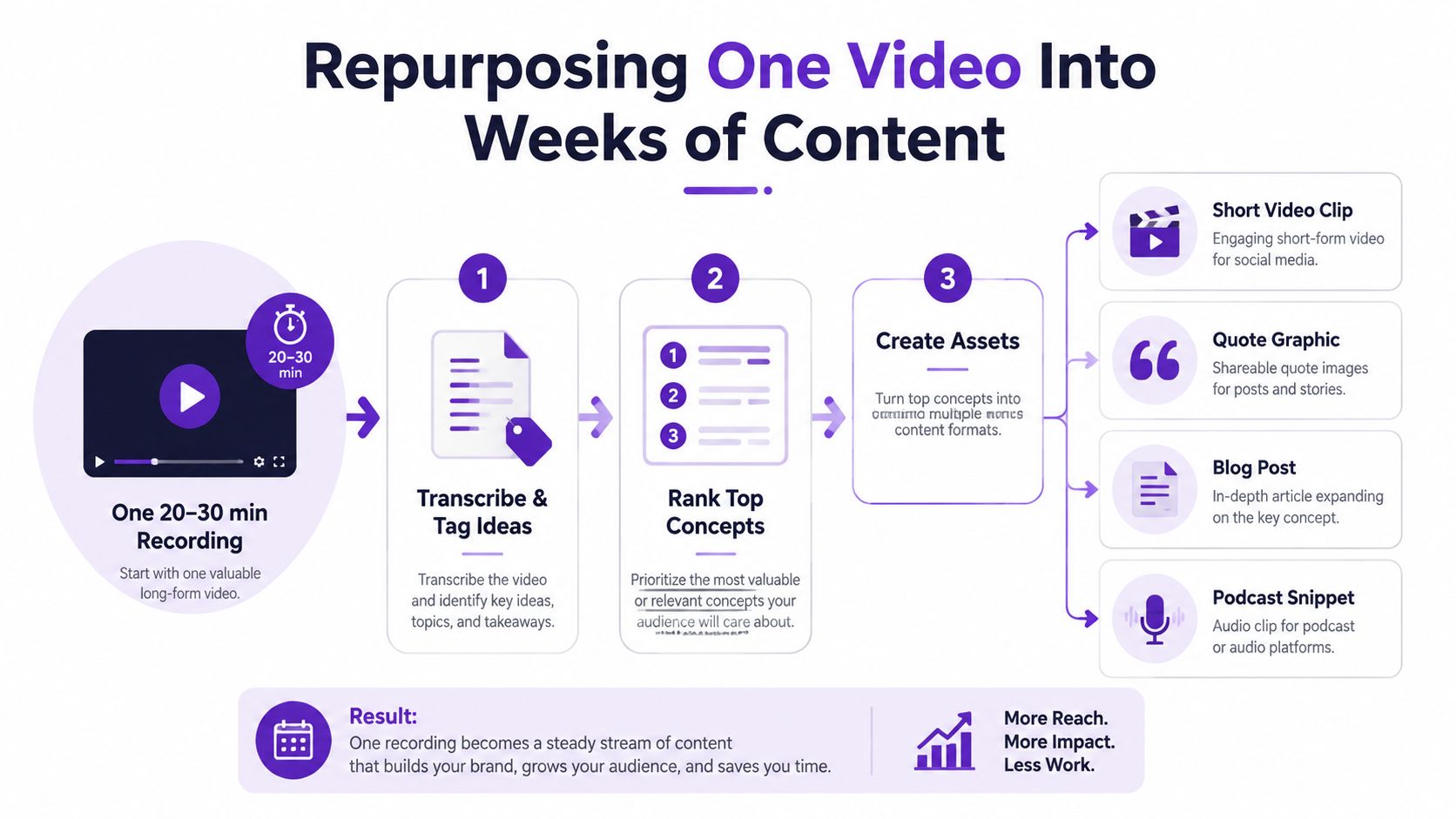
Step one, transcribe and tag. Mark every distinct idea, story, framework, objection, example, and quotable sentence. Don't edit while discovering. Build the inventory first.
Step two, rank the inventory. Put standalone value ahead of chronology. A useful clip answers a clear question, challenges an assumption, demonstrates a process, or creates an emotional turn. If a segment requires five minutes of context, keep it for the long-form version or add the missing context in the edit.
Step three, create native formats. Use vertical 9:16 for TikTok, Reels, and Shorts, especially when the clip is under 60 seconds. LinkedIn and Facebook can support square or vertical feed assets. Pull horizontal excerpts for YouTube when the original source is 16:9, but don't assume one crop works everywhere.
Step four, rewrite the packaging. Keep the underlying idea, but change the hook, caption, opening text, and call to action for each audience. A TikTok caption can be direct and conversational. A LinkedIn post may need a clear argument with deliberate line breaks. Copying the same file and caption across every channel saves minutes and wastes context.
Step five, stagger release. Spread the derivatives across two or three weeks. This gives each asset room to collect feedback and gives you time to adjust later hooks instead of dumping the entire source at once.
This clip checklist keeps selection practical:
Use this caption formula: problem, specific insight, practical action, conversation prompt. Replace “Here are some content tips” with the actual tension, such as “Your tutorial isn't underperforming because it's too short. The opening takes too long to prove why the viewer should stay.”
This simple calendar maps a source recording into a manageable batch:
| Release Window | Asset | Platform | New Hook | CTA |
|---|---|---|---|---|
| Week one, post one | Primary clip | YouTube Shorts | Main promise | Watch the full video |
| Week one, post two | Contrarian clip | TikTok | Common mistake | Comment with an example |
| Week one, post three | Framework clip | Business implication | Share your process | |
| Week two, post one | Story clip | Instagram Reels | Personal tension | Save for later |
| Week two, post two | Quote or visual | Practical takeaway | Read the discussion | |
| Week two, post three | FAQ clip | YouTube Shorts | Direct question | Subscribe |
| Week three, post one | Objection clip | TikTok | Audience doubt | Ask a follow-up |
| Week three, post two | Summary clip | Instagram Reels | Recap and payoff | Visit the offer |
For a deeper operating model, use this step-by-step content repurposing guide. You can also reduce manual handoffs with automated content creation workflows.
A good video can fail because its packaging belongs to another platform. Don't export one file, paste one caption, and call distribution complete.
Short-form performance data supports giving the opening serious attention. One reported benchmark places videos under 60 seconds at 8.4% engagement per impression, compared with 5.2% for videos from 1 to 10 minutes and 3.8% for videos longer than 10 minutes, as documented in Digital Applied's video marketing statistics. Use the finding as a production signal, not a universal promise. Short clips need an immediate reason to stay.
| Platform | Optimal Length | Aspect Ratio | Hook Style | Caption Format | Posting Cadence |
|---|---|---|---|---|---|
| YouTube long-form | Topic-dependent | 16:9 | Search-led promise | Title, description, chapters | Sustainable recurring schedule |
| YouTube Shorts | Short-form | 9:16 | Immediate pattern interrupt | Concise context and CTA | Consistent batch releases |
| TikTok | Short-form | 9:16 | Direct tension or question | Conversational, searchable text | Consistent testing |
| Instagram Reels | Short-form | 9:16 | Visual or verbal interruption | Short caption with focused tags | Regular releases plus feed support |
| Thought leadership | Square or vertical | Business problem or opinion | Line-broken argument | Reliable professional cadence | |
| Story and community content | Square or vertical | Context-led opening | Native caption with discussion prompt | Community-oriented schedule |
For YouTube long-form, write a keyword-led title that makes the outcome obvious. Build the opening around a 15-character hook, use a custom thumbnail with a face and three words of text, and make the first 30 seconds earn continued attention. Don't bury the answer beneath a branded animation.
For Shorts and TikTok, begin with a pattern interrupt in the first two seconds, burn captions into the video, and end in a way that can loop naturally. Instagram Reels needs a deliberate cover frame, a clear visual identity, and a caption that supports the clip rather than repeating its transcript. Use focused hashtag choices instead of stuffing every available tag.
LinkedIn works better with a native upload and a document-style caption that gives the argument room to breathe. Facebook rewards native, caption-led storytelling and can support a link placed in the comments when the post's primary job is discussion. For production references and channel-ready execution, review this guide to Social Media Video Production.
Don't rely on generic “peak windows in 2026” claims unless your own analytics supports them. Every audience has different working hours, time zones, and habits. Test publishing windows, but prioritize a reliable schedule and a strong first three seconds over chasing a universal posting hour.
Analytics only helps when each metric answers a planning question. Build a lean stack with native platform insights, Google Analytics 4 for website behavior, and one spreadsheet dashboard. Don't create a reporting system so elaborate that you stop publishing.
Track the minimum useful set:
A short-form retention framework from Clipper University's benchmark research recommends reviewing hook rate, average view duration, and completion rate in sequence. Its independent benchmark data reports average engagement of about 50% for videos under one minute, 47% for videos from one to three minutes, 46% for three to five minutes, 38% for five to 30 minutes, 26% for 30 to 60 minutes, and 16% for videos over 60 minutes. Use those figures as directional benchmarks, then compare each video with your own previous work and its format-specific purpose.
If views are weak but retention is strong, improve the topic framing, title, cover, or distribution. If the hook attracts viewers but watch time drops quickly, rewrite the opening and remove setup. If watch time is healthy but clicks are absent, make the offer and call to action more relevant. If a topic repeatedly attracts the wrong audience, stop polishing it and replace it.
Reserve 20 minutes each week for review:
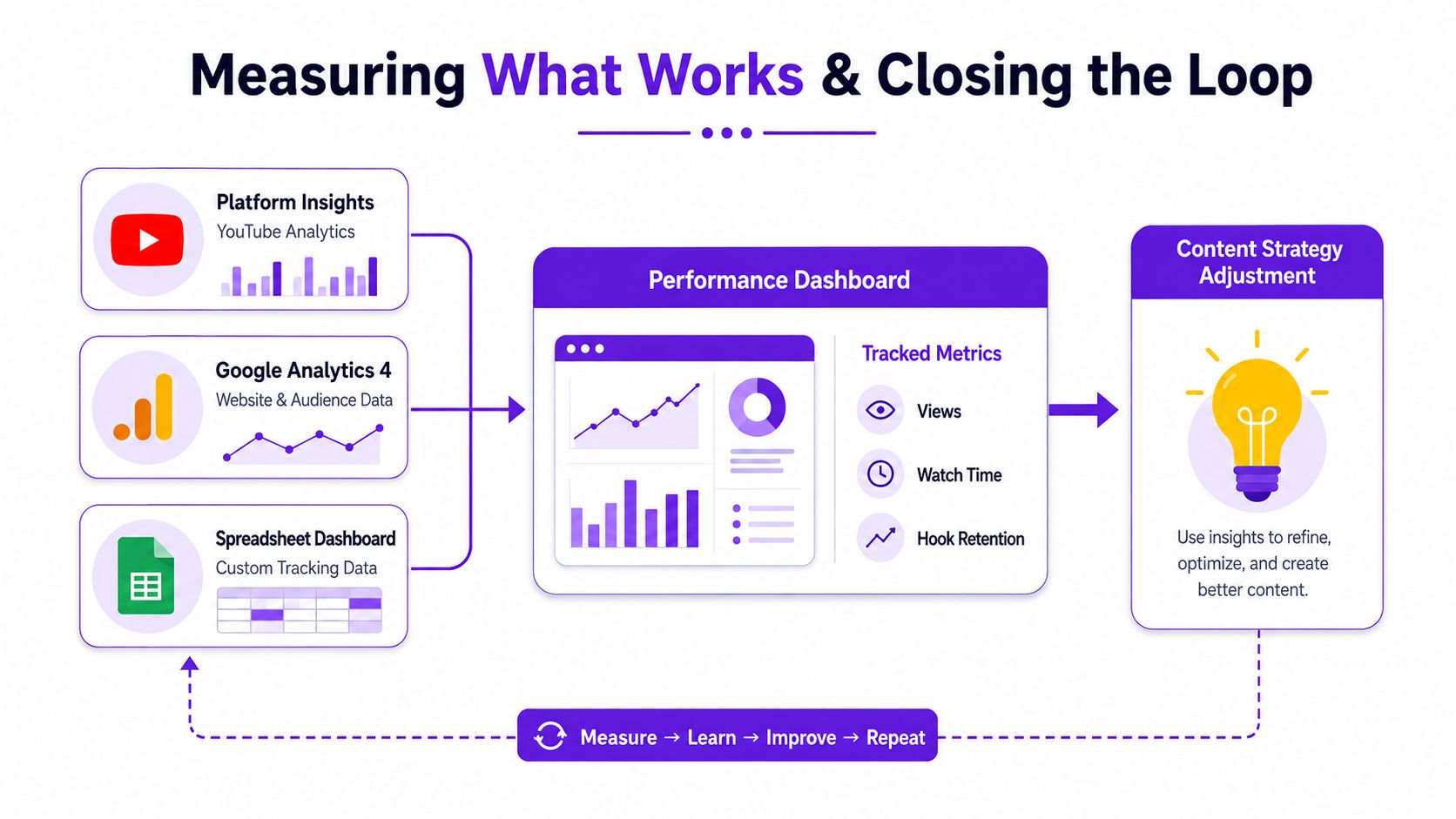
The feedback loop compounds through repetition. Across a 90-day operating cycle, you should expect planning to become faster because your topic library grows, your hooks become more specific, and your editing templates remove recurring decisions. Don't increase posting volume just to create more data. Improve the quality of the questions you ask each time you review the data.
The enterprise workflow problem reinforces why this matters beyond solo creators. A 2026 enterprise video survey reports that 60% of organizations haven't achieved full organization-wide deployment, 67% say distributed teams only sometimes or rarely produce on-brand video without central support, and 84% consider pre-publication review essential or important, while 37% still publish without formal review at least sometimes. A small business doesn't need enterprise bureaucracy, but it does need clear ownership, brand rules, and a final review checkpoint.
The volume problem is just as real. A MarketingTechNews summary of Metricool's 2025 short-form report says short-form publishing grew by 71% and the number of accounts using the format grew by 51%, while another benchmark cited in the same verified data says performance marketing teams produce a median of 20 video ads per month but want 60, creating a 3x creative velocity gap. Your answer isn't frantic daily production. It's a connected system that makes each source recording work harder.
Taja AI helps solopreneurs turn long-form recordings into ready-to-publish clips, captions, thumbnails, blogs, and platform-specific posts, with tools for repurposing, scheduling, and content ideas. Upload a source video, review the generated assets, and visit Taja AI to see whether it fits the planning, repurposing, and measurement workflow you want to run.


We are blessed to work with leading brands & Companies


We try to make easy and simple for every professionals. Get 30 days free trial - No credit card required.


© 2025 Taja AI. All rights reserved.