.jpeg)

YouTube Shorts vs TikTok: Which Wins for Creators in 2026
YouTube Shorts vs TikTok compared on specs, reach, algorithms and monetization, with a clear platform pick for creators and brands in 2026.
5 min read
October 27, 2026

Master video asset management. Discover how to streamline your workflow, organize media, and boost content creation with our expert guide for 2026.
Written by:


You probably already have a video asset management system. It just doesn't feel like one.
It looks like a desktop full of exports, a Google Drive with six folder levels, Slack messages asking which cut is approved, and filenames like webinar-final-v2-FINAL-use-this.mp4. It works until your content starts working. Then every new video adds friction.
That's the moment most creators and small teams miss. They think the problem is volume. It usually isn't. The problem is that useful content becomes hard to find, hard to trust, and hard to reuse. When that happens, publishing slows down even if your ideas are strong.
A solo creator records a weekly podcast, slices clips for Instagram, uploads the full episode to YouTube, sends snippets to an editor, and saves thumbnails in another folder. A small business does the same thing with product demos, customer stories, team training, and event footage. Different mission, same mess.
For a while, brute force works. You remember where things are. Your editor remembers what “latest” means. Your assistant knows the green room interview is buried in the “event assets” folder, not the “social clips” folder. Then someone leaves, a client requests a revision, or you want to repurpose an old video into a new campaign. Suddenly nobody knows which file is current.
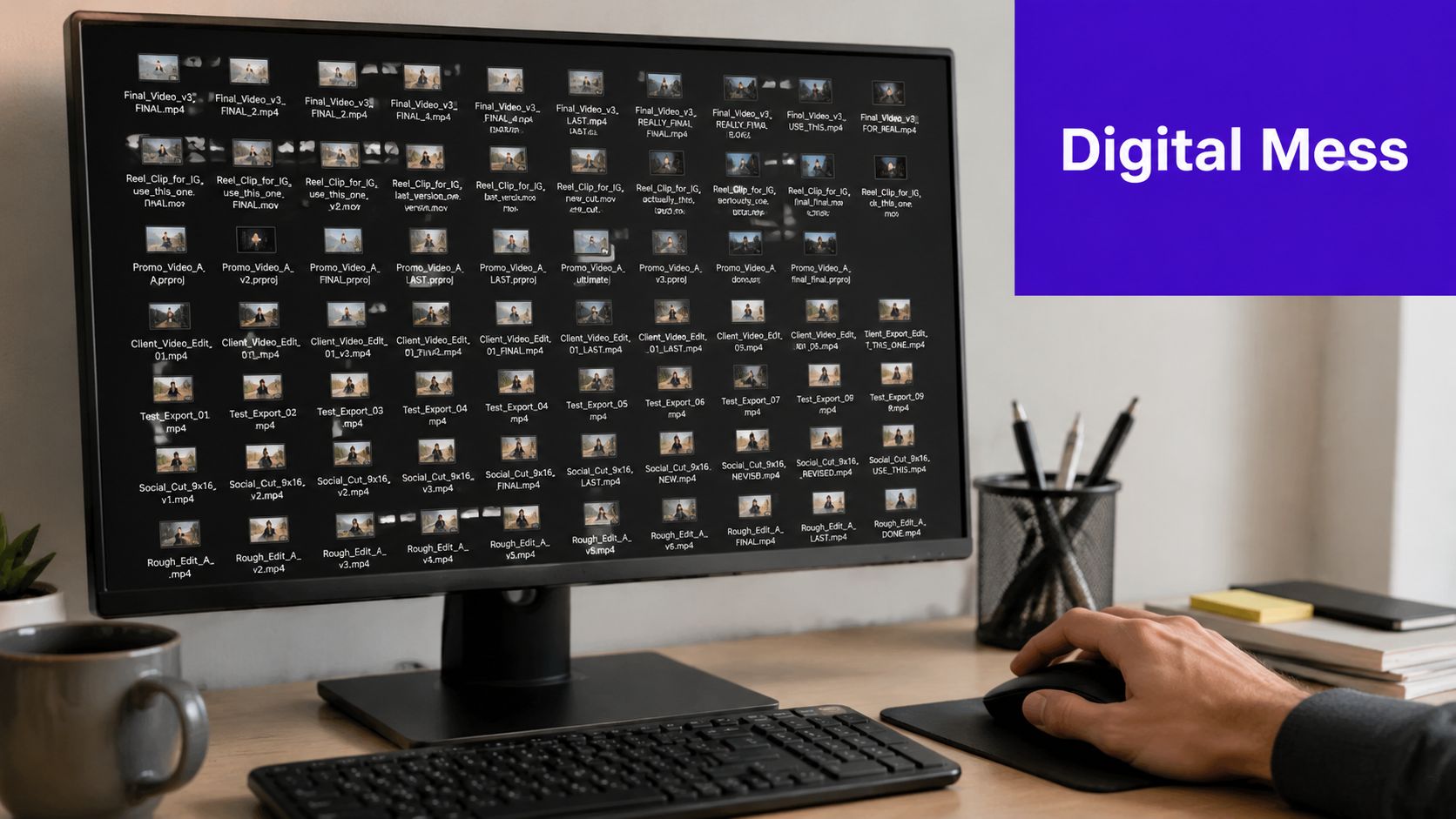
The obvious cost is search time. The less obvious cost is lost creative potential.
When teams can't quickly find a clip, transcript, b-roll sequence, approved lower third, or subtitle-ready export, they stop reusing good material. They re-record. They re-edit. They rebuild assets they already own. That turns content into a treadmill instead of a library.
A few common signs show up fast:
When creators say they need to “post more,” they often don't need more recording time. They need a cleaner way to use what they already made.
That matters because video is no longer a side format. Aprimo notes that video is expected to account for 82% of all internet traffic and that there are more than 3 billion digital video viewers worldwide in the referenced context, which is why manual workflows no longer keep up for organizations and creators managing growing libraries of content (Aprimo on video asset management).
Manual folders break down when one video becomes many deliverables.
A single recording can produce a long-form upload, vertical shorts, captions, thumbnails, transcripts, quote graphics, email embeds, course assets, and sales enablement clips. Once your content branches across channels, “save it somewhere logical” stops being a real process.
That's where burnout starts. Not from creating. From hunting, renaming, re-exporting, and double-checking.
Video asset management is the operational system that keeps your content usable after you hit record.
The simplest way to think about it is this. It's a digital librarian plus traffic controller for your videos. It doesn't just store files. It helps you ingest them, label them, secure them, retrieve them, share them, and keep the right version moving to the right place.
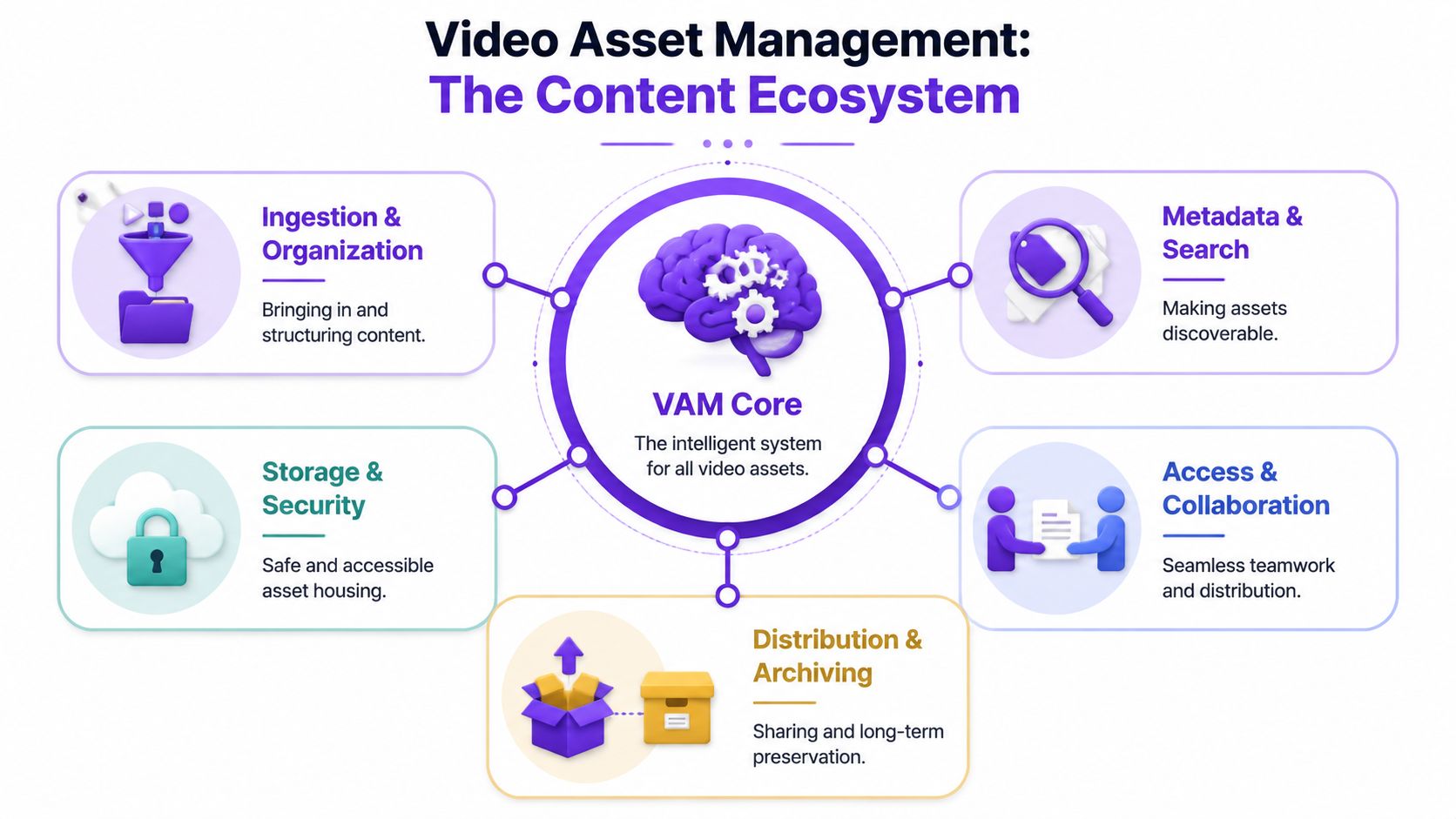
This is the intake desk. Raw footage, edited cuts, transcripts, thumbnails, and caption files come into one controlled place instead of being scattered across laptops and inboxes.
For a small team, this can be as simple as one upload destination with clear folder categories by content type, campaign, or client.
This is what makes the system useful. A file with a good title but no context still gets lost. A searchable asset has tags, dates, topics, speakers, platforms, rights notes, and version status.
That's why video asset management feels different from storage. Storage says, “the file exists.” Metadata says, “you can find the exact moment where the founder explained pricing.”
You need files accessible, but not exposed. The approved promo cut should be easy for marketing to grab. The source project files might be limited to editors. Sensitive internal training videos need tighter control than public social content.
In this environment, a lot of teams save sanity. Instead of attaching giant files to messages, you share the right asset with the right permission level. Editors, clients, virtual assistants, and internal teams all work from the same source of truth.
Publishing is part of the system, not a separate scramble. The same video may need one version for YouTube, another for LinkedIn, and shorter edits for vertical platforms. Older assets also need an archive policy so they can be retrieved later instead of disappearing into cold storage.
Practical rule: If your team can't answer “Where is the approved version?” in seconds, you don't have video asset management. You have file storage.
For content-heavy teams, this structure matters because the business case isn't just keeping files safe. It's making them searchable and reusable at scale. Aprimo describes smart video asset management as centralizing assets while enabling capabilities like AI search, speech-to-text, object recognition, and multichannel distribution (Aprimo's overview of smart video asset management).
If you manage mixed media across a mission-driven team, a broader guide to digital asset management software for churches is also useful because it shows how governance, access, and content reuse matter outside traditional media companies too.
People buy storage because they're out of space. They adopt video asset management because they're out of time.
That distinction matters. A well-run system changes how fast you publish, how often you repurpose, and how confidently you collaborate. It turns your content library into a production asset instead of a digital attic.
Most small teams sit on a surprising amount of reusable footage. Customer testimonials contain social clips. Webinar recordings contain FAQ answers. Sales calls often reveal content themes. Training libraries can be turned into onboarding snippets.
Without structure, those assets may as well not exist.
With structure, one solid recording keeps generating value. You can pull old clips for a new launch, rebuild a highlight reel, or update a product walkthrough without starting from zero.
Creators often think consistency requires more hustle. In practice, consistency usually comes from less friction.
When every asset has a home, approved versions are clear, and collaborators don't need to ask where things live, your publishing cadence becomes more durable. You don't need to rely on memory or one highly organized person holding the whole operation together.
A practical shift often looks like this:
| Before video asset management | After video asset management |
|---|---|
| Search across drives, chats, and emails | Search one organized library |
| Rebuild caption and thumbnail packs | Reuse approved supporting assets |
| Ask “which version is current?” | Check one version-controlled source |
| Send large attachments repeatedly | Share controlled links or folders |
| Publish inconsistently across channels | Repurpose and distribute more reliably |
Freelancers and part-time help are common in small content teams. That setup works well only if access is clean.
If your editor needs to ask for footage, logos, intros, subtitles, and final approval every time, the system is leaking time. If a virtual assistant can't tell which clips are approved for public posting, they'll either stall or make risky guesses.
The strongest small teams don't have fewer moving parts. They have fewer mystery files.
Video asset management also protects brand consistency. Teams stop grabbing random exports. They use the current ones. That sounds minor until you've had outdated visuals, incorrect captions, or old intros show up in public content.
The primary benefit isn't just neatness. It's about strategic advantage. You get more mileage from each recording session, and your content operation becomes easier to hand off, scale, and repeat.
Often, teams don't need a giant system first. They need a few workflows that are boring, repeatable, and enforced.
That starts with naming, metadata, permissions, and a clear path from raw footage to approved asset. If those four things are shaky, no platform will save you.
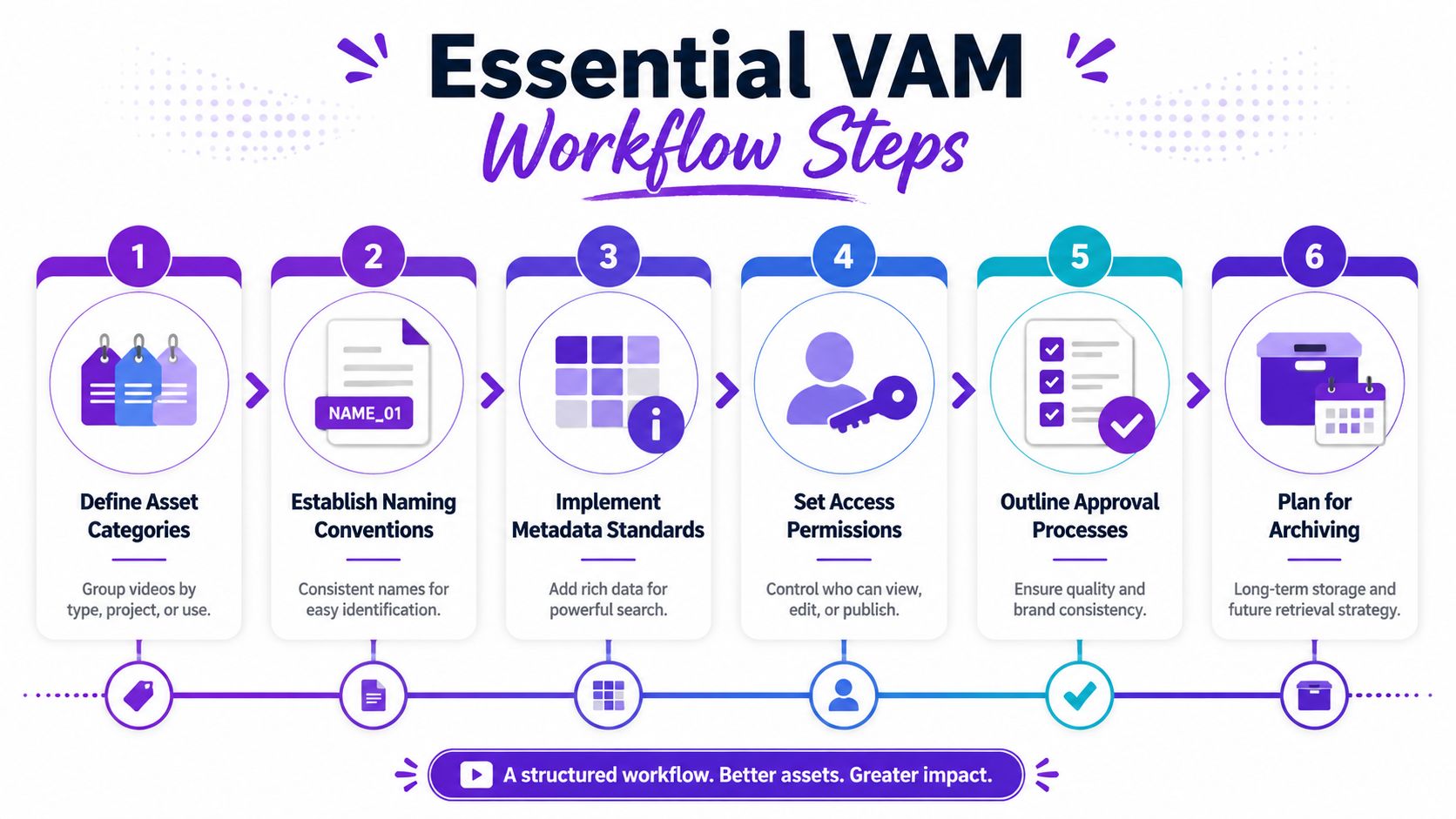
The best metadata strategy isn't the most detailed one. It's the one your team can apply consistently.
A useful baseline usually includes:
If you want one simple rule, use the “who, what, when, where” model. Who appears in it. What it covers. When it was created. Where it's intended to go.
Bad naming spreads quickly. One person creates final.mp4, another makes final2.mp4, and six months later no one trusts the folder.
A simple naming convention beats a clever one. For example:
| Asset element | Example |
|---|---|
| Brand or project | Acme |
| Content type | Webinar |
| Topic | Pricing-FAQ |
| Date | 2026-06 |
| Status | Approved |
| Version | v03 |
Combined, that becomes a name people can parse without opening the file.
You don't need enterprise complexity. You need one rule. Only one asset is the approved public-facing version.
Everything else should be clearly marked as draft, review, superseded, or archive. If your team keeps approved files in the same folder as work-in-progress exports, mistakes are guaranteed.
A practical small-team setup often looks like this:
For high video volume teams, workflow efficiency matters more than storage alone. Cloudinary notes that centralized libraries, support for multiple formats, and automation like metadata extraction and content analysis reduce manual handling and make publishing more scalable (Cloudinary on video asset management workflows).
Small teams often overshare because it feels faster. Then someone deletes a source file, edits the wrong asset, or publishes an unapproved cut.
Use simple permission tiers:
That approach cuts risk without turning your system into bureaucracy.
If your process still feels messy upstream, it helps to optimize your content creation workflow before adding more tools. Workflow clarity beats tool sprawl every time.
Repurposing shouldn't happen “if there's time.” It should happen because the asset enters the system with reuse in mind.
That means storing transcripts, highlights, captions, and clip notes alongside the main video. It also means thinking about long-form recordings as source material for multiple outputs. A practical guide to that mindset is this look at video repurposing with AI tools.
Keep the main question simple. If someone new joined your team tomorrow, could they find, understand, and use a video asset without asking for help?
If the answer is no, tighten the workflow before adding more production volume.
Most small teams delay video asset management because they assume it requires a full platform rollout. It doesn't. The early win is process discipline, not software sophistication.
Start with Google Drive, Dropbox, OneDrive, or whatever your team already touches daily. Create a top-level structure by function, not by whim.
A practical starter setup:
Inside those folders, use one naming convention and one owner for enforcement. Add a lightweight spreadsheet or shared doc that lists your required metadata fields if your storage tool doesn't handle that cleanly.
This stage feels basic because it is basic. That's a strength. It teaches the habits your future system will depend on.
You'll know it's time to upgrade when the team starts feeling repeat friction.
That usually looks like rights confusion, hard-to-search libraries, too many duplicate files, growing dependence on transcripts and clip extraction, or repeated sharing with outside collaborators. At that point, a dedicated DAM or video-focused management platform starts making sense because search, permissions, previews, tagging, and approvals become easier to govern.
A helpful parallel is team planning. If content demand keeps outgrowing your current setup, this guide on team capacity planning is useful because it helps you see whether your bottleneck is tooling, staffing, or process design.
The mature stage isn't about having the fanciest platform. It's about connecting your library to the rest of your operation.
That can include editing tools, publishing tools, review flows, transcript workflows, clip generation, and channel distribution. By then, your content engine depends on assets moving cleanly from record to edit to approval to repurpose to archive.
Small teams don't need to copy enterprise setups. They need a system that stays usable when the content backlog doubles.
That's the right standard. Not perfection. Durability.
Once your library is organized, AI stops being a gimmick and starts being useful. Clean inputs make automation far more practical.
That's the shift many teams miss. They try to automate chaos, then conclude the tools aren't ready. In reality, AI works best when your footage, approvals, and metadata already have structure.
In a practical video asset management setup, AI can support three jobs that often eat the most time:
That's where content velocity improves. Not because AI replaces judgment, but because it reduces repetitive handling.
One example is Taja AI, which can take a long-form upload and generate clips, titles, descriptions, thumbnails, blog-style outputs, and platform-specific posts from that source material. In a video asset management workflow, that connects directly to metadata creation, repurposing, and distribution.
For many small teams, the hardest part isn't making one good video. It's turning that video into everything else the business needs.
A recorded interview might need YouTube packaging, short-form cutdowns, LinkedIn copy, email-ready snippets, and a blog recap. If all of that still depends on manual handoffs, content slows down after the first publish.
That's where automation earns its place. Not at the idea stage. At the packaging and distribution stage.
For a closer look at that shift, this breakdown of how to automate content creation is worth reading because it maps the repetitive work that can be systemized once your asset flow is organized.
A short demo makes the workflow easier to visualize:
The key trade-off is simple. AI speeds production only if your approvals, source files, and naming conventions are clear. If not, it just helps you generate more confusion faster.
If your video asset management system is working, your team should feel the difference quickly. But don't stop at “this feels better.” Track the operational changes.
Focus on a short list you can review consistently:
A simple before-and-after log can tell you a lot. Track one month before tightening your system, then compare it with one month after.
Views matter, but operations matter first. A cleaner system should reduce rework, speed handoffs, and make posting more dependable. Those are the conditions that support stronger marketing outcomes later.
If you want a broader framework for connecting activity to outcomes, this guide on driving real business growth is useful because it pushes measurement beyond surface-level reporting.
The clearest sign of success is simple. Your team spends less time asking where things are and more time publishing work that's ready.
That's what return on investment looks like for small teams. Fewer bottlenecks. More reuse. Better consistency.
If your content library is growing faster than your workflow can handle, Taja AI is worth exploring as part of a practical video asset management stack. It helps turn long-form videos into usable clips, captions, posts, and other publish-ready assets so your team can spend less time repackaging and more time distributing consistently.


We are blessed to work with leading brands & Companies


We try to make easy and simple for every professionals. Get 30 days free trial - No credit card required.


© 2025 Taja AI. All rights reserved.