.jpeg)
Auto Generate Captions for Video in 2026
Learn how to auto generate captions for video with AI tools, accuracy tips, and platform publishing workflows that actually scale in 2026.
5 min read
October 18, 2026

Learn how to build an effective quality assurance process with core stages, roles, KPIs, and templates tailored for small teams and content creators.
Written by:


Your team repurposes one webinar into shorts, captions, thumbnails, and a blog. By Friday, one clip sounds off-brand, two captions repeat the same point, and a thumbnail promises something the video never delivers. Nobody meant to publish sloppy work. You just moved fast without a shared review system.
That's where a quality assurance process helps. Small teams often think QA belongs to software companies or regulated industries. It doesn't. If you create content at speed, especially with AI in the mix, you need a reliable way to define quality, check for issues early, and fix the process that caused them.
A small content team usually feels the pain before it names the problem. One person writes. Another edits. A tool generates clips. Someone approves posts on a phone between meetings. The output looks busy, but quality drifts.
A good quality assurance process brings order to that mess. It tells the team what “good” means before work starts, how to review content without endless back-and-forth, and what to do when the same mistakes keep showing up. In business terms, quality matters because companies that effectively implement quality management practices experience an average of 9% increase in sales and a 26% increase in profitability, according to an ASQ-related summary.
For a lean team, the win is simpler. Fewer avoidable edits. Clearer approvals. More consistent content.
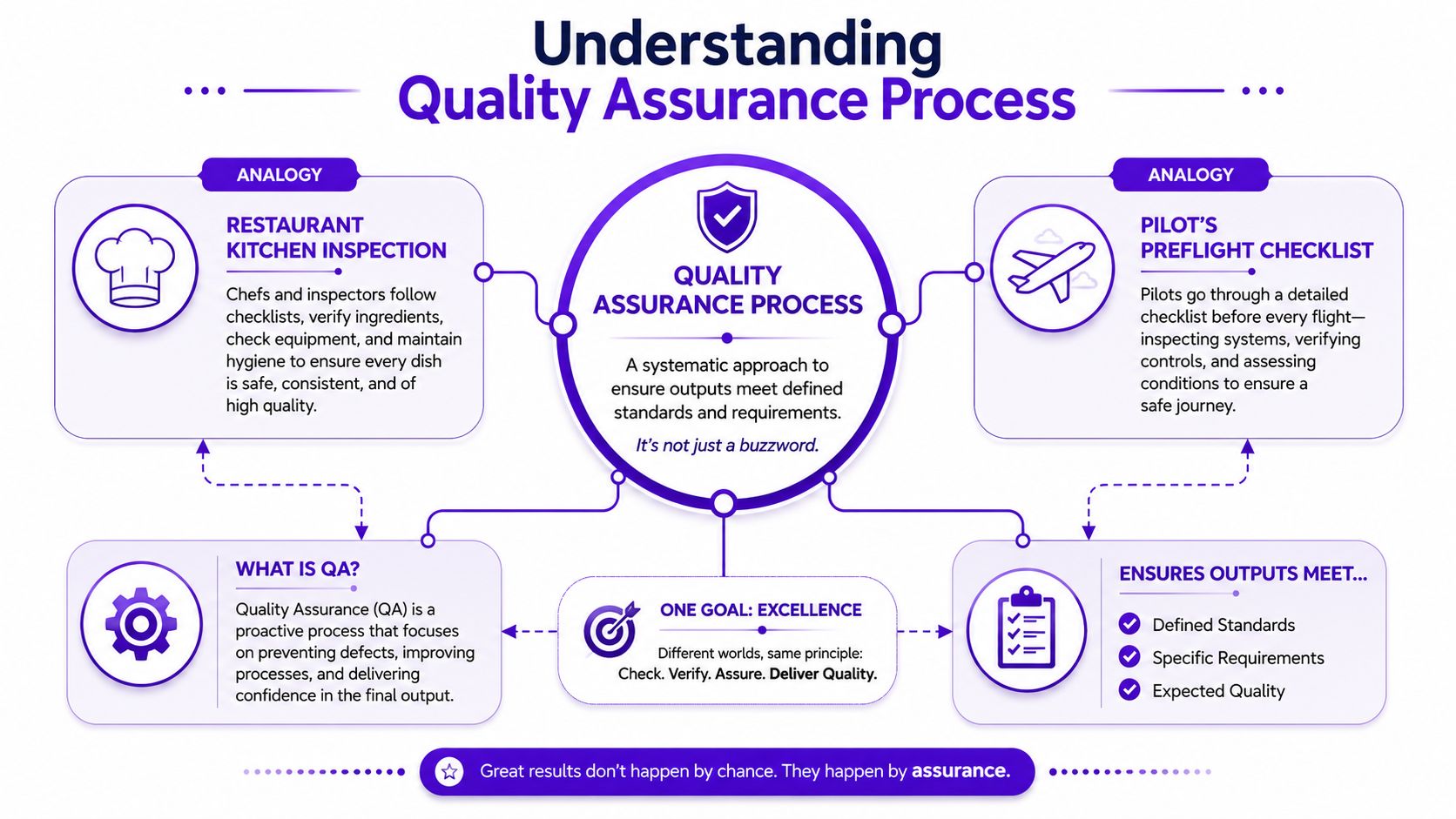
Quality assurance is the system you use to prevent problems before content goes live, much like a restaurant kitchen inspection. The goal isn't just to look at the plated dish at the end. The kitchen checks ingredients, prep steps, temperatures, and cleanliness so the dish is safe and consistent every time.
A second analogy is a pilot's preflight checklist. Pilots don't wait until midair to discover a missing check. They follow a repeatable process on the ground because prevention is cheaper than recovery.
People often confuse quality assurance with quality control. They're related, but they aren't the same.
In content repurposing, that difference matters. If your only step is “final review before posting,” you're doing mostly quality control. Useful, but late.
AI speeds up production, but speed creates a new trap. Teams assume fast output equals ready output. It doesn't. AI can produce a usable caption, a weak hook, and a misleading summary in the same batch. Without QA, those errors spread across multiple channels at once.
Practical rule: If AI creates the first draft, humans still need to validate meaning, tone, and platform fit.
For small teams, QA keeps three things aligned:
A useful quality assurance process doesn't need a giant manual. It needs a clear loop. A formal QA workflow in a Quality Management System is described as a closed-loop process that moves from defining requirements to controlled execution, monitoring, root-cause analysis, corrective and preventive action, change control, and management review, as explained in this quality assurance process overview. Small teams can adapt that idea without copying enterprise bureaucracy.
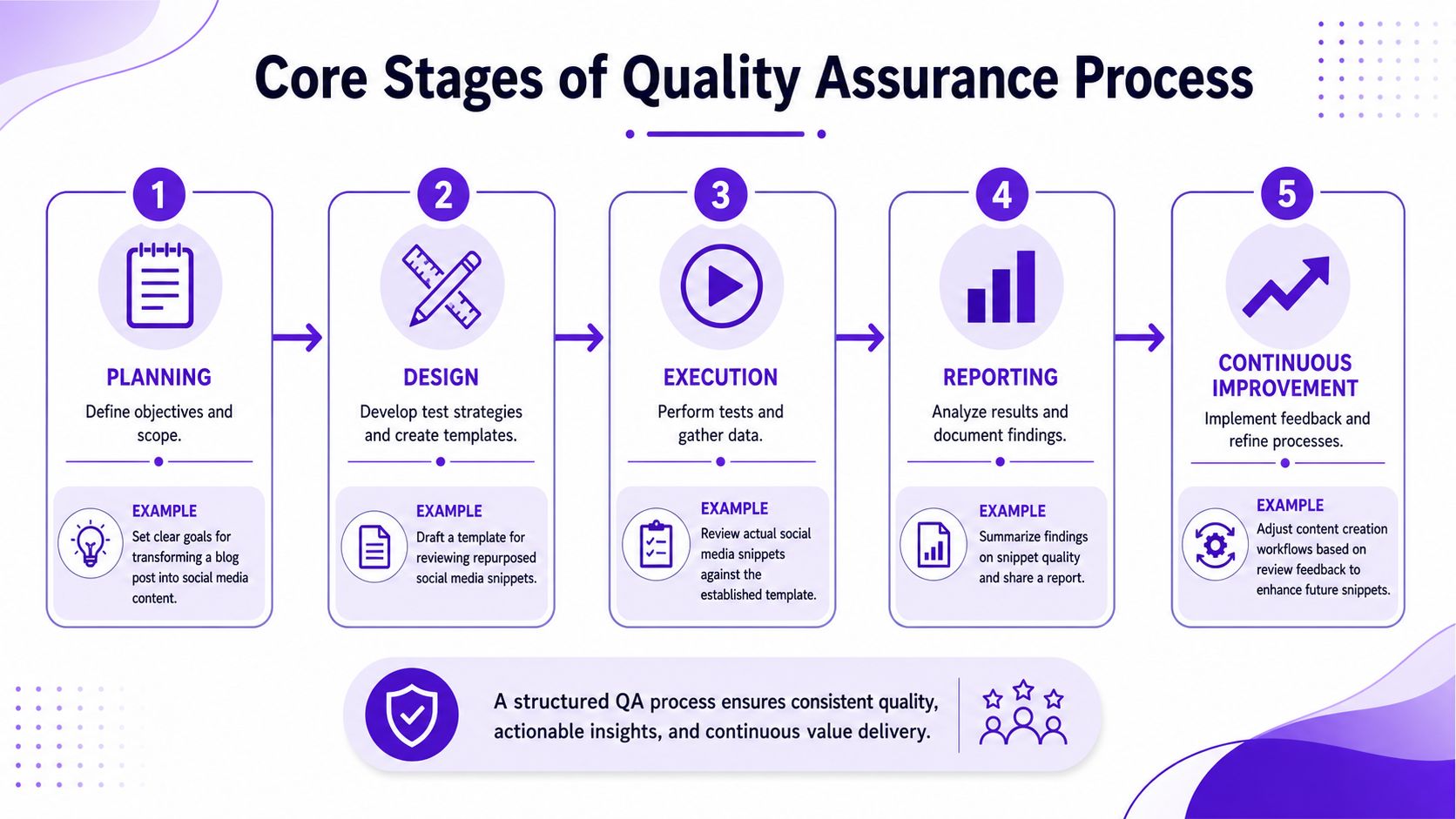
Start by deciding what quality means for each asset type. A short video clip might need accurate subtitles, a clear hook, and a clean cut point. A thumbnail might need readable text, one visual focal point, and brand-safe language. A caption might need platform-specific formatting and a defined call to action.
Write these rules down. If quality lives only in one editor's head, your process will break the minute that person gets busy.
A simple planning document should answer:
This is where teams usually skip ahead and regret it later. Design means building the review system before the work pile arrives. That includes checklists, naming conventions, defect categories, and approval status labels.
For a repurposing workflow, your design phase might include:
If your content touches multiple tools or handoffs, it also helps to understand how systems connect. A practical resource for that is MarTech Do's guide on integration testing, especially when your workflow includes transcription, editing, scheduling, and publishing tools.
Execution is the live review stage. During this stage, people and tools both do their part.
For example, AI can flag awkward phrasing, duplicate claims, or formatting issues. A human reviewer then checks the things AI struggles with, such as whether the clip feels credible, whether the caption overpromises, or whether the joke lands in your brand voice.
Here's the video reference for teams that want a visual walkthrough of QA thinking in practice:
A strong execution habit is to review in layers:
Don't ask one person to do all three layers at once. They'll miss things because they're switching mental roles.
Reporting sounds formal, but it can be lightweight. You just need a way to log defects and patterns. If five thumbnails in a row fail for the same reason, that's not a creative accident. That's a process issue.
Useful reporting fields include:
| Field | Example |
|---|---|
| Asset | Webinar clip 03 |
| Issue | Subtitle timing hides speaker name |
| Severity | Medium |
| Owner | Video editor |
| Root cause | Auto-caption template not adjusted |
| Fix | Update subtitle safe-zone settings |
The final stage is where QA becomes worth the effort. Don't just fix the asset. Fix the reason the asset failed.
If your team keeps rewriting AI captions for tone, improve the style guide or prompt instructions. If stakeholder approvals stall, simplify the approval criteria. If one content type always creates confusion, narrow the checklist to the few things that matter most.
That's how a small team stays fast without becoming careless.
In a small team, people wear multiple hats. That's normal. What matters is that each responsibility is clear.
A lean QA workflow usually works best with four roles, even if two people share them.
The mistake I see most often is vague ownership. Everyone assumes “someone” will catch the issue. Nobody does.
A two-person team can still run this well. One person creates and performs the first self-review. The second person handles final review and approval. If the founder wants final say on public-facing claims, that role stays narrow. They shouldn't rewrite every caption from scratch.
Clear handoffs reduce friction more than extra meetings do.
Here's a practical split for a tiny operation:
The team doesn't need titles that sound enterprise-grade. It needs accountability that survives a busy week.
Quality gets better when teams measure a few useful things instead of tracking everything. The broader market reflects that priority. The global market for Software Quality Assurance was estimated at US$14.2 Billion in 2024 and is projected to reach US$21.6 Billion by 2030, growing at a 7.2% CAGR, according to Research and Markets. Small teams don't need enterprise software budgets, but they do need clear signals.
| KPI | Description | Tool |
|---|---|---|
| Defect rate | How often assets fail review for issues like tone mismatch, formatting errors, or factual inconsistencies | Issue tracker such as Trello, Asana, or Notion |
| Turnaround time | How long an asset takes from draft to approved version | Project board with timestamps |
| Revision count | How many rounds an asset needs before approval | Shared editorial tracker |
| Approval delay | Where work gets stuck waiting for signoff | Workflow dashboard |
| Audience response quality | Whether published assets align with real engagement signals and audience fit | Platform analytics plus content QA tools |
Early-stage teams should start with only three KPIs:
More mature teams can add performance-based checks. If you're trying to ensure high-quality SEO content, quality tools that review structure, clarity, and search alignment can complement manual editorial review.
For process visibility, a workflow map matters as much as the tool itself. Teams that want to tighten approvals and reduce waiting time can learn from this guide to workflow optimization.
Pick tools that answer one question each. Where are defects logged. Where do approvals happen. Where do performance signals live.
Avoid buying a “full QA system” before you've built a stable checklist. Tools amplify habits. If the habit is messy, the software just records the mess more neatly.
Templates save small teams from relying on memory. That matters even more when AI generates multiple assets quickly. The more volume you create, the easier it is to skip obvious checks.
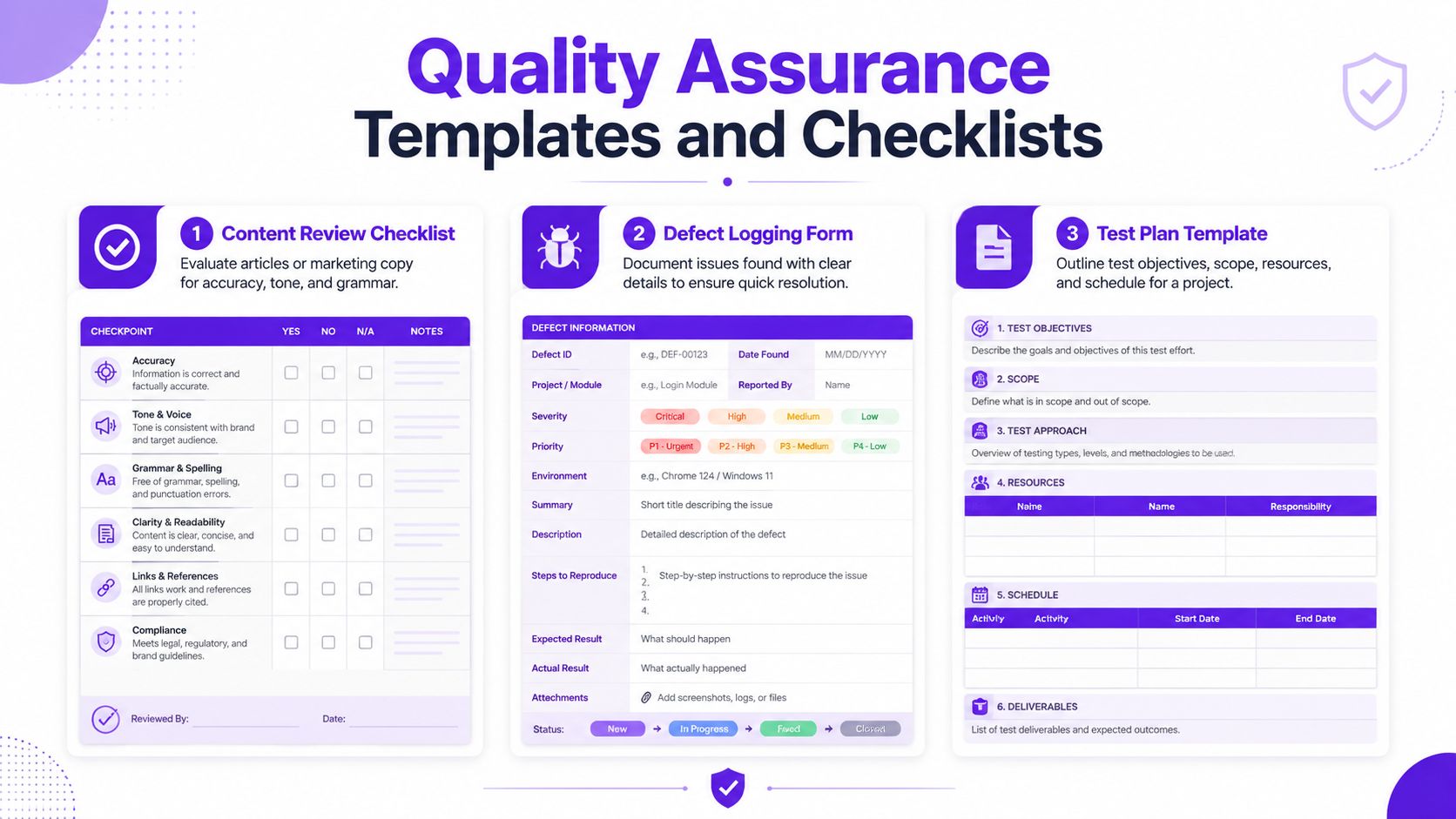
Content review checklist
Use this before approval. Keep it short enough that people will readily use it.
Defect logging form
This helps you spot repeat issues.
| Field | What to enter |
|---|---|
| Asset name | Specific clip, caption, post, or thumbnail |
| Defect type | Tone, accuracy, formatting, SEO fit, branding |
| Severity | Low, medium, high |
| What happened | Short description of the issue |
| Fix owner | Person responsible |
| Prevention note | Process change needed |
Test plan template
This is useful for larger batches, such as turning a podcast episode into a week of content.
A clip checklist should focus on pacing, subtitle readability, and cut quality. A caption checklist should focus on clarity, tone, and promise alignment. A thumbnail checklist should focus on message match and visual simplicity.
If you're formalizing periodic reviews, a practical reference point is this content audit for 2025, which can help teams think beyond single assets and review patterns across a whole library. For voice consistency, it also helps to maintain a simple brand style guide template that reviewers can reference during approval.
A checklist should catch predictable mistakes. If it's trying to judge creativity itself, it's too broad.
Teams don't fail because they ignore quality. They fail because they treat QA as one final check. That model breaks down when AI is creating drafts quickly across formats. Existing guidance often treats QA as a linear, human-led workflow, but AI changes the check phase and requires hybrid validation, where manual review confirms AI output for complex quality categories, as noted in this discussion of QA and AI validation.
Some problems need a full process update. Most don't. They need a small correction.
| Mistake | Fast fix |
|---|---|
| Captions sound generic | Add approved brand phrases and banned phrases to the checklist |
| Thumbnails feel inconsistent | Create two or three approved thumbnail patterns and review against those |
| Too many review rounds | Define blocking issues versus minor edits |
| Final approver becomes bottleneck | Limit their review to business-critical items |
| AI summaries miss nuance | Require human validation for claims, context, and tone |
If the same defect appears three times, stop blaming the asset. Update the process.
The goal isn't to remove every flaw. It's to catch the costly and repeatable ones early enough that your workflow stays lean.
Small teams need a process they will adhere to on a busy Tuesday. That means fewer documents, tighter review windows, and one shared definition of quality. Current coverage often centers on manufacturing or healthcare and misses the QA needs of AI-generated content repurposing, where teams must balance platform-specific SEO and brand voice consistency, as reflected in this ISO quality assurance overview.
A practical setup looks like this:
That cadence keeps QA inside the workflow instead of turning it into a separate department.
Use AI where consistency helps. Let it handle transcription cleanup, draft captions, format checks, and pattern spotting. Use human review where judgment matters. That includes claims, nuance, humor, cultural context, and whether the content sounds like your business.
A simple rule helps avoid automation bias:
That final step matters. Over time, your team will learn where AI is reliable and where it regularly needs help.
Keep the approval chain short. Most small teams only need three statuses:
Anything more detailed usually slows publishing. If stakeholders often change direction late, create a separate “strategy approved” step before production begins. That prevents the common problem where an editor gets blamed for a message problem that started upstream.
For teams building a more consistent signoff system, this guide to a content approval workflow is a useful reference.
If your current process is mostly Slack messages and memory, don't try to build a full QA program in one day. Start with this:
That's enough to create momentum. Once the team trusts the process, you can expand it to thumbnails, blogs, and scheduled post batches.
The best quality assurance process for a small content team is not the most complex one. It's the one that keeps quality steady while the workload grows.
If you want a faster way to turn long-form videos into shorts, captions, thumbnails, blogs, and platform-specific posts without losing control of quality, Taja AI is built for that workflow. It helps small teams repurpose content quickly, keep output organized from one dashboard, and reduce the manual drag that usually slows approvals and publishing.


We are blessed to work with leading brands & Companies


We try to make easy and simple for every professionals. Get 30 days free trial - No credit card required.


© 2025 Taja AI. All rights reserved.