.jpeg)

Short Form Video Creation: The Complete Step-by-Step Guide
Master short form video creation with actionable steps for scripting, shooting, editing, and distributing high-performing clips. Build your system in 2026.
5 min read
October 6, 2026

Master marketing workflow automation with practical strategies for small teams. Learn implementation steps, tool selection, and real-world examples
Written by:


You publish a strong video, article, or podcast episode after days of research and editing. The first day looks encouraging, then the comments slow down, the platform moves on, and the asset disappears beneath newer posts. Meanwhile, your team knows the content still has value, but nobody has the time to turn it into clips, captions, emails, social posts, and follow-up campaigns.
That isn't a creativity problem. It's a content supply-chain problem. Marketing workflow automation connects the steps between creation and distribution, so valuable ideas keep moving without requiring someone to manually copy, resize, rewrite, schedule, and approve every version.
The shift is already mainstream. About 76% of companies use some form of marketing automation, and roughly half of organizations using it began within the previous four years, according to Salesgenie's marketing automation statistics roundup. The practical question for a small team isn't whether automation matters. It's which workflow should be automated first, and where human judgment must remain in control.
A founder records a thoughtful customer interview, edits it into a polished video, writes a useful description, and publishes it on YouTube. The launch goes well. Viewers ask questions, the sales team notices familiar buying concerns in the comments, and the founder feels the production effort was justified.
Then the work stops.
The interview remains one long video. Nobody extracts the strongest moments for LinkedIn, Instagram, or TikTok. Nobody turns the answers into an email, a blog outline, or a sales enablement snippet. The team returns to client work, and the next recording starts the same cycle. The original asset isn't bad. It has no distribution system behind it.
Manual publishing creates a fragile sequence. One person identifies a useful moment, another edits it, someone else writes the caption, a manager reviews the copy, and a social media owner schedules the final file. If any handoff stalls, the asset stays in a folder.
That process also encourages teams to treat publishing as an event instead of a system. They promote a piece once, watch the first wave of engagement, and move on. A multi-channel workflow treats the original recording as a source file that can generate several channel-native outputs, each adapted to the audience, format, and call to action.
Automating social media posting works best when it follows a clear content strategy, not when it fills a queue. The system should know which asset is being distributed, who needs to approve it, where it belongs, and what happens after publication.
Practical rule: If a task repeats every time you publish, document it before you automate it.
A useful workflow can detect a finished recording, create working assets, route them for review, and prepare platform-specific versions. The team still decides what deserves emphasis and what sounds on-brand. Automation handles the repetitive movement between those decisions.
That distinction matters because the market has grown quickly. One industry summary places the workflow automation market at about $10.0 billion by 2025, with a projected 25% CAGR from 2020 to 2025, while another estimates the broader global market at $26.5 billion in 2024 and projects it to exceed $78 billion by 2030, as reported in World Metrics' workflow automation industry statistics. The figures describe market expansion, but the operational lesson is simpler: teams are paying to remove delays, duplicated effort, and unreliable handoffs.
Your best content doesn't need to be published everywhere indiscriminately. It needs a repeatable path from one valuable source to the formats your audience consumes.
A dependable marketing workflow has three parts: triggers, actions, and conditions. Remove any one of them and you usually end up with a scheduler, a notification tool, or a collection of disconnected tasks rather than an operating system.
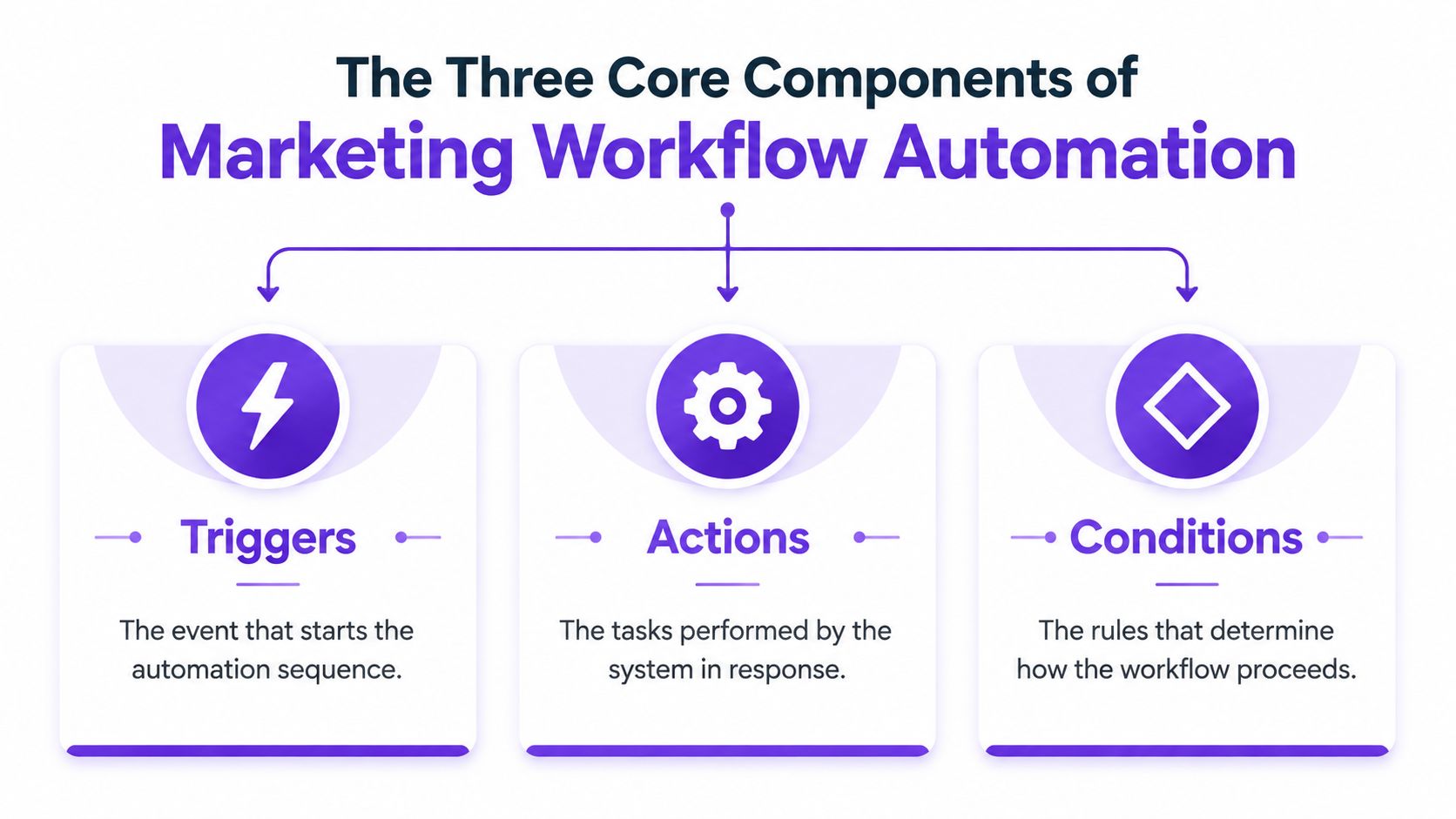
A trigger is the event that tells the system to begin. Common marketing triggers include a form submission, a new lead entering a CRM, a video being uploaded, a content item reaching an approval status, or a scheduled date arriving.
For example, when someone downloads a guide, the trigger can create a contact record, apply a source tag, send a confirmation email, and place the person into a nurture sequence. When a long-form recording enters a content library, the trigger can start transcription, asset extraction, review routing, and distribution preparation.
The trigger should be specific. “New content exists” may be too broad. “Approved customer interview assigned to the video distribution workflow” gives the system enough context to take the right next step.
Actions are the operations performed after the trigger. They might include sending an email, assigning a task, creating a social post, updating a CRM field, generating a caption, notifying a reviewer, or publishing an approved asset.
A simple scheduling tool performs a limited action at a chosen time. True marketing workflow automation connects several actions and records what happened. That record lets the next step use the output from the previous one instead of relying on a person to remember the handoff.
For teams focused on content operations, a platform that helps automate content publishing with Viral.new can fit into the distribution layer, provided the review and approval rules are clear before anything goes live.
Conditions decide which route a contact or asset takes. A lead from a target account might go directly to sales, while a student or early-stage researcher enters nurture. A video intended for LinkedIn may need a different opening, caption length, and aspect ratio than one prepared for short-form entertainment feeds.
Use conditions for meaningful differences, not for every possible exception. Overbuilt branching becomes difficult to test and maintain. Start with a small number of business rules, name them clearly, and review them whenever your offer, audience, or channel mix changes.
A workflow therefore looks like this: an approved asset triggers transformation, the system creates channel-specific outputs, conditions route high-risk or high-value items to additional review, and actions schedule or publish only after the required checks pass.
The strongest financial argument for automation isn't that software makes a team look modern. It's that timing, prioritization, and repeatability affect revenue, while manual processes often introduce delay at exactly the wrong moment.
Speed-to-lead is the clearest example. A widely cited lead-response study reports that responding within 5 minutes makes a lead about 21 times more likely to qualify than waiting 30 minutes, and about 100 times more likely to connect than waiting longer, as summarized by Dear Customer's speed-to-lead analysis. A workflow can capture the form, enrich the record, assign ownership, and initiate the first touch immediately, even when the team is busy.
Automation also helps teams decide where human attention belongs. Lead scoring combines behavioral and firmographic signals to distinguish active buying intent from casual interest. A systematic review of B2B lead-scoring research reports that lead scoring improves marketing-process effectiveness and positively affects sales outcomes by improving lead conversion rate and reducing cost per lead.
The same principle applies to content. A high-value product announcement, a routine educational clip, and a compliance-sensitive customer story shouldn't move through identical approval paths. Conditions can assign different reviewers and levels of scrutiny without forcing an operations manager to coordinate each handoff manually.
| Metric | Manual Workflow | Automated Workflow | Improvement |
|---|---|---|---|
| Campaign preparation | Repeated copying, formatting, and follow-up | Defined sequence with tracked handoffs | Less administrative friction |
| Lead response | Dependent on staff availability | Immediate routing and first-touch triggers | Faster contact while intent is active |
| Content output | Limited by editing and publishing capacity | One source can feed multiple transformations | Greater distribution capacity |
| Follow-up priority | Based on memory or inbox order | Based on behavioral and firmographic rules | More focused sales attention |
| Reporting | Compiled after work is complete | Captured as workflow events occur | Clearer operational visibility |
Time is only one part of the business case. Track the delay between trigger and response, the percentage of assets that reach publication, the number of manual handoffs, the volume of rework, and the quality of leads passed to sales. For influencer and creator programs, Social Cloud's ROI measurement guidance is a useful reminder to connect activity metrics with business outcomes rather than treating reach as the final result.
Automation doesn't guarantee better creative or conversion. It creates the conditions for faster execution and more consistent follow-through. The team still needs a strong offer, accurate data, relevant messaging, and a review process that catches mistakes before they become public.
Small teams usually fail by automating too much too soon. They connect every tool, create complicated branches, and discover that nobody can explain what happens when data is missing or an approval is delayed. A five-phase rollout is safer because each stage produces a usable decision before the next one begins.
Map one process from start to finish. Write down the trigger, every handoff, every tool, every approval, and every point where work waits. Ask the people doing the work where they copy information, rename files, check status, or chase responses.
Choose a workflow with clear repetition and visible friction. Content approvals, lead routing, and social distribution are usually easier to map than brand strategy or campaign planning.
Pick one outcome. For a video team, that might be turning an approved recording into reviewed social assets. For a demand-generation team, it might be routing qualified leads to the right owner.
Define what the workflow won't do yet. Excluding edge cases keeps the first version understandable. A content approval process should specify who can approve, what counts as a revision, and what happens when someone rejects an asset. A practical content approval workflow can help you formalize those states before you configure software.
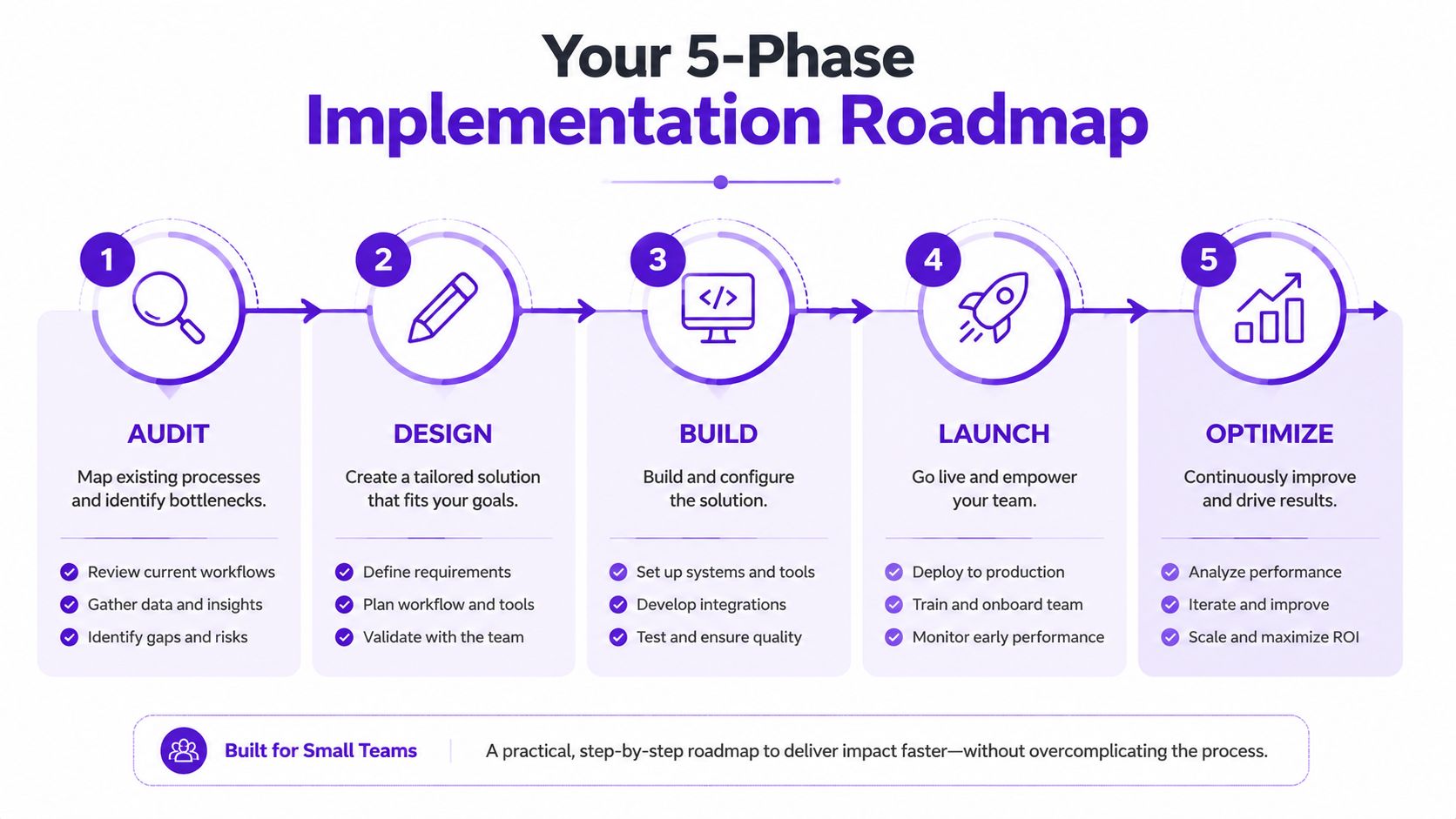
Select tools that can exchange the data your workflow needs. Check native integrations, export options, permissions, error notifications, and ownership settings. A beautiful interface won't compensate for a system that can't pass approved assets, campaign tags, or CRM status between tools.
Test with a limited set of contacts or assets. Use realistic edge cases, including missing fields, rejected content, duplicate records, and an unavailable reviewer. Confirm that every action is logged and that a person can pause the workflow without contacting support.
Compare the baseline with post-launch performance. Remove unnecessary steps, improve naming conventions, and fix routing rules before adding another channel. Scaling a broken workflow only spreads the problem.
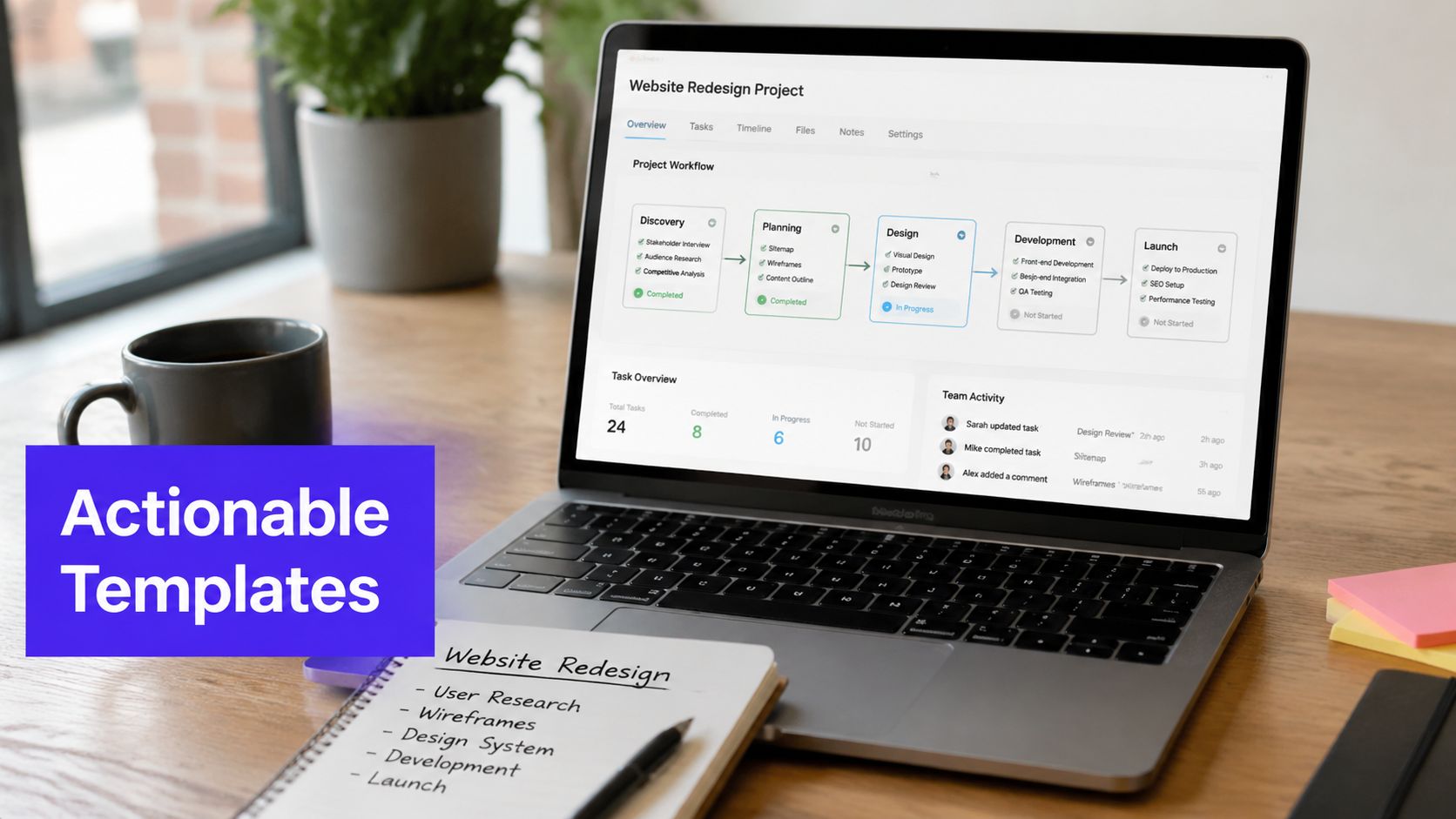
Templates are useful only when they specify what starts the process and where a person intervenes. The following models are deliberately practical. Adapt the timing and channel mix to your audience rather than copying the sequence blindly.
Trigger: A prospect submits a form or downloads a resource.
Actions: Create or update the CRM record, capture the source, send the requested resource, and begin an educational sequence. If the contact engages with product or pricing content, increase the score and notify the assigned sales owner. If engagement remains low, continue education or move the contact into a re-engagement path.
Human checkpoint: Sales reviews the highest-priority contacts and confirms that the score reflects actual fit, not just activity.
This model works because it separates immediate relevance from sales attention. The system responds quickly, while the team reserves personal outreach for contacts who meet defined criteria.
Trigger: A recording receives final approval.
Actions: Generate a transcript, identify useful segments, draft platform-specific captions, create title and thumbnail options, and place each asset into a review queue. Approved outputs receive channel labels and publication dates. Performance data later feeds a backlog for refresh or re-release.
The important design choice is to automate transformation before scheduling. If you only automate publishing, the editing bottleneck remains intact. A content repurposing workflow should reduce the number of manual touches between the original recording and the finished channel assets. Guidance on how to automate content creation is relevant here, especially for teams that need a repeatable path from one source asset to multiple formats.
Review the content-supply-chain workflow before distributing it widely:
A platform such as Taja AI can create platform-specific posts from a long-form video and support scheduling across connected channels. It belongs in the transformation and distribution layer, while the team remains responsible for strategy, factual accuracy, and final approval.
The video below offers a visual reference for thinking about content workflows as connected stages rather than isolated publishing tasks.
Trigger: An approved asset enters the content library.
Actions: Select the appropriate channel variants, apply campaign tags, add the asset to a publishing queue, and notify the owner when a post requires a custom response. After publication, route meaningful engagement or high-intent comments to the relevant team member.
This setup preserves consistency without making every post identical. The automation controls the routine, while people handle community context, sensitive replies, and opportunities that need judgment.
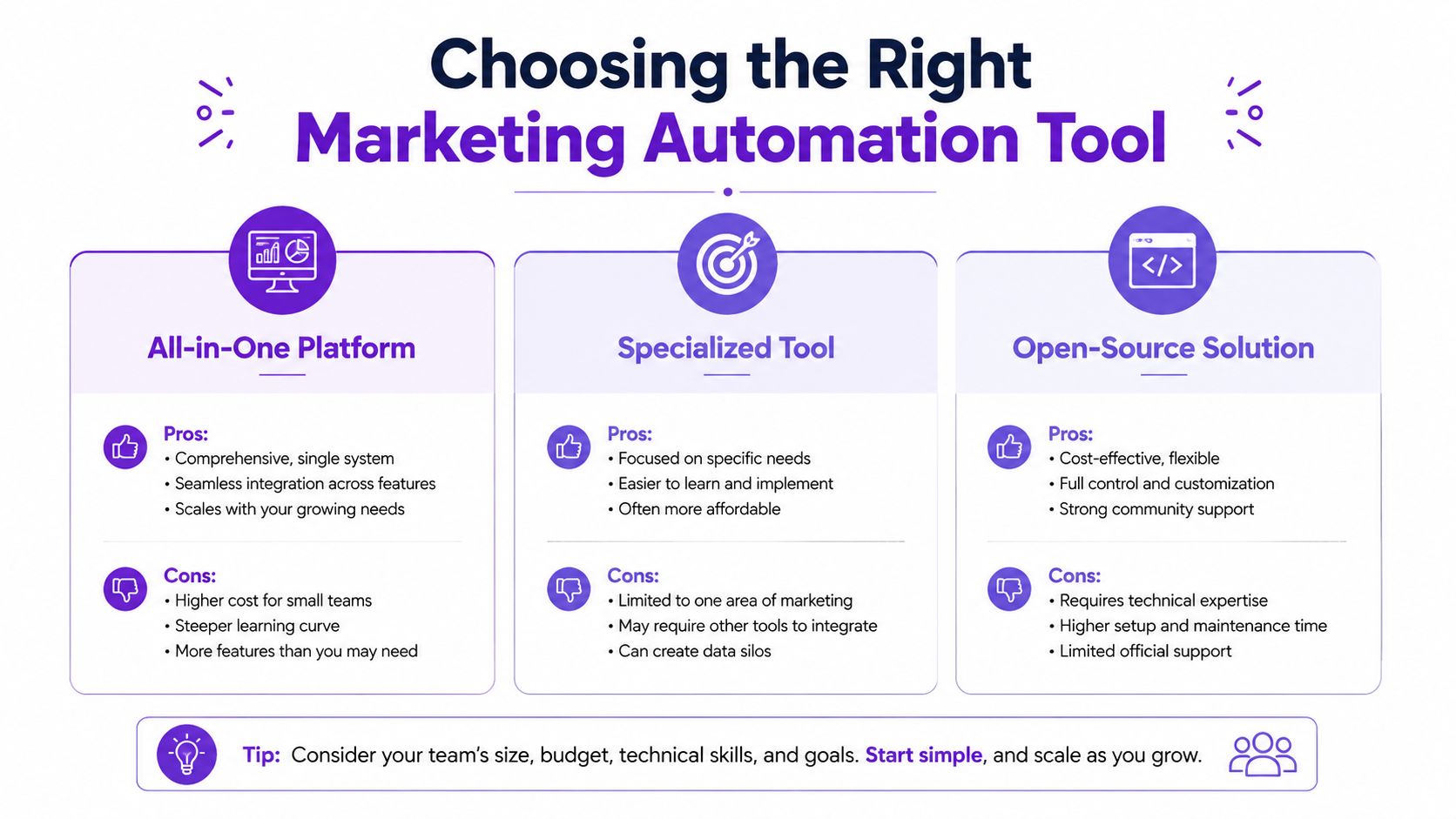
Tool selection should follow the workflow, not the other way around. Start by asking what the team must accomplish, what information needs to move between systems, and which decisions require a human. Feature lists are less useful than a clear answer to those questions.
Solopreneurs generally need low setup overhead, reliable templates, and a clear publishing view. A specialized content or email tool may be more useful than a large platform whose configuration becomes a second job.
Small teams should prioritize integrations, role permissions, approval states, reusable templates, and visible error reporting. A focused tool can outperform an all-in-one suite when it handles the team's main bottleneck without introducing unused modules.
Growing SMBs may need a central CRM and broader orchestration. At that point, standardization and data ownership matter more than a quick interface. The team should document which system owns contacts, assets, approvals, and performance data.
| Tool category | Strengths | Trade-offs |
|---|---|---|
| All-in-one platform | Centralized records, broad workflow coverage, fewer major systems | Higher complexity, unused features, more involved implementation |
| Specialized tool | Strong depth in one workflow, faster adoption, focused user experience | Requires integration planning and may leave adjacent gaps |
| Open-source solution | Greater control and customization potential | Technical maintenance, support responsibility, and governance burden |
Ask vendors to demonstrate your actual process. Upload a source asset, create a variation, send it for review, reject it, revise it, approve it, schedule it, and inspect the reporting. If the demonstration only shows isolated features, you haven't seen the workflow.
Evaluate permissions, audit logs, data export, failure alerts, and pause controls. For teams comparing process platforms, a review of Kissflow alternatives can broaden the shortlist, but the final choice should come from your process map and integration requirements.
The right tool reduces coordination. It doesn't merely add another dashboard for someone to maintain.
More automation isn't automatically better. Once AI can draft, route, publish, and adjust campaigns, the risk moves from slow execution to unreviewed execution.
Industry coverage identifies agentic AI workflows, autonomous orchestration, unified customer data, and privacy-first personalization among important 2026 trends, while also highlighting the unanswered questions around approval controls, audit trails, and data access in Nvecta's marketing automation trends coverage. An AI system can move quickly, but speed doesn't tell you whether the data was collected with valid consent or whether the message still sounds like your brand.
A small team needs explicit rules before connecting email, SMS, social, web, and CRM data. Define which actions can happen automatically and which require approval.
Content repurposing adds another layer of risk because a short clip can remove the context that made the original statement accurate. The system should flag excerpts that contain qualifications, customer information, or claims requiring verification.
The best autonomous workflow is not the one with no human involvement. It's the one where people review the decisions that carry reputational, legal, or customer-impacting risk, while software handles predictable movement.
Use the first week to audit one workflow and identify its biggest time sink. Write down the trigger, handoffs, approval points, failure cases, and the outcome you want to improve.
During the second week, choose a tool and build the smallest workable version. For most small content teams, that means starting with approved-asset transformation and distribution, or with lead capture and routing if response delay is the larger commercial problem.
In the third week, test with a limited set of assets or contacts. Track response time, manual touches, rejected outputs, rework, publication consistency, and lead quality. Fix the workflow before adding complexity.
Use the fourth week to expand only after the first process is stable. Add a second channel or workflow, assign an owner, document the rules, and schedule a regular review of permissions and performance.
Decision filter: Choose the workflow with the clearest business impact and the fewest dependencies, not the one with the most impressive automation demo.
If your team spends more time editing and moving content than deciding what to say, start upstream with asset transformation. If valuable leads wait for attention, start with routing and scoring. In either case, prove control and reliability before pursuing full autonomy.
Taja AI helps turn long-form video into platform-specific clips, captions, thumbnails, blogs, and social posts, then supports scheduling from one dashboard. Visit Taja AI to see how it can fit into a governed marketing workflow that increases content output without removing human control.


We are blessed to work with leading brands & Companies


We try to make easy and simple for every professionals. Get 30 days free trial - No credit card required.


© 2025 Taja AI. All rights reserved.