.jpeg)
7 Closed Caption Fails That Cost Viewers and Lawsuits
Seven real closed caption fails, from Netflix and edX lawsuits to garbled auto-captions, plus before/after fixes and quick quality checks.
5 min read
October 28, 2026

Build a content calendar Instagram creators actually stick to in 2026. Learn posting cadence, content pillars, batching, tools, and a sample monthly plan.
Written by:


You're staring at Instagram on Sunday night, trying to decide what goes live tomorrow. Three half-finished Reels are buried in your camera roll, your Notes app contains disconnected ideas, and the content calendar you built months ago no longer matches what your audience responds to.
That's the core problem with most Instagram calendars. They organize dates without organizing decisions. A useful content calendar for Instagram starts with your own performance data, assigns each post a job, matches cadence to your available capacity, and keeps enough room for timely opportunities.
Instagram has changed from a photo-sharing app into a multi-format publishing platform with feed posts, Stories, Reels, and scheduling workflows. The platform launched on October 6, 2010, reached 1 million users by December 12, 2010, and later crossed 1 billion users, according to Instagram's milestone timeline. A calendar now has to coordinate formats and decisions, not just fill squares.
The familiar failure starts with good intentions. A solo creator chooses a Monday educational post, a Wednesday Reel, and a Friday promotion. By Monday morning, the educational post isn't ready. By Wednesday, the Reel feels dated because a new conversation has taken over the platform. Friday arrives with another sales post that doesn't connect to anything published earlier in the week.
A small team can fail differently. The strategist fills every date two months ahead, the designer produces assets in isolation, and the person managing the account has no approved space for a relevant audience question or trending audio. The spreadsheet looks complete, but the publishing system has no flexibility.
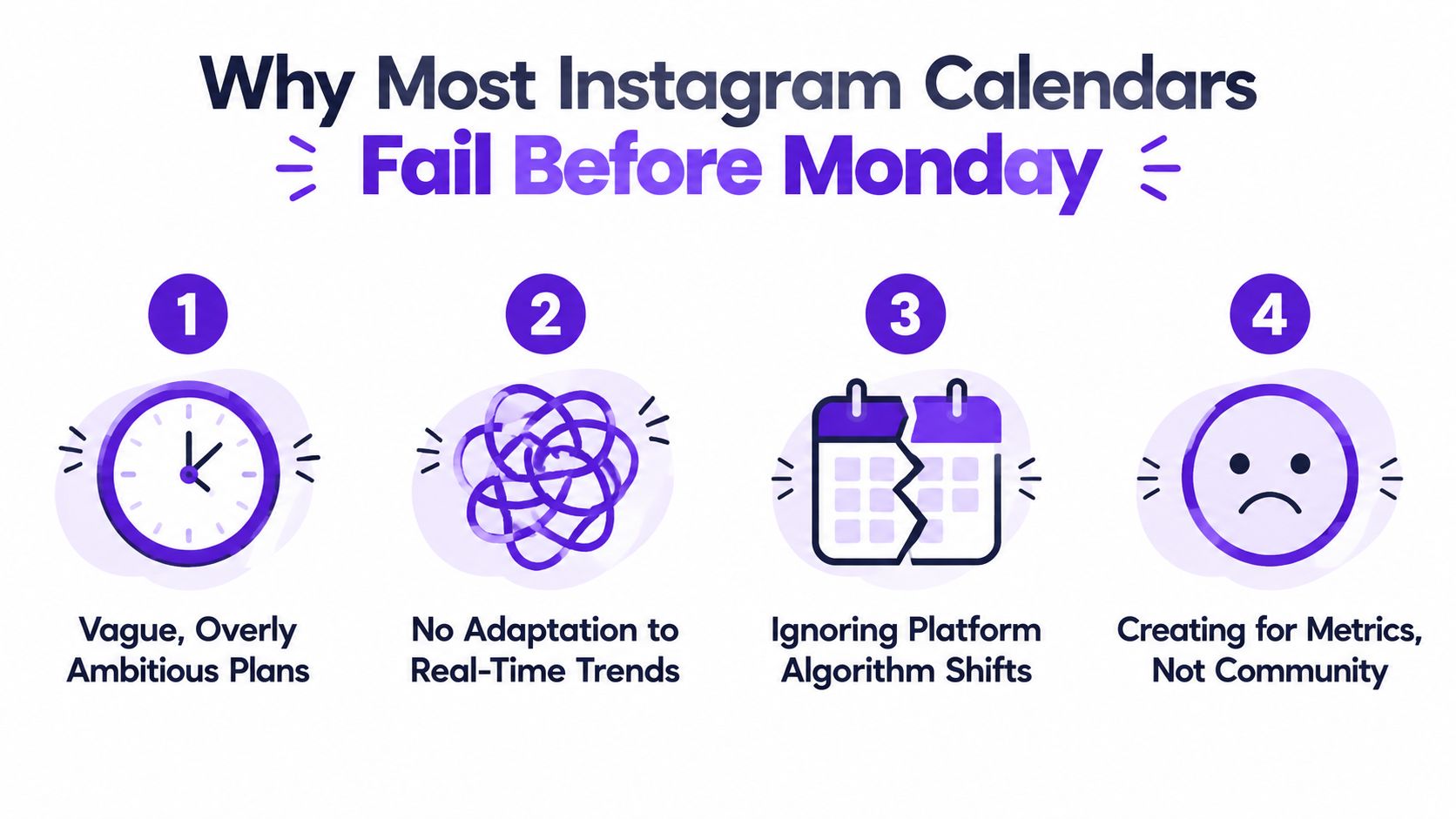
Capacity mismatch is the first. A generic grid assumes you can create at its pace. It doesn't account for filming, editing, approvals, client work, or the fact that one person may handle strategy, production, publishing, and community management.
Unconnected pillars create the second problem. Labels such as “education,” “behind the scenes,” and “promotion” don't make a strategy. Each pillar needs a clear audience job and a relationship to your offer.
No reactive capacity causes the third. A fully pre-filled calendar treats Instagram like a fixed broadcast schedule. It leaves no room for a useful comment, a cultural moment, a timely news hook, or an audio trend that fits your niche.
Practical rule: Build your calendar like a flight plan with reserves. Know the route, prepare the planned assets, and keep capacity for conditions you couldn't predict.
The answer isn't to post more until the process breaks. It's to create a system that protects creative energy. The content calendar best practices approach is useful as a starting point, but your account's own history should decide which formats, themes, and publishing windows earn priority.
Don't open a blank calendar first. Open your analytics.
A 30-day audit gives you a defensible reason for every slot in the next schedule. Review the last 30 posts or 30 days of content, then classify each piece by format, theme, and primary KPI. The Instagram content calendar workflow recommends rebuilding the calendar around the format, day, and time combinations that already perform well on your account.
Open Instagram Insights or your analytics platform and gather the available data for each post. Record:
Then add the context Instagram analytics alone won't organize for you. Tag every post as a Reel, carousel, single image, Story, or live. Add a theme such as educational, behind the scenes, promotional, social proof, or trending reaction.
Sort your strongest posts by reach relative to follower count rather than likes alone. A post with modest visible engagement can still matter if it reached people outside your existing audience, while saves and shares often reveal stronger utility than a quick heart count.
Look for repeated combinations. If Reels repeatedly produce the strongest reach and carousels repeatedly earn saves, your calendar should give those formats distinct jobs. If a promotional pillar underperforms across multiple attempts while consuming substantial production time, remove or redesign it instead of protecting it because it appears in the original strategy document.
| Column Header | What to Enter |
|---|---|
| Publish date | The date and, if available, the publishing window |
| Format | Reel, carousel, single image, Story, or live |
| Content pillar | The recurring theme or audience job |
| Primary KPI | Reach, saves, shares, comments, profile visits, or link taps |
| Performance result | The account-level result for that KPI |
| Reach context | Reach compared with your follower base |
| Production effort | A qualitative estimate of time and complexity |
| Decision | Repeat, adapt, test, or remove |
End the audit with three strong pillars and one or two weak pillars. The strong pillars receive priority because your account has evidence behind them. Weak pillars should only remain if they serve an important business function and have a specific test planned.
Your posting cadence should match the work your team can complete without lowering quality. A daily schedule is useful only if it survives busy weeks. A sparse calendar can perform well when each post has a clear job and your audience receives regular contact.
A benchmark analysis of 19 million Instagram feed posts found that nano accounts with 0 to 10K followers averaged 2 feed posts per week, micro accounts with 10K to 100K averaged 3, and mid-sized accounts with 100K to 500K averaged 5. Stories rose from 3 per week for nano accounts, to 4 for micro accounts, and 15 for mid-sized accounts, according to the Instagram posting-frequency benchmark.
Feed cadence tends to rise with account size. Stories can increase faster because they support regular audience contact without requiring every update to become a polished feed asset.
Later's social team, with more than 520K Instagram followers, averaged 12 feed posts per week in the same benchmark context. Use that figure to understand what a dedicated social operation can sustain, not as a target for a solo creator.
A separate benchmark cited by Later linked posting 2 to 3 times weekly with about 19% follower growth, while posting 10 or more times weekly was linked with about 79% growth. Buffer reported an average of 17 Instagram posts per month, or roughly 4.25 per week, in the same posting-frequency research. These figures are reference points, not promises. Your production quality, audience, niche, and format mix decide whether more volume helps.
| Account Size | Feed Posts / Week | Reels / Week | Stories / Week | Team Setup |
|---|---|---|---|---|
| Nano, 0 to 10K | 2 baseline | 1 to 2 within feed plan | 3 baseline | Solo creator |
| Micro, 10K to 100K | 3 baseline | 1 to 3 within feed plan | 4 baseline | Solo creator or small support |
| Mid-sized, 100K to 500K | 5 baseline | Format mix based on reach | 15 baseline | Dedicated social support |
| Large account | Based on production capacity | Multiple format slots | Scaled to audience needs | Larger social team |
A study of 2,400 accounts found that posting 3 to 5 times per week could more than double follower growth compared with lower-frequency publishing. Higher frequency continued to help, with diminishing returns. The same guidance recommends batching in 4-week blocks, keeping 15% to 20% of calendar slots open for reactive posts, and choosing a sustainable rhythm instead of a daily sprint that collapses, as detailed in the Instagram frequency study.
Set your baseline from the audit: choose the feed frequency your current workflow can repeat, then assign Stories only when someone owns their creation and replies. A solo operator may start with a manageable feed rhythm. A two-person setup can expand the production pipeline. Larger teams should increase volume only after quality, approvals, and community response remain consistent.
A content pillar isn't a topic bucket. It's a recurring answer to a problem your audience is actively trying to solve.
Start with three lists:
Those answers give you a practical pool of potential pillars. Combine similar answers, then narrow the result to 3 to 5 pillars. Every pillar should connect to an audience need and, where appropriate, to a product, service, affiliate recommendation, or next step.
Suppose one pillar is Objection Handling. Don't leave it as a label. Turn it into a recurring carousel that breaks down one hesitation, answers it with evidence, and closes with a clear action.
A pillar called Proof of Outcome could become a Reel showing a transformation, a customer workflow, or a sequence of results. Quick Wins might work as short tutorials, while Decision Support could use comparison carousels that help followers choose between approaches.
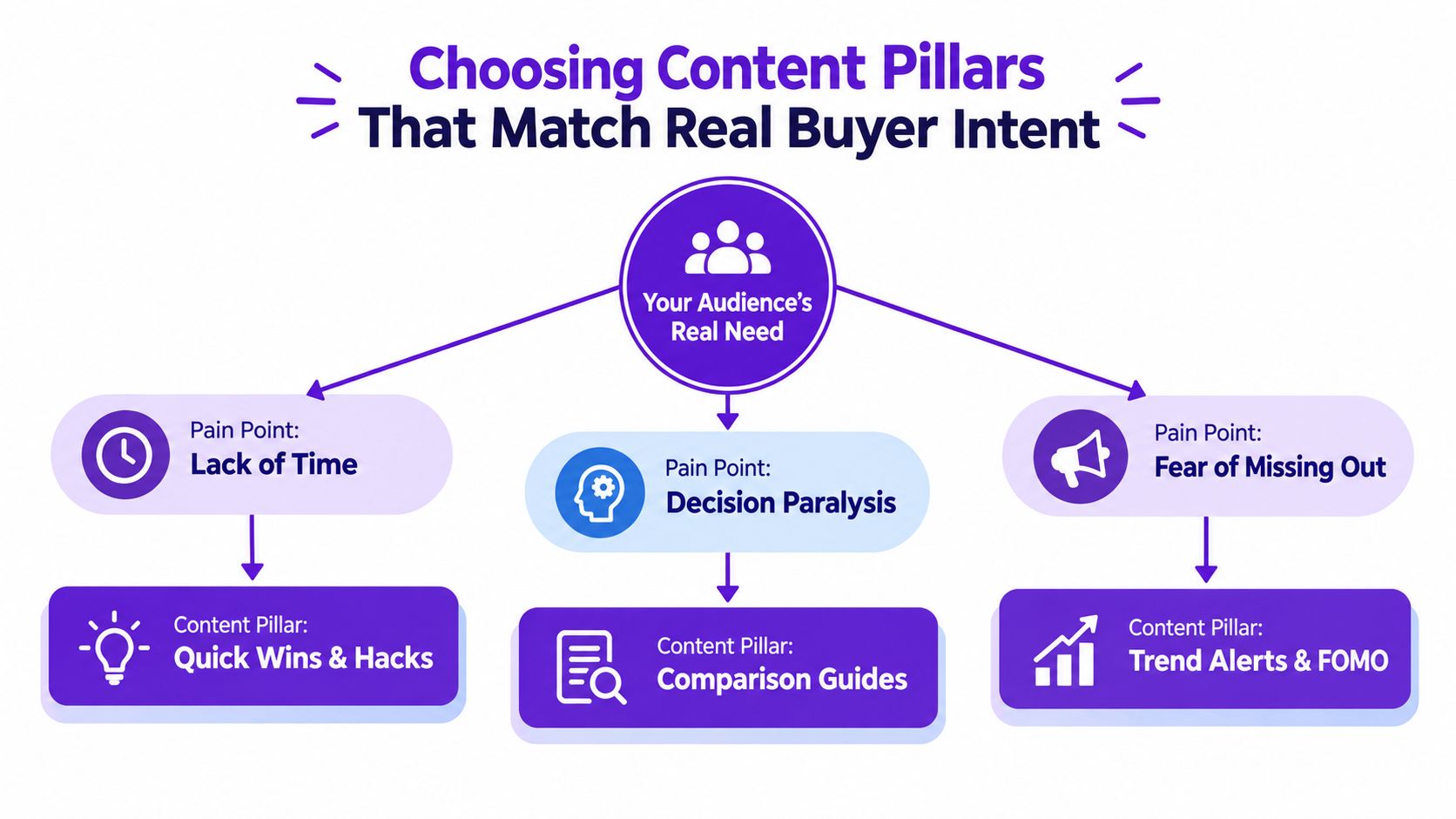
For a solopreneur selling a $300 course, a focused set might include:
For a creator earning through affiliates, the structure changes:
A detailed Instagram strategy plan can help you connect these pillars to broader goals, but don't let a planning framework create more categories than your audience can recognize. The “five pillars of everything” trap makes every topic fit and nothing distinctive. If a pillar can't answer a buyer question, support a business objective, or create a recognizable recurring series, cut it.
Full-month batching feels efficient because it creates a satisfying sense of completion. You script, shoot, edit, caption, and schedule several weeks in one or two concentrated sessions. The problem arrives later, when a new question changes your angle, a trend expires, or a caption written weeks earlier no longer sounds relevant.
Rolling weekly planning has the opposite profile. You stay close to current conversations and avoid stale content, but you repeatedly reopen the same decisions. That interrupts creative momentum and makes it harder to see whether the month has a balanced pillar and format mix.
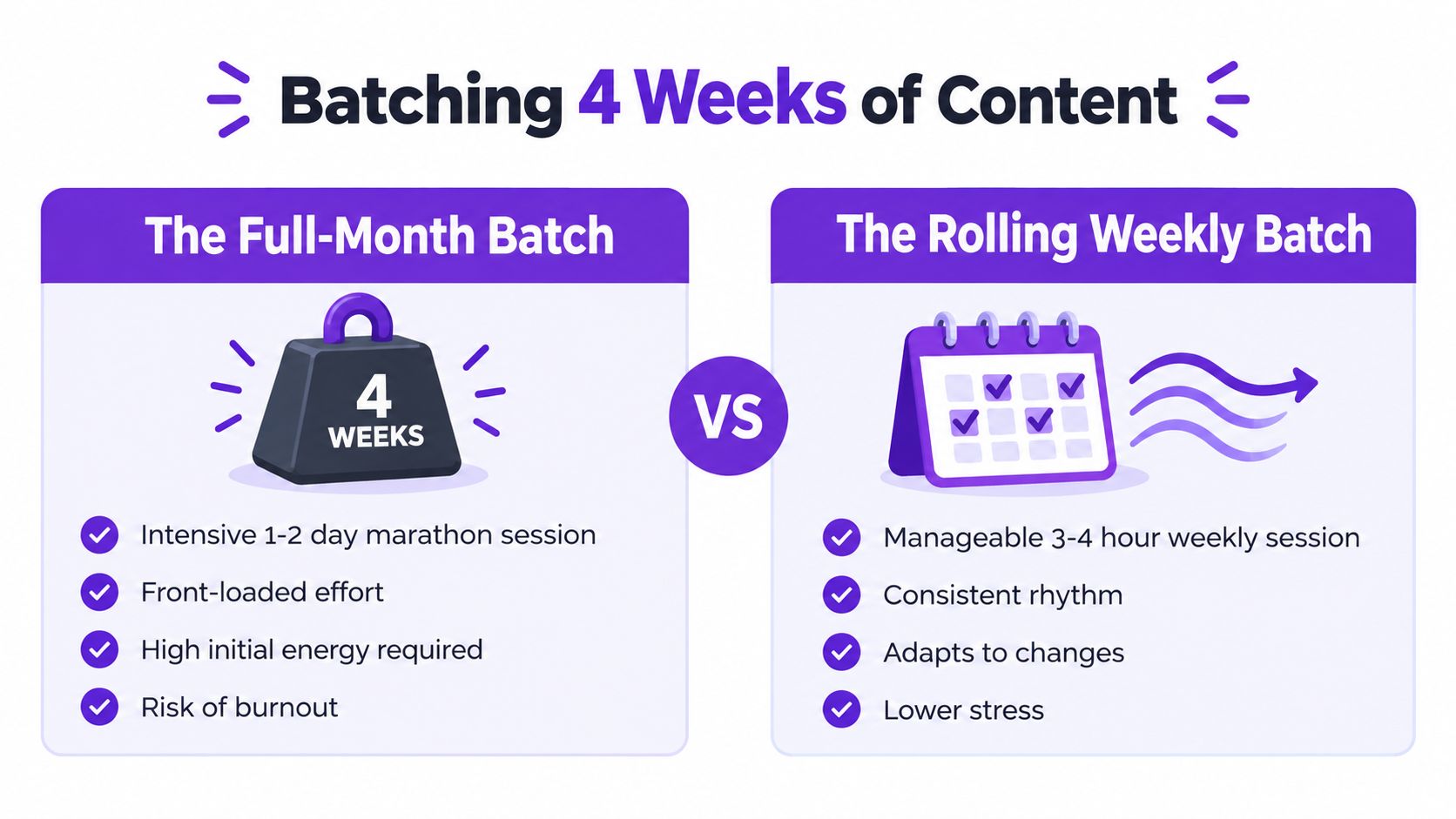
Batch the decisions that benefit from distance, then keep the publishing layer flexible:
For a cadence of 4 to 5 posts per week, the planned workflow may require roughly 8 to 10 hours per month, based on the supplied batching guidance. Use that estimate as a planning reference, then adjust for your editing standards, approval process, and filming setup.
Human judgment belongs in the brief, hook, opinion, and final edit. AI assistance is most useful for variations, caption drafts, repurposing, and organizing ideas after the creative direction is decided.
Prep an asset checklist for every pillar: hook ideas, script outlines, supporting footage, carousel structure, visual references, caption angles, calls to action, and status fields. A repurposing workflow such as this content repurposing process can help teams turn one strong source idea into multiple platform-ready assets without making every post feel duplicated.
Use this video as a practical reference while setting up the production rhythm:
A calendar that fills every slot weeks in advance is fragile. Instagram content often benefits from speed, timely relevance, and a response to what your audience is asking right now. Your calendar should protect consistency without forcing you to ignore the moment.
Reserve a meaningful share of weekly capacity for posts that aren't assigned a final topic yet. The supplied 2026 guidance recommends keeping 15% to 20% of calendar slots open for reactive or trending content, while newer recommendations also emphasize a flex slot each week and a 24 to 48 hour publishing window for reactive posts, as discussed in the 2026 Instagram content-calendar analysis.
Don't leave flex slots blank. Blank cells look like missed work. Use placeholder labels that tell everyone why the space exists:
This keeps the grid accountable while preserving the decision for later. Stakeholders can see that the slot is planned capacity, not procrastination.
Take a trending audio example. On Monday morning, the creator spots the audio in Reels and checks whether it fits the account's audience and one of its established pillars. By Monday afternoon, they decide whether the trend supports a useful idea or would look forced.
Monday evening is for drafting, filming, and editing. Tuesday is the publishing window. If the trend doesn't fit the brand, the slot can become an audience-question Reel or a timely response to a conversation already happening in the niche.
Use this guide to finding trending audio on Instagram as part of the monitoring routine, but don't chase every sound. A trend earns a place only when it makes the pillar clearer, the audience problem more urgent, or the offer more relevant.
Reactive scheduling isn't an excuse to lower standards. It's a production reserve with a defined trigger, owner, decision window, and fallback asset.
The strongest flex system has one person watching conversations, one clear approval path, and pre-approved visual templates. That combination lets a small team respond quickly without turning every trend into an emergency.
The following sample uses a realistic solopreneur rhythm of 4 feed posts and 5 Story frames per week. It rotates educational value, proof, objection handling, and offer-related content while protecting two flex slots per week. Adapt the pillar names to your niche, but preserve the structure: different formats, recurring jobs, and room for timely posts.
| Day | Week 1 | Week 2 | Week 3 | Week 4 |
|---|---|---|---|---|
| Monday | Reel, Quick Win | Carousel, Objection Handling | Reel, Quick Win | Carousel, Decision Support |
| Tuesday | Story series, behind the scenes | Story series, audience poll | Story series, production process | Story series, customer question |
| Wednesday | Carousel, Buyer Education | Reel, Proof of Outcome | Carousel, Buyer Education | Reel, Proof of Outcome |
| Thursday | FLEX: trend response | FLEX: audience question | FLEX: comment turned post | FLEX: news hook |
| Friday | Static post, Offer Clarity | Static post, Social Proof | Static post, Offer Clarity | Static post, next-step CTA |
| Saturday | Story frame, personal context | Story frame, FAQ | Story frame, personal context | Story frame, monthly reflection |
| Sunday | FLEX: trend or rest | FLEX: trend or rest | FLEX: trend or rest | FLEX: trend or rest |
The table shows four feed posts per week, while the Story series and individual Story frames create five planned Story touchpoints. A flex slot can become a Reel, carousel, or Story response depending on the opportunity. If nothing relevant appears, leave the slot unused or publish a prepared evergreen asset. Consistency doesn't require filling every available space.
At the end of Week 2, run a mid-cycle KPI scan. Compare reach for Reels, saves for carousels, engagement for static posts, and Story completion for Story sequences. Don't rebuild the entire calendar from one result. Look for an early signal that a format, pillar, or publishing window deserves adjustment.
At the end of Week 4, complete the full performance review. Mark the formats and themes to repeat, adapt, test, or remove, then carry those decisions into the next 30-day audit. This makes the calendar a feedback loop rather than a document that gets abandoned after scheduling.
If you want a ready-made starting point, Trendy's free Instagram content calendar can provide the structure. Replace generic prompts with the pillars, KPIs, production statuses, and flex labels your account needs.
Taja AI turns long-form videos into ready-to-publish clips, captions, thumbnails, blogs, and platform-specific posts, then lets you organize and schedule content across Instagram and other channels from one dashboard. Upload a source video, use the generated assets to fill your planned and flex slots, and visit Taja AI to start free without a credit card.


We are blessed to work with leading brands & Companies


We try to make easy and simple for every professionals. Get 30 days free trial - No credit card required.


© 2025 Taja AI. All rights reserved.