.jpeg)
10 Best YouTube Video Thumbnail Maker Tools for 2026
Compare the top YouTube video thumbnail maker tools by features, pricing, ease of use and integrations, plus what makes thumbnails get clicks.
5 min read
October 13, 2026

Master content calendar creation without burnout. Learn to map platforms, set realistic cadences, and automate repurposing with AI tools like Taja AI.
Written by:


Most content calendar advice starts with the wrong question: How often can you post? It should start with what can your team produce consistently without sacrificing client work, quality, or sleep? Telling a solo operator or small marketing team to publish everywhere every day turns a planning problem into a capacity crisis.
A practical content calendar creation system does something more useful. It takes one strong source asset, adapts it for specific audiences and platforms, schedules the work, and leaves enough flexibility for real business priorities. The result is a minimum viable calendar, not an ambitious publishing fantasy.
Small teams rarely fail because they lack ideas. They fail because every idea becomes a separate production project. A podcast episode needs clips, captions, thumbnails, a blog post, email copy, social posts, approvals, uploads, and reporting. If each asset starts from a blank page, even a modest publishing plan becomes impossible to maintain.
Verizon's 2025 small-business survey found that more than three in five decision-makers had launched or increased investment in content creation, while 56% struggled to prioritize social media and 54% struggled to produce enough content for multiple channels. The problem isn't a lack of commitment. It's the mismatch between channel expectations and available production capacity.
Practical rule: Don't build a calendar around the maximum your team could publish during an unusually quiet week. Build it around the minimum your team can repeat during a busy month.
That principle is central to team capacity planning for content operations. A minimum viable calendar begins with one monthly anchor recording, such as a client Q&A, property tour, lesson, interview, sermon, or product explanation. The recording carries the main idea. Derivative assets carry different parts of that idea to audiences who consume content in different ways.
The anchor should answer a meaningful audience question and support a business objective. A local accountant might record a practical explanation of a tax issue. A real-estate professional might film a neighborhood walkthrough. A consultant might record a buyer FAQ. The source matters because weak material produces weak derivatives, no matter how efficient the editing process becomes.
From that recording, create a prioritized backlog. Keep the most valuable formats first, then stop when the available capacity runs out. You don't need to fill every platform just because the platform exists.
A workable minimum viable calendar typically defines:
This approach preserves reach without confusing activity with progress. It also gives the team a clear answer when new requests arrive: does this task support the anchor, the audience, and the conversion path, or does it create another disconnected obligation?
A cadence should reflect production reality, not a generic recommendation from a social media checklist. A survey of 1,200 marketers cited in research on content cadence and publishing practices found that 34% published multiple times per week, 33% published once per day, and 13% published multiple times per day. Together, 80% published at least several times weekly.
That pattern explains why calendars became operational tools. Teams manage recurring output across blogs, video, social channels, and email, rather than occasional campaigns. Planning distributes production work, prevents repetitive topics, and makes it easier to connect one long-form asset to several scheduled touchpoints.
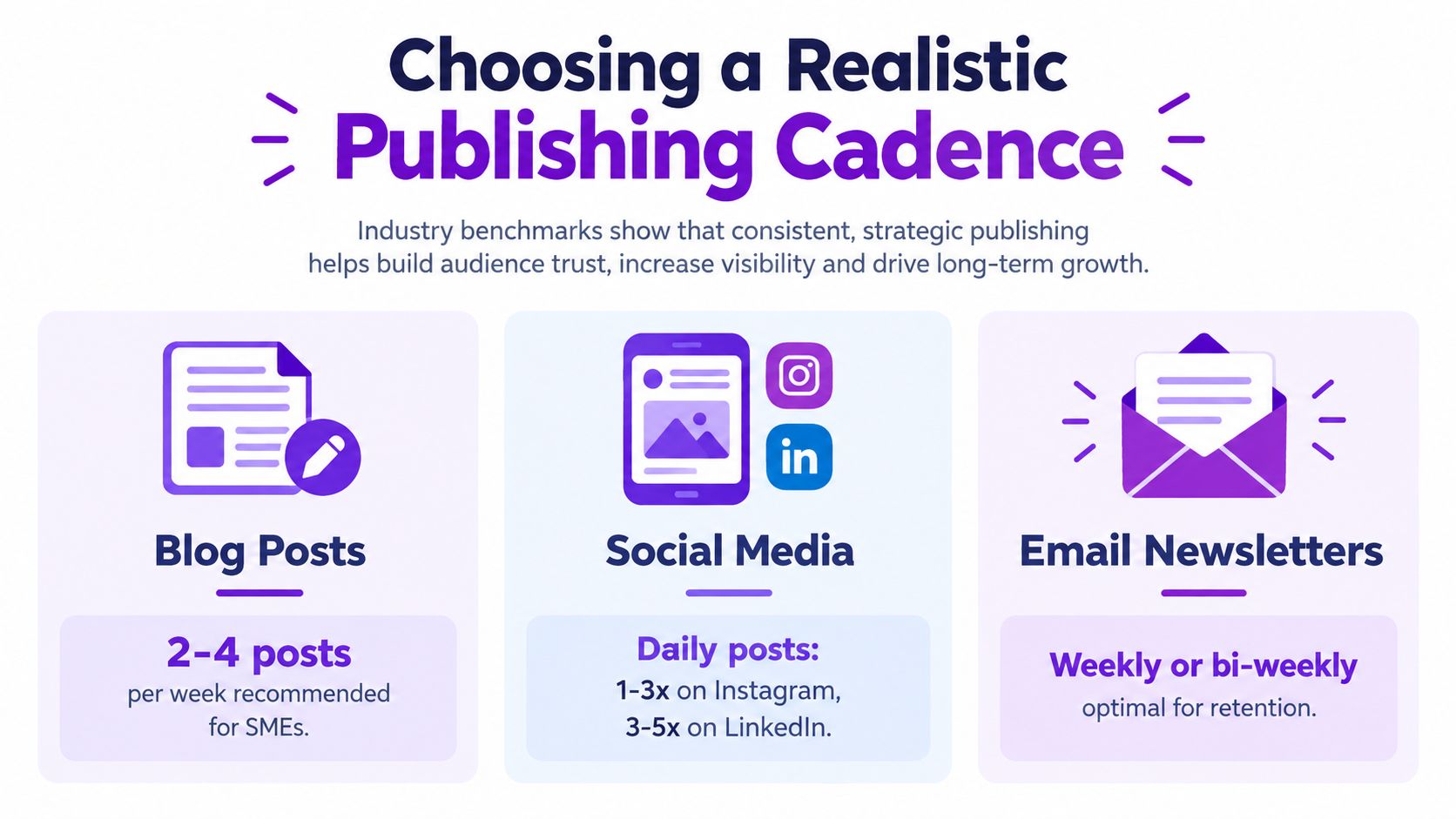
A small team should set cadence by working backward from available production time. Count the steps required for research, recording, editing, copywriting, approvals, scheduling, and review. If one person owns most of those steps, the calendar must protect that person from unnecessary variations.
Use a simple decision sequence:
A focused weekly publishing rhythm can outperform an exhausting daily schedule because the team can maintain quality and respond to comments, leads, and customer needs. The calendar should make that choice visible. If every slot is occupied, the system has no room for reality.
Consistency isn't a promise to publish everywhere. It's a promise to deliver a recognizable value proposition at a pace your team can sustain.
Repurposing also becomes more useful when it follows a sequence. Schedule the anchor first, then place the strongest derivative when audience attention or business context makes sense. Avoid publishing every variation at once. A staged backlog gives the source material a longer working life and helps the team learn which angles deserve more investment.
Cross-posting the same asset everywhere is efficient only if the audience, format, and intent are identical. They aren't. A person searching YouTube for an explanation behaves differently from someone scrolling TikTok for a quick idea, and a potential business buyer on LinkedIn needs a different reason to act than a local follower on Facebook.
Recent data shows meaningful differences in format preferences and platform behavior. 55% of Gen Z adults and 43% of millennials prefer videos shorter than 15 minutes, while Facebook remains substantially stronger among older audiences, according to S&P Global Market Intelligence's analysis of the generational divide in social media.
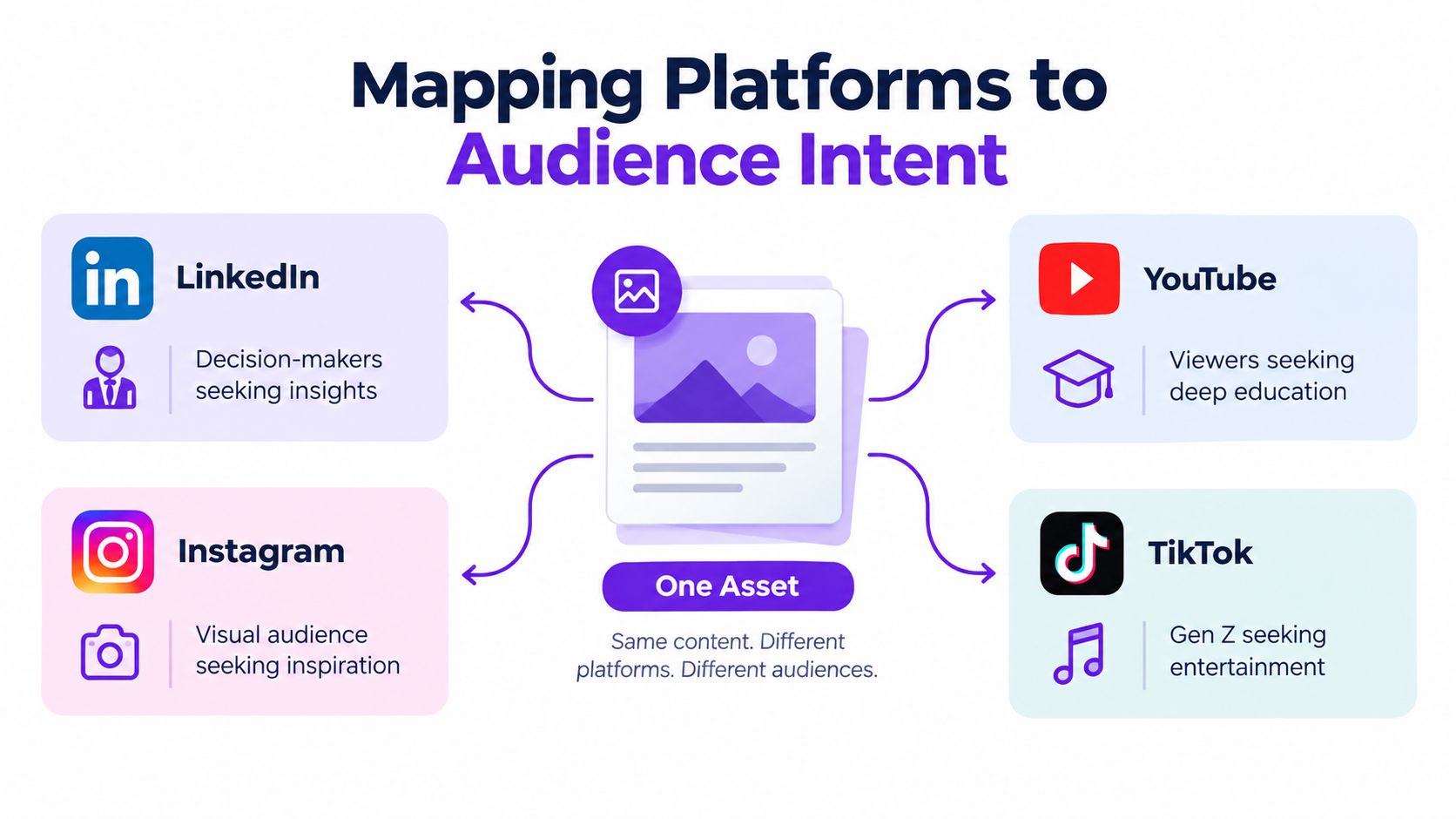
Start by writing the anchor's core promise in one sentence. That promise remains consistent. The hook, length, context, and call to action change according to the audience journey.
| Platform | Audience intent | Adaptation from the same recording |
|---|---|---|
| TikTok | Discover a sharp idea quickly | Open with the surprising claim, remove setup, and end with a simple follow or comment prompt |
| YouTube | Learn enough to solve a problem | Retain context, add searchable framing, chapters, and a deeper next step |
| Find useful or inspiring visual content | Lead with the strongest visual moment and use concise on-screen text | |
| Follow familiar, accessible explanations | Use a clear summary, community-oriented framing, and an approachable invitation | |
| Evaluate expertise and business relevance | Extract the professional implication, add a practical lesson, and direct qualified readers to the next resource |
A real-estate video illustrates the difference. The TikTok version might lead with one overlooked feature of the property. YouTube can explain the neighborhood, buying considerations, and tour context. Instagram can emphasize the visual transformation. Facebook can frame the property around local community needs. LinkedIn might turn the same observation into a discussion of market positioning for professionals.
The calendar entry shouldn't say only “publish property video.” It should specify the platform angle, intended viewer, hook, asset length, caption, and call to action. That detail prevents the editor from exporting the same cut repeatedly and calling it a multi-channel strategy.
Audience test: If the hook and call to action could move between platforms without any edits, the entry probably isn't adapted enough.
The strongest calendars therefore organize assets by audience journey, not just by date. Awareness content earns attention. Educational content builds understanding. Trust content reduces uncertainty. Conversion content gives a relevant next action. One recording can serve all four stages, but each version must earn its place.
A calendar should explain why each asset exists, not just when it is due. Small teams often have plenty of software and too little strategic context. A 2023 study by the Content Marketing Institute and MarketingProfs found that only about 40% of marketers reported having a documented content marketing strategy, while 76% used content creation, calendaring, collaboration, or workflow tools. The findings are available in the 2023 B2B content marketing research.
A spreadsheet can store dates without creating alignment. Build each row so another person can understand the audience, purpose, production state, source asset, and success signal without scheduling another meeting.
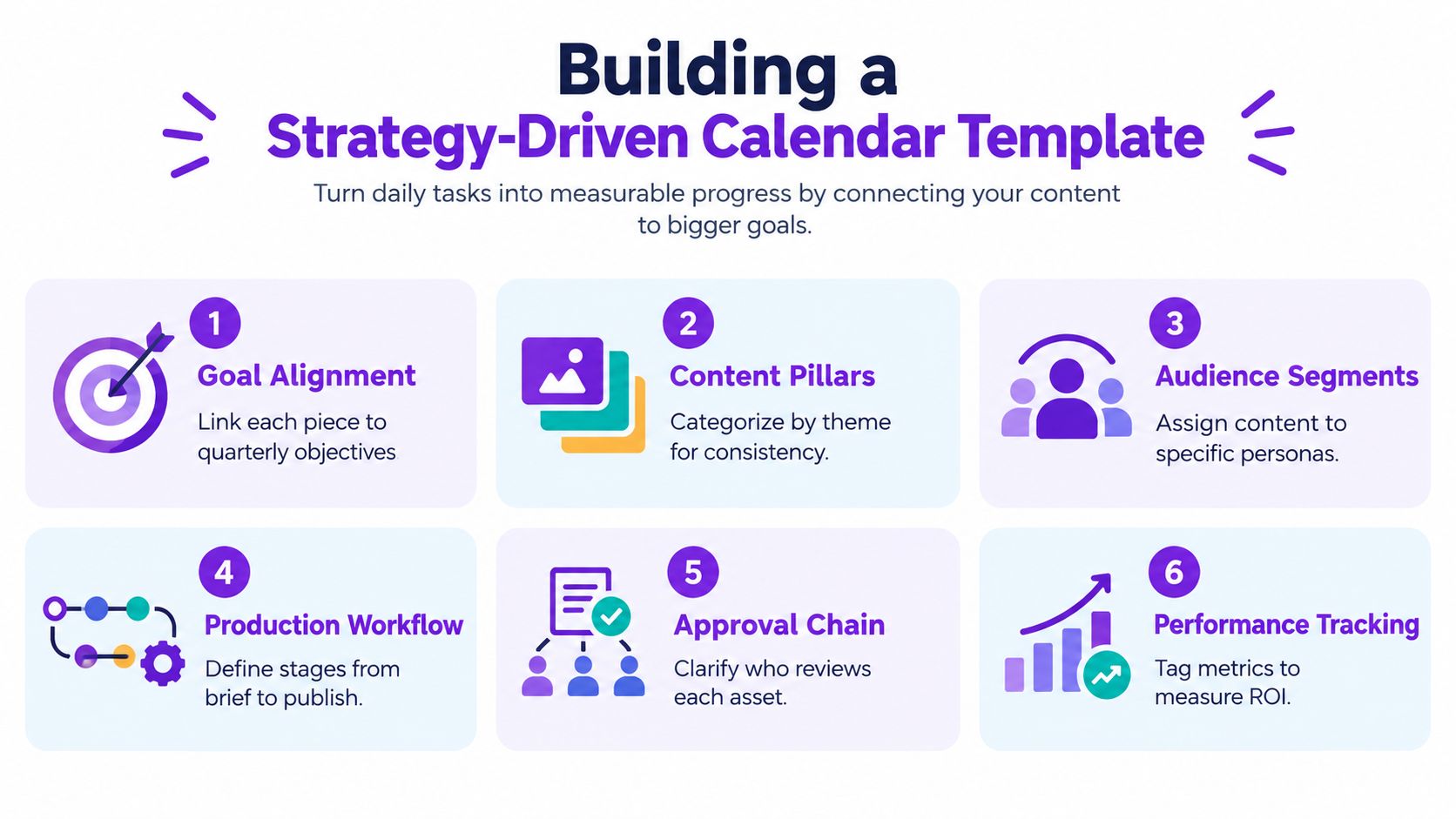
Use one row or record for every publishable derivative. A long-form recording can supply the backlog, but each platform version needs its own decision and owner.
Measurement criteria prevent weak comparisons. A post intended to generate local inquiries should not be judged only by views. An educational video may succeed through relevant site visits or informed questions, even without broad reach.
Jimmy Clemmons Photographer's content notes show how an editorial tag structure can tie each calendar row back to a business priority, which is useful for creators balancing content with client work. The takeaway is practical: label the business role of each asset instead of collecting disconnected ideas.
A field nobody updates adds administrative work without improving decisions. Start with the information required to approve and publish an asset, then add detail only when it improves execution or reporting. This content calendar best practices guide can help teams decide which planning habits belong in their operating system.
A simple status system works well: Backlog, Briefed, In production, Review, Scheduled, and Published. Add a blocked state when approvals or missing assets delay work regularly. The calendar should expose the bottleneck, not conceal it behind a cheerful green status.
Automation works best after the team has made the strategic decisions. It can accelerate transcription, clipping, captioning, formatting, and scheduling. It can't decide whether a topic matters to a buyer or whether a platform deserves continued attention.

Start with a clean anchor recording and a short brief. Record the intended audience, central promise, offer, brand voice, and channels before uploading the source. This information gives the repurposing workflow useful constraints and helps prevent generic outputs.
A practical sequence looks like this:
Taja AI is one option for this workflow. It turns long-form video into platform-specific shorts, clips, captions, thumbnails, blogs, and posts, then lets users organize and schedule generated content across channels from one place. Its built-in editor and brand templates can reduce repetitive polishing, while the team still controls the final selection and approval.
The point isn't to publish every output an automated tool creates. Automation should produce a useful backlog, not a larger backlog of mediocre work. Select the derivatives that match the audience journey and the capacity ceiling established earlier.
A detailed content repurposing workflow helps clarify the handoffs between source recording, editing, review, and distribution.
Auto-scheduling becomes useful once each asset has a purpose and a destination. Schedule the strongest educational cut where search behavior supports it, place concise discovery clips where fast consumption is normal, and reserve conversion-focused posts for audiences already familiar with the business. Keep a human review step before publication, especially for regulated claims, local details, client information, or sensitive community topics.
A calendar succeeds when it improves decisions, not when every row reaches “published.” Output volume is easy to count, yet it says little about whether the right audience responded or whether the work deserves more capacity.
The 2023 Content Marketing Institute and MarketingProfs research found that 81% measured content performance, using measures such as conversions, lead quality, and website engagement. These signals connect publishing activity to audience response and commercial intent more clearly than a post count.
Review each anchor and its derivatives against three questions:
A weak channel does not automatically need more content. The audience match, format, or conversion path may be wrong. If producing and evaluating that channel disrupts higher-value work, pausing it can protect the team's capacity and clarify where the minimum viable calendar should focus.
Refresh evergreen material while its subject, offer, examples, and links remain useful. A backlog-revival feature such as Backlog Boost can surface previously published videos for another review. The team still needs to check accuracy and relevance before scheduling anything. Reuse serves the audience when it improves a useful asset, not when it fills an empty slot.
Measure the question your content was designed to answer. A lead-generation asset needs a lead-quality review. A teaching asset needs evidence that viewers understood and continued exploring.
Use the calendar as a feedback system. Mark formats that generate relevant inquiries, record hooks that earn meaningful engagement, and remove production steps that do not affect quality or results. A smaller team can then turn one long-form recording into a selective backlog, rather than publishing every automated derivative.
Taja AI helps small teams turn one long-form recording into platform-specific clips, captions, blog content, and scheduled posts. The team can assign each asset a clear role, review the useful derivatives, and maintain a sustainable calendar without full-time editing hours. Visit Taja AI to start free and organize a repurposed backlog.


We are blessed to work with leading brands & Companies


We try to make easy and simple for every professionals. Get 30 days free trial - No credit card required.


© 2025 Taja AI. All rights reserved.