.jpeg)
How to Make Highlights Video
Learn how to make highlights video content from long footage with a retention-led workflow, captioning, export settings, and platform-ready exports.
5 min read
October 19, 2026

Discover the best practices for YouTube SEO in 2026, covering keyword research, titles, thumbnails, retention, Shorts repurposing, and AI-powered optimization.
Written by:


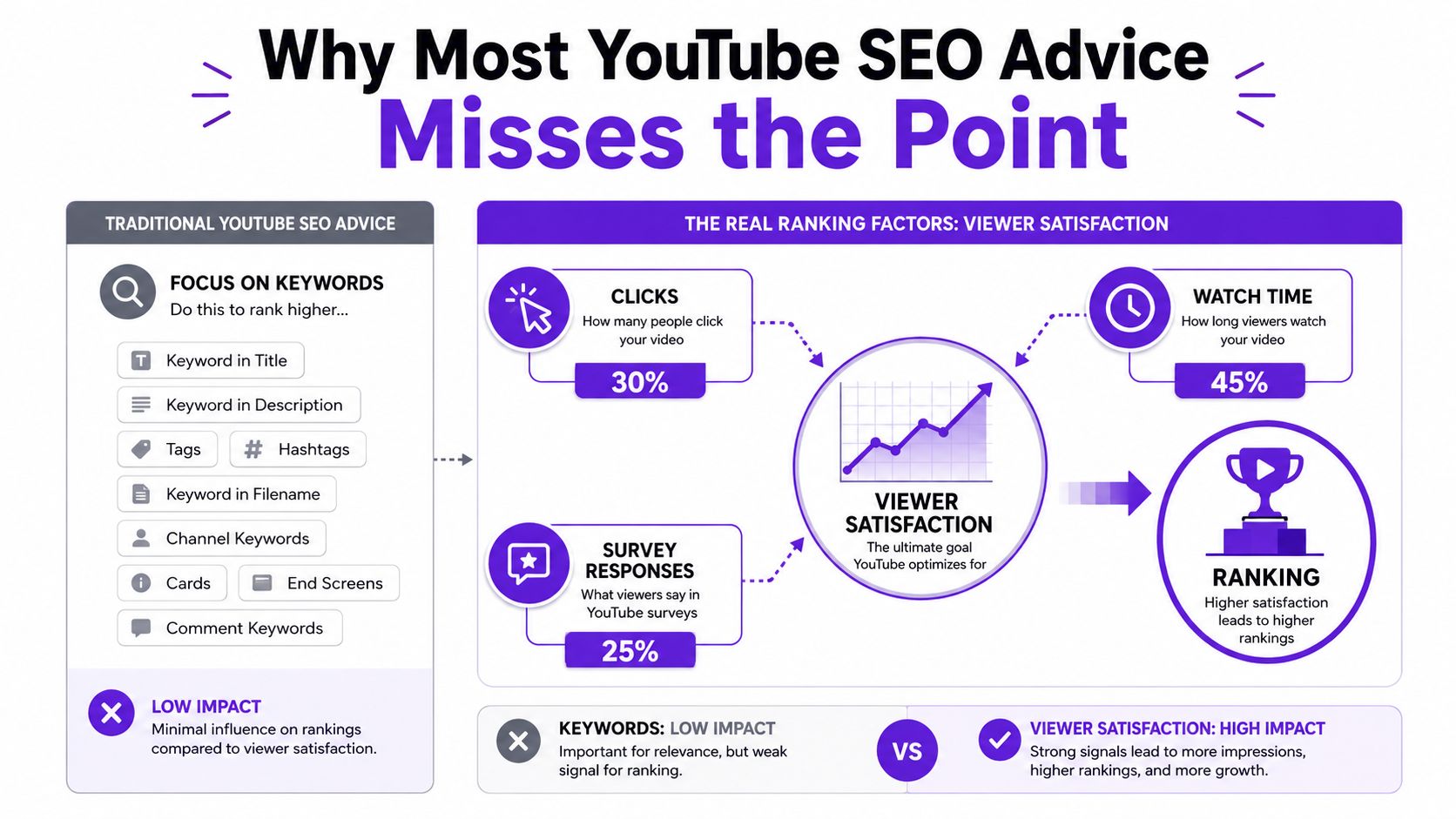
The counterintuitive truth behind the best practices for YouTube SEO is that keyword placement alone rarely carries a video. A large analysis of 1.3 million YouTube videos found that comments, likes, shares, and views correlated with stronger search rankings, while the average first-page video lasted 14 minutes and 50 seconds and 68.2% of first-page results were in HD, according to Backlinko's analysis of YouTube ranking factors. The practical lesson is simple: metadata earns the opportunity to be understood, but viewer response determines whether YouTube keeps distributing the video.
YouTube SEO is therefore a two-stage signal chain. Discovery metadata helps match a video with a query. Then impressions, click-through rate, watch time, retention, comments, shares, and follow-on viewing determine whether the packaging and content deserve more reach. That chain now extends beyond a single search result into Suggested feeds, Shorts, playlists, and AI-driven discovery surfaces.
Most YouTube SEO guides stop after the upload fields are complete. They recommend a keyword in the title, a description, some tags, and perhaps a playlist. Those actions help YouTube classify the video, but they don't answer the harder question: did the viewer find the result useful enough to keep watching?
A study of top-ranking videos reported a 2.65% video engagement rate, compared with a 0.09% platform average, and found that 90% of those top-ranking videos were in HD or 4K, as documented in Backlinko's YouTube ranking research. The gap points to a working principle I use when auditing channels: optimize the promise, the click, and the viewing experience as one system. A perfectly tagged video with a weak opening still creates a poor signal after the click.
Start with a query and an audience problem. Build a video that fulfills the intent. Package it clearly enough to earn a click, then inspect the analytics to see where the promise and delivery diverged.
The first stage is impression to view. Your thumbnail and title make the initial case for relevance. The second stage is view to continued distribution. Retention and watch time show whether that case held up. Engagement adds another layer, because comments and shares indicate that the video generated enough value or disagreement to prompt action.
Practical rule: Never diagnose a weak video with metadata alone. Check the impression source, CTR, first 30 seconds of retention, average view duration, and the next action viewers take.
That diagnosis should inform the next upload. If search impressions are strong but clicks are weak, revise the title and thumbnail. If CTR is healthy but viewers leave early, fix the opening and pacing. If viewers finish but don't continue watching, improve playlists, cards, and end screens.
A long-form video can become the source for Shorts, chapter summaries, pinned-comment prompts, and follow-on topics. The same audience question can therefore create several connected entry points instead of one isolated upload.
This matters for AI search too. Accurate captions, clear chapters, and concise summaries give machine systems more usable context, while related-video pathways help viewers and recommendation systems understand what should come next. YouTube SEO isn't a checklist you complete at publishing time. It's a feedback system that improves every time you connect a viewer signal to a specific editorial decision.
The strongest workflow begins before scripting. Pick the viewer's question, not a list of attractive tags. For a topic such as “best practices for YouTube SEO,” the primary query may support a broad guide, while related questions can become separate videos about keyword research, Shorts SEO, thumbnail CTR, retention curves, and transcript optimization.
Use YouTube autocomplete, competitor results, comments, and your own search analytics to build a keyword document. The document should record the main phrase, supporting questions, likely audience, content format, and the action you want viewers to take next. Taja's keyword research guidance is useful as a workflow reference, but the final decision still depends on whether your video can satisfy the query better than the visible alternatives.
Search intent determines the shape of the video. A viewer searching for a process usually expects a tutorial. A comparison query needs a clear evaluation framework. An update query needs current context and a direct explanation of what changed.
| Search Intent Type | Example Query | SERP Format to Match | Competition Signal |
|---|---|---|---|
| How-to | How to improve YouTube retention | Step-by-step tutorial | Many established channels may already target the phrase |
| List or guide | Best practices for YouTube SEO | Structured guide or playbook | Broad results often contain dense competition |
| Comparison | YouTube SEO tool vs. manual workflow | Side-by-side review | Strong packaging and clear criteria matter |
| Update | YouTube SEO changes for AI search | Timely explainer | Results may shift as audience interest changes |
A common failure is choosing a keyword with the wrong format. A detailed tutorial won't satisfy a viewer who wants a quick comparison, and a listicle may feel shallow when the query implies implementation. Before writing the title, inspect the dominant video type in the results and identify what those videos promise in their openings.
Head terms can offer a large audience but require stronger authority and more distinctive packaging. Long-tail terms narrow the audience, yet they often reveal a clearer problem and make the opening easier to write. Competition density, suggested-video saturation, your channel's topical credibility, and the commercial value of the viewer all belong in the decision.
Don't force every supporting phrase into one upload. Cluster related questions, then assign each one a role. The primary query guides the central promise. Supporting queries shape chapters, examples, captions, and follow-on videos. That keyword document becomes the single source of truth for metadata, scripting, repurposing, and internal linking.
Metadata works best as a coordinated layer, not as five disconnected fields. Your title establishes the promise, the description clarifies the scope, tags provide limited context, timestamps expose structure, and transcripts make the spoken content easier to interpret.
A large YouTube SEO study found that 94% of top-ranking videos included full transcripts, nearly 94% used closed captions, 89% used custom thumbnails, 63% included timestamps, and the average description was 222 words, according to Search Engine Journal's study of factors associated with top rankings. Those figures describe observed patterns, not a guarantee. They support a sensible workflow: make every important layer accurate, accessible, and aligned with the actual video.
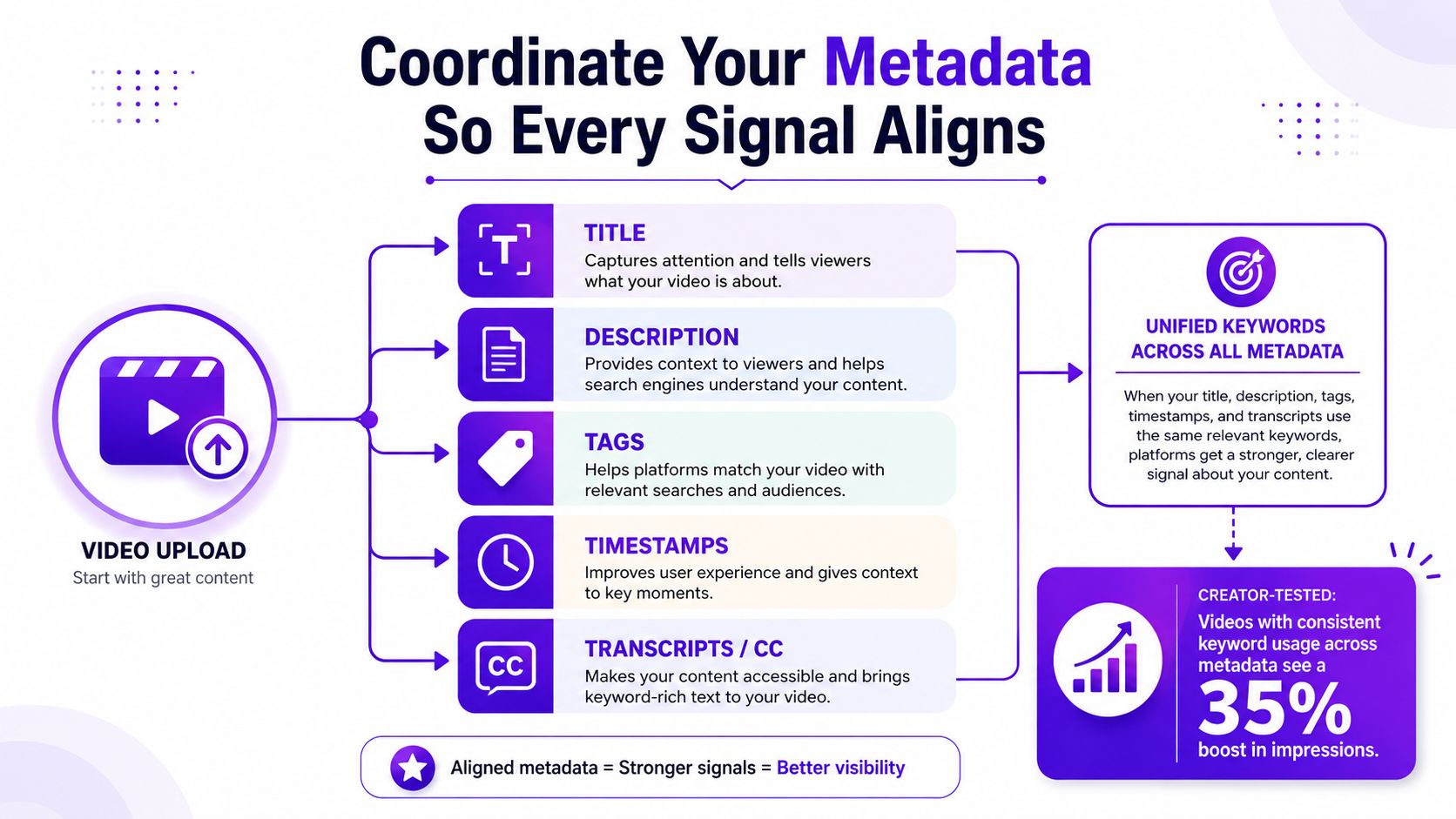
Put the primary topic near the front of the title when it reads naturally. Use the opening description lines to state who the video helps and what it delivers, then add context, links, and chapter labels below. Tags can clarify spelling variants and close topic relationships, but they shouldn't replace a strong title or accurate content.
Timestamps deserve more attention than they usually receive. They help viewers, give YouTube clearer topic boundaries, and create clean candidates for clips or Shorts. Write chapter names as useful descriptions, not vague labels. “Build a retention-focused opening” tells both the viewer and the system more than “Tip 2.”
Your transcript and captions should reflect the words spoken. Clean obvious errors, preserve natural phrasing, and make sure chapter labels agree with the content. This transcript-first approach also gives external systems more reliable material when they interpret a video for conversational search.
For upload details, channel teams can use API Direct YouTube video docs as a practical reference for working with video metadata programmatically. If you're building a repeatable publishing workflow, document which fields are generated, reviewed, and approved before release.
A natural description should front-load the answer, explain the video's boundaries, and point viewers toward relevant next steps. Keyword stuffing makes the text harder to read and can create a mismatch between the search promise and the viewing experience. More guidance on coordinating these fields appears in Taja's metadata optimization workflow.
Maya's tutorial had a familiar problem. The video sat at 248 views for three weeks, with a 3.1% CTR, 2:08 average view duration, and a sharp retention drop at the 45-second introduction. Those figures come from the scenario, not a general benchmark. The useful part is the diagnosis: the video had both a packaging problem and a delivery problem.
She first rewrote the title around a verb-led outcome instead of a broad topic label. Then she redesigned the thumbnail after comparing it with three competing frames, increasing contrast and making the face easier to read at a small size. Finally, she cut the cold open from 18 seconds to 6 seconds and inserted a pattern interrupt at 1:30.
The sequence mattered. Changing the thumbnail alone might have increased clicks while sending more viewers into the same weak opening. Fixing the opening without improving the package would have limited the number of people who started watching.
| Metric | Before Iteration | After Iteration |
|---|---|---|
| CTR | 3.1% | 7.4% |
| Average view duration | 2:08 | 4:42 |
| Impressions | Baseline | 3.2x within two weeks |
| Early retention issue | Cliff at 45 seconds | Shorter opening and pattern interrupt |
YouTube Studio's retention graph shows where viewers lose interest. Maya used it to separate the thumbnail problem from the introduction problem. CTR measures whether the package earns the click, while the retention curve shows whether the video keeps the promise after the click.
The first 30 seconds deserve close inspection because an early exit tells you that the opening didn't establish relevance quickly enough. Open with the result, the problem, or the decision the viewer came to make. Move branding, greetings, and background context after the first useful payoff.
The thumbnail earns attention. The title frames the expectation. The opening proves whether the click was justified.
For titles, Wispra's AI SEO title guide offers useful perspective on balancing search language with a compelling promise. Use that kind of guidance to generate options, then judge every option against the actual video. A title that attracts the wrong viewer can raise initial interest and damage retention.
Maya also tested thumbnails with a fixed window rather than changing several variables at once. The goal wasn't to chase a universal CTR target. It was to isolate whether a clearer visual package improved qualified viewing, then keep the version that produced the healthier combination of clicks and retention.
A long-form upload shouldn't end when the original video goes live. It can supply shorter answers for viewers who enter through Shorts, while those Shorts can point interested viewers toward the deeper explanation.
Use a 14-minute Notion dashboards video as the working example. Start by inspecting the retention curve and identifying the strongest segments. Those moments already hold attention, so they're promising candidates for subqueries, Shorts, and chapter summaries.
Find the strongest segments. Look for sections where the explanation is self-contained and the audience stays engaged. A useful segment answers one question without requiring the entire video.
Rebuild each clip vertically. Reframe the footage for a 9:16 Short, remove dead setup, and rewrite the hook so the first 1.5 seconds communicates the problem or payoff. Put the topic phrase in the opening text overlay rather than relying only on the Short's title.
Add readable captions. Correct automated transcription errors, emphasize the key phrase visually, and make the clip understandable without sound. The caption should support the spoken explanation, not compete with it.
Link the formats. Use the Short's description, pinned comment, and related-video pathway to direct interested viewers to the full dashboard tutorial. In the long-form description, add chapter labels and a concise summary that reflects the questions answered by the clips.
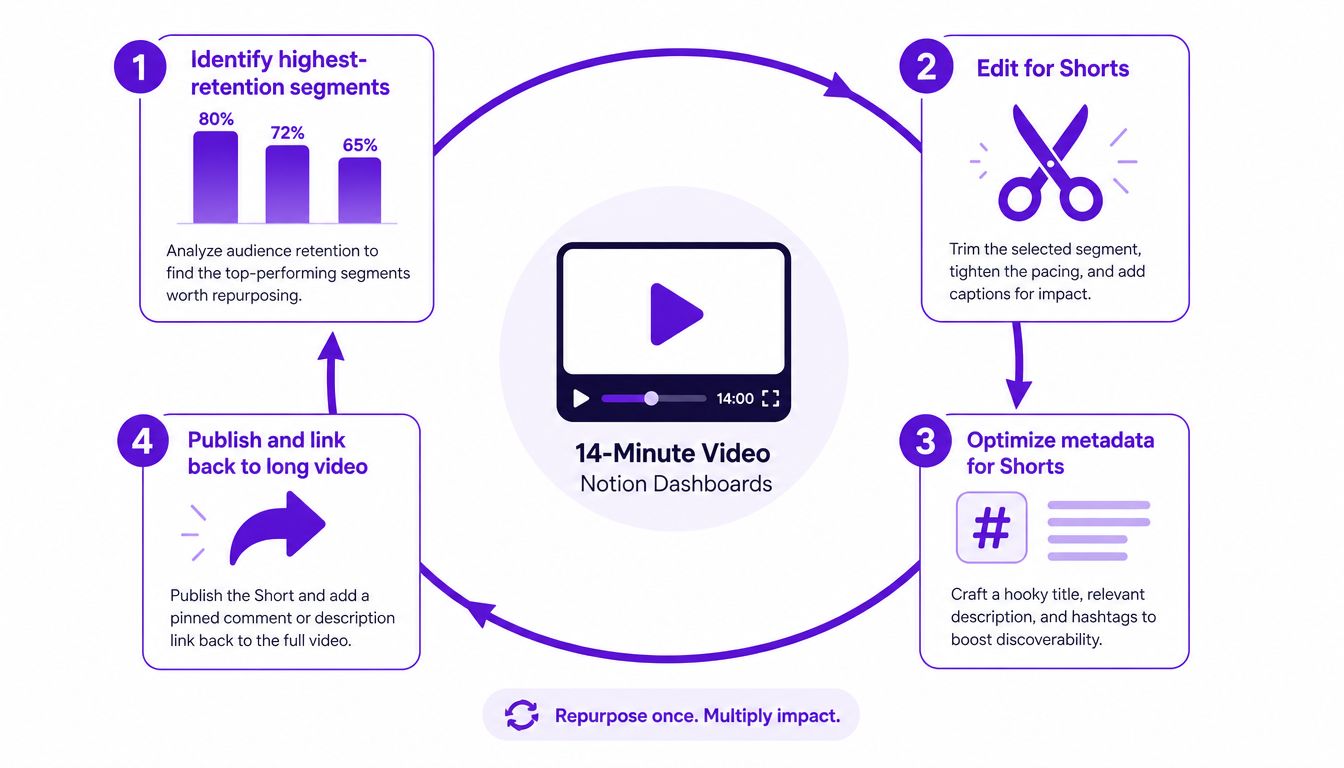
This creates a content graph rather than a pile of disconnected posts. Each asset has its own discovery surface, while the connected paths help viewers move from a quick answer to a more complete solution. Surnex's video SEO guide provides additional context for treating video optimization and distribution as a connected process.
Taja AI can compress this workflow by analyzing an uploaded video, suggesting segment cuts, generating captions and summaries, and producing YouTube-ready titles, descriptions, tags, chapters, and Short-focused text outputs. The important operational benefit is consistency. A creator can review the suggestions, preserve the strongest moments, and publish a connected set of assets without rebuilding every deliverable manually.
Don't repurpose every sentence. A clip needs a complete micro-promise, a fast opening, and a reason to continue. The long-form video remains the authority asset, while Shorts provide additional entry points into the topic.
YouTube SEO in 2026 increasingly requires creators to think beyond the isolated search result, although the specific way platforms and AI systems surface videos can change. Current best-practice discussions highlight AI search discovery, Shorts, playlists, and end screens as parts of a broader watch-path strategy, as described in Blue Things' YouTube SEO best-practice discussion.
The operating model has three connected parts. Engagement signals tell YouTube whether viewers value the experience. AI answer surfaces need clear, trustworthy text and structure to interpret the content. Watch-path design gives interested viewers an obvious next video instead of ending the session.
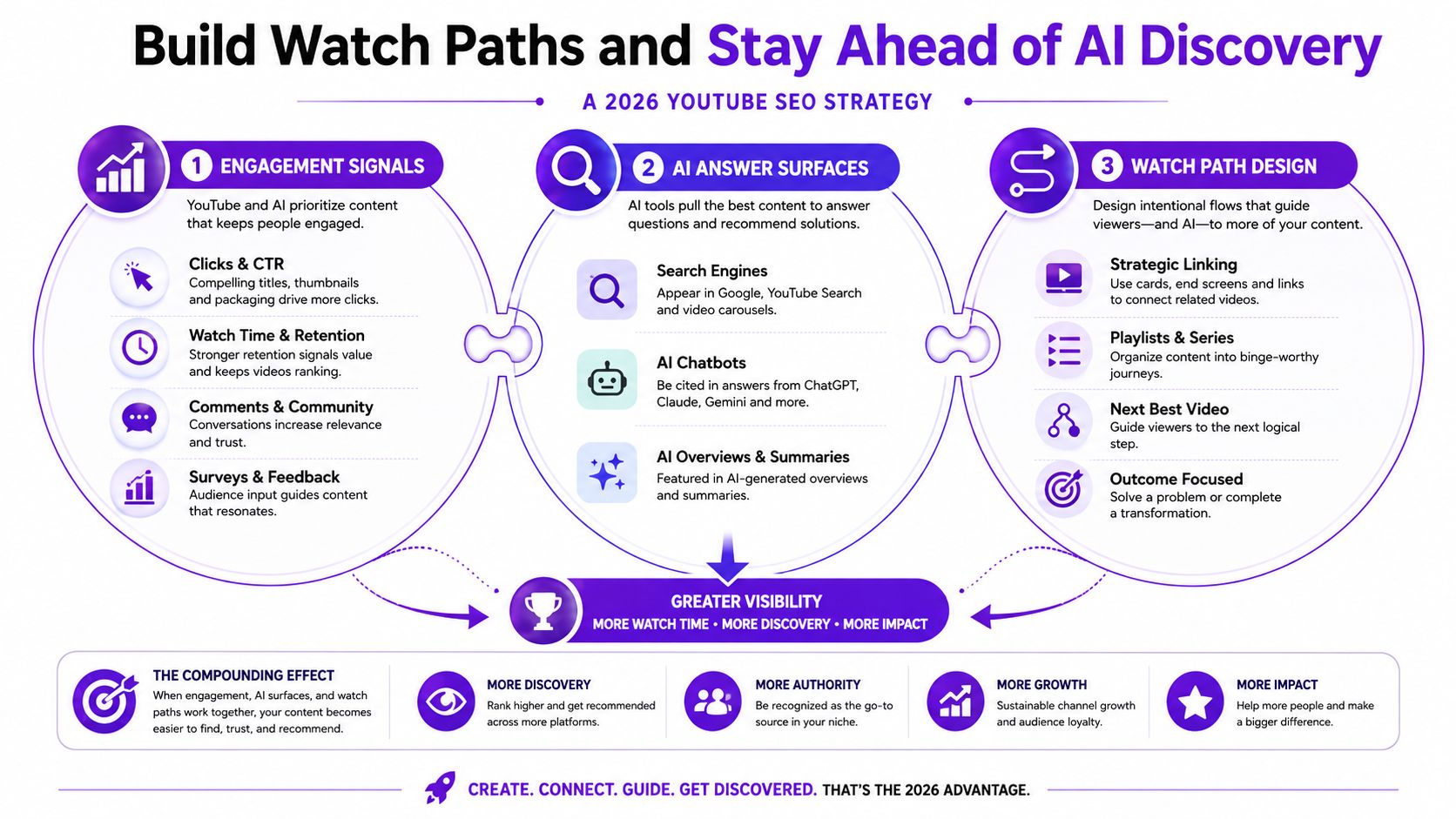
Cards, end screens, and playlists function like internal links. A video about keyword research can lead to a video about search intent. A thumbnail tutorial can lead to a retention audit. The connection should feel useful, not like an interruption.
Plan related videos around modular questions. A short segment might answer one tactical issue, while a longer video explains the complete workflow. Chapter titles and summaries make those relationships easier for people and machines to parse.
Accurate captions matter here because they preserve the actual language of the explanation. Clean structure matters because it identifies where one idea ends and another begins. Together, they improve navigation inside YouTube and make the content more legible when an external assistant retrieves a passage for a conversational answer.
Build every upload so a viewer can arrive with one question, get a useful answer, and find the next relevant question without leaving your channel.
Measure the path rather than focusing only on views. Inspect which videos receive traffic from end screens, which chapters attract movement, and where viewers stop continuing. Then adjust the next video's opening, chapter order, and recommendation target.
Run this audit before you upload. It should take only a few minutes when the keyword document, script, thumbnail, and follow-on plan already exist.
Don't treat the checklist as a one-time ceremony. Revisit it after the first analytics snapshot and record what changed. A weak CTR points toward packaging. A strong CTR with an early drop points toward the opening. Strong retention with little onward viewing points toward the watch path. That feedback turns each upload into a more informed starting point for the next one.
Taja AI analyzes your YouTube video and channel, then helps generate SEO-focused titles, descriptions, tags, chapters, captions, thumbnails, and repurposed Shorts from one upload. Visit Taja AI to turn your next video into a connected publishing workflow instead of a one-off optimization task.


We are blessed to work with leading brands & Companies


We try to make easy and simple for every professionals. Get 30 days free trial - No credit card required.


© 2025 Taja AI. All rights reserved.