.jpeg)
Content Strategy for Small Business That Actually Ships
A content strategy for small business that sets one goal, picks a few channels, turns one video into many posts, and tracks real leads.
5 min read
October 23, 2026

Learn how to share videos from YouTube to Instagram. Our guide covers linking, downloading, and repurposing videos for Reels, Stories, and Feed posts in 2026.
Written by:


You publish a YouTube video, promote it for a day or two, and then the graph flattens. The work was real. The footage, editing, scripting, thumbnails, and publishing all took time. But on one platform alone, even strong videos can stop pulling their weight faster than they should.
That’s why creators who want steady reach now share videos from youtube to instagram as a system, not as an afterthought. The question isn’t whether you can repost a clip. It’s whether you can do it efficiently enough to keep doing it every week without turning yourself into a full-time editor.
You publish a strong YouTube video. A few days later, performance slows, even though the core idea is still useful. That is the point where smart distribution decisions matter.
YouTube and Instagram are both crowded. According to SocialRails' daily upload statistics, Instagram receives 95 million photos and videos daily, while YouTube sees 720,000 hours of video uploaded daily. The same source reports 2 billion monthly active users on Instagram and 2.53 billion monthly active users on YouTube. Publishing on one platform only limits how many entry points your content has.
Repurposing solves a business problem, not just a content problem. A YouTube video already contains research, positioning, proof, and often several short moments that can perform well on Instagram. Reusing that asset extends the return on work you already paid for with time, budget, or both.
The strongest YouTube uploads usually contain several usable assets:
That matters most for solo creators, consultants, educators, and lean marketing teams. More filming is rarely the bottleneck. Distribution is.
A practical rule works well here. If a YouTube video teaches a clear lesson, shows a result, or makes a sharp point, it can usually be recut for Instagram without losing value.
Instagram and YouTube also do different jobs. YouTube holds long-form trust. Instagram earns quick attention and repeated exposure. Used together, they create a stronger content loop, especially as short-form video keeps shaping audience behavior. For a broader view of that shift, see where YouTube Shorts is heading.
If you need a basic posting walkthrough before building a larger system, Postiz has a useful guide on how to post a YouTube video on Instagram.
There are three practical options.
You can link the video in Stories or your bio. That is fast, but it does little for native reach.
You can cut clips manually. That keeps costs low, but editing, reframing, captions, exports, and posting add up fast.
You can use automation to turn one long video into multiple Instagram-ready assets. That costs money, but it removes a large amount of repetitive production work and makes weekly publishing easier to sustain.
All three methods can work. The trade-off is whether your process is cheap, fast, or scalable. For creators trying to grow without spending half the week repackaging the same footage, that trade-off decides whether repurposing becomes a system or another abandoned task.
If speed matters more than polish, linking is the fastest move.

This works well when you’ve just published a new video and want immediate traffic from people who already follow you on Instagram. It also works when you don’t have time to edit a native clip.
The simplest method is the Instagram Story link sticker.
That’s the lowest-friction way to get a YouTube link in front of people.
What it does well is speed. What it doesn’t do well is discovery. Story links are useful for existing followers, not broad reach.
If you post often, constantly swapping links can get messy.
A cleaner method is to keep your newest or most important YouTube destination in your Instagram bio, then point Reels, feed posts, and Stories toward it. This works better when your content fits a clear funnel. For example, a realtor might send Instagram traffic to a YouTube neighborhood tour. A coach might route people to a full teaching video.
Here’s the trade-off in plain terms:
| Method | Best for | Strength | Weakness |
|---|---|---|---|
| Story link | Fast traffic | Takes minutes | Expires quickly |
| Bio link | Ongoing promotion | Centralizes traffic | Requires people to take extra steps |
| DM sharing | Highly targeted outreach | Personal | Doesn't scale |
A short demo helps if you want to see one of these posting flows in action.
Linking sounds efficient because it is. But it’s also limited.
Instagram users usually want to stay inside Instagram. A Story sticker asks them to leave the app. A bio link asks them to read a caption, remember the instruction, visit your profile, and then click. Every extra step loses people.
A link is distribution. It isn't repurposing.
That’s why link-based sharing is useful as a support tactic, not the main tactic. If your goal is actual Instagram performance, native uploads usually beat posted links because they match how people consume content on the platform.
Use links when you need speed. Use native clips when you want reach, saves, shares, and repeatable growth.
You finish a strong YouTube video, open Instagram, and realize the actual work starts now. The manual path can produce better clips than any template driven workflow, but it also turns one long video into several small production jobs: clip selection, reframing, captions, cover design, export, upload, and scheduling.
That trade-off matters.
Manual repurposing makes sense when one clip has high stakes. Product launches, founder videos, customer proof, nuanced education, and opinion-led content often benefit from a human editor who knows which sentence to cut and which pause to keep. The cost is time, and time is usually the first bottleneck once posting frequency increases.
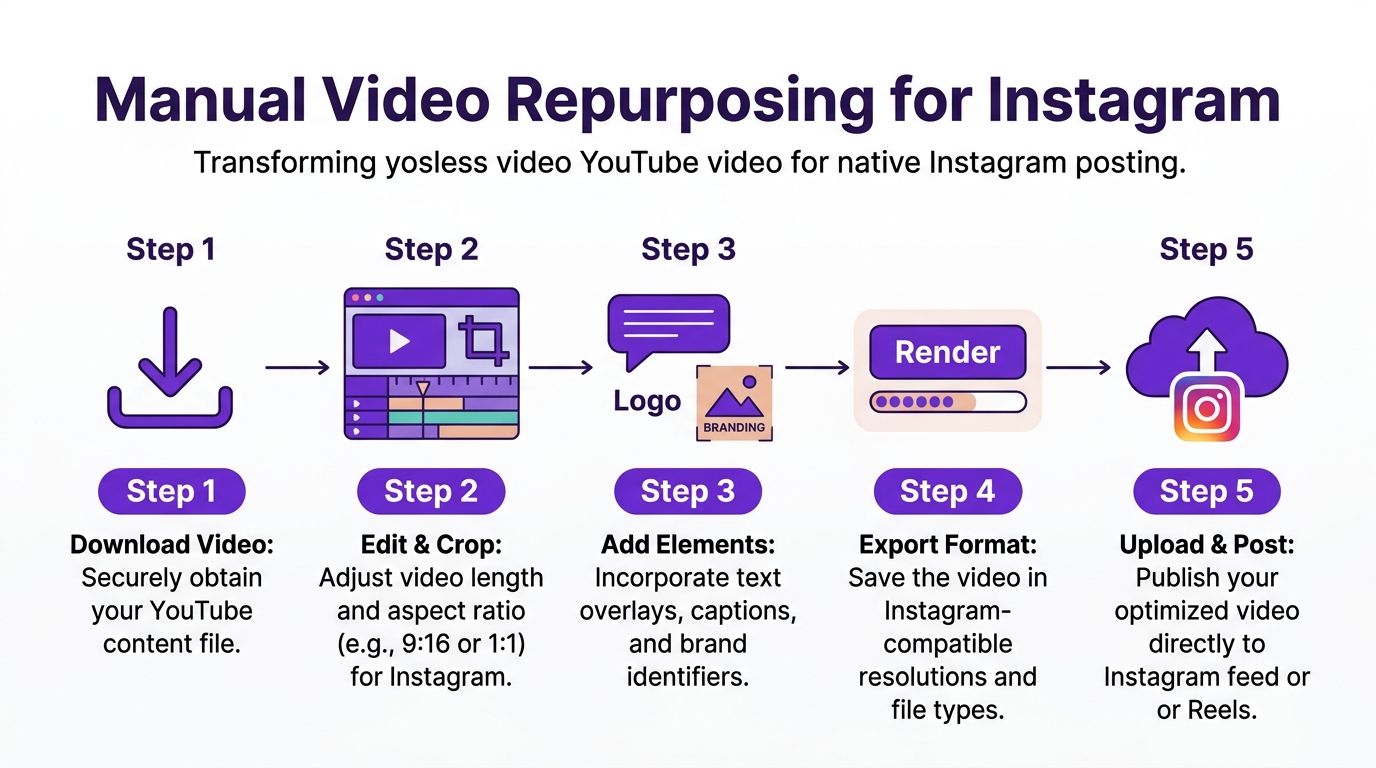
Use the highest quality source available from your local project folder or YouTube Studio. A compressed download gives you less room to crop, zoom, and reframe before the footage starts looking soft on mobile.
Then match the edit to the placement.
CapCut’s Instagram sharing resource is useful here because it covers practical export settings, vertical editing steps, and caption tools inside a workflow many creators already use.
If you need help deciding what moments are worth clipping in the first place, this guide on repurposing YouTube videos for shorts gives a solid framework for identifying excerpt-worthy segments.
Manual editing usually succeeds or fails at this point.
A weak excerpt often comes from the middle of a strong YouTube video. It made sense in the full episode because the setup happened three minutes earlier. On Instagram, that same segment feels flat, confusing, or incomplete.
A clip worth posting usually includes:
I use one simple test. If the clip never sends a single viewer back to YouTube, is it still useful, interesting, or worth saving? If not, it is not ready yet.
The job is not to preserve the original frame. The job is to preserve the point.
Most YouTube footage starts in 16:9. Instagram rewards clips that feel native to vertical viewing, so you will usually need to crop around the face, shift the frame during visual changes, punch in on product shots or demos, and cut pauses that felt fine at YouTube speed but drag on Instagram.
This is also where the manual route gets expensive. A careful vertical re-edit can take far longer than creators expect, especially when the speaker moves, slides need repositioning, or multiple people are on screen.
Many viewers start with sound off. Captions help the video make sense before audio ever kicks in, and they also improve retention because people can follow the point while scrolling in distracting environments.
Auto-captions are fine for a draft. They are rarely clean enough to publish untouched.
Fix names, technical terms, punctuation, and line breaks. Keep the text clear of Instagram interface elements. Short caption lines usually read better than full sentence blocks.
Teams using AI for social media posts often apply the same principle to video packaging too. The winning asset is usually the one that removes friction fastest, whether that means clearer on-screen text, stronger hooks, or a caption that gives the clip context before someone hits play.
Before exporting, confirm the post type and trim for that container. Reels have tighter attention economics than YouTube. Stories break into shorter viewing behavior. Feed videos can run longer, but they need a stronger reason to exist because they compete with faster formats.
That changes the edit.
A great YouTube moment is not automatically a great Instagram clip. Good manual repurposing means choosing the right slice of the source, then shaping it for the way Instagram is consumed.
The video may be yours. The audio inside it may not be reusable everywhere.
Music cleared for YouTube does not always carry over to Instagram. The same applies to stock assets, overlays, or third-party clips licensed for one use case. Check the source files before publishing natively, especially if the original video included licensed music beds or borrowed media.
Manual repurposing gives you the best control over message, pacing, and polish. It is often the right choice for flagship content.
It is a poor choice for scale if you need multiple clips every week and you are doing all of it by hand. At that point, "free" usually means paid for with editing hours, inconsistency, and creator fatigue.
The manual route breaks down when output matters more than craft on a single clip.
If you’re producing one YouTube video every week, or sitting on a backlog of webinars, podcasts, sermons, interviews, walkthroughs, or client education videos, the bottleneck usually isn’t ideas. It’s production time. Editing every excerpt by hand is possible. Sustaining that pace usually isn’t.
A useful benchmark comes from VidPros’ discussion of cross-posted YouTube clips and vertical optimization. It says vertical videos achieve 2.5x higher completion rates on Instagram, yet only 22% of cross-posted YouTube clips are pre-formatted correctly. The same source notes tools like Taja AI can save 2.3 hours per video by auto-generating vertical 9:16 clips.
That gap is the automation story. Most creators don’t need help understanding that vertical performs better. They need help getting there repeatedly.
Paid repurposing tools aren’t just charging for editing. They’re charging for reduced friction.
A solid AI workflow can handle tasks such as:
That matters for teams and solo operators alike. The time drain is rarely one giant task. It’s ten small tasks that pile up after every upload.
This is the honest trade-off.
| Approach | What it gives you | What it costs |
|---|---|---|
| Manual editing | Precision and control | Time and repetition |
| AI repurposing tools | Speed and consistency | Subscription cost and review time |
| Hybrid workflow | Scale with some polish | More process management |
Automation isn’t magic. It still needs review. You may still tweak hooks, correct captions, replace a cover, or change a crop on a talking-head clip.
But it removes the slowest part of the job, which is starting from zero every time.
When creators say they need “more content,” they often mean they need a workflow that can survive a busy week.
For people exploring the broader category, this article on AI for social media posts gives a helpful overview of where AI fits into publishing operations.
Taja AI is one option in this category. It’s built to turn long-form videos into platform-specific assets, including vertical clips, captions, thumbnails, and scheduled posts, from a single workflow through its video repurposing AI tool.
That kind of setup is especially useful for podcasters, real estate teams, educators, and small businesses with lots of existing video and very little spare editing time.
Free tools look cheaper on paper. Sometimes they are.
But if manual repurposing makes you post inconsistently, or leaves finished YouTube videos sitting idle because no one has time to cut them down, the hidden cost is lost distribution. Paid automation makes the most sense when it replaces recurring labor, not when it replaces judgment.
Use manual editing when the clip is high stakes or creatively nuanced.
Use automation when the bigger problem is scale.
A good clip can still underperform if the packaging is lazy.
Instagram doesn’t only evaluate the video file. People respond to the first frame, the caption, the cover, and whether the post feels worth engaging with. That’s why publishing matters almost as much as editing.

A strong benchmark comes from Socialinsider’s video statistics. It reports that Instagram Reels perform best at 60 to 90 seconds, averaging 5,400 views, which is a 208% increase over clips under 15 seconds that average 1,750 views. For anyone trimming YouTube footage, that gives you a practical target rather than guessing.
Don’t treat the caption like an afterthought.
The best captions do one of three things:
If the Reel explains one mistake, the caption can name that mistake directly. If the clip shows a result, the caption can explain what led to it.
Instagram shows your content in grids, tabs, and previews. If the cover is messy, the content looks disposable before anyone watches it.
Use covers that do these jobs well:
A polished cover also helps your profile look intentional instead of random.
Posting rule: If the first frame is weak, the rest of the clip often won’t get a chance.
Most creators don’t have a content problem. They have a consistency problem.
The fix is simple in theory and annoying in practice: schedule posts in advance. Whether you use Meta’s native tools or a broader publishing dashboard, the goal is the same. Remove daily posting decisions from your calendar.
A workable weekly system looks like this:
Not every Instagram post needs to push traffic out.
Sometimes the right CTA is a comment. Sometimes it’s a save. Sometimes it’s “watch the full version through the link in bio.” Match the call to the clip’s role.
If the post is top-of-funnel, keep people inside Instagram and build engagement.
If the clip is clearly a teaser for a deeper tutorial, then send people to the full YouTube video.
That distinction keeps your Instagram content from feeling like constant exit-intent marketing.
The biggest shift isn’t technical. It’s strategic.
When you share videos from youtube to instagram consistently, you stop treating each upload like a single event. One video becomes a content source. That changes how you plan, edit, publish, and measure effort.
The three paths are straightforward.
Linking is fast and useful when you want immediate traffic.
Manual editing gives you control and can produce strong native clips if you have the time.
Automation makes the system repeatable when you need scale more than handcrafted editing on every post.
None of these methods are wrong. The wrong move is letting finished YouTube content die after one release cycle.
A practical next step is simple. Take your next YouTube upload and choose one method from this guide. Post one Story link, or cut one Reel manually, or run the video through an automation workflow and publish a week’s worth of clips.
That’s how a YouTube creator becomes a multi-platform operator. Not with more filming. With better reuse.
Usually, the bigger issue is tracking, not direct damage.
A useful note from this YouTube discussion of embeds, referral data, and analytics fragmentation is that direct embeds on other sites can preserve view counts, but Instagram often strips referral data unless you use bio links. The same source notes fragmented analytics are a problem that 47% of marketers struggle with.
So if you upload a native Instagram Reel, don’t expect clean YouTube attribution from that post alone. If your goal is measurable YouTube traffic, use a bio link and mention it clearly.
If it’s your video, you generally control the core content. The risk usually sits inside the video, not around it.
Check music, stock media, guest footage, or any licensed elements that may have been cleared only for one platform or one use case. Native Instagram posting can trigger a different review environment than YouTube.
Use a Story link when the goal is direct traffic from existing followers.
Use a Reel when the goal is discovery, reach, and stronger native engagement on Instagram itself.
Those are different jobs. Treating them as interchangeable is where most creators get mediocre results.
If you want a faster way to turn one YouTube video into Instagram-ready clips, captions, and scheduled posts without rebuilding the workflow every time, Taja AI is built for that use case. It helps repurpose long-form video into platform-specific assets so you can stay consistent without spending your week inside an editor.


We are blessed to work with leading brands & Companies


We try to make easy and simple for every professionals. Get 30 days free trial - No credit card required.


© 2025 Taja AI. All rights reserved.