.jpeg)
10 Best YouTube Video Thumbnail Maker Tools for 2026
Compare the top YouTube video thumbnail maker tools by features, pricing, ease of use and integrations, plus what makes thumbnails get clicks.
5 min read
October 13, 2026

Learn how to repurpose content in 2026 with a clear workflow, platform tips, and tools that turn one asset into weeks of posts without burning out.
Written by:


You publish a thoughtful podcast, webinar, or tutorial, share it once, and then move on because the next post is already due. The recording contains useful ideas, but your audience sees only the original upload, while you spend the next week trying to invent something new from scratch.
Content repurposing fixes that problem when you treat it as an operating system rather than a clipping trick. One source asset becomes a set of focused, platform-specific units, each with its own hook, format, accessibility layer, distribution label, and measurement goal. A 2023 SEMrush industry summary reported that 94% of marketers repurposed content or planned to do so, while 42% said updating and repurposing existing content contributed to successful campaigns and 46% identified repurposing as the best-performing content marketing strategy (2023 content repurposing statistics).
The practical question isn't whether repurposing works in theory. It's how to build a workflow that produces useful assets without turning a small team into a low-grade editing department.
A creator records a strong forty-minute podcast on Monday. The video goes to YouTube with a clean title and thumbnail, gets a handful of views, and then disappears into the content archive. By Wednesday, the calendar demands a LinkedIn post, an Instagram Reel, an email, and something for the next week. The creator knows the answers are already inside Monday's recording, but rebuilding each post feels almost as difficult as creating new work.
That pattern creates three costs. The original idea has fewer opportunities to reach people through search and recommendation feeds. The creator loses the long-tail value of a useful asset because the recording has only one distribution path. Most damaging, the creator starts every week with a blank page, even though the raw material already exists.
Repurposing isn't copying a video into several upload boxes. Cross-posting can save time when the format travels well, but genuine repurposing changes the unit for its audience and channel. A podcast insight might become a short vertical video, a written argument for LinkedIn, a newsletter section, a carousel, and a search-focused article. The idea stays consistent, while the delivery changes.
Operating rule: Build a portfolio of platform-shaped units from every strong source asset. Don't force one file through every distribution pipe.
The scale of this model explains its appeal. Independent 2026 industry reporting says one blog post can become 8 to 12 separate content pieces, while another estimate in the same reporting set says repurposing can extend content lifespan by 300% on average across channels (repurposing ROI statistics). Those figures aren't a promise for every creator, but they show why the workflow has moved beyond a productivity shortcut.
Start with the source asset, not the platform checklist. Decide what the recording teaches, divide it into single-purpose ideas, then choose the best container for each idea. If you're trying to coordinate several channels from one source, a practical overview of managing social media from one app can help you think in terms of distribution systems rather than isolated posts.
A durable workflow has five phases. Each phase produces a clear unit of work and a decision that prevents wasted editing.
Log the source asset before cutting anything. Record its title, URL, publication date, transcript location, owner, permissions, and primary business objective. The objective might be discovery, email growth, product education, or sales conversations.
The gate is simple: what should this asset help someone do next? Without that answer, editors select entertaining moments that may attract attention but don't support the business.
Break the transcript and recording into narrow units. Each unit should carry one claim, one story, one objection, or one teaching point. A ten-minute explanation may contain several useful units, but a short clip should not ask viewers to understand the entire episode.
Mark the beginning and end of each unit, write a one-sentence summary, and note its intended audience. This gives your editor a decision-ready list instead of a vague instruction to “find good clips.”
Assign each unit to a container that matches the platform and objective. A sharp opinion may work as a LinkedIn video or X post. A visual demonstration may need a Reel or Short. A detailed explanation may deserve a blog section, email, or YouTube chapter rather than a rushed clip.
The gate is relevance. If the original moment doesn't fit the channel's viewing behavior, rewrite or reject it.
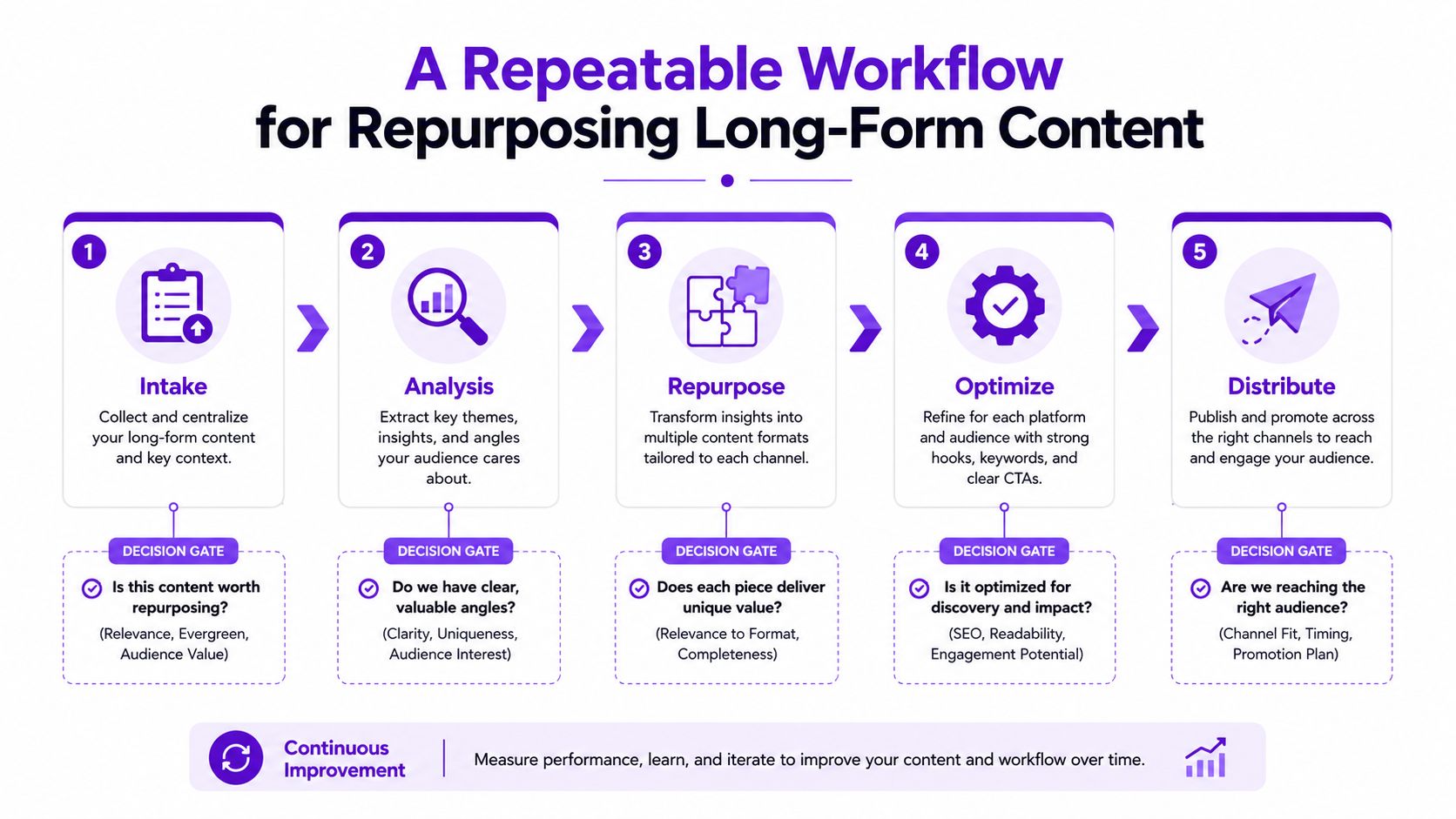
Add captions, a corrected transcript, descriptive alt text, on-screen context, and a search-aware description before scheduling. Auto-generated captions are useful drafts, but names, technical terms, and false starts need human review.
Create one clean transcript as the source for blog copy, email language, captions, and social descriptions. This reduces repeated work while keeping the message consistent.
Schedule the finished units according to each platform's publishing rhythm. Give every asset a clear internal label, such as source name, topic, format, audience, and campaign. Add UTM-style campaign labels where appropriate so analytics can connect a post to a visit, signup, inquiry, or sale.
Most workflows fail at the first gate. Teams jump straight into clipping because editing feels productive, but a fast edit of the wrong moment is still wasted work.
The same idea should rarely leave your production system as the same MP4 with a new caption. Each platform gives the viewer a different reason to stop, and the edit needs to make that reason obvious immediately.
| Platform | Aspect Ratio | Ideal Length | Hook Window | Native Caption Style |
|---|---|---|---|---|
| TikTok | Vertical 9:16 | Short, fast-moving lesson or story | Open on the tension or payoff | Conversational text, searchable topic language |
| Instagram Reels | Vertical 9:16 | Focused visual or spoken takeaway | Lead with a clear visual and claim | Concise caption with context and selective hashtags |
| YouTube Shorts | Vertical 9:16 | One complete insight | Put the strongest idea first | Direct title and description built around the topic |
| LinkedIn video | Vertical or square, depending on creative | Commentary with professional context | State the business implication early | Thoughtful native post that adds interpretation |
| X | Square, vertical, or landscape | Short clip supporting a written point | Pair the clip with a sharp written premise | Text-led post, reply context, and conversation prompt |
Treat those cues as editing decisions, not upload settings. On TikTok, faster cuts and a spoken opening can work well when the subject supports that pace. Reels often benefits from a clear visual identity and readable burned-in captions. Shorts needs the single strongest insight near the start, because a slow introduction wastes the clip's opportunity.
LinkedIn video needs a different framing. The clip should explain why the point matters to a professional audience, rather than just presenting an isolated quote. On X, the written post can carry the argument while the video supplies evidence or personality.
If the first frame wouldn't stop a scroll on that specific feed, the asset needs a re-cut, not a repost.
A common failure is preserving the original podcast introduction, logo animation, guest greeting, and generic caption on every channel. The viewer doesn't care that this is episode twelve. They care whether the first seconds answer a relevant question, challenge an assumption, or show a useful result.
Build a master unit from the source, then make platform edits from that unit. Change the first frame, opening line, crop, text density, pacing, caption, and call to action. The core idea remains stable, but the experience feels native.
Accessibility belongs in the first production pass, not at the end of the publishing queue. Many viewers encounter video without sound, and accurate captions help them follow the argument while giving you usable text for descriptions, articles, emails, and social posts.
Start with auto-generated captions, then review every proper noun, product name, technical term, and sentence break. A caption that misstates the central concept can damage trust faster than a missing caption. Tools such as a video caption generator can accelerate the draft, but a human should approve the final text.
Export a corrected transcript for every long-form asset. Remove verbal clutter, identify the strongest passages, and preserve the language your audience uses. That transcript can feed a blog post, newsletter, show notes, carousel copy, and on-screen captions without forcing each person on the team to replay the recording.
Use platform-native descriptions rather than pasting the same paragraph everywhere. Put the target topic early, explain the value of the specific asset, and add a next step that matches the viewer's intent. Hashtags can support discovery where they remain useful, but they shouldn't replace a clear description.
For website content, follow practical search fundamentals such as matching the page to a real audience question, using descriptive headings, and making the content easy to use. SEO advice for churches from HolyJot offers a useful example of how a focused organization can connect audience needs, page structure, and discoverability without stuffing keywords.
Write alt text for every meaningful image and thumbnail. Describe what the image communicates, not a list of keywords. Add chapter markers to long YouTube videos so viewers can go directly to relevant sections, and use the chapter titles to clarify the page's subject matter.
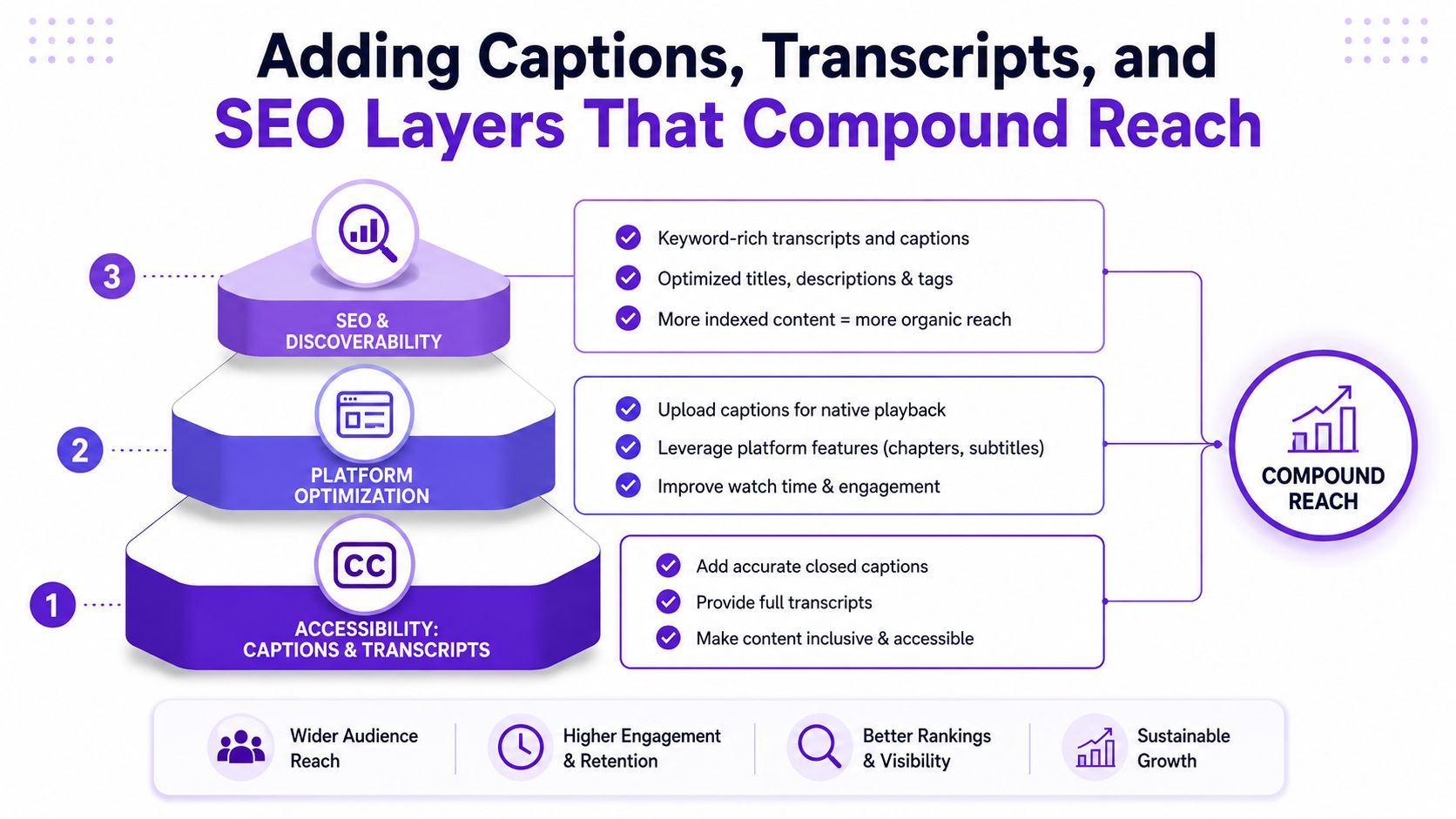
Think of these layers as a connected system. The transcript supports captions. Captions reveal clip candidates. The corrected text supports descriptions and SEO pages. Alt text and chapter markers improve access and navigation. One careful cleanup pass can therefore improve every derivative rather than only the original video.
Repurposing without measurement means producing more variations without learning which ones deserve another edit. A 30/60/90 loop ties review to the asset's lifecycle and separates early distribution signals from later business outcomes.
| Checkpoint | Metric Focus | Specific KPIs to Track | Decision to Make |
|---|---|---|---|
| 30 days | Efficiency and reach | Hook rate, average view duration, saves, shares, impressions | Keep, revise, or retire the source moment and format |
| 60 days | Audience response | Cross-platform views, clicks, downloads, inquiries | Choose the strongest channel and derivative |
| 90 days | Commercial impact | Follower growth, email signups, inbound messages, assisted conversions | Invest more, refresh the asset, or change the offer path |
Look for evidence that the opening earned attention and that the content delivered on its promise. A clip with strong impressions but weak viewing depth may need a better first frame or tighter setup. A clip with modest reach but strong saves and shares may have a useful idea that deserves a different presentation.
Don't judge every asset by raw views. Compare the unit with your own original posts and with other derivatives from the same source.
The same idea may attract a different response as a Reel, Short, LinkedIn video, or email section. Track each version separately with a consistent asset label. Review clicks, downloads, and inquiries, not just platform activity.
Format selection becomes practical here. If the written version generates qualified responses while the video version earns passive reach, keep both, but assign them different jobs.
The later review should ask whether repurposed assets influenced a meaningful business action. Use analytics annotations, campaign labels, and assisted-conversion views where available. Attribution won't be perfect, but an unlabeled content library makes useful analysis impossible.
Measurement habit: Write the decision beside every checkpoint. “Make more,” “rewrite the hook,” and “stop using this format” are more useful than a spreadsheet full of disconnected metrics.
A 2026 industry analysis reported 47% more content at 35% lower cost per piece for teams using repurposing workflows, while another estimate in the same source set said repurposing could reduce per-piece costs to 20 cents on the dollar compared with creating from scratch (repurposing ROI analysis). Treat those figures as industry-reported estimates, not guaranteed outcomes. Your loop determines whether the economics work in your operation.
Manual editing gives you control. Watching the full recording yourself can reveal a subtle exchange, a pause before a strong point, or an awkward cut that an automated system would miss. It also keeps every decision close to your voice and audience.
The drawback is throughput. Manual transcription, clip selection, caption correction, resizing, copywriting, and scheduling can consume the time you intended to spend on sales, delivery, or product work.
AI tools change the trade-off. Taja AI, Opus Clip, and Descript can assist with transcription, candidate selection, caption drafts, clip creation, and platform copy. Their most useful jobs are usually:
The limitations matter. AI can miss the emotional reason a moment works, flatten a distinctive voice, choose a technically complete clip with no tension, or remove context that a specialist audience needs. It can also generate captions that look polished while misrepresenting a name or claim.
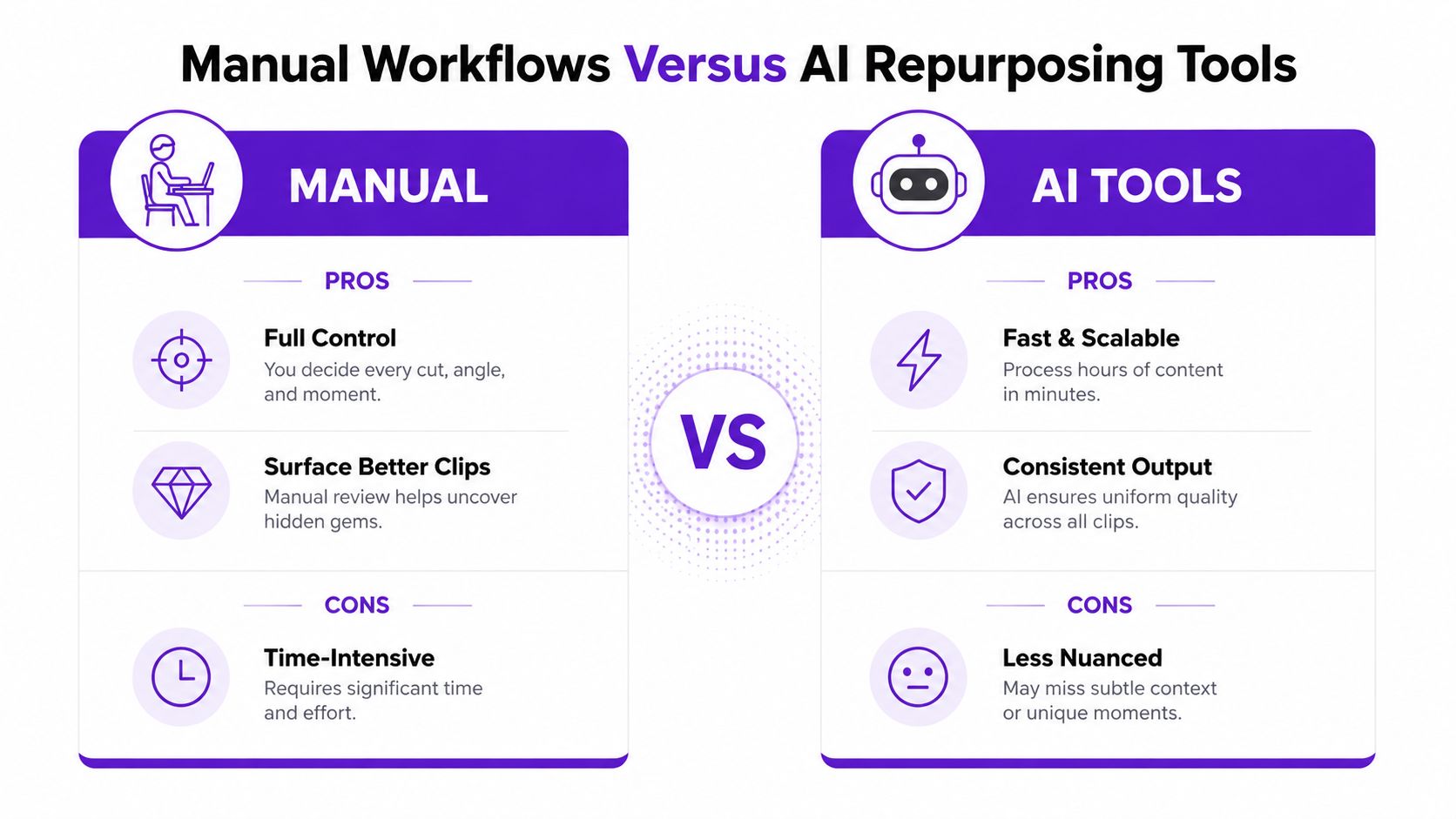
A sensible division of labor is to let software handle the repetitive first pass and reserve human attention for selection, tone, factual accuracy, and final platform edits. Taja AI's AI content repurposing tool is one example of a workflow that turns a long-form video into candidate short clips, captions, thumbnails, blog content, and social posts.
Use automation to increase the number of options, not to eliminate judgment. The human pass is where the content stops looking like an automated extract and starts sounding like a deliberate piece of communication.
A weekly cadence works when each block has a defined input and output. The schedule below suits a solo operator or a small team because it limits meetings and keeps the source asset moving through the system.
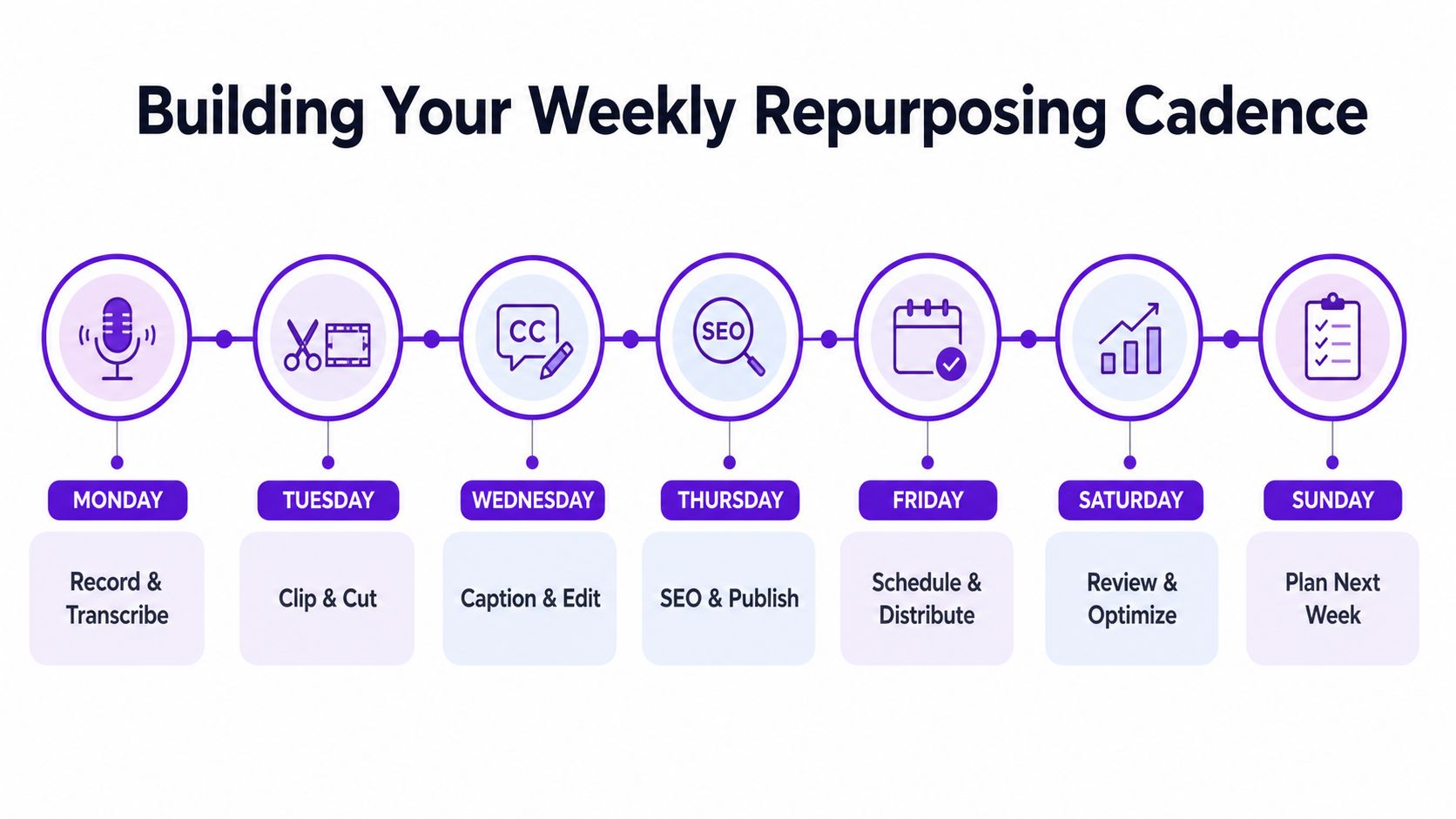
Monday is the source session. Record one pillar asset in a focused session, capture the primary objective, and send the file for transcription. A ninety-minute source session can feed two weeks of planned material when the topic has enough depth and the recording stays organized.
Tuesday is selection day. Review the transcript, mark atomic units, and choose the moments that support your objective. The output is a short list of approved claims, stories, and lessons, not a folder full of random clips.
Wednesday is the editing block. Create the first cuts, correct captions, add on-screen hooks, and export the versions that need human review. Complete captioning within twenty-four hours while the context remains fresh.
Thursday is the platform pass. Rewrite openings, descriptions, crops, calls to action, and text overlays for the destinations you use. Prepare the transcript-derived blog or email section at the same time.
Friday is distribution and review. Schedule the approved assets, apply campaign labels, and reserve a forty-five-minute review slot for your 30/60/90 metrics. Record one decision for each active content family.
The weekend doesn't need another production scramble. Use it for community replies, idea capture, and identifying questions that could shape the next pillar topic.
For a first Monday, keep the scope deliberately small:
Teams often struggle with scalability rather than ideas. One 2025 industry report said only 1 in 3 B2B teams had a scalable content process, and 47% of enterprise respondents listed content repurposing as a challenge (2026 content repurposing workflow reporting). A smaller cadence that ships consistently will outperform an ambitious system that collapses after one busy week.
Taja AI helps turn long-form video into ready-to-edit clips, captions, thumbnails, blog content, and platform-specific posts so your source asset can move through a repeatable repurposing workflow. Upload a recording, review the suggested derivatives, and visit Taja AI to start building a content cadence that fits your business.


We are blessed to work with leading brands & Companies


We try to make easy and simple for every professionals. Get 30 days free trial - No credit card required.


© 2025 Taja AI. All rights reserved.