.jpeg)
Impressions Click Through Rate: What Good Looks Like
Learn what impressions click through rate means, how to calculate it, realistic benchmarks for YouTube, TikTok and Instagram, and how to improve it.
5 min read
October 30, 2026

A practical caption generator for videos workflow — pick a tool, upload, edit, export SRT/VTT, and optimize for YouTube, TikTok, and Instagram in 2026.
Written by:


You finish the cut, watch the last frame lock in, and then the real work starts. The timeline looks clean, the color grade is done, and every stakeholder wants the file now, but the caption pass is still waiting. If you've ever spent another hour nudging subtitle lines after export, you already know why a caption generator for videos is no longer a convenience tool, it's part of the delivery pipeline.
That shift is visible in how people watch. Sonix cites a survey showing 70% of Americans now watch content with subtitles, and it also reports that subtitled videos can increase viewership by up to 40% in some cases, which is why captions now affect more than accessibility compliance, they affect how far a video travels and how long people stay with it, especially on social feeds and short-form platforms. Sonix also cites market research putting the global AI subtitle generation market at USD 1.03 billion in 2023 with a projected rise to USD 7.42 billion by 2032 at a 24.5% CAGR subtitle generation trends analysis. The practical takeaway is simple, captions aren't the last polish anymore, they're the connective layer between one source video and a wider distribution system.
A good example is any producer working from a long interview, webinar, or client case study. The caption file doesn't just make the video readable, it becomes the raw material for clips, searchable text, social-safe exports, and multilingual repurposing. If you want a broader production lens on that workflow, the video productions services guide shows how captioning fits into the full service stack rather than sitting outside it.
A finished edit used to mean the hard part was over. Now it often means the caption queue has opened, and whoever owns distribution has to decide whether the video will live as one asset or become five or ten assets with different text treatments. That's the primary reason captions matter more than they used to. They sit between the master file and everything that follows.
The behavior change is already baked into viewer habits. When subtitles become the default for most viewers, captions stop being an accessibility add-on and start shaping whether a clip survives sound-off browsing, fast scrolling, and skim reading. The effect isn't only on the people who need captions to understand speech, it's on everyone who wants the message quickly without adjusting volume or rewinding.
A lot of teams still write captions like they're filing paperwork. That mindset breaks down the moment one long-form video has to power several outputs. A single transcript can feed on-platform captions, sidecar files, social cuts, blog drafts, and teaser scripts, so the caption layer becomes reusable infrastructure instead of a one-time fix.
That's why captioning decisions affect the rest of the pipeline. If the transcript is sloppy, every repurposed asset inherits the same mistakes. If the timing is awkward, burned-in captions look cheap and sidecar files become a cleanup job. If the text is clean, captioning turns into a force multiplier rather than a bottleneck.
Practical rule: treat captions like an edit decision, not a formatting task. The cleaner the transcript, the easier every downstream cut becomes.
For teams that publish from long-form content, that change is bigger than most tutorials admit. A creator with one talking-head upload can survive manual edits. A marketer, podcaster, or local business with a recurring content calendar cannot, because the caption step sits inside a larger publish-repurpose-distribute loop. That's where the right workflow saves time and the wrong one eats it.
Most tool roundups compare features like they're shopping for the same job. They're not. A solo creator posting a few clips a week needs fast cleanup and decent styling. A team working through a backlog needs batch handling, export discipline, and a way to keep captions consistent across formats.
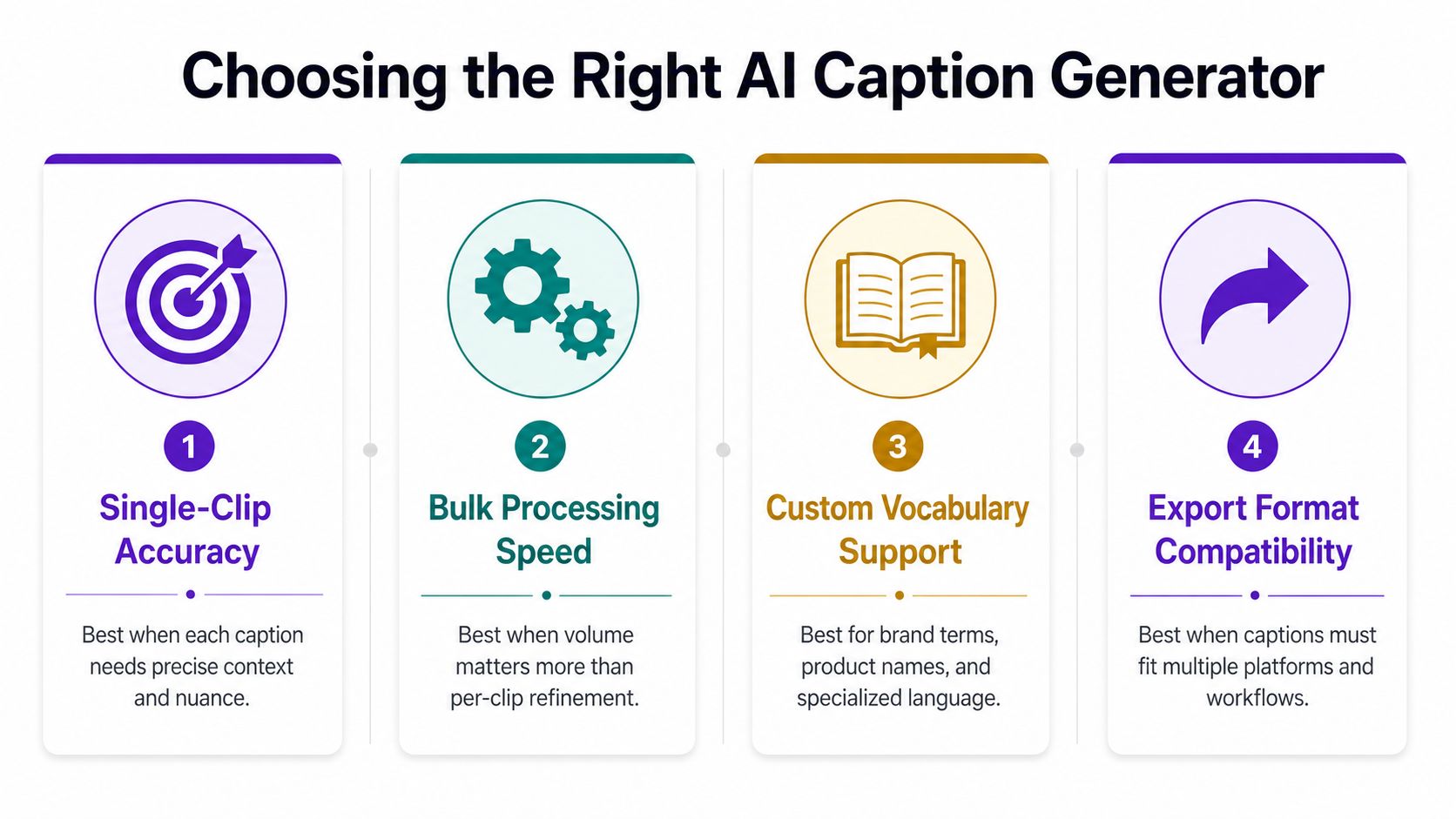
Start with accuracy, but don't stop there. Kapwing positions its auto-subtitle generator as 99% accurate and supports export formats such as SRT, VTT, and TXT Kapwing subtitles. Choppity says its speech-to-text AI transcribes with 95%+ accuracy and can post directly to TikTok, Instagram, YouTube, Facebook, and LinkedIn Choppity free video caption generator. Those claims point to two different priorities, one is polished file output, the other is publication flow.
The better question is what you're trying to ship.
If your workflow lives inside a repurposing stack, an embedded transcript editor can be enough. If your workflow is subtitle-first, a dedicated caption tool is usually easier to control. If your team publishes the same source across several platforms, a tool that can move captions into platform-specific publishing is often less annoying than a standalone editor.
A platform like Taja AI fits a different problem set, because the caption step sits next to clipping, thumbnails, blogs, and platform posts instead of standing alone. That matters when the task is turning one long recording into multiple deliverables. If you only need subtitles once, a simpler editor may be enough. If you need captions to travel with the rest of the content system, the workflow architecture matters more than the prettiest subtitle font.
The upload button hides most of the work. Under the hood, the file gets demuxed, the audio track is isolated, speech recognition runs, and the output is turned into timed text for formats like SRT or WebVTT, which is why formatting and timing are usually the bottlenecks rather than the caption editor itself Mux auto-generate captions, transcripts, translations. If the audio is messy, the transcript inherits that mess.
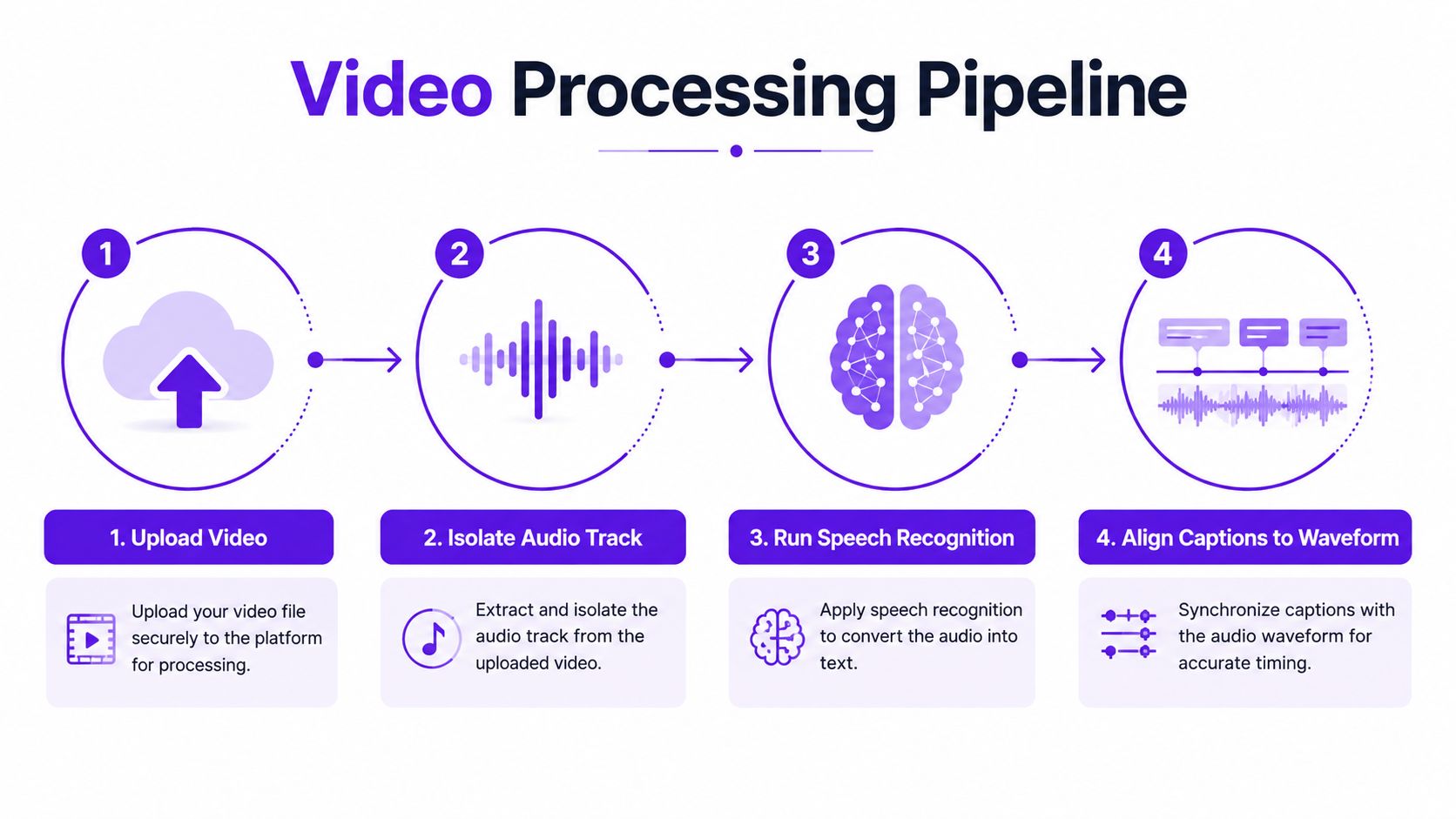
The first failure mode is obvious once you've lived through it, heavy background music masks speech. The second is harder, multi-speaker dialogue can confuse timing and speaker separation, especially when people interrupt each other or talk over audio cues. Both issues make the transcript editor look worse than it is, because the source file already fought the model.
Clean audio helps more than most creators expect. So does giving the system an easier transcript path, which means a tight script, clear speaker turns, and fewer overlapping voices. If you know a section has fast back-and-forth dialogue, upload the cleanest master you have instead of a compressed social export. That gives the caption generator better waveform detail and less chance of drifting on timing.
This is the choice many guides skip. A clipped segment is fine when you already know the exact section you want captioned, but a master long-form file is usually better when the plan is repurposing. The reason is simple, the transcript created from the full recording gives you more reusable text for future cuts, while the clip-only upload can trap you in a narrow edit path.
Upload the file that gives the caption engine the most context, not just the shortest runtime.
A quick preflight saves time later. Use the source with the cleanest dialogue, trim dead air before upload if your tool struggles with long silences, and make sure speaker names are obvious in the recording notes. That's enough to prevent a lot of rework once the transcript lands in the editor.
Auto-captions are a draft, not a delivery asset. The fastest editors don't read every line with equal attention, they work in order, fixing the words that matter most before they start polishing style. That approach keeps you from spending twenty minutes perfecting line breaks on a caption that still mislabels a product name.
Start with proper nouns, product names, client names, streets, and acronyms. Those errors are the most visible, and they create the most damage if they survive into repurposed clips. Then strip filler words and false starts where they distract from the message. Last, adjust line breaks so each caption reads naturally instead of chopping phrases in awkward places.
A good transcript editor lets you change the text and the timing in the same place. That matters because it avoids the export-import loop, where you fix one file, regenerate another, and lose alignment in the process. Several legacy workflows still separate those steps, but they're slower than they need to be for modern publishing.
Brand voice in captions isn't about sounding fancy. It's about consistency. If you always capitalize certain product terms, always spell a service name the same way, and always keep punctuation clean, the captions feel intentional even when they're created quickly.
A simple checklist works better than a giant style system.
The Stanford CS231n project note on a lightweight captioning pipeline built around a CLIP ViT-B/32 vision encoder, multi-head attention for temporal structure, and a partially fine-tuned GPT-2 decoder is a reminder that model choice matters as much as formatting Stanford CS231n project report.pdf). In practice, that means the better your source alignment and wording discipline, the less the model has to guess.
Format choice is where caption projects waste time. Teams often export whatever the tool suggests first, then discover the platform wants something else, the designer wants a burned-in version, and the web team wants the sidecar file. Choosing the output early saves a second pass.
SRT is the most familiar sidecar format for many teams because it's widely accepted and simple to move between tools. WebVTT is also a sidecar format, but it's often better when your delivery environment expects web-native caption handling or needs styling flexibility. Burned-in captions are different, because they're part of the video itself and can't be toggled off by the viewer.
| Caption export formats by use case | Best for | Limitations |
|---|---|---|
| SRT | Broad compatibility, accessibility, simple delivery | Styling is limited |
| WebVTT | Web playback, structured delivery, some styling support | Not every platform treats it the same way |
| Burned-in captions | Social feeds, sound-off viewing, fixed visual branding | Not editable after export |
Kapwing's support for SRT, VTT, and TXT is a good example of why export flexibility matters Kapwing subtitles. A team that republishes the same clip across web, email, and social can often use more than one format from the same transcript. That's why most production workflows end up exporting both a sidecar file and a social-ready version.
If the platform accepts sidecar captions, use them when you can. If the video is destined for a sound-off feed, burned-in captions are usually safer because viewers don't need to turn anything on. If the text needs to be reused later, keep the editable file somewhere outside the final render so you don't have to rebuild the transcript from scratch.
The main mistake is exporting for the tool instead of the platform. The better habit is to ask where the video will live first, then choose the caption file that fits that environment. That one decision removes a lot of avoidable cleanup.
A caption file can be technically correct and still perform badly once it lands on a platform. Each distribution channel treats captions a little differently, and the difference shows up in how people watch, whether the text is discoverable, and how much styling survives.
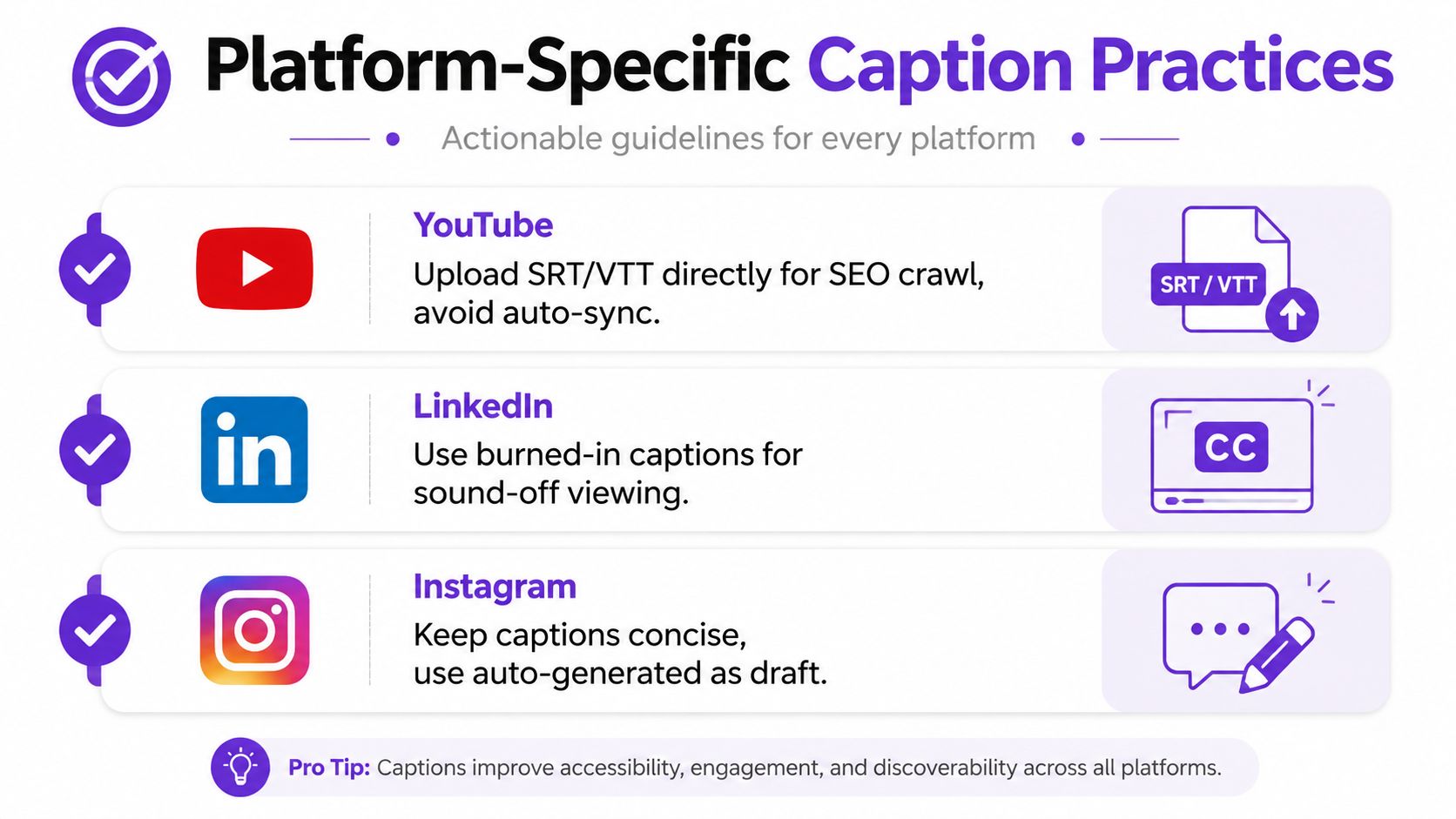
On YouTube, upload SRT or WebVTT directly when you have a clean file. That keeps the text separate from the video and gives you a more controlled caption layer than relying on rough auto-sync. If the transcript is already clean, don't waste time letting the platform guess timing from scratch.
Instagram is more visual and more ruthless about attention. Burned-in captions are often the safer default for Reels because the viewer may never pause to enable anything manually. Keep the lines short and readable, because tight framing and quick motion can make crowded subtitles harder to scan.
TikTok sits in between. Auto-captions can get the job done, but timing and styling still benefit from a manual pass when the clip carries a brand message or a hard call to action. A small cleanup is usually enough to keep the video from looking machine-generated.
LinkedIn and Facebook both accept sidecar captions, but viewer behavior often makes burned-in text or very clean caption files the more practical choice for repurposed clips. If you're pushing one edit across multiple channels, check each destination once, then save the output settings as your default.
Use this quick check before publishing:
Once you do this a few times, the platform settings stop being a mystery. The work is remembering that one caption style doesn't belong everywhere.
Search engines read text, not pixels, which is why captions do more than improve comprehension. A clean transcript can become indexable copy on YouTube, source text for a LinkedIn post, and the starting point for a blog, a clip script, or a short-form edit. That's where captioning stops being a finishing task and becomes part of content architecture.

A transcript that's only used for subtitles leaves value on the table. The same wording can support accessibility, help viewers follow along when sound is off, and give your publishing team a head start on the next asset. That's why many teams now prefer systems where captions and repurposing live in the same workflow instead of separate tools stitched together by hand.
Taja AI is one example of that model. It turns long-form video into captions, shorts, clips, thumbnails, blogs, and platform-specific posts from a single upload, with auto-scheduling across YouTube, Instagram, TikTok, Facebook, X, and LinkedIn. In practice, that kind of setup matters when the goal isn't just one caption file, it's a repeatable content pipeline that keeps moving after the edit is done.
Use automation when the video has to feed multiple channels on a recurring calendar. Keep it manual when the overhead of setup would outrun the time you save.
Automation makes sense when the same team publishes on a schedule and the source content keeps coming. It's less useful for one-off projects, custom deliverables, or rare uploads where configuring templates costs more than the work itself. That's the key cutoff.
If you have a steady flow of long-form content, use tools that move the transcript into several deliverables at once. If you only caption sporadically, a lighter generator may be enough. The point isn't to automate everything, it's to automate the repetitive part once it becomes a pattern.
If you're turning long videos into a steady stream of captions, clips, and publish-ready assets, Taja AI is built for that workflow. It takes one upload and turns it into repurposed content with captions, shorts, blogs, and platform-specific outputs, so you spend less time rebuilding the same message for each channel. Visit it and see whether your current caption process is ready to move from single-file editing to a real distribution system.


We are blessed to work with leading brands & Companies


We try to make easy and simple for every professionals. Get 30 days free trial - No credit card required.


© 2025 Taja AI. All rights reserved.