.jpeg)
10 Best Video Analytics Tools for Creators in 2026
Compare 10 video analytics tools by features, pricing tiers, and best use cases, from YouTube Studio to Wistia. Includes a checklist for choosing one.
5 min read
October 31, 2026

Learn how to get views on YouTube short with hooks, 9:16 cuts, titles, and a simple analytics check that shows what to fix.
Written by:


85% of U.S. adults said they used YouTube as of 2024, according to Pew Research Center. The catch isn't finding a platform with enough viewers. It's getting the right people to stop, finish your Short, and care enough to do something afterward.
If you're figuring out how to get views on YouTube Shorts, start by separating a swipe-away problem, a late payoff, and a poor audience match. Those need different fixes. A sharper title won't repair a rambling middle, and a completed watch won't necessarily bring your business a customer.
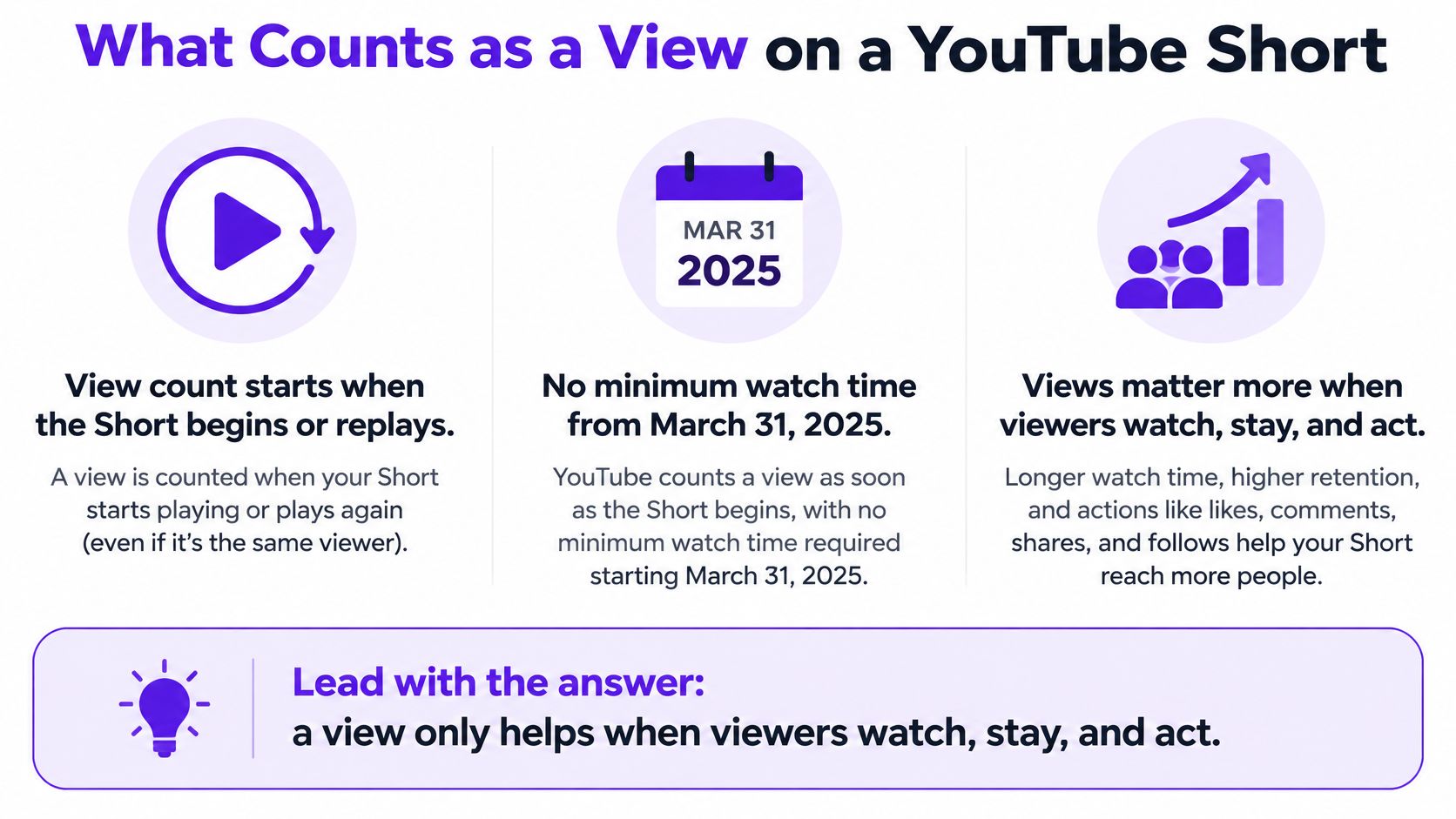
A view only helps when viewers watch, stay, and act. Since March 31, 2025, YouTube has counted every Short start or replay without a minimum watch-time requirement, as documented in Revid's YouTube Shorts statistics. That makes the raw counter useful for measuring starts, but weak as a standalone measure of success.
A clip can begin playing, register a view, and lose the viewer before you've made your point. For a solopreneur, that's not the same outcome as someone finishing a useful explanation, subscribing, or opening your full demonstration.
The distinction is simple enough to keep beside your editing checklist.
Before filming, name a particular viewer and a particular problem. A property seller worried about pricing needs a different clip from someone browsing attractive kitchens for entertainment.
Use these signals as diagnostic clues, not verdicts. A weak result suggests where to investigate; it doesn't prove the cause.
Shorts signals that matter more than the view counter
| Signal | A weak result usually means | First change to test |
|---|---|---|
| Viewed vs swiped away | People reject the Short on sight | New first frame and first-second hook |
| Average percentage viewed | Viewers leave before the payoff | Move the result earlier and cut setup |
| Average view duration | The length or dead air does not match the promise | Tighten to one idea and remove pauses |
| Likes and comments | The watch did not feel satisfying | Deliver the promised point more clearly |
| Subscribers gained | The viewer does not want more from this channel | Align the topic and the ending offer |
| Visits to the long video | The Short ends without a next step | Name the related video after the payoff |
Don't select a winning clip solely because it accumulated the most starts. Keep the version that attracts relevant viewers and supports your actual objective, whether that's subscribers, longer viewing sessions, or qualified inquiries.
Working rule: Make a clear opening promise, use a vertical frame and readable captions, deliver a focused idea, and earn either completion or a relevant next click.
Your recording setup doesn't need to look elaborate. Your edit does need to make the subject immediately understandable on a phone.
Review your shot for clear expression, uncluttered framing, and space for captions.

Choose an idea you can finish.
Don't compress an entire webinar into a miniature summary. Choose a correction, decision, demonstration, or disagreement that makes sense without the rest of the recording. If viewers need the preceding conversation, rebuild the context or choose another moment.
Put the result or tension before the introduction.
A realtor can open on the pricing decision, an educator on the incorrect answer, and a podcaster on the guest's sharpest claim. Remove the greeting and animated logo. Your identity can appear after viewers understand why they should watch.
Export a clean vertical frame.
Use 9:16, which YouTube's Shorts guidance identifies as a suitable vertical format. Reframe deliberately rather than cropping a wide horizontal recording down the middle and hoping the important detail survives. Keep the speaker's face and any demonstrated object visible.
Add context without covering the action.
Burn in accurate captions, then proofread names, locations, technical terms, and negations. Keep essential text away from interface controls. A short topic label can orient viewers, but a paragraph of text competing with speech makes the clip harder to follow.
Delete repetition, not meaning.
Remove pauses, throat-clearing, and sentences that merely repeat the opening. Keep the condition that makes the advice accurate. Cutting a qualification from a pricing recommendation might produce a punchier clip while making the advice misleading.
Finish the promised story.
Show the corrected answer, completed result, or practical decision before asking for anything. If the full video offers a useful continuation, name that continuation. Don't interrupt the reveal with a subscription speech.
Create an alternate opening.
Keep the central explanation stable while changing the opening image or sentence. That gives you a useful comparison instead of a pile of unrelated uploads. Record the change so you can distinguish a stronger hook from a different topic.
Use the following video as a viewing reference, then return to your own footage and inspect the opening without sound.
Use your channel's median performance for comparable Shorts as a working control, not a viral outlier. Compare clips with similar topics, audience intent, and length before deciding which opening to keep.
Don't chase a supposedly guaranteed retention target. The useful question is whether your revision consistently improves the stage you intended to fix without weakening satisfaction or subscriber conversion.
Editing judgment: Keep the explanatory sentence that prevents confusion. Cut the introductory sentence that delays understanding.
Fast editing isn't constant zooming. Change the visual when the meaning changes: show the document when you discuss the clause, the room when you explain the layout, or the worked answer when you correct the mistake.
A specific package helps viewers recognize relevance. A vague package asks them to gamble on what you mean.
Say you've filmed a property-pricing explanation. A title about your morning routine describes the circumstances of filming, not the viewer's problem. A title about a listing mistake identifies the decision the viewer is trying to make.
The title, opening image, and spoken opening should describe the same useful outcome. If the title promises a pricing mistake but the clip begins with your drive to the office, you've created a mismatch before the explanation starts.
Weak versus specific Shorts packaging
| Piece | Weak version | Stronger version |
|---|---|---|
| Title | My morning routine | The 9 a.m. listing mistake that costs sellers |
| Hashtags | A dump of broad tags | Two or three tags naming the niche and the topic |
| Description | Watch this | One or two sentences that restate the promise and name the long video |
| First frame | A logo or a face mid-blink | The result, number, or question already on screen |
| End line | Like and subscribe | The specific video, episode, or local next step |
The stronger title is still only appropriate if the clip explains that mistake. Don't borrow specificity you can't substantiate. If timing isn't relevant to the advice, remove the time and name the main issue instead.
Use the wording your intended viewer would recognize. A homeowner might search for pricing a house rather than a technical term used inside your brokerage. An educator should name the concept or exam problem rather than label every upload a learning tip.
For a focused title-writing exercise, use this guide to crafting titles for YouTube Shorts to turn the clip's actual payoff into a clear promise.
Write the description after the edit is final. Summarize what the viewer will learn, then identify the related recording if it adds value. Don't paste a generic channel biography above the useful context.
Choose hashtags that describe the subject and audience. A local property explanation needs location and property relevance, not a collection of unrelated popular tags.
Test packaging changes separately from major footage changes. If you rewrite everything and replace the middle, you won't know what helped. If the feed rejection pattern remains unchanged, stop polishing adjectives and inspect what viewers see and hear when playback begins.
A long recording is a source, not a batch of finished Shorts. Pick moments that make sense outside the original conversation, then edit each one around a distinct viewer problem.
A home-selling interview, for example, might cover a pricing disagreement, a preparation mistake, and an offer condition. Those are three separate topics. Cutting each passage without context can leave viewers confused, so judge every candidate as a standalone story.
Choose a recording with usable substance.
Look for a property tour, interview, sermon, webinar, or lesson with a clear result, correction, or disagreement. Confirm the advice is still accurate before editing. Strong past performance does not make outdated information useful.
Add the recording to your workflow.
Upload the original file or use its YouTube link. Taja analyzes channel information and brand voice after you add the video. Review suggested moments against the viewer's problem instead of accepting every cut.
Find moments that stand alone.
Read the transcript around each candidate. Phrases such as “that option” or “what she mentioned earlier” point to missing context. Add a brief explanation if it preserves the useful point. If the repair takes over the clip, choose another moment.
Start with the strongest part of the story.
An interview may reveal its answer after a long question. Open with the answer or disagreement, supply only the context viewers need, and keep the reasoning that makes the point credible. The original conversation's setup does not need to dictate the Short's opening.
Package each clip for its own question.
Reframe the footage, correct captions, and write a title that fits that specific clip. A preparation mistake and an offer-condition explanation need distinct titles. Check that the crop follows the speaker without hiding an important demonstration.
Schedule the clips as a sequence.
Spread related clips across your publishing week rather than releasing every excerpt together. Alternate closely related questions to give regular viewers useful variety, and leave room to apply what earlier releases show.
Separate selection, editing, and publishing. That makes the process easier to repeat and helps you see which decisions need improvement.
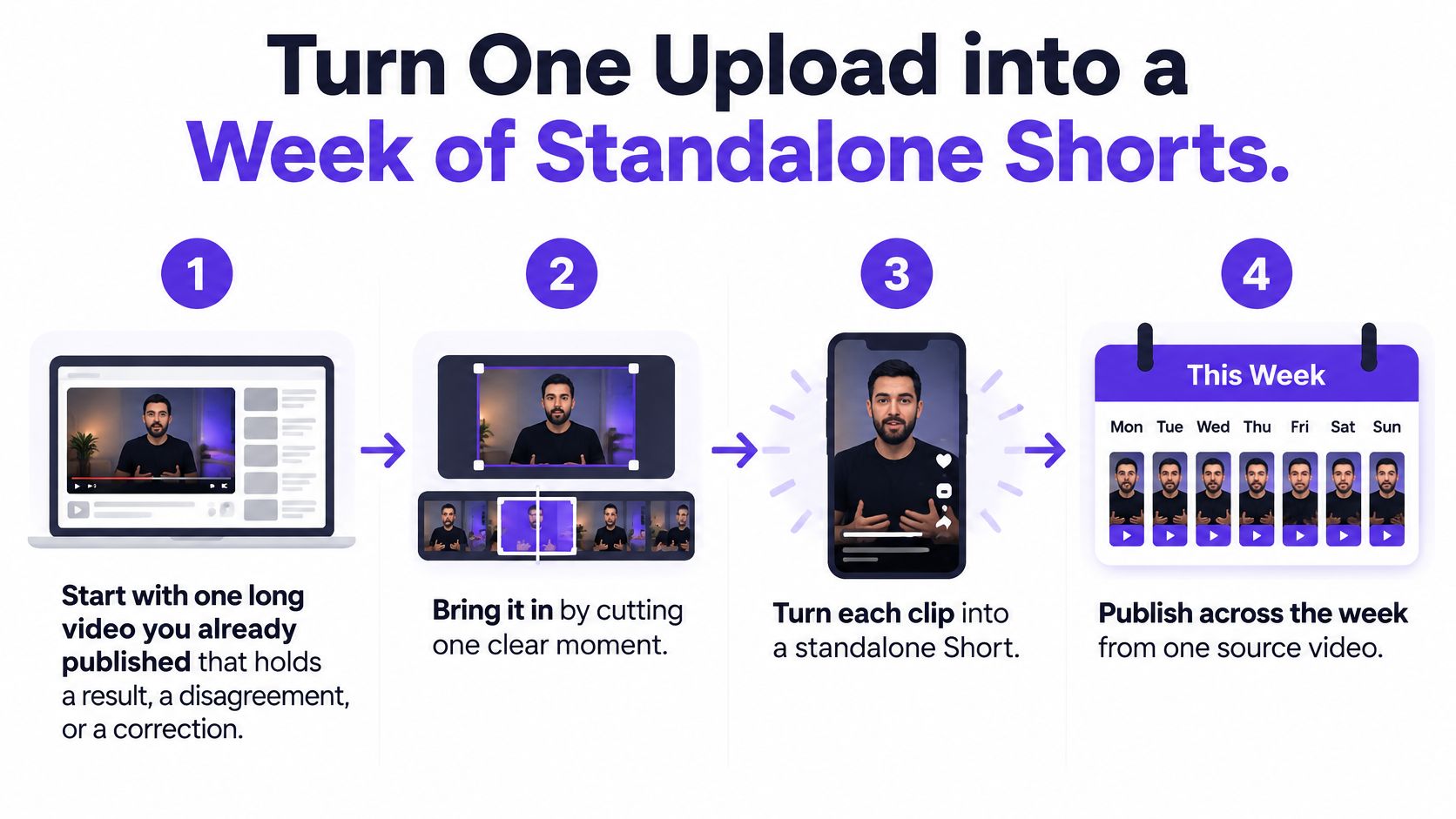
Track each source recording, viewer problem, opening approach, payoff, and intended next action. A repeatable content repurposing workflow keeps those choices consistent instead of making you start from scratch each time.
Compare clips with relevant channel performance, but don't treat raw views as the only result that matters. Keep the opening that attracts suitable viewers into the explanation, then check whether they want another video or a business conversation. Drop a weak segment even if the source interview was expensive to produce.
At Taja AI, several viral clips can be generated from a single uploaded video. Backlog Boost can repurpose older videos into Shorts, clips, and text outputs. During the free trial, you can optimize and repurpose up to 4 long-form videos.
Use the batch to assess whether the moments work as complete stories. Verify each claim, supply the context the cut needs, and choose clips for the audience you want to reach.
A view is a start, not proof of useful attention. A Short can attract plenty of views and still reach people who have no interest in your listings, show, or community. Treat raw starts as a weak goal. Diagnose whether people swipe away, leave before the payoff, or watch through without becoming the audience you need.
That last pattern is an audience-to-offer problem. YouTube recommendations account for viewer interests and viewing history across formats, as described in YouTube's discovery guidance. Broad entertainment appeal can earn attention without creating relevant demand.
Open YouTube Analytics → Content → Shorts and separate Shorts Feed, Search, channel pages, browse features, and external traffic. Compare similar uploads rather than treating one result as proof. For a clearer view of the tools and metrics available, use this guide to video analytics tools.
First check whether viewers chose to watch. Then inspect the first steep retention drop: a sharp early exit points to a weak opening, while a drop before the promised result suggests a late payoff. Finally, check whether viewers who stayed took a relevant next step. Keep the metric that answers your goal, such as retention or relevant follow-on interest, not the biggest view count.
What the Shorts pattern means and what to change
| Pattern | Likely cause | Next test |
|---|---|---|
| Shown in the feed but rarely viewed | First frame or opening loses the swipe | Replace the first two seconds only |
| Viewed often, finished rarely | Payoff arrives after the drop on the retention curve | Cut setup and move the result forward |
| Finished often, few subscribers | The audience and the offer do not match | Name the show, channel, or next episode |
| Finished often, no leads | Curiosity with no specific ask | End on the local fact and one next step |
| Strong once, then impressions fade | Feed interest moved on | Refresh the open, context, and on-screen text |
Use each row as a testable explanation. Low feed exposure alone does not prove viewers rejected the opening. Without enough viewing behavior, you cannot judge the edit from that signal.
For a real-estate Short, a completed tour with no inquiries may have reached design enthusiasts rather than local buyers. Put the neighborhood and a buyer-relevant feature in the opening, then give viewers a specific way to ask about the property. Check availability before implying it is still on the market.
For a podcast clip, completion without subscriptions may mean the guest held attention but the show's continuing value was unclear. Identify the show and name the related episode or recurring subject. A generic subscription request gives viewers no reason to continue.
For a lesson or sermon, viewers outside your intended community may appreciate the message without connecting it to their ongoing questions. Use language that makes those questions recognizable, then offer a relevant continuation.
A completed watch proves someone stayed. It does not prove you reached the person your business or community needs.
Choose a publishing rhythm you can maintain while still reviewing the results. Build the week from a coherent recording or topic, and leave time to make revisions instead of filling every slot with whatever footage is available.
I'd rather publish a smaller batch with distinct viewer problems than exhaust a recording through near-identical excerpts. Posting more often won't repair a clip that people reject or an offer that doesn't fit the audience.
An older Short doesn't need refreshing just because it's old. A useful explanation can remain worth keeping, while a once-popular clip can become inaccurate or stop matching what your audience needs.
A December 2025 Search Engine Journal analysis reported reduced exposure for older Shorts on some large channels after an apparent September change, with channel-level observations suggesting a roughly 28–30-day threshold. YouTube hadn't publicly confirmed the alleged change, so those observations aren't an official expiration rule.
Don't delete your library or create an automatic repost cycle around that claim. Use your own traffic sources and recent performance to decide where an update is justified.
For a search-led explanation, check accuracy, wording, and whether the answer still resolves the query. If it continues bringing relevant viewers, leave it working. For a feed-dependent clip whose exposure has faded, assess whether the underlying subject is still worth another treatment.
Build the refreshed version around the strongest relevant moment. Replace the opening, remove context that no longer matters, update on-screen text, and add current information only when you can verify it.
Compare the original and revision over the same observation window, recording traffic source, viewer choice, retention, and the intended outcome. Retire material that no longer serves your audience, not merely material with an unimpressive counter.
Historical views are evidence, not a promise of future distribution. Keep a rotation of useful, audience-matched clips rather than trusting yesterday's winner to carry next week's results.
Taja AI turns long-form recordings into shorts, clips, captions, and platform-specific content, with Backlog Boost available to repurpose older videos. Visit Taja AI and start with a recording that answers a real audience question, then use the diagnostic above to decide which cuts deserve another round.


We are blessed to work with leading brands & Companies


We try to make easy and simple for every professionals. Get 30 days free trial - No credit card required.


© 2025 Taja AI. All rights reserved.