.jpeg)

Convert Video to Blog Post for More Traffic
Learn to convert video to blog post with transcription, SEO structuring, editing and republishing tips that turn recordings into traffic.
5 min read
October 16, 2026

Find what is a good camera for youtube in 2026. This guide covers key features, budget tiers, & workflow tips to choose the ideal one for your content.
Written by:


You have done this already. Opened five tabs, compared Sony against Canon against Panasonic, watched a creator insist that full-frame is mandatory, then watched another say your phone is enough.
That spiral ends the same way. You still have no camera, and you still have not filmed.
For most business owners and solo creators, what is a good camera for youtube is not a specs question. It is a friction question. The right camera is the one that helps you record without technical drama, finish faster, and keep publishing when your week gets busy.
A bad camera decision does not fail on image quality. It fails on effort.
A camera can look amazing in reviews and still be wrong for your channel. If it needs lens swaps, constant battery management, menu hunting, and retakes because focus drifted, it slows down the whole machine. That matters more than many admit.
The creators I see struggle most are not blocked by talent. They are blocked by setup friction.
They buy something advanced because it feels like a serious move. Then every recording session turns into a small production. They need to mount a lens, dial settings, test audio, fix framing, and troubleshoot overheating or power. That might be fine for a videographer. It is a problem for a consultant, realtor, coach, podcaster, or educator trying to get content done between client work.
A good YouTube camera removes decisions.
It starts fast. It keeps you in focus. It lets you confirm framing without guessing. It captures clean enough footage that you can cut a long video into shorts without apologizing for the quality.
Practical rule: If a camera makes you delay filming, it is not a good camera for your business, no matter how impressive the spec sheet looks.
The smarter way to buy is to start with your workflow.
Ask:
If you want a useful model for simplifying the rest of your creation process, this guide on integrating AI into your YouTube content creation process is worth reading alongside your camera decision.
Most camera menus are filled with things you can ignore for a long time. These six are the ones that affect your day-to-day results.
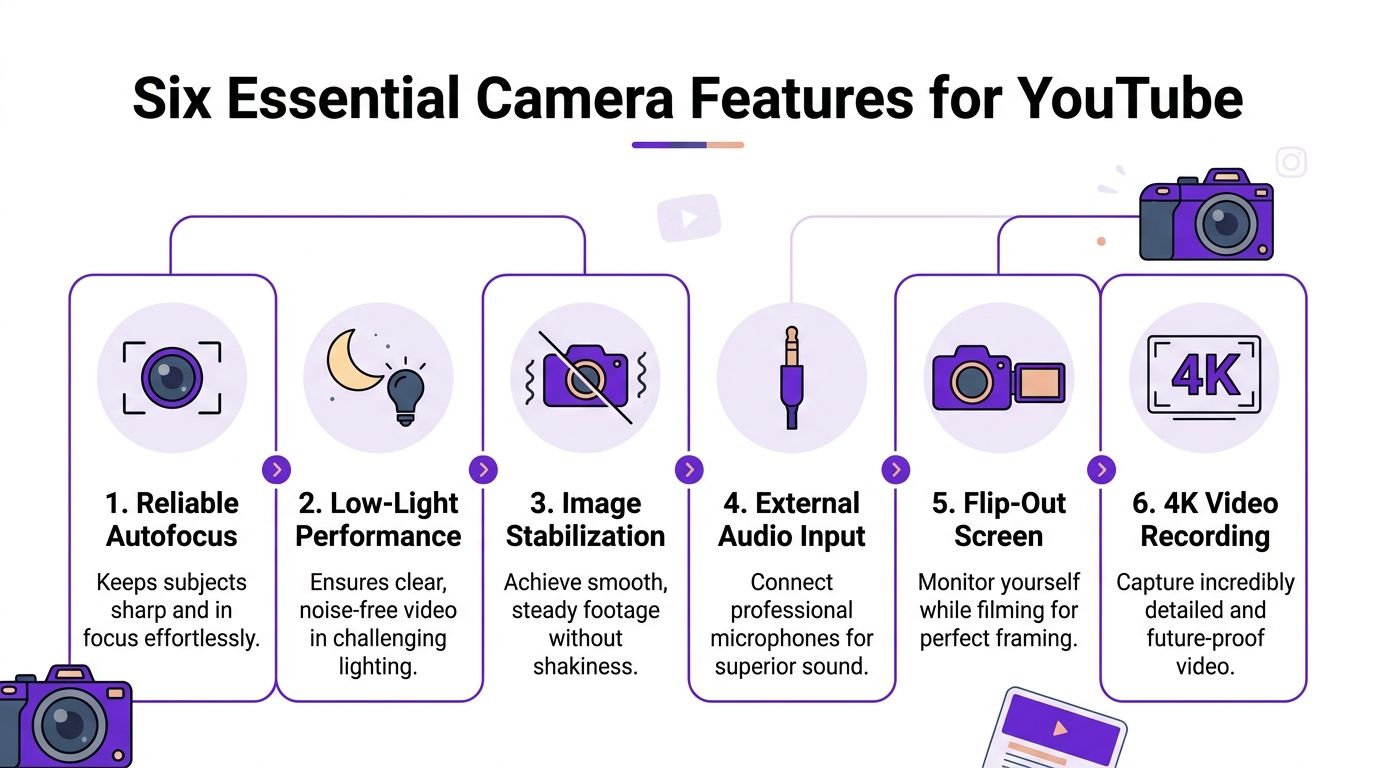
Autofocus is your invisible camera operator.
If you film solo, the camera has one main job. Keep your face sharp while you talk, move, lean in, or hold up an object. When autofocus is unreliable, you do not just lose polish. You lose takes.
For YouTube, especially talking-head videos, product demos, and walk-and-talk content, bad focus is a silent time thief. You may not notice the problem until editing.
Look for autofocus that feels boring in the best way. It should lock on and stay there.
A flip screen prevents stupid mistakes.
Without one, you guess where your head sits in frame. You wonder if the crop is too tight. You record for ten minutes, then find out your forehead is cut off or the camera focused on the bookshelf behind you.
That tiny screen saves full retakes. For solo creators, that is a big deal.
If you have to choose between better video and better audio, choose audio.
Viewers will tolerate an image that is good. They leave quickly when the sound is thin, echoey, or inconsistent. A dedicated mic input lets you use a lav mic, shotgun mic, or wireless system instead of relying on the camera’s built-in microphones.
Clean audio does more than improve quality. It reduces repair work.
You spend less time with noise reduction, EQ fixes, and patching around bad takes. That means faster edits and fewer “I should probably re-record this” moments.
Stabilization is your anti-shake insurance.
If you vlog, show properties, film in a workshop, or move while talking, stabilization keeps footage watchable. Some cameras do this in the body, some in the lens, some digitally, and some by using a built-in gimbal approach.
If you mostly record on a tripod, stabilization matters less. If you shoot handheld, it matters a lot.
Low-light performance is not about making moody art. It is about surviving real rooms.
A lot of business creators record early in the morning, in an office, in a church, in a conference room, or in a living room that was never designed for video. A camera that falls apart the second the light is less than ideal creates grainy footage and more setup stress.
Good low-light performance buys flexibility. It does not replace lighting, but it gives you breathing room.
4K is useful even if you publish in 1080p.
The biggest reason is editing freedom. You can crop in, reframe, and pull vertical clips from a wider shot more cleanly. That matters if one recording session is feeding your main YouTube video plus shorts and social cutdowns.
Key takeaway: The best YouTube camera features are the ones that reduce reshoots, cut editing friction, and let a solo creator work without assistance.
Camera type matters because each category comes with a different amount of complexity. Some save time by being simple. Others reward you with more control but ask more from you.
| Camera type | Best for | Main strength | Main trade-off |
|---|---|---|---|
| Smartphone | Beginners, fast posting, travel | Always with you, easy to use | Limited control and accessory comfort |
| Compact point-and-shoot | Solo creators who want simplicity | All-in-one convenience | Less room to grow than lens-based systems |
| Action camera | Movement, outdoors, unusual angles | Tough, small, stabilized | Weak choice for classic studio talking head setups |
| DSLR | Budget used market, hybrid shooters | Familiar controls, solid image | Older video experience and bulk |
| Mirrorless | Serious creators and pro workflows | Best flexibility for video | More learning curve and more gear decisions |
Your phone is the best camera if the alternative is not publishing.
That is not a motivational quote. It is a workflow reality. Phones are fast, familiar, and easy to mount. If you are validating an idea, building consistency, or posting quick Shorts, a smartphone can carry a lot of the load.
The downside shows up when you want cleaner audio options, better subject separation, more dependable long-form recording, or an easier tripod-first setup.
Compact cameras sit in a sweet spot for many creators.
You get a dedicated device, usually a flip screen, often a built-in zoom, and fewer moving parts than a lens-based system. That means less decision fatigue. For a lot of solopreneurs, this category is a smarter step up than jumping straight to mirrorless.
Action cams are specialists.
If your content involves movement, driving, cycling, property tours, behind-the-scenes shop footage, or travel clips, they are useful. If your channel is mostly seated talking-head videos, they can feel awkward and overly wide.
DSLRs are older workhorses. Mirrorless cameras are the current standard for creators who want strong video tools.
Mirrorless is where you see the most serious YouTube setups. You also see the most complexity. Once you enter interchangeable-lens territory, the purchase is no longer just about the body. It becomes about lenses, batteries, memory cards, and accessories.
That does not make mirrorless bad. It means you should only move there if the added control helps your content.
Decision shortcut: If you hate setup, start with a phone or compact. If you enjoy gear or need higher-end flexibility, mirrorless makes more sense.
You are choosing between two very different kinds of pain. One is paying more up front. The other is losing time every time you film, transfer footage, fix focus misses, or cut vertical clips for Shorts.
For most solopreneurs, the better camera is the one that keeps the whole workflow light. If a camera slows setup, adds gear decisions, or creates bigger files than your editing process can handle, it can hurt output even if the image looks great.
This budget is usually better for a phone-first setup or a simple all-in-one camera than a bargain mirrorless body.
Cheap interchangeable-lens kits often look like an upgrade on paper. In practice, they pull you into extra purchases fast. Lens, battery, charger, card, tripod plate, maybe a mic adapter. Then there is the learning curve. If your real goal is to publish every week, that friction matters more than having a larger sensor.
A practical buy in this range is a capable smartphone, especially if you are filming talking-head videos, Shorts, client updates, or social clips that will be repurposed later. If you want to save money, shopping the best refurbished iPhones can be a smart way to get a dedicated filming device without paying new-phone prices.
This tier makes sense if your priority is speed.
A helpful video perspective before you buy:
This is the range where spending starts to save time instead of just buying nicer specs.
You can get better autofocus, a cleaner image, a mic input, and more dependable recording without stepping into a full production kit. That matters if you film alone. A camera that locks on your face, flips forward, and records for long sessions cuts retakes and keeps editing cleaner.
I usually tell creators to stay disciplined here. Buy one body that is easy to use and one lens that covers most of your work. A simple setup beats an ambitious one you never fully dial in.
What usually pays off in this range:
What usually wastes money:
For many business creators, this is the sweet spot. The footage looks clearly better than a basic phone setup, but the workflow can still stay lean.
At this level, a camera should earn its keep in production time, not just image quality.
If video is a major part of your business, higher-end bodies start to make sense because they give you more room in post, better thermal performance for long sessions, stronger monitoring tools, and more reliable recording options. Those benefits matter most for creators running a repeatable content system, especially if one recording session feeds YouTube, Shorts, course material, ads, and social clips.
A strong example is the Panasonic LUMIX GH7. RTINGS recommends it as a top pick for professional YouTube creators and calls out features that matter in real production, including uncropped 4K up to 120 fps, internal ProRes, internal RAW, phase-detection autofocus, and good heat management for extended recording (RTINGS' YouTube camera picks).
That kind of camera fits a creator who knows how they will use those files. If you want more grading control, cleaner slow motion, or a camera that can sit through long tutorials and interviews without becoming a problem, the GH7 earns a serious look. If your current bottleneck is still scripting, confidence on camera, or publishing consistency, this tier can wait.
The right upgrade is the one that removes a recurring bottleneck. For one creator that is autofocus. For another, it is unlimited recording. For another, it is footage that drops into an editing and repurposing workflow without extra cleanup.
The best camera for a podcaster is not automatically the best camera for a realtor, fitness coach, or travel vlogger. Content style should shape the purchase.
If you move while filming, prioritize a camera that forgives movement.
You want:
For this kind of content, a compact creator camera, action camera, or a simple mirrorless setup often makes more sense than a bulky studio-first body.
For desk videos, teaching videos, podcasts, and commentary, stability is already solved because you can use a tripod.
That changes the priorities. Here, eye autofocus, a clean image, simple framing, and reliable audio support matter more than extreme stabilization. If you mostly stay seated, you do not need to overspend on movement-focused features.
If you show objects, tools, products, or before-and-after work, you need a camera that handles transitions well.
That means it should shift focus cleanly between your face and the item in your hand. You also want color that feels believable. For service businesses, trust often lives in small visual details.
For livestreaming, interviews, podcasts, and tutorials, endurance matters.
A camera that overheats, cuts itself off, or makes external power awkward becomes a real liability. This is one area where “best image quality” is often less useful than “predictable for long sessions.”
If your strategy includes cutting one long recording into shorter pieces, your camera choice should support that plan. This matters even more if you are balancing short-form and long-form distribution, which is why this breakdown of YouTube Shorts vs long videos is a useful companion to your gear decision.
Content-match rule: Buy for the videos you make every week, not the videos you imagine making twice a year.
A creator can buy the right camera and still build a frustrating process around it. The camera is one part. The system around it decides whether content gets published consistently.
Three accessories improve YouTube videos more than a body upgrade:
These are not glamorous purchases. They are the ones that save the most retakes.
If you want easier repurposing, make a few smart recording choices:
A simple recording setup makes post-production lighter. That matters if one long-form recording is feeding clips, captions, and social cutdowns. If that is your model, these shorts, clips, and blogs repurposing features show the kind of downstream workflow your filming choices should support.
Efficient creators do not chase perfect every time.
They build a repeatable setup. Same camera position. Same light placement. Same mic. Same memory card routine. Same framing template. That consistency removes mental load, and lower mental load leads to more published content.
Better workflow beats better gear. The camera that lets you record with less friction will usually outperform the camera that only looks better on a spec sheet.
In most cases, yes.
Even if you export in 1080p, 4K gives you room to crop, reframe, and cut alternate versions more cleanly. It is less about bragging rights and more about editing flexibility.
Yes, if it helps you publish consistently.
A phone is a strong starting point for many creators. It becomes limiting when you want better audio options, longer sessions, more reliable framing, or a more dedicated setup.
Audio.
People will forgive decent video. They stop watching when speech sounds distant, hollow, or noisy. If you are deciding where to upgrade first, review guides like this one on the best mic for recording before spending everything on a camera body.
Use the camera in a stable indoor setup, avoid direct sun, and keep recording demands reasonable for the device. Cameras built for longer-form use tend to be safer choices than ultra-compact bodies when your channel relies on podcasts, interviews, or tutorials.
Choose the simplest camera that gives you a flip screen, dependable autofocus, mic input, and easy recording. That means a phone, a compact creator camera, or an all-in-one option before it means an advanced mirrorless rig.
If you want your camera setup to lead to more published content instead of a bigger editing backlog, Taja AI helps turn one long-form video into shorts, clips, captions, blogs, thumbnails, and platform-ready posts so your filming effort goes further.


We are blessed to work with leading brands & Companies


We try to make easy and simple for every professionals. Get 30 days free trial - No credit card required.


© 2025 Taja AI. All rights reserved.