.jpeg)

Convert Video to Blog Post for More Traffic
Learn to convert video to blog post with transcription, SEO structuring, editing and republishing tips that turn recordings into traffic.
5 min read
October 16, 2026

Learn how to post Reels on Facebook from your phone or desktop. This guide covers crossposting, specs, and repurposing video for maximum reach in 2026.
Written by:


Knowing how to post a Reel on Facebook is easy. Anyone can tap a few buttons. But understanding why Reels are the key to unlocking growth in 2026? That's what separates the creators who get noticed from those who stay invisible.
These short videos aren't just a fun feature anymore. They've become an absolute necessity for reaching new audiences, outperforming your standard posts, and driving real engagement—all without a huge ad budget.
If you've noticed your regular Facebook posts are getting less and less attention, you're not imagining things. User behavior has completely shifted. People are now hardwired for fast-paced, vertical video, and Facebook's algorithm is aggressively rewarding creators and businesses who get on board.
This isn't just another passing trend. It’s a fundamental change in how people consume content on the platform, and ignoring it is like trying to sell CDs in a streaming world.
The numbers behind this shift are, frankly, staggering. The growth of Reels on Facebook has been explosive since their launch, skyrocketing from a respectable 78 million active users in 2020 to a mind-blowing 800 million by 2023. That’s not a slow climb; that's a rocket launch.
Here are the numbers that really matter for creators and businesses, straight from a 2024 report by SendShort.
This table breaks down the explosive growth and engagement metrics that show just how critical Facebook Reels have become for anyone trying to grow on the platform.
| Metric | Statistic (as of 2023/2024) | Why It Matters |
|---|---|---|
| User Growth | 800 Million Active Users | Your potential audience is massive and actively looking for this exact type of content. |
| View Performance | Reels outperform other video by 3.1x | The algorithm is heavily prioritizing Reels, giving you a better shot at organic reach. |
| Daily Shares | 3.5 Billion Reels shared daily | Your content isn't just being watched; it's being actively distributed by users, creating a powerful ripple effect. |
| Daily Plays | Over 180 Billion daily plays | This format dominates user feeds, making it the most effective way to grab attention in a noisy environment. |
These aren't just vanity metrics. They represent a seismic shift in how content is discovered and consumed, and smart creators are using it to their advantage.
This explosive growth is about more than just big numbers; it's about opportunity. For small businesses, real estate agents, or individual creators, Reels have leveled the playing field in a way we haven't seen in years.
Your content is now far more likely to be shown to people who don't follow you yet. This opens the door to the kind of massive organic reach that has become almost impossible to achieve with regular image or text posts.
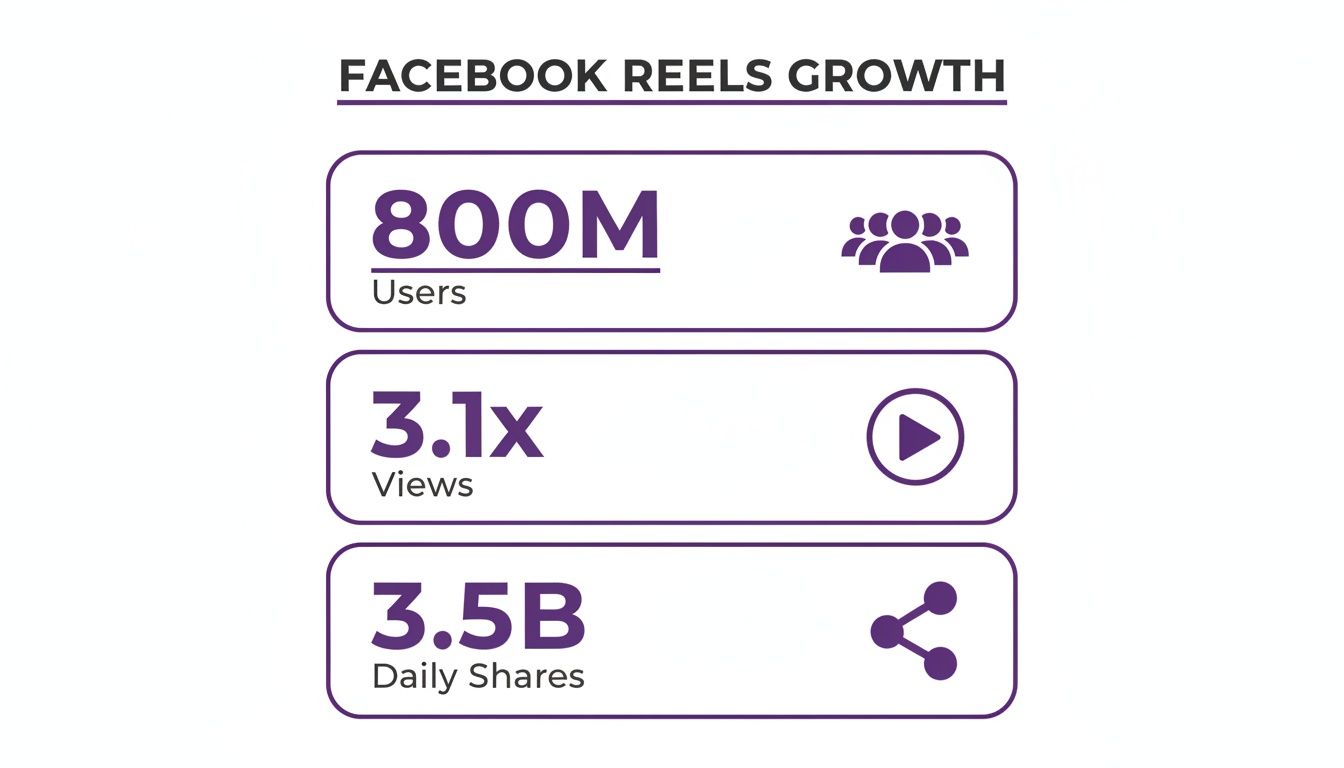
The figures above confirm that Reels aren't just being passively watched. They are being shared. A lot. This creates a powerful ripple effect that gets your content in front of entirely new networks of people.
Imagine a local service business posting a quick "before and after" Reel of a recent project. Or a real estate agent giving a 30-second tour of a new listing. These quick, engaging videos grab attention in a noisy feed far more effectively than a static image or a long, rambling text post ever could.
The Key Takeaway: Mastering Facebook Reels is no longer optional. It's the single most effective strategy for organic growth on the platform today. It allows accounts of all sizes to connect with a huge, active audience without relying on a massive ad budget. The platform is prioritizing this format, and if you're serious about growth, you should too.
Ready to get your Reel live? You've got two main paths to choose from: the fast, creative route on your phone, or the more strategic, scheduled approach from your desktop.
Posting directly from the Facebook mobile app is where most of the action happens. It gives you all of Facebook's creative toys—like trending audio and AR effects—right in your hands. It’s perfect for that spontaneous, in-the-moment content.
But what about when you need to schedule content or manage multiple accounts? That's where your desktop and the Meta Business Suite come in. This is the workflow for social media managers and businesses who need efficiency and control.
Let's break down both methods.
When you want to create a Reel on the go, the mobile app is your best bet.
Just open the Facebook app and look for the "Reel" button right under the "What's on your mind?" box. Tapping this drops you into the creation studio. From here, you can either shoot a new video on the spot or pull in something you've already edited from your camera roll.
Once your video is loaded, the menu on the right is your creative command center. This is where you add the personality.
Here’s a quick rundown of the tools you’ll use most:
Imagine a local landscaping business making a Reel. They could use the timer to set up a shot, record a quick "before" clip of an overgrown yard, and then an "after" of the finished project. Slap an upbeat, trending song on top and add a text overlay like, "From Jungle to Gem in One Day!" It’s simple, effective, and takes minutes to create.
Pro Tip: Don’t sleep on your cover image. You can pick a frame from the video or upload a custom one. A great cover acts like a movie poster, giving people a reason to stop scrolling and actually watch.
While mobile is great for quick, creative posts, it’s not very efficient for managing a real content strategy. For that, you need a desktop workflow.
This is all done through the Meta Business Suite. Head to your dashboard and click "Create Reel." You'll be prompted to upload your video file, which should already be edited and ready to go in the proper 9:16 vertical format.
Once your video is uploaded, the real management features kick in. You can:
This desktop method is essential for anyone batching content or trying to maintain a consistent posting schedule. You lose access to the in-app creative tools like the full music library and AR effects, but you gain powerful scheduling and management features. It’s a trade-off between on-the-fly creativity and strategic control.
Let's be real. You spend hours crafting the perfect Reel—finding the trend, editing the clips, writing the caption. Hitting "publish" feels great, but what if you could double your reach with zero extra effort?
That’s where crossposting comes in. It’s basically the creator's version of working smarter, not harder. Instead of creating separate content for Facebook, you can just tell Instagram to share your Reels there automatically. If you're new to the concept, this quick primer on What is Cross-posting? is a great place to start.
For busy creators, automatically sharing your Instagram Reels to Facebook is a total game-changer. You hit two audiences at once, keep your brand consistent, and get way more mileage out of the content you already worked so hard on.
First things first, you need to make sure your Instagram and Facebook accounts are linked up in the Accounts Center. Most people have this done already, but it never hurts to double-check.
Once that's confirmed, you can turn on crossposting right before you share a new Reel on Instagram. When you get to that final screen where you write your caption and add tags, just scroll down to the “Share to Facebook” option.
You’ve got a few choices here:
After you enable it, your Instagram Reels will start showing up on your connected Facebook profile or Page. Simple as that.
A single post hits two distinct audiences simultaneously without doubling your workload. It’s one of the easiest efficiency wins you can get.
While crossposting is a massive time-saver, it's not a silver bullet. You have to weigh the efficiency against a few potential downsides.
The Obvious Wins:
For example, a podcaster doing live Q&A Reels on Instagram can automatically crosspost them to their Facebook Page. It’s a perfect way to reach a different demographic that might have missed the live session, and the context still works.
But what about a Reel based on a super niche TikTok trend that’s blowing up on Instagram? That might feel totally out of place on a more buttoned-up Facebook Page. The audience vibes on each platform can be wildly different.
The Potential Headaches:
If your goal is to create consistently high-quality content for both platforms, you might find that an AI video generator for Instagram Reels can help you create optimized clips much faster than doing it all by hand.
Honestly, the best approach is a hybrid one. Use crossposting for your evergreen content or anything with broad appeal. But when you want to nail a platform-specific trend or use a Facebook-only feature, take the extra five minutes to post natively.
Look, just getting your Reel posted is only half the battle. If you want it to do more than just exist on your profile, you need to convince the algorithm to show it to the right people. This means dialing in a few key details that can make the difference between a dozen views and thousands.
It all starts with the basics, and on Reels, the basics are non-negotiable. Your video absolutely must be a 9:16 vertical video. This full-screen format is designed to take over a viewer's entire mobile screen. Posting a horizontal or square video is like showing up to a business meeting in swim trunks—it immediately tells the algorithm your content wasn't made for this platform.
And for the love of all things digital, aim for the best quality you can. Shoot for 1080p resolution and stick to standard file types like MP4 or MOV. These tech specs ensure your video looks crisp and professional, avoiding that pixelated, blurry look that makes people swipe away instantly.
Here's a quick cheat sheet I keep handy to make sure every Reel is perfectly formatted. Getting these details right gives the algorithm exactly what it wants and provides a much better user experience.
| Element | Recommendation | Pro Tip |
|---|---|---|
| Aspect Ratio | 9:16 (Vertical) | Film vertically from the start. Cropping a horizontal video often looks awkward and cuts off important visuals. |
| Resolution | 1080p (1080 x 1920 pixels) | Higher resolution looks more professional. Avoid anything less than 720p, which can appear blurry. |
| File Type | MP4 or MOV | These are the most common and universally accepted formats, ensuring smooth playback. |
| Length | 15-120 seconds | While you can go up to 2 minutes, the sweet spot for engagement is often between 15-30 seconds. |
| Captions | Brief, engaging, and relevant | Use a hook in the first line. Ask a question to encourage comments and boost engagement signals. |
| Cover Photo | Custom designed, 9:16 | Don't rely on a random frame from your video. Create a custom cover with a clear title to grab attention on your profile. |
Following these specs isn't just about appeasing the algorithm; it's about respecting the viewer's experience. A clean, well-formatted video is simply more enjoyable to watch.
Facebook now lets you post Reels up to 120 seconds, but don't fall into the trap of thinking longer is always better. The perfect length is the one that tells your story without a single wasted second.
For a quick tip or a behind-the-scenes look, a punchy 15-30 seconds is perfect. It delivers a quick hit of value and moves on. But if you're storytelling or teaching something, don't be afraid to use the full 90-120 second range. This gives you enough time to actually build a connection and deliver real value, which can lead to higher watch times.
The goal isn't just to be seen; it's to be watched. The algorithm rewards Reels that people finish, so trim any dead air or fluff that might cause viewers to swipe away.
Let's take a real estate agent, for instance. A 15-second Reel can show off a stunning kitchen—that’s fine. But a 90-second version can offer a mini-tour where the agent's voiceover points out three hidden features of the home. The longer format provides way more value and does a better job of qualifying potential buyers.
Think of your caption as your video's sales pitch. It needs to provide context, stir up some curiosity, and give viewers a reason to actually care about what they're watching. Try asking a question, sharing a surprising fact, or telling a micro-story related to the video.
Hashtags, on the other hand, are your discovery tools. They're like keywords that help Facebook categorize your content and show it to people who are already interested in that topic.
Here’s a simple strategy I use:
#realestate, #faith).#firsttimehomebuyer, #dailydevotional).#atlantarealtor, #dallaschurch).A faith-based organization might use a caption like, "Finding peace in the chaos isn't easy. Here’s one simple verse that helps ground me," and pair it with hashtags like #faithjourney, #christianliving, and #scriptureoftheday.
It's also fascinating to see how Reels are performing. Data from Q1 2024 showed something pretty unusual: on Facebook, larger accounts (with over 50,000 followers) actually saw a higher engagement rate of 2.18% on Reels compared to smaller accounts. This is rare on social media and proves that Reels give everyone a legitimate chance to connect. You can dig into more Facebook Reels engagement trends on Statista.
Ultimately, a strong optimization strategy is a mix of technical precision and creative flair. If you're looking to streamline this whole process and turn your longer videos into perfectly optimized clips, exploring a long video to short generator can automate a ton of this heavy lifting for you.
Okay, let's get real. Manually creating Reels is effective, but it's also a soul-crushing time suck. Imagine turning one long video—that webinar you hosted, a property tour, or a keynote speech—into a full month of ready-to-post Facebook Reels. This isn't a fantasy; it's what an automated workflow makes possible, letting you stay consistent and grow your reach without burning out.
Modern AI platforms can now handle this entire content repurposing job for you. You just upload your long-form video, and the AI gets to work. It doesn't just randomly chop up your footage; it actually analyzes the content, pinpoints the most engaging moments, and suggests dozens of vertical clips that are already optimized to perform.
Think of this technology less like a video slicer and more like a full-service content assistant. It writes SEO-driven captions tailored for Facebook, generates multiple eye-catching thumbnails for you to pick from, and even pulls together relevant hashtags to get your Reels in front of more people.
Let's walk through a real-world example. A business coach delivers a one-hour keynote on leadership. That single video is a goldmine of content just sitting there. Using an AI tool, she uploads the recording.
Within minutes, the platform flags fifteen high-impact clips, each one laser-focused on a single, powerful idea from her talk.
For every single clip, the AI has already drafted a compelling caption, picked a thumbnail that pops on a crowded feed, and provided a list of hashtags. The work that would have taken an entire day of manual editing and writing is now done in less than thirty minutes.

This is what's happening behind the scenes. The AI is analyzing your video's data to suggest optimizations that actually work. It’s the core of an automated workflow—using data, not guesswork, to create content that performs.
The real magic here is how everything works together. When you automate your workflow to generate viral reels from longer videos, knowing how to transcribe podcast to text becomes a game-changer for creating killer captions and boosting reach—and the best tools have this built right in.
Key Insight: This automated workflow completely shifts your role from being a video editor to being a content strategist. You spend less time buried in tedious tasks and more time focused on the big picture.
The top platforms even offer built-in editors for quick tweaks, brand kits to keep all your visuals consistent, and—most importantly—auto-scheduling. From a single dashboard, you can line up weeks of content across Facebook, Instagram, TikTok, and more. If you're ready to turn your existing video library into a content machine, you can learn more about how to generate Reels from video with these powerful tools. This is how you take back your time while scaling your impact.

So you're diving into Facebook Reels. You're posting clips, trying to get traction, and then... something goes wrong. A video gets muted. You're confused about monetization. You're not sure if you should have posted that clip as a Story instead.
Don't worry, we've all been there. These are the roadblocks every creator hits. Let's get you some straight answers so you can stop troubleshooting and get back to creating.
Yes, but it’s not a free-for-all. Meta gives you a few ways to earn, mostly through the Reels Play Bonus program and overlay ads. The catch is that eligibility isn't guaranteed. It all depends on your follower count, the engagement your Reels get, and whether you're following Facebook's Partner Monetization Policies to the letter.
The quickest way to find out where you stand is to head to your Professional Dashboard. Look for the "Monetization Tools" section. Facebook will lay out exactly which programs you qualify for. If you don't see anything yet, your mission is simple: keep growing your audience and cranking up that engagement.
Ah, the dreaded silent Reel. This is a classic—and insanely frustrating—problem. It almost always boils down to one of two music licensing issues.
The Safest Bet: Always, always pick your audio from inside the native Facebook Reels editor. This guarantees the sound is fully licensed for the platform, so you don't have to worry about your hard work going silent.
This one trips up a lot of creators, but getting it right is crucial for your content strategy. The two formats have completely different jobs.
| Feature | Facebook Reels | Facebook Stories |
|---|---|---|
| Lifespan | Permanent; lives on your profile grid | Disappears after 24 hours |
| Primary Audience | Non-followers; built for discovery and reach | Existing followers; for community engagement |
| Best Use Case | Polished, high-value content to attract brand-new fans. | Raw, timely, behind-the-scenes updates for your crew. |
Think of it this way: Reels are your highlight reel, designed to impress strangers at the party. Stories are the inside jokes you share with the friends you came with. Knowing when to use each is a huge part of mastering how to post Reels on Facebook effectively.
Ready to stop wasting time and start scaling your reach? Taja AI turns your long videos into dozens of viral-ready clips, complete with SEO-optimized captions, thumbnails, and hashtags. Try it for free and see how much time you save. Find out more at https://www.taja.ai.


We are blessed to work with leading brands & Companies


We try to make easy and simple for every professionals. Get 30 days free trial - No credit card required.


© 2025 Taja AI. All rights reserved.