.jpeg)
Create Youtube Shorts from Youtube Video
Create youtube shorts from youtube video. Create YouTube Shorts from a YouTube video with this practical 2026 guide. Learn clipping, captions, thumbnails
5 min read
October 17, 2026

Learn how to get live access on TikTok with our step-by-step 2026 guide. We cover follower requirements, age limits, and how to apply in-app.
Written by:


TikTok requires creators to be at least 18 and have 1,000 followers to gain standard LIVE access (verified guidance). That single rule filters out most bad advice on this topic, because a lot of tutorials stop there and pretend that's the whole story.
It isn't.
If you want to know how to get live access on TikTok, you need two playbooks. The first is the standard route for accounts that already meet the baseline requirements. The second is the less-discussed agency route for creators and businesses that don't have the follower count yet. Then there's the technical side. Plenty of eligible accounts still can't go live because of app version issues, permissions, account standing problems, or broken OBS settings.
This guide focuses on what proves effective, what usually fails, and where the trade-offs are.
TikTok LIVE is one of the few places where short-form attention can turn into an actual conversation. A feed post gets a view. A live session gets questions, objections, reactions, and buying signals in real time.
For creators, that means faster audience feedback. For service businesses, it means answering the exact questions people hesitate to ask in comments. For product-based brands, it means showing the product in motion instead of hoping a polished clip does all the work.
Short videos are great for reach. LIVE is better for trust.
When someone stays in your stream, asks a question, and watches you respond on the spot, you learn what your audience cares about without waiting for analytics to catch up. That makes your next batch of videos sharper. If you're building a broader publishing system, these video marketing best practices help connect LIVE content to everything else you're producing.
A strong LIVE session also gives you material you can repurpose into clips, hooks, FAQs, and follow-up posts. If you're refining your wider stack, this roundup of essential AI tools for content in 2026 is useful for planning workflows around capture, editing, and distribution.
Practical rule: Don't treat TikTok LIVE as a bonus feature. Treat it as your fastest way to test what your market will actually respond to.
A lot of people delay LIVE because they assume it only matters once they have a huge audience. That's usually backwards. Smaller accounts often get more value from direct interaction because every question reveals content ideas, objections, and purchase intent.
What matters most is having a reason to go live. Good examples include:
If your content already starts conversations, LIVE gives those conversations a home.
The standard route is simple on paper and strict in practice. TikTok's baseline rules are not soft suggestions.
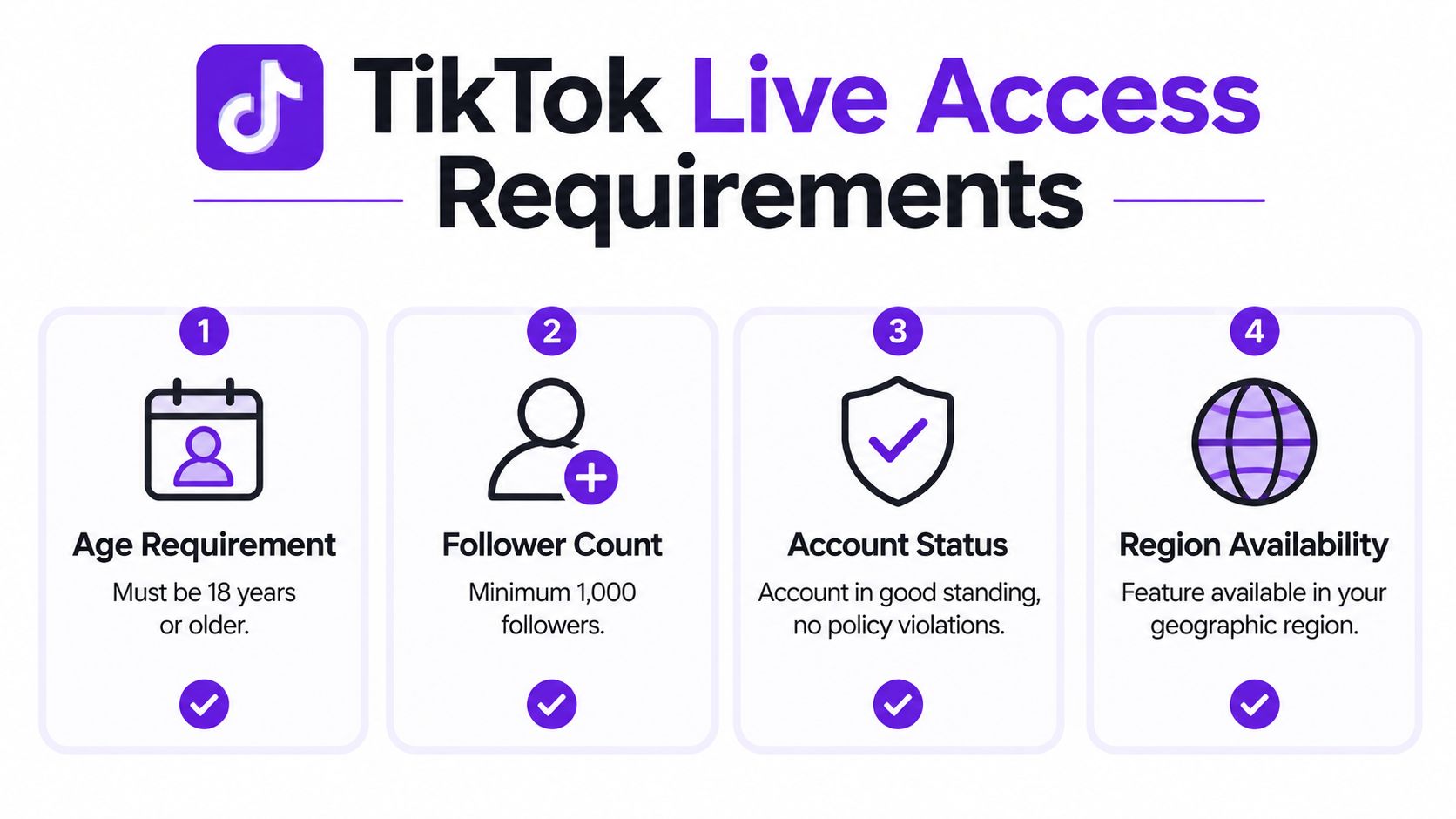
According to this TikTok LIVE access explanation, creators must be at least 18 years old and have a minimum of 1,000 followers on an account in good standing to obtain standard live access. The same source notes that TikTok's age requirement moved up from 16 to 18.
Think of this as a gate, not a growth tactic. If you don't pass it, the usual in-app LIVE access won't open.
Here's the practical checklist:
Many creators encounter a challenge at this point. They hit the follower threshold, then assume TikTok is glitching. Sometimes it is a technical problem. Sometimes the account is not yet considered stable enough.
If your account has policy issues, follower count alone won't fix LIVE access.
In practice, "good standing" means keeping the account clean enough that TikTok doesn't see you as a risk for real-time broadcasting. That includes avoiding repeated content violations, spam-like behavior, or anything that makes the account look unstable.
A quick way to think about it is this:
| Checkpoint | What it means for you |
|---|---|
| 18+ age | Non-negotiable for standard LIVE access |
| 1,000 followers | Unlock threshold for the standard route |
| Good standing | Violations can delay or block approval |
| Feature availability | Your app and region can affect what you see |
Creators often waste time looking for hacks before verifying the basics. Start here. If you don't meet these standards, skip workaround videos and move to the alternative route covered later in this guide.
Once your account is eligible, the activation process is usually straightforward. The confusion comes from the fact that TikTok doesn't always surface the LIVE option the same way on every account.
Some users see the button automatically. Others need to apply through Creator Tools, Live Center, or TikTok LIVE Studio.
If you're figuring out how to get live access on TikTok from the app itself, use this order:
For some accounts, the LIVE option appears directly in the posting flow once the account is eligible. For others, TikTok pushes the process into Studio-related menus.
TikTok's official LIVE Studio help documentation says you can open LIVE Studio, click Your LIVE access in the top-right corner, choose Get access, and submit the application by following the prompts in-app, as outlined in TikTok's LIVE Studio access instructions.
That matters because some creators keep checking the mobile posting screen when the actual approval path is sitting inside LIVE Studio.
Two things commonly block the option from appearing:
If you're creating support content or tutorials from your streams, it also helps to know how to turn those sessions into usable text later. A practical workflow starts with transcribing TikTok video content efficiently.
Before assuming your account is bugged, check these in order:
This quick walkthrough shows the flow visually:
Don't judge eligibility by one missing button on one screen. Check the app, the profile tools, and LIVE Studio before concluding TikTok denied you.
This is the part most basic guides leave out. There is an official path that doesn't rely on the usual follower threshold.
According to a creator community discussion on TikTok Live Agency access, joining an official TikTok Live Agency can grant live access without requiring the standard follower count, and that route is described as 100% free to join. That's the key myth to kill. If someone is charging you just to gain access to LIVE through an agency connection, be careful.
This option is useful for creators and small businesses that already know how to show up on camera but haven't built follower volume yet. Think local service providers, educators, niche experts, coaches, and product sellers with decent on-camera skill but limited organic reach.
The trade-off is that the agency route doesn't remove all conditions. It changes the type of qualification.
Based on the verified information provided, this path still involves an account age requirement of 30 days, an initial 14-day violation-free probation, and a later reapplication path toward 180-day live access if the account stays clean during that period.
The agency pathway solves a follower problem. It does not solve a trust problem.
Use it if this sounds like your situation:
A bad use case is trying to rush into LIVE with a messy account. If your account behavior looks risky, agency access won't protect you from violations.
For creators planning content while building toward LIVE, a good interim move is to publish formats that naturally generate comments, objections, and repeat questions. These social media video ideas can help you create the kind of content that later performs well in live sessions too.
Agency access is best viewed as professional verification, not a loophole.
Plenty of creators meet the requirements and still can't stream. Usually the issue falls into one of two buckets. Either TikTok isn't surfacing access correctly, or your technical setup is failing before the stream starts.

Start with the boring fixes first. They solve more problems than people want to admit.
For PC streaming, the workflow is different. You need to pull your Stream Key and Server URL from TikTok Live Center, then go into OBS > Settings > Stream > Service: Custom and paste those credentials.
The technical details matter here. According to this OBS setup and rejection analysis, recommended settings include H.264, 3,000 to 6,000 kbps bitrate, and 30fps, with audio sample rate set to 48kHz. The same source says mismatched sample rates and related setup issues account for 40% of rejected streams in 2026 audits.
That tells you where to look first.
| Problem | Fix |
|---|---|
| Stream won't connect | Re-copy the Stream Key and Server URL from Live Center |
| Video rejection | Confirm H.264, 3,000 to 6,000 kbps, and 30fps |
| Audio lag or desync | Set audio sample rate to 48kHz |
| Repeated denials | Review account violations and stream health history |
A lot of "TikTok blocked my LIVE" complaints are really encoder and audio configuration errors.
If you're on OBS, don't improvise your settings. Match the known working values first, then test from there.
Maybe through alternative pathways, but not through the standard follower-based route covered earlier. The more nuanced point is that recent trends described in this analysis of LIVE distribution signals suggest TikTok is putting more weight on engagement signals like watch time and comments for algorithmic live distribution, even though major guides still don't offer a quantified strategy for gaining access purely through engagement-first performance.
So engagement may help your LIVE get distributed better once you're in. It doesn't give you a reliable public formula for skipping standard eligibility on its own.
Yes. Mobile is the simpler route for basic sessions. PC streaming is better when you need scene control, overlays, screen sharing, or OBS-level customization. The trade-off is complexity. The more flexible your setup gets, the more likely a small technical mismatch will block the stream.
Usually one of these is different:
Not necessarily. If LIVE supports your sales process, waiting can be the expensive choice. Businesses that answer questions, demo offers, or educate buyers often benefit from going live earlier, whether through the standard route or the official agency pathway discussed above.
The best approach is simple. Use short-form videos to earn attention, and use LIVE to convert attention into trust.
If you want to turn one video or livestream into shorts, captions, blogs, thumbnails, and platform-ready posts without rebuilding everything by hand, Taja AI is built for that workflow. It's a practical fit for creators and businesses that want to publish consistently across TikTok, YouTube, Instagram, Facebook, X, and LinkedIn from one system.


We are blessed to work with leading brands & Companies


We try to make easy and simple for every professionals. Get 30 days free trial - No credit card required.


© 2025 Taja AI. All rights reserved.